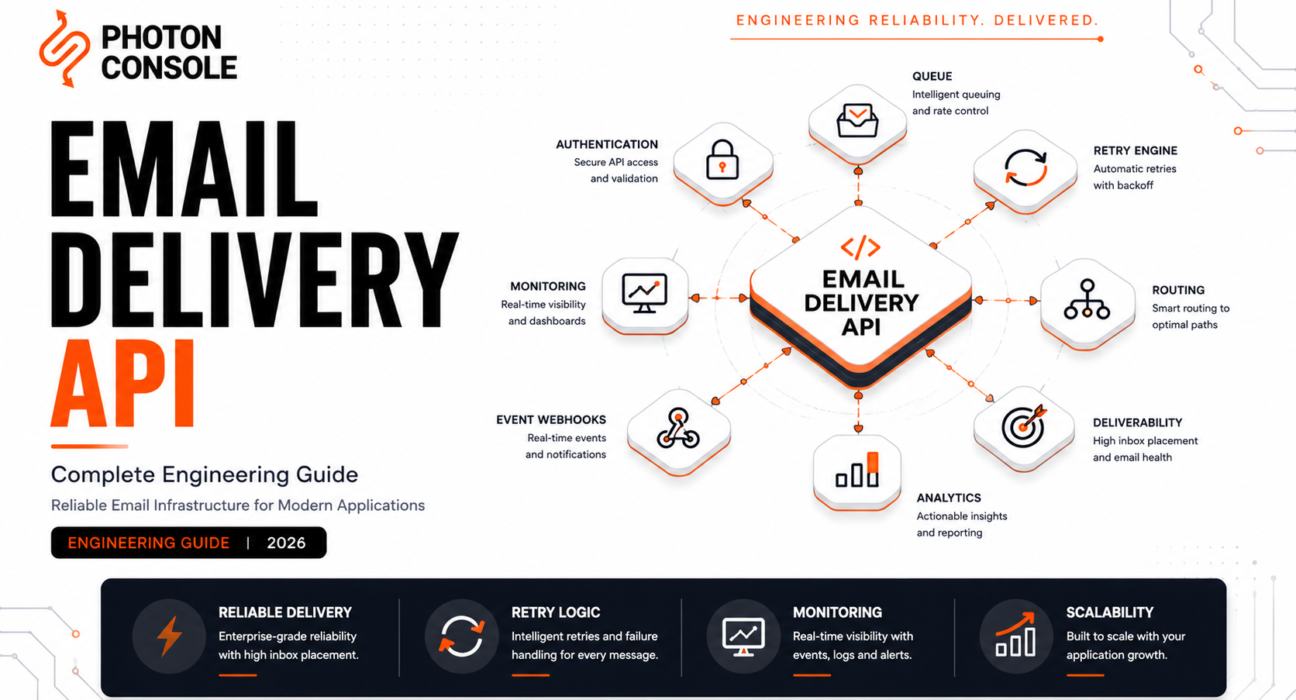
An email delivery API accepts an HTTP request and returns a 202. That’s the interface. Behind it sits a multi-stage pipeline — queuing, authentication, routing, retry, reputation management, event processing — that determines whether your message reaches an inbox, lands in spam, or disappears into a deferral queue nobody is monitoring.
Most guides about these APIs compare providers. This one explains the infrastructure. By the time you finish reading, you should understand what’s happening between your API call and the recipient’s inbox well enough to evaluate any provider’s architecture, diagnose delivery failures without a support ticket, and design email infrastructure that survives production-grade stress.
Engineering Snapshot: A typical transactional email traverses 7–10 distinct infrastructure stages between your API call and the recipient’s mailbox. A failure or degradation at any single stage can silently prevent delivery — and most failures are silent, producing a 200 response on your end and nothing in the recipient’s inbox.
We call the full path the Email Delivery Pipeline — a framework for understanding every stage a message passes through, what can fail at each stage, and what signals each stage produces. Every section below maps to a stage in this pipeline.
Table of Contents
- What Is an Email Delivery API?
- The Email Delivery Pipeline
- Authentication Layer
- Queue Architecture
- Routing and IP Selection
- Retry Engineering
- Reputation Management
- Event Processing and Webhooks
- Observability for Delivery Infrastructure
- Scaling Delivery Infrastructure
- Production Failure Modes
- Choosing an Email Delivery API
- Production Readiness Checklist
- Frequently Asked Questions
- Conclusion
What Is an Email Delivery API?
An email delivery API is an HTTP interface through which your application submits messages to a managed delivery infrastructure. The API handles ingestion — validating the request, authenticating the sender, accepting the message. Everything after that — queuing, routing, delivery attempts, retry, reputation management, event reporting — is the delivery infrastructure the API fronts.

The terminology in this space overlaps heavily. Here’s how the terms relate:
Table 1: Email Sending Terminology
| Term | Scope | What It Emphasizes |
|---|---|---|
| SMTP relay | Protocol-level — accepts email via SMTP | Compatibility with any SMTP-speaking system |
| Email API | Interface-level — accepts email via HTTP | Developer experience, metadata control |
| Transactional email API | Use-case-specific — event-triggered messages | Password resets, OTPs, receipts |
| Email delivery API | Infrastructure-level — the full delivery pipeline | Reliability, deliverability, production operations |
| Email delivery platform | Product-level — API + dashboard + analytics | End-to-end managed service |
This guide focuses on the “email delivery API” scope: not just the HTTP endpoint, but the infrastructure behind it that determines whether messages actually reach inboxes. For provider selection specifically, see our provider comparison guide and engineering evaluation framework.
The Email Delivery Pipeline
Every message submitted to a delivery API passes through a sequence of stages. Understanding this sequence is what separates teams that can diagnose delivery problems from teams that open support tickets.
Table 2: Email Delivery Pipeline Stages
| Stage | What Happens | What Can Fail | Signal Produced |
|---|---|---|---|
| 1. Ingestion | API validates payload, authenticates request, returns 202 | Auth failure, malformed payload, rate limit | HTTP response code |
| 2. Queue | Message buffered; priority and throttling applied | Queue overflow, priority inversion | Internal metrics (provider-side) |
| 3. Rendering | Templates resolved, personalization applied, MIME assembled | Template errors, encoding issues | Dropped event (if render fails) |
| 4. Authentication stamping | DKIM signature applied, SPF alignment verified | Misconfigured DNS, key rotation failure | Auth failure visible to receiving server |
| 5. Routing | MX lookup, IP selection, TLS negotiation | DNS failure, IP blocklisting, TLS mismatch | SMTP response code from receiver |
| 6. Delivery attempt | SMTP handshake with receiving mail server | Rejection, deferral, timeout | SMTP response codes |
| 7. Retry | Deferred messages retried with backoff | Retry exhaustion, permanent failure misclassified as temporary | Deferred/bounced webhook events |
| 8. Event processing | Delivery outcome reported back via webhooks | Webhook delivery failure, processing lag | Webhook events (delivered, bounced, complained) |
A 202 response from the API confirms stage 1 completed. It says nothing about stages 2–8. Teams that treat a 202 as “delivered” are operating with visibility into 12% of the pipeline.
We call the full picture the Delivery Success Pyramid: at the base sits authentication (stages 1 and 4), then infrastructure reliability (stages 2–3), then delivery execution (stages 5–7), and at the top sits observability (stage 8) — the layer that tells you whether everything below is working. Each layer depends on the one beneath it. Failures at the base propagate upward silently.
Authentication Layer
Authentication is the foundation of the delivery pipeline because it’s the first thing a receiving mail server evaluates. SPF, DKIM, and DMARC alignment must be correct before any volume flows — a requirement reinforced by Google’s sender guidelines and Yahoo’s sender requirements, which now mandate DMARC for bulk senders.
Table 3: Authentication Requirements
| Mechanism | What It Proves | Consequence If Missing |
|---|---|---|
| SPF | The sending IP is authorized for the domain | Soft or hard fail at receiving server; spam foldering |
| DKIM | Message integrity; sender authenticity | Reduced trust score; DMARC alignment failure |
| DMARC | Policy alignment of SPF and DKIM | No enforcement policy; spoofing exposure; Gmail visibility loss |
| Reverse DNS (PTR) | IP resolves to a valid hostname | Some receivers reject or defer immediately |
| TLS | Encryption in transit | Increasingly required; some receivers reject non-TLS |
Every provider handles DKIM signing server-side — that’s table stakes. The differentiation is how easy the provider makes it to configure SPF and DKIM correctly, whether DMARC alignment is validated during setup, and whether authentication failures produce clear diagnostic events rather than silent delivery degradation. See our SMTP configuration guide for implementation specifics.
Queue Architecture
The queue is where messages wait between API acceptance and delivery attempt. Its design determines how the system handles bursts, maintains ordering fairness between senders, and prevents message loss during infrastructure failures.
Production delivery queues are not simple FIFO structures. They implement priority tiers (OTP emails should not wait behind a batch of weekly digests), per-sender rate limiting (one customer’s billing run shouldn’t exhaust the provider’s throughput for everyone else), and durable persistence (messages survive component crashes). Our queue architecture guide covers these patterns in depth.
Table 4: Queue Design Patterns
| Pattern | How It Works | What It Protects Against |
|---|---|---|
| Priority queuing | High-priority messages (OTP, security) processed before lower-priority | Time-sensitive email delayed by batch traffic |
| Per-sender throttling | Each sender’s throughput capped independently | One customer’s spike degrading service for others |
| Durable persistence | Messages written to disk/replicated before acknowledgment | Message loss during crashes or failover |
| Dead-letter routing | Unprocessable messages moved to a separate queue | Poison messages blocking the main queue |
When evaluating a provider, the queue layer is almost entirely invisible — providers rarely document it. The proxy signals: does the provider support message priority? Is there a maximum queue retention window? What happens to messages during a provider-side outage — are they durably queued or potentially lost?
Routing and IP Selection
Routing is where the delivery pipeline decides which IP address sends the message, which MX server receives it, and how the SMTP connection is negotiated. The routing layer’s sophistication directly affects deliverability.
- IP selection — on shared pools, the provider selects an IP from a pool based on sending domain, traffic type, and pool health. On dedicated IPs, the sender’s traffic uses a single address whose reputation they fully own.
- MX resolution — the provider resolves the recipient domain’s MX records to determine which mail server to connect to. DNS failures here silently prevent delivery.
- TLS negotiation — opportunistic or enforced TLS with the receiving server. Most major providers (Gmail, Outlook) now require or strongly prefer TLS.
- Provider-specific routing — sophisticated delivery APIs route Gmail-bound traffic differently than Outlook-bound traffic, because each ISP has different rate limits, reputation signals, and filtering behavior.
This is also where IP warming connects to the pipeline: a new dedicated IP has no routing history, and ISPs treat unknown IPs with maximum suspicion. The warm-up process is really about building enough positive routing history that ISPs stop throttling.
Retry Engineering
Not every delivery attempt succeeds on the first try. Receiving servers defer messages for many reasons: temporary rate limiting, greylisting, transient server errors, or reputation-based throttling. The retry layer determines whether deferred messages eventually deliver or silently expire.
Table 5: Retry Strategies
| Strategy | Behavior | Best For |
|---|---|---|
| Fixed interval | Retry every N minutes | Simple, but can overwhelm receivers |
| Exponential backoff | Increasing delays between retries | Standard for most delivery systems |
| Exponential backoff + jitter | Backoff with randomized variance | High-volume systems avoiding retry storms |
| Adaptive retry | Retry schedule adjusted per-recipient-domain based on historical acceptance patterns | Sophisticated providers optimizing per-ISP |
The retry layer is where many delivery failures become permanent. A message deferred by Gmail at 2pm and retried at 2:05pm, 2:20pm, 3pm, 5pm, and then abandoned at 11pm was never “bounced” — it was retried to exhaustion and quietly dropped. If the webhook event for this case says “deferred” instead of “bounced,” teams that only alert on bounce events will never know it happened.
Our SMTP retry logic guide covers the engineering of retry systems in detail. When evaluating providers, ask: what’s the maximum retry window? Is retry behavior configurable? Are retry exhaustion events reported distinctly from permanent bounces?
Reputation Management
Sender reputation is the ISP’s running assessment of how trustworthy a sending IP and domain are. It’s built from complaint rates, bounce rates, spam trap hits, engagement signals, and volume consistency — signals we’ve covered in our deliverability guide.
For the delivery pipeline specifically, reputation management is the layer that determines long-term inbox placement. A well-engineered provider manages reputation actively:
Table 6: Reputation Management Capabilities
| Capability | What It Does | Why It Matters |
|---|---|---|
| Traffic segmentation | Separates transactional from marketing onto different IPs/domains | Prevents marketing engagement dragging down transactional reputation |
| Automatic suppression | Stops sending to addresses that have bounced or complained | Prevents repeated sending to addresses that damage reputation |
| Abuse monitoring | Detects and isolates senders with unusual patterns | Protects shared pool health for other senders |
| Feedback loop processing | Ingests ISP complaint reports and suppresses complainers | Keeps complaint rate below ISP thresholds |
| Warm-up automation | Gradually ramps new IP volume | Builds IP reputation without triggering spam filters |
The gap between providers here is significant. Some manage reputation actively (monitoring pool health, isolating abusive senders, automating suppression). Others leave reputation management to the sender — which works if you have a deliverability engineer on staff, and fails quietly if you don’t.
Event Processing and Webhooks
Webhooks are where the delivery pipeline closes the loop — reporting what actually happened to each message after the API accepted it. Without this layer, you’re operating blind on stages 2–7 of the pipeline.
Table 7: Webhook Event Types
| Event | What It Means | Action Required |
|---|---|---|
| Processed | Message accepted and queued | Confirm submission in your system |
| Delivered | Receiving server accepted the message | Mark as delivered; start engagement tracking |
| Deferred | Temporary rejection; will retry | Monitor; alert on repeated deferrals |
| Bounced | Permanent delivery failure | Suppress address; investigate rate spikes |
| Complained | Recipient marked as spam | Immediate suppression; reputation-critical |
| Opened | Tracking pixel loaded | Directional signal only (privacy clients affect accuracy) |
| Clicked | Tracked link followed | Strongest engagement signal available |
Webhook reliability, signature verification, and retry behavior determine how trustworthy this event stream is. Our webhooks engineering guide covers idempotency, ordering, and dead-letter queue design for the receiving side. Our email observability guide covers how to build monitoring on top of this event stream.
Observability for Delivery Infrastructure
We call this layer the Infrastructure Reliability Stack: the observability signals that, stacked together, give you a real-time picture of whether your delivery infrastructure is healthy.
Table 8: Observability Layers
| Layer | What It Monitors | Key Metric |
|---|---|---|
| API health | Is the provider accepting requests? | Response latency, error rate |
| Delivery confirmation | Are accepted messages being delivered? | Delivery rate, deferral rate |
| Inbox placement | Are delivered messages reaching inbox (not spam)? | Complaint rate, engagement signals |
| Reputation health | Are IP and domain reputations stable? | Bounce rate trend, spam trap hits |
| Business-level delivery | Are critical message types (OTP, billing) meeting SLAs? | Per-message-type latency and delivery rate |
Most providers give you layers 1 and 2 natively. Layers 3–5 typically require combining provider data with your own monitoring infrastructure. The teams that catch delivery incidents in minutes instead of days are the ones monitoring all five layers.
Scaling Delivery Infrastructure
Scaling email delivery is not the same as scaling a web application. The bottleneck is rarely throughput — it’s reputation. A system that can technically send 1 million emails per hour but hasn’t built the IP reputation to sustain that volume will get throttled, deferred, and spam-filtered long before it hits a throughput ceiling.
Table 9: Scaling Dimensions
| Dimension | What Scales | What Constrains It |
|---|---|---|
| Throughput | Messages per second the API accepts | Provider rate limits, plan tier |
| Delivery capacity | Messages per hour that reach receiving servers | IP reputation, ISP rate limits |
| Reputation headroom | How much volume an IP can sustain at healthy reputation | Warm-up history, sending consistency, complaint rate |
| Webhook processing | Events per second your system can ingest | Your infrastructure, not the provider’s |
This is where the Email Delivery Maturity Model becomes useful: teams at the first level treat email as a feature (call the API, hope for the best). At the second level, they monitor delivery. At the third, they manage reputation actively. At the fourth, they design for multi-provider failover and treat email as production infrastructure with the same rigor as their database or CDN. Most scaling problems are maturity problems, not throughput problems.
Production Failure Modes
These are the failure patterns that actually occur in production email delivery, mapped to the pipeline stage where they originate.
Table 10: Production Failure Modes
| Failure | Pipeline Stage | Symptom | Root Cause |
|---|---|---|---|
| Silent spam foldering | Routing / Reputation | API returns 200, message “delivered,” but lands in spam | Poor IP/domain reputation, authentication misalignment |
| Retry exhaustion | Retry | Message deferred repeatedly, eventually dropped | Persistent ISP throttling, insufficient retry window |
| Webhook gap | Event processing | Messages sent but no delivery events received | Provider webhook outage, endpoint misconfiguration |
| Bounce spike after migration | Authentication / Reputation | Hard bounce rate jumps after switching providers | Stale addresses, cold IP, DNS misconfiguration |
| OTP delay during traffic spike | Queue | OTPs arrive 30+ seconds late during peak | Queue congestion, no priority differentiation |
| SMTP connection timeout | Routing / Delivery | Delivery attempts timeout before completing | DNS resolution failure, receiver overload, network issue |
The most dangerous failure mode is the first one: silent spam foldering. The API worked. The provider reported “delivered.” The receiving server accepted the message. And it went straight to spam. This failure produces no error anywhere in your system — it’s only detectable through reputation monitoring, inbox placement testing, or the support ticket from a user who never received their password reset. See our guide on why emails go to spam in Gmail for diagnostic approaches.
Choosing an Email Delivery API
Rather than repeating the provider-by-provider comparison covered in our dedicated guides, here’s the architectural question that should drive your choice: how much of the delivery pipeline do you want to own, and how much do you want the provider to manage?
Table 11: Infrastructure Ownership Spectrum
| Ownership Level | What You Manage | What the Provider Manages | Provider Archetype |
|---|---|---|---|
| Fully managed | API integration only | Everything: queue, routing, retry, reputation, monitoring | Postmark, SMTP2GO, PhotonConsole |
| Partially managed | Some monitoring, template management, IP decisions | Core delivery, retry, basic reputation | SendGrid, Mailgun, Resend |
| Infrastructure-only | Bounce handling, webhook assembly, monitoring, reputation | Raw delivery infrastructure | Amazon SES |
For detailed provider-by-provider comparison, evaluation frameworks, and pricing analysis, see:
- Best Transactional Email API: 9 Providers Evaluated
- Transactional Email API Pricing: Complete Cost Comparison
- 8 Critical Criteria for Choosing an SMTP Relay
Individual provider comparisons: SendGrid alternatives, Amazon SES alternatives, Postmark alternatives, SMTP2GO alternatives, SparkPost alternatives, Mailgun alternatives, SendGrid vs Mailgun.
Production Readiness Checklist
Table 12: Production Readiness Checklist
| Step | Action | Why |
|---|---|---|
| 1 | Validate SPF, DKIM, DMARC alignment end-to-end | Authentication failures silently degrade deliverability |
| 2 | Send test messages to major providers (Gmail, Outlook, Yahoo) and verify inbox placement | Catches authentication and reputation issues before production volume |
| 3 | Instrument webhook processing with idempotency and dead-letter queuing | Event data is your only delivery visibility after the API call |
| 4 | Configure bounce and complaint suppression | Prevents repeated sending to addresses that damage reputation |
| 5 | Set up monitoring for all 5 observability layers (Table 8) | Catches delivery degradation before users report it |
| 6 | Plan IP warm-up if using a dedicated IP | Cold IPs get throttled at volume |
| 7 | Test delivery under peak load conditions | OTP and billing flows must perform under spikes |
| 8 | Build internal email service abstraction | Enables provider migration without application changes |
For a broader pre-launch checklist covering DNS, monitoring, and infrastructure setup, see our email infrastructure checklist.
Frequently Asked Questions
What is an email delivery API?
An HTTP interface for submitting messages to a managed delivery infrastructure that handles queuing, routing, retry, reputation management, and event reporting — everything between your API call and the recipient’s inbox.
How is an email delivery API different from SMTP?
SMTP is a protocol for transmitting email between servers. A delivery API is a service layer that accepts messages via HTTP (or SMTP), adds managed infrastructure (retry, reputation, analytics), and handles delivery at scale. You can use both — most providers support SMTP relay alongside their HTTP API.
What happens after the API returns 202?
The message enters the delivery pipeline: queuing, authentication stamping, MX routing, delivery attempt, and potentially retry. A 202 confirms acceptance, not delivery. Delivery outcome is reported later via webhooks.
Why do emails land in spam even when the API says “delivered”?
“Delivered” means the receiving server accepted the message — not that it placed it in the inbox. Spam foldering happens after acceptance, based on content filtering, reputation scoring, and engagement history. This is the hardest failure to detect automatically.
How do I monitor email delivery in production?
Instrument all five observability layers from Table 8: API health, delivery confirmation, inbox placement, reputation health, and business-level delivery metrics. Our SMTP monitoring guide covers the tooling.
Do I need a dedicated IP?
Generally above 50,000–100,000 emails/month sustained. Below that, shared pools outperform self-managed dedicated IPs because they have an established reputation baseline. See our dedicated vs shared IP guide.
What’s the most common production failure mode?
Silent spam foldering — the API worked, the provider reported delivery, and the message went to spam. It produces no error anywhere and is only detectable through reputation monitoring or user reports.
How do I test a delivery API before committing?
Use the free tier or sandbox with real sending to Gmail, Outlook, and Yahoo. Verify inbox placement, check authentication headers, and test webhook processing end-to-end. Our SMTP testing methods guide covers the full process.
Can I use multiple delivery APIs simultaneously?
Yes — this is the multi-provider failover pattern. Build an internal email service abstraction, integrate multiple providers behind it, and implement health-check-driven routing. Our email failover guide covers the architecture.
What should I check before migrating providers?
Validate authentication on the new provider, audit recipient lists, plan IP warm-up, run providers in parallel, and instrument monitoring before cutover. See Table 12 and our infrastructure checklist.
Conclusion
A delivery API is an interface to an infrastructure. The API is the part you integrate with; the infrastructure — queuing, routing, retry, reputation, observability — is the part that determines whether your messages actually reach inboxes. Understanding both is what separates teams that debug delivery problems in minutes from teams that discover them from user complaints days later.
Evaluate providers on the infrastructure behind the API, not just the API itself. Monitor all five layers of the observability stack. Treat email delivery with the same operational seriousness you’d apply to any production dependency. And build the abstraction layer from day one — because the most expensive thing about your email infrastructure is not the send fee. It’s the migration you’ll do later if you chose the wrong provider.
Related Reading
- Best Transactional Email API (2026)
- Transactional Email API: Engineering Guide
- Transactional Email API Pricing
- Email API Integration
- Transactional Email Service
- Email Observability Explained
- Email Webhooks Explained
- Email Failover Explained
- SMTP Relay Service
- Reducing Email Bounce Rate
- Sending 100K Emails Without Overpaying
External references: RFC 5321 (SMTP), RFC 5322 (Internet Message Format), Google email sender guidelines, Yahoo sender best practices, M3AAWG, AWS SES documentation.