


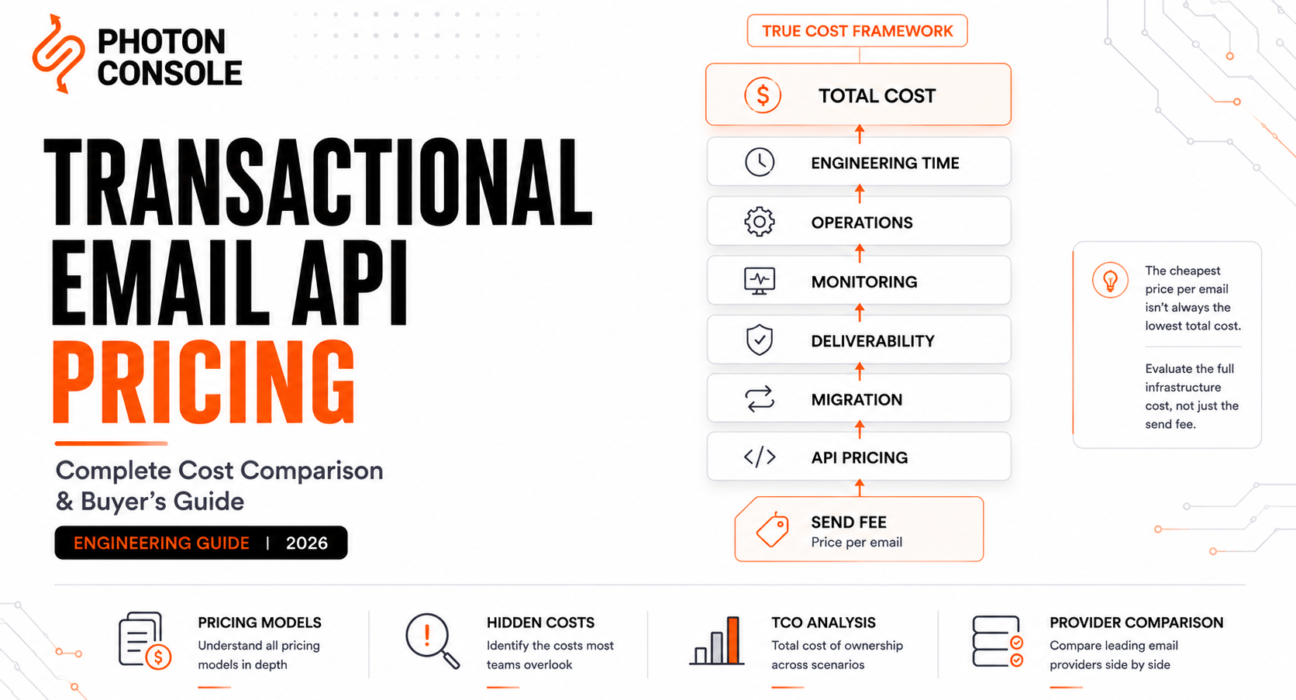
Transactional email API pricing is the first thing most engineering teams check when evaluating providers — and the most misleading. Comparing the per-message number on each pricing page is like comparing cloud providers by EC2 instance cost: technically a data point, functionally incomplete, and almost guaranteed to produce the wrong decision for any team sending more than trivial volume.
The number on the pricing page is the send fee. The actual cost is that number, plus the infrastructure you build around the provider, plus the engineering time spent operating it, plus the deliverability incidents you absorb when things go wrong, plus the migration cost when you eventually outgrow the choice you made based on the pricing page alone.
Engineering Snapshot: Amazon SES costs roughly $0.10 per 1,000 emails — by far the lowest per-message rate in the market. Teams that choose SES purely on this number routinely discover that the total cost of operating SES in production (bounce handling, complaint processing, webhook assembly, reputation monitoring, warm-up management) exceeds what a managed provider with a higher per-message rate would have cost, once engineering time is factored in.
We call this the True Cost Framework: the real price of a transactional email API is not the send fee. It is the send fee, plus the operational overhead the provider doesn’t absorb, plus the opportunity cost of engineering time spent on email infrastructure instead of product. Every comparison in this guide evaluates providers against that full cost, not just the line item.
Table of Contents
- How Transactional Email API Pricing Works
- Hidden Costs Most Teams Ignore
- What Actually Affects Your Email Bill
- Pricing Comparison of 9 Major Providers
- Cost Scenarios by Use Case
- Total Cost of Ownership
- How to Choose the Right Pricing Model
- Frequently Asked Questions
- Conclusion
How Transactional Email API Pricing Works
Transactional email API pricing is built on one of four models, sometimes combined. Understanding which model a provider uses — and where the model’s cost curve bends — is the first step to avoiding a pricing surprise at scale.

Table 1: Pricing Model Comparison
| Model | How It Works | Best For | Watch Out For |
|---|---|---|---|
| Pay-per-email | Flat rate per message; no monthly minimum | Variable or growing volume; startups | No volume discounts without negotiation at most providers |
| Monthly subscription tier | Fixed monthly fee includes a volume block; overages charged separately | Predictable, steady-state volume | Overages at premium rates; wasted spend if underused |
| Hybrid (base + overage) | Low monthly base includes some volume; additional sends billed per-message | Teams with a predictable baseline and occasional spikes | Overage rates often significantly higher than base rate |
| Enterprise / committed use | Custom pricing negotiated with sales; volume commitments | High-volume, predictable senders | Lock-in; minimum commitments; less flexibility |
Our pay-per-use vs subscription total cost of ownership analysis covers the economics of these models in depth.
Hidden Costs Most Teams Ignore
This is the section that justifies the True Cost Framework. The per-message fee is the visible cost. These are the costs that don’t appear on the pricing page but show up in the quarterly infrastructure budget review:
Table 2: Hidden Cost Inventory
| Hidden Cost | Where It Comes From | Typical Impact |
|---|---|---|
| Dedicated IP fees | Monthly per-IP charge, typically $20–90/mo per IP | $240–1,080/year per IP, often required above ~100k/mo volume |
| Overage rates | Per-message rate above your plan’s included volume | Often 30–80% more expensive than the base rate |
| Webhook / event processing add-ons | Some providers charge for event storage, extended retention, or advanced analytics | Variable; can add $20–100+/mo at scale |
| Team seats / user access | Per-user fees for dashboard access | $5–25/user/mo on some providers |
| Log and data retention | Extended message history beyond default retention window | Add-on pricing or tier upgrade required |
| Email validation / verification | Per-address fee for list verification tools | $1–4 per 1,000 addresses verified |
| Engineering integration time | Hours spent on initial integration, webhook processing, monitoring setup | A few days for managed providers; weeks for SES-class infrastructure |
| Ongoing operational overhead | Time spent on monitoring, debugging, IP management, reputation maintenance | Varies dramatically by provider — from near-zero to part-time job |
| Migration cost | Engineering time + deliverability risk of switching providers | Typically 1–4 weeks of engineering work plus an IP warm-up period |
The providers with the lowest per-message fees tend to have the highest hidden costs in the “engineering time” and “operational overhead” rows. The providers with the highest per-message fees tend to absorb those costs into the service, which is what you’re paying the premium for.
What Actually Affects Your Email Bill
- Volume — the dominant cost driver at every provider. Most pricing is tiered or per-message, so your monthly send volume is the single biggest input to your bill.
- Attachments — some providers (notably Amazon SES) charge for data transfer, which means large attachments (invoice PDFs, receipts) increase costs beyond the per-message rate.
- Dedicated IPs — typically $20–90/month per IP, and relevant once your volume justifies separating from shared IP pools.
- Domains and subaccounts — some providers charge per-domain or per-subaccount, which adds up for multi-product companies or agencies.
- API rate limits — if your provider’s rate limit is lower than your peak sending rate, you either queue (adding latency to time-sensitive sends) or upgrade to a higher tier.
- Retention and analytics — how long the provider stores delivery logs, and whether advanced analytics require a tier upgrade.
Transactional Email API Pricing: 9 Providers Compared
All pricing figures below are based on publicly available information as of mid-2026 and are approximate. Providers update pricing regularly — verify current figures directly with each provider before making a decision. Sources include official pricing pages from SendGrid, Postmark, Amazon SES, Mailgun, SMTP2GO, Resend, and Brevo.
Table 3: Provider Pricing Overview
| Provider | Pricing Model | Starting Price | Free Tier | Dedicated IP Cost |
|---|---|---|---|---|
| PhotonConsole | Pay-per-email | Pay-as-you-go (no monthly minimum) | Yes (limited) | Available |
| Amazon SES | Pay-per-email | $0.10/1,000 emails | 3,000/mo for 12 months | $24.95/mo per IP (standard) |
| SendGrid | Tiered subscription | Essentials: $19.95/mo (50k emails) | 60-day trial (100/day) | Included on Pro ($89.95/mo); $89.95/mo add-on on Essentials |
| Postmark | Tiered (base + overage) | Basic: $15/mo (10k emails) | 100 emails/mo | $50/mo (Pro/Platform tiers only) |
| Mailgun | Tiered subscription | Foundation: ~$35/mo (50k emails) | Limited trial | Included on Scale tier (~$90/mo) |
| SMTP2GO | Tiered subscription | Starter: $10/mo (10k emails) | 1,000 emails/mo | Available on higher tiers |
| Brevo | Tiered (daily send limits) | Starter: ~$9–25/mo (volume varies) | 300 emails/day | Add-on (~$12/mo) |
| Resend | Tiered subscription | Pro: $20/mo (50k emails) | 3,000 emails/mo | Not available (shared pools) |
| SparkPost | Tiered / enterprise | Enterprise-oriented (contact sales for production) | Limited test tier | Managed IP pools |
Table 4: Approximate Monthly Cost at Volume Tiers
| Provider | 10,000 emails/mo | 50,000 emails/mo | 100,000 emails/mo | 500,000 emails/mo |
|---|---|---|---|---|
| Amazon SES | ~$1 | ~$5 | ~$10 | ~$50 |
| PhotonConsole | Pay-per-use (verify current rates) | Pay-per-use | Pay-per-use | Pay-per-use |
| Resend | Free (under 3k) / ~$20 | ~$20 | ~$80 | Custom |
| SMTP2GO | ~$10 | ~$40–50 | ~$75 | Custom |
| Postmark | ~$15 | ~$68–85 | ~$126–135 | ~$450+ |
| SendGrid | ~$20 | ~$39 | ~$90 | Custom / Pro tier scaling |
| Mailgun | ~$35 | ~$64 | ~$90 | Custom |
| Brevo | Free (under daily cap) | ~$65–74 | Custom | Custom |
| SparkPost | Enterprise (contact sales) | Enterprise | Enterprise | Enterprise |
These figures are directional estimates based on published pricing pages and do not include dedicated IP costs, overages, add-ons, or data transfer fees. Actual costs will vary.
Table 5: Feature and Infrastructure Comparison
| Provider | HTTP API + SMTP Relay | Webhooks | Dedicated IP | Traffic Segmentation | Primary Strength |
|---|---|---|---|---|---|
| PhotonConsole | Both | Yes (signed) | Yes | Account-level | Pay-per-use simplicity; no tier friction |
| Amazon SES | Both | Via SNS (assembly required) | Yes (managed warm-up available) | Configuration sets | Lowest per-message cost at any volume |
| SendGrid | Both | Yes | Yes (Pro tier+) | Subuser / IP pool | Ecosystem breadth; Twilio integration |
| Postmark | Both | Yes (well-documented) | Yes (Pro/Platform) | Message streams | Transactional-only focus; deliverability |
| Mailgun | Both | Yes (HMAC signed) | Yes (Scale tier) | Domain-based | Developer API quality; flexible routing |
| SMTP2GO | Both | Yes | Higher tiers | Limited | Straightforward setup; good support |
| Brevo | Both | Limited | Add-on | Limited | All-in-one (marketing + transactional) |
| Resend | API only | Yes (Svix-based) | No | Limited | Modern DX; React Email integration |
| SparkPost | Both | Yes (extensive) | Yes (pool management) | Subaccount | High-volume analytics; predictive tools |
For detailed infrastructure-level comparisons of individual providers, see our guides on SendGrid alternatives, Amazon SES alternatives, Postmark alternatives, SMTP2GO alternatives, SparkPost alternatives, and Mailgun alternatives.
Cost Scenarios by Use Case
Abstract pricing tables are useful for scanning. Real decisions need concrete numbers tied to specific use cases. Each scenario below includes transparent assumptions so you can adjust for your own situation.
Early-stage startup (5,000–10,000 emails/month). Sending password resets, verification emails, and basic notifications. At this volume, most providers’ free tiers or entry plans cover the need: Amazon SES costs under $1/month in send fees (but requires integration time), Resend’s free tier handles it, SMTP2GO’s free tier covers it at 1,000/month or the $10 Starter plan handles it comfortably, and Postmark’s Basic plan covers it at $15/month. The cost difference between providers at this volume is negligible — a few dollars per month. The meaningful difference is integration time and operational overhead. Choose the provider with the best developer experience and documentation for your stack, not the cheapest per-message rate.
Growing SaaS (50,000–100,000 emails/month). OTPs, receipts, product notifications, onboarding emails. At 100k/month, the cost spread widens meaningfully: Amazon SES is ~$10/month in send fees but requires you to build and maintain bounce handling, webhook assembly, and reputation monitoring. Managed SMTP relay providers absorb that operational cost at higher per-message rates. Postmark Pro runs ~$130/month with overages. SendGrid Pro is ~$90/month with a dedicated IP included. This is the volume where the True Cost Framework matters most: the cheapest provider by send fee is not necessarily the cheapest provider by total cost of ownership, because the “build-around” cost of operating SES at this volume can easily exceed $80/month in engineering time.
High-volume SaaS (500,000–1,000,000 emails/month). At this scale, the per-message rate dominates — even a $0.10 difference per thousand adds up to real money over a year. Amazon SES costs ~$50–100/month in send fees. Managed providers are typically $200–600+/month. But at this volume, you probably also need dedicated IPs ($25–90/month per IP), production-grade observability, and someone accountable for deliverability — all of which are included in a managed provider’s price and built-from-scratch on SES. The break-even depends entirely on whether your team has (or wants to hire) dedicated deliverability engineering capacity.
OTP platform. OTP delivery has the tightest latency requirements of any transactional email use case — a code that arrives 30 seconds late is functionally the same as a code that didn’t arrive. At 100k OTPs/month, the provider comparison isn’t about price at all — it’s about delivery latency and the provider’s ability to consistently land in primary inbox, not promotions or spam. Postmark and providers with transactional-only infrastructure tend to have measurably faster delivery than all-in-one platforms, and the latency advantage is worth a per-message premium for this use case specifically.
E-commerce marketplace. Order confirmations, shipping updates, seller notifications, buyer receipts — a mix of transactional subtypes with varying time-sensitivity. At 200k emails/month split across multiple message types, the operational question is traffic segmentation: can the provider separate high-priority transactional (order confirmation) from lower-priority notifications (weekly seller digest) without requiring separate accounts? Providers with message-stream or subaccount segmentation (Postmark, SendGrid, SparkPost) handle this natively. Others may require manual splitting across multiple configurations.
Healthcare and fintech. Appointment reminders, prescription notifications, account alerts, fraud warnings. Compliance requirements (HIPAA-adjacent for healthcare, SOC 2 for fintech) add a dimension that pure pricing comparisons miss: which providers offer BAA availability, data residency controls, and audit logging? These features typically live on enterprise tiers with custom pricing, so the sticker price on the pricing page isn’t the relevant number — the negotiated enterprise price is, and it’s rarely published.
Total Cost of Ownership
We call this the Infrastructure Cost Stack — the layers of cost that make up the true price of operating a transactional email system, only one of which is the per-message send fee.
Table 6: Infrastructure Cost Stack
| Cost Layer | What It Includes | Who Pays (Managed Provider) | Who Pays (SES-Class Infrastructure) |
|---|---|---|---|
| Send fee | Per-message delivery cost | Provider (included in pricing) | AWS (minimal) |
| Integration | Initial engineering time to integrate API/SMTP | Your team (hours to days) | Your team (days to weeks) |
| Webhook processing | Building the event ingestion pipeline | Provider handles delivery; you build processing | You build everything (SNS → processing pipeline) |
| Bounce / complaint handling | Suppression lists, feedback loop processing | Provider manages; you configure | You build and maintain |
| Reputation management | IP warming, monitoring, incident response | Provider manages (shared pools) or assists (dedicated) | You manage entirely |
| Monitoring / observability | Dashboards, alerting, diagnostic tools | Included (quality varies by provider) | You build (CloudWatch + custom tooling) |
| Ongoing operations | Time spent managing the email infrastructure | Minimal for most providers | Meaningful — part of someone’s job |
At 10,000 emails/month, the difference between these two columns is a few hours of engineering time. At 500,000/month, it’s the difference between “email mostly works by itself” and “we need someone accountable for email infrastructure as part of their role.”
Table 7: Total Cost Estimate at 100,000 Emails/Month (Annualized)
| Cost Component | Managed Provider (e.g., Postmark Pro) | Amazon SES (Self-Managed) |
|---|---|---|
| Send fees | ~$135/mo ($1,620/yr) | ~$10/mo ($120/yr) |
| Dedicated IP | ~$50/mo ($600/yr) | ~$25/mo ($300/yr) |
| Integration engineering (one-time, amortized) | ~$500–1,500 | ~$2,000–5,000 |
| Ongoing operational overhead (estimated) | Low (~2 hrs/mo) | Medium (~8–15 hrs/mo) |
| Estimated annual total (send fees + IP + amortized integration) | ~$2,700–3,300 | ~$900–1,400 + engineering time value |
Engineering time valued at your team’s internal rate changes this math entirely. At a $100/hour internal rate, 10 extra hours/month of SES operational overhead adds $12,000/year to the SES column — more than the managed provider’s total annual cost.
How to Choose the Right Transactional Email API Pricing Model
This is the Provider Value Index — a framework for mapping your team’s constraints to the pricing model that actually minimizes total cost, not just send fees.
Table 8: Decision Framework
| Your Situation | Recommended Pricing Model | Why |
|---|---|---|
| Variable, growing, or unpredictable volume | Pay-per-email (no monthly minimum) | No wasted spend on unused capacity; cost scales with actual usage |
| Predictable, steady monthly volume | Subscription tier that includes your volume | Lower effective per-message rate than pure pay-per-use at the right tier |
| High volume with engineering capacity | SES-class pay-per-email with self-managed infrastructure | Lowest send fee; infrastructure cost justified by volume savings |
| High volume without engineering capacity | Managed provider with enterprise pricing | Negotiate volume rates; avoid building infrastructure you can’t operate |
| Multiple products or traffic types | Provider with subaccount or stream segmentation | Avoid cross-contamination between traffic types without multiple accounts |
Table 9: Provider Recommendations by Team Profile
| Team Profile | Providers Worth Evaluating First | Rationale |
|---|---|---|
| Early-stage, <2 engineers | PhotonConsole, Resend, Postmark | Fastest integration, minimal operational overhead |
| Growth-stage SaaS, 5–20 engineers | PhotonConsole, SendGrid, Mailgun, SMTP2GO | Flexible scaling, good API quality, reasonable pricing |
| Enterprise / regulated | SendGrid, SparkPost, Amazon SES | Compliance features, subaccount isolation, enterprise support |
| High-volume, engineering-heavy | Amazon SES, SparkPost | Lowest cost at scale; team can absorb operational complexity |
| Marketing + transactional combined | Brevo, SendGrid | Single-platform convenience, though with traffic segmentation caveats |
Table 10: Free Tier Comparison
| Provider | Free Tier Volume | Duration | Notable Limitations |
|---|---|---|---|
| Amazon SES | 3,000 emails/mo | 12 months | Sandbox mode requires production approval |
| Resend | 3,000 emails/mo | Permanent | Limited domains, no dedicated IP |
| SMTP2GO | 1,000 emails/mo | Permanent | 5-day log retention, limited webhooks |
| Brevo | 300 emails/day (~9,000/mo) | Permanent | Daily cap (not monthly); Brevo branding |
| Postmark | 100 emails/mo | Permanent | Testing only at this volume |
| SendGrid | 100 emails/day | 60-day trial | No longer permanent; trial expires |
| PhotonConsole | Yes (limited) | Verify current terms | Verify current terms |
Frequently Asked Questions
What is the cheapest transactional email API?
By per-message send fee, Amazon SES at $0.10 per 1,000 emails. By total cost of ownership (including engineering time and operational overhead), it depends on your team’s capacity — managed providers with higher per-message rates often cost less in total when engineering time is factored in.
How much does transactional email cost per month?
At 100,000 emails/month: roughly $10/month on Amazon SES (send fees only), $75–135/month on managed providers (Postmark, SendGrid, SMTP2GO), depending on plan and features. Add $25–90/month for dedicated IPs if needed. These figures don’t include engineering time or operational overhead.
Should I choose a provider based on price alone?
No. Price is one input. Deliverability, observability, retry logic, webhook quality, and operational overhead are equally important — a provider that saves $50/month on send fees but costs your team an extra 10 hours/month in operational work is more expensive in practice.
When should I consider a dedicated IP?
Generally above 50,000–100,000 emails/month sustained, where your volume is large enough to build and maintain a statistically meaningful sending reputation independently. Below that threshold, shared pools typically outperform self-managed dedicated IPs.
Is pay-per-email or subscription cheaper?
Pay-per-email is cheaper when your volume is variable, growing, or below a subscription tier’s included volume. Subscription is cheaper when your volume is predictable and consistently near or above a tier’s included block. Our detailed TCO comparison covers the crossover math.
How do I avoid unexpected charges?
Before committing: check overage rates (not just base rates), understand dedicated IP costs, verify whether webhook/analytics features require a tier upgrade, and confirm whether the provider charges per-seat for dashboard access. Monitor usage against your plan’s included volume with alerts, not just dashboards.
Conclusion
The per-message price on a provider’s pricing page is the starting point of a cost analysis, not the conclusion. The True Cost Framework — send fee, plus operational overhead, plus engineering time, plus migration risk — is what determines the actual infrastructure cost, and it frequently inverts the “obvious” choice. Amazon SES is the cheapest by send fee and sometimes the most expensive by total cost. Postmark is among the most expensive by send fee and sometimes the cheapest by total cost. The right answer depends entirely on your volume, your team’s capacity, and how much infrastructure you’re willing to build and maintain yourself.
Evaluate providers against the full Infrastructure Cost Stack, not just the send line. Test the integration, test the monitoring, test the webhook processing, and test the migration path before you commit — because the most expensive email infrastructure decision is never the monthly send fee. It’s the migration you have to do six months later when the provider you chose on price alone turns out to be wrong on everything else.
For a practical pre-launch checklist covering authentication, DNS, monitoring, and infrastructure readiness, see our email infrastructure checklist. For choosing the right provider architecture beyond pricing, see our 8 critical criteria for evaluating an SMTP relay.
Related Reading
- Pay-Per-Use vs Subscription: Total Cost of Ownership
- Sending 100,000 Transactional Emails a Month Without Overpaying
- Email API Integration
- SMTP Relay Service
- Email Observability Explained
- Email IP Warming Explained
- Dedicated IP vs Shared IP
- SMTP Monitoring Tools
- Transactional Email Latency
- Email Infrastructure Checklist Before Launch
- Debugging Transactional Email Failures in Production
- Best SendGrid Alternatives
- Best Amazon SES Alternatives
- Postmark Alternatives
- SendGrid vs Mailgun

SendGrid Free Tier Limits: What Happens When You Exceed Them | Photonconsole.com
July 23, 2026[…] Transactional email pricing across nine providers […]
Mailgun Pricing Explained: Overages, Add-Ons And True Cost | Photonconsole.com
July 23, 2026[…] Transactional email pricing across nine providers […]