


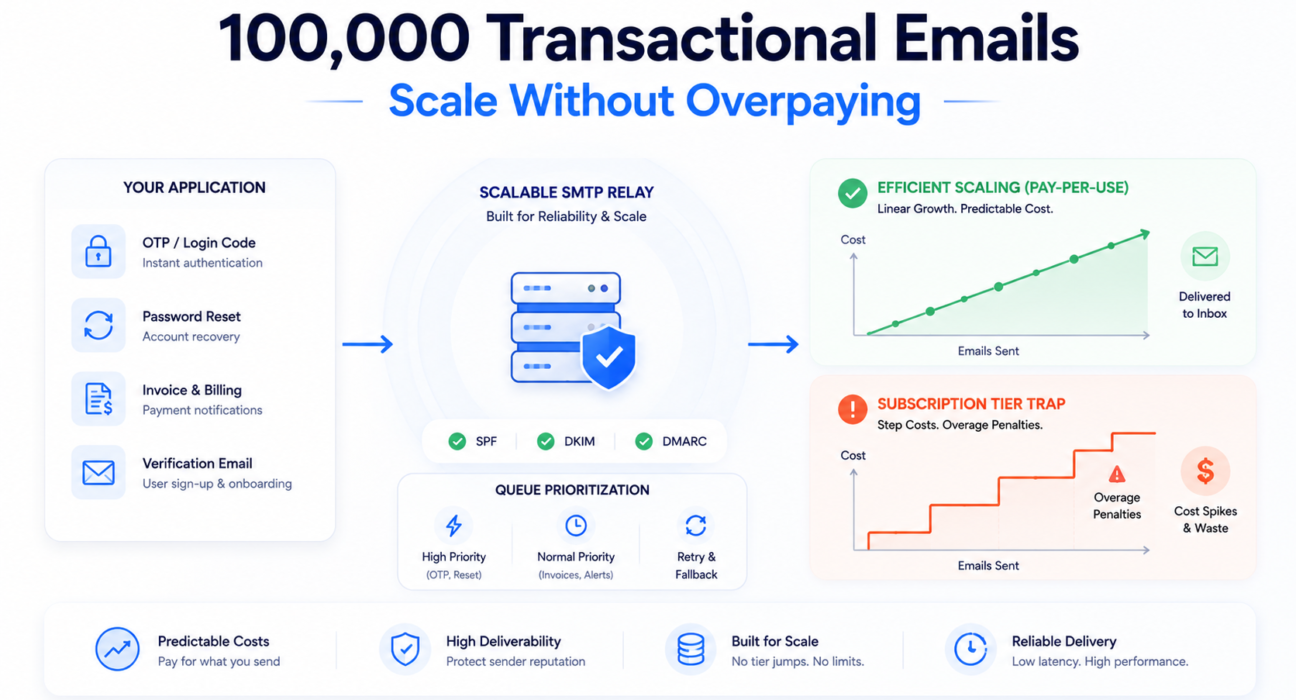
A SaaS product crosses 80,000 monthly active users. Authentication emails, onboarding sequences, invoice notifications, and password reset flows are now generating over 90,000 transactional sends per month. The team upgrades their email plan to cover the volume — and discovers the next tier costs nearly three times the previous one, requires a dedicated IP add-on billed separately, and bundles a marketing automation suite they have no use for.
The emails still go out. The infrastructure bill has tripled. Nothing about the product experience improved.
This is not an edge case. Most SMTP pricing models become less efficient precisely when your product becomes more successful. Tiers are designed to capture revenue at growth inflections — exactly the moments when infrastructure spend should be scaling smoothly, not jumping in steps.
This guide covers the actual cost structure of sending 100,000 transactional emails per month, the deliverability risks that appear at that volume, and the infrastructure decisions that determine whether you scale efficiently or expensively.

The cheapest email system at 10,000 emails per month is rarely the cheapest system at 100,000.
Quick Answer: How to Send 100,000 Transactional Emails a Month Without Overpaying
The short answer is architectural. The decisions you make before you hit 100,000 emails per month determine what it costs when you get there. Five variables control cost at scale.
- Use pay-per-use pricing infrastructure. Subscription tiers create cost floors and overage penalties at exactly the volume levels where you most need cost predictability. Pay-per-use billing eliminates tier jumps, overage rates, and forced upgrades entirely.
- Separate transactional and marketing email traffic. Running both through the same relay means a marketing bounce problem can degrade OTP and authentication delivery. Separate infrastructure, separate reputation.
- Configure SPF, DKIM, and DMARC before scaling. Authentication failures at 1,000 emails per month are annoying. At 100,000, they are a deliverability crisis. Major ISPs apply stricter filtering to high-volume senders — and authentication records are the minimum entry requirement.
- Monitor bounce and complaint rates actively. At 100,000 monthly sends, a 2% bounce rate is 2,000 failed deliveries per month. Left unmanaged, that degrades sender reputation, increases spam folder placement, and creates a compounding problem that gets harder to reverse the longer it runs.
- Choose relay infrastructure built for transactional volume. The queue architecture, retry logic, and IP pool management of a purpose-built transactional relay differs meaningfully from a marketing email platform that also supports transactional sends. At scale, that difference shows up in OTP latency, bounce rates, and inbox placement consistency.
What Counts as Transactional Email at Scale
Most “high volume email” advice online conflates transactional and marketing email. The infrastructure requirements, deliverability standards, and cost structures are different enough that this distinction is not semantic — it is architectural.
At 100,000 sends per month, a SaaS product’s transactional volume typically comes from:
- One-time passwords and authentication codes — sent immediately on login, with a delivery window of seconds before the session expires
- Password reset and account recovery — user-initiated, time-sensitive, directly connected to product access
- Email verification and onboarding confirmation — required to complete signup; failed delivery equals failed activation
- Invoice and billing notifications — sent at payment events, required for financial compliance in many jurisdictions
- System alerts and threshold notifications — usage warnings, security events, subscription renewals
What transactional email is not: marketing newsletters, promotional campaigns, product announcements, or re-engagement sequences. Mixing these with transactional traffic on the same sending infrastructure is one of the most common and expensive scaling mistakes — and one of the easiest to avoid with early architectural separation.
For a detailed breakdown of transactional email infrastructure and how it differs operationally from marketing systems, the transactional email service guide covers the differences in depth.
Why Email Costs Spike After Scaling
The cost structure of most email relay platforms is designed for predictable, low-growth usage. At 100,000 emails per month, nearly every cost element works against you simultaneously — and the mechanisms are structural, not accidental.
Subscription tiers monetize growth volatility. The more unpredictable your email volume, the more expensive subscription pricing becomes.
Tier Jump Penalties
Most subscription platforms structure pricing in discrete tiers: 25,000 / 50,000 / 100,000 / 250,000 emails per month. The gaps are wide by design. When volume crosses a tier boundary — even briefly during a product launch — you are forced to upgrade to a tier with far more capacity than you currently need.
A product growing from 80,000 to 110,000 emails per month does not need 250,000-email plan capacity. But if the 100,000-email tier is the ceiling, the 250,000-email tier is the only option — and you will overpay for unused capacity for months until growth catches up. Teams that experience this for the first time often assume it was a one-time cost. It typically recurs at every tier boundary on the growth path.
Visual model — the subscription tier trap:
| Emails Sent | Required Plan Tier | Emails Paid For | Monthly Waste |
|---|---|---|---|
| 80,000 | 100k plan @ $149/month | 100,000 | 20,000 unused |
| 101,000 (spike) | Forced 250k plan @ $249/month | 250,000 | 149,000 unused |
| 120,000 (next month) | 250k plan @ $249/month | 250,000 | 130,000 unused |
| 150,000 (4 months later) | 250k plan @ $249/month | 250,000 | 100,000 unused |
One volume spike forces months of overpayment. This is how subscription pricing is designed to work at tier boundaries.
Overage Pricing — The Worst-Timed Cost
Overage rates at major platforms typically run $0.005 to $0.015 per additional email — 3 to 5 times higher per email than the plan’s effective base rate. The timing problem: volume spikes that trigger overages coincide with product launches, marketing campaigns, or seasonal events — the exact moments when transactional delivery is most critical and most visible to users.
Most overage penalties happen during the exact moments your product needs infrastructure reliability most.
Dedicated IP Charges
At 100,000 emails per month, shared IP infrastructure introduces meaningful reputation risk. Other senders on the same pool can degrade your inbox placement even when your own hygiene is excellent. Dedicated IPs — the standard mitigation — are typically sold as add-ons at $20 to $30 per IP per month, or gated behind enterprise tiers that bundle features you do not need.
Hidden Infrastructure Costs
These never appear on an email invoice but are directly caused by infrastructure quality choices:
- Lost activations from bounced onboarding emails
- Failed logins from OTPs that arrived after session expiration
- Support tickets from users who did not receive password resets
- Engineering time spent diagnosing delivery failures and managing configurations
The cost of failed delivery rarely appears on the invoice. It appears in your activation rate, your support queue, and your churn data.
The email infrastructure failure cost guide covers how to calculate these downstream costs in terms engineering and finance teams can evaluate together.
What this means: Email infrastructure costs often increase faster than actual usage growth because subscription pricing scales in steps, not proportionally. The total effective cost — plan plus add-ons plus overages plus engineering time — is typically 2 to 3.5 times the advertised plan price at this volume level.
The Real Cost of Sending 100,000 Emails Per Month
Here is a realistic cost breakdown for a SaaS product sending 100,000 transactional emails per month on a subscription-based relay platform versus a pay-per-use model. These figures reflect typical market pricing as of 2025 across major relay providers.
Subscription Model — Full Cost Picture
| Cost Category | Approximate Monthly Cost | Notes |
|---|---|---|
| Base plan (100k–150k tier) | $149 – $199/month | Often includes features irrelevant to transactional-only use |
| Dedicated IP add-on | $20 – $30/IP/month | Operationally necessary at this volume for reputation control |
| Overage charges (spike months) | $25 – $75/month | At $0.005–$0.015/email above ceiling; higher during launches |
| Engineering maintenance time | $120 – $240/month | Bounce investigation, plan management, config — at $120/hr loaded rate |
| Support tier upgrade | $50 – $150/month | Deliverability guidance often gated behind premium support |
| Total effective monthly cost | $364 – $694/month | Versus advertised plan price of $149–$199 |
Pay-Per-Use Model — Full Cost Picture
| Cost Category | Approximate Monthly Cost | Notes |
|---|---|---|
| Per-email usage (100k sends) | $80 – $120/month | At $0.0008–$0.0012/email, typical transactional relay rates |
| Dedicated IP | Included or usage-priced | Purpose-built transactional providers typically bundle at volume |
| Overage charges | None | No ceiling — spikes bill at the same per-email rate |
| Engineering maintenance | Minimal | No plan transitions, no tier decisions, no configuration complexity |
| Total effective monthly cost | $80 – $120/month | Scales linearly with actual usage at every volume level |
For most growth-stage SaaS products sending 100,000 transactional emails per month, the pricing model choice represents a $200 to $500 monthly cost difference — before accounting for deliverability quality. The full analysis across every cost category and volume scenario is covered in the pay-per-use vs subscription total cost of ownership analysis.
Pay-Per-Use vs Subscription at 100,000 Email Scale
The structural difference between pricing models is most consequential in the 50,000 to 200,000 email range. Tier jumps are most frequent here, overage exposure is highest, and the gap between advertised and effective cost per email is widest.
| Monthly Volume | Subscription Model | Pay-Per-Use Model |
|---|---|---|
| 30,000 emails | 50k plan @ $89/month — 40% unused | ~$27/month — pay for 30,000 only |
| 60,000 emails | 100k plan @ $149/month — 40% unused | ~$54/month |
| 100,000 emails | 100k plan @ $149/month — at ceiling | ~$90/month — no ceiling risk |
| 120,000 (spike) | Overage @ $0.01/email = +$200, or forced 250k plan @ $249 | ~$108/month — same rate, no penalty |
| 150,000 emails | 250k plan @ $249/month — 40% unused for months | ~$135/month |
The core pattern:
- Pay-per-use: Cost increases gradually and proportionally at every volume level. No ceiling, no billing spike at any threshold, no months of overpayment during growth.
- Subscription: Cost is flat within a tier, then jumps sharply at the boundary — where you immediately overpay for unused capacity until the next growth inflection forces the next jump.
Email infrastructure becomes expensive when pricing stops matching usage.
How to Scale Transactional Email Cost-Effectively
Scaling to 100,000 transactional emails per month without overpaying is an infrastructure design problem as much as a pricing one. These are the decisions that determine both your cost and reliability at that volume.
1. Separate Transactional and Marketing Traffic — From the Beginning
This is the most commonly skipped architectural decision — and one of the most expensive to fix after the fact.
Running transactional and marketing emails through the same relay, sending domain, and IP pool means a reputation problem in one category affects the other. A marketing campaign that generates elevated complaint rates will degrade inbox placement for authentication emails — a product reliability problem that users experience directly.
Use separate sending domains and relay configurations for each traffic type. This is significantly easier to implement before scale than to retrofit after a reputation problem develops.
Infrastructure model — transactional vs marketing separation:
- Transactional domain:
mail.yourapp.com→ dedicated relay → high-priority queue - Marketing domain:
news.yourapp.com→ separate relay → standard delivery queue - Separate IP pools, separate DKIM signing keys, separate reputation tracking
2. Configure Authentication Records Before Volume Increases
SPF, DKIM, and DMARC are not optional at 100,000 emails per month. Google, Microsoft, and Yahoo enforce strict authentication requirements for high-volume senders — and failures at this volume produce systematic delivery problems, not isolated bounces.
Verify your configuration against actual sending behavior using MXToolbox or Mail-Tester. DNS record existence and correct configuration are different things — both matter. The SPF, DKIM, and DMARC configuration guide covers correct implementation for each record type.
3. Choose Pay-Per-Use Infrastructure for Variable or Growing Volume
If your volume is growing — which it is, if you are approaching 100,000 emails per month — pay-per-use relay infrastructure eliminates the tier management overhead, overage risk, and overpayment periods that subscription models impose at growth inflection points.
Some pay-per-use providers, including PhotonConsole, structure billing directly around usage with no monthly minimum or ceiling — meaning cost tracks actual volume at every growth stage without plan management decisions.
4. Monitor Bounce and Complaint Rates Continuously
At 100,000 monthly sends, a 1.5% bounce rate is 1,500 failed deliveries per month. Unmanaged, this compounds: bouncing addresses remain in your list, ISPs register the pattern as poor list hygiene, inbox placement decreases across your entire sending volume.
Teams often notice deliverability degradation weeks before they connect it to bounce rate changes — the signal appears first as slightly lower open rates, then as increased support tickets about missing emails, then as visible spam folder placement. By that point, the reputation damage is months old.
Implement hard bounce removal immediately and automatically. Set complaint rate alerts. Review Google Postmaster Tools and Microsoft SNDS weekly. The email bounce rate reduction guide covers list management and bounce handling strategies at production volume.
5. Warm Dedicated IPs Before Scaling
New IPs have no sending reputation. ISPs treat high volume from new IPs as a risk signal and throttle or block delivery accordingly. A proper warmup ramps volume gradually over 4 to 6 weeks: 500 to 1,000 emails per day in week one, doubling every few days until the IP has established consistent sending behavior across major ISPs.
Skipping or shortcutting warmup produces inbox placement failures that can take weeks to reverse — and that typically surface during a product launch or high-traffic period, when the consequences are most visible.
6. Match Retry Logic to Email Priority Class
Not all failures are permanent. Temporary failures — server busy, rate limited, greylisted — should be retried. But the retry logic for a marketing newsletter (retry in 4 hours) is not appropriate for an OTP (retry in 30 seconds, abandon after 2 minutes).
Teams typically discover queue latency problems only after authentication emails begin arriving after OTP expiration windows — at which point users have already experienced the failure. Transactional relay infrastructure should support configurable retry behavior by email type or priority class.
Infrastructure model — queue prioritization:
- OTP / authentication queue → immediate retry, 30-second intervals, 2-minute expiry
- Password reset queue → retry within 60 seconds, 5-minute window
- Invoice / billing queue → retry within 15 minutes, 24-hour window
- Marketing / bulk queue → standard retry, 4-hour intervals
Deliverability Problems That Appear at High Volume
Deliverability problems at 1,000 emails per month look like isolated failures. At 100,000, the same root causes produce systematic patterns that behave like infrastructure bottlenecks — because they are.
At scale, deliverability stops looking like a content problem and starts behaving like an infrastructure problem.
ISP Throttling
When high volume comes from a domain or IP that ISPs do not recognize as established, they throttle delivery — accepting email more slowly than you send it, or deferring delivery until your sending rate drops. The practical effect: OTP delivery in 30 to 90 seconds instead of under 5, producing authentication failures for users with short session timeouts.
Throttling is a reputation signal, not a configuration error. The fix is IP warmup, authentication records, and consistent sending behavior — not sending rate adjustments. Symptoms of active throttling are covered in the email delivery delay diagnosis guide.
Spam Filter Reclassification
At high volume, spam filters evaluate aggregate sending behavior — volume patterns, bounce rates, complaint rates, domain age, authentication consistency. A product delivering cleanly at 10,000 emails per month may find a portion reclassified to spam at 100,000 — not because content changed, but because volume increase triggered more aggressive filtering thresholds.
The response is sender reputation management: bounce hygiene, complaint rate monitoring, authentication verification, and blacklist monitoring. Content changes do not fix reputation problems.
Shared IP Reputation Decay
On shared IP infrastructure, your inbox placement is partly determined by other senders on the same pool. A co-tenant with poor list hygiene or aggressive sending behavior can degrade your reputation even when your own practices are clean.
Shared IP infrastructure transfers reputation risk between unrelated companies. Your sender score is a function of your neighbors as much as your own behavior.
At 100,000 emails per month, dedicated IPs are the operational standard. The deliverability implications of IP infrastructure choices are covered in the email deliverability improvement guide.
Mixed Queue Delays
When transactional and marketing email share the same relay and send queue, high-priority sends can be delayed behind bulk traffic during spikes. An OTP that should deliver in under 5 seconds takes 45 seconds because the queue is processing a 50,000-email campaign batch ahead of it.
This is invisible in the relay dashboard but visible in authentication failure rates. If emails are successfully sent but not arriving on schedule, the emails sent but not delivered guide covers relay-level causes and diagnosis steps.
What this means: Deliverability problems at scale are infrastructure problems, not content problems. Throttling, reputation decay, and queue delays all have specific technical causes that require operational responses — not email redesigns. Monitoring ISP reputation data continuously is the only way to catch these problems before they compound into visible delivery failures.
Why Many SaaS Teams Overpay for Email Infrastructure
Cost waste in SaaS email infrastructure accumulates gradually and across several compounding patterns — until it becomes significant enough to trigger a billing review, at which point the team has often overpaid for months without realizing it.
Paying for Unused Tier Capacity
The most common form of infrastructure waste: consistently not reaching your plan’s volume ceiling. A product sending 60,000 emails per month on a 100,000-email plan pays for 40,000 emails it never sends — every month. Over twelve months, that unused capacity represents $360 to $720 in pure recurring overhead with no operational return.
Forced Upgrades Before They Are Needed
Subscription tier gaps are wide by design. When volume crosses a tier boundary — even temporarily — the only option is upgrading to a tier that covers significantly more capacity than current needs. Teams that experience a spike month and upgrade often spend the next four to eight months paying for capacity they will not fully utilize until genuine growth arrives.
Bundled Features That Add Cost Without Adding Value
Higher subscription tiers frequently bundle marketing automation tools, analytics dashboards, and enterprise integrations. For teams whose sole requirement is reliable transactional email delivery, these features are invisible items in a plan cost that is already above their operational needs. Email infrastructure pricing should reflect the infrastructure you use — not the product roadmap of your provider.
Treating Email as a Commodity
Some teams underinvest in email infrastructure because they treat delivery as a commodity where any provider is equivalent. The result is often a free or near-free SMTP plan running in production — imposing sending rate limits, running on congested shared IPs, and providing no delivery event logging for bounce diagnosis. The savings are nominal. The reliability exposure compounds with volume.
If SMTP is producing unexpected failures, the SMTP failure diagnosis guide and SMTP response codes reference cover the most common infrastructure-level causes and resolution paths.
How PhotonConsole Is Positioned for This Problem
PhotonConsole was built around the pricing and infrastructure requirements that SaaS teams encounter specifically in the 30,000 to 500,000 monthly email range — where subscription pricing is most expensive relative to actual usage, and where transactional delivery quality has the most direct impact on product experience.
Its SMTP relay operates on a pay-as-you-use model — no monthly minimum, no volume tier commitments, no overage billing. Cost scales linearly with actual usage. A product launch that doubles email volume for one month doubles infrastructure cost for that month — and returns to baseline when volume normalizes. No upgrade decision, no overage invoice, no tier management.
The relay is designed for transactional email specifically: OTPs, password resets, account notifications, invoice delivery. Not a marketing platform that also supports transactional sends — infrastructure built around the delivery latency, queue prioritization, and reputation management requirements of systems where email delivery directly affects user authentication and product flow.
Review the pricing structure to calculate what your actual sending volume would cost versus your current plan.
Common Scaling Mistakes That Increase Cost and Risk
Running Production Email on Free or Shared SMTP
Free SMTP plans are appropriate for development and testing. In production at meaningful volume, they impose daily sending rate limits that prevent burst sends, provide no delivery event logging, and run on the most congested IP pools in the provider’s network. The reliability exposure grows with every email you send through them.
Skipping Authentication Configuration
SPF, DKIM, and DMARC failures at 100,000 emails per month produce systematic delivery failures — not isolated incidents. Google, Microsoft, and Yahoo all enforce authentication requirements for high-volume senders. Missing or misconfigured records mean a percentage of your transactional volume fails before it reaches an inbox. The SMTP configuration guide covers relay setup and authentication record verification together.
Mixing Marketing and Transactional Traffic
Same sending domain, same IP, same relay for both traffic types — this is the most common architectural mistake SaaS teams make before scale makes its consequences visible. A complaint spike from a marketing campaign degrades the reputation your authentication emails depend on. Traffic separation is an early architectural decision, not a post-scale remediation.
Ignoring Reputation Signals Until a Crisis
Sender reputation problems compound quietly. A 2% bounce rate this month becomes a reputation signal that produces worse inbox placement next month — more bounces — further reputation damage. By the time teams investigate, the problem is weeks old and recovery takes weeks more. Review Google Postmaster Tools and Microsoft SNDS before there is a visible delivery problem, not after it surfaces in support tickets.
Choosing Infrastructure on Plan Price Alone
Selecting a relay on the advertised monthly plan price without calculating effective per-email cost, overage exposure, dedicated IP requirements, and engineering overhead is how teams discover three months later that their “cheaper” plan costs twice as much. The comparison content on SendGrid vs Mailgun and Mailgun alternatives covers the specific trade-offs teams encounter when evaluating relay options at scale. For validating relay performance before committing volume, the SMTP testing methods guide covers the evaluation process systematically.
Frequently Asked Questions
How much does it cost to send 100,000 transactional emails per month?
On a pay-per-use model at $0.0008 to $0.0012 per email, 100,000 emails cost approximately $80 to $120 per month. On subscription-based platforms, the total effective cost — base plan, dedicated IP add-ons, overage exposure, engineering maintenance — typically ranges from $300 to $700 per month when all cost categories are included. The gap between those two numbers is the cost of choosing the wrong pricing model at this volume.
What is the best SMTP relay for high-volume transactional email?
At 100,000 emails per month, the right relay combines pay-per-use pricing (to eliminate tier jumps and overage penalties), purpose-built transactional infrastructure (queue prioritization and retry logic optimized for authentication and system email), dedicated IP availability, and full SPF, DKIM, and DMARC support. The SMTP relay evaluation guide covers these criteria across provider options.
How do I improve email deliverability at scale?
At 100,000 emails per month, deliverability management requires five ongoing operational practices: correct SPF, DKIM, and DMARC configuration; dedicated IP infrastructure with a completed warmup; hard bounce removal after every delivery cycle; complaint rate monitoring via ISP feedback loops; and separation of transactional and marketing traffic onto different sending domains and IP pools. These are operational processes, not one-time configurations.
What are transactional email scaling best practices?
The most important scaling practices: use pay-per-use infrastructure to eliminate cost inefficiencies at tier boundaries; separate transactional from marketing traffic architecturally from the start; configure authentication records before volume increases; monitor sender reputation signals continuously; warm dedicated IPs before scaling volume to them; and match retry logic to email priority class so authentication emails are not delayed behind bulk traffic.
Why does email cost increase so much at 100,000 emails per month?
Primarily a pricing model problem, not a delivery cost problem. Subscription tier structures create forced upgrades at growth inflection points that bundle unused capacity. Overage penalties at tier ceilings are priced at 3 to 5 times the base rate. Dedicated IPs become necessary and are sold as add-ons. Engineering maintenance increases with plan complexity. These costs compound into a total effective rate that is 2 to 3.5 times the advertised plan price.
Can I send 100,000 emails per month with a free SMTP plan?
Free SMTP plans are not appropriate for production transactional email at this volume. They impose daily sending rate limits, run on the most congested shared IP pools in the provider’s network, provide no delivery event logging, and typically lack the authentication enforcement that ISPs require of high-volume senders. Infrastructure limitations produce delivery failures that are invisible on the invoice but visible in activation data and the support queue.
Conclusion: Scaling Email Infrastructure Is a Pricing Architecture Problem
At 10,000 emails per month, almost any SMTP relay works. At 100,000, the infrastructure decisions made at launch — pricing model, relay architecture, authentication configuration, IP strategy, traffic separation — determine both the cost and the reliability of your email delivery at scale.
Subscription tiers create cost floors, overage penalties, and tier jump economics that make infrastructure progressively more expensive relative to value delivered as your product grows. Shared IP infrastructure introduces reputation risk outside your control. Mixed traffic couples the reputation management problems of two fundamentally different email categories onto the same infrastructure.
Scaling email cost-effectively is not about finding the cheapest plan. It is about choosing the right pricing model, the right infrastructure architecture, and the right operational practices before the volume arrives — because retrofitting them after the fact is significantly more expensive than building correctly from the beginning.
The cheapest email system at 10,000 emails is rarely the cheapest system at 100,000. The infrastructure decisions you make at low volume determine the cost structure you live with at scale.
If you are approaching or operating at 100,000 transactional emails per month and evaluating whether your current infrastructure is cost-efficient, PhotonConsole’s pay-per-use SMTP relay is built around the pricing model and transactional delivery architecture this guide describes. Review the current pricing to compare your actual sending volume against your current plan cost.
Read More
- Pay-per-use vs subscription email pricing — total cost of ownership analysis
- Best SMTP relay service evaluation guide
- How to choose the right SMTP relay for transactional email
- How to improve email deliverability
- How to reduce email bounce rate for SaaS applications
- SPF, DKIM, and DMARC explained simply
- Transactional email service architecture guide

Email Infrastructure Checklist For SaaS Products Before Launch | Photonconsole.com
May 9, 2026[…] How to Send 100,000 Transactional Emails a Month… […]