

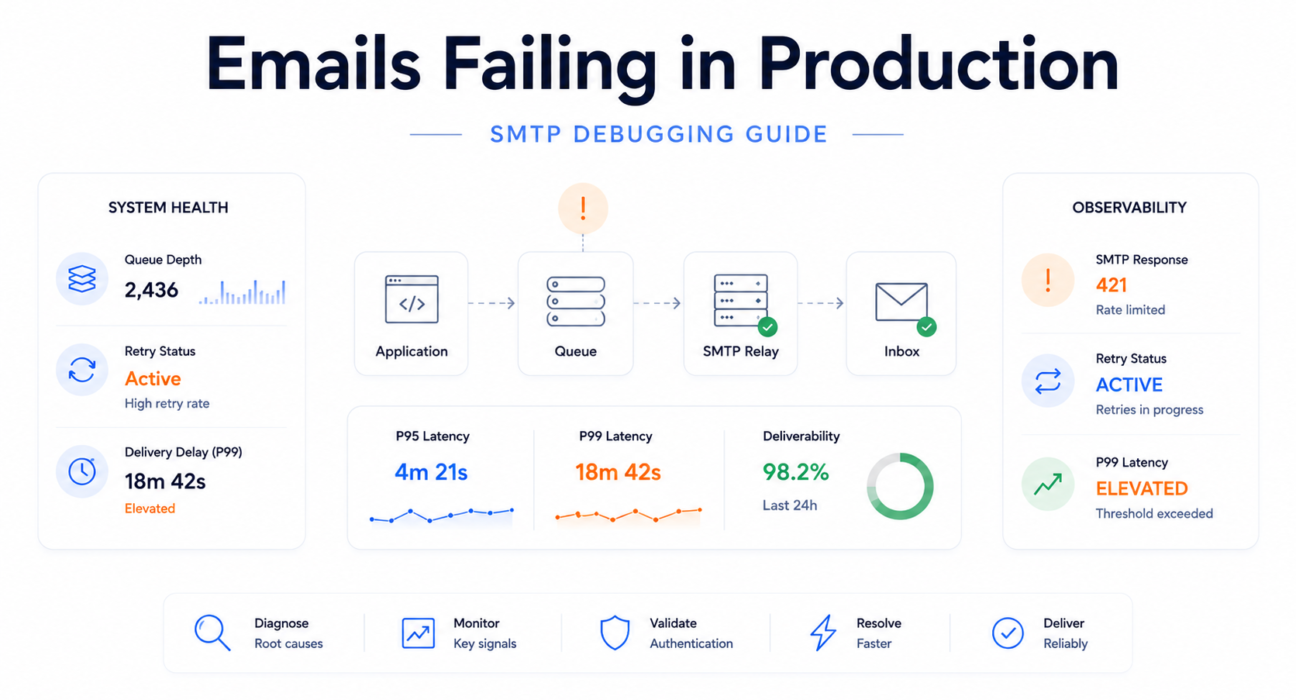
The integration test passes. Staging delivers correctly. The deployment completes without errors. Within 90 minutes of production traffic, support tickets arrive: users cannot complete sign-up because the OTP never arrived. Password resets are going to spam. The engineering team checks the SMTP logs — every message shows 250 OK. No errors visible anywhere in the stack.
This is one of the most disorienting failure patterns in production SaaS engineering. It is also one of the most predictable. The failure modes that cause email to work in development and fail in production are a defined set of infrastructure conditions — conditions that development environments do not replicate, and that only become visible under real DNS, real ISP behavior, and real traffic volumes.
SMTP success metrics often hide delivery failure. Development testing confirms that code can call an SMTP API. It does not confirm that users will receive the result.
Operational Reality: A 250 OK response from the relay confirms message acceptance — not inbox delivery. Everything that happens after that handshake requires separate instrumentation to observe.

Table of Contents
- Quick Answer: Why Transactional Email Fails in Production
- Why Email Systems Behave Differently in Production
- Most Common Production Email Failure Modes
- How to Debug Transactional Email Failures Systematically
- SMTP Response Codes That Matter Most
- Why Production Failures Are Harder to Detect
- Observability and Monitoring Best Practices
- Incident Snapshot: Password Reset Failure After Launch
- How PhotonConsole Reduces Production Email Failures
- Production Email Debugging Checklist
- Key Takeaways
- Frequently Asked Questions
- Conclusion
Quick Answer: Why Transactional Email Fails in Production but Works in Dev
Development environments simplify every variable that production makes complex. The specific causes, roughly in order of frequency:
- Authentication misalignment — SPF, DKIM, or DMARC records configured for staging infrastructure do not match production DNS
- Environment variable drift — staging SMTP credentials, sender domains, or API keys deployed to production configuration
- Queue worker delays — background workers that handled 20 messages per minute in staging cannot handle 500 during launch, pushing OTP delivery past token expiration windows
- SMTP provider rate limits — development plan rate limits exceeded under production burst traffic; throttle responses trigger retry storms that extend delays
- Firewall and network restrictions — cloud providers block port 25 by default; production VPCs may not have port 587 or 465 open to the relay provider
- ISP deliverability filtering — production sends to thousands of addresses across ISPs with spam filters that staging volume never triggered
- New sender reputation effects — domains with no sending history are filtered more aggressively than established senders regardless of authentication status
An SMTP integration tested with five local emails behaves very differently under 50,000 production requests from real users across real ISPs.
Why Email Systems Behave Differently in Production
Development Eliminates Every Condition That Production Creates
Local SMTP tools — Mailtrap, Mailhog, local sendmail stubs — accept all messages without authentication, rate limits, or ISP-side processing. DNS records are irrelevant. Spam filters never see the message. The development environment produces clean delivery signals for every email because it was designed to.
Production reverses every one of those conditions simultaneously. This is not a configuration problem. It is a structural difference between what development SMTP behavior proves and what production SMTP behavior requires.
Asynchronous Queue Behavior at Scale
In development, email queues process messages against minimal competing load. Workers pick up jobs within seconds. In production, the same queue processes concurrent users. A launch spike adds 400 messages in 10 minutes. Workers that handled 20 messages per minute in staging now face 400 — and messages that should deliver in 5 seconds are waiting 8 minutes, past every OTP expiration window.
A queue that eventually drains can still destroy authentication reliability. Eventual delivery is not the same as timely delivery.
DNS Propagation and Authentication Reality
Authentication records configured during development may not have fully propagated to all resolvers when production traffic begins. SPF records covering staging relay IPs may not include the production relay’s IP ranges. DKIM selectors pointing to staging keys produce authentication failures invisible at the sending MTA — visible only in received email headers at the ISP side.
For a comprehensive pre-launch validation checklist covering every authentication record, the email infrastructure checklist for SaaS products before launch covers the validation steps that prevent these development-to-production gaps.
Most Common Production Email Failure Modes
SPF / DKIM / DMARC Misalignment
Authentication misalignment is the most common cause of email working in development and failing in production — and the failure is silent. The sending MTA delivers successfully. The ISP rejects or spam-routes. The relay log shows success throughout.
Symptom → Cause → Fix
- Symptom: 250 OK in relay logs — users report missing email at specific ISPs
- Cause: SPF/DKIM authentication passes the relay but fails ISP-side filtering; staging auth records do not match production DNS
- Fix: Send test message from production credentials, inspect Authentication-Results header for spf=pass, dkim=pass, dmarc=pass; update records against production sending infrastructure
Common forms in production:
- SPF record covers staging relay IPs, not production relay IP ranges
- DKIM key selector configured in the application points to a key rotated or never migrated to production DNS
- DMARC alignment fails because the From header uses a different subdomain than the authenticated sending domain
- DNS migration completed before launch did not include authentication record updates for the new nameserver
Why this is hard to catch: Authentication failure happens at the receiving ISP, after SMTP handshake success. The sending team sees clean relay logs. Users see no email. Since the 2024 binary rejection mandate from Google and Yahoo, authentication failures increasingly produce explicit 5xx rejections rather than silent spam routing — making production log monitoring more valuable than it has ever been.
Full authentication configuration and validation guidance is in the SPF, DKIM, and DMARC guide.
Queue Saturation and Retry Delays
Background queue workers that functioned under development load become bottlenecks under production traffic. The queue fills faster than workers drain it. Delivery latency climbs into minutes. Time-sensitive OTPs and password resets arrive after their expiration windows.
Symptom → Cause → Fix
- Symptom: OTP emails arrive after expiration; users cannot authenticate despite receiving the email
- Cause: Deferred queue congestion — worker concurrency insufficient for burst traffic; retry logic using fixed intervals amplifies congestion
- Fix: Check queue depth and worker pickup latency in Sidekiq/Flower/Bull Dashboard; increase worker concurrency; implement exponential backoff
Engineering Snapshot:
- Queue depth: 2,400 deferred messages
- P99 delivery latency: 14 minutes
- Token expiration window: 5 minutes
- Observed impact: OTP expiration failure spike — zero SMTP errors in relay logs
SMTP Provider Rate Limits
Development plans enforce lower sending rate limits than production traffic generates. A plan allowing 200 messages per minute is exceeded within minutes of launch announcement traffic. The relay returns 4xx throttle responses. If retry logic uses fixed intervals rather than exponential backoff, the retry pattern holds the rate limit exceeded continuously — a self-sustaining retry storm.
Engineering Snapshot — Retry Storm:
- SMTP response: 421 4.4.5 rate limit exceeded
- Retry pattern: Fixed 60-second retry interval
- Result: All 340 deferred messages retry simultaneously every 60 seconds
- Effect: Rate limit held continuously exceeded for 90 minutes after initial spike resolved
Debugging approach: Check the relay provider dashboard for current sending rate versus plan rate limit. Verify retry logic implements exponential backoff — 30 seconds, 2 minutes, 8 minutes — not fixed-interval retry.
Environment Variable Drift
Staging SMTP credentials, sender domains, or API keys deployed to production by accident are among the simplest causes of production email failure — and the most overlooked, because the failure appears to be a code problem rather than a configuration problem.
Common forms:
SMTP_HOSTpointing to a staging relay endpoint inaccessible from the production VPCSMTP_USERorSMTP_PASSWORDcontaining staging credentials that fail against the production relayFROM_EMAILset to a staging sender domain without production SPF/DKIM records- API keys for development accounts with lower rate limits or different permission scopes than production
Symptom → Cause → Fix
- Symptom: 535 Authentication failed errors in SMTP logs immediately after deployment
- Cause: Staging SMTP credentials deployed to production; credentials valid in staging, rejected in production
- Fix: Audit all email-related environment variables; implement startup credential validation that verifies SMTP connectivity before accepting traffic
Production Firewall and Network Restrictions
Cloud providers block outbound traffic on port 25 by default. AWS EC2, Google Cloud, and Azure all apply email port restrictions that do not exist in local development. A local environment delivers to port 25 without issue. A production VPC that has not explicitly opened port 587 or 465 for the relay provider silently drops all outbound SMTP connections.
Symptom → Cause → Fix
- Symptom: Messages queued but never attempted; SMTP connection timeout errors; no response code at all
- Cause: Firewall or security group blocking outbound SMTP port at the network layer
- Fix: From inside the production environment:
telnet smtp.yourprovider.com 587— connection timeout confirms network block, not SMTP protocol failure
The detailed diagnosis process for SMTP connection failures at the network layer is covered in the SMTP connection timeout debugging guide.
Deliverability Filtering and Spam Placement
An email can traverse the full delivery path and be placed in the spam folder without producing a single error code. From the relay’s perspective: delivered. From the user’s perspective: missing.
This failure mode is production-specific because development testing uses a single test inbox that accepts all messages. Production sends to users across ISPs with different spam filter thresholds and different reputation scoring for new senders.
Inbox placement failures rarely appear in application dashboards. They appear in support tickets from users at specific email domains who cannot find the email.
Common causes:
- New sending domain with no reputation history triggers aggressive ISP filtering
- Shared IP pool contamination from co-tenants generating complaint spikes
- Message content triggering spam scoring thresholds that staging volume never activated
- Authentication misalignment at specific ISPs with different enforcement thresholds
Async Queue Timing Problems
OTPs and password reset links expire. An email delivered 12 minutes after a user requested it — technically successful by relay metrics — is a failed user experience. Development environments rarely surface this because queue processing is fast at low volume. Production creates the queue depth and ISP throttling conditions that push delivery past token validity windows.
Greylisting is harmless until retry timing collides with token expiration. A 15-minute greylist delay is invisible in relay success metrics and catastrophic in OTP delivery outcomes.
The relay-level causes and diagnostic approaches for delayed delivery are covered in the email delivery delay guide.
How to Debug Transactional Email Failures Systematically
Systematic debugging isolates failure points in order of probability and instrumentation access. The goal is to move from symptom to root cause by following the delivery path — not by guessing which component changed most recently.
Production Email Debugging Hierarchy:
- SMTP Acceptance — is the relay receiving the message?
- Queue Health — is the message moving through the queue without accumulating depth?
- Authentication Validation — are SPF, DKIM, and DMARC passing in production DNS?
- Response Code Analysis — what is the receiving server returning on delivery attempts?
- Inbox Placement — is the message reaching inbox or spam folder at affected ISPs?
- Bounce Log Review — what patterns appear in persistent delivery failures?
- Retry Timing Analysis — are deferred messages being retried correctly?
- Latency Percentiles — is P99 delivery time within token expiration windows?
Step 1 — Verify SMTP Acceptance
Confirm that messages are reaching the relay and being accepted — not failing before the SMTP handshake completes.
Signals:
- 250 OK present → SMTP acceptance confirmed; failure is downstream
- Connection timeout or refused → Network block; test TCP connectivity from inside production VPC
- 535 Authentication failed → Credential mismatch; audit environment variables
- No relay activity at all → Message not reaching relay; check queue worker process health
Step 2 — Check Queue State
If SMTP is accepting messages, check whether they are moving through the queue or accumulating depth.
Signals:
- Deferred queue growing, active queue stable → ISP throttling or provider rate limit; receiving servers returning 4xx temporary failures
- Incoming queue growing, workers not draining → Worker concurrency insufficient or worker process crashed
- Queue depth normal, job pickup latency elevated → Queue broker performance issue; not an SMTP problem
Step 3 — Validate SPF, DKIM, and DMARC
Authentication failure is invisible at the MTA level. Validate against production DNS — not staging, not local, and not immediately after a DNS record change before propagation is complete.
Process:
- Send a test from production credentials to a test inbox; inspect Authentication-Results header for spf=pass, dkim=pass, dmarc=pass
- Run production domain SPF check at MXToolbox
- Verify DKIM record matches the selector used by the production relay
- Confirm DMARC alignment between From header domain and authenticated sending domain
Signals:
- spf=fail → Production relay IP not in SPF record; update to include production IP ranges
- dkim=fail → Key selector mismatch or DNS record not propagated; verify selector name and record visibility
- dmarc=fail with passing SPF/DKIM → Alignment mismatch; From header domain does not align with authenticated domain
Step 4 — Inspect SMTP Response Codes
Filter relay delivery event logs to failed and deferred messages. Sort by response code to identify patterns rather than investigating individual delivery events.
Patterns and their diagnostic meaning:
- 421 responses → Rate limiting at receiving server; verify backoff logic and sending rate
- 451 responses → Greylisting; normal retry behavior should resolve — but monitor time-to-delivery
- 550 5.7.1 → Policy rejection; SPF/DKIM failure or spam score threshold
- 554 5.7.0 → Reputation block; check Spamhaus SBL and major DNSBLs immediately
The full SMTP response code reference with remediation steps is in the SMTP response codes guide.
Step 5 — Test Inbox Placement
If SMTP is accepting and authentication is passing but users at specific domains are not receiving email, the failure is spam folder routing — which produces no SMTP error.
Send a test message through Mail-Tester for spam score analysis. Check the actual inbox at the affected ISP. If Gmail delivers correctly but Outlook does not, check Microsoft SNDS for the sending IP’s reputation specifically with Outlook.
Step 6 — Review Bounce Logs
Review bounce trend behavior over 24 to 72 hours — not point-in-time values.
- Sudden bounce rate spike → List quality event or infrastructure change; identify timing correlation
- Gradual increase over days → Reputation degradation; investigate sender score and IP pool status
- Bounces concentrated at specific domains → Domain-level policy block; review ISP-specific filtering behavior
For persistent delivery failures that do not generate visible SMTP errors, the emails sent but not delivered guide covers relay-level diagnosis paths.
Step 7 — Analyze Retry Timing
Compare first attempt timestamp with successful delivery timestamp for deferred messages. Review retry interval configuration in queue worker settings.
- Uniform short retry intervals → Fixed-interval retry configured; under throttling, all messages retry simultaneously, re-triggering rate limits; switch to exponential backoff
- Large gap between first attempt and delivery for greylisted messages → Normal greylist behavior; verify token expiration windows exceed maximum expected greylist delay
- Messages retrying indefinitely → 5xx permanent failure being treated as transient; verify retry logic distinguishes 4xx from 5xx
Step 8 — Monitor P95/P99 Delivery Latency
Compute P95 and P99 delivery latency from delivery event timestamps. Compare against OTP and password reset token expiration windows.
- P99 exceeds token expiration window → Tail latency causing functional authentication failures; investigate queue depth and worker concurrency at P99 latency events
- P50 normal, P95 elevated → ISP throttling affecting a portion of sends; monitor deferred queue ratio
- All percentiles elevated uniformly → Queue saturation affecting all messages; investigate worker capacity
The full observability architecture for tracking latency percentiles in production is covered in the SMTP monitoring tools guide.
SMTP Response Codes That Matter Most in Production Debugging
Enhanced status codes — the three-part X.X.X suffix — carry more actionable diagnostic information than the numeric code alone. Relay delivery event logs return enhanced codes; monitoring that does not parse them cannot distinguish between a greylist event and a reputation block.
| Code | Enhanced | Meaning | Type | Action |
|---|---|---|---|---|
| 421 | 4.4.5 | Rate limited or too many connections | Transient | Reduce sending rate; switch to exponential backoff; verify plan rate limit tier |
| 450 | 4.2.2 | Mailbox temporarily unavailable | Transient | Retry with backoff; escalate to hard bounce if persistent beyond 24 hours |
| 451 | 4.7.1 | Greylisted — retry after interval | Transient | Verify retry honors greylist interval; monitor time-to-delivery against token expiration |
| 535 | 5.7.8 | Authentication credentials rejected | Permanent | Audit SMTP_USER, SMTP_PASSWORD, and API key in production environment config |
| 550 | 5.1.1 | Recipient address does not exist | Permanent | Suppress immediately; audit application-level address validation |
| 550 | 5.7.1 | Policy rejection — authentication or spam score | Permanent | Validate SPF/DKIM/DMARC in production DNS; test content with Mail-Tester |
| 554 | 5.7.0 | Reputation block — IP or domain blocklisted | Permanent | Check Spamhaus SBL, Barracuda, SpamCop; initiate delisting; audit sending hygiene |
Critical Rule: Retrying 5xx permanent failures worsens sender reputation without any chance of delivery. Retry logic must distinguish 4xx (transient — retry appropriate) from 5xx (permanent — suppress and alert). This distinction is one of the most commonly missing checks in production retry implementations.
Why Production Failures Are Harder to Detect
Production email failures violate the normal relationship between error signals and failure state — which is why standard monitoring approaches consistently fail to catch them early.
SMTP Acceptance Masks Downstream Failure
Most infrastructure failures produce error signals that correlate with failure. An SMTP 250 OK produces no error signal even when the message is subsequently spam-routed, greylisted for 20 minutes, or silently discarded.
Engineering teams trained on error-signal-based debugging are looking in the wrong layer. The signals they need — inbox placement, delivery timing, ISP-side reputation — require instrumentation that most relay integrations do not provide by default.
Production reliability depends more on observability than SMTP connectivity. A working relay connection tells you very little about whether users are receiving email.
Queue Invisibility
A queue with 2,000 messages in deferred state is technically functioning. Every message will eventually be delivered. But if 300 of those contain OTPs for users who signed up 15 minutes ago, those messages are functionally failed deliveries — the tokens they contain expired while the messages were queued.
Most SaaS architectures monitor the queue enough to know whether it is running. Not enough to know whether the messages it contains are still operationally useful.
Bounce Signal Latency and Compound Failures
Bounce notifications are not immediate. A message rejected at 11:00 AM may not appear in relay webhook events until 11:15 AM. A soft bounce that retries three times before final failure may not be visible in bounce logs for hours. By the time bounce metrics appear in a dashboard, the root cause has been active significantly longer than the metrics suggest.
Most production email failures begin as latency problems before they become support tickets. The queue signal exists before the user complaint exists.
The difficulty increases because production systems rarely expose these failures through a single visible error. Authentication problems, queue delays, and ISP throttling can interact — queue latency masking the original authentication failure source, support tickets arriving before any metric shows abnormal state.
Observability and Monitoring Best Practices
The gap between development email success and production email reliability is filled by instrumentation. These are the monitoring practices that make failures detectable before they accumulate into user-visible incidents.
Queue Depth Ratio Monitoring
Monitor the ratio of deferred to active queue — not total queue size. A deferred queue growing while the active queue remains stable is the earliest signal of ISP throttling or rate limiting. Alert when deferred queue exceeds 20% of active queue for more than 10 consecutive minutes. This produces meaningful alerts regardless of absolute volume level.
P95/P99 Latency Tracking
Track delivery latency percentiles — not averages. Average latency is dominated by the fast majority and masks the tail that causes authentication failures. Define an SLO: P99 delivery latency for authentication-critical email under 10 seconds. Alert when P99 breaches this threshold — not when average latency does.
SMTP Response Code Aggregation
Log every SMTP response code from relay delivery events. Aggregate by category and alert on spikes. A sudden increase in 550 5.7.1 responses indicates authentication failure. A 554 5.7.0 response indicates blocklist listing. These signals are actionable immediately — if they are being collected and aggregated.
Bounce Rate Velocity Alerting
Alert on rate-of-change rather than absolute rate. A sudden 0.5 percentage point increase within 24 hours indicates an event — list import, DNS change, reputation incident. Gradual increase over weeks indicates systemic degradation. Both require investigation, with different urgency and different root causes.
Seed List Inbox Placement Testing
Run inbox placement tests across Gmail, Outlook, Yahoo, and Apple Mail after every template change, DNS update, or infrastructure change. Seed list testing is the only approach that detects spam folder routing. Integrating it into CI/CD pipelines catches deliverability regressions before deployment — not after users report that email is going to spam.
ISP-Side Reputation Signals
Configure Google Postmaster Tools for domain authentication and review reputation data weekly. Configure Microsoft SNDS for the sending IP range. These are the only sources of ISP-side reputation signals — and they are the earliest available warning of reputation problems before they produce visible delivery failures.
The complete observability architecture covering every metric category, alerting configuration, and tool stack is in the SMTP monitoring tools for transactional email infrastructure guide.
Incident Snapshot: Password Reset Failure After Product Launch
The following describes a realistic production failure during a SaaS launch. No individual system failed. The failure emerged from the interaction between a rate limit never tested under real load and retry logic that amplified rather than resolved the initial bottleneck.
Context: A product launched publicly to significant interest. Sign-ups hit 1,200 in the first three hours — 4x the largest single-day staging volume. The relay plan’s rate limit — 500 messages per hour — had never been tested against realistic launch volume.
T+45 min: Sending rate hits the plan ceiling. Relay begins returning 421 4.4.5 rate limit responses. The application’s fixed 60-second retry logic begins retrying all deferred messages simultaneously — holding the sending rate at or above the limit continuously.
T+60 min: Deferred queue at 340 messages and growing. New sign-up OTPs waiting behind a backlog of deferred retries. OTP delivery time: 8 to 14 minutes.
T+75 min: First support tickets. “I never received my verification email.” Engineering team checks relay dashboard — 100% acceptance rate, no hard errors. Concludes the issue is likely a spam folder problem and begins investigating content.
T+110 min: A senior engineer checks the relay rate limit section. Finds the account at 500/500 messages per hour. Increases plan to 2,000/hour, modifies retry logic to exponential backoff.
T+130 min: Deferred queue drains. Delivery normalizes. Approximately 18% of users who initiated sign-up during the peak 90-minute window had abandoned verification flows.
What would have caught it at T+50 min: A deferred queue ratio alert — firing when deferred queue exceeds 20% of active queue for more than 10 minutes — would have triggered before the first user complaint. The retry storm pattern would have been visible in response code aggregation within minutes of the rate limit being hit.
Operational Lesson: Most production email incidents begin long before monitoring systems recognize them as incidents. The deferred queue signal was available at T+45. Detection happened at T+110. That 65-minute gap is the difference between proactive queue monitoring and reactive log review.
How PhotonConsole Reduces Production Email Failures
The core challenge in production transactional email reliability is not sending capacity — it is instrumentation. Most relay integrations provide aggregate success metrics. Debugging production failures requires message-level event visibility: per-message SMTP response codes, delivery timestamps that enable latency percentile analysis, and retry event logs that expose whether deferred messages are processing normally or accumulating into a retry storm.
PhotonConsole’s SMTP relay surfaces this telemetry at the message level. Delivery event logging provides the SMTP response code, delivery timestamp, and retry history for each message — reducing the diagnostic gap between SMTP acceptance and actual user delivery outcome.
The relay is designed for the delivery requirements of transactional email: queue prioritization for authentication-critical sends, retry behavior appropriate to OTP timing constraints, and the event visibility that allows P99 latency analysis rather than relying on aggregate success metrics that mask tail latency failures.
For teams evaluating relay infrastructure, the SMTP relay evaluation guide covers the observability, queue architecture, and authentication support variables that determine production reliability — not just delivery capacity.
Production Email Debugging Checklist
| Signal | What It Means | Recommended Action |
|---|---|---|
| Deferred queue growing, active queue stable | ISP throttling or provider rate limit; receiving servers returning 4xx temporary failures | Check relay rate limit dashboard; switch to exponential backoff; reduce sending rate or upgrade plan |
| 421 responses in delivery logs | Rate limiting at receiving server | Implement exponential backoff; reduce concurrent connections; verify plan rate limit |
| 535 authentication failed | SMTP credentials rejected — wrong credentials or expired key | Audit SMTP_USER, SMTP_PASSWORD, and API key in production environment config |
| SPF failure in email headers | Production relay IP not in SPF record | Update SPF record to include production relay IP ranges; validate with MXToolbox |
| DKIM failure in email headers | Key selector mismatch or DNS record not propagated | Verify DKIM selector matches relay config; check DNS propagation status |
| 550 5.7.1 responses | Policy rejection — authentication failure or spam score | Audit SPF/DKIM/DMARC alignment; test content with Mail-Tester |
| 554 5.7.0 responses | Sending IP or domain blocklisted | Check Spamhaus SBL, Barracuda, SpamCop; submit delisting; review list hygiene |
| P99 latency exceeds token expiration window | Tail latency causing functional authentication failures invisible to success metrics | Investigate queue depth and worker concurrency at P99 latency spike timestamps |
| Bounce rate spike (sudden) | List quality event, DNS change, or IP reputation incident | Identify timing correlation with recent changes; check IP blocklist status |
| Bounce rate increase (gradual) | Systematic reputation degradation or stale address accumulation | Audit address validation at sign-up; review Postmaster Tools reputation signals |
| SMTP connection timeout from production | Firewall or security group blocking outbound SMTP port | Test TCP to relay host on port 587 from inside production VPC; review security groups |
| Email in spam folder at specific ISP | ISP-specific deliverability filtering — spam scoring or reputation issue | Run Mail-Tester from production; check Postmaster Tools domain reputation; seed list test |
| No relay activity despite application sending | Messages not reaching relay — worker crash, queue connection failure, or send error | Check worker process health; verify queue broker connectivity; review application error logs |
Key Takeaways
- SMTP acceptance does not guarantee inbox delivery. 250 OK confirms relay acceptance — not that the user received the email.
- Queue latency can become authentication failure. An OTP delayed beyond its expiration window is functionally a failed delivery regardless of what relay metrics show.
- Production DNS misalignment causes silent deliverability failures. Authentication records must be validated against production DNS specifically — not staging, not local, and not immediately after a record change before propagation completes.
- Retry storms amplify rate-limit failures. Fixed-interval retry logic under ISP throttling creates a self-sustaining loop that extends delays far beyond the initial traffic event.
- Observability gaps delay incident detection. Most production email incidents are detectable in queue metrics 30 to 60 minutes before they appear in user support tickets — if queue ratio monitoring is active.
- Spam folder routing is invisible to SMTP monitoring. It requires seed list inbox placement testing to detect — the only layer that sees actual message disposition at the ISP.
- 5xx failures should never be retried. Retrying permanent failure codes worsens sender reputation without any possibility of delivery.
Frequently Asked Questions
Why do transactional emails work locally but fail in production?
Development environments eliminate every condition that production creates: local SMTP tools accept all messages without authentication or rate limits; DNS records are irrelevant because email never leaves the local network; ISP filtering never applies; and queue behavior is simple at low volume. The most common specific cause is authentication record misconfiguration — SPF, DKIM, or DMARC records configured for staging that do not match production DNS.
What is the first thing to check when transactional emails fail in production?
Check SMTP response codes in relay delivery logs for recent failed messages. If 250 OK responses are present, the relay accepted the message — check queue depth and delivery timing next. If 535 responses are present, verify SMTP credential environment variables. If 550 5.7.1 responses appear, validate authentication records in production DNS. If no relay activity exists, check queue worker process health and broker connectivity.
How do I debug transactional email failures in production?
Follow the eight-step hierarchy: SMTP acceptance → queue health → authentication validation → SMTP response code analysis → inbox placement testing → bounce log review → retry timing analysis → P99 latency measurement. Each step isolates a specific failure class and directs to a specific remediation without guessing. The hierarchy is ordered by instrumentation accessibility — SMTP logs are immediately available; P99 latency requires delivery timestamp tracking that must be set up before the failure occurs.
Why do OTP emails fail after deployment?
OTP failures after deployment typically result from one of four causes: authentication record misconfiguration producing spam routing or rejection; queue worker capacity insufficient for production traffic causing delivery past token expiration; SMTP provider rate limits exceeded with fixed-interval retry creating retry storms; or staging credentials deployed to production causing authentication failure on first send attempt.
How do I test SMTP delivery in production?
Test from inside the production environment — never from local. Verify TCP connectivity to the relay host on port 587 using telnet or nc. Send a test from production credentials and inspect received email headers for SPF, DKIM, and DMARC pass status. Run the sending domain through Mail-Tester for spam scoring and authentication analysis. Verify SPF record propagation using MXToolbox. The SMTP testing methods guide covers systematic pre- and post-deployment test workflows.
How do I fix SMTP queue problems in production?
Diagnose the queue failure type first. Deferred queue growing with active queue stable → external bottleneck (ISP throttling or rate limit); implement exponential backoff, verify plan rate limits, check sending rate. Both queues growing → internal bottleneck (worker concurrency or resource exhaustion); increase worker process count, check database connection pool, verify queue broker performance metrics.
Why are production emails going to spam?
Common causes: SPF or DKIM failure in production DNS that passed in staging; sending from a new domain with no reputation history; shared IP pool contamination from co-tenants; or message content triggering spam scoring thresholds that staging volume never activated. Check authentication headers in received email, review Google Postmaster Tools domain reputation, test inbox placement across ISPs, and verify the sending IP is not on any major blocklist.
Conclusion: Production Email Reliability Is an Infrastructure Problem
Transactional email that works in development gives teams confidence in the wrong thing. Development success confirms the code can call an SMTP API and receive a positive response. It does not confirm that production users will receive time-sensitive email reliably under real DNS, real ISP filtering, real queue load, and real rate limits.
Every failure pattern in this guide has a specific cause, a specific detection signal, and a specific remediation. None requires exotic tooling. All require treating email infrastructure with the same observability investment applied to application infrastructure — because the users who encounter email failures during authentication or onboarding are the users who paid the highest acquisition cost to reach the product at exactly the moment their initial motivation was highest.
Production email reliability depends more on observability than on SMTP connectivity. A relay that delivers successfully tells you very little about whether users are receiving email within the windows that make it useful.
If you are experiencing production transactional email failures and want relay infrastructure with the delivery event visibility and per-message telemetry that production debugging requires, PhotonConsole provides the instrumentation this guide describes. For teams preparing infrastructure before a production launch, the email infrastructure checklist for SaaS products before launch covers the validation steps that prevent development-to-production gaps before the first real user arrives.
Recommended Debugging Resources
SMTP Failure Diagnosis
- SMTP response codes — complete reference and remediation guide
- SMTP connection timeout — causes, fixes, and debugging guide
- Emails sent but not delivered — relay-level diagnosis
Authentication and Deliverability
Monitoring and Infrastructure