Most explanations of IP warming boil down to “send a little, then send more.” That’s true, and also close to useless — it tells you the shape of the curve without explaining why the curve exists, what mailbox providers are actually measuring while you climb it, or why so many warm-ups fail despite following a schedule that looked correct on paper.
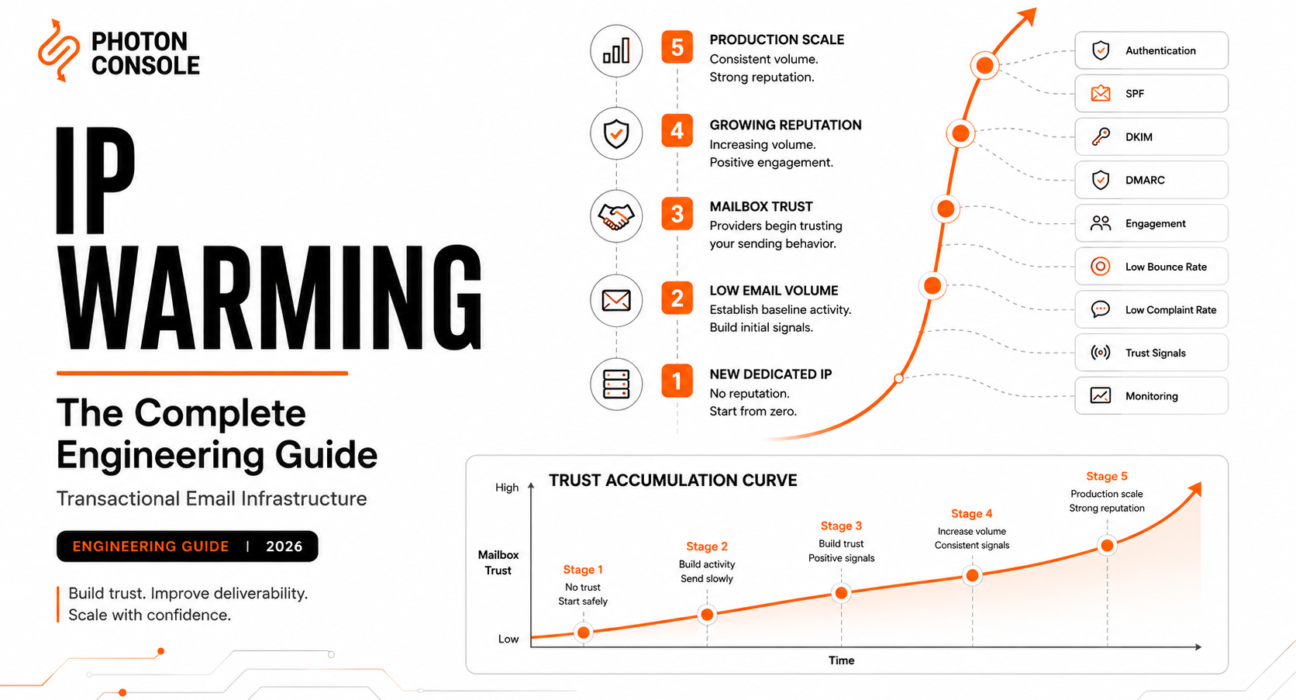
Here’s the reframe that matters: IP warming is not a volume ramp. It’s a trust-accumulation process, and volume is just the mechanism you use to generate trustworthy signal over time. Two teams can follow an identical volume schedule and get opposite outcomes, because volume was never the thing being evaluated. Behavior was.
Engineering Snapshot: A brand-new IP address has exactly zero sending history. To a mailbox provider’s filtering system, zero history is indistinguishable from “unknown risk” — it is not treated as neutral. This is why day-one full-volume sends get throttled or filtered even when every email is legitimate: the system has no basis yet to believe otherwise.
We’ll call this idea the Trust Accumulation Curve throughout this guide: trust with a mailbox provider builds slowly at first, accelerates once a consistent behavioral pattern is established, and eventually plateaus into a stable baseline that can absorb normal variance. Every section below is really describing a different facet of that curve.
What Is IP Warming?
IP warming is the deliberate, gradual increase of email volume sent from a new or dormant IP address, structured so that mailbox providers can observe consistent, low-complaint, well-authenticated sending behavior before extending that IP the trust required to deliver at full production volume.

It is not a checkbox you complete once. It’s the initial phase of an ongoing relationship between your sending infrastructure and every major mailbox provider’s filtering system — a relationship that continues to be evaluated for as long as you send mail.
Why New IP Addresses Have No Reputation
Reputation systems are, at their core, statistical models trained on behavior over time. A new IP has no behavior to train on. This absence of history is itself a risk signal, for a specific reason: it’s the exact signature a spammer produces when rotating through freshly acquired IP space to evade detection.
Mailbox providers can’t distinguish “legitimate new sender” from “spammer on a fresh IP” on day one using IP history alone — because there is no IP history yet on either side. That’s why the industry-standard response is defensive by default: throttle, defer, or sample-inspect unknown IPs until enough consistent behavior accumulates to make a confident classification.
How Mailbox Providers Build Trust
Trust isn’t a single score. It’s assembled from multiple independent signals, each updated continuously:
- Complaint rate — recipients marking mail as spam. This is the single heaviest-weighted negative signal across every major provider.
- Bounce rate, especially hard bounces, which indicate invalid addressing or poor list hygiene.
- Spam trap hits — sending to addresses planted specifically to catch senders with stale, scraped, or purchased lists.
- Engagement — opens, clicks, and for transactional mail, whether the recipient clearly expected and acted on the message.
- Volume consistency — whether sending follows a stable, explainable pattern or spikes unpredictably.
- Authentication — correctly configured and aligned SPF, DKIM, and DMARC.
Trust accumulates when these signals stay consistently positive over time. It erodes fast and rebuilds slowly — an asymmetry that matters enormously for how you should think about risk during warm-up.
IP Reputation Explained
IP reputation is the mailbox provider’s running assessment of a specific sending IP’s trustworthiness, built from the signals above, evaluated continuously rather than fixed at setup. Think of it less like a credit score with a single number, and more like a rolling average with memory — recent behavior matters more than old behavior, but old behavior isn’t forgotten instantly either.
This rolling-average property is why a single bad campaign can visibly dent an otherwise healthy IP’s performance for days or weeks, even after the underlying issue is fixed. The system needs new positive signal to outweigh the negative signal, and that takes time to accumulate — it can’t be corrected instantly by fixing the root cause alone.
Domain Reputation vs IP Reputation
These are evaluated together, not interchangeably, and conflating them is one of the most common diagnostic mistakes teams make. IP reputation is scoped to the sending address. Domain reputation is scoped to the sending domain, tracked primarily through DMARC-aligned authentication and the historical behavior of mail sent under that domain, regardless of which IP it came from.
The practical implication: a domain with strong, long-standing reputation can partially cushion a newly warming IP, because the mailbox provider has independent positive signal about the sender’s identity. This is one reason Gmail deliverability issues are so often domain-authentication problems misdiagnosed as IP problems — Gmail in particular weights domain-level signal heavily.
Table 1: Domain vs IP Reputation
| Property | IP Reputation | Domain Reputation |
|---|---|---|
| Resets on migration? | Yes, always | Partially — history persists if domain unchanged |
| Primary evaluator | All major providers | Gmail especially, growing elsewhere |
| Built from | Sending IP’s behavior only | All mail sent under the domain, any IP |
| Recovery speed after an incident | Slow | Slow, but partially insulated by history |
How Modern Deliverability Systems Evaluate Senders
Modern filtering isn’t a static blocklist check. It’s closer to continuous, adaptive risk scoring — every message contributes a small update to the sender’s standing, and the threshold for “trusted enough for full inbox placement” moves based on accumulated evidence, not a fixed calendar date.
This is the mechanism behind what we call the Sender Confidence Index: an informal but useful mental model where each mailbox provider maintains something functionally equivalent to a confidence score per sender-IP-domain combination, and every warm-up action either raises or lowers that score. You’ll never see the actual number. But designing your warm-up as if it exists — and as if every action either helps or hurts it — is the correct engineering posture.
Warm-Up Lifecycle
We call the full arc the IP Reputation Lifecycle, and it has four distinct phases, each with a different risk profile:
- Cold start — zero history, maximum caution required, lowest volume.
- Ramp — volume increases on a defined schedule, engaged recipients prioritized, monitoring is continuous.
- Stabilization — volume approaches production levels, the system has enough history to classify the sender confidently, variance tolerance increases.
- Steady state — full production volume, reputation is maintained rather than built, but never assumed permanent.
Teams frequently treat warm-up as ending at stabilization and stop monitoring closely. That’s a mistake — steady state is a maintenance phase, not a finished state, and reputation can still degrade from there.
It’s worth naming what’s actually being assembled across these four phases: a Deliverability Trust Pyramid. At the base sits authentication — SPF, DKIM, DMARC, PTR — because nothing above it matters if the foundation is broken; a warm-up built on unverified authentication is building on sand. The next layer is list hygiene: clean, verified, engaged recipients. Above that sits behavioral consistency: predictable volume, stable patterns, no unexplained spikes. At the top sits accumulated history — the thing that can only be earned with time, never shortcut. Each layer depends on the one below it. Teams that try to build behavioral consistency on top of poor list hygiene, or accumulated history on top of shaky authentication, end up with a pyramid that looks fine until the first real stress test — a traffic spike, a provider policy change, a migration — at which point the weak layer underneath gives way and the whole structure’s reputation drops with it.
Building a Safe Warm-Up Schedule
There’s no universal schedule that fits every sender, but the underlying design principles are consistent: start small, favor your most engaged recipients first, increase volume gradually rather than in large jumps, and never let growth outpace your ability to monitor it.
Table 2: Illustrative Volume Progression Schedule
| Phase | Duration | Daily Volume | Recipient Priority |
|---|---|---|---|
| Cold start | Days 1–5 | 50–500 | Most recently active, highest-engagement users only |
| Early ramp | Week 2 | 500–2,000 | Broaden to actively engaged segment |
| Mid ramp | Weeks 3–4 | 2,000–10,000 | Full active base, still excluding dormant addresses |
| Late ramp | Weeks 5–6 | 10,000–50,000 | Near-full recipient base |
| Stabilization | Weeks 7–8 | Full production volume | All recipients, including lower-engagement segments |
Roughly doubling volume every few days, rather than jumping by 10x, keeps growth inside the range mailbox providers treat as explainable rather than anomalous.
Daily Volume Growth
The specific multiplier matters less than the principle: growth should be steady enough to demonstrate consistency, and slow enough that any single day’s problems (a bad batch, a bug in your retry logic causing duplicate sends) represent a small fraction of total volume rather than a spike that defines the whole warm-up.
We call this the Trust Velocity Model: trust doesn’t just depend on the direction of your volume growth, it depends on the rate. Growing too fast burns the exact signal you’re trying to build, because sudden acceleration is itself a risk pattern mailbox providers are tuned to catch.
Engagement Signals
Prioritizing engaged recipients first during warm-up isn’t just about avoiding complaints — it’s about actively generating positive signal. An email that gets opened and acted on quickly (a password reset used within a minute, an OTP entered immediately) is strong positive evidence. An email that sits unopened for weeks is neutral at best. Front-loading warm-up with your highest-engagement segment maximizes the ratio of positive signal to neutral signal during the exact window when the sender-confidence model is most sensitive to input.
Complaint Thresholds
Complaint rate is the most consequential metric during warm-up because it’s the most directly punitive. Industry guidance from major mailbox providers generally treats complaint rates above roughly 0.1% as a warning threshold and rates approaching 0.3% as actively damaging — figures worth confirming against current Google sender guidelines and Yahoo’s sender requirements directly, since providers do adjust thresholds.
During warm-up specifically, a small number of complaints carries outsized weight simply because the total sample size is small — five complaints out of 500 sends is a very different signal than five complaints out of 50,000.
Bounce Management
Hard bounces during warm-up are worse than hard bounces at steady state, for the same small-sample-size reason complaints are worse. List hygiene should be audited and cleaned before warm-up begins, not discovered mid-warm-up. A dedicated IP with a 3% hard bounce rate in week one can lose weeks of accumulated trust that a shared pool would have absorbed without visible impact.
Authentication Requirements
Table 3: Authentication Checklist Before Warm-Up Begins
| Requirement | Why It’s a Prerequisite |
|---|---|
| SPF record includes sending IP/provider | Confirms the IP is authorized to send for the domain |
| DKIM signing configured and passing | Confirms message integrity and sender authenticity |
| DMARC policy published and aligned | Ties SPF/DKIM together and signals intent to mailbox providers |
| Reverse DNS (PTR) configured for the IP | Basic sender legitimacy check used by most filters |
| SMTP configuration validated end-to-end | Prevents warm-up volume being wasted on misconfigured sends |
Starting warm-up before authentication is fully validated is one of the most avoidable ways to waste the first, most sensitive days of the process — see RFC 5321 and RFC 5322 for the underlying protocol specifications your configuration needs to satisfy.
Common Warm-Up Mistakes
Table 4: Warm-Up Mistakes and Their Consequences
| Mistake | Consequence |
|---|---|
| Skipping the schedule under launch pressure | Throttling, deferrals, spam foldering at exactly the wrong moment |
| Warming with an unclean list | Elevated bounce/complaint signal during the most sensitive phase |
| Mixing marketing traffic into a transactional warm-up | Lower engagement drags down the whole IP’s trust accumulation |
| Pausing warm-up mid-schedule for days | Loses momentum; some providers treat gaps as a fresh restart signal |
| No monitoring until problems are already visible to users | Incidents diagnosed too late to correct within the warm-up window |
Traffic Segmentation
Warming a single IP with mixed traffic types is warming against a blended signal — the mailbox provider can’t tell your transactional engagement apart from your marketing engagement, so a mediocre marketing open rate quietly caps how much trust your transactional traffic can build. Segmenting transactional and marketing sends onto separate IPs or subdomains during warm-up produces a cleaner, faster-accumulating trust signal for each.
Segmentation also enables what we call the Traffic Expansion Ladder: rather than warming one IP against your full traffic mix at once, warm it against your narrowest, highest-trust traffic category first — typically security-critical transactional mail like password resets and OTPs — then expand to broader transactional categories (receipts, notifications) once that narrow category has established stable trust, and only bring in marketing traffic last, on its own IP entirely if volume justifies it. Each rung on the ladder inherits confidence from the rung below, rather than diluting a single undifferentiated warm-up with your riskiest traffic type from day one.
Table: Warm-Up Risk Matrix
| Traffic Category | Typical Engagement | Warm-Up Risk Level | Recommended Sequencing |
|---|---|---|---|
| Password reset / OTP | Very high, near-immediate action | Low | Warm first |
| Receipts / invoices | High, delayed action | Low-Medium | Warm second |
| Product notifications | Medium, variable | Medium | Warm third |
| Onboarding / lifecycle emails | Medium, declines over series | Medium | Warm third, monitor closely |
| Marketing / promotional | Low-Medium, highly variable | High | Separate IP, warm independently |
Multi-IP Strategies
At scale, warming isn’t a one-time event on one IP. Growing SaaS platforms often maintain a small pool of dedicated IPs segmented by traffic priority — critical transactional (OTP, password reset), standard transactional (receipts, notifications), and marketing — each with its own warm-up history and blast radius. This is the same idea covered in more depth in our dedicated vs shared IP guide (placeholder link — update once that article’s live URL is available; it isn’t in the current sitemap), extended specifically to the warm-up phase: each new IP added to a segmented pool needs its own full lifecycle, not a shortcut because “the other IPs are already trusted.”
Warm-Up Automation
Manual warm-up — someone remembering to bump a volume cap in a dashboard each morning — is fragile and doesn’t survive vacations, incidents, or launch-week chaos. Production-grade warm-up should be automated: volume caps enforced in the sending queue itself, engagement-based recipient prioritization built into the send logic, and automatic throttling if monitored signals (bounce rate, complaint rate) cross defined thresholds mid-ramp.
This is where warm-up strategy intersects directly with queue architecture: a queue that’s reputation-aware can pause or slow its own throughput automatically rather than relying on a human to notice a dashboard trending the wrong way at 2am.
Monitoring During Warm-Up
Table 5: Monitoring Metrics During Warm-Up
| Metric | Healthy Range | Action If Exceeded |
|---|---|---|
| Complaint rate | Under 0.1% | Pause volume growth, audit recent sends |
| Hard bounce rate | Under 2% | Freeze ramp, re-audit list hygiene |
| Deferral rate | Low and stable | Slow ramp pace, don’t increase volume that day |
| Spam trap hits | Zero | Immediate freeze; investigate list source |
| Engagement rate (opens/clicks where applicable) | Stable or improving | Investigate segment mix if declining |
SMTP and deliverability monitoring tooling should be in place before warm-up starts, not added reactively once something looks wrong.
When Warm-Up Should Restart
Not every dip requires starting over, but some situations do warrant treating the IP as effectively cold again: an extended sending gap (commonly cited around two to four weeks of inactivity), a significant spike in complaints or spam trap hits that suggests the provider has actively downgraded the IP’s standing, or a migration to new infrastructure where the IP itself has changed. When in doubt, restarting conservatively costs days; assuming residual trust that isn’t there costs an incident.
Real Production Examples
Password reset traffic on a newly dedicated IP. Low, steady, highly engaged (recipients act on password resets almost immediately). This is close to ideal warm-up traffic — small volume, strong positive signal ratio. Lesson: if you can choose which traffic type warms an IP first, choose the highest-engagement, lowest-volume type available.
OTP systems during a product launch. High engagement, but often high and sudden volume the moment a launch goes live. Teams that pre-warm ahead of a known launch date avoid the throttling that hits teams who start warming the week of. Lesson: warm-up timing should be planned against your product roadmap, not reactive to it.
Invoice notifications on a monthly billing cycle. Naturally spiky — near zero most days, a burst on billing day. This spiky pattern needs to be explicitly accounted for in the warm-up schedule (spread the send window, don’t fire all invoices in one hour) or it will look anomalous regardless of overall list quality.
High-volume onboarding after unexpected growth. A team mid-warm-up gets featured somewhere and signups spike 5x overnight. Onboarding email volume spikes with them, blowing through the planned daily cap. Lesson: warm-up plans need an explicit “growth exceeds plan” contingency — throttle onboarding sends to stay within the safe ramp rather than letting product growth dictate email volume.
Black Friday traffic on an already-warm IP. Even a fully warmed, steady-state IP can trigger anomaly detection if volume triples for a single predictable event. The fix isn’t re-warming from scratch — it’s proactively notifying your SMTP relay provider or building in a gradual pre-event ramp so the spike has some lead-in rather than appearing instantaneously.
Cold dedicated IP migration under deadline pressure. Covered in depth in our dedicated vs shared IP guide — the single most common warm-up failure is skipping the schedule entirely because a launch date arrived before the IP was ready. Every other mistake in this article is a variant of this one.
Provider migration mid-scale. A team switches SMTP providers, assuming reputation transfers. IP-level reputation does not transfer at all; domain-level reputation transfers partially if the sending domain stays constant. Lesson: treat every provider migration as a full warm-up event, scheduled with the same care as a brand-new dedicated IP.
Decision Checklist
- Is authentication (SPF, DKIM, DMARC, PTR) fully validated before any volume moves? (See Table 3.)
- Has the recipient list been audited and cleaned of stale or unverified addresses?
- Is the warm-up schedule automated at the queue level, not dependent on a person remembering?
- Is monitoring (Table 5) instrumented and alerting before warm-up begins, not after?
- Is transactional traffic segmented from marketing traffic for the duration of warm-up?
- Is there an explicit contingency plan for unplanned volume growth mid-ramp?
- Is the warm-up timeline planned against known future events (launches, Black Friday, billing cycles) rather than reactive to them?
Visual Asset Specifications
The following visuals are specified for design production and are not embedded in this article body.
- IP Warm-Up Timeline. Purpose: visualize Table 2’s phase progression. Layout: horizontal timeline, weeks on x-axis, volume band on y-axis. Designer notes: mark phase transitions (cold start → ramp → stabilization → steady state) with clear boundary lines.
- Trust Accumulation Curve. Purpose: show trust building slowly, then accelerating, then plateauing. Layout: S-curve line chart, time on x-axis, trust on y-axis (unitless). Designer notes: annotate the inflection point where growth accelerates.
- Mailbox Trust Flow. Purpose: show signals (complaints, bounces, engagement, authentication) feeding into a provider’s sender classification. Layout: funnel or flow diagram, 4–5 inputs converging to one output. Designer notes: keep input count low for clarity, don’t overcrowd.
- Reputation Lifecycle. Purpose: visualize the four-phase IP Reputation Lifecycle as continuous, not terminal. Layout: circular diagram looping back from steady state to monitoring. Designer notes: avoid implying steady state is an end point.
- Volume Growth Graph. Purpose: show healthy vs risky volume progression side by side. Layout: two overlaid line charts, one gradual, one spiky. Designer notes: use color to clearly distinguish “safe” from “risky” pattern.
- Warm-Up Decision Tree. Purpose: help a reader decide whether they need warm-up, restart, or steady-state monitoring. Layout: top-down branching tree, 3–4 decision nodes. Designer notes: end nodes should be plain-language actions.
- Traffic Segmentation Architecture. Purpose: show separate IPs/domains for transactional vs marketing traffic during warm-up. Layout: two parallel pipelines from application layer to separate IPs. Designer notes: emphasize the separation point clearly.
- Deliverability Trust Pyramid. Purpose: visualize the four-layer trust pyramid (authentication, list hygiene, behavioral consistency, accumulated history). Layout: classic pyramid, four horizontal layers, base to apex. Designer notes: label each layer with one supporting example.
Frequently Asked Questions
How long does IP warming take?
Typically 4–8 weeks to reach full production volume safely, though the exact timeline depends on target volume, list quality, and how consistently the schedule is followed.
What happens if I skip IP warming?
Full-volume sends on a cold IP are commonly throttled, deferred, or routed to spam by major providers, because there’s no history to justify trusting the volume. This is the most common cause of dedicated IP deliverability failures.
Do I need to warm up a shared IP?
No — shared pools inherit an established aggregate reputation from the provider’s existing sending base. Warm-up is specific to new or dormant dedicated IPs.
Can warm-up be automated?
Yes, and at production scale it should be. Volume caps, engagement-based prioritization, and threshold-based throttling can all be built into sending queue logic rather than managed manually.
How long of a sending gap requires restarting warm-up?
Commonly cited guidance is two to four weeks of inactivity, though this varies by provider and prior sending history. When uncertain, treat the IP conservatively and re-ramp rather than assuming trust persisted.
Does IP warming matter if I use a well-known SMTP provider?
Yes, if you’re on a dedicated IP through that provider. The provider’s overall reputation as a company doesn’t transfer to your specific dedicated IP — that IP still needs its own warm-up history.
Final Recommendations
Treat warm-up as trust engineering, not volume scheduling. The schedule is just the mechanism; the goal is generating a consistent, low-risk, well-authenticated behavioral signal that mailbox providers can confidently classify as legitimate. Build monitoring and automation before you need them, segment traffic types from the start, and plan warm-up timing against your product roadmap instead of reacting to it after a launch date is already fixed.
The teams that get this right treat the Trust Accumulation Curve as a real engineering constraint — something to design around, the same way they’d design around API rate limits or database connection pool limits. The teams that get it wrong treat it as a formality to complete quickly, and pay for that assumption during exactly the week they can least afford a deliverability incident.
Related Reading
- Improving Email Deliverability
- SPF, DKIM, and DMARC Explained Simply
- SMTP Monitoring Tools for Transactional Email Infrastructure
- SMTP Retry Logic Explained
- Transactional Email Queue Architecture Explained
- SMTP Relay Service
- Email Infrastructure Checklist Before Launch
- Debugging Transactional Email Failures in Production
- Reducing Email Bounce Rate for SaaS Applications
- Why Emails Go to Spam in Gmail
- Best SendGrid Alternatives: An Infrastructure-Level Comparison
External references: Google’s email sender guidelines, Yahoo sender best practices, RFC 5321, RFC 5322, M3AAWG, and AWS SES dedicated IP documentation.