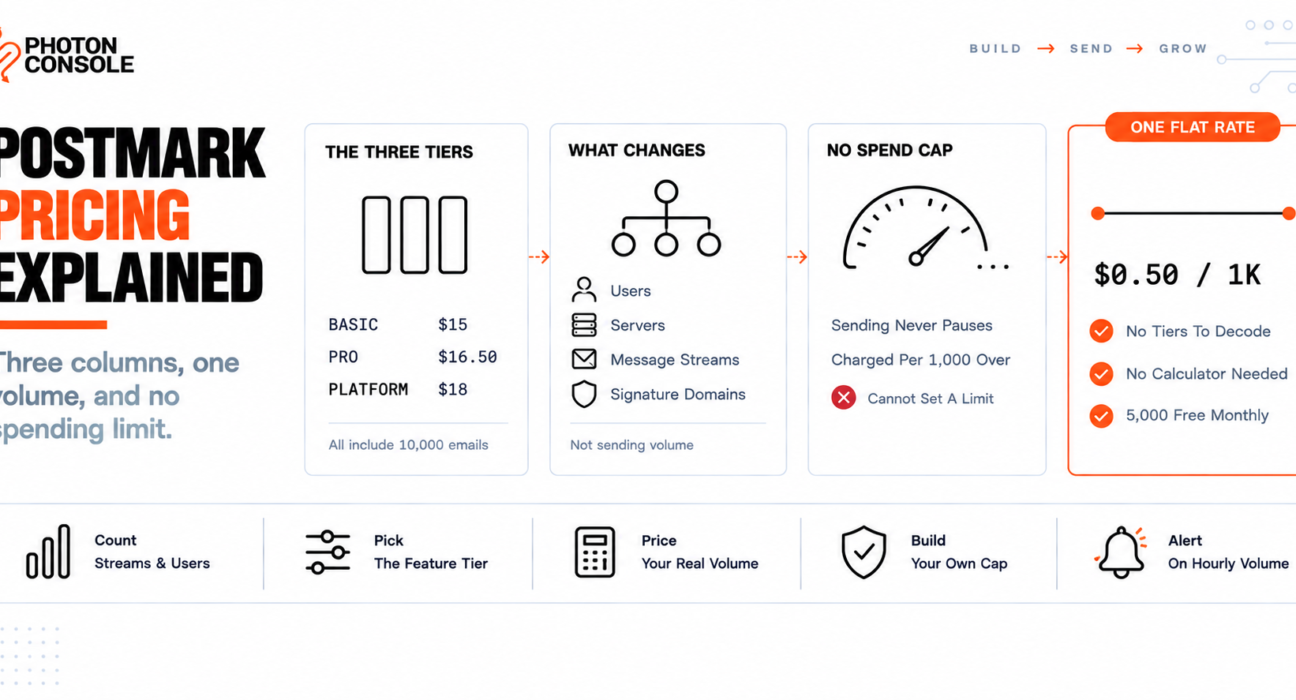
Open Postmark’s pricing page and you see three columns — Basic, Pro, Platform — at $15, $16.50 and $18. Every pricing page you have ever read puts volume in those columns, so you reasonably assume the $18 one lets you send more.
It does not. All three include the same 10,000 emails a month.
Postmark’s columns are feature tiers, not volume tiers. Volume is a separate axis that scales the price inside whichever column you pick. Until you know that, every cost estimate you make from that page will be wrong.
Quick Answer: What Does Postmark Cost?
At the 10,000-email level, from Postmark’s own announcement of its tier restructure:

| Tier | Price | Emails included | Effective rate |
|---|---|---|---|
| Developer | Free | 100 per month | — |
| Basic | $15/month | 10,000 | $1.50 per 1,000 |
| Pro | $16.50/month | 10,000 | $1.65 per 1,000 |
| Platform | $18/month | 10,000 | $1.80 per 1,000 |
The free Developer plan allows 100 emails a month and, per Postmark’s pricing and billing FAQ, the trial has no expiration date — you can stay on it as long as you need.
Higher-volume pricing is not published as a table; it comes from Postmark’s own calculator. Anything you read quoting a figure for 100,000 or 500,000 emails is either out of date or guessing, so get that number from Postmark directly.
Feature Tiers, Not Volume Tiers
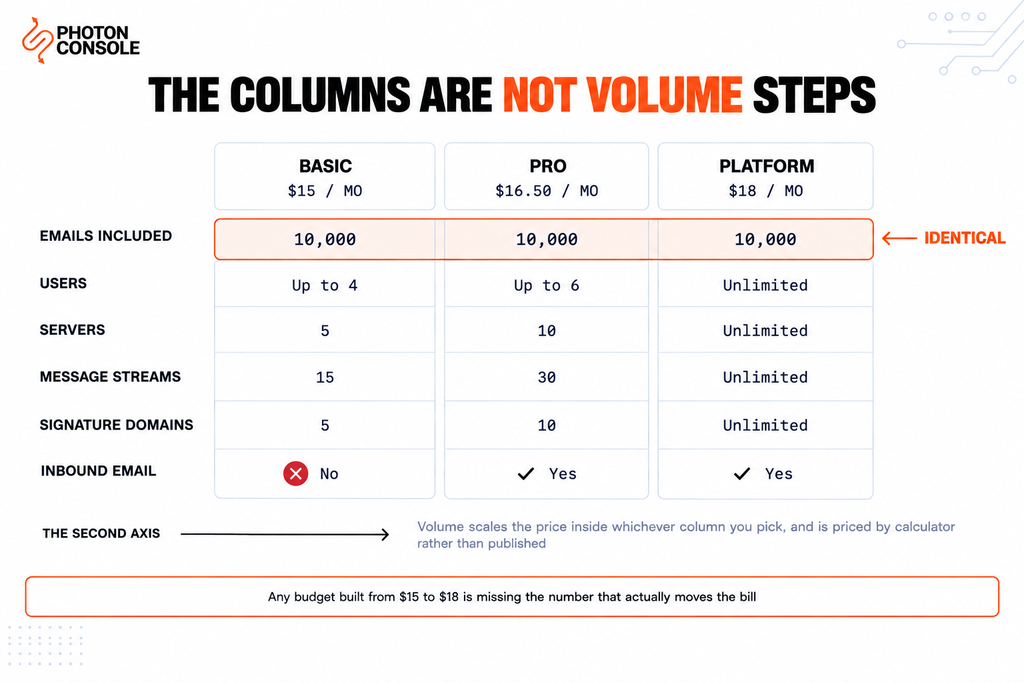
Here is what the $3 between Basic and Platform actually buys at 10,000 emails.
| Basic ($15) | Pro ($16.50) | Platform ($18) | |
|---|---|---|---|
| Emails included | 10,000 | 10,000 | 10,000 |
| Users | Up to 4 | Up to 6 | Unlimited |
| Servers | 5 | 10 | Unlimited |
| Message streams | 15 | 30 | Unlimited |
| Signature domains | 5 | 10 | Unlimited |
| Inbound email | No | Yes | Yes |
So the question Postmark’s pricing page is really asking is not “how much do you send?” but “how many separate applications, domains and teammates do you need to keep apart?”
That matters most for agencies and for anyone running several products from one account. If you need ten client domains isolated from each other, Platform is the tier — and at 10,000 emails it costs $3 more than Basic, not ten times more.
Note
Credit where it is due: this used to be far more expensive. Postmark’s announcement states that Pro features at the 10,000 level previously cost $60.50 a month and now cost $16.50, and Platform features went from $138 to $18 — reductions of roughly 73% and 87%. If you priced Postmark more than a year ago and dismissed it because the features you needed sat behind a high-volume plan, that is no longer the case and the comparison is worth redoing.
Common Mistake
Budgeting from the three headline prices. Because all three tiers show the same 10,000 emails, people read $15 to $18 as the range of what Postmark costs and plan around $20 a month. The volume axis is what moves the bill, and it is not on that part of the page. A team at 100,000 emails a month is not paying $18 for Platform — they are paying Platform’s price at 100,000, which only Postmark’s calculator will tell you. Get that figure before you compare against anything.
Message Streams: the Separation Is the Product
This is where Postmark differs from most of its competitors, and it is a genuine strength rather than a limitation.
Message Streams split your sending into transactional and broadcast, and the split is infrastructural rather than cosmetic. Transactional email — triggered by something a user does, going to a single recipient — sends on dedicated transactional IPs. Broadcast email — many recipients at once, on your schedule — sends on separate broadcast IPs.
A common misconception is worth correcting here: Postmark does permit bulk and marketing email. Its own FAQ answers the question directly and affirmatively. The requirement is that transactional and marketing email never mix, which is what the streams enforce.
That requirement is correct. It is the same separation our guides to Microsoft 365 limits and Zoho Mail limits argue for, and the reason is straightforward: a marketing campaign to a stale list generates complaints, and complaints on the same infrastructure as your password resets degrade the delivery of your password resets. Postmark builds the fix in and charges for the streams as a tier resource.
The practical implication for cost modelling is that you may need more streams than you expect. One per application, per environment, and per message type adds up — which is exactly why stream count is a tier differentiator and why Basic’s 15 can feel tight for an agency.
Quick Fix
Choosing the Right Postmark Tier
- Ignore the prices first — count your users, servers, streams and sending domains
- Need inbound email? Basic does not include it, so the floor is Pro
- Running client work or several products from one account? Platform’s unlimited structure is the point
- Only then get your real volume priced inside that tier, from Postmark’s calculator
- Do not pick Platform expecting more sending capacity — the volume is identical
The Real Risk: You Cannot Cap Your Spend
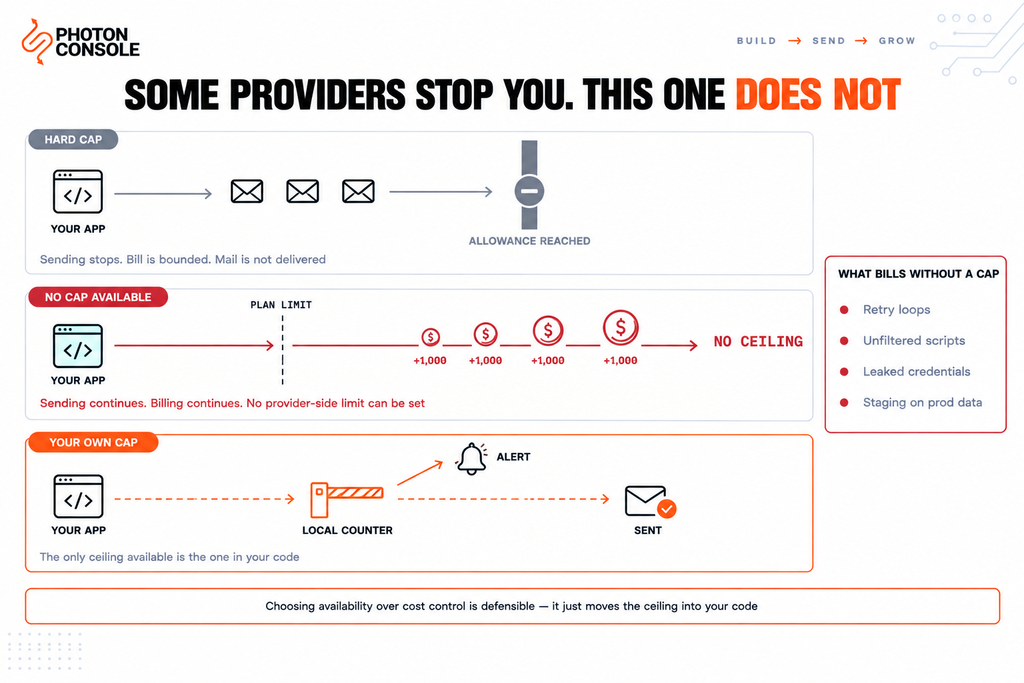
This is the finding that should shape how you operate a Postmark account, and it comes straight from their FAQ.
When you exceed your plan’s volume, sending is not paused. You are charged for additional emails beyond the plan, billed per 1,000 over the monthly limit at a rate that varies by tier. And the FAQ is explicit that you cannot currently disable this or set sending limits.
Read that as an operational fact rather than a complaint. For most teams it is exactly what you want — a transactional provider that silently stops delivering password resets because you crossed a threshold would be far worse. Postmark has chosen availability over cost control, which for transactional email is the defensible choice.
But it means there is no spend ceiling available to you, and the usual failure modes become billing events:
- A retry loop that resends on every failure
- A migration script that mails a table it should have filtered
- A leaked API credential used by someone else
- A test environment pointed at production credentials and a real user table
On a plan-with-allowance model you would hit the ceiling and stop. Here, each of those keeps going until a human notices.
Quick Fix
Protecting Yourself With No Provider-Side Cap
- Enforce the limit in your own code — a daily counter that refuses to send past a threshold you choose
- Make the send path the only way mail leaves, so nothing can bypass that counter
- Alert on send volume per hour, not per month; a runaway loop is visible within minutes
- Use separate credentials per environment so staging can never bill production
- Make every send idempotent, so a retry cannot become a duplicate charge
# The ceiling the provider does not offer, in your own code
async function sendGuarded(message) {
  const sentThisHour = await counter.get(hourKey());
  if (sentThisHour >= HOURLY_CAP) {
    await alert.sendingCapReached(sentThisHour);
    throw new Error("Local sending cap reached");
  }
  await counter.increment(hourKey());
  return transporter.sendMail(message);
}

# HOURLY_CAP is yours to choose. Without it there is no ceiling.
None of that is Postmark-specific good practice, but on a provider that will not stop for you it stops being optional. Our guide to transactional email queue architecture covers idempotency keys and retry design.
Where the Per-Send Economics Bite
At $1.50 per 1,000 on Basic’s entry tier, Postmark sits at the premium end of the market. That is the same entry rate as Mailgun’s Basic plan, and considerably above usage-priced alternatives.
| At 10,000 emails/month | Cost | Effective rate |
|---|---|---|
| Postmark Basic | $15.00 | $1.50 per 1,000 |
| Mailgun Basic | $15.00 | $1.50 per 1,000 |
| PhotonConsole | $2.50 | $0.50 per 1,000, first 5,000 free |
PhotonConsole’s figure there is the same $0.50 per thousand applied at every volume, which is why it can be stated without a calculator. That gap widens with volume on a flat rate and is harder to predict on a tiered one, which is why the comparison has to be run at your own volume rather than at an entry tier. Our analysis of pay-per-use versus subscription pricing sets out the method, and transactional email pricing across nine providers covers the wider field.
When Postmark Is Worth the Premium
Often, and it is worth being specific about when rather than pretending otherwise.
Postmark’s reputation for deliverability is earned, and the Message Streams architecture is a real part of why — strict separation of transactional and broadcast traffic protects the transactional IP pool that your password resets depend on. If your email is latency-critical and reputation-critical, paying more per message for a provider that polices its own pool carefully is a rational trade, not a tax.
It is also the right answer if your account structure is the complicated part. Agencies needing many isolated domains and streams get that at Platform for $18 at 10,000 emails, which after the restructure is genuinely cheap for what it is.
Where it stops being the obvious choice is volume. Per-send premium pricing compounds, and at high volume the deliverability argument weakens because you will likely be on dedicated IPs with any serious provider — at which point you are paying a premium for a shared-pool benefit you no longer use. A reliable SMTP provider on a flat per-thousand rate does the same job at a fraction of the per-message cost once your volume justifies managing your own sending reputation.
Moving the Sending Path
Postmark offers SMTP, so this is a credential change unless you built against its API.
# Before
SMTP_HOST=smtp.postmarkapp.com
SMTP_PORT=587
SMTP_USER=your_server_api_token
SMTP_PASS=your_server_api_token

# After
SMTP_HOST=smtp.photonrelay.com
SMTP_PORT=587
SMTP_USER=your_project_api_user
SMTP_PASS=your_secret_api_key
Note that Postmark uses the server API token as both username and password over SMTP, so a migration replaces one value with two distinct ones — worth checking if your configuration stores a single token.
Keep the stream discipline when you move. Whatever separation you had between transactional and broadcast sending is worth preserving on any provider, because the reason for it is how receivers judge you rather than how your provider bills you.
# During migration — both authorised in ONE record
v=spf1 include:spf.mtasv.net include:relay.photonconsole.com ~all
CNAME photon._domainkey dkim.photonconsole.comTake Postmark’s exact include from your own account rather than from this article. Add the new one to the same record — a second TXT record beginning v=spf1 breaks authentication rather than combining — and mind the ten-lookup ceiling that RFC 7208 places on SPF evaluation.
Receivers including Gmail expect aligned SPF and DKIM on transactional mail. Our guide to SPF, DKIM and DMARC covers alignment, and the free email deliverability checker shows what your domain publishes today.
PhotonConsole publishes a flat per-thousand rate with no tier structure to decode, so the cost comparison takes one multiplication rather than a calculator. Pricing starts with 5,000 free emails a month, enough to run both paths side by side on real traffic.
Pro Tips
- Read the columns as features, not volume. Then get your actual volume priced separately.
- Count the streams you need before choosing a tier. One per application, environment and message type adds up faster than expected.
- Build your own sending cap. No provider-side limit is available, so the only ceiling is the one in your code.
- Alert on hourly volume. A monthly budget alert tells you about a runaway loop days too late.
- Re-price Postmark if you dismissed it before. Pro and Platform features at low volume dropped by 73% and 87%.
- Check the startup credit. Postmark’s FAQ mentions a $75 credit for eligible bootstrapped startups.
- Verify before any cutover. MXToolbox checks the combined SPF record, and Mail Tester scores a real send.
Related Reading
- Postmark alternatives — an infrastructure-level guide if you have decided to move
- Mailgun pricing explained — the same entry rate with a very different tier structure
- Amazon SES sending limits — the cheapest per email, and what that costs you elsewhere
- Transactional versus marketing email — the separation Message Streams enforces
- Dedicated versus shared IP — when the shared-pool premium stops paying off
- Transactional email queue architecture — idempotency and retry design
Frequently Asked Questions
How much does Postmark cost?
At 10,000 emails a month, $15 for Basic, $16.50 for Pro and $18 for Platform. A free Developer plan allows 100 emails a month. Higher volumes are priced by Postmark’s calculator rather than published as a table.
What is the difference between Basic, Pro and Platform?
Not volume — all three include the same 10,000 emails at those prices. They differ in users, servers, message streams, signature domains and whether inbound email is included.
Does Postmark have a free plan?
Yes. The Developer plan includes 100 emails per month, and the FAQ states the trial has no expiration date.
What happens if I exceed my Postmark plan?
Sending continues. You are charged for additional emails per 1,000 over the monthly limit at a rate that varies by tier, and the FAQ notes you cannot currently disable this or set sending limits.
Can I set a spending limit on Postmark?
Not at the provider. Per their FAQ, sending limits cannot currently be set, so any cap has to be enforced in your own application.
Does Postmark allow marketing email?
Yes. Its FAQ confirms bulk marketing email is permitted, provided transactional and marketing mail never mix — which is what Broadcast Message Streams are for.
What are Message Streams?
Parallel, separate sending infrastructures for transactional and broadcast email, using distinct IP pools so campaign complaints cannot degrade transactional delivery.
Is Postmark expensive?
At the entry tier it is premium — $1.50 per 1,000 matches Mailgun’s Basic rate and sits well above usage-priced providers. Whether that is worth it depends on how much you value its deliverability reputation and stream architecture at your volume.
Conclusion
Postmark’s pricing page is unusual in a way that misleads by accident. The three columns look like volume steps and are not — Basic, Pro and Platform all include 10,000 emails at $15, $16.50 and $18, and what separates them is users, servers, streams and domains. Volume is a second axis priced by calculator, so any estimate built from the headline figures is wrong before you start.
Two things are genuinely good here and worth saying plainly. The Message Streams architecture enforces the transactional and broadcast separation that protects your most important email, and the recent restructure cut the price of Pro and Platform features at low volume by 73% and 87%.
The thing to engineer around is the absence of a spend cap. Postmark will not stop sending when you pass your plan, and it offers no way to make it stop — a defensible choice for transactional email, and one that moves the responsibility for the ceiling onto your code. Build the counter, alert on hourly volume, and separate your credentials by environment.
Then price it against your real volume rather than the entry tier. If deliverability and account structure are what you are buying, Postmark earns its premium. If volume is the number that dominates your bill, a flat per-thousand rate from a dedicated email delivery service does the same work for considerably less, with one rate to multiply and no calculator required.