Your application sends from noreply@yourcompany.com. So when sending stops, the puzzling part is which account Google says has hit its limit — because it is not the one in your From header.
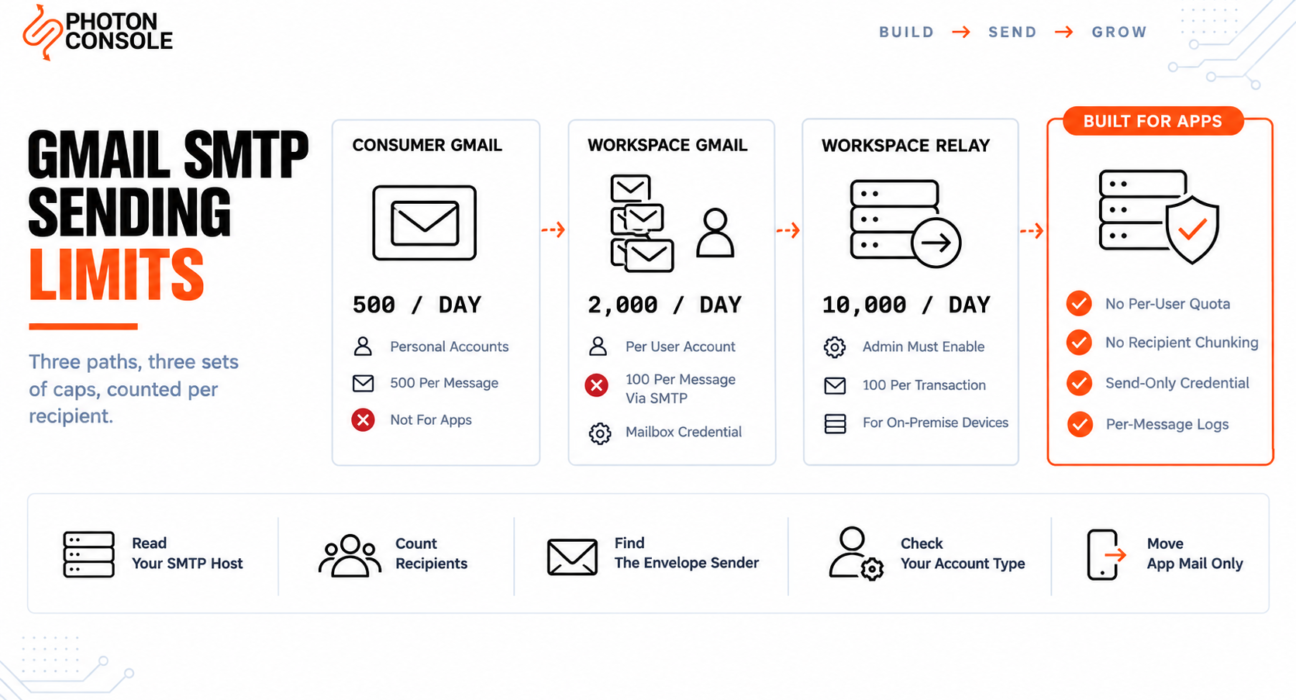
That single detail explains most Gmail sending mysteries, and it follows from how Google counts. There is no one Gmail limit. There are three different sending paths, each with different caps, and the caps are measured in recipients rather than messages.
Work out which path you are on and the arithmetic stops being mysterious. Until then, the number you planned around is probably the wrong one.
Quick Answer: What Are the Gmail SMTP Sending Limits?
It depends entirely on which of Google’s three paths your application uses.

| Path | Endpoint | Who it is for | Headline limit |
|---|---|---|---|
| Consumer Gmail | smtp.gmail.com | Personal accounts | 500 emails per day |
| Workspace Gmail | smtp.gmail.com | Paid Workspace mailboxes | Per-user daily limit, 2,000 published |
| Workspace SMTP relay | smtp-relay.gmail.com | On-premise devices and applications | 10,000 messages per user per 24 hours |
Most application developers are on the first or second path and assume they are on the third. The relay service is the only one Google describes as intended for devices and applications, and it has to be switched on and configured by an administrator — it is not what you get by default.
Figures differ by account type and change over time. Confirm yours against Google’s own pages, linked throughout, rather than any article.
Which Path Are You Actually On?
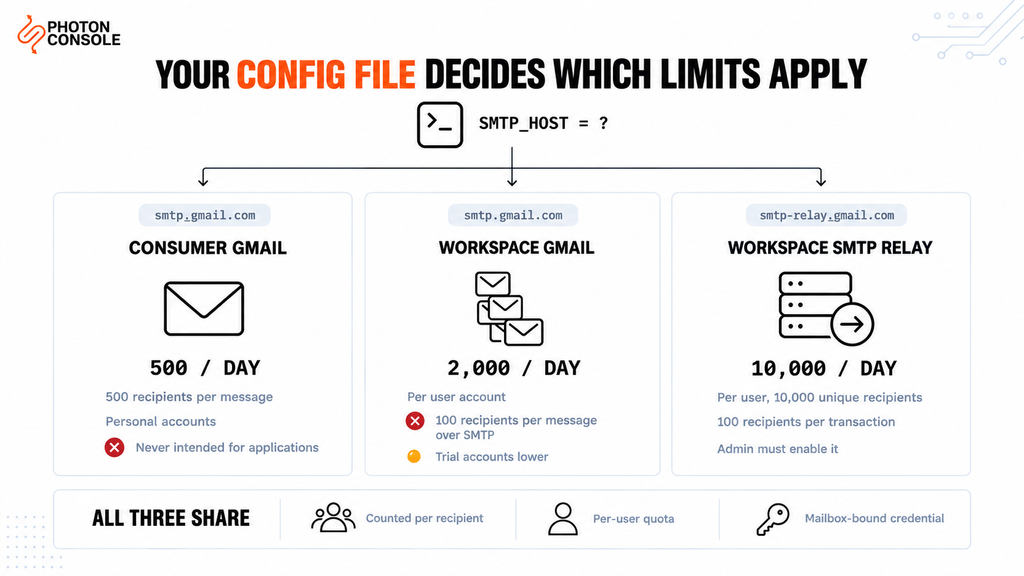
Open your application’s mail configuration and read the host. That one line settles it.
If it says smtp.gmail.com, you are authenticating as a mailbox and you are subject to that mailbox’s per-user limits. Whether those are consumer or Workspace limits depends on the account, not the endpoint.
If it says smtp-relay.gmail.com, you are using the Workspace SMTP relay service, which an administrator has deliberately enabled for your domain.
Consumer Gmail
Google’s limits for sending and getting mail page sets the thresholds at more than 500 emails sent in a day, and more than 500 recipients in a single email. It also notes that work and school accounts can have different limits.
A personal Gmail account was never intended to carry application traffic, and nothing about 500 a day makes it viable for a product with users.
Workspace Gmail
For paid Workspace mailboxes, Google’s Gmail sending limits page publishes a daily sending limit per user account of 2,000, with trial accounts limited lower. Two details on that page matter more than the headline:
- Recipients per message: 2,000 across To, Cc and Bcc, with a maximum of 500 external recipients
- Messages sent via SMTP by POP or IMAP users: 100 recipients per message
- Gmail API messages: 500 recipients per message
- Auto-forwarded messages: 10,000, and these are not counted in the daily sending limit
That second line is the one that catches applications. If your code authenticates over SMTP, the relevant per-message recipient ceiling is 100 — not the 2,000 in the headline row.
Workspace SMTP relay service
Google’s documentation for routing outgoing SMTP relay messages through Google describes it as intended for on-premise devices and applications sending outbound email through Google’s SMTP servers. Its published limits are considerably higher:
| Limit | Figure |
|---|---|
| Messages per user per 24 hours | 10,000 |
| Unique recipients per user per 24 hours | 10,000 |
| Non-unique recipients per account per 24 hours | 4,600,000 |
| Non-unique recipients per 10-minute window | 319,444 |
| Recipients per SMTP transaction | 100 |
Trial accounts have lower limits, and so do accounts with an unpaid bill — which is a failure mode worth knowing about, because a billing problem becoming a sending problem is not an obvious connection to make at three in the morning.
The Counting Is Per Recipient, and It Stacks
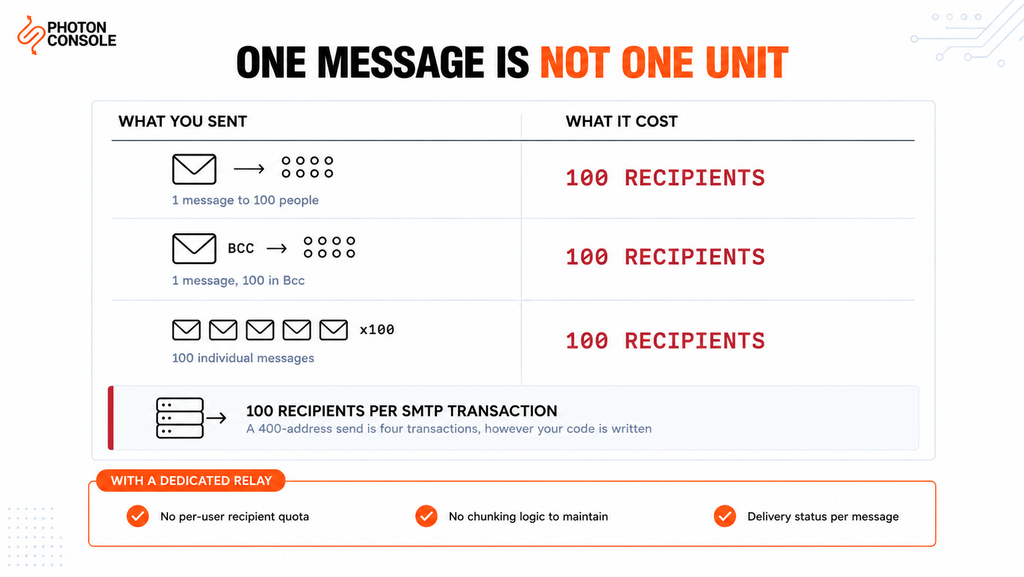
This is where planning goes wrong. People budget in messages and Google bills in recipients.
A notification sent to a 100-person distribution list is one message in your logs and 100 recipients against the limit. The arithmetic changes a comfortable-looking allowance into a tight one very quickly.
What you think you sent:        What it costs:

  1 message to 100 people   ->   100 recipients
  1 message, 100 in Bcc     ->   100 recipients
  100 individual messages   ->   100 recipients

  Plus: a single SMTP transaction carries at most
  100 recipients. More than that needs another one.
The 100-recipient transaction ceiling is a hard boundary rather than a budget. Google’s relay documentation states that additional recipients require a new transaction, so batching 500 addresses into one send does not work — your code has to chunk them.
Common Mistake
Estimating capacity by counting the messages your application sends. If any of them address multiple recipients, your real consumption is higher than your logs suggest — and the gap widens exactly when volume grows, because larger sends tend to have more recipients each. Count recipients, not messages, and remember that a 100-recipient transaction ceiling means a 400-address announcement is four transactions regardless of how your code is written.
The Envelope Sender Decides Whose Quota It Is
Here is the detail that explains the symptom in the opening paragraph, and it is documented but almost never mentioned.
On the relay service, per-user limits apply based on the envelope sender registered to your Workspace account. Google’s documentation is explicit that the From and Reply-to fields are ignored for this purpose.
So if your application authenticates as alerts@yourcompany.com but sets a From header of noreply@yourcompany.com, the quota being consumed belongs to alerts@. Every message your product sends is drawing down one real person’s or one service account’s allowance, and the header you carefully configured has nothing to do with it.
Quick Fix
A Different Account Than Expected Has Hit Its Limit
- Find which account your application authenticates as — that is the envelope sender
- Ignore the From header; it does not determine which quota is charged
- Check that account’s own usage rather than the one in your templates
- If several applications share one authenticating account, they share one allowance
- Give each sending system its own identity so one noisy job cannot starve the rest
The practical consequence is that consolidating all application mail onto a single authenticating mailbox concentrates every limit onto that one account. It feels tidy and it is the opposite of resilient.
Authentication: Less Secure Apps Are Gone
Any guide that tells you to enable “less secure app access” is describing a setting that no longer exists. Google’s relay documentation states plainly that less secure apps are no longer supported and that third-party apps must use OAuth.
That leaves two realistic options for an application, and both have drawbacks worth understanding before you build on them.
| Method | What it requires | The catch |
|---|---|---|
| App Password | 2-Step Verification on the account | It is a full-account credential, not scoped to sending |
| OAuth 2.0 | A Cloud project, consent flow and token refresh | Real implementation work, and tokens to keep alive |
| IP authentication | Relay service without TLS, on a static IP | No TLS, and a static IP your host may not provide |
The App Password route is the one most teams take, and the security trade should be explicit: that credential can access the mailbox, not merely send from it. A leaked App Password is a mailbox breach, not a sending incident. By contrast, a PhotonConsole credential can send and nothing else — losing it costs you a rotated API key, not access to a mailbox.
Note
The third row is a genuine option but it rules itself out for most modern deployments. Google’s documentation notes that without TLS you cannot use SMTP authentication and must authenticate by IP address instead. That requires a static outbound IP, which Heroku dynos, serverless functions and Kubernetes pods do not give you — the same constraint covered in our guides to those platforms. It also means sending without transport encryption, which is rarely an acceptable trade in 2026.
Quick Fix
Authentication Suddenly Failing on smtp.gmail.com
- A guide telling you to enable “less secure app access” is out of date — that setting is gone
- Turn on 2-Step Verification for the account, then generate an App Password for the application
- Use the App Password as the SMTP password; the account password will not work
- Check nobody has rotated or revoked that App Password during routine security work
- If the account has been handed to a different owner, the App Password went with it
What the Relay Service Is Actually For
Two lines in Google’s own documentation define the intended use, and reading them honestly saves a lot of argument later.
First, the service is “intended for on-premise devices and applications” — a scanner that emails PDFs, a line-of-business system on a server in your building, an Exchange deployment routing outbound mail through Google for filtering. Second, the documentation notes the relay is not meant for mail that originates from Gmail.
Neither description is a cloud-hosted SaaS product sending transactional email to customers. That does not mean it will refuse to work. It means you are using a mail filtering and routing service as application infrastructure, and the limits, the authentication model and the per-user accounting all reflect what it was designed for.
This is the same structural point as using Microsoft 365 for application mail, which our guide to Microsoft 365 SMTP relay limits covers — different limits and a different mechanism, but the same category error.
When You Have Outgrown It
Three signals mean the decision is already made, whatever the daily figure says.
You are chunking around the transaction ceiling. Writing code to split recipients into hundreds is writing code to work around a limit rather than to serve users.
One mailbox is a single point of failure. If the account your application authenticates as hits its limit, gets suspended, or has its App Password rotated by someone doing routine security hygiene, your product stops sending.
You need delivery data you do not have. Mailbox sending gives you very little: no per-message delivery log your application can query, no bounce webhook, no complaint feed. Debugging a delivery question becomes asking a person to look in a mailbox.
That last point is usually what decides it. PhotonConsole, like any transactional email solution built for applications, treats each send as an event with an identifier, a status and a webhook — which is the difference between answering “did this user get their OTP?” in seconds and in an afternoon.
Moving the Sending Path
Because both are SMTP, the change is configuration rather than code.
# Before — authenticating as a mailbox
SMTP_HOST=smtp.gmail.com
SMTP_PORT=587
SMTP_USER=alerts@yourcompany.com
SMTP_PASS=your_app_password

# After — a credential scoped to sending
SMTP_HOST=smtp.photonrelay.com
SMTP_PORT=587
SMTP_USER=your_project_api_user
SMTP_PASS=your_secret_api_key
PhotonConsole issues these credentials on signup, so the new path can be tested the same day. Two things improve immediately and are worth naming. The From address becomes yours to set freely, because no per-user mailbox quota is being charged behind it. And the recipient chunking logic can go, because you are no longer working around a 100-recipient transaction ceiling.
Your staff mailboxes stay on Google Workspace throughout. Nothing about anyone’s inbox changes — this moves application mail only, exactly as it would when separating app traffic from Microsoft 365.
Authentication records
Your domain almost certainly publishes Google’s include already:
# Existing
v=spf1 include:_spf.google.com ~all

# During migration — both authorised
v=spf1 include:_spf.google.com include:relay.photonconsole.com ~all
CNAME photon._domainkey dkim.photonconsole.comKeep Google’s include as long as staff mail flows through Workspace, which will be indefinitely. Add the relay alongside it in the same record — a second TXT record beginning v=spf1 breaks authentication rather than combining — and mind the ten-lookup ceiling that RFC 7208 places on SPF evaluation.
DKIM matters more than SPF because it survives forwarding, and Google’s own sender guidelines expect aligned authentication on transactional mail. Our guide to SPF, DKIM and DMARC covers alignment, and the free email deliverability checker shows what your domain publishes now.
Pro Tips
- Count recipients, not messages. Every capacity estimate built on message counts understates real consumption.
- Know which account authenticates. That is the envelope sender, and it is the quota being spent regardless of your From header.
- Never share one authenticating mailbox across systems. They share a limit, and the noisiest one wins.
- Treat an App Password as mailbox access. Scope and rotate it accordingly, and never commit it.
- Watch the billing status. An unpaid Workspace bill lowers relay limits, which surfaces as a sending fault.
- Reuse connections and set a real HELO identifier. Google’s relay documentation recommends connection caching and a unique identifier such as your domain rather than
localhost. - Verify before any cutover. MXToolbox checks the combined SPF record, and Mail Tester scores a real send.
Related Reading
- Microsoft 365 SMTP relay limits — the same category error on the other major mailbox platform
- Free SMTP servers — a survey of free options and where they stop being practical
- SendGrid free tier limits if you are comparing dedicated providers
- Why emails go to spam in Gmail for delivery rather than sending problems
- SMTP authentication errors for App Password and OAuth failures
- Transactional versus marketing email on why the two should not share a path
Frequently Asked Questions
What is the Gmail SMTP sending limit?
For consumer accounts, Google’s help page sets the thresholds at more than 500 emails sent in a day and more than 500 recipients in a single email. Workspace accounts and the SMTP relay service have different, higher limits.
What is the Google Workspace daily sending limit?
Google publishes a daily sending limit per user account of 2,000 for Workspace Gmail, with trial accounts lower. Check the linked page for your own account type, since figures vary by tier.
Why is my per-message recipient limit 100 and not 2,000?
Because you are sending over SMTP. Google’s limits page lists 100 recipients per message for messages sent via SMTP by POP or IMAP users, separately from the 2,000-recipient figure for the Gmail interface.
Which account’s quota does my application use?
The one it authenticates as. Per-user limits apply based on the envelope sender registered to your Workspace account, and Google’s documentation states the From and Reply-to fields are ignored for this.
Can I still use “less secure app access” for Gmail SMTP?
No. Google’s relay documentation confirms less secure apps are no longer supported and third-party apps must use OAuth. The alternatives are an App Password with 2-Step Verification, OAuth, or IP authentication without TLS.
Is the Workspace SMTP relay service meant for application email?
It is described as intended for on-premise devices and applications, and the documentation notes it is not meant for mail originating from Gmail. A cloud-hosted product sending customer email is outside that description.
How many recipients can one SMTP transaction carry?
100. Additional recipients require a new transaction, so large sends must be chunked by your application.
Do I have to move our mailboxes to use a relay?
No. Staff mailboxes stay on Google Workspace. You change the SMTP configuration in your application and add one include to your existing SPF record.
Conclusion
“What is the Gmail sending limit” has no single answer, which is why so much capacity planning around it turns out wrong. Consumer Gmail, Workspace Gmail and the Workspace SMTP relay are three different services with three sets of caps, and the one that applies to you is written in your configuration file.
Two mechanics matter more than any headline figure. The limits are counted in recipients, so a message to a hundred people costs a hundred — and a single SMTP transaction carries at most a hundred regardless. And the quota consumed belongs to the account your application authenticates as, not the address in the From header, which is why the wrong user keeps running out.
Google’s relay is a mail routing and filtering service for devices and on-premise systems, and it is good at that. Application email asks for different things: a credential scoped to sending rather than to a mailbox, per-message delivery data your code can query, no per-user accounting behind the From address, and no recipient chunking. A dedicated email delivery service provides those, mailboxes stay exactly where they are, and pricing starts with 5,000 free emails a month — enough to run the new path alongside Workspace and compare them on real traffic before changing anything.