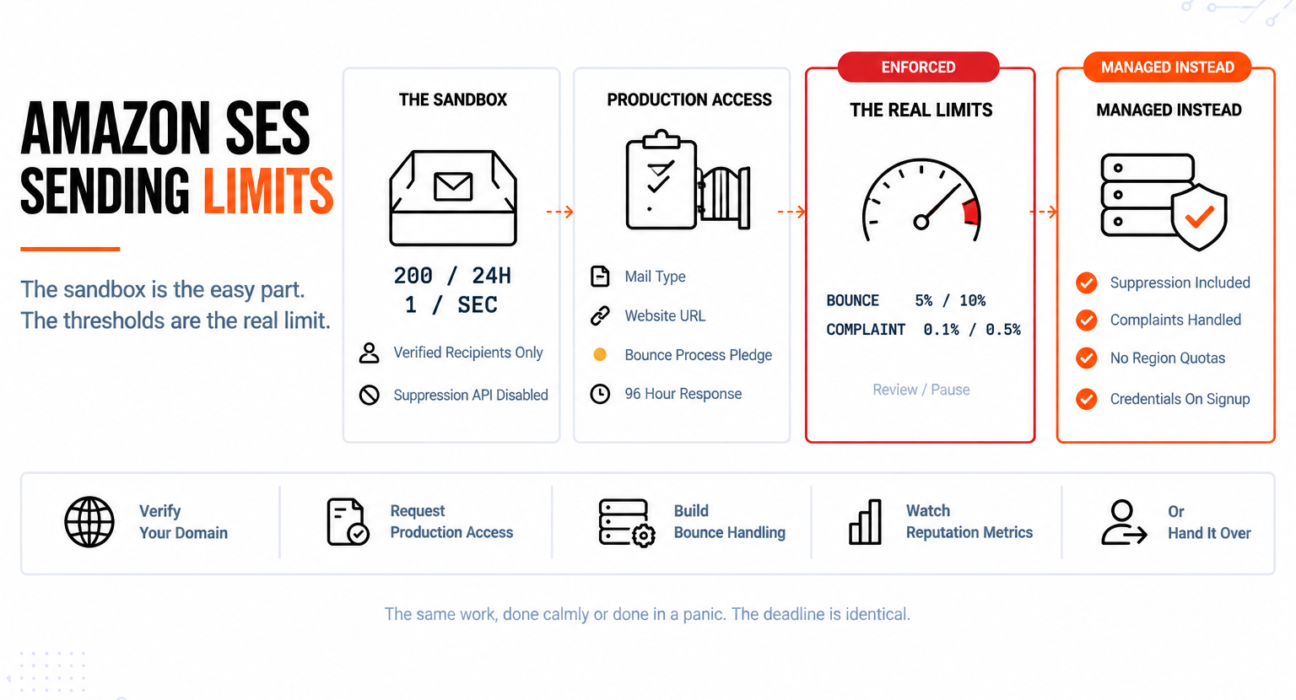
Amazon SES is the cheapest way to send email at volume, and the sandbox is the part everyone worries about. Two hundred messages a day, verified recipients only, one message per second — restrictive enough that getting out of it feels like the milestone.
It is not the milestone. Getting out of the sandbox takes a form and a few days. Staying out is the part nobody plans for.
Buried in the production access request is an acknowledgement that you have a process for handling bounce and complaint notifications. Most people tick it without building one. SES then enforces thresholds against those exact metrics, and the complaint threshold for putting your account under review is one complaint per thousand emails.
Quick Answer: What Are the Amazon SES Sending Limits?
There are two sets of limits, and the second set matters far more than the first.

| Stage | Recipients | Per 24 hours | Per second |
|---|---|---|---|
| Sandbox | Verified addresses and domains only | 200 messages | 1 message |
| Production | Any recipient | Varies by use case | Varies by use case |
AWS does not publish a fixed production quota. Its service quotas documentation states that both the daily sending quota and the maximum send rate vary based on your specific use case once you leave the sandbox. Your actual figures appear in your own Account dashboard, and they apply per AWS Region.
The limits that genuinely govern a production SES account are not volume quotas at all. They are reputation thresholds, and exceeding them stops your sending regardless of how much quota you have left.
The Sandbox, and How to Leave It
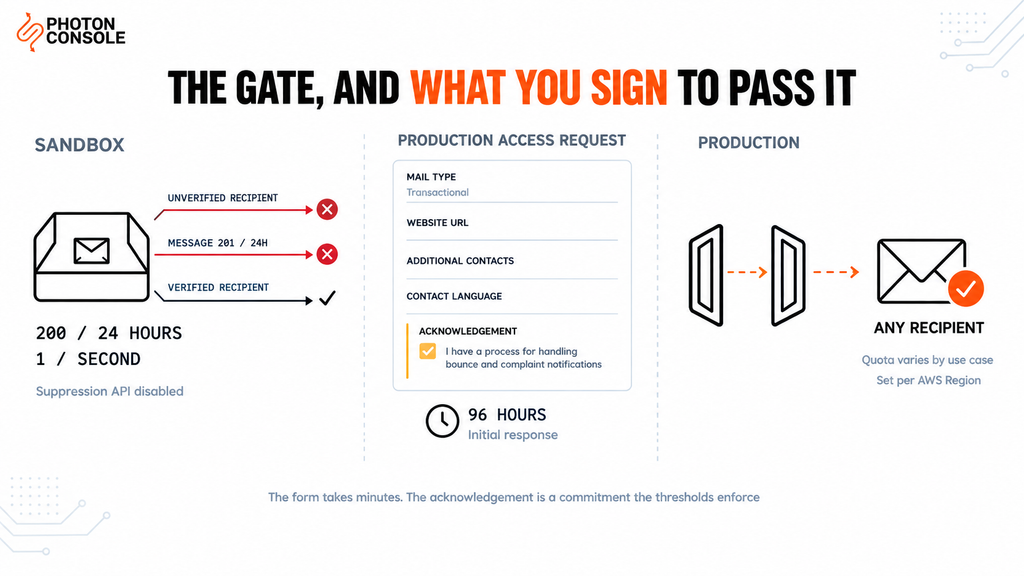
In the sandbox you can send only to verified email addresses and domains, or to the SES mailbox simulator. The caps are 200 messages per 24-hour period and 1 message per second. Account-level suppression bulk actions and the suppression list API are also disabled.
That last restriction is worth noticing early: the tooling for managing bad addresses is switched off in exactly the phase where you would learn to use it.
What the production access request asks for
From the Account dashboard you choose Request production access. According to AWS’s own documentation, the request requires:
- Mail type — marketing or transactional, based on the majority of your mail
- Website URL — so AWS can understand your content
- Additional contacts — up to four addresses for account communications
- Preferred contact language — English or Japanese
- An acknowledgement — that you only send to individuals who explicitly requested email, and that you have a process for handling bounce and complaint notifications
AWS Support gives an initial response within 96 hours, and you cannot edit your details while a review is in progress. Verifying a domain before you submit helps the request move faster.
# The same request from the CLI
aws sesv2 put-account-details \
  --production-access-enabled \
  --mail-type TRANSACTIONAL \
  --website-url https://example.com \
  --additional-contact-email-addresses info@example.com \
  --contact-language EN
Quick Fix
Production Access Request Is Taking Too Long
- Verify your sending domain before submitting, not after — AWS notes this speeds approval
- Give a real, reachable website URL that describes what the mail is for
- Describe your use case specifically; “transactional email” alone explains nothing
- Expect an initial response within 96 hours, and do not edit details mid-review
- Say concretely how you handle bounces and complaints — vagueness here invites follow-up questions
The Acknowledgement Most People Tick Without Reading
That final checkbox is the pivot of this whole article. You are stating that you have a process for handling bounce and complaint notifications — and SES holds you to it afterwards, numerically.
This is the structural difference between SES and a managed email service. SES gives you the sending infrastructure at close to cost. The deliverability work that other providers absorb — suppressing bad addresses, processing complaints, keeping your metrics clean — remains yours.
That is a legitimate trade, and for teams with the engineering capacity it is an excellent one. It only goes wrong when nobody realises a trade was made.
The Thresholds That Actually Govern Your Account
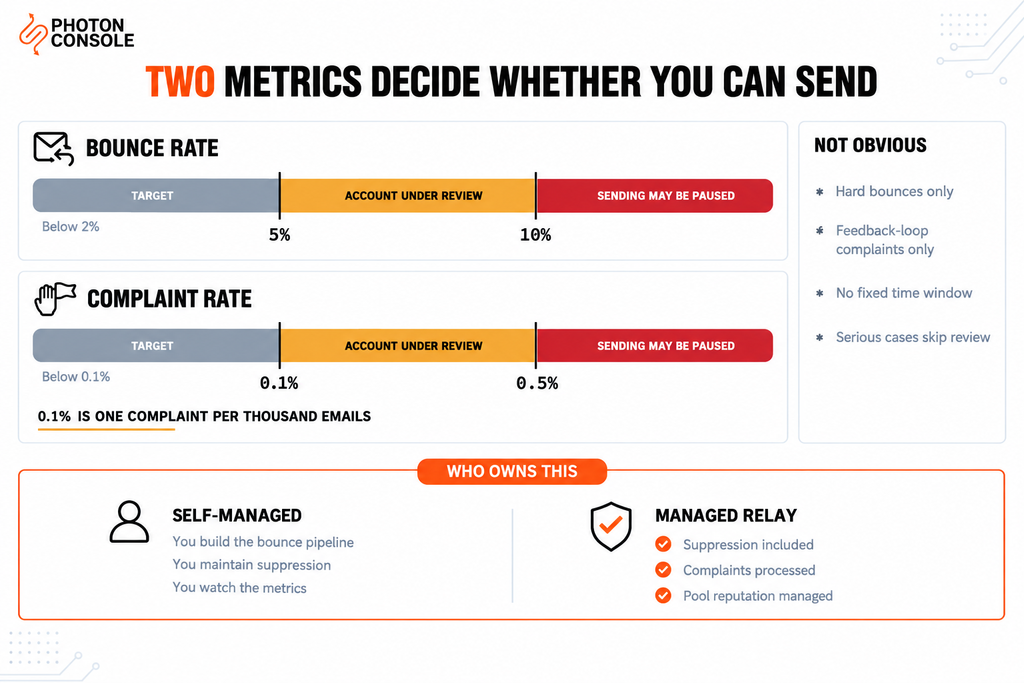
Amazon’s sending review process FAQs set out the figures explicitly.
| Metric | Target | Account under review | Sending may be paused |
|---|---|---|---|
| Bounce rate | Below 2% | 5% or greater | 10% or greater |
| Complaint rate | Below 0.1% | 0.1% or greater | 0.5% or greater |
Read the complaint row twice. The target is below 0.1%, and review begins at 0.1% — which is one complaint per thousand delivered emails. On a 50,000-email send, 50 people marking it as spam reaches the review threshold.
For transactional mail that is usually comfortable, because people expect a password reset. For anything that drifts towards marketing — a feature announcement, a re-engagement nudge, a “your trial is ending” sequence — it is a genuinely tight budget.
Four things about these numbers that are not obvious
The FAQs include caveats that change how you should monitor these metrics, and they are rarely mentioned anywhere else.
The bounce rate counts only hard bounces. Specifically, hard bounces to domains you have not verified. Temporary failures and bounces caused by blocked IPs do not count toward it. So your internal bounce figure and SES’s figure can differ substantially.
The complaint rate only counts feedback-loop complaints. It reflects complaints received through feedback loops, on mail sent to domains that provide that feedback to SES. Complaints at providers without a feedback loop are invisible in this number — which means the metric understates how people are actually reacting.
Neither rate uses a fixed time window. SES evaluates against a “representative volume” of your typical sending rather than a defined period. You therefore cannot reproduce the number by calculating your rate for the last seven days, and a bad single send does not simply age out on a known schedule.
Serious violations skip the review stage. The FAQs note that for serious violations, SES may pause sending without first placing the account under review. The threshold table is not a guaranteed warning sequence.
Common Mistake
Building a dashboard that computes your own bounce and complaint rates over the last 30 days and treating it as an early-warning system. It is not measuring the same thing SES measures. Your figure probably includes soft bounces that SES excludes, and almost certainly misses complaints from providers with no feedback loop. Use the reputation metrics SES itself reports in the Account dashboard as the number that matters, and treat your own as supplementary.
Quick Fix
Your Account Has Been Placed Under Review
- Stop any campaign or bulk send immediately — the representative volume is still accumulating
- Identify the send that moved the metric, then suppress every address it hard-bounced
- Purge addresses you cannot evidence consent for, rather than defending them
- Reply to AWS with the specific cause and the specific change you have made, not a reassurance
- Stand up a second sending path for critical transactional mail now, so a pause does not stop password resets
What “Having a Process” Actually Requires
If you intend to run SES properly, this is the work the acknowledgement commits you to. None of it is difficult; all of it is ongoing.
- Subscribe to bounce and complaint notifications. Configure SNS topics and consume them, rather than discovering problems from the dashboard.
- Suppress automatically. A hard-bounced address must never be sent to again, and that has to happen without a human deciding.
- Act on complaints immediately. A complaint is a withdrawal of consent. Stop sending to that address regardless of what your signup records say.
- Validate at the point of capture. Most hard bounces are typos that a check at signup would have caught.
- Separate transactional from marketing. One sending identity carrying both means a campaign’s complaint rate can pause your password resets.
- Watch the reputation metrics continuously. By the time you are under review, the damage is already in the representative volume.
Our guide to transactional email webhooks covers consuming these events reliably, and reducing your bounce rate covers the hygiene side. On PhotonConsole the suppression list and complaint processing are handled for you, so this list describes work you would not be taking on.
Note
The separation point deserves emphasis because it is the most common way a healthy SES account gets into trouble. Transactional mail has a naturally low complaint rate; marketing mail does not. Sending both through one identity pools the complaint rate, so a single campaign to a stale list can push the combined figure past 0.1% and put the account that sends your OTP codes under review. If you send both, separate the sending identities — or separate the providers.
Production Quotas and the Region Trap
Once you are in production, your daily quota and send rate are set for your account based on your use case, and both are adjustable through a quota increase request. AWS does not publish a standard starting figure, so check your own Account dashboard rather than any article quoting a number.
The detail that catches teams out is that quotas apply per AWS Region. A generous quota in the region you launched in says nothing about a second region you expand into later, and a multi-region deployment needs the request repeated. Sending identities and verifications are also regional.
There is no regional equivalent on a managed relay — PhotonConsole credentials work from any region without a separate quota request, which is worth factoring in if you expect to expand geographically. When you do request an SES increase, the request is strongest when your reputation metrics are good and your stated use case matches what you actually send. Asking for a large increase while sitting near a review threshold is asking the wrong question at the wrong time.
When SES Stops Being Worth the Effort
Let us be straightforward about the economics, because this is where most comparisons become dishonest.
SES is cheaper per email than any managed provider, including this one. On raw send price it is very hard to beat, and if your volume is large and you have engineering capacity to spend on email operations, it is often the correct choice. Nothing in this article argues otherwise.
The question is what the per-email price excludes. With SES you are also buying a job: someone has to build the bounce and complaint pipeline, maintain the suppression logic, monitor reputation metrics, separate sending identities, and respond when the account goes under review. That person has a salary.
| Consideration | Amazon SES | Managed relay |
|---|---|---|
| Price per email | Lowest available | Higher per message |
| Bounce and complaint handling | Yours to build and run | Included |
| Suppression list | Yours to maintain | Managed |
| Reputation enforcement | Thresholds with account pause | Provider manages pool reputation |
| Setup to first production send | Verification plus review, up to several days | Credentials on signup |
| Best fit | High volume with engineering capacity | Teams who would rather not own this |
The honest decision rule: if a developer would spend more than a few hours a month on email operations, compare that time against the price difference at your actual volume. Below a certain volume the maths favours a managed service clearly; above it, SES wins on cost and you should budget the operational work deliberately rather than by accident.
If You Move the Sending Path
Because SES offers an SMTP interface, moving away from it is a credential change rather than a rewrite — provided you used SMTP rather than the AWS SDK.
# Before
SMTP_HOST=email-smtp.us-east-1.amazonaws.com
SMTP_PORT=587
SMTP_USER=YOUR_SES_SMTP_USERNAME
SMTP_PASS=YOUR_SES_SMTP_PASSWORD

# After
SMTP_HOST=smtp.photonrelay.com
SMTP_PORT=587
SMTP_USER=your_project_api_user
SMTP_PASS=your_secret_api_key
If you used SendEmail through the SDK instead, the sending code needs replacing — which is the practical argument for integrating over SMTP even when a provider offers a native SDK.
Take your suppression list with you. Whatever you have accumulated about addresses that hard-bounced is real deliverability value, and starting a new sending path by mailing those addresses again undoes the move immediately.
TXT    @                    v=spf1 include:relay.photonconsole.com ~all
CNAME  photon._domainkey    dkim.photonconsole.com
During a parallel run, authorise both in a single SPF record and remove the old include only once the old path is retired. One domain gets one SPF record, and each include consumes part of the ten-lookup budget that RFC 7208 allows.
Receivers including Gmail expect aligned SPF and DKIM on transactional mail. Our guide to SPF, DKIM and DMARC covers alignment, and the free email deliverability checker shows what your domain publishes today.
A reliable SMTP provider that manages suppression and reputation on your behalf removes the operational commitment rather than the sending capability — pay-as-you-use pricing with 5,000 free emails a month is enough to run the new path alongside SES before deciding anything.
Pro Tips
- Trust the SES dashboard metrics over your own. They are calculated differently, and theirs are the ones that trigger a review.
- Separate transactional and marketing identities on day one. Retrofitting this after a review has started is painful.
- Treat a complaint as consent withdrawn. Suppress immediately, whatever your records say about signup.
- Validate addresses at capture. It is the cheapest bounce-rate reduction available and it happens before you send.
- Repeat quota requests per region. Quotas, verifications and identities are all regional.
- Verify authentication before any cutover. MXToolbox checks the combined record, and Mail Tester scores a real send end to end.
Related Reading
- Best Amazon SES alternatives — an infrastructure-level comparison if you have decided to move
- SendGrid free tier limits — the same decision from a different starting point
- Reducing email bounce rate — the hygiene work the thresholds demand
- IP warming explained for anyone considering a dedicated IP
- Dedicated versus shared IP
- AWS EC2 port 25 blocked if your application also runs on EC2
Frequently Asked Questions
What are the Amazon SES sandbox limits?
You can send only to verified addresses and domains or the mailbox simulator, with a maximum of 200 messages per 24-hour period and 1 message per second.
How long does SES production access take?
AWS Support provides an initial response within 96 hours. Verifying your sending domain before submitting helps, and you cannot edit your details while the review is in progress.
What is the default SES sending quota after leaving the sandbox?
AWS does not publish a fixed figure — the documentation says both the daily quota and send rate vary by use case. Check your own Account dashboard, and remember the values are per region.
What bounce rate will get my SES account suspended?
A bounce rate of 5% or greater places the account under review, and 10% or greater may pause sending. AWS recommends staying below 2%.
What complaint rate does SES allow?
Below 0.1% is the target. At 0.1% or greater the account goes under review, and at 0.5% or greater sending may be paused. That review threshold is one complaint per thousand emails.
Does my own bounce rate calculation match SES’s?
Probably not. SES counts only hard bounces to unverified domains and excludes temporary failures, and its complaint figure only reflects feedback-loop data. It also uses a representative volume rather than a fixed window.
Is SES cheaper than a managed email provider?
Per email, yes, and by a clear margin. The comparison changes once you include the engineering time to build and run bounce handling, suppression and reputation monitoring, which a managed service includes.
Can I use SES for marketing and transactional email together?
You can, but pooling them means a campaign’s complaint rate affects the identity sending your password resets. Separate the sending identities, or the providers.
Conclusion
The SES sandbox is a form and a wait. The real limits are the two percentages in Amazon’s enforcement FAQs: 5% bounce or 0.1% complaint puts your account under review, and 10% or 0.5% may stop it sending altogether. Those figures are enforced against metrics Amazon calculates differently from how you probably calculate them, over a window it does not define, and for serious violations without a warning first.
That is not a criticism of SES. It is the shape of the product. You get sending infrastructure at close to cost, and in exchange you own the deliverability operation — which is exactly what the acknowledgement in the production access request says you will do.
The decision is therefore not about price per email, where SES wins. It is about whether owning that operation is a good use of your team. If it is, budget the work explicitly and build the bounce pipeline before you need it. If it is not, a managed email delivery service takes on the suppression, the complaint processing and the pool reputation as part of what you are paying for — and the switch, if you integrated over SMTP, is four environment variables.