Brevo’s free plan is genuinely free forever. No trial period, no credit card, no expiry date — which makes it unusual and, for some projects, the right answer.
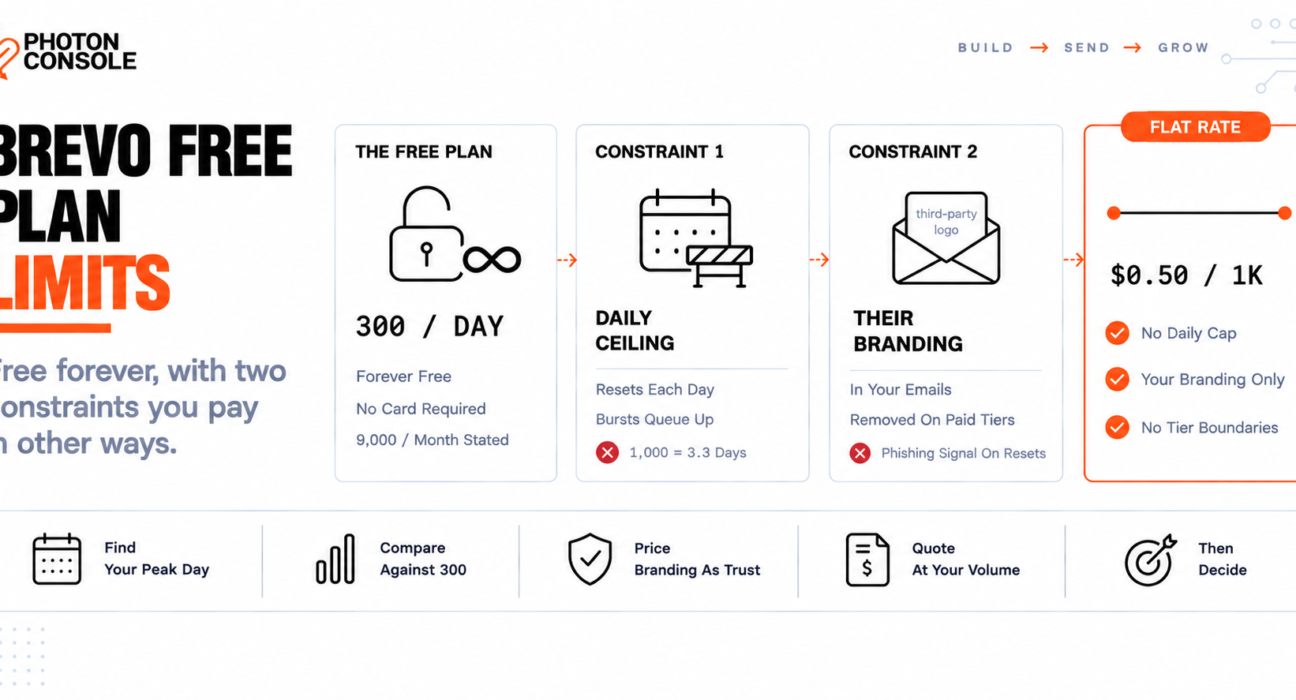
You pay in two other currencies. There is a ceiling on what you can send in a single day regardless of your monthly volume, and until you upgrade, your emails carry Brevo’s branding.
For a newsletter, the second one is a minor annoyance. For a password reset, it is a different kind of problem entirely.
Quick Answer: What Are Brevo’s Free Plan Limits?
From Brevo’s own pages, the free plan allows 300 emails per day — which Brevo states as 9,000 emails per month — and is described as forever free with no credit card required.

| Plan | Price | Volume | Daily cap |
|---|---|---|---|
| Free | $0 | 300/day, stated as 9,000/month | Yes |
| Starter | From $9/month | 5,000/month | No |
| Standard | From $18/month | 5,000/month | No |
| Professional | From $499/month | 150,000/month | No |
| Enterprise | Custom | Custom | No |
Look at the first two rows together, because the comparison is not what anyone expects. We will come back to it.
Prices are listed as starting figures and change over time, so confirm against Brevo’s transactional email page before deciding.
A Daily Cap Is Not a Monthly Allowance
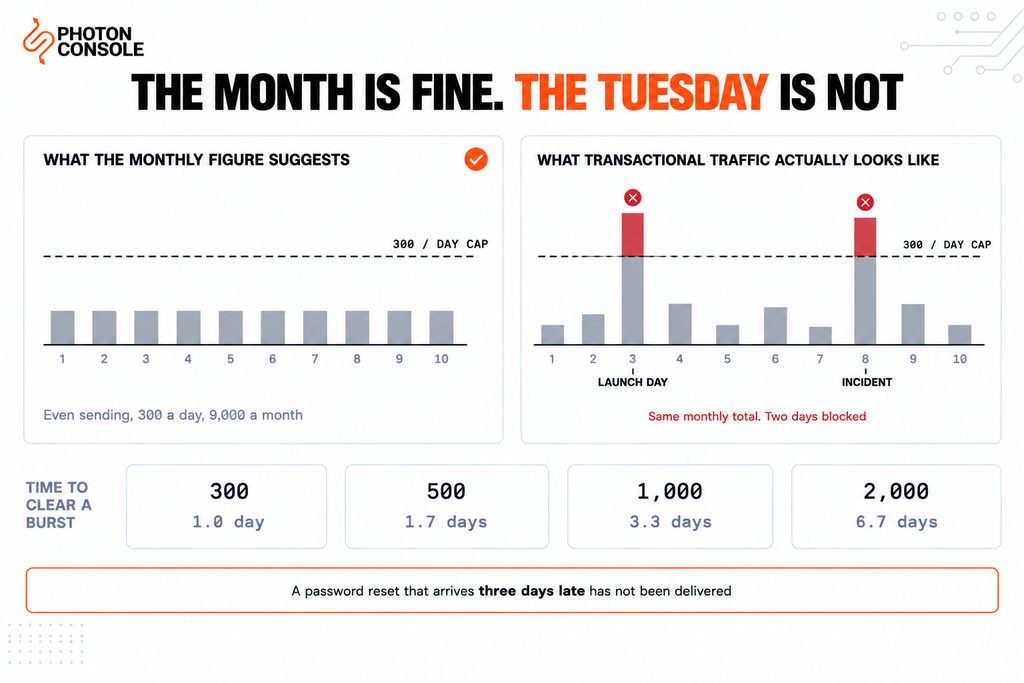
300 a day multiplies out to 9,000 a month, and Brevo presents it that way. The arithmetic is correct and the implication is misleading, because it assumes your sending is evenly distributed.
Transactional email is the least evenly distributed traffic there is. It spikes when you launch, when a campaign lands, when something breaks and everyone resets their password at once.
# How long a burst takes to clear at 300/day

   300 emails  ->  1.0 day
   500 emails  ->  1.7 days
 1,000 emails  ->  3.3 days
 2,000 emails  ->  6.7 days

# A password reset that arrives three days late
# has not been delivered. It has failed.
#
# On a flat per-thousand rate such as PhotonConsole's,
# the same 1,000-email burst clears in minutes.| Your heaviest single day | Fits in 300/day? | What happens |
|---|---|---|
| Under 300 | Yes | Free plan works, whatever your monthly total |
| 400 | No | 100 emails wait until tomorrow |
| 1,000 | No | Backlog clears over three days |
| 2,000 | No | Nearly a week to clear one day’s sending |
So the usable monthly figure is not 9,000. It is whatever your busiest day allows, multiplied out — and if any single day exceeds 300, the overflow does not borrow from tomorrow’s quiet allowance. It waits.
Common Mistake
Sizing a project against the monthly figure because it comfortably exceeds your expected volume. A product sending 4,000 emails a month is well inside 9,000 and will still break the moment 400 of them land on the same afternoon. The constraint is the shape of your traffic, not its total. Work out your heaviest single day in the last quarter and compare that against 300 — that is the number that decides whether the free plan works for you.
Quick Fix
Sending Stopped Partway Through the Day
- Check today’s count against 300 — the cap is daily, not monthly, so your monthly total is irrelevant
- Queued messages are not lost, but they wait for the reset rather than borrowing from a quiet day
- For anything time-critical, send it through a second path now rather than waiting
- Spreading sends across the day only helps if your total stays under 300
- If this happens on a normal day rather than a spike, the free plan has been outgrown
The Branding Problem Is Worse for Transactional Mail
Brevo does not spell out the free plan’s branding terms on its free plan pages. It does something more informative: it sells the removal of branding as a paid feature.
The Starter tier lists “No Brevo logo” among the things you get for paying. The Standard tier offers to “Remove the ‘Sent with Brevo’ footer to keep emails strictly professional.” Both are presented as benefits of upgrading, which tells you plainly enough what the free plan includes.
For marketing email this is a recognised trade. Free tools have carried “sent with” footers for twenty years and recipients barely register them.
Transactional email is different, and the reason is security rather than aesthetics. Users have been trained — correctly — to be suspicious of unexpected branding in emails about their account. A password reset carrying a logo belonging to a company the recipient has never heard of, plus a footer crediting a third party, is a reasonable thing to treat as phishing.
That produces two costs you will not see on an invoice. Some recipients will not click the link. Some will report the message as spam, which damages the sending reputation you share with every other free-plan user on that infrastructure.
Note
Brevo’s page indicates branding removal differently across tiers: Starter lists “No Brevo logo” while Standard specifically addresses the “Sent with Brevo” footer. The higher tiers list their features as “everything in” the tier below, so removal presumably carries upward, but the page does not state it explicitly. If branding is the reason you are upgrading, confirm exactly which tier removes which element before paying — the logo and the footer appear to be treated as separate items.
The Upgrade That Gives You Less
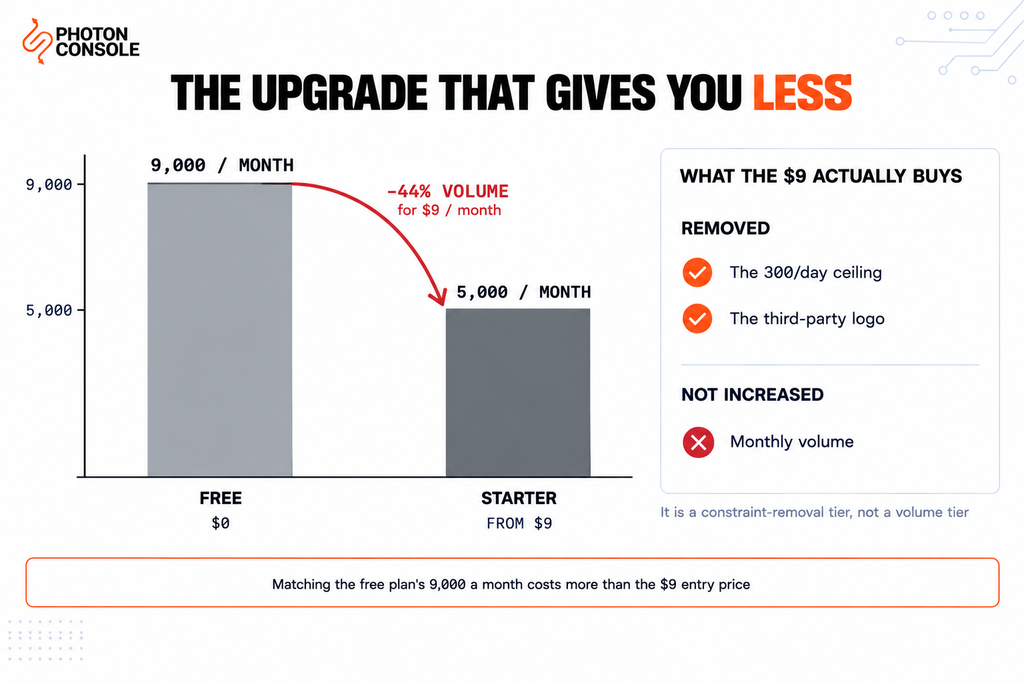
Here is the comparison worth sitting with.
The free plan gives you 9,000 emails a month, by Brevo’s own arithmetic. Starter’s entry tier gives you 5,000 emails a month, for $9.
Upgrading from free to the first paid tier therefore reduces your monthly allowance by 4,000 emails — 44% less volume — while introducing a bill.
| Free | Starter (from $9) | |
|---|---|---|
| Monthly volume | 9,000 | 5,000 |
| Daily cap | 300 | None |
| Largest single-day send | 300 | Up to your monthly total |
| Brevo logo | Present | Removed |
| Monthly cost | $0 | From $9 |
Once you see it laid out, the pricing makes sense — it is simply not a volume upgrade. At $9 you are buying two constraints removed: the daily ceiling and the branding. The volume figure goes down because volume was never what you were short of.
That is worth knowing before you upgrade expecting more headroom, because you will get less. Starter’s price scales with volume from that $9 entry point, so matching the free plan’s 9,000 a month costs more than $9.
Quick Fix
Deciding Whether to Upgrade or Move
- Find your heaviest single day in the last three months, not your monthly average
- Under 300 a day and happy with the branding? The free plan is genuinely fine — stay
- Over 300 on your peak day? You need the daily cap removed, which is what Starter sells
- Sending account security email? Price the branding as a trust cost, not a cosmetic one
- Compare Starter’s cost at your volume, not at its $9 entry volume of 5,000
The Gap in the Middle of the Range
One structural point if you expect to grow. Standard is listed from $18 a month at 5,000 emails. Professional is listed from $499 a month at 150,000.
That is roughly 28 times the price for 30 times the volume, with nothing listed between them. A product sending 30,000 emails a month — a perfectly ordinary volume for a small SaaS — sits in that gap with no tier designed for it. In practice you scale Standard’s volume upward, and the right question becomes what Standard actually costs at 30,000 rather than at its entry point.
Work that figure out from Brevo’s pricing page with your real volume before committing, and compare it against a flat per-thousand rate at the same volume. Our analysis of pay-per-use versus subscription pricing covers how to run that comparison properly.
When Brevo’s Free Plan Is the Right Choice
It genuinely is, for a specific and not uncommon profile, and it is worth being clear about this rather than arguing otherwise.
If your sending is low and smooth, if you do not send security-sensitive mail, and if branding in your emails does not matter to you, a permanent 9,000 a month for nothing is a better deal than most free tiers — including ours. PhotonConsole includes 5,000 emails a month free, which is less monthly volume than Brevo’s free plan offers.
Where the comparison turns is on the two constraints. A flat per-thousand rate has no daily ceiling, so a burst is just a busy hour rather than a three-day backlog, and there is no third-party branding in a password reset at any volume. Past the free allowance, pricing is $0.50 per thousand — so 9,000 emails a month costs about $2, and 30,000 about $12.50, with no tier boundary in between.
That is the honest shape of the choice: Brevo’s free plan wins on free monthly volume, and a usage-based relay wins on burst capacity, branding and cost once you are paying at all.
Moving the Sending Path
Brevo offers SMTP, so this is a credential change rather than a rewrite.
# Before
SMTP_HOST=smtp-relay.brevo.com
SMTP_PORT=587
SMTP_USER=your_brevo_login
SMTP_PASS=your_brevo_smtp_key

# After
SMTP_HOST=smtp.photonrelay.com
SMTP_PORT=587
SMTP_USER=your_project_api_user
SMTP_PASS=your_secret_api_key
If your configuration still references smtp-relay.sendinblue.com, that is the pre-rebrand hostname — worth checking, because an old integration may be pointing at a legacy name.
Two things improve immediately. Any throttling logic written to spread sends across the day can go, and the branding question disappears from your transactional templates.
Authentication records
# During migration — both authorised in ONE record
v=spf1 include:spf.brevo.com include:relay.photonconsole.com ~all
CNAME photon._domainkey dkim.photonconsole.comTake Brevo’s exact include string from your own Brevo dashboard rather than from this article, since it has changed with the rebrand. Add the new include to the same record — a second TXT record beginning v=spf1 breaks authentication rather than combining — and mind the ten-lookup ceiling that RFC 7208 places on SPF evaluation.
Receivers including Gmail expect aligned SPF and DKIM on transactional mail. Our guide to SPF, DKIM and DMARC covers alignment, and the free email deliverability checker shows what your domain publishes today.
PhotonConsole issues credentials on signup, so you can run a real burst through the new path the same day and see whether the daily ceiling was the thing holding you back.
Pro Tips
- Measure your peak day, not your month. A daily cap is only ever broken by a single day.
- Price branding as a trust cost on security email. An unrecognised logo on a password reset suppresses clicks and invites spam reports.
- Do not assume upgrading means more volume. Brevo’s first paid tier lists less monthly volume than its free plan.
- Get the quote at your own volume. Every published price is an entry point that scales.
- Check for legacy hostnames. Older integrations may still point at the pre-rebrand Sendinblue endpoints.
- Verify before any cutover. MXToolbox checks the combined SPF record, and Mail Tester scores a real send end to end.
Related Reading
- Free SMTP servers — the wider survey of free options and their constraints
- SendGrid free tier limits — a free tier that expires rather than caps
- Transactional versus marketing email — why branding matters differently for each
- Pay-per-use versus subscription pricing
- Emails arriving late — what a daily cap looks like to a user
- Improving email deliverability
Frequently Asked Questions
How many emails can I send on Brevo’s free plan?
300 per day, which Brevo states as 9,000 per month. It is a forever free plan with no credit card required, rather than a trial.
Does Brevo’s free plan put branding in my emails?
Brevo sells branding removal as a paid feature — Starter lists “No Brevo logo” and Standard offers to remove the “Sent with Brevo” footer — which indicates the free plan carries both.
Does the free plan expire?
No. Unlike time-boxed free tiers, Brevo’s is described as forever free. The constraints are the daily cap and the branding rather than a deadline.
Is 300 a day the same as 9,000 a month?
Only if your sending is perfectly even. Any day that exceeds 300 spills over rather than borrowing from a quieter day, so bursty transactional traffic gets far less than 9,000 of usable capacity.
Does upgrading to Starter give me more emails?
Fewer, at the entry tier. Starter lists 5,000 a month against the free plan’s 9,000. What $9 buys is the removal of the daily cap and the branding, not additional volume.
What happens when I hit the 300 daily limit?
Further sending is blocked until the allowance resets. For transactional mail that means the message does not reach the user when they need it, which is a delivery failure in practice.
Why is there no plan between $18 and $499?
Standard’s listed entry volume is 5,000 and Professional’s is 150,000. In between you scale Standard upward, so ask what Standard costs at your actual volume rather than reading the entry price.
Is switching away from Brevo difficult?
If you send over SMTP, it is a change of host, port, username and password. Check whether your configuration still uses the legacy Sendinblue hostname.
Conclusion
Brevo’s free plan is one of the more honest free offers in email: permanent, no card required, and 9,000 emails a month is real volume. If your sending is low and smooth and your emails are not about anyone’s account security, it is a good deal and there is no reason to move.
The two constraints are what decide it. A 300-a-day ceiling turns a thousand-email burst into a three-day backlog, which for a password reset is indistinguishable from failure. And third-party branding on account email is not a cosmetic issue — it is a reason for a cautious user to treat your message as phishing.
The upgrade path is where most people are surprised. The first paid tier lists less monthly volume than the free plan, because what you are buying at $9 is the removal of those two constraints rather than more capacity. Knowing that in advance makes the decision clearer: if the daily cap and the branding are your problem, that is exactly what Starter fixes, and if volume is your problem, a reliable SMTP provider on a flat per-thousand rate removes the ceiling, the branding and the tier boundaries at once. Work out your heaviest day, price both at your real volume, and the answer falls out.