Your plan is $35 a month for 50,000 emails. Last month you sent 60,000, and the invoice came to $48.
That extra $13 is worth staring at. Your first 50,000 emails cost 70 cents per thousand. The next 10,000 cost $1.30 per thousand — nearly double the rate you thought you were paying.
This is the part of Mailgun’s pricing that catches people, and it is not hidden. It is simply never presented as a rate comparison, so almost nobody does the division.
Quick Answer: What Does Mailgun Cost?
Mailgun’s published plans, from its pricing page:

| Plan | Monthly price | Emails included | Overage per 1,000 |
|---|---|---|---|
| Free | $0 | 100 per day | Not listed |
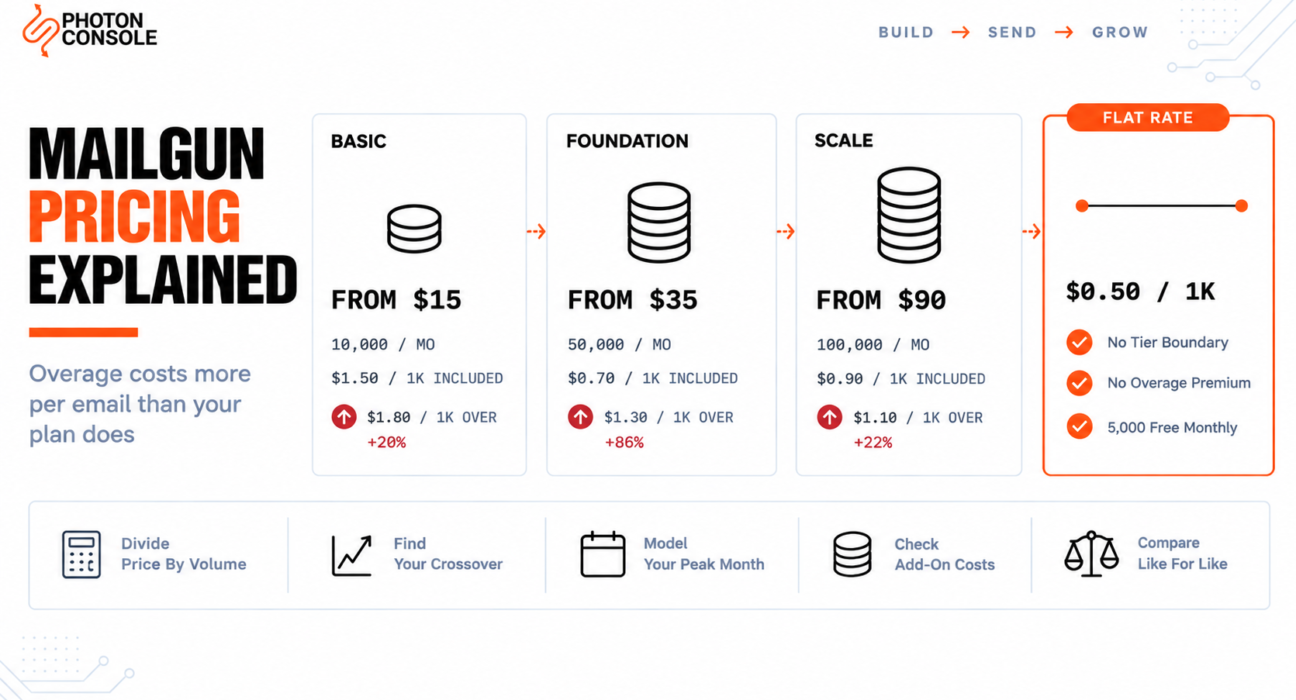
| Basic | From $15 | 10,000 per month | From $1.80 |
| Foundation | From $35 | 50,000 per month | From $1.30 |
| Scale | From $90 | 100,000 per month | From $1.10 |
Note the word “from” on every price. Mailgun lists these as starting prices, which means the figure for your configuration may be higher. Foundation and Scale are also advertised with a first month free.
Prices change, so treat the table above as a snapshot and confirm against Mailgun’s own page before deciding anything.
The Overage Premium Nobody Calculates
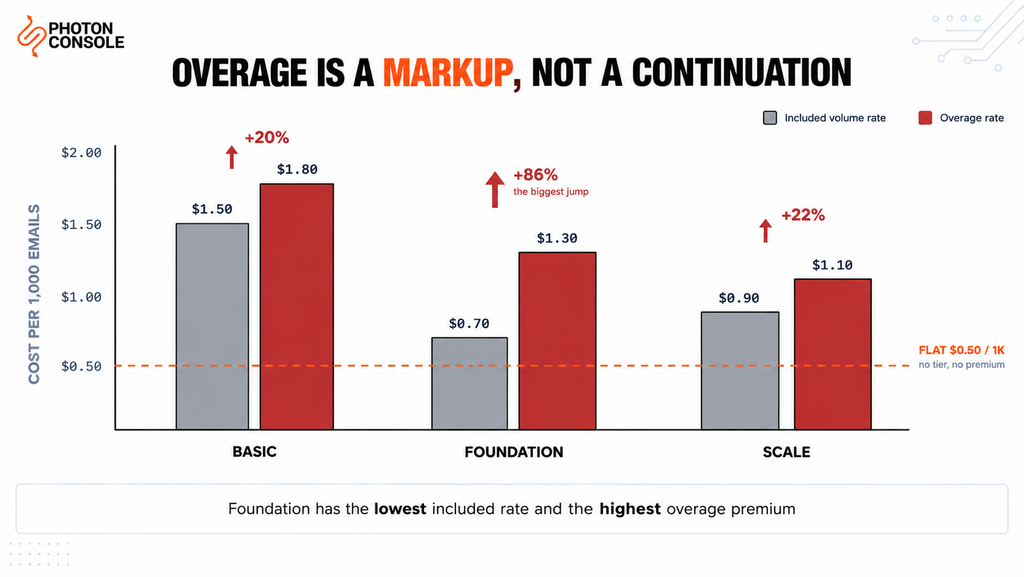
Divide each plan’s price by its included volume and you get the effective rate you are actually paying. Compare that against the overage rate and the structure becomes clear.
| Plan | Effective included rate | Overage rate | Overage premium |
|---|---|---|---|
| Basic | $1.50 per 1,000 | $1.80 per 1,000 | 20% more |
| Foundation | $0.70 per 1,000 | $1.30 per 1,000 | 86% more |
| Scale | $0.90 per 1,000 | $1.10 per 1,000 | 22% more |
Two things stand out.
First, overage is never a continuation of your rate — it is always a markup on it. Going over is priced as a penalty rather than as additional consumption.
Second, and less obviously, Foundation has the best included rate and the worst overage premium. At 70 cents per thousand it is the cheapest email on the published list. Exceed it and you pay $1.30 — a premium of 86%. The plan that looks most efficient punishes overage hardest.
Common Mistake
Choosing a plan by its effective included rate and treating overage as a minor rounding item. Foundation’s 70 cents per thousand is genuinely good value — right up to 50,000 emails. The rate on email 50,001 is $1.30, which is worse than the Basic plan’s included rate and only slightly better than Basic’s overage. If your volume is variable month to month, the plan with the best headline rate may cost you more than the tier above it.
When Upgrading Is Cheaper Than Going Over
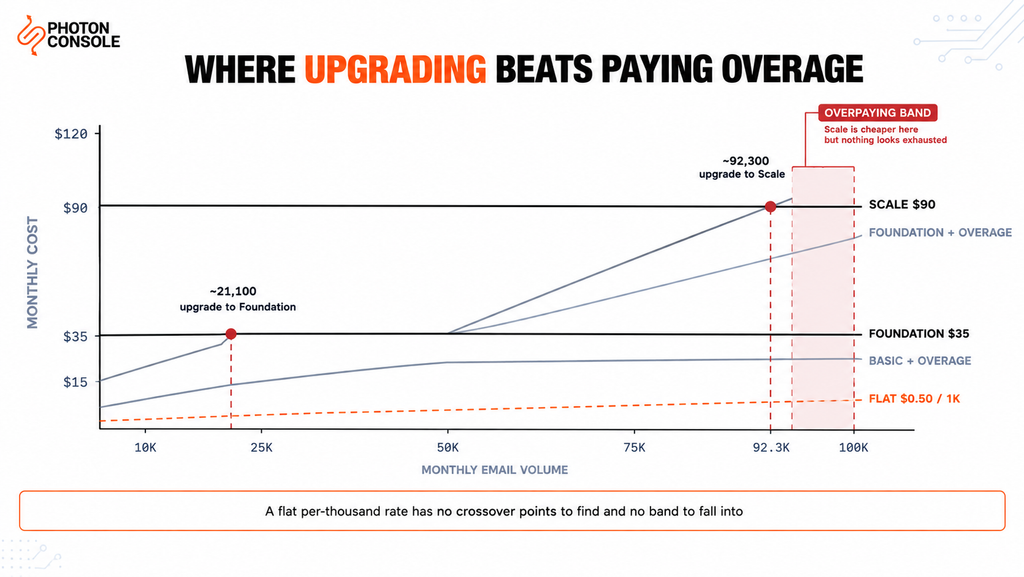
Because overage carries a premium, there is a volume at which paying it costs more than simply moving to the next tier. Those crossover points are where the money is.
| If you are on | Paying overage costs more than upgrading above | Upgrade to |
|---|---|---|
| Basic ($15, 10,000) | ~21,100 emails per month | Foundation ($35) |
| Foundation ($35, 50,000) | ~92,300 emails per month | Scale ($90) |
The second row contains the useful surprise. Scale includes 100,000 emails, but Foundation plus overage becomes more expensive than Scale at roughly 92,300 — well before Foundation’s allowance is anywhere near Scale’s ceiling.
So there is a band between about 92,300 and 100,000 emails a month where you should already be on Scale, even though nothing in your account looks like it has run out. Nothing warns you about this band. You simply pay more than you need to until someone does the arithmetic.
Quick Fix
Work Out Whether You Are in the Overpaying Band
- Take your highest-volume month from the last six, not your average
- On Basic: if that figure is above ~21,100, Foundation is cheaper even unused
- On Foundation: if it is above ~92,300, Scale is cheaper despite costing $55 more
- Recompute whenever Mailgun changes its rates — the crossover moves with them
- Check whether a single spike month, not your baseline, is what pushed you over
Quick Fix
This Month’s Invoice Is Higher Than Expected
- Find your billable volume for the month, not your application’s sent count — they differ
- Subtract your plan’s included allowance; the remainder is what was charged at the overage rate
- Check whether validation usage is on the same invoice — it is metered per hundred, not per thousand
- Look for retries and multi-recipient sends inflating the billable count
- If this is a recurring pattern rather than one spike, you are past your crossover point
What It Costs at 100,000 and 500,000
These are the two volumes worth modelling, because they are where most teams either settle or start negotiating.
| Monthly volume | Basic + overage | Foundation + overage | Scale + overage |
|---|---|---|---|
| 100,000 | $177 | $100 | $90 |
| 500,000 | $897 | $620 | $530 |
At 100,000 the answer is simply Scale, which is what its allowance is sized for.
At 500,000 every published option is expensive, and that is the point rather than a criticism. The figures show why you would not stay on Scale at that volume — $530 a month of which $440 is overage. In practice Mailgun offers higher tiers and custom pricing above its published plans, and anyone sending half a million emails a month should be talking to their sales team rather than absorbing overage. Treat the $530 as the cost of not having that conversation.
Note
Every figure in the two tables above is calculated from Mailgun’s published plan prices and overage rates, using the lowest “from” price in each case. Because those prices are starting figures, your actual bill may be higher. The arithmetic is simple enough to redo with your own numbers: plan price, plus the volume above your allowance divided by 1,000, multiplied by the overage rate. Do it with your real peak month rather than your average.
The Add-Ons
Two add-ons change the total enough to matter.
Email validation is priced separately and metered in hundreds rather than thousands. Overage runs from $1.20 per 100 validations on the lower tiers and from $0.80 per 100 on Scale, which includes 5,000 validations. Note the unit: $1.20 per 100 is $12 per thousand, an order of magnitude above the email rate. Validation is useful, and it is not a rounding item.
Dedicated IPs are listed at $59 per IP per month for additional IPs. Mailgun’s page indicates one is included with certain higher plans, though the plan names in that section did not map cleanly onto the published tier names when we checked — so confirm eligibility for your specific plan rather than assuming it.
If you are weighing a dedicated IP at all, the decision is about volume and consistency rather than cost. Our guides to dedicated versus shared IP and IP warming cover when a dedicated IP helps and when it actively hurts.
What You Are Actually Buying
It would be easy to read the above as an argument that Mailgun is expensive. That is not quite the right conclusion, and being precise about it matters if you are making a real decision.
Mailgun is a mature product with strong deliverability tooling, detailed analytics, inbound routing, and validation built in. The plan structure bundles things that other providers charge for separately or do not offer. If you use the validation allowance, want the analytics, and value a dedicated IP included rather than added, the effective value is better than the per-email rate suggests.
The honest criticism is narrower and it is about shape, not level. Tiered pricing with premium overage means your bill moves in steps that do not track your usage, and the step is steepest exactly when you are growing. A month 20% over allowance costs considerably more than 20% extra.
| Consideration | Tiered plans with overage | Pay-as-you-use |
|---|---|---|
| Cost at steady, predictable volume | Good — pick the right tier | Good — tracks usage |
| Cost in a spike month | Overage premium applies | Same rate as any other email |
| Budget predictability | Fixed, until you exceed it | Variable, but proportional |
| Risk of overpaying | Unused allowance is spent | None — you pay for sends |
| Bundled extras | Often included in higher tiers | Usually priced separately |
Neither model is better in the abstract. Tiers suit stable volume with a known ceiling. Usage pricing suits variable or growing volume, because a spike costs the same per email as a quiet week.
For a direct comparison on send cost alone: PhotonConsole charges a flat $0.50 per 1,000 with 5,000 free each month, which works out at roughly $47.50 for 100,000 emails and $247.50 for 500,000. That is send cost only, and it excludes the validation allowance and bundled dedicated IP that Mailgun’s higher tiers include — so compare against what you actually use rather than against the headline.
How to Model Your Own Cost Properly
Three corrections to how most teams do this.
Use your peak month, not your average. Overage is charged on the month it happens, so an average hides exactly the months that cost you money.
Model three times your current volume. Today’s price tells you little. The question is what the model does as you grow, and tiered pricing changes character at each boundary.
Count recipients and retries, not sends. Your application’s “emails sent” counter and your provider’s billable count are rarely the same number. Retries, multi-recipient messages and system notifications all land on the invoice.
# Mailgun monthly cost
cost = plan_price + max(0, volume - included) / 1000 * overage_rate

# Pay-as-you-use monthly cost
cost = max(0, volume - free_allowance) / 1000 * rate

# Run both at:  last month  |  peak month  |  3x peak
#
# PhotonConsole has no tier boundary, so the second
# formula gives the same rate at every volume.
Our analysis of pay-per-use versus subscription pricing works through the total cost of ownership comparison, and sending 100,000 emails a month without overpaying covers that volume specifically.
If You Decide to Move
Mailgun offers SMTP, so switching is a credential change rather than a rewrite — unless you integrated through its HTTP API, in which case the sending code needs replacing.
# Before
SMTP_HOST=smtp.mailgun.org
SMTP_PORT=587
SMTP_USER=postmaster@mg.yourdomain.com
SMTP_PASS=your_mailgun_smtp_password

# After
SMTP_HOST=smtp.photonrelay.com
SMTP_PORT=587
SMTP_USER=your_project_api_user
SMTP_PASS=your_secret_api_key
Take your suppression list with you. Whatever you have accumulated about addresses that hard-bounced is real deliverability value, and mailing them again from a new path undoes the move on day one.
# During migration — both authorised in ONE record
v=spf1 include:mailgun.org include:relay.photonconsole.com ~all
CNAME photon._domainkey dkim.photonconsole.comAdd the new include to the existing record rather than publishing a second one — two TXT records starting v=spf1 break authentication entirely. Keep both while you run in parallel, and mind the ten-lookup ceiling that RFC 7208 places on SPF evaluation.
Receivers including Gmail expect aligned SPF and DKIM on transactional mail. Our guide to SPF, DKIM and DMARC covers alignment, and the free email deliverability checker shows what your domain publishes today.
Pro Tips
- Divide price by volume for every plan you consider. The effective rate is the only number that compares across providers.
- Find your crossover point and set an alert below it. Knowing the figure is useless if you only check the invoice.
- Treat validation as a separate budget line. Priced per hundred, it is roughly ten times the per-email rate.
- Model on your peak month. Averages hide the months you actually get billed for.
- Integrate over SMTP where you can. It keeps any future provider change a configuration edit rather than a sprint.
- Verify authentication before cutting over. MXToolbox checks the combined SPF record, and Mail Tester scores a real send end to end.
Related Reading
- Best Mailgun alternatives — if you have decided to move rather than model
- SendGrid versus Mailgun for a head-to-head comparison
- SendGrid free tier limits — the same decision from the free-tier side
- Amazon SES sending limits for the cheapest-per-email option and its trade
- Transactional email pricing across nine providers
- Pay-per-use versus subscription
Frequently Asked Questions
How much does Mailgun cost per month?
Published plans start from $15 for Basic with 10,000 emails, from $35 for Foundation with 50,000, and from $90 for Scale with 100,000. A free plan allows 100 emails per day. All prices are listed as starting figures.
What are Mailgun’s overage charges?
From $1.80 per 1,000 on Basic, from $1.30 on Foundation and from $1.10 on Scale. In every case the overage rate is higher than the effective rate of the plan’s included volume.
Why is my Mailgun bill higher than my plan price?
You exceeded your included volume and were charged overage. Because overage carries a premium of between 20% and 86% depending on tier, a small amount of extra sending produces a disproportionate increase.
When should I upgrade instead of paying overage?
On Basic, above roughly 21,100 emails a month. On Foundation, above roughly 92,300 — which is before Foundation’s own allowance looks exhausted relative to Scale’s ceiling.
What does a Mailgun dedicated IP cost?
Additional IPs are listed at $59 per IP per month. One is included with certain higher plans, but confirm eligibility for your specific tier on Mailgun’s pricing page.
How much is Mailgun email validation?
Validation overage runs from $1.20 per 100 on lower tiers and from $0.80 per 100 on Scale, which includes 5,000 validations. Priced per hundred, it is substantially more expensive per unit than sending.
What would 500,000 emails a month cost?
Staying on Scale and paying overage would come to about $530. At that volume you would normally move to a higher or custom plan instead, which is the practical lesson in the figure.
Is switching away from Mailgun difficult?
If you send over SMTP it is a change of host, port, username and password. If you integrated through the HTTP API, the sending code needs rewriting.
Conclusion
Mailgun’s pricing is not expensive so much as stepped, and the steps have a premium built into them. Every tier charges more per email for overage than for included volume — 20% more on Basic, 22% on Scale, and 86% on Foundation, the tier with the best headline rate.
That produces two actionable numbers. Above roughly 21,100 emails a month, Foundation costs less than Basic plus overage. Above roughly 92,300, Scale costs less than Foundation plus overage — which means there is a band where you are overpaying while nothing in your account appears to be running out.
If your volume is stable and you use the bundled validation and analytics, a correctly chosen tier is good value and the arithmetic above is simply how you choose it. If your volume is variable or growing, the shape works against you, and usage-based pricing removes the penalty on the months you grow fastest. A reliable SMTP provider charging a flat rate per thousand means a spike month costs proportionally more and nothing else — no tier boundary, no overage multiplier, and no band where you quietly overpay. Run both models against your own peak month and the right answer will be obvious.