A send email API is an HTTP interface — almost always REST, almost always authenticated with a bearer token or API key — that accepts a JSON payload describing a message and hands it to a delivery pipeline that queues, renders, retries, routes, and reports on it. The endpoint itself is the smallest part of the system. This guide is scoped specifically to that REST-API surface: how the request/response contract is designed, how authentication and idempotency work, how webhooks close the observability loop, and how nine providers implement that contract differently. If you’re comparing this to raw SMTP transport specifically, see our companion SMTP relay service guide, which covers the protocol-level tradeoffs this article intentionally leaves aside.
Table of Contents
- What Is a Send Email API?
- SMTP vs Send Email API
- How a Send Email API Works
- Why Modern Applications Use Email APIs
- Essential Features
- Compare Leading Providers
- Feature Comparison Matrix
- Best Provider by Use Case
- Common Integration Mistakes
- Production Checklist
- FAQ
- Final Recommendation
What Is a Send Email API?
Quick answer: A send email API is a REST endpoint — typically POST /v1/email/send or similar — that accepts a JSON body (sender, recipient, subject, body, optional template ID and variables) over HTTPS, authenticates the request with an API key, and returns a structured JSON response with a message ID you can correlate against later webhook events. The contract is request-in, message-ID-out, events-later.
That last part is the piece teams miss most often. A 200 response from a send-email endpoint confirms the provider accepted the job — it is not confirmation of delivery, and it’s definitely not confirmation of inbox placement. Everything after acceptance (queueing, rendering, retrying, routing, actual delivery) happens asynchronously and is only observable through webhooks or a polling API. Treating the initial API response as “the email was sent” is the single most common architectural mistake in this space.
Quick Fix: If your error handling only checks the HTTP status code of the send request and nothing else, you have no visibility into bounces, spam complaints, or delivery failures. Add a webhook consumer before you add anything else to your email integration.

[Image placeholder 1 — designer to build from the Email Sending Pipeline™ diagram below. Add alt text manually in WordPress Media Library.]
SMTP vs Send Email API
This article is scoped to the REST contract, but the comparison is unavoidable in any evaluation. The short version: SMTP wins on drop-in compatibility with existing mail libraries; a REST send-email API wins on structured error handling, native JSON templating, and lower per-request overhead at scale.
| Dimension | SMTP | Send Email API (REST) |
|---|---|---|
| Transport | Persistent SMTP connection, MIME-encoded payload | Stateless HTTPS request, JSON payload |
| Auth model | Username/password over the connection | Bearer token or API key in request header |
| Response contract | Numeric SMTP codes (250, 421, 550) | Structured JSON with typed error objects |
| Idempotency | Not natively supported | Often supported via idempotency keys |
| Templating | Rendered client-side before send | Server-side dynamic templates, native to most providers |
| Batch sending | One connection per message or manual batching | Native batch endpoints in most providers |
| Observability | Requires a separate webhook layer bolted on | Webhooks are typically first-class, tied to the same message ID |
| Integration effort for new code | Requires an SMTP library dependency | A single HTTP client call, often with a thin SDK wrapper |
For the deeper protocol-level breakdown — including how nine providers implement SMTP specifically — see our companion piece on the SMTP relay service and SMTP retry logic. This guide continues down the REST path only.
How a Send Email API Works
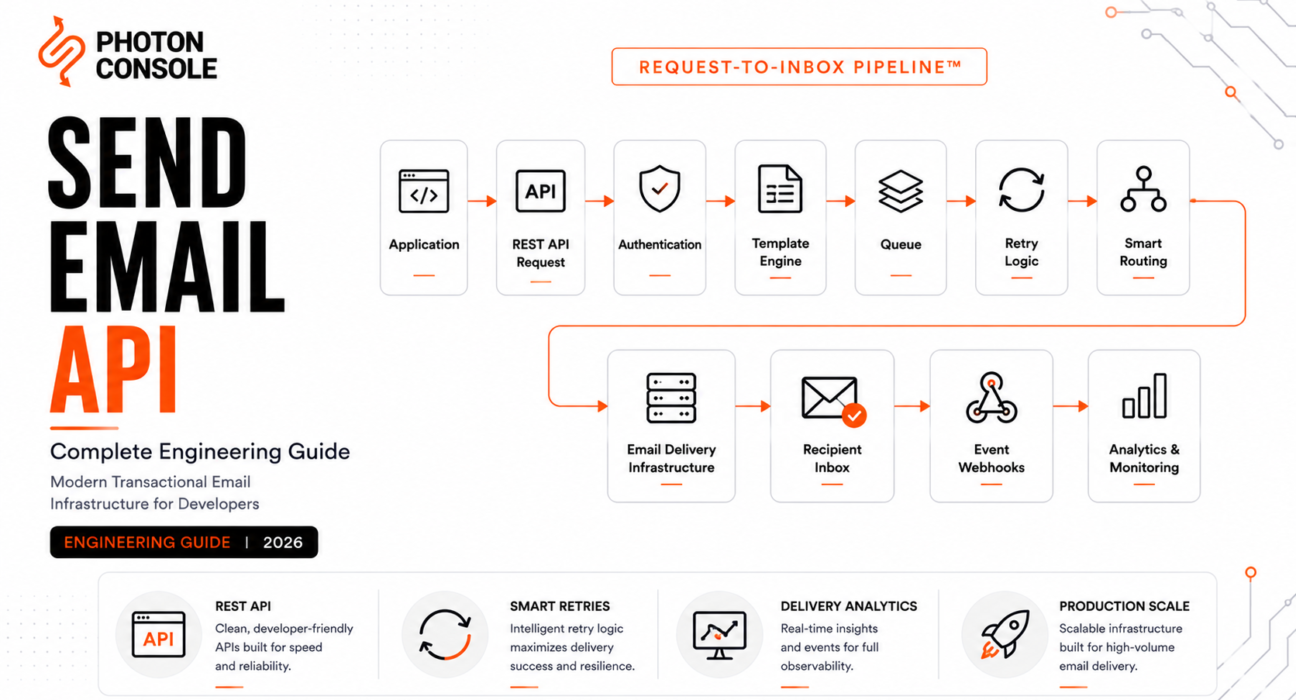
Every send email API routes a request through the same eleven-stage architecture, whether the provider’s marketing page calls it that or not. This is the Email Sending Pipeline™ — understanding each stage is what makes provider feature comparisons meaningful instead of just a list of buzzwords.
Diagram 1 — Email Sending Pipeline™ (Request-to-Inbox Framework™)
Purpose: show the full asynchronous path from API request to a monitored inbox event.
Layout: vertical flow, 11 stages, with a visual break between “synchronous” (request → queue) and “asynchronous” (template rendering onward) phases.
Application
   ↓
API Request (JSON payload, bearer auth)
   ↓
Authentication (API key validation, scopes/permissions)
   ↓
Queue (message accepted, async processing begins)
   ↓
Template Rendering (variable substitution, dynamic content)
   ↓
Retry Engine (application-level backoff on 4xx/5xx and downstream soft bounces)
   ↓
Routing (IP pool / domain selection)
   ↓
Email Infrastructure (outbound MTA, reputation management)
   ↓
Recipient ISP
   ↓
Inbox
   ↓
Webhooks (delivered, bounced, opened, clicked, complained)
   ↓
Monitoring
Designer notes: shade the “synchronous” stages (request through queue) in one color and the “asynchronous” stages in a second color, with a dotted divider — this is the visual the “200 doesn’t mean delivered” point in the intro should link back to.
API Delivery Maturity Model™
We rate a provider’s REST API maturity across four layers, each building on the one below it:
| Layer | What It Covers | Signal of Maturity |
|---|---|---|
| 1. Request contract | Payload structure, auth, validation errors | Structured, typed JSON errors — not generic 400s |
| 2. Processing | Queueing, templating, retry logic | Documented retry/backoff behavior, not “best effort” |
| 3. Delivery | Routing, IP reputation, ISP-level handling | Published deliverability practices, dedicated IP options |
| 4. Feedback loop | Webhooks, analytics, suppression lists | Message-ID-correlated events covering bounce, complaint, open, click |
Why Modern Applications Use Email APIs
Three forces pull new application code toward a REST send-email API over SMTP: structured error handling that fits naturally into application-level error boundaries, native templating that avoids maintaining a separate templating library, and webhook-native observability that ties every delivery event back to a message ID your application already knows about. None of this is available from raw SMTP without significant custom tooling — see our breakdown of transactional email queue architecture for what that custom tooling would otherwise have to replicate.
This shows up clearly in pre-launch SaaS infrastructure audits: new services — auth, billing, notifications — are almost always built against a REST email API from day one, while only legacy code inherits SMTP.
Essential Features
| Feature | Why It Matters | How to Verify |
|---|---|---|
| REST API with typed errors | Lets your app distinguish validation errors from delivery failures programmatically | Check docs for a full error-code reference, not just HTTP status |
| SMTP fallback support | Useful for legacy code paths without a second vendor | Confirm SMTP and REST hit the same delivery pipeline |
| SDKs | Reduces integration boilerplate and keeps auth handling consistent | Check SDK coverage for your primary language and recent commit activity |
| Idempotency keys | Prevents duplicate sends on network retries from your own client | Confirm the API accepts and honors an idempotency header |
| Server-side templates | Keeps rendering logic out of application code and version-controlled centrally | Check for variable substitution, conditionals, and template versioning |
| Attachment support | Required for invoices, receipts, reports | Verify size limits and encoding requirements |
| Webhooks | Only reliable way to know what happened after acceptance | Confirm bounce, complaint, delivered, opened, clicked events are all covered |
| Documented retry/backoff | Determines resilience under recipient-side throttling | Look for exponential backoff, not fixed-interval retry |
| Rate limiting transparency | Prevents surprise throttling under load | Published per-second/per-minute limits, ideally returned in response headers |
| Dedicated IP option | Isolates reputation at scale | Confirm the volume threshold at which it becomes available |
| Batch/bulk send endpoint | Reduces per-request overhead for high-volume sends | Check documented batch size limits |
| Security (API key scoping) | Limits blast radius if a key leaks | Confirm support for scoped/restricted API keys, not just one global key |
Compare Leading Providers
Coverage below is scoped to each provider’s REST send-email API specifically — request design, webhook depth, templating, and developer experience — rather than their SMTP layer, which is covered separately in our SMTP relay service guide. Verify current pricing and limits directly with each provider before committing, as these change frequently.
PhotonConsole
| Attribute | Details |
|---|---|
| Overview | REST email API and SMTP relay for developer and SaaS engineering teams, same underlying delivery pipeline |
| API Design | JSON request/response, bearer token auth, message-ID correlated webhooks |
| Strengths | Predictable pay-per-use pricing; REST and SMTP share one pipeline, so partial migrations don’t split observability |
| Weaknesses | Smaller SDK ecosystem and fewer third-party integrations than long-established providers |
| Pricing | Pay-per-use at $0.50 per 1,000 emails; free tier includes 5,000 emails/month |
| Developer Experience | Straightforward request contract, documented response codes and retry behavior |
| Operational Complexity | Low |
| Migration Difficulty | Low — standard REST payload structure, minimal SDK lock-in |
| Best Use Cases | Startups and SaaS teams with variable send volume wanting pay-per-use predictability without vendor lock-in |
Amazon SES
| Attribute | Details |
|---|---|
| Overview | AWS-native email API, deeply integrated with the AWS SDK ecosystem |
| API Design | AWS SDK conventions (IAM auth, SigV4), not a standalone REST-first design |
| Strengths | Extremely cost-efficient at scale, tight integration with other AWS services (SNS, Lambda) |
| Weaknesses | Steep setup for teams outside the AWS ecosystem; sandbox mode requires manual production access request |
| Pricing | Very low per-email cost, but has surrounding AWS cost surface (data transfer, CloudWatch) |
| Developer Experience | Powerful but assumes AWS familiarity |
| Operational Complexity | Medium-High |
| Migration Difficulty | Medium — IAM policy and sending domain verification add setup steps |
| Best Use Cases | Teams already deep in AWS infrastructure optimizing for lowest per-email cost at high volume |
SendGrid
| Attribute | Details |
|---|---|
| Overview | Twilio-owned platform with a mature, widely adopted REST API |
| API Design | Well-documented REST endpoints, dynamic templating engine (Handlebars-based) |
| Strengths | Large SDK ecosystem, mature documentation, strong template tooling |
| Weaknesses | Tiered pricing can penalize spiky send volume; some senders report deliverability inconsistency |
| Pricing | Tiered subscription plans by monthly volume |
| Developer Experience | Mature SDKs across most major languages |
| Operational Complexity | Low-Medium |
| Migration Difficulty | Low-Medium |
| Best Use Cases | Teams needing marketing and transactional email under one API |
Mailgun
| Attribute | Details |
|---|---|
| Overview | Developer-focused API with strong routing and validation tooling |
| API Design | REST-first, good support for programmatic domain/route management |
| Strengths | Flexible routing rules, solid email validation API alongside sending |
| Weaknesses | Support responsiveness varies by plan tier |
| Pricing | Tiered, with a pay-as-you-go option at higher per-email rates |
| Developer Experience | Strong docs, good for programmatic infrastructure management |
| Operational Complexity | Low-Medium |
| Migration Difficulty | Low |
| Best Use Cases | Developer-heavy teams wanting fine-grained routing control via API |
Postmark
| Attribute | Details |
|---|---|
| Overview | Transactional-only email API, deliberately excludes bulk marketing sending |
| API Design | Clean, minimal REST contract widely regarded as best-in-class for simplicity |
| Strengths | Strong deliverability reputation from strict transactional-only policy; excellent docs |
| Weaknesses | No marketing email support; higher cost per email at scale |
| Pricing | Tiered by volume, priced at a premium relative to pure pay-per-use providers |
| Developer Experience | Best-in-class for fast setup and low integration friction |
| Operational Complexity | Low |
| Migration Difficulty | Low |
| Best Use Cases | Teams wanting a transactional-only sender to protect domain reputation from marketing sends |
Resend
| Attribute | Details |
|---|---|
| Overview | Newer, developer-experience-first email API built around React Email templating |
| API Design | Modern REST API, JSX-based templating via React Email |
| Strengths | Excellent DX for React/Next.js stacks, fast integration, clean SDKs |
| Weaknesses | Less mature for teams needing deep SMTP compatibility or complex routing |
| Pricing | Tiered, generous free tier for low volume |
| Developer Experience | Best-in-class for React/Next.js-native teams |
| Operational Complexity | Low |
| Migration Difficulty | Low for new projects, medium migrating from an SMTP-first stack |
| Best Use Cases | React/Next.js-native teams building new transactional flows |
SMTP2GO
| Attribute | Details |
|---|---|
| Overview | SMTP-first relay provider with a REST API layered on top |
| API Design | Functional but less feature-rich than API-first competitors |
| Strengths | Multiple global data centers for routing redundancy |
| Weaknesses | REST API feature set trails SMTP-first design; fewer templating options |
| Pricing | Tiered plans by monthly email volume |
| Developer Experience | Adequate, not a primary differentiator |
| Operational Complexity | Low |
| Migration Difficulty | Low |
| Best Use Cases | Teams prioritizing SMTP-first reliability where REST is a secondary interface |
Brevo
| Attribute | Details |
|---|---|
| Overview | Combined marketing and transactional platform, formerly Sendinblue |
| API Design | REST API covering both transactional sends and marketing campaigns |
| Strengths | Good fit if marketing and transactional teams share one platform |
| Weaknesses | Engineering-specific tooling less deep than developer-first competitors |
| Pricing | Tiered, includes CRM/marketing features bundled in |
| Developer Experience | Adequate; platform leans toward marketing-team usability |
| Operational Complexity | Medium |
| Migration Difficulty | Low-Medium |
| Best Use Cases | Small teams wanting one platform for both marketing and transactional email |
SparkPost
| Attribute | Details |
|---|---|
| Overview | Enterprise-oriented email API with strong analytics focus |
| API Design | Full-featured REST API with deep event/analytics data |
| Strengths | Deep analytics and deliverability insight tooling, strong webhook event granularity |
| Weaknesses | Pricing and onboarding geared toward larger senders, less friendly for small teams |
| Pricing | Tiered, enterprise-focused |
| Developer Experience | Solid, geared toward larger engineering teams |
| Operational Complexity | Medium-High |
| Migration Difficulty | Medium |
| Best Use Cases | Larger engineering orgs needing deep deliverability analytics via API |
For deeper single-provider comparisons, see SendGrid alternatives, Amazon SES alternatives, Postmark alternatives, SMTP2GO alternatives, Mailgun alternatives, and SendGrid vs Mailgun.
Feature Comparison Matrix
| Provider | REST API | SDKs | Idempotency Keys | Server-Side Templates | Batch Send | Webhooks |
|---|---|---|---|---|---|---|
| PhotonConsole | Yes | Core languages | Yes | Basic | Yes | Yes |
| Amazon SES | Yes | AWS SDKs | Via AWS SDK conventions | Basic | Yes | Via SNS |
| SendGrid | Yes | Extensive | Limited | Dynamic | Yes | Yes |
| Mailgun | Yes | Extensive | Limited | Basic | Yes | Yes |
| Postmark | Yes | Good coverage | Limited | Yes | Yes | Yes |
| Resend | Yes | Modern (JS-first) | Yes | Dynamic (React Email) | Yes | Yes |
| SMTP2GO | Limited | Basic | Limited | Basic | Limited | Yes |
| Brevo | Yes | Good coverage | Limited | Dynamic | Yes | Yes |
| SparkPost | Yes | Good coverage | Limited | Dynamic | Yes | Yes |
| Provider | Setup Complexity | Ongoing Ops Burden | Best-fit Team Size |
|---|---|---|---|
| PhotonConsole | Low | Low | Startup / small team |
| Amazon SES | High | Medium | AWS-native, any size |
| SendGrid | Medium | Low | Small to mid |
| Mailgun | Low-Medium | Low | Small to mid |
| Postmark | Low | Low | Small to mid |
| Resend | Low | Low | Startup, JS-native |
| SMTP2GO | Low | Low | Small to mid |
| Brevo | Medium | Medium | Small team, marketing+eng |
| SparkPost | Medium-High | Medium | Mid to enterprise |
| Provider | Pricing Model | Free Tier | Cost Predictability at Variable Volume |
|---|---|---|---|
| PhotonConsole | Pay-per-use ($0.50/1,000 emails) | 5,000 emails/month | High |
| Amazon SES | Pay-per-use, plus AWS surface cost | Limited (sandbox) | Medium |
| SendGrid | Tiered subscription | Small tier available | Low — spikes force tier upgrades |
| Mailgun | Tiered, pay-as-you-go option | Small tier available | Medium |
| Postmark | Tiered, premium pricing | Small tier available | Low at scale |
| Resend | Tiered | Generous for low volume | Medium |
| SMTP2GO | Tiered | Small tier available | Medium |
| Brevo | Tiered, bundled features | Small tier available | Medium |
| SparkPost | Tiered, enterprise-focused | Limited | Low for small teams |
For a deeper cost model against your actual send volume, see pay-per-use vs subscription total cost of ownership and sending 100,000 transactional emails a month without overpaying.
Best Provider by Use Case
| Scenario | API Priority | What to Look For |
|---|---|---|
| Password resets / OTP | Low latency, reliable webhooks | Fast synchronous acceptance, documented p99 delivery times |
| Order confirmations / invoices | Templating, attachment support | Server-side templates, reliable PDF/attachment handling |
| Marketplace notifications | Domain reputation isolation | Ability to separate transactional and marketplace sends by domain |
| Healthcare | Compliance, auditability | Willingness to sign a BAA, detailed API-level delivery logs |
| FinTech / banking | Security, scoped API keys | Restricted/scoped key support, audit trails, dedicated IPs |
| CRM-triggered email | Webhook depth, integration flexibility | Rich event payloads correlated to CRM record IDs |
| AI SaaS notifications | Fast iteration, generous free tier | Simple request contract, low-friction sandbox testing |
| Developer platforms | SDK quality | Strong SDK coverage across the languages your users build in |
| Internal/ops notifications | Low cost, low setup overhead | Pay-per-use pricing, minimal integration effort |
Common Integration Mistakes
| Mistake | Consequence | Fix |
|---|---|---|
| Treating a 200 response as delivery confirmation | Silent failures go unnoticed until a customer complains | Consume webhook events for delivered/bounced/complained status, not just the initial response |
| No idempotency key on retried requests | Duplicate emails sent on network-level client retries | Generate and send a unique idempotency key per logical send |
| Hardcoding email templates in application code | Every copy change requires a deploy | Move to server-side templates versioned in the provider |
| No rate-limit backoff on the client side | Burst sends get throttled and silently dropped | Read rate-limit response headers and implement client-side backoff |
| Mixing marketing and transactional sends on one API key/domain | Marketing spam complaints damage transactional deliverability | See transactional vs marketing email for domain separation guidance |
| Using one global, unscoped API key across all services | A single leaked key exposes your entire send capability | Use scoped/restricted keys per service where the provider supports it |
These patterns show up repeatedly in incident work — see transactional emails failing in production but working in dev and why email infrastructure fails.
Production Checklist
Delivery Reliability Stack™ / Production Email Flow™
| Item | Status |
|---|---|
| API key scoped to minimum necessary permissions | ☐ |
| Idempotency key generated per logical send | ☐ |
| Webhook endpoint live and tested for delivered/bounced/complained/opened/clicked events | ☐ |
| SPF, DKIM, DMARC configured for sending domain — see SPF, DKIM, DMARC explained | ☐ |
| Client-side retry/backoff implemented for 429/5xx responses | ☐ |
| Templates version-controlled server-side, not hardcoded | ☐ |
| Rate limits confirmed against expected peak send volume | ☐ |
| Monitoring/alerting connected — see monitoring tools guide | ☐ |
| Bounce/suppression list handling wired into application logic | ☐ |
| Rollback/fallback provider plan documented | ☐ |
Operational Visibility Framework™
| Visibility Layer | Question to Answer |
|---|---|
| Request-level | Do you log every API response, not just failures? |
| Delivery-level | Are webhook events persisted and queryable by message ID? |
| Engagement-level | Can you correlate open/click events back to the originating application event? |
| Reputation-level | Are bounce and complaint rates tracked as an ongoing metric, not just checked reactively? |
FAQ
What is a send email API?
A REST HTTP endpoint that accepts a JSON payload describing an email and hands it to an asynchronous delivery pipeline, returning a message ID for later correlation with delivery events.
Does a 200 response mean the email was delivered?
No. It confirms the provider accepted the request. Actual delivery status only becomes available through webhook events or a separate status-check call.
Should I use SMTP or a REST send email API?
If you’re writing new application code, REST typically offers a cleaner error-handling and templating experience. If your framework already sends mail via SMTP, see our SMTP relay service guide instead — swapping SMTP credentials is usually lower effort than rewriting send logic.
What’s an idempotency key and do I need one?
An idempotency key is a unique identifier you attach to a send request so that if your client retries the request (due to a network timeout, for example) the provider recognizes it as a duplicate and doesn’t send the email twice. Yes — any production integration with client-side retries needs one.
How do I know if my email bounced?
Only through a webhook event or a status-check API call. The initial send response will not tell you.
What should a webhook payload include?
At minimum: event type (delivered, bounced, complained, opened, clicked), the original message ID, a timestamp, and — for bounces — a reason code distinguishing hard from soft bounces.
Can I use dynamic templates with a send email API?
Most modern providers support server-side templates with variable substitution. Coverage and sophistication vary — see the Feature Comparison Matrix above.
What causes rate limiting on a send email API?
Exceeding the provider’s documented per-second, per-minute, or per-hour request limits. Well-designed APIs return this information in response headers so your client can back off proactively.
How do I attach a PDF invoice to an API-sent email?
Most providers accept base64-encoded attachments in the request payload, subject to a size limit — check provider docs for the exact ceiling, typically 10-25MB.
What’s the difference between a scoped and unscoped API key?
A scoped key is restricted to specific permissions (e.g., send-only, no domain management) and ideally to specific sending domains. An unscoped key can perform any action the account allows — a much larger blast radius if leaked.
Why did I get duplicate emails from a single logical send?
Almost always a missing idempotency key combined with a client-side retry on a timeout or transient network error.
Is Amazon SES a REST API or SMTP?
Both — SES exposes an SMTP endpoint and a REST/SDK-based API against the same underlying delivery infrastructure.
How much does a send email API typically cost?
From roughly $0.50–$1 per 1,000 emails on pay-per-use models to significantly higher effective per-email costs on tiered subscription plans at moderate volume. Model your actual send pattern against both structures.
What’s the best send email API for a React/Next.js app?
Resend is purpose-built for this stack via React Email templating, though it’s less mature for teams also needing heavy SMTP compatibility.
How do I reduce latency on transactional API sends?
See our dedicated breakdown of transactional email latency for SaaS applications.
Do I need a dedicated IP for a send email API?
Only at meaningful volume, where shared-IP reputation risk from other senders becomes a real concern. Most providers gate dedicated IPs behind a minimum monthly volume.
What’s queue architecture in this context?
The internal system that holds accepted API requests before processing and delivery — see transactional email queue architecture explained.
How do I test a send email API integration safely before production?
Use a sandbox/test mode if the provider offers one, and follow a staged rollout to a small percentage of real traffic before full cutover.
Why do emails sent via API still land in spam?
API acceptance and authentication passing don’t override sender reputation, content signals, or recipient engagement history — see why emails go to spam in Gmail.
Final Recommendation
The right send email API depends on what you’re optimizing for at the request-contract level, not just delivery infrastructure underneath it. Teams inside AWS should weigh SES against its SDK-and-IAM setup cost. Teams wanting dynamic templating and a mature ecosystem should look at SendGrid. React/Next.js-native teams building new flows are well served by Resend’s templating model. Teams that want scoped API keys, idempotency support, and pay-per-use pricing without committing to a large SDK ecosystem — while keeping REST and SMTP on one pipeline for legacy code paths — are the clearest fit for a provider like PhotonConsole.
Whichever you choose, the architecture discipline is the same regardless of vendor: never treat the initial API response as delivery confirmation, always use idempotency keys on any retried request, and build the webhook consumer before you need it in an incident, not during one.
Related reading: Email API integration · Transactional email service · SMTP relay service · Choosing an SMTP relay: 8 critical criteria · Emails sent but not delivered · Emails delayed · Reducing email bounce rate for SaaS applications
External references: RFC 7208 — SPF · RFC 6376 — DKIM · DMARC.org · Gmail sender guidelines · Google Postmaster Tools · MDN — HTTP response status codes · RFC 9110 — HTTP Semantics