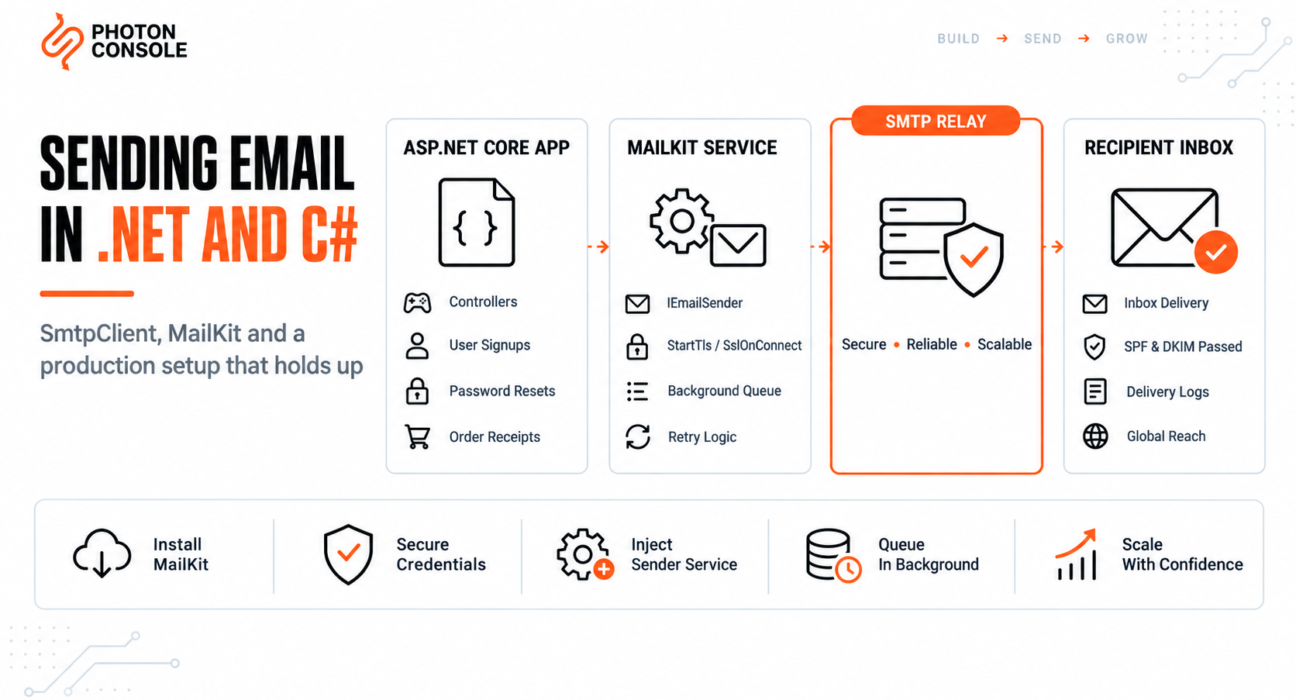
Most C# email tutorials start with System.Net.Mail.SmtpClient. It is built into the framework, the code is short, and it works on the first test. Then you point it at a production mail server on port 465 and the connection hangs until it times out. Or it works for a week and starts throwing under load.
Microsoft’s own documentation now recommends against using that class for new development. This guide explains why, shows the modern replacement, and covers the production pieces most examples skip: configuration, async sending, background queuing in ASP.NET Core, and the port setting that catches almost everyone.
Quick Answer: How Do You Send Email in C#?
Use MailKit with an authenticated SMTP relay:
dotnet add package MailKitusing MailKit.Net.Smtp;
using MailKit.Security;
using MimeKit;
var message = new MimeMessage();
message.From.Add(new MailboxAddress("Your App", "noreply@yourdomain.com"));
message.To.Add(MailboxAddress.Parse("user@example.com"));
message.Subject = "Your verification code";
message.Body = new TextPart("plain") { Text = "Your code is 492019." };
using var client = new SmtpClient();
await client.ConnectAsync("smtp.photonrelay.com", 587, SecureSocketOptions.StartTls);
await client.AuthenticateAsync(smtpUser, smtpPass);
await client.SendAsync(message);
await client.DisconnectAsync(true);The library handles the protocol correctly. What decides delivery is the server you authenticate against and whether your domain is authorised to send. An authenticated relay such as PhotonConsole covers that side.

Why Not System.Net.Mail.SmtpClient?
The Microsoft documentation for SmtpClient states that it is not recommended for new development because it does not support many modern protocols, and points developers to MailKit instead. The class still exists and still compiles, which is why so many tutorials continue to use it.
| Capability | System.Net.Mail.SmtpClient | MailKit |
|---|---|---|
| STARTTLS on port 587 | Yes | Yes |
| Implicit SSL on port 465 | No | Yes |
| True async API | Limited | Yes |
| Modern authentication methods | Limited | Yes |
| Detailed protocol errors | Minimal | Yes |
| Recommended for new code | No | Yes |
The second row causes the most production failures, covered next.
Why .NET Email Fails in Production
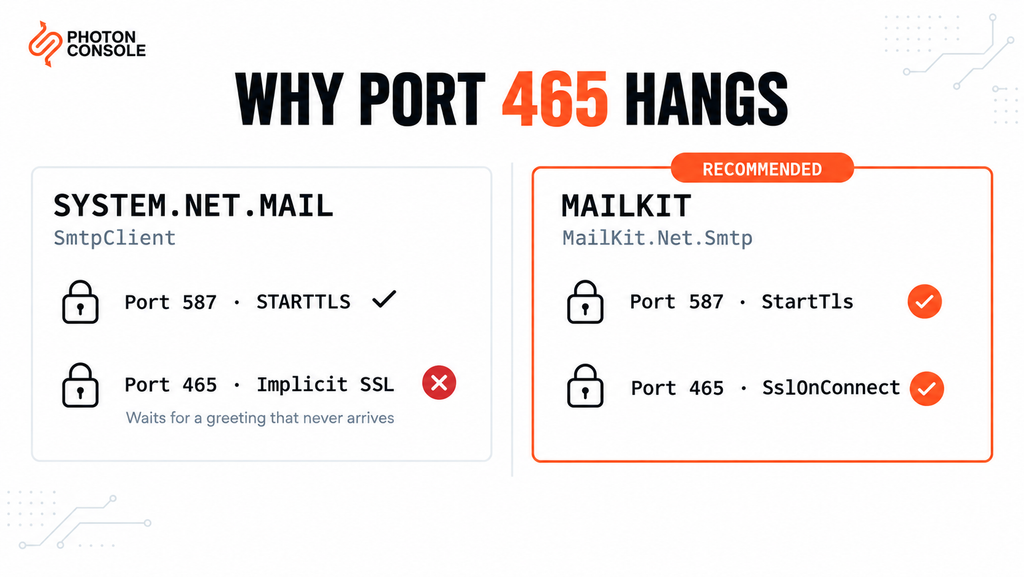
Most failures come from configuration or authentication rather than faults in the framework. These five account for the majority.
1. Port 465 With System.Net.Mail
The built-in SmtpClient only supports STARTTLS, where the connection starts plain and upgrades. Port 465 expects encryption from the first byte. Setting EnableSsl = true with port 465 does not produce implicit SSL — it produces a connection that waits for a plaintext greeting that never arrives, then times out.
2. Credentials Committed in appsettings.json
SMTP passwords placed in appsettings.json end up in source control and in every build artefact. Use user secrets in development and environment variables or a secret store in production.
3. Synchronous Sends Inside Request Handlers
A blocking send inside a controller ties up a thread for the entire SMTP conversation. Under load this exhausts the thread pool and slows every request on the server, not only the ones sending mail.
4. No Authentication Records on the Sending Domain
Without SPF and DKIM, receiving servers cannot verify your application is authorised to send as your domain, in line with Google’s sender guidelines. Our guide to SPF, DKIM and DMARC covers the records, and the free email deliverability checker shows what your domain currently publishes.
5. Outbound SMTP Blocked by the Host
AWS, Google Cloud and Azure restrict outbound port 25 by default. AWS documents its port 25 throttle removal process, though removal does not solve the reputation problem underneath. Our breakdown of SMTP connection timeouts covers the diagnosis.
Common Mistake
Using System.Net.Mail.SmtpClient with port 465 and EnableSsl = true, then spending hours checking credentials. The credentials are fine. That class cannot do implicit SSL, so the connection hangs before authentication is ever attempted. Switch to port 587, or move to MailKit with SecureSocketOptions.SslOnConnect if the provider requires 465.
Quick Fix
SMTP Send Hangs or Times Out
- Use port 587 with STARTTLS, or MailKit with
SslOnConnectfor port 465 - Set an explicit timeout rather than relying on the default
- Try port 2525 if your host blocks both 587 and 465 outbound
- Test connectivity from the server itself, not from your development machine
- Check the exception’s inner exception — the useful detail is usually there
Step-by-Step: Production Setup in ASP.NET Core
Step 1: Install MailKit
dotnet add package MailKitMailKit brings MimeKit with it. Both are maintained in the MailKit repository.
Note
MailKit’s SmtpClient has the same class name as System.Net.Mail.SmtpClient. If a file imports both namespaces you will get an ambiguous reference error. Remove the System.Net.Mail using directive, or fully qualify the type as MailKit.Net.Smtp.SmtpClient.
Step 2: Define Strongly Typed Settings
public class SmtpSettings
{
    public string Host { get; set; } = "";
    public int Port { get; set; } = 587;
    public string Username { get; set; } = "";
    public string Password { get; set; } = "";
    public string FromAddress { get; set; } = "";
    public string FromName { get; set; } = "";
}
// appsettings.json — no password here
{
"Smtp": {
"Host": "smtp.photonrelay.com",
"Port": 587,
"FromAddress": "noreply@yourdomain.com",
"FromName": "Your App"
}
}# Development: store secrets outside the repository
dotnet user-secrets set "Smtp:Username" "your_project_api_user"
dotnet user-secrets set "Smtp:Password" "your_secret_api_key"
# Production: environment variables use double underscores
Smtp__Username=your_project_api_user
Smtp__Password=your_secret_api_keyStep 3: Build an Email Service
using MailKit.Net.Smtp;
using MailKit.Security;
using Microsoft.Extensions.Options;
using MimeKit;

public interface IEmailSender
{
    Task SendAsync(string to, string subject, string html, CancellationToken ct = default);
}

public class SmtpEmailSender : IEmailSender
{
    private readonly SmtpSettings _settings;
    private readonly ILogger<SmtpEmailSender> _logger;

    public SmtpEmailSender(IOptions<SmtpSettings> options, ILogger<SmtpEmailSender> logger)
    {
        _settings = options.Value;
        _logger = logger;
    }

    public async Task SendAsync(string to, string subject, string html, CancellationToken ct = default)
    {
        var message = new MimeMessage();
        message.From.Add(new MailboxAddress(_settings.FromName, _settings.FromAddress));
        message.To.Add(MailboxAddress.Parse(to));
        message.Subject = subject;

        var builder = new BodyBuilder
        {
            HtmlBody = html,
            TextBody = System.Text.RegularExpressions.Regex.Replace(html, "<.*?>", "")
        };
        message.Body = builder.ToMessageBody();

        using var client = new SmtpClient { Timeout = 10000 };

        var socketOptions = _settings.Port == 465
            ? SecureSocketOptions.SslOnConnect
            : SecureSocketOptions.StartTls;

        try
        {
            await client.ConnectAsync(_settings.Host, _settings.Port, socketOptions, ct);
            await client.AuthenticateAsync(_settings.Username, _settings.Password, ct);
            await client.SendAsync(message, ct);
        }
        catch (Exception ex)
        {
            _logger.LogError(ex, "Email to {Recipient} failed", to);
            throw;
        }
        finally
        {
            await client.DisconnectAsync(true, ct);
        }
    }
}
Note the plain text alternative in TextBody. HTML-only messages score worse with spam filters.
Step 4: Register the Service
// Program.cs
builder.Services.Configure<SmtpSettings>(builder.Configuration.GetSection("Smtp"));
builder.Services.AddTransient<IEmailSender, SmtpEmailSender>();
Queueing Email with a Background Service
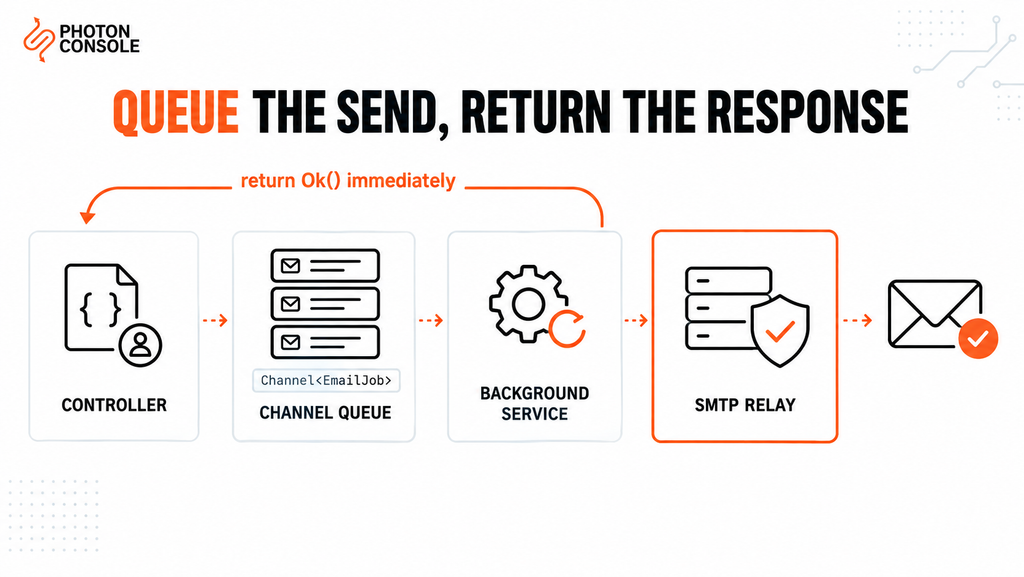
Awaiting a send inside a controller still makes the user wait for the SMTP handshake. For anything user-facing, push the message into an in-memory queue and let a hosted background service deliver it.
using System.Threading.Channels;

public record EmailJob(string To, string Subject, string Html);

public class EmailQueue
{
    private readonly Channel<EmailJob> _channel =
        Channel.CreateBounded<EmailJob>(new BoundedChannelOptions(1000)
        {
            FullMode = BoundedChannelFullMode.Wait
        });

    public ValueTask EnqueueAsync(EmailJob job) => _channel.Writer.WriteAsync(job);
    public IAsyncEnumerable<EmailJob> ReadAllAsync(CancellationToken ct) =>
        _channel.Reader.ReadAllAsync(ct);
}

public class EmailBackgroundService : BackgroundService
{
    private readonly EmailQueue _queue;
    private readonly IServiceScopeFactory _scopes;
    private readonly ILogger<EmailBackgroundService> _logger;

    public EmailBackgroundService(EmailQueue queue, IServiceScopeFactory scopes,
        ILogger<EmailBackgroundService> logger)
    {
        _queue = queue;
        _scopes = scopes;
        _logger = logger;
    }

    protected override async Task ExecuteAsync(CancellationToken stoppingToken)
    {
        await foreach (var job in _queue.ReadAllAsync(stoppingToken))
        {
            for (var attempt = 1; attempt <= 3; attempt++)
            {
                try
                {
                    using var scope = _scopes.CreateScope();
                    var sender = scope.ServiceProvider.GetRequiredService<IEmailSender>();
                    await sender.SendAsync(job.To, job.Subject, job.Html, stoppingToken);
                    break;
                }
                catch (Exception ex) when (attempt < 3)
                {
                    _logger.LogWarning(ex, "Retry {Attempt} for {To}", attempt, job.To);
                    await Task.Delay(TimeSpan.FromSeconds(Math.Pow(2, attempt)), stoppingToken);
                }
                catch (Exception ex)
                {
                    _logger.LogError(ex, "Giving up on email to {To}", job.To);
                }
            }
        }
    }
}
// Program.cs
builder.Services.AddSingleton<EmailQueue>();
builder.Services.AddHostedService<EmailBackgroundService>();
// In a controller
await _emailQueue.EnqueueAsync(new EmailJob(user.Email, "Welcome", html));
return Ok();An in-memory channel is lost if the process restarts. For mail that must survive a restart, such as receipts or password resets, use a durable queue. Our guide to transactional email queue architecture covers the trade-offs, and SMTP retry logic explains which failures are worth retrying.
Quick Fix
MailKit Authentication Errors
AuthenticationException— credentials wrong, or whitespace copied into themSslHandshakeException— wrong socket option for the port- Confirm environment variables use double underscores:
Smtp__Password - Check user secrets are not being read in production, where they do not apply
- Log the full exception including inner exceptions before changing any setting
Port Reference
| Port | MailKit option | When to use |
|---|---|---|
| 587 | SecureSocketOptions.StartTls | Recommended default |
| 465 | SecureSocketOptions.SslOnConnect | When the provider requires implicit SSL |
| 2525 | SecureSocketOptions.StartTls | When the host blocks 587 and 465 |
| 25 | n/a | Avoid — blocked on nearly all hosts |
Configuring .NET With PhotonConsole
Two steps: authenticate your domain in DNS, then supply the settings.
TXT    @                    v=spf1 include:relay.photonconsole.com ~all
CNAME  photon._domainkey    dkim.photonconsole.com
Smtp__Host=smtp.photonrelay.com
Smtp__Port=587 # 465 with SslOnConnect, 2525 if 587 is blocked
Smtp__Username=your_project_api_user
Smtp__Password=your_secret_api_key
Smtp__FromAddress=noreply@yourdomain.com
Smtp__FromName=Your AppDNS records can take up to 24-48 hours to propagate, so verify them before assuming a configuration error. Port 2525 exists for hosts that block the standard SMTP ports. Every PhotonConsole account includes 5,000 free emails per month, enough to validate the service, the background queue and retry handling before any spend. Details are on the PhotonRelay page, and pricing has no monthly minimum.
If you are comparing options first, our analysis of free SMTP servers covers where each stops being practical.
Environment-Specific Notes
Azure App Service
Set settings under Configuration using double-underscore names. Azure restricts outbound port 25, so use 587 or 2525.
Docker and Kubernetes
Containers have no local mail agent, so an external relay is required. Pass credentials as secrets, and remember that an in-memory email queue is lost whenever the pod restarts.
Azure Functions and AWS Lambda
A hosted background service does not fit a function that ends after each invocation. Send directly with a short timeout, or hand the message to a durable queue that another function processes.
Legacy .NET Framework
MailKit supports .NET Framework as well as modern .NET, so older applications can migrate without an upgrade.
Pro Tips
- Always call DisconnectAsync(true). It sends the SMTP QUIT command cleanly rather than dropping the socket.
- Reuse one connection for batches. Connect and authenticate once, send several messages, then disconnect.
- Send from your own domain. Put a visitor’s address in Reply-To, never From, or SPF and DMARC fail.
- Never log the settings object. It contains the password. Log the recipient and exception only.
- Verify DNS after any change. MXToolbox checks SPF, DKIM and blocklist status in one lookup.
- Score a real send before launch. Mail Tester flags authentication problems early.
Related Issues You May Hit Next
- SMTP authentication errors when credentials are rejected
- SMTP not working across the ten most common failure modes
- Emails landing in Gmail spam despite a successful send
- Emails sent but not delivered when the server reports success
- SMTP response codes for interpreting server replies
Frequently Asked Questions
Is System.Net.Mail.SmtpClient deprecated?
Microsoft’s documentation recommends against it for new development and points to MailKit instead. It still compiles and runs, but lacks implicit SSL and modern protocol support.
Why does SmtpClient hang on port 465?
The built-in class only supports STARTTLS. Port 465 expects encryption from the first byte, so the connection waits for a greeting that never arrives. Use port 587, or MailKit with SslOnConnect.
Should email be sent synchronously from a controller?
No. Queue it and return immediately. A blocking send holds a thread for the entire SMTP conversation and degrades the whole application under load.
Where should SMTP credentials live?
User secrets in development, environment variables or a secret manager in production. Never in appsettings.json committed to the repository.
Can I use Gmail SMTP from a .NET application?
For testing, yes. For production, no. Google enforces low sending caps, throttles automated traffic, and can lock the account.
Does MailKit work with .NET Framework?
Yes. It supports both .NET Framework and modern .NET, which makes it a straightforward migration path for older applications.
Conclusion
The built-in SmtpClient still appears in most C# tutorials, and it still works for simple cases on port 587. It fails on port 465, offers limited async support, and is no longer recommended by Microsoft for new code.
MailKit replaces it with a small amount of change, and the production pattern around it is consistent: strongly typed settings, credentials outside source control, an injected sender service, and a background queue so users never wait on the SMTP handshake.
What remains is infrastructure: whether your host permits outbound SMTP, and whether receiving providers trust your domain. A dedicated transactional email solution handles authentication, routing and reputation using the configuration shown above. Developers working across stacks may also want our guides to sending email in Node.js and sending email in Python.