


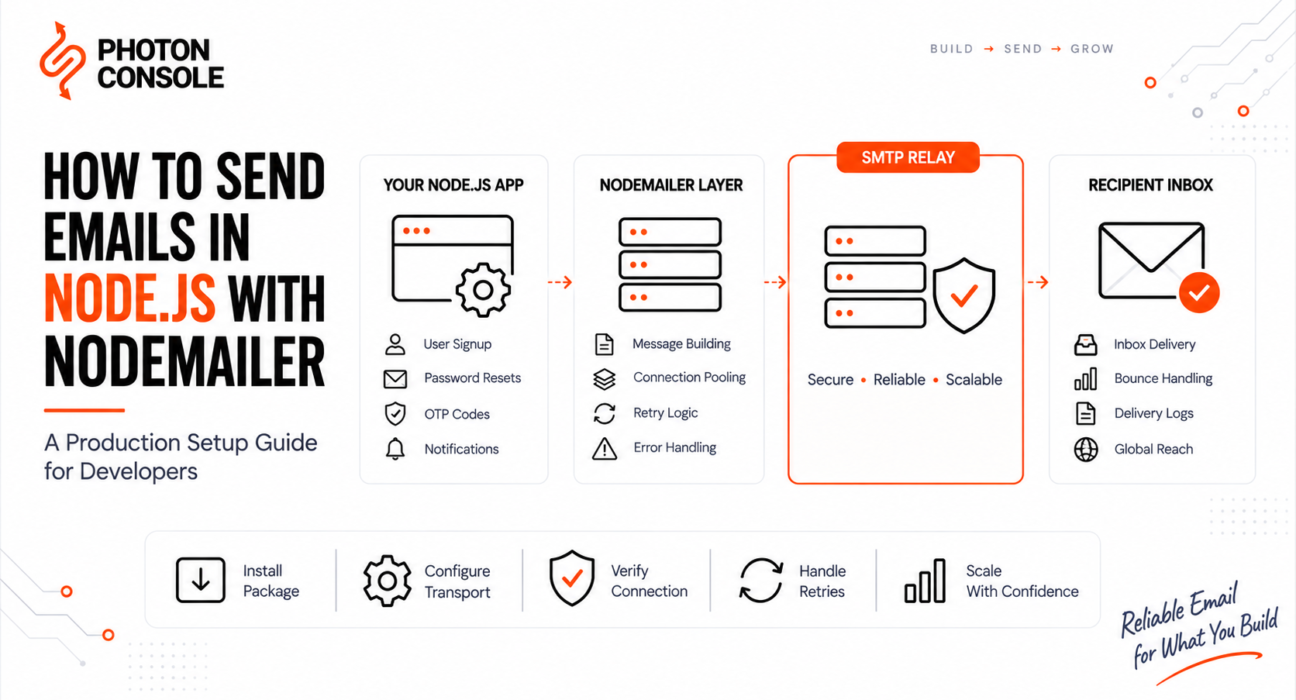
Your Node.js app sends email perfectly on localhost. You deploy it, and the emails stop arriving. No crash, no error in the logs, no bounce message. Just silence.
This is the most common email failure in Node.js applications, and it is almost never a bug in your code. It is a configuration gap between your development machine and your production environment. Most SMTP errors occur due to misconfiguration or authentication issues rather than faults in the application itself.
This guide walks through a Nodemailer setup that survives production: correct ports, safe credentials, connection pooling, retry handling, and the point at which you need to stop using a personal mailbox and move to a dedicated relay.
Quick Answer: How Do You Send Email in Node.js?
Install Nodemailer, create a single reusable transporter with your SMTP host, port and credentials, then call sendMail().

- Run
npm install nodemailer - Create one transporter using
nodemailer.createTransport()with host, port 587, and auth credentials - Store credentials in environment variables, never in code
- Call
transporter.verify()at startup to confirm the connection - Send with
await transporter.sendMail({ from, to, subject, html }) - Enable
pool: trueso connections are reused instead of reopened per message - Use an authenticated SMTP relay rather than port 25 or a personal Gmail account
The setup takes about ten minutes. The reason it fails in production is usually port 25 being blocked, a missing app password, or a transporter created inside a request handler.
For production traffic, point that transporter at a dedicated relay rather than a personal mailbox. Using an SMTP service like PhotonConsole means the same six lines of Nodemailer code work at 10 emails a day or 10,000.
What Nodemailer Actually Does
Nodemailer is a Node.js module that speaks SMTP on your behalf. It does not deliver email itself. It opens an authenticated connection to a mail server you specify, hands over your message, and that server handles the actual delivery to the recipient.
This distinction matters. Nodemailer is a client, not a mail server. Its job is to format your message correctly and transmit it. Whether that message reaches the inbox depends entirely on the server you connect it to and on your domain’s authentication records.
If you are new to the underlying protocol, our explanation of what SMTP is and how it works covers the fundamentals this guide builds on.
Why Node.js Email Fails in Production but Works Locally
Six causes account for the overwhelming majority of these failures.
1. Port 25 is blocked by your host
Almost every cloud provider blocks outbound port 25 by default to prevent spam. Code that works on your laptop silently fails on a deployed server. Use port 587 instead.
2. Gmail rejects your password
Google removed support for basic “less secure app” sign-in. A regular account password will not authenticate. You need either an App Password generated on an account with two-factor authentication enabled, or OAuth 2.0.
3. You create a new transporter on every request
Calling createTransport() inside a route handler opens a fresh TLS handshake for every single email. Under load this exhausts connections and triggers rate limiting from your provider.
4. There is no retry logic
SMTP failures are frequently temporary. A 4xx response means “try again later,” but a plain sendMail() call treats it as final and the message is lost.
5. Your domain has no authentication records
Without SPF and DKIM aligned to your sending domain, mailbox providers treat your mail as unverified. Authentication failures are one of the most common causes of email delivery problems, and they produce no error in your application at all. Our guide to SPF, DKIM and DMARC explained simply covers what to publish.
6. You are sending through a personal mailbox
Free Gmail accounts cap at roughly 500 recipients per day and Google Workspace accounts at 2,000, according to Google’s published Workspace sending limits. Application traffic hits these ceilings quickly, and exceeding them can suspend the account your team relies on.
Step-by-Step: A Production Nodemailer Setup
Step 1: Install the package
npm install nodemailerStep 2: Choose the correct port
Port choice determines whether your connection succeeds at all. The secure flag must match the port.
| Port | Encryption | secure value | Use in production? |
|---|---|---|---|
| 587 | STARTTLS (upgrades after connect) | false | Yes — recommended default |
| 465 | Implicit TLS (encrypted from start) | true | Yes — valid alternative |
| 2525 | STARTTLS | false | Yes — fallback when 587 is blocked |
| 25 | Usually none | false | No — blocked by most hosts |
Setting secure: true on port 587 is a frequent mistake and produces a connection that hangs rather than a clear error.
Step 3: Store credentials in environment variables
Never commit SMTP credentials. Put them in .env and add that file to .gitignore.
SMTP_HOST=smtp.yourprovider.com
SMTP_PORT=587
SMTP_USER=your_smtp_username
SMTP_PASS=your_smtp_password
MAIL_FROM="Your App <noreply@yourdomain.com>"
Step 4: Create one shared transporter
Create this once, at module level, and import it wherever you send mail.
// mailer.js
import nodemailer from "nodemailer";

export const transporter = nodemailer.createTransport({
  host: process.env.SMTP_HOST,
  port: Number(process.env.SMTP_PORT),
  secure: false,           // false for 587, true for 465
  auth: {
    user: process.env.SMTP_USER,
    pass: process.env.SMTP_PASS,
  },
  pool: true,              // reuse connections
  maxConnections: 5,
  maxMessages: 100,
  connectionTimeout: 10000,
  greetingTimeout: 10000,
});
The official Nodemailer SMTP documentation lists every available transport option.
Step 5: Verify the connection at startup
This surfaces credential and firewall problems on deploy rather than on the first user signup.
try {
  await transporter.verify();
  console.log("SMTP connection verified");
} catch (err) {
  console.error("SMTP verification failed:", err.message);
}
Step 6: Send a message
export async function sendWelcomeEmail(to, name) {
  const info = await transporter.sendMail({
    from: process.env.MAIL_FROM,
    to,
    subject: "Welcome aboard",
    text: `Hi ${name}, thanks for signing up.`,
    html: `<p>Hi ${name}, thanks for signing up.</p>`,
  });

  console.log("Message sent:", info.messageId);
  return info;
}
Always include a text version alongside html. Messages with only an HTML body score worse with spam filters.
Quick Fix: Emails Send Locally but Not in Production
- Switch from port 25 to port 587
- Confirm
secure: falseis paired with port 587 - Check that environment variables are actually loaded on the server, not just in
.env - Run
transporter.verify()and read the error code - Confirm your host has not firewalled outbound SMTP
Step 7: Add connection pooling correctly
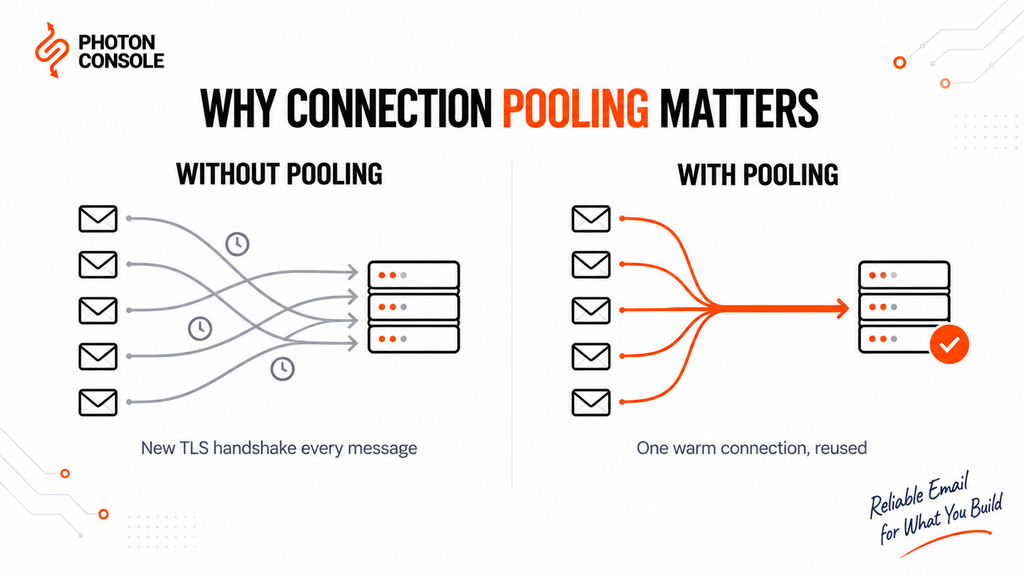
Pooling keeps connections open between sends instead of performing a full TLS handshake each time. Nodemailer defaults to a maximum of 5 concurrent connections and 100 messages per connection, and it supports rate limiting through rateDelta and rateLimit. The pooled SMTP documentation explains the full option set.
const transporter = nodemailer.createTransport({
  // ...connection settings
  pool: true,
  maxConnections: 5,
  maxMessages: 100,
  rateDelta: 1000,   // time window in ms
  rateLimit: 5,      // max messages per window
});

// Close the pool cleanly on shutdown
process.on("SIGTERM", () => {
  transporter.close();
  process.exit(0);
});
Create the transporter once. Every call to createTransport() builds a separate pool, which defeats the purpose entirely.
Step 8: Handle errors and retry properly
Distinguish permanent failures from temporary ones. Retrying a permanent failure wastes sends and damages your reputation; not retrying a temporary one loses the message.
async function sendWithRetry(message, attempts = 3) {
  for (let i = 0; i < attempts; i++) {
    try {
      return await transporter.sendMail(message);
    } catch (err) {
      const permanent = err.responseCode >= 500 && err.responseCode < 600;
      if (permanent || i === attempts - 1) throw err;

      const delay = Math.pow(2, i) * 1000;   // 1s, 2s, 4s
      await new Promise((r) => setTimeout(r, delay));
    }
  }
}
For the reasoning behind backoff intervals and when to stop retrying, see our guide to SMTP retry logic for transactional email systems.
Step 9: Move sending off the request path
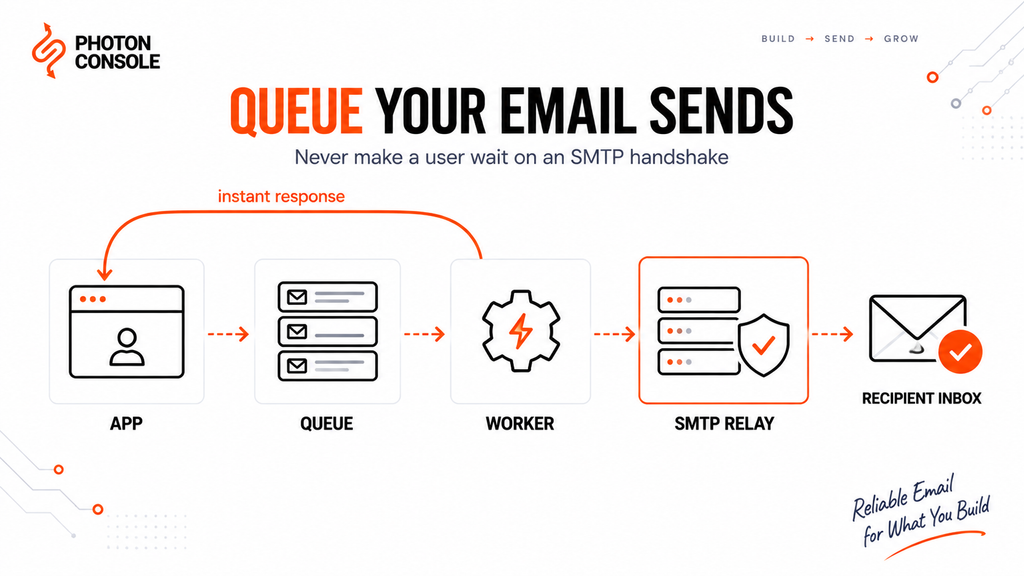
Never make a user wait for an SMTP handshake. Push the message onto a queue and return the response immediately.
// Instead of awaiting the send inside your route:
app.post("/signup", async (req, res) => {
  const user = await createUser(req.body);
  await emailQueue.add("welcome", { to: user.email, name: user.name });
  res.status(201).json({ ok: true });
});
This is the single biggest reliability improvement in most Node.js applications. Our breakdown of transactional email queue architecture covers worker design and failure handling.
Common Nodemailer Errors and What They Mean
| Error | Likely cause | Fix |
|---|---|---|
ECONNREFUSED | Wrong host or port, or port blocked | Switch to 587; confirm host spelling |
ETIMEDOUT | Firewall silently dropping traffic | Check outbound rules; try port 2525 |
EAUTH | Invalid credentials or app password required | Regenerate credentials; enable 2FA app password |
ESOCKET | secure flag mismatched to port | false for 587, true for 465 |
EENVELOPE | Malformed from or to address | Validate address format before sending |
self signed certificate | TLS interception or local test server | Fix the certificate chain; do not disable TLS checks in production |
For numeric SMTP replies rather than Node error codes, our reference on SMTP response codes explained maps each code to its cause. Persistent authentication failures are covered in detail in our SMTP authentication error guide, and hanging connections in SMTP connection timeout.
Quick Fix: EAUTH Authentication Failed
- Enable two-factor authentication on the sending account
- Generate a dedicated app password rather than using the login password
- Remove spaces when pasting the generated password
- Confirm the username is the full email address where required
- Verify the credential belongs to the same host you are connecting to
Platform-Specific Setup
Express applications
Define the transporter in a separate module and import it. Do not attach it to the request object or recreate it per route.
Next.js
SMTP cannot run in the browser or in the Edge runtime. Send only from Route Handlers, Server Actions, or API routes running on the Node.js runtime. Add export const runtime = "nodejs" to any route that sends mail.
Serverless functions and Lambda
Pooling provides little benefit when containers are short-lived, and open pools can hold a function open past its timeout. Set pool: false, keep timeouts below the platform limit, and prefer queue-triggered sends over synchronous ones.
Docker containers
Minimal base images often lack CA certificates, which breaks TLS with a certificate error. Install ca-certificates in your image rather than disabling verification.
Shared hosting and cPanel
Outbound SMTP is frequently restricted to the host’s own mail server. Port 2525 is often open when 587 is not; an external relay such as PhotonConsole avoids the restriction entirely.
Pro Tips for Production Email in Node.js
- Use a subdomain for sending. Sending from
mail.yourdomain.comisolates application email reputation from your corporate mail. - Set a real reply-to address. Messages from a no-reply address with no reply path attract more complaints.
- Log the messageId on every send. Without it you cannot trace a delivery complaint back to a specific message.
- Test rendering before launch. Send a sample through mail-tester to catch authentication and spam-score problems.
- Verify DNS records after any change. MXToolbox confirms SPF, DKIM and blocklist status.
- Never disable TLS verification.
rejectUnauthorized: falsesilences the symptom and leaves traffic exposed. - Separate transactional and bulk streams. A marketing send that damages reputation should never take password reset emails down with it.
When to Move Beyond Gmail SMTP
Gmail SMTP is acceptable for a prototype. It stops being viable once your application sends real volume.
Mailbox providers cap daily sending, throttle automated traffic, and count every recipient individually. Beyond the raw limits, a mailbox gives you no delivery log, no bounce webhook, and no way to separate transactional traffic from your team’s day-to-day mail. The SMTP protocol itself, defined in RFC 5321, has no concept of delivery reporting — that visibility has to come from the relay you send through.
A dedicated SMTP relay service such as PhotonConsole replaces the credentials in your existing Nodemailer config without any code change. You update three environment variables and gain delivery logs, bounce handling, authentication support and headroom that a mailbox cannot provide. Because pricing is pay-as-you-use, cost tracks actual send volume rather than a fixed tier — the pricing page shows how that scales.
Configuring Nodemailer With PhotonConsole
Setup is two steps: authenticate your domain in DNS, then point your transporter at the relay.
First, add the authentication records to your DNS provider so mailbox providers can verify your domain authorised the send:
TXT    @                    v=spf1 include:relay.photonconsole.com ~all
CNAME  photon._domainkey    dkim.photonconsole.com
Then update your environment variables and transporter:
# .env
SMTP_HOST=smtp.photonconsole.com
SMTP_PORT=587
SMTP_USER=your_project_api_user
SMTP_PASS=your_secret_api_key
const transporter = nodemailer.createTransport({
host: 'smtp.photonconsole.com',
port: 587, // 465 for implicit SSL, 2525 if 587 is blocked
secure: false, // true only on port 465
auth: {
user: process.env.SMTP_USER,
pass: process.env.SMTP_PASS
},
pool: true,
maxConnections: 5
});Port 2525 matters here. It is the fallback for exactly the AWS, DigitalOcean and Azure port blocking described at the start of this guide, so a host that refuses 587 is no longer a dead end. Every account includes 5,000 emails per month at no cost, which is enough to validate the full setup — DNS records, pooling, retries and bounce webhooks — before any spend.
If you are still evaluating options, our comparison of free SMTP servers covers where the free tiers stop being practical.
Related Issues You May Hit Next
- Mail sends successfully but never arrives. Delivery accepted by the server does not mean inbox placement — see emails sent but not delivered.
- Messages land in spam. Usually an authentication or reputation problem rather than content — see why emails go to spam in Gmail.
- Delivery is slow. Queue depth and provider throttling are the usual causes — see emails delayed.
- Everything worked in dev and broke in prod. Our production debugging guide covers the environment gaps.
Frequently Asked Questions
Is Nodemailer still maintained?
Yes. Nodemailer remains the standard SMTP client for Node.js and is actively maintained. Current versions use nodemailer.createTransport() with an options object.
Can I use Nodemailer without an SMTP server?
No. Nodemailer is a client and requires a mail server to relay through. Options are a personal mailbox, your own mail server, or a dedicated SMTP relay such as PhotonConsole.
Which port should I use?
Port 587 with secure: false for most cases. Use 465 with secure: true if your provider requires implicit TLS. Avoid port 25.
Why does Gmail reject my password?
Google no longer accepts standard account passwords for SMTP. Enable two-factor authentication and generate an App Password, or use OAuth 2.0.
How many emails can Nodemailer send?
Nodemailer imposes no limit. Your ceiling is set entirely by the SMTP server you connect to.
Should I enable pooling?
Yes for long-running servers sending regularly. No for serverless functions, where containers are short-lived.
How do I test without emailing real users?
Use a capture service that accepts messages without delivering them, or a dedicated test inbox. Never test against real customer addresses.
Do I still need SPF and DKIM if I use a relay?
Yes. The relay transmits your mail, but the authentication records must exist on your own domain’s DNS for messages to be trusted.
Conclusion
Sending email from Node.js is straightforward. Sending email that reliably arrives is an infrastructure decision.
The setup above — port 587, environment-based credentials, a single pooled transporter, verified connections, classified retries, and queued sending — removes the failure modes that break most production applications. What it cannot do is fix the ceiling of the mail server underneath it.
Once your application sends OTPs, password resets or order confirmations, delivery stops being a developer convenience and becomes a business dependency. A failed password reset email is a support ticket; a failed OTP is a lost signup. At that point a purpose-built email delivery service like PhotonConsole, with logging, bounce handling and authentication support, is the correct foundation, and moving to one requires nothing more than changing the credentials your transporter already reads.
Read More
- SMTP Configuration: A Complete Setup Guide
- Email API Integration for Developers
- How to Fix SMTP Authentication Errors
- SMTP Connection Timeout: Causes and Fixes
- SMTP Retry Logic for Transactional Email
- Transactional Email Queue Architecture Explained
- How to Improve Email Deliverability
- SPF, DKIM and DMARC Explained Simply

Django Email Configuration For Production Applications | Photonconsole.com
September 6, 2026[…] If messages are blocked by port restrictions, throttled by a mailbox provider, or filtered because your server has no sending reputation, no change to settings.py will fix it. A dedicated transactional email solution handles authentication, routing and reputation, using the same configuration shown above. Developers working across stacks may also want our guides to sending email in Python with smtplib and sending email in Node.js. […]
AWS EC2 Port 25 Blocked: Why It Happens And How To Send Email | Photonconsole.com
September 6, 2026[…] Nodemailer production guide covers pooling, retries and error […]
Sending Email From Google Cloud: Port Restrictions And Working Options | Photonconsole.com
September 6, 2026[…] Nodemailer production guide covers pooling, retries and error handling in […]
Sending Email From Heroku Without An Add-On | Photonconsole.com
September 6, 2026[…] stack guides cover the libraries themselves in depth: Node.js with Nodemailer, Django email configuration, Rails ActionMailer and Laravel mail […]