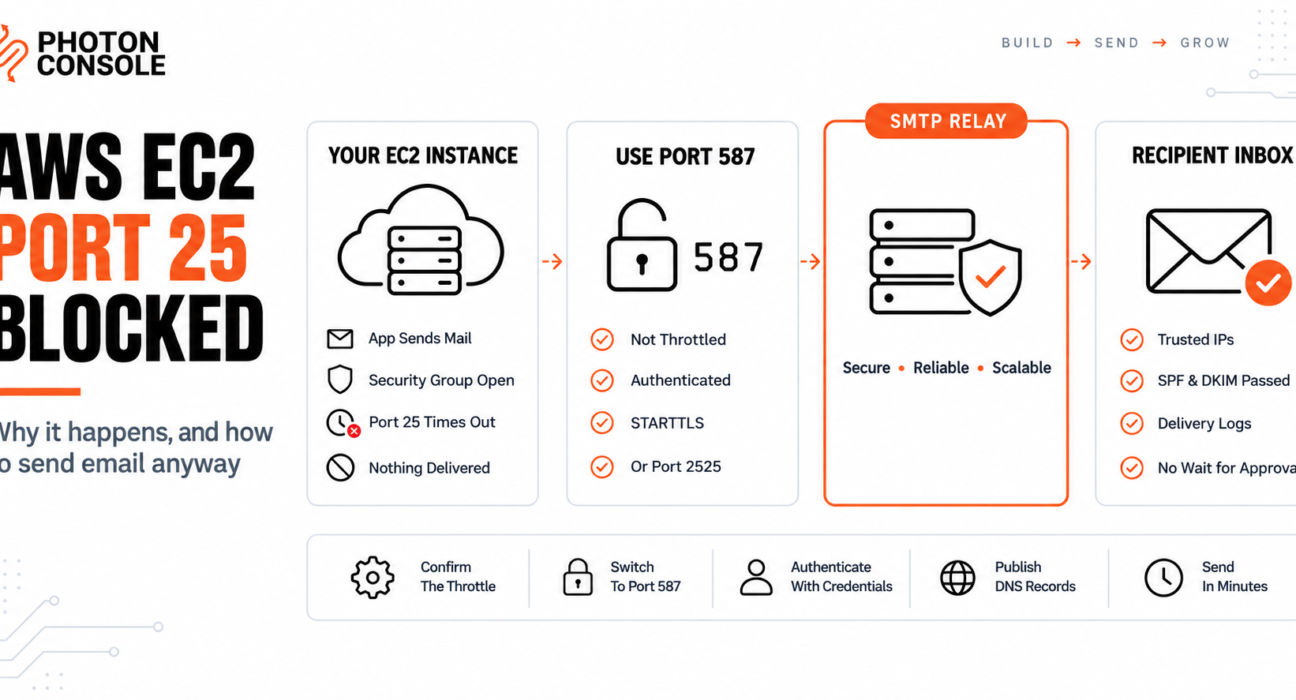
You deploy an application to EC2, wire up email, and nothing sends. The connection does not get refused — it just hangs, then times out after thirty seconds or more. You check the security group, and outbound traffic is already allowed on all ports.
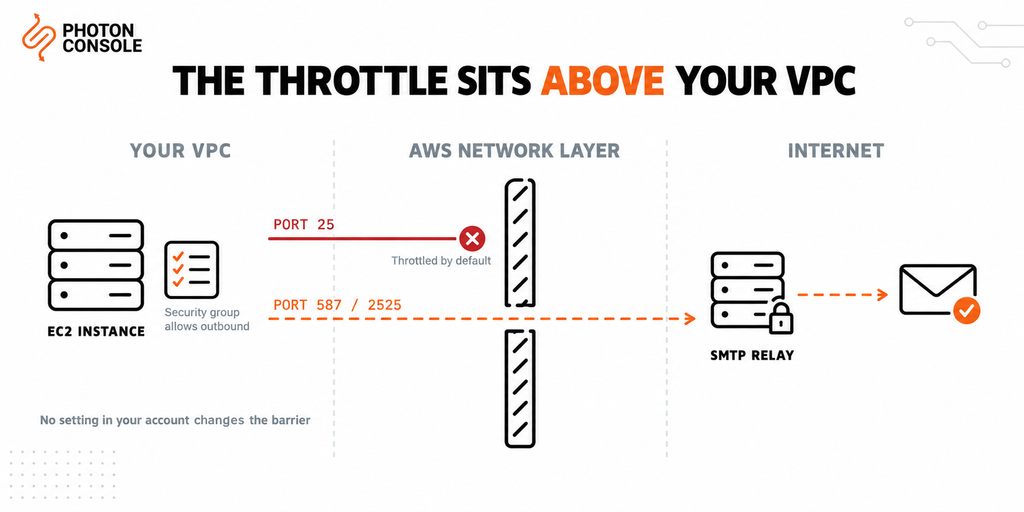
Nothing is misconfigured. AWS throttles outbound traffic on port 25 by default on every EC2 instance, and that restriction lives above your security groups where no setting in your account can change it.
This guide covers how to confirm that is what you are hitting, the two ways out, and why the faster one is also the one that actually delivers.
Quick Answer: Why Is Port 25 Blocked on EC2?
AWS throttles outbound port 25 on EC2 instances by default to limit spam originating from its network. The restriction is applied at the AWS network layer, not in your VPC configuration, so security group and network ACL changes have no effect on it.

You have two options:
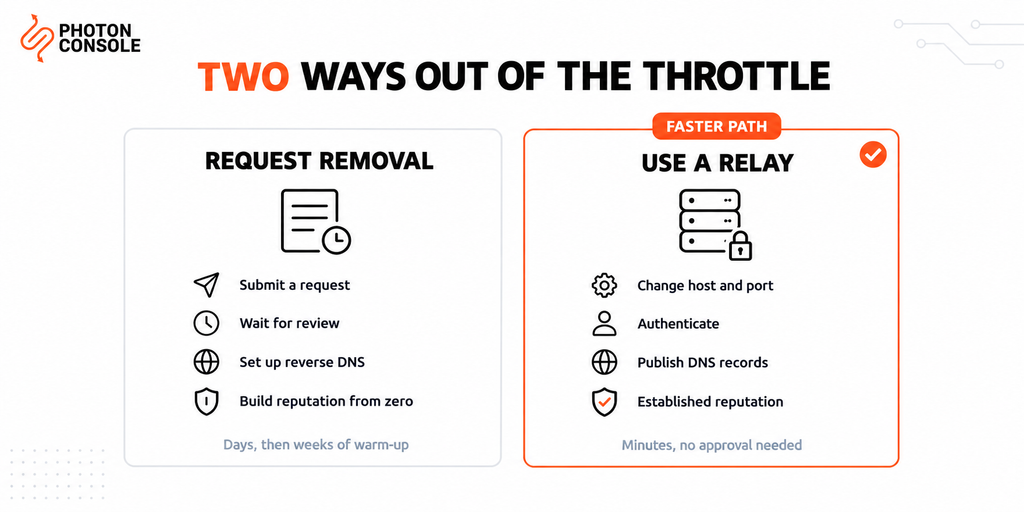
- Request removal from AWS, which takes time and still leaves you sending from an IP with no reputation
- Send on port 587 or 2525 through an authenticated relay, which works immediately and arrives with an established sending reputation
The second is what most production applications do. An authenticated relay such as PhotonConsole accepts connections on ports that AWS does not throttle:
Host:  smtp.photonrelay.com
Port:  587          # or 2525 if 587 is also restricted
User:  your_project_api_user
Pass:  your_secret_api_key
Confirm It Is Actually the Port
Before changing anything, verify the symptom. Run these from the EC2 instance itself, not from your laptop.
# Port 25 — expect this to hang, then time out
nc -zvw5 smtp.photonrelay.com 25

# Port 587 — expect this to connect immediately
nc -zvw5 smtp.photonrelay.com 587

# Port 2525 — fallback, should also connect
nc -zvw5 smtp.photonrelay.com 2525
If 25 times out while 587 connects, you have confirmed the throttle. That pattern is the signature: a refused connection points at a firewall, while a silent hang followed by a timeout points at traffic being dropped upstream.
Once 587 connects, check that TLS negotiates properly too:
openssl s_client -starttls smtp -connect smtp.photonrelay.com:587 -crlfCommon Mistake
Spending hours editing security groups, network ACLs and route tables. Outbound traffic is permitted by default in a security group, and the port 25 throttle is applied by AWS above your VPC entirely. No combination of rules in your account will lift it. If port 587 connects from the same instance, your networking is fine and the throttle is the only thing in the way.
Quick Fix
Confirming the Port 25 Throttle
- Run the test from the EC2 instance, never from a local machine
- A timeout on 25 plus a successful connection on 587 confirms the throttle
- Check your application is not hardcoded to port 25 in a config file
- Remember the same restriction applies to Lambda functions
- Switch to port 587 or 2525 before requesting anything from AWS
Why AWS Throttles Port 25
Port 25 is the port mail servers use to talk to each other. It requires no authentication by design, which makes any machine that can reach it on the open internet a potential spam source.
Cloud instances are cheap, quick to create and easy to abuse at scale. Left open, a compromised or malicious EC2 instance can send enormous volumes of unauthenticated mail, which damages the reputation of the entire IP range and everyone else using it.
Throttling outbound port 25 by default is how AWS keeps that from happening. AWS documents the restriction and the removal process in its port 25 throttle knowledge centre article.
This is not unique to AWS. Google Cloud applies a similar restriction and, unlike AWS, does not lift it at all. Azure and most VPS providers apply comparable rules to new accounts.
Which Ports Actually Work
| Port | Purpose | On EC2 |
|---|---|---|
| 25 | Server-to-server mail relay | Throttled by default |
| 587 | Authenticated message submission | Available |
| 465 | Submission over implicit SSL | Available |
| 2525 | Unofficial submission fallback | Available |
The distinction matters. Port 25 carries mail between servers with no authentication. Port 587 is the submission port, defined in RFC 6409 for authenticated clients handing mail to a server they have credentials for. Your application is a client, not a mail server, so 587 is the correct port regardless of the throttle.
Port 2525 is not an official standard, but most relays accept it precisely because some networks restrict the standard ports. It is the fallback when 587 is also unavailable.
Option 1: Request Removal From AWS
AWS will lift the restriction for legitimate use. The process involves submitting a request that describes your use case and the volume you expect to send.
AWS may also require a reverse DNS record for the Elastic IP you send from, which means the IP must resolve back to a hostname you control. Requests are reviewed rather than granted automatically, so allow for a wait.
Two things are worth knowing before you start.
Removal does not give you deliverability. A newly allocated IP has no sending history. Receiving providers treat mail from an unknown IP with suspicion, and building a reputation takes consistent sending over weeks.
Cloud IP ranges carry existing baggage. Because these ranges have been used for spam historically, many blocklists treat them cautiously by default. You may be starting from a deficit rather than from neutral.
Option 2: Send Through an Authenticated Relay
The alternative skips the restriction rather than fighting it. Your application connects to a relay such as PhotonConsole on port 587 or 2525, authenticates, and hands off the message. The relay delivers it from IPs with an established sending reputation.
| Request removal | Use a relay | |
|---|---|---|
| Time to working email | Days, subject to review | Minutes |
| Sending reputation | Starts at zero | Established |
| Reverse DNS required | Usually | No |
| Blocklist monitoring | Your responsibility | Handled by the relay |
| Bounce and complaint handling | You build it | Webhooks provided |
| Ongoing maintenance | Yours | None |
For a machine that genuinely needs to act as a mail server, removal is the right path. For an application that needs to send password resets, receipts and notifications, a relay is both faster and more reliable.
Configuring Your Application
The change is usually two lines: the host and the port. Below are the common stacks.
Node.js
const transporter = nodemailer.createTransport({
  host: 'smtp.photonrelay.com',
  port: 587,        // not 25
  secure: false,    // STARTTLS on 587
  auth: {
    user: process.env.SMTP_USER,
    pass: process.env.SMTP_PASS
  }
});
Our Nodemailer production guide covers pooling, retries and error handling.
Python
import smtplib

with smtplib.SMTP("smtp.photonrelay.com", 587, timeout=10) as server:
    server.starttls()
    server.login(smtp_user, smtp_pass)
    server.send_message(msg)
Our guide to sending email in Python covers the wider setup.
PHP
$mail->isSMTP();
$mail->Host       = 'smtp.photonrelay.com';
$mail->Port       = 587;
$mail->SMTPAuth   = true;
$mail->SMTPSecure = PHPMailer::ENCRYPTION_STARTTLS;
Postfix as a Relay Host
If the instance runs Postfix and you want to keep using it, point it at the relay instead of delivering directly.
# /etc/postfix/main.cf
relayhost = [smtp.photonrelay.com]:587
smtp_sasl_auth_enable = yes
smtp_sasl_password_maps = hash:/etc/postfix/sasl_passwd
smtp_sasl_security_options = noanonymous
smtp_tls_security_level = encrypt
# /etc/postfix/sasl_passwd
[smtp.photonrelay.com]:587 your_project_api_user:your_secret_api_keysudo postmap /etc/postfix/sasl_passwd
sudo chmod 600 /etc/postfix/sasl_passwd*
sudo systemctl restart postfixThis keeps every local process that sends through sendmail working, with PhotonConsole handling actual delivery.
Publish Your DNS Records
Changing the port gets mail out of the instance. Authentication records are what get it into inboxes.
TXT    @                    v=spf1 include:relay.photonconsole.com ~all
CNAME  photon._domainkey    dkim.photonconsole.com
Note
DNS changes are not instant. SPF and DKIM records can take from a few minutes to 24-48 hours to propagate depending on your registrar and TTL settings. Check you do not already publish a second SPF record — two separate TXT records starting with v=spf1 break authentication entirely.
Without these, mail leaves the instance successfully and is filtered on arrival, in line with Google’s sender guidelines. Our guide to SPF, DKIM and DMARC explains the records, and the free email deliverability checker shows what your domain currently publishes.
Quick Fix
Still Not Sending After Switching Ports
- Confirm no config file still hardcodes port 25
- Check credentials have no whitespace copied into them
- Try 2525 if 587 also times out on your network
- Confirm the instance can resolve DNS — a broken resolver looks like a blocked port
- Check the application log for the SMTP response code rather than guessing
Other AWS Services With the Same Restriction
Lambda
Functions run inside the AWS network and are subject to the same port 25 throttle. Use 587 or 2525, and keep function timeouts comfortably above your SMTP timeout so a send is never cut off mid-handshake.
ECS and Fargate
Containers inherit the restriction from the underlying network. Pass SMTP credentials as secrets rather than baking them into an image.
Elastic Beanstalk
Environments run on EC2, so the restriction applies. Set SMTP values as environment properties so they survive redeployment.
Lightsail
Lightsail instances are also restricted, with a separate removal process from EC2’s.
Pro Tips
- Test from the instance, always. Local testing proves nothing about what the instance can reach.
- Set explicit SMTP timeouts. Default timeouts in many libraries are very long, which turns a blocked port into a hung worker.
- Never hardcode the port. Keep host and port in environment variables so a change does not require a deploy.
- Do not run your own mail server to avoid a relay fee. Reputation, blocklist monitoring and security patching cost far more in engineering time.
- Verify DNS after any change. MXToolbox checks SPF, DKIM and blocklist status in one lookup.
- Score a real send before launch. Mail Tester flags authentication problems before users encounter them.
Related Issues You May Hit Next
- SMTP connection timeouts when connections hang rather than fail
- SMTP not working across the ten most common failure modes
- SMTP authentication errors once the port is open but login fails
- Emails sent but not delivered when the server reports success
- Emails landing in Gmail spam after delivery succeeds
Frequently Asked Questions
Can I open port 25 in my security group?
Outbound traffic is already permitted by default. The throttle is applied by AWS above your VPC, so no security group or network ACL change affects it.
How long does AWS take to remove the restriction?
Requests are reviewed rather than granted automatically, so plan for a wait. Switching to port 587 works immediately and does not require approval.
Does the restriction apply to Lambda?
Yes. Lambda functions run inside the AWS network and are subject to the same port 25 throttle.
Will removing the restriction fix deliverability?
No. It only allows the traffic. The IP still has no sending history, and cloud IP ranges are treated cautiously by many receiving providers.
What is the difference between port 25 and port 587?
Port 25 carries unauthenticated mail between mail servers. Port 587 is the submission port for authenticated clients. An application is a client, so 587 is the correct choice regardless of any restriction.
Why use port 2525?
It is an unofficial fallback that most relays accept, useful when a network restricts both 587 and 465.
Does Google Cloud block port 25 too?
Yes, and unlike AWS it does not lift the restriction. A relay on port 587 or 2525 is the only route there.
Conclusion
A hung connection on port 25 from EC2 is not a bug in your application and not a gap in your VPC configuration. It is a deliberate default that AWS applies to limit spam leaving its network, and it sits somewhere your account settings cannot reach.
You can ask AWS to lift it, wait for review, set up reverse DNS, and then begin the separate job of building a sending reputation from nothing. Or you can move to port 587, authenticate against a relay, and be sending within minutes from IPs that receiving providers already trust.
For an application that sends password resets, receipts and notifications rather than acting as a mail server, the second is the practical answer. A dedicated transactional email solution handles the ports, authentication and reputation, and pricing starts with 5,000 free emails per month — enough to confirm the whole path works before spending anything.