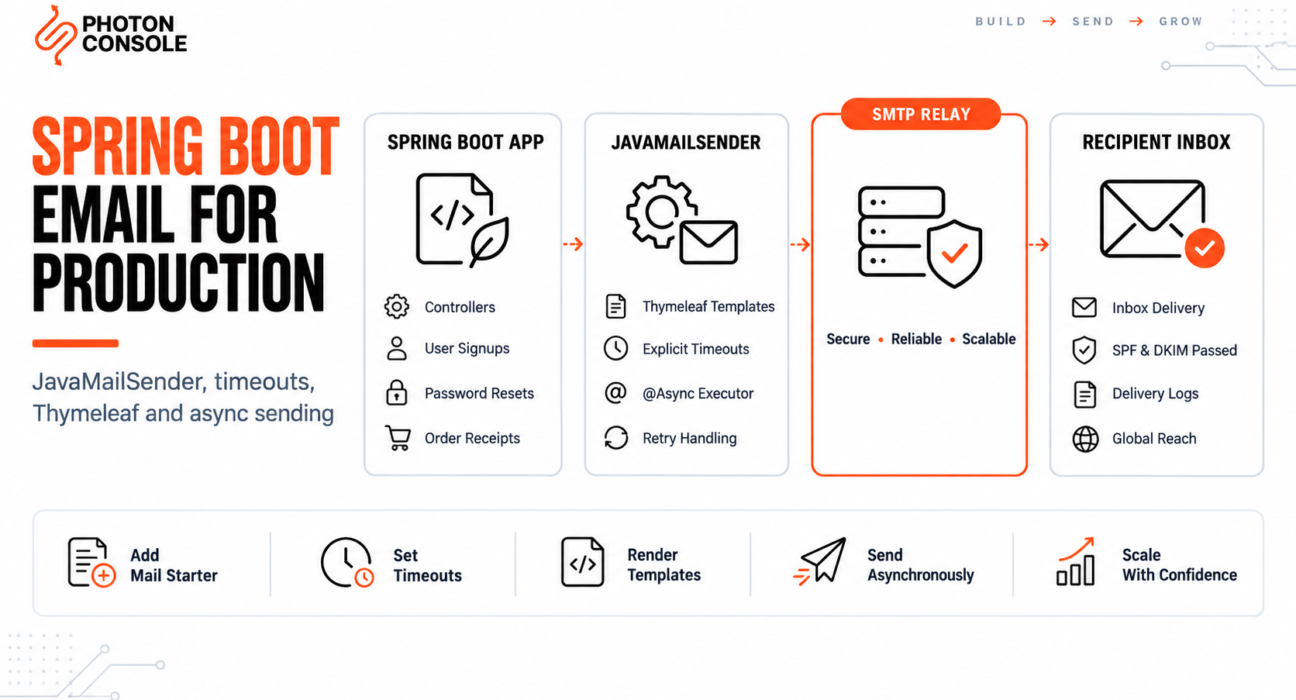
Spring Boot makes email look almost free. Add one starter dependency, set a few properties, inject JavaMailSender, and a test message goes out on the first try.
Production is where the gaps show. A request thread hangs for minutes because a mail server stopped responding. The application refuses to start because a bean could not be created. An @Async method runs synchronously for reasons nobody can see. Or everything succeeds and the message lands in spam anyway.
This guide covers the production setup: the properties that matter, the timeout default that causes most outages, HTML templates with Thymeleaf, asynchronous sending that actually works asynchronously, and the relay configuration underneath it all.
Quick Answer: How Do You Send Email in Spring Boot?
Add the mail starter, configure SMTP in application.properties, and inject JavaMailSender:

<dependency>
    <groupId>org.springframework.boot</groupId>
    <artifactId>spring-boot-starter-mail</artifactId>
</dependency>
spring.mail.host=smtp.photonrelay.com
spring.mail.port=587
spring.mail.username=${SMTP_USER}
spring.mail.password=${SMTP_PASS}
spring.mail.properties.mail.smtp.auth=true
spring.mail.properties.mail.smtp.starttls.enable=true
spring.mail.properties.mail.smtp.starttls.required=true
spring.mail.properties.mail.smtp.connectiontimeout=5000
spring.mail.properties.mail.smtp.timeout=5000
spring.mail.properties.mail.smtp.writetimeout=5000@Service
public class EmailService {
private final JavaMailSender mailSender;
public EmailService(JavaMailSender mailSender) {
this.mailSender = mailSender;
}
public void sendCode(String to, String code) {
SimpleMailMessage message = new SimpleMailMessage();
message.setFrom("noreply@yourdomain.com");
message.setTo(to);
message.setSubject("Your verification code");
message.setText("Your code is " + code + ".");
mailSender.send(message);
}
}The three timeout lines are not optional, and the next sections explain why. Delivery itself depends on the server you authenticate against and whether your domain is authorised to send — an authenticated relay such as PhotonConsole covers that side.
How Spring Boot Mail Works
Spring Boot auto-configures a JavaMailSenderImpl bean when it finds spring.mail.host in your configuration. That bean wraps Jakarta Mail, which opens the SMTP connection and speaks the protocol.
Two consequences follow. The bean only exists if the host property is present. And every connection setting Jakarta Mail understands — timeouts, TLS, authentication — is passed through the spring.mail.properties.* namespace, not through dedicated Spring properties.
Note
Spring Boot 3 moved from javax.mail to jakarta.mail. Code copied from older tutorials that imports javax.mail.internet.MimeMessage will not compile on Spring Boot 3. Change the imports to the jakarta.mail package — the class names are otherwise identical.
Why Spring Boot Email Fails in Production
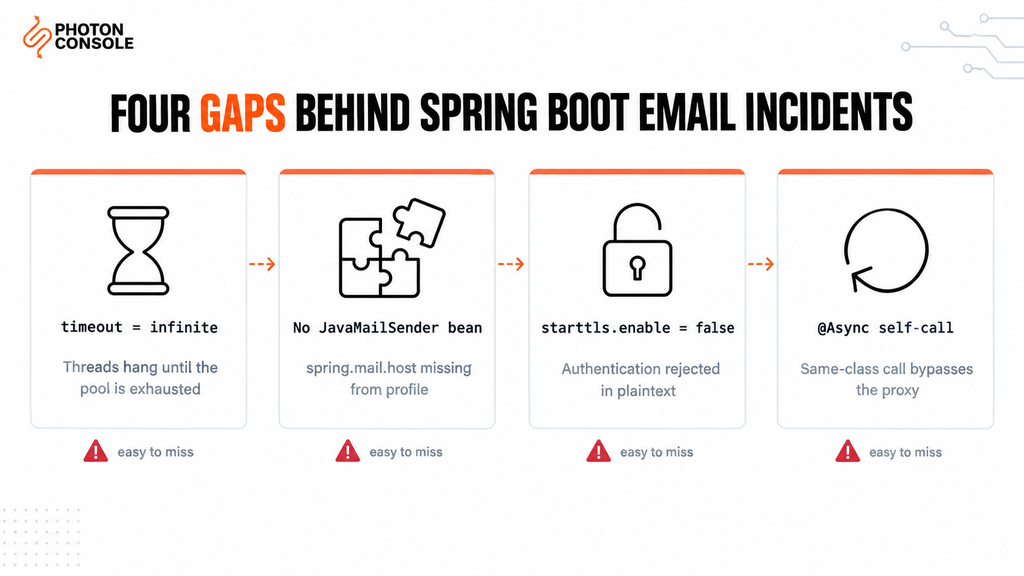
Most failures come from configuration rather than defects in Spring. These five account for the majority.
1. No Timeouts Are Set
Jakarta Mail’s default connection, read and write timeouts are effectively infinite. If the mail server accepts the connection and then stops responding, the calling thread waits indefinitely. In a web application that thread is a request thread, and enough of them stalled at once takes the whole service down.
This is the single most important property block in any Spring Boot mail configuration, and most tutorials leave it out.
2. JavaMailSender Bean Not Found
The application fails to start with an error saying no qualifying bean of type JavaMailSender is available. The cause is almost always a missing or misspelled spring.mail.host, often because it is defined in a profile that is not active in that environment.
3. STARTTLS Not Enabled
Setting the port to 587 does not enable encryption by itself. Without mail.smtp.starttls.enable=true the client never upgrades the connection, and most relays reject authentication over a plaintext channel.
4. @Async Runs Synchronously
Annotating a method with @Async does nothing unless async support is enabled, and nothing when the method is called from inside the same class. The send appears to work, but it is still blocking the request thread.
5. No Authentication Records on the Sending Domain
Without SPF and DKIM, receiving servers cannot verify your application is allowed to send as your domain, in line with Google’s sender guidelines. Our guide to SPF, DKIM and DMARC covers the records, and the free email deliverability checker shows what your domain currently publishes.
Common Mistake
Deploying without the three mail.smtp.*timeout properties. Because Jakarta Mail waits indefinitely by default, one unresponsive mail server can hold request threads open until the container’s thread pool is exhausted. The symptom looks like the whole application freezing, not like an email problem, which is why it is so often misdiagnosed.
Quick Fix
Application Fails to Start or Mail Never Connects
- Confirm
spring.mail.hostexists in the active profile, not only in a dev profile - Add
starttls.enableandstarttls.requiredfor port 587 - Add connection, read and write timeouts of around 5 seconds
- Try port 2525 if your host blocks 587 outbound
- Set
spring.mail.properties.mail.debug=truetemporarily to see the SMTP conversation
Step-by-Step: Production Setup
Step 1: Externalise Credentials
Never commit an SMTP password in application.properties. Reference environment variables with placeholders, as shown in the quick answer, and supply the values at runtime.
export SMTP_USER=your_project_api_user
export SMTP_PASS=your_secret_api_key
Step 2: Send HTML With a Plain Text Alternative
SimpleMailMessage is plain text only. For HTML, use MimeMessageHelper with multipart enabled, and always include a plain text version — HTML-only messages score worse with spam filters.
import jakarta.mail.MessagingException;
import jakarta.mail.internet.MimeMessage;
import org.springframework.mail.javamail.MimeMessageHelper;

public void sendHtml(String to, String subject, String html, String text)
        throws MessagingException {

    MimeMessage message = mailSender.createMimeMessage();
    MimeMessageHelper helper = new MimeMessageHelper(message, true, "UTF-8");

    helper.setFrom("noreply@yourdomain.com");
    helper.setTo(to);
    helper.setSubject(subject);
    helper.setText(text, html);   // plain text first, HTML second

    mailSender.send(message);
}
Step 3: Render Templates With Thymeleaf
Keep email markup out of Java strings. With spring-boot-starter-thymeleaf on the classpath, Thymeleaf can render email templates the same way it renders pages.
<!-- src/main/resources/templates/email/welcome.html -->
<html xmlns:th="http://www.thymeleaf.org">
<body>
  <p>Hello <span th:text="${name}">there</span>,</p>
  <p>Your account is ready.</p>
  <a th:href="${loginUrl}">Sign in</a>
</body>
</html>
import org.thymeleaf.context.Context;
import org.thymeleaf.spring6.SpringTemplateEngine;
public void sendWelcome(String to, String name) throws MessagingException {
Context ctx = new Context();
ctx.setVariable("name", name);
ctx.setVariable("loginUrl", "https://yourapp.com/login");
String html = templateEngine.process("email/welcome", ctx);
String text = "Hello " + name + ", your account is ready: https://yourapp.com/login";
sendHtml(to, "Welcome to Your App", html, text);
}Step 4: Send Asynchronously — Correctly
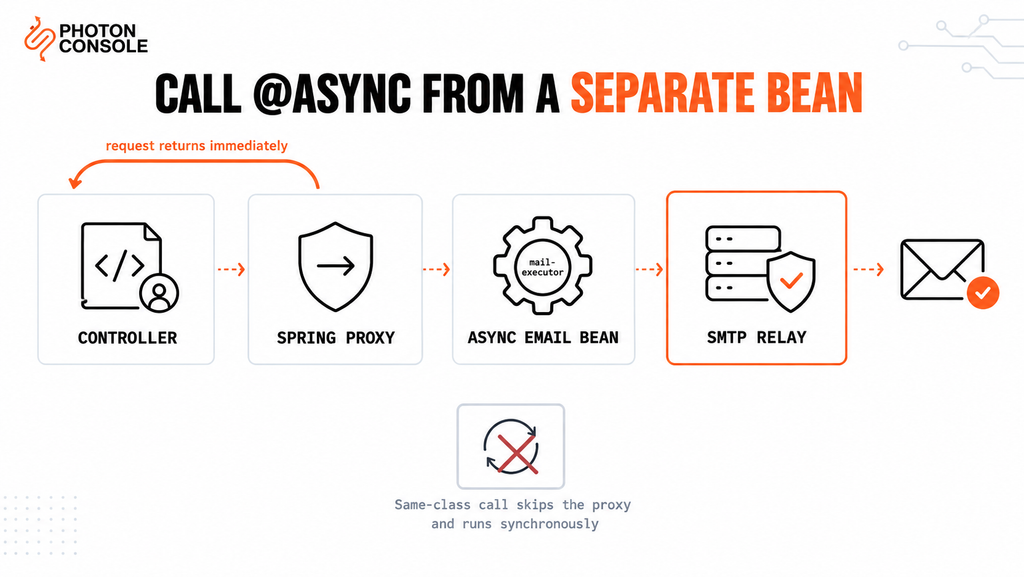
Enable async support once, then annotate the sending method.
@Configuration
@EnableAsync
public class AsyncConfig {

    @Bean(name = "mailExecutor")
    public ThreadPoolTaskExecutor mailExecutor() {
        ThreadPoolTaskExecutor executor = new ThreadPoolTaskExecutor();
        executor.setCorePoolSize(2);
        executor.setMaxPoolSize(5);
        executor.setQueueCapacity(500);
        executor.setThreadNamePrefix("mail-");
        executor.initialize();
        return executor;
    }
}
@Service
public class AsyncEmailService {
private final EmailService emailService;
private static final Logger log = LoggerFactory.getLogger(AsyncEmailService.class);
public AsyncEmailService(EmailService emailService) {
this.emailService = emailService;
}
@Async("mailExecutor")
public void sendWelcomeAsync(String to, String name) {
try {
emailService.sendWelcome(to, name);
} catch (Exception e) {
log.error("Welcome email to {} failed", to, e);
}
}
}The async method lives in a separate bean from the code that calls it. That is deliberate, and it is the part most implementations get wrong.
Quick Fix
@Async Method Still Blocks the Request
- Confirm
@EnableAsyncis present on a configuration class - Call the async method from a different bean — calls within the same class bypass the proxy
- Make sure the method is
public; private methods cannot be proxied - Define a dedicated executor so mail does not compete with other async work
- Log the thread name inside the method — if it is not
mail-*, it is not running async
Step 5: Handle Failures and Retries
Exceptions thrown inside an @Async void method are not propagated to the caller, so they must be logged inside the method as shown above. For retries, Spring Retry provides @Retryable, but retry only transient failures — a permanent rejection retried repeatedly damages sender reputation.
For mail that must survive an application restart, such as receipts or password resets, an in-memory executor queue is not enough. Our guide to transactional email queue architecture covers durable alternatives, and SMTP retry logic explains which failures are worth retrying.
Port and Property Reference
| Port | Required properties | When to use |
|---|---|---|
| 587 | mail.smtp.starttls.enable=true | Recommended default |
| 465 | mail.smtp.ssl.enable=true | When the provider requires implicit SSL |
| 2525 | mail.smtp.starttls.enable=true | When the host blocks 587 and 465 |
| 25 | None | Avoid — blocked on nearly all hosts |
Timeout Properties Explained
| Property | What it limits | Suggested value |
|---|---|---|
mail.smtp.connectiontimeout | Opening the TCP connection | 5000 ms |
mail.smtp.timeout | Waiting for a server response | 5000 ms |
mail.smtp.writetimeout | Writing the message to the socket | 5000 ms |
Configuring Spring Boot With PhotonConsole
Two steps: authenticate your domain in DNS, then set the properties.
TXT    @                    v=spf1 include:relay.photonconsole.com ~all
CNAME  photon._domainkey    dkim.photonconsole.com
spring.mail.host=smtp.photonrelay.com
spring.mail.port=587
spring.mail.username=${SMTP_USER}
spring.mail.password=${SMTP_PASS}
spring.mail.properties.mail.smtp.auth=true
spring.mail.properties.mail.smtp.starttls.enable=true
spring.mail.properties.mail.smtp.starttls.required=true
spring.mail.properties.mail.smtp.connectiontimeout=5000
spring.mail.properties.mail.smtp.timeout=5000
spring.mail.properties.mail.smtp.writetimeout=5000DNS records can take up to 24-48 hours to propagate, so verify them before assuming a configuration error. Port 2525 exists for hosts that block the standard SMTP ports. Every PhotonConsole account includes 5,000 free emails per month, enough to validate the full setup — templates, async executor and retry handling — before any spend. Details are on the PhotonRelay page, and pricing has no monthly minimum.
If you are comparing options first, our analysis of free SMTP servers covers where each stops being practical.
Environment-Specific Notes
Spring Boot Actuator
When Actuator is present, Spring Boot adds a mail health indicator that connects to the SMTP server on every health check. If the relay is briefly unreachable, your whole service reports as unhealthy and an orchestrator may restart it. Disable it with management.health.mail.enabled=false if mail is not critical to service health.
Kubernetes and Docker
Supply credentials through Secrets mapped to environment variables. Containers have no local mail agent, so an external relay is required.
AWS and Cloud Hosting
Cloud providers restrict outbound port 25 by default — AWS documents its port 25 throttle removal process. Use 587 or 2525 instead of requesting the restriction be lifted.
Tests
Use an embedded SMTP server such as GreenMail in integration tests so no real mail is sent and assertions can inspect the received message.
Pro Tips
- Set all three timeouts. Connection, read and write. Missing any one leaves a path for an indefinite hang.
- Give mail its own executor. A dedicated thread pool stops a slow mail server from starving unrelated async work.
- Send from your own domain. Put a user’s address in Reply-To, never From, or SPF and DMARC fail.
- Never log the mail properties. They include the password. Log the recipient and exception only.
- Verify DNS after any change. MXToolbox checks SPF, DKIM and blocklist status in one lookup.
- Score a real send before launch. Mail Tester flags authentication problems before users encounter them.
Related Issues You May Hit Next
- SMTP authentication errors when credentials are rejected
- SMTP connection timeouts when the connection hangs
- SMTP not working across the ten most common failure modes
- Emails landing in Gmail spam despite a successful send
- SMTP response codes for interpreting server replies
Frequently Asked Questions
Why is there no JavaMailSender bean?
Spring Boot only creates it when spring.mail.host is set. Check the property exists in the profile that is active in the failing environment.
What are the default SMTP timeouts in Spring Boot?
Jakarta Mail waits indefinitely by default. Always set connectiontimeout, timeout and writetimeout explicitly.
Why is my @Async email method not asynchronous?
Either @EnableAsync is missing, the method is not public, or it is called from within the same class, which bypasses the Spring proxy.
Should I use javax.mail or jakarta.mail?
Spring Boot 3 and later use jakarta.mail. Spring Boot 2 uses javax.mail. Mixing them causes compilation or runtime errors.
How do I send email with attachments?
Create a MimeMessageHelper with multipart set to true and call addAttachment() with a file name and resource.
Can I use Gmail SMTP with Spring Boot?
For testing, yes. For production, no. Google enforces low sending caps, throttles automated traffic, and can lock the account.
Why does my service report unhealthy when email is down?
Actuator’s mail health indicator checks the SMTP connection. Disable it with management.health.mail.enabled=false if a mail outage should not mark the whole service as down.
Conclusion
Spring Boot’s mail support is well designed, but its defaults are tuned for convenience rather than production. The infinite timeout, the host-dependent bean, and the proxy rules around @Async are each invisible until they cause an incident.
Set explicit timeouts, enable STARTTLS deliberately, keep credentials in the environment, render templates with Thymeleaf, and run sending on a dedicated executor in a separate bean. That covers nearly every production failure the framework is capable of producing.
What remains is infrastructure: whether your host permits outbound SMTP, and whether receiving providers trust your domain. A dedicated transactional email solution handles authentication, routing and reputation using the configuration shown above. Developers working across stacks may also want our guides to sending email in Node.js and sending email in Python.