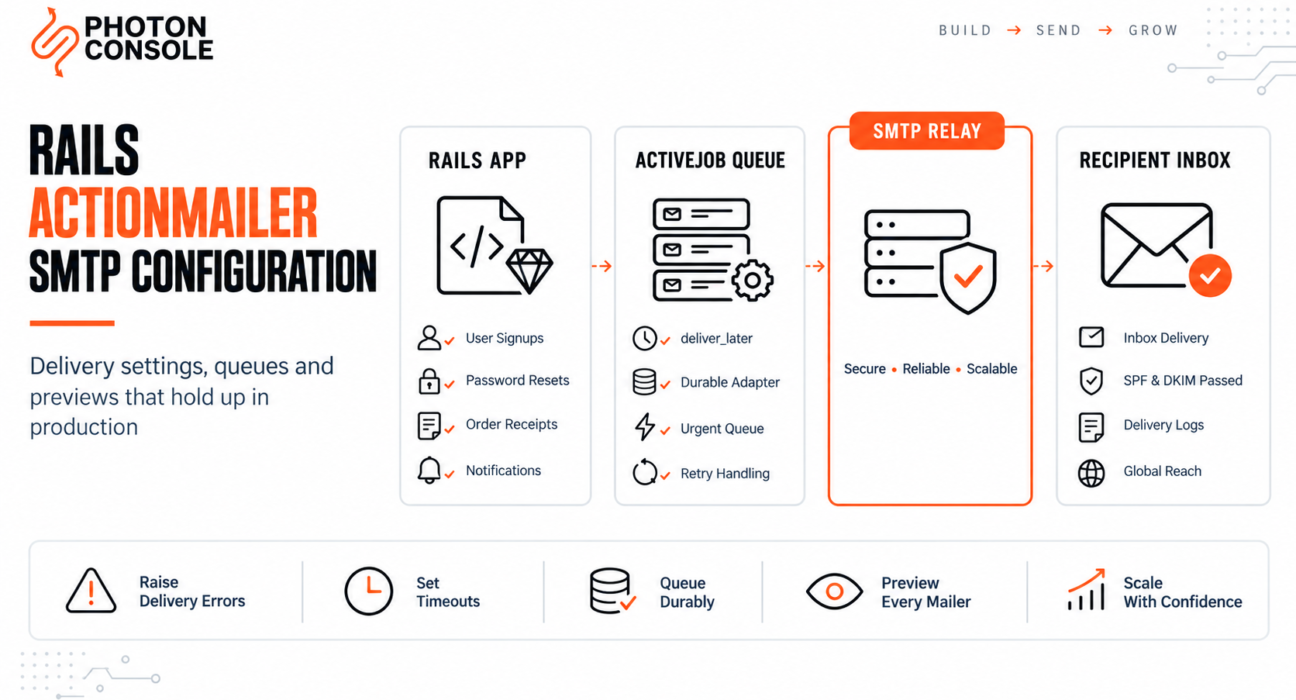
ActionMailer is one of the most pleasant parts of Rails. Generate a mailer, write a view, call deliver_later, and email works. Locally, at least.
In production the same code can fail without a sound. No exception, no log entry, no failed job. The controller returns a success response, the user waits for a password reset that never arrives, and nothing in your monitoring suggests anything happened.
That silence is a configuration default, not a bug. This guide covers the production setup: SMTP settings that actually connect, the flag that hides every delivery error, queuing with ActiveJob, mailer previews, and the errors Rails developers hit most often.
Quick Answer: How Do You Configure ActionMailer SMTP?
Set the delivery method and SMTP settings in your production environment file:

# config/environments/production.rb
config.action_mailer.delivery_method = :smtp
config.action_mailer.perform_deliveries = true
config.action_mailer.raise_delivery_errors = true
config.action_mailer.default_url_options = { host: "yourapp.com", protocol: "https" }

config.action_mailer.smtp_settings = {
  address:              "smtp.photonrelay.com",
  port:                 587,
  domain:               "yourdomain.com",
  user_name:            ENV["SMTP_USER"],
  password:             ENV["SMTP_PASS"],
  authentication:       :plain,
  enable_starttls_auto: true,
  open_timeout:         5,
  read_timeout:         5
}
class UserMailer < ApplicationMailer
default from: "noreply@yourdomain.com"
def welcome(user)
@user = user
mail(to: @user.email, subject: "Welcome to Your App")
end
end
UserMailer.welcome(user).deliver_laterThree lines in that configuration matter more than the rest, and the next sections explain why. Delivery itself depends on the server you authenticate against and whether your domain is authorised to send — an authenticated relay such as PhotonConsole covers that side.
How ActionMailer Delivers
ActionMailer builds the message and hands it to a delivery method. The Rails guides document four, and only one sends real mail over the network.
| Delivery method | What it does | Use in |
|---|---|---|
:smtp | Sends over SMTP to the configured server | Production |
:sendmail | Pipes to a local sendmail binary | Rarely — usually unauthenticated |
:file | Writes each message to tmp/mails | Local inspection |
:test | Appends to ActionMailer::Base.deliveries | Automated tests |
Underneath, ActionMailer uses the Mail gem to open the SMTP connection and speak the protocol. Rails does not deliver email itself — it hands a correctly formed message to whatever server you named.
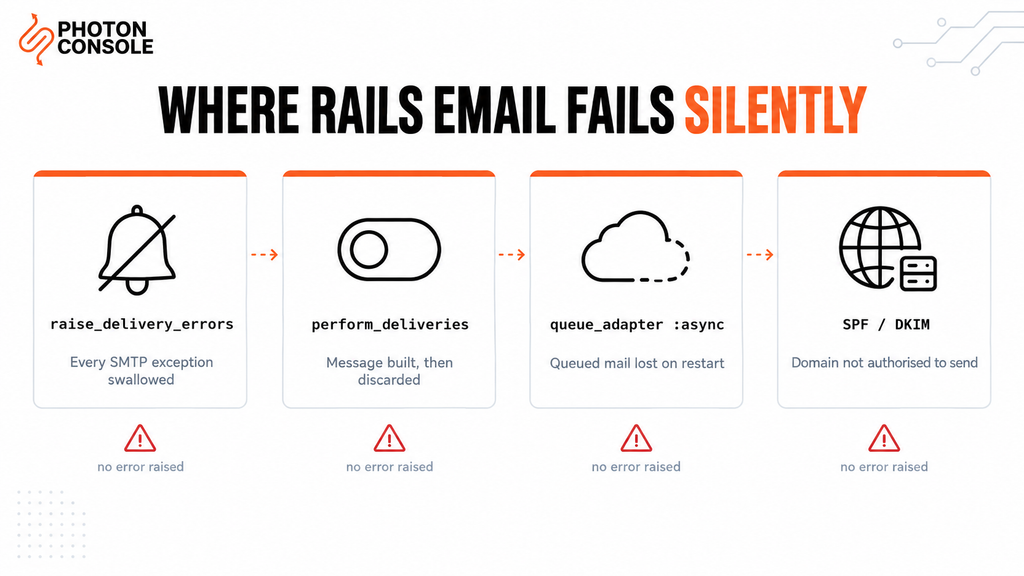
Why Rails Email Fails Silently in Production
1. raise_delivery_errors Is Set to False
Rails’ generated development config sets raise_delivery_errors = false so developers are not interrupted by mail failures while working offline. That block frequently gets copied into production.rb.
With it off, every SMTP exception is swallowed. Bad credentials, an unreachable host, a rejected recipient — all of it disappears. Your application reports success because, as far as it knows, nothing went wrong.
2. perform_deliveries Is Disabled
Another development default. When false, ActionMailer builds the message and discards it. The mailer runs, the view renders, and no connection is ever opened.
3. deliver_later Uses the Async Adapter
Rails ships with the :async queue adapter by default. It runs jobs on an in-process thread pool, which means queued email is held in memory. A deploy, a restart or a crash discards everything still waiting.
For a password reset that is a lost login. For a receipt it is a support ticket.
4. default_url_options Is Missing
Mailer views have no request context, so URL helpers cannot infer a host. Without default_url_options, any mailer using a _url helper raises Missing host to link to. Under deliver_later that surfaces as a failed job rather than a request error, which is easy to miss.
5. No Authentication Records on the Sending Domain
Without SPF and DKIM, receiving servers cannot verify your application is authorised to send as your domain, in line with Google’s sender guidelines. Our guide to SPF, DKIM and DMARC covers the records, and the free email deliverability checker shows what your domain currently publishes.
Common Mistake
Copying the ActionMailer block from development.rb into production.rb. That block exists to keep local development quiet, and it carries raise_delivery_errors = false with it. In production the result is an application that cannot tell you its email is broken — the failure mode most likely to go unnoticed for weeks. Set it to true in production, always.
Quick Fix
Rails Sends No Email in Production
- Set
raise_delivery_errors = trueso the real exception surfaces - Confirm
perform_deliveries = true - Confirm
delivery_method = :smtp, not:testor:file - Run a send from
rails consoleon the server withdeliver_nowto see the error directly - Try port 2525 if your host blocks 587 outbound
Step-by-Step: Production Setup
Step 1: Keep Credentials Out of the Repository
Use Rails encrypted credentials or environment variables. Never commit an SMTP password.
rails credentials:edit# config/credentials.yml.enc
smtp:
user_name: your_project_api_user
password: your_secret_api_keyuser_name: Rails.application.credentials.dig(:smtp, :user_name),
password: Rails.application.credentials.dig(:smtp, :password),Step 2: Always Set Timeouts
Without open_timeout and read_timeout, a mail server that accepts a connection then stops responding can hold a worker indefinitely. Five seconds is a sensible default for both.
Step 3: Verify From the Server, Not Your Laptop
rails console --environment=productionActionMailer::Base.smtp_settings
# confirm the values are what you expect
UserMailer.welcome(User.first).deliver_now
# deliver_now surfaces the exception immediatelyUse deliver_now for this test. deliver_later moves the failure into a background job where you may not see it.
Step 4: Use a Real Queue Adapter
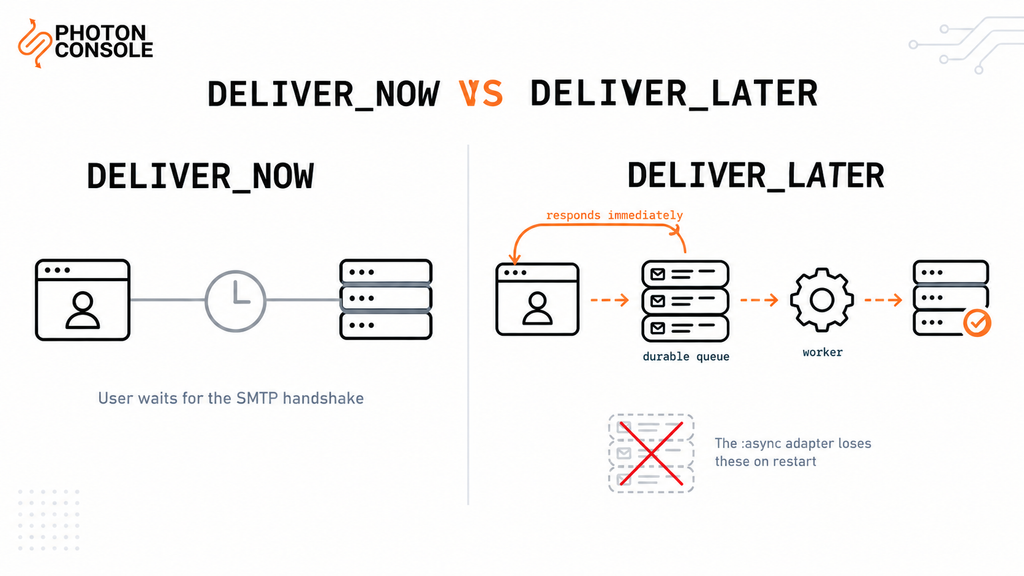
Replace the in-memory async adapter with something durable before relying on deliver_later.
# config/environments/production.rb
config.active_job.queue_adapter = :sidekiq # or :solid_queue, :good_job, :delayed_jobclass UserMailer < ApplicationMailer
default from: "noreply@yourdomain.com"
def password_reset(user)
@user = user
@reset_url = edit_password_reset_url(token: user.reset_token)
mail(to: @user.email, subject: "Reset your password")
end
end# Time-critical mail on its own queue
UserMailer.password_reset(user).deliver_later(queue: :urgent)
# Lower priority mail
UserMailer.weekly_digest(user).deliver_later(queue: :low)Separating queues matters more than it looks. A digest batch that backs up should never delay a password reset. Our guide to transactional email queue architecture covers the pattern, and SMTP retry logic explains which failures are worth retrying.
Quick Fix
deliver_later Queues but Never Delivers
- Confirm a worker process is actually running, not just the web server
- Check the queue adapter is not still
:async, which loses jobs on restart - Confirm the worker is listening on the queue name you passed
- Check the failed job backlog for the underlying exception
- Confirm the worker process has the same credentials as the web process
Step 5: Preview Before You Ship
Rails renders mailer previews in the browser, which catches layout and content problems without sending anything.
# test/mailers/previews/user_mailer_preview.rb
class UserMailerPreview < ActionMailer::Preview
def welcome
UserMailer.welcome(User.first)
end
def password_reset
UserMailer.password_reset(User.first)
end
endVisit /rails/mailers in development to see every preview. Previews render the real view with real data, so a missing interpolation or a broken URL helper shows up immediately.
Common Rails Delivery Errors
| Error | Usual cause |
|---|---|
Net::SMTPAuthenticationError | Wrong credentials, or whitespace copied into them |
Net::OpenTimeout | Host unreachable or outbound SMTP blocked |
EOFError | TLS mismatch — usually port 465 with STARTTLS settings |
Missing host to link to | default_url_options not set for that environment |
Net::SMTPFatalError | Recipient rejected, or sender not authorised |
| No error at all | raise_delivery_errors is false |
Note
Port 465 needs different settings from 587. Use enable_starttls_auto: true on port 587, or ssl: true on port 465 — never both. Mixing them typically produces an EOFError rather than a message explaining the mismatch.
Port Reference
| Port | smtp_settings | When to use |
|---|---|---|
| 587 | enable_starttls_auto: true | Recommended default |
| 465 | ssl: true | When the provider requires implicit SSL |
| 2525 | enable_starttls_auto: true | When the host blocks 587 and 465 |
| 25 | n/a | Avoid — blocked on nearly all hosts |
Configuring Rails With PhotonConsole
Two steps: authenticate the domain in DNS, then set smtp_settings. No mailer code changes.
TXT @ v=spf1 include:relay.photonconsole.com ~all
CNAME photon._domainkey dkim.photonconsole.comconfig.action_mailer.smtp_settings = {
address: "smtp.photonrelay.com",
port: 587, # 465 with ssl: true, 2525 if 587 is blocked
domain: "yourdomain.com",
user_name: Rails.application.credentials.dig(:smtp, :user_name),
password:  Rails.application.credentials.dig(:smtp, :password),
authentication: :plain,
enable_starttls_auto: true,
open_timeout: 5,
read_timeout: 5
}The domain value should be your sending domain, not the relay’s — it is what Rails announces in the SMTP HELO. DNS records can take up to 24-48 hours to propagate, so verify before assuming a configuration error. Every PhotonConsole account includes 5,000 free emails per month, enough to validate mailers, queues and previews before any spend. Details are on the PhotonRelay page, and pricing has no monthly minimum.
If you are comparing options first, our analysis of free SMTP servers covers where each stops being practical.
Environment-Specific Notes
Development
Use delivery_method = :file or a mail catcher such as Mailpit. Keep raise_delivery_errors = false here only, and never copy that line forward.
Staging
Use separate relay credentials so a staging mistake cannot affect production sending reputation. Consider intercepting all recipients so test mail cannot reach real users.
Heroku and Platform Hosting
Config vars must be available to both web and worker dynos. A worker missing the SMTP credentials produces jobs that fail only when queued, which looks like a queue problem rather than a configuration one.
Docker and Kubernetes
Containers have no local mail agent, so an external relay is required. Pass credentials as secrets, and remember the async adapter loses queued mail whenever a pod restarts.
AWS Hosting
Outbound port 25 is restricted by default — AWS documents its port 25 throttle removal process. Use 587 or 2525 instead.
Pro Tips
- Set
default from:on ApplicationMailer. One place to change the sender rather than every mailer. - Use a monitored Reply-To. Users reply to transactional mail. A noreply address that bounces reads as untrustworthy.
- Keep previews current. A preview for every mailer means layout regressions surface in review, not in a user’s inbox.
- Never log the smtp_settings hash. It contains the password. Log the recipient and exception only.
- Verify DNS after any change. MXToolbox checks SPF, DKIM and blocklist status in one lookup.
- Score a real send before launch. Mail Tester flags authentication problems before users hit them.
Related Issues You May Hit Next
- SMTP authentication errors when credentials are rejected
- SMTP connection timeouts when the connection hangs
- SMTP not working across the ten most common failure modes
- Emails landing in Gmail spam despite a successful send
- Emails sent but not delivered when the server reports success
Frequently Asked Questions
Why does Rails send no email and raise no error?
raise_delivery_errors is almost certainly false, or perform_deliveries is false. Both are development defaults that often get copied into production.
Should I use deliver_now or deliver_later?
deliver_later for anything triggered by a web request, so the user does not wait on the SMTP handshake. deliver_now for console testing, where you want the exception immediately.
Why do I get “Missing host to link to”?
Mailer views have no request context. Set config.action_mailer.default_url_options with a host for each environment.
Is the async queue adapter safe for email?
Not for anything important. It holds jobs in memory, so a deploy or restart discards queued mail. Use Sidekiq, Solid Queue, GoodJob or a similar durable adapter.
Why do I get EOFError when connecting?
Usually a TLS mismatch. Port 465 needs ssl: true; port 587 needs enable_starttls_auto: true. Setting both, or the wrong one for the port, produces this error.
Can I use Gmail SMTP with Rails?
For local testing, yes. For production, no. Google enforces low sending caps, throttles automated traffic, and can lock the account.
How do I stop staging email reaching real users?
Use an interceptor that rewrites every recipient to an internal address, registered only in the staging environment.
Conclusion
ActionMailer is reliable. Almost every production failure traces to a setting that exists to make local development quieter: delivery errors suppressed, deliveries disabled, or an in-memory queue adapter that silently drops work.
Turn raise_delivery_errors on in production, confirm deliveries are enabled, set timeouts, move to a durable queue adapter, and give time-critical mail its own queue. That covers the framework side almost entirely.
What remains is infrastructure: whether your host permits outbound SMTP, and whether receiving providers trust the domain you send from. A dedicated transactional email solution handles authentication, routing and reputation using the configuration shown above. Developers working across stacks may also want our guides to sending email in Python and sending email in Node.js.