You move an application to Compute Engine, and email stops. The connection on port 25 hangs and times out. You add an egress firewall rule allowing TCP 25, confirm it is active, and nothing changes.
The rule is being ignored. Google Cloud blocks outbound port 25 across its network, the block sits above your VPC firewall, and — unlike AWS — there is no request form, no support ticket and no appeal. It is permanent.
That permanence is actually useful information, because it removes an option that would otherwise waste days. This guide covers how to confirm the block, which Google Cloud services it affects, and the routes that do work.
Quick Answer: Can You Send Email From Google Cloud?
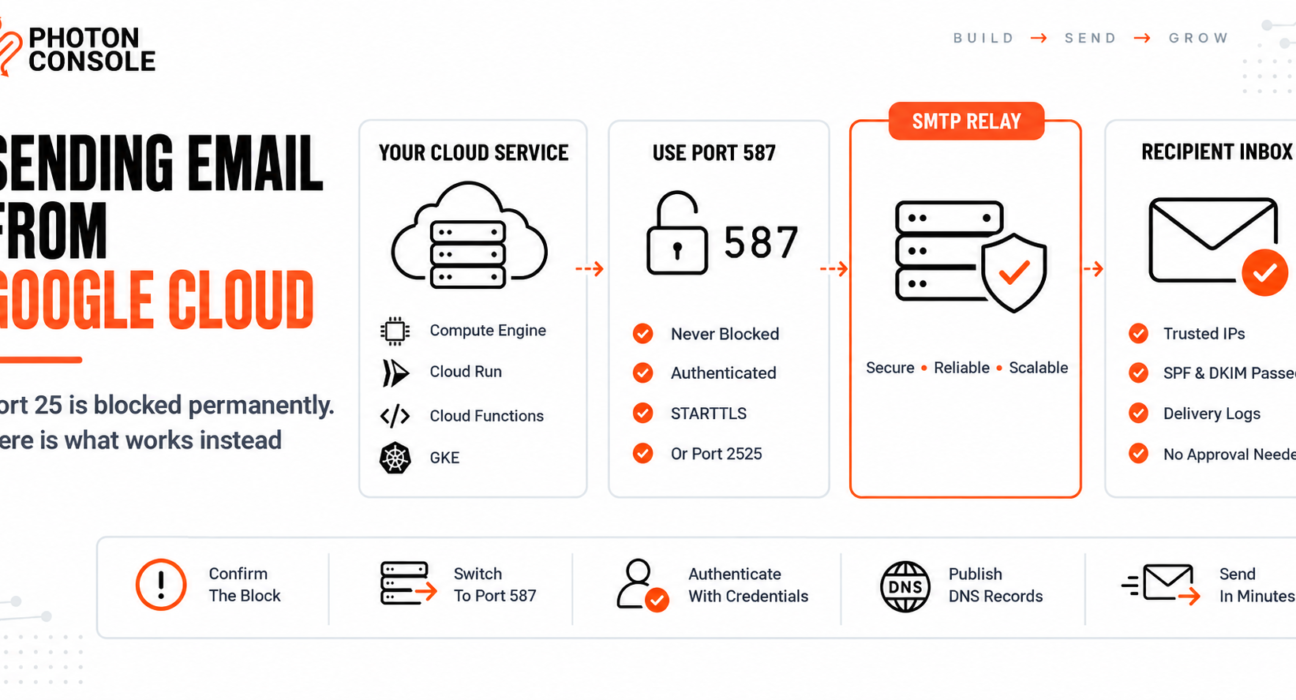
Yes, but never on port 25. Google Cloud permanently blocks outbound traffic on that port and does not lift the restriction for any customer.

Use port 587 or 2525 with an authenticated relay instead:
Host:  smtp.photonrelay.com
Port:  587          # or 2525 if 587 is restricted on your network
User:  your_project_api_user
Pass:  your_secret_api_key
This works on Compute Engine, GKE, Cloud Run and Cloud Functions without any request to Google. An authenticated relay such as PhotonConsole accepts connections on the ports Google leaves open.
Confirm the Block Before Changing Anything
Run these from the Compute Engine VM itself, not from your local machine.
# Port 25 — expect this to hang, then time out
nc -zvw5 smtp.photonrelay.com 25

# Port 587 — expect an immediate connection
nc -zvw5 smtp.photonrelay.com 587

# Port 2525 — fallback, should also connect
nc -zvw5 smtp.photonrelay.com 2525
A timeout on 25 with a successful connection on 587 confirms the block. The distinction matters: a refused connection suggests a firewall rule, while a silent hang followed by a timeout means traffic is being dropped upstream of your configuration.
Once 587 connects, confirm TLS negotiates too:
openssl s_client -starttls smtp -connect smtp.photonrelay.com:587 -crlfCommon Mistake
Creating a VPC egress firewall rule that allows TCP 25 and assuming the problem is solved. The rule will save successfully and show as active in the console, because the rule itself is valid. Google’s block is applied at the network level above your VPC, so the traffic is dropped regardless of what your firewall permits. A rule that looks correct and changes nothing is the expected result, not a sign of misconfiguration.
Quick Fix
Confirming the Google Cloud Port 25 Block
- Test from the VM, never from a local machine
- Timeout on 25 plus a connection on 587 confirms the block
- Delete any egress rule you added for TCP 25 — it does nothing
- Check your application config does not hardcode port 25
- Do not open a support case asking for removal; there is no removal process
Why Google Does Not Lift It
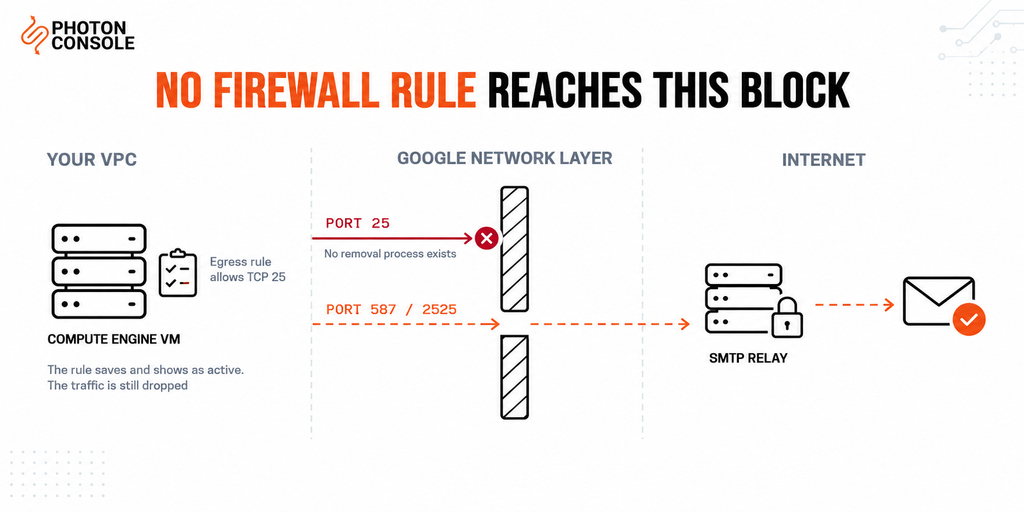
Port 25 carries mail between mail servers and requires no authentication by design. That makes any machine reachable on it a potential spam source, and cloud instances are cheap and quick to create at scale.
AWS throttles port 25 by default but will consider removal requests for legitimate use. Google Cloud takes the stricter position and blocks it outright, with no exception process. If you have arrived here from an AWS background, our guide to the AWS EC2 port 25 throttle covers how the two differ.
The practical effect is that the decision is simpler on Google Cloud. There is no trade-off to weigh between waiting for approval and moving on — only one path exists.
Which Ports Work
| Port | Purpose | On Google Cloud |
|---|---|---|
| 25 | Server-to-server mail relay | Permanently blocked |
| 587 | Authenticated message submission | Available |
| 465 | Submission over implicit SSL | Available |
| 2525 | Unofficial submission fallback | Available |
Port 587 is the submission port, defined in RFC 6409 for authenticated clients handing mail to a server they hold credentials for. An application is a client rather than a mail server, so 587 is the correct port even where 25 is available.
How Each Google Cloud Service Behaves
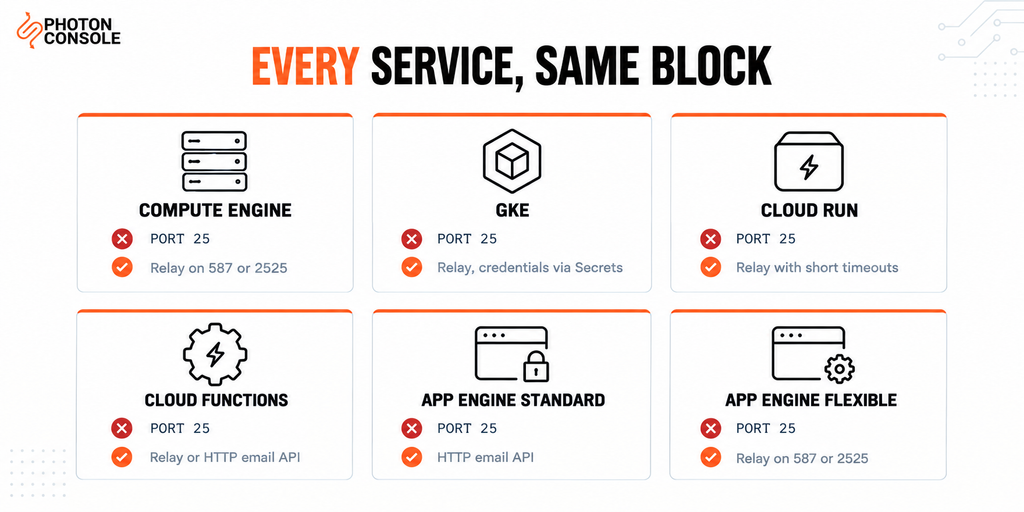
| Service | Port 25 | Recommended approach |
|---|---|---|
| Compute Engine | Blocked | SMTP relay on 587 or 2525 |
| GKE | Blocked | SMTP relay, credentials via Secrets |
| Cloud Run | Blocked | SMTP relay with short timeouts |
| Cloud Functions | Blocked | SMTP relay, or an HTTP email API |
| App Engine standard | Blocked | HTTP email API in restricted runtimes |
| App Engine flexible | Blocked | SMTP relay on 587 or 2525 |
Note
Some managed runtimes restrict outbound socket access more tightly than Compute Engine does, so even port 587 may be unavailable. If an SMTP connection fails on every port from a serverless runtime, the environment is likely blocking raw sockets rather than that specific port. An HTTP email API works there because it travels over an ordinary HTTPS request.
Configuring Your Application
The change is usually the host and the port. No application logic needs rewriting.
Node.js
const transporter = nodemailer.createTransport({
  host: 'smtp.photonrelay.com',
  port: 587,        // never 25 on Google Cloud
  secure: false,    // STARTTLS on 587
  auth: {
    user: process.env.SMTP_USER,
    pass: process.env.SMTP_PASS
  },
  connectionTimeout: 8000,
  socketTimeout: 8000
});
Our Nodemailer production guide covers pooling, retries and error handling in depth.
Python
import smtplib

with smtplib.SMTP("smtp.photonrelay.com", 587, timeout=10) as server:
    server.starttls()
    server.login(smtp_user, smtp_pass)
    server.send_message(msg)
Our guide to sending email in Python covers the wider setup.
Postfix as a Relay Host
If the VM already runs Postfix, point it at the relay rather than delivering directly.
# /etc/postfix/main.cf
relayhost = [smtp.photonrelay.com]:587
smtp_sasl_auth_enable = yes
smtp_sasl_password_maps = hash:/etc/postfix/sasl_passwd
smtp_sasl_security_options = noanonymous
smtp_tls_security_level = encrypt
sudo postmap /etc/postfix/sasl_passwd
sudo chmod 600 /etc/postfix/sasl_passwd*
sudo systemctl restart postfixEvery local process that sends through sendmail keeps working, with PhotonConsole handling delivery.
Serverless Considerations
Cloud Run and Cloud Functions behave differently from a long-running VM, and three things matter.
Connection pooling gives little benefit. The container may be destroyed after the request, so a pooled connection has nothing to reuse it. Disable pooling and use short-lived connections.
Timeouts must fit inside the platform limit. Request timeouts vary by service and configuration, so check the current limits for your setup and keep SMTP timeouts comfortably below them. Being killed mid-handshake produces a platform error rather than a mail error, which is misleading when debugging.
Cold starts add latency. A cold container paying the full TCP and TLS handshake cost can take several seconds before the message is even accepted. For time-critical mail such as one-time codes, that latency is worth measuring.
Quick Fix
Cloud Run or Cloud Functions Cannot Connect
- Confirm the port is 587 or 2525, never 25
- Lower SMTP timeouts below the service request timeout
- Disable connection pooling — it does not help in a short-lived container
- Check environment variables are set on the deployed revision, not only locally
- If every port fails, the runtime may block raw sockets entirely — use an HTTP email API
What About the Google Workspace SMTP Relay?
Google Workspace offers an SMTP relay service for customers on a paid plan. It can work for internal or low-volume mail, but it carries conditions worth understanding before relying on it.
It requires an active Workspace subscription, applies its own sending limits, and ties your application’s email to a mailbox product rather than a sending platform. You also get limited delivery logging and no bounce webhooks, so diagnosing a delivery problem means working without the data you would normally use.
For application mail — password resets, receipts, notifications — a dedicated relay is the better fit. Our analysis of free SMTP servers covers where options like this stop being practical.
Publish Your DNS Records
Changing the port gets mail out of Google Cloud. Authentication records are what get it into inboxes.
TXT    @                    v=spf1 include:relay.photonconsole.com ~all
CNAME  photon._domainkey    dkim.photonconsole.com
Without these, mail leaves successfully and is filtered on arrival, in line with Google’s sender guidelines. Our guide to SPF, DKIM and DMARC explains the records, and the free email deliverability checker shows what your domain currently publishes.
DNS changes take from a few minutes to 24-48 hours to propagate depending on your registrar and TTL settings. Check you do not already publish a second SPF record — two separate TXT records starting with v=spf1 break authentication entirely.
Pro Tips
- Test from inside Google Cloud. Local testing proves nothing about what a VM or container can reach.
- Never hardcode the port. Keep host and port in environment variables so a change does not require a rebuild.
- Use Secret Manager for credentials. Mount them as environment variables rather than baking them into an image.
- Set explicit SMTP timeouts. Library defaults are often very long, which turns a blocked port into a hung worker.
- Do not run your own mail server to avoid a relay fee. On a permanently blocked port 25 it will not work regardless, and reputation management costs far more in engineering time.
- Verify DNS after any change. MXToolbox checks SPF, DKIM and blocklist status in one lookup.
- Score a real send before launch. Mail Tester flags authentication problems before users encounter them.
Related Issues You May Hit Next
- AWS EC2 port 25 blocked for how the AWS restriction differs
- SMTP connection timeouts when connections hang rather than fail
- SMTP authentication errors once the port is open but login fails
- Emails sent but not delivered when the server reports success
- Emails landing in Gmail spam after delivery succeeds
Frequently Asked Questions
Can I request that Google unblock port 25?
No. Unlike AWS, Google Cloud has no removal process for this restriction. Opening a support case will not change it.
Will a VPC firewall rule allowing port 25 work?
No. The block is applied above your VPC, so the rule saves and appears active while the traffic is still dropped.
Does the block apply to Cloud Run and Cloud Functions?
Yes. Every Google Cloud compute service is subject to it. Use port 587 or 2525, or an HTTP email API where raw sockets are unavailable.
Can I use Gmail SMTP from a Compute Engine VM?
For testing only. Google enforces low sending caps on consumer and Workspace mailboxes, throttles automated traffic, and can lock the account, which takes your application’s email down with it.
Why does port 587 work when 25 does not?
Port 587 is the authenticated submission port. Because every connection requires credentials, it cannot be used anonymously for spam the way port 25 can.
What if 587 is also blocked on my network?
Use port 2525. It is an unofficial fallback that most relays accept precisely for networks that restrict the standard ports.
Do I still need SPF and DKIM when using a relay?
Yes. The relay delivers the message, but the DNS records prove your domain authorised it. Without them, delivery is far less reliable regardless of which relay you use.
Conclusion
A hung connection on port 25 from Google Cloud is not a configuration error, and it is not something a firewall rule can fix. Google blocks the port across its network permanently, and no amount of searching for a removal form will turn up one, because none exists.
The useful consequence is that the decision is already made for you. Move the application to port 587 or 2525, authenticate against a relay, and publish SPF and DKIM for your sending domain. That is the complete fix, and it takes minutes rather than days.
A dedicated transactional email solution handles the ports, authentication and sending reputation, and works identically across Compute Engine, GKE, Cloud Run and Cloud Functions. Pricing starts with 5,000 free emails per month, which is enough to confirm the whole path works before spending anything.