

Your staging environment sends emails without a single failure. SPF and DKIM are configured. Integration tests pass. You ship to production.
Then launch day arrives. OTP emails start queuing. Onboarding confirmations are delayed by four minutes. You open your SMTP dashboard and find no useful diagnostics — just a vague delivery count and a green status indicator that refuses to explain anything.
Most SMTP relay evaluations focus on feature lists instead of operational behavior under production load. Developers verify DKIM support and sign up. What they do not test is how the relay behaves when 40,000 OTP emails hit the queue simultaneously — or whether the platform surfaces actionable data during an outage.
The real quality of an SMTP relay is usually discovered after deployment, not during signup.

This guide is a structured evaluation framework for developers, startup CTOs, and SaaS engineering teams who need an SMTP relay decision that survives production scale.
Table of Contents
- Quick Answer: What to Evaluate Before Choosing an SMTP Relay
- What an SMTP Relay Actually Does
- Why SMTP Relay Decisions Become Expensive Later
- The 8-Criterion Developer Evaluation Framework
- Most Common SMTP Relay Evaluation Mistakes
- Shared IP vs Dedicated IP: How to Decide
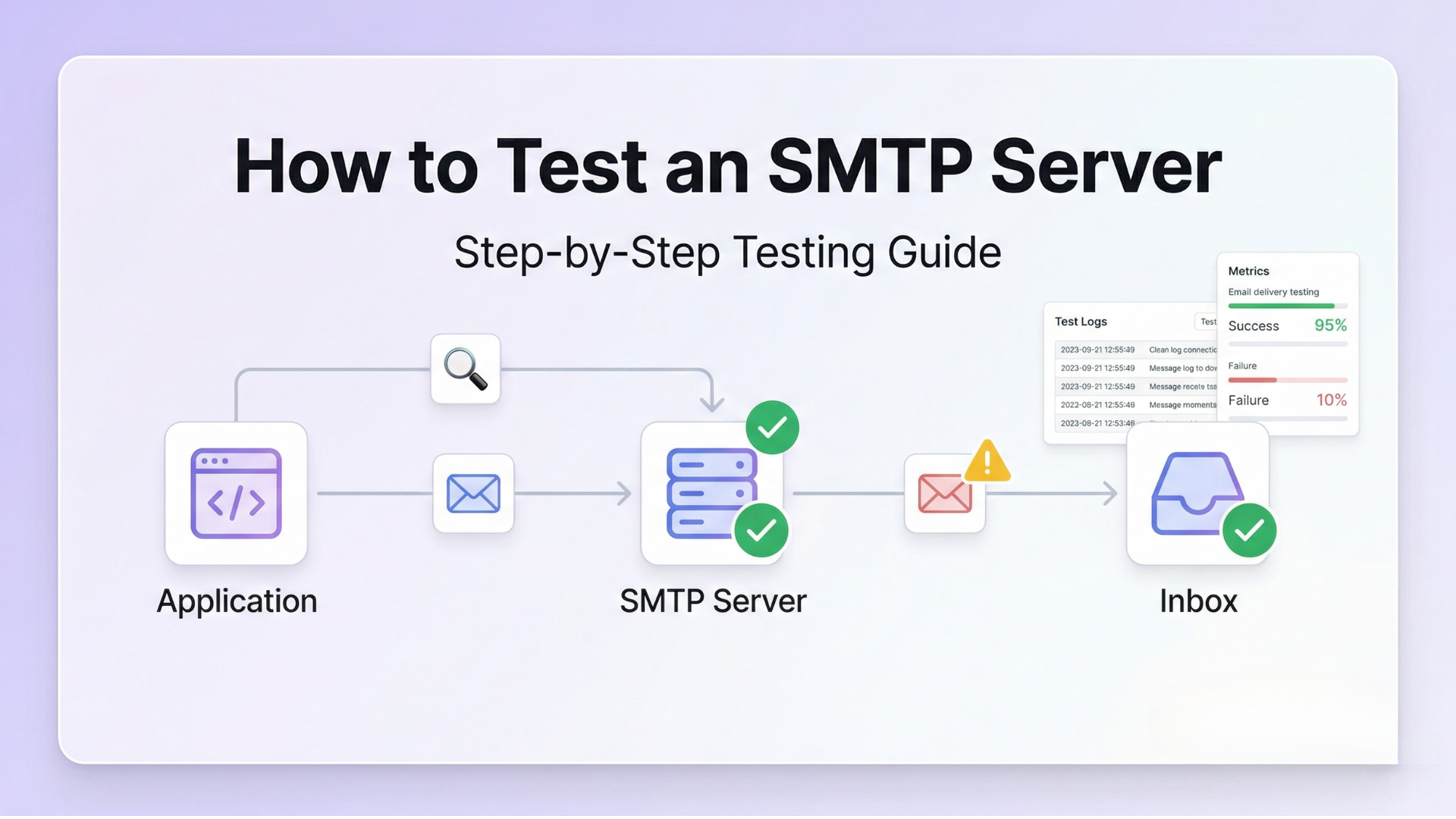
- How to Test an SMTP Relay Before Committing
- Reality Snapshot: OTP Failure During a Traffic Spike
- How PhotonConsole Approaches SMTP Relay Infrastructure
- SMTP Relay Evaluation Checklist
- Key Takeaways
- Frequently Asked Questions
- Conclusion
Quick Answer: What to Evaluate Before Choosing an SMTP Relay
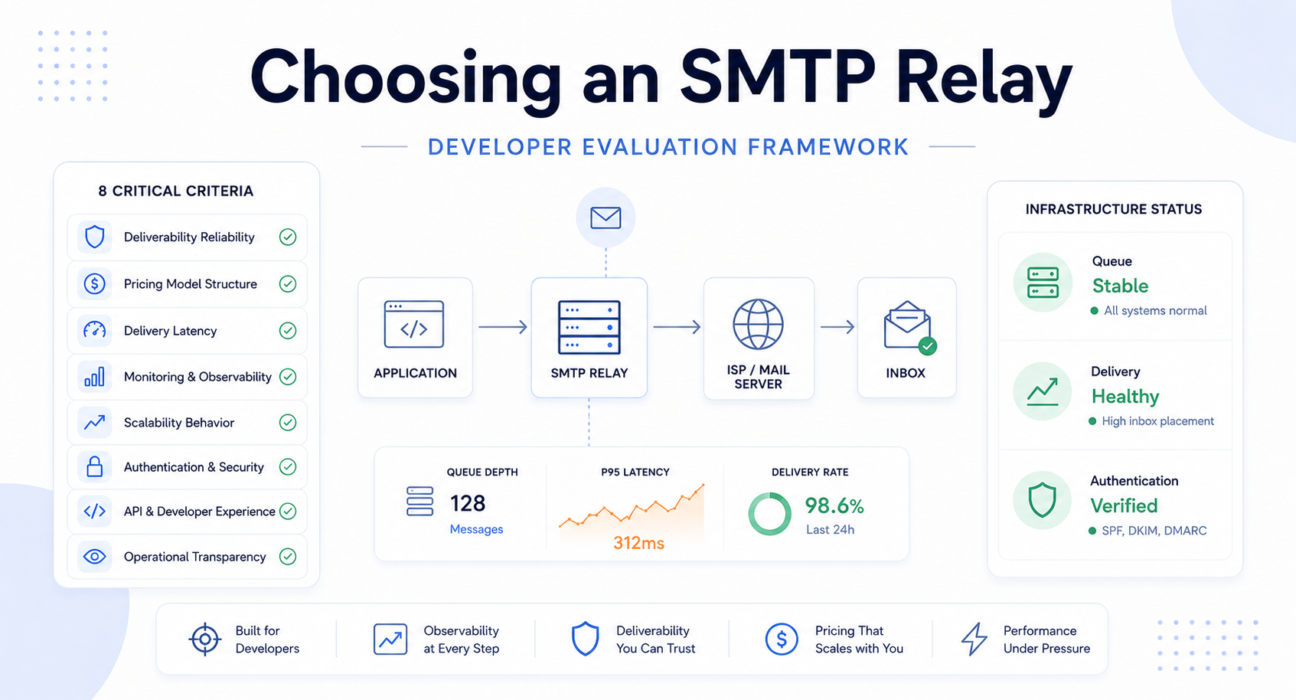
When choosing an SMTP relay, evaluate these eight criteria in order of operational consequence — not feature availability:
- Deliverability reliability — inbox placement rates, ISP relationships, IP pool hygiene
- Pricing model structure — subscription tiers vs pay-per-use, overage behavior, cost at 10x volume
- Delivery latency — P95 and P99 latency, not averages; critical for OTP and authentication flows
- Monitoring and observability — per-message event logs, bounce diagnostics, webhook reliability
- Scalability behavior — queue handling under burst traffic, rate limits, retry storm management
- Authentication support — SPF, DKIM, DMARC alignment, domain reputation protection
- API and developer experience — error visibility, SDK quality, debugging support
- Operational transparency — status page quality, incident communication, failure visibility
Each criterion has an operational consequence that compounds over time. Skipping any one of them is a risk that surfaces under pressure, not during setup.
SMTP Relay Evaluation Priority Order
When prioritization matters — and it will during incident response — use this hierarchy:
| Priority | Criterion | Operational Consequence If Skipped |
|---|---|---|
| 1 | Inbox Reliability | Undelivered email is invisible failure |
| 2 | Latency Stability | OTP delays convert directly to churn |
| 3 | Observability Quality | Incidents without logs become permanent guesswork |
| 4 | Scalability Behavior | Burst failures hit at the worst possible moment |
| 5 | Pricing Efficiency | Entry cost rarely reflects production cost |
| 6 | Developer Experience | Poor APIs extend every incident duration |
What an SMTP Relay Actually Does
Definition: An SMTP relay is infrastructure that accepts outbound email from applications, manages queuing and retries, communicates with recipient mail servers using reputation-aware sending IPs, and tracks delivery outcomes per message.
Your application submits a message via SMTP credentials or an API key and receives a 250 OK response. That response confirms the relay accepted the message — not that it was delivered.
Actual delivery, deferral, bounce, or failure happens asynchronously — sometimes seconds later, sometimes minutes later, depending on recipient server conditions and queue depth. The relay’s responsibilities in that window include:
- Queuing and retrying messages when recipient servers are temporarily unavailable
- Communicating with ISPs using reputation-aware sending infrastructure
- Classifying bounces (hard vs soft) and managing suppression lists
- Signing outbound messages with your domain’s DKIM key
- Reporting delivery events back via webhooks or log APIs
This asynchronous gap between acceptance and delivery is where most SMTP reliability failures live. It is also where observability tooling either saves you or leaves you guessing.
For a deeper look at the infrastructure layer, the SMTP relay service architecture guide covers queue systems and retry behavior in detail.
Why SMTP Relay Decisions Become Expensive Later
SMTP relay selection feels lightweight during onboarding. The structural cost becomes clear later — usually at the worst possible time.
Migration Difficulty
SMTP migration becomes significantly harder once reputation history, suppression lists, and delivery workflows are deeply integrated into production. Moving providers means a new IP warmup cycle — weeks of temporarily depressed inbox placement rates. Migrating webhook schemas, bounce handling logic, and suppression list formats adds engineering time that is almost always underestimated.
Deliverability Reputation Lock-In
Domain reputation accrues against specific IP pools. Switching providers does not transfer that history. For high-volume senders, re-establishing inbox placement rates after a migration can take longer than the migration itself.
Pricing Escalation
A provider costing $15/month at 10,000 emails may cost $400/month at 300,000 emails — not because prices changed, but because subscription tiers are structured to extract value at scale. Always model cost at 3x and 10x volume before committing.
The total cost of ownership analysis for SaaS teams shows exactly where subscription and pay-per-use models diverge as volume grows.
Operational Dependency
Once transactional email is live, your SMTP relay is critical infrastructure. A fast relay with opaque incident communication is still an expensive relay — because every undisclosed failure costs your team debugging time rather than recovery time.
Operational Reality: Most developers do not regret choosing an SMTP relay during onboarding. They regret it during scaling, outages, migration, and unexpected billing spikes. That delayed pain is structurally predictable — and mostly preventable.
The 8-Criterion Developer Evaluation Framework
Choosing an SMTP relay on feature availability alone is how teams end up rebuilding email infrastructure six months after launch. The following framework evaluates providers on operational behavior — the only thing that matters at production scale.
1. Deliverability Reliability
Deliverability is the most important metric for transactional email and the hardest to verify during a free-tier trial. Authentication failures are among the most common causes of delivery problems — so before evaluating inbox placement numbers, confirm proper DKIM signing, SPF alignment, and DMARC enforcement on your sending domain.
Key questions:
- What is the provider’s inbox placement rate across Gmail, Outlook, and Yahoo?
- Are shared IPs segmented by sender type — transactional vs marketing?
- What happens to your delivery when a neighbor on a shared IP is flagged for spam?
- How does the provider handle IP warmup for new dedicated IPs?
Shared IP infrastructure works — until somebody else’s sending behavior becomes your problem.
For deeper context on inbox placement and domain reputation, the email deliverability guide covers both technical and reputational factors. You can also check your domain’s current authentication health using Google’s MX record checker.
2. Pricing Model Structure
Pricing model choice has a larger operational impact at scale than it does during onboarding. The three common models behave very differently under growth:
| Pricing Model | Low Volume | High Volume | Spike Risk |
|---|---|---|---|
| Subscription tiers | Predictable | Forced tier upgrades | Overage charges or blocked sends |
| Pay-per-use | Cost-efficient | Linear cost growth | Scales automatically |
| Hybrid | Base fee + usage | Tier-dependent | Unpredictable overages |
Model the cost at 3x and 10x your expected volume before signing up. The PhotonConsole pricing page shows how pay-as-you-use scales without tier penalties. For a detailed volume benchmark, the guide to sending 100,000 transactional emails cost-effectively compares models in detail.
The pricing model becomes far more important once deliverability stability depends on scaling behavior — which is when it is too late to switch without risk.
3. Delivery Latency
For OTP codes, password resets, and login verification, latency is a user experience metric. A password reset arriving in 45 seconds is friction. One arriving in 4 minutes is churn.
Average delivery time matters less than worst-case authentication latency. Providers rarely publish P99 numbers proactively — ask for them explicitly.
Engineering Snapshot:
Normal: 8-second average OTP delivery
Traffic spike (referral campaign, 3x volume): P99 climbs to 7 minutes
OTP expiry window: 5 minutes
Result: Verification failures for a significant portion of new signups
Evaluate whether the provider maintains dedicated transactional queues separate from marketing sends, how queue depth affects latency under burst conditions, and whether documented rate limits create artificial latency at volume.
4. Monitoring and Observability
This is where most SMTP relay evaluations fail. Developers assess the sending feature set during the trial and ignore the diagnostic layer entirely. Then they hit their first production incident.
An SMTP provider without observability tools turns every incident into guesswork. SMTP dashboards tend to fail at exactly the moment engineers need clarity most.
Useful observability includes:
- Per-message delivery event logs with timestamps: queued, sent, deferred, bounced, delivered
- Bounce classification with SMTP response codes — not just bounce counts
- Webhooks for real-time event streaming to your application
- Latency metrics broken down by recipient domain
- Suppression list management with removal audit trails
Observability matters most when latency problems stop looking like latency problems and start looking like user churn. The engineering guide to SMTP monitoring tools covers what each visibility layer catches and when it matters.
5. Scalability Behavior
Scalability is not about maximum throughput. It is about how the relay behaves when your traffic profile changes suddenly — and transactional email workloads are inherently bursty.
Product launches, referral campaigns, and scheduled digest sends can produce spikes of 10x to 50x baseline volume. Rate limits and queue behavior under these conditions are what determine whether users experience delays.
Engineering Snapshot:
Shared IP reputation degrades due to neighbor sender
→ Gmail increases throttling on inbound connections from that IP
→ Queue retry volume spikes as messages defer
→ OTP latency climbs across all senders on the pool
Evaluate: Does excess traffic queue internally or get rejected? How does the provider handle retry storms? Is burst capacity documented anywhere beyond marketing copy? For more on how queue failures compound, see the guide to email delivery delays.
6. Authentication and Security
Most SMTP errors occur due to misconfiguration or authentication issues. SPF, DKIM, and DMARC alignment is foundational — not optional. Evaluate whether the provider signs with per-domain DKIM keys (not a shared generic key), provides clear SPF include records, and supports DMARC policy enforcement with reporting integration.
Verify your domain’s authentication configuration using MXToolbox SuperTool. The SPF, DKIM, and DMARC guide explains how each layer interacts and what failures look like diagnostically.
7. API and Developer Experience
Poor API design has operational consequences: harder debugging, slower incident response, brittle integrations. Evaluate whether:
- Error responses are machine-readable with consistent codes
- The API distinguishes temporary failures from permanent ones
- SDKs surface delivery errors clearly at the call site
- Failed sends can be replayed or requeued without manual intervention
The email API integration guide covers integration patterns for common development stacks including Node.js, PHP, and WordPress environments.
8. Operational Transparency
This silently breaks setups: a team spends hours debugging a deliverability problem while a known infrastructure issue on the provider’s side goes uncommunicated. Time lost to guesswork that a single status update would have resolved in minutes.
Evaluate whether the provider publishes incident postmortems, whether degraded states are reported proactively or only after user escalations, and how quickly incidents are acknowledged after they begin.
The operational quality of an SMTP relay is easiest to measure during failure, not during uptime. Read the last three incident postmortems before signing a contract.
Most Common SMTP Relay Evaluation Mistakes
Choosing Based on Free Tier Alone
Free tier limits are a customer acquisition mechanism, not an infrastructure benchmark. A provider offering 10,000 free emails may impose aggressive rate limits, offer minimal observability, and enforce restrictive upgrade paths. The operational question is not “how many emails are free?” — it is “how does this provider behave at 500,000 emails per month?”
Free tier stability is not a deliverability benchmark. Low-volume success does not predict production reliability.
Ignoring Observability Until an Incident Forces the Issue
Delivery logs and bounce diagnostics feel unnecessary right up until the first production failure. At that point, their absence is catastrophic. Evaluate the diagnostic layer during the trial period — not in response to an incident.
Underestimating Scaling Cost
Evaluating SMTP cost at current volume is one of the most predictable budget mistakes in SaaS infrastructure. Model 3x and 10x scenarios against the pricing tier structure explicitly before committing. A pay-per-use SMTP relay service eliminates the tier jump problem entirely by scaling linearly with actual volume.
Mixing Marketing and Transactional Traffic
Marketing campaigns generate spam complaints that damage IP reputation. If transactional and marketing sends share the same pool, a problematic campaign can delay OTP delivery for all users. Always use separate infrastructure — or at minimum, separate IP pools. The transactional vs marketing email guide explains the architectural separation clearly.
Evaluating Average Latency Instead of Tail Latency
Average delivery time hides the tail behavior that causes authentication failures. Always request P95 and P99 latency data and simulate burst conditions during the trial period. Latency problems become authentication problems faster than teams expect.
Not Testing Deliverability During the Trial
Use Mail Tester during the trial to score outbound message quality. Send to Gmail, Outlook, and Yahoo test inboxes. Check inbox placement and header authentication before committing — not after. The SMTP testing methods guide provides a structured pre-commitment methodology.
Shared IP vs Dedicated IP: How to Decide
The distinction matters less than the conditions that make each model appropriate for your sending profile.
| Factor | Shared IP | Dedicated IP |
|---|---|---|
| Initial reputation | Inherited from pool | Must be built from zero |
| Reputation isolation | None — neighbor risk exists | Full isolation |
| Warmup required | No | Yes — several weeks minimum |
| Minimum volume needed | Any volume | 50,000+ emails/month consistently |
| Sending consistency required | Not critical | Critical — gaps cause reputation decay |
| Management overhead | Low | Higher |
For most early-stage and mid-volume SaaS products, a well-managed shared IP pool is the operationally correct choice. Dedicated IPs become justified at consistent high volume where reputation isolation outweighs warmup management overhead.
The key qualifier is “well-managed.” A shared pool without active hygiene is reputation risk inheritance, not reputation benefit.
How to Test an SMTP Relay Before Committing
Most developers test whether email sends successfully. Few test whether it arrives reliably under stress.
Inbox Placement Testing
Send test messages to Gmail, Outlook, Yahoo, and Apple Mail. Inspect headers to verify DKIM signatures, SPF alignment, and DMARC policy using Mail Tester or MXToolbox Email Header Analyzer.
Latency Testing
Send batches of 100, 1,000, and 10,000 messages and record time-to-delivery at each scale. Watch for non-linear latency degradation — the clearest signal of queue congestion under volume.
Bounce Handling and Observability Audit
Send to intentionally invalid addresses. Verify bounce classification, automatic suppression list updates, and SMTP response code detail. Then deliberately trigger a failure scenario and assess whether the dashboard provides enough information to diagnose the problem without contacting support. If it does not — that is your answer.
Burst Traffic Simulation
Submit 5,000–10,000 messages in a short window. Observe whether traffic queues smoothly, hits rate limits, or gets rejected. This is the most reliable way to understand burst behavior before production depends on it.
Pre-Commitment Evaluation Checklist
- Verify inbox placement across Gmail, Outlook, and Yahoo
- Confirm DKIM, SPF, and DMARC pass via header inspection
- Test latency at 100, 1,000, and 10,000 message batch sizes
- Validate bounce classification and automatic suppression list behavior
- Simulate burst traffic and observe rate limit or rejection behavior
- Trigger a deliberate failure — evaluate diagnostic visibility without contacting support
- Test webhook delivery reliability and event schema completeness
Reality Snapshot: OTP Delivery Failure During a Traffic Spike
A SaaS authentication platform was running on a mid-tier SMTP relay with shared IP infrastructure. Normal OTP latency averaged under 10 seconds. A referral campaign caused signups to climb 400% over 72 hours — each new registration triggering an immediate email verification OTP.
What followed:
- Shared queue depth increased as burst traffic from multiple senders hit simultaneously.
- The platform’s OTP messages entered a deferred state with no visible queue position or ETA in the dashboard.
- OTP delivery latency climbed from under 10 seconds to over 6 minutes during peak hours.
- New users encountered expired OTP codes — the verification window was 5 minutes.
- The support team could not distinguish delayed messages from failed ones. The dashboard showed sent counts only.
- Engineering escalated to provider support. Response time: over 3 hours. The explanation: “elevated queue volumes due to platform-wide traffic.”
- The platform manually rate-limited new signups to drain the queue — throttling its own growth on its best traffic day.
The incident lasted approximately 11 hours. Approximately 18% of new signups during the peak period did not complete email verification.
The root cause was not the traffic spike. It was shared queue infrastructure with no transactional priority lanes, no burst capacity documentation, and no observability to diagnose queue state in real time. None of these gaps were visible during the trial period.
How PhotonConsole Approaches SMTP Relay Infrastructure
PhotonConsole’s infrastructure is designed around the failure modes this framework describes — not as marketing positioning, but as architectural decisions with specific operational consequences.
Transactional traffic is isolated from lower-priority bulk delivery patterns. Delivery-event visibility is exposed at the per-message level — queue state, delivery time, bounce classification, and SMTP response codes — rather than aggregated send counts. This observability layer is accessible through both the dashboard and the API, so delivery diagnostics integrate directly into your operational tooling rather than requiring manual dashboard inspection during incidents.
The pricing model is pay-per-use with no monthly volume commitment. Cost scales linearly with actual sending volume — eliminating the non-linear tier jumps that create budget surprises at growth inflection points. Authentication setup (DKIM signing, SPF alignment, DMARC policy) is part of the standard onboarding flow, not an advanced configuration add-on.
The SMTP relay service supports both standard SMTP credentials and API-based sending, making integration straightforward with existing applications, WordPress installations, and custom stacks — without rebuilding delivery workflows from scratch.
If you are evaluating alternatives to SendGrid, Mailgun, or Amazon SES, the Mailgun alternatives comparison and SendGrid vs Mailgun analysis provide structured comparisons across the same criteria framework.
SMTP Relay Evaluation Checklist
| Evaluation Area | Why It Matters | What to Verify |
|---|---|---|
| Deliverability reliability | Direct impact on inbox placement | Placement rate across Gmail, Outlook, Yahoo; IP hygiene practices |
| Pricing model | Cost predictability at scale | Per-email cost at 3x and 10x volume; overage behavior; tier thresholds |
| Delivery latency | OTP and authentication email UX | P95/P99 latency; burst behavior; dedicated transactional queue existence |
| Monitoring and observability | Incident diagnosis speed | Per-message event logs; bounce classification with response codes; webhook reliability |
| Authentication support | Deliverability and domain reputation | Per-domain DKIM signing; SPF alignment; DMARC policy enforcement |
| Scalability behavior | Burst traffic handling | Rate limit documentation; queue behavior under load; retry storm handling |
| Bounce handling | List hygiene and sender reputation | Hard/soft classification; automatic suppression; suppression list portability |
| Operational transparency | Incident response speed | Status page quality; proactive incident communication; postmortem publication |
| Developer experience | Integration and debugging quality | Error response clarity; SDK delivery error visibility; documentation accuracy |
Signs You Are Evaluating the Wrong Provider
- The dashboard shows sent counts but no per-message delivery events
- Bounce data is aggregated without SMTP response code detail
- There is no public status page, or it shows only historical uptime percentages
- Per-email cost at 100,000+ volume is unclear or absent from documentation
- Transactional and marketing sends share the same IP pool with no separation option
- DKIM setup requires manual key management without dashboard-level validation
- Burst traffic behavior is undocumented or described only in marketing language
Pro Tips for Choosing an SMTP Relay
- Test during business hours in your target region. Off-peak trial performance does not reflect behavior when your peak sending coincides with peak receiving load at major ISPs.
- Check suppression list portability before committing. Some providers do not allow export. Migration then means re-accumulating hard bounce and unsubscribe data from scratch — a significant deliverability setback.
- Verify how your sending is classified. Some providers classify bulk transactional sends (digest emails, system notifications) as marketing traffic, applying different rate limits or pricing. Confirm the classification before deployment.
- Read the last three incident postmortems. Postmortem quality is the clearest available signal of how much engineering visibility you will have during a production failure.
- Map volume growth against tier thresholds. Identify the exact monthly volume at which you cross into the next pricing tier. Many providers have non-linear cost jumps at specific thresholds that are not obvious from the pricing page.
For a complete pre-launch infrastructure review, the email infrastructure checklist for SaaS products covers SMTP, authentication, deliverability, and monitoring in a single structured reference.
Related Issues
- SMTP not working: common causes and fixes
- SMTP authentication errors: diagnosis and resolution
- Emails sent but not delivered: what to check
- SMTP connection timeout: causes and fixes
- SMTP response codes explained
- How to reduce email bounce rate for SaaS applications
- Why emails go to spam in Gmail and how to fix it
Frequently Asked Questions
What should I evaluate when choosing an SMTP relay?
Evaluate deliverability reliability, P95/P99 latency (not just averages), observability tooling, pricing at 3x–10x volume, authentication support, burst traffic behavior, and operational transparency. Free tier performance is not a reliable signal of production quality.
What is an SMTP relay?
An SMTP relay is infrastructure that accepts outbound email from your application, manages queuing and retries, communicates with recipient ISPs, and tracks delivery outcomes per message. Your application receives a 250 OK acceptance — actual delivery happens asynchronously.
What is the difference between an SMTP relay and an email API?
An SMTP relay accepts messages via the standard SMTP protocol with no code changes needed for existing integrations. An email API accepts messages via HTTP with a custom payload. SMTP relay is faster to integrate into existing applications; email APIs offer more programmatic flexibility for new builds.
How do I test SMTP relay deliverability before committing?
Send to Gmail, Outlook, and Yahoo inboxes and inspect headers for DKIM, SPF, and DMARC pass. Use Mail Tester to score authentication and content quality. Also send to invalid addresses to verify bounce classification and suppression list behavior.
When do I need a dedicated IP address for email?
Dedicated IPs are justified at consistent volumes above 50,000–100,000 emails per month. Below that threshold, a well-managed shared IP pool is more cost-effective and requires no warmup management.
How does SMTP relay pricing scale?
Subscription tiers create non-linear cost jumps at volume thresholds. Pay-per-use scales linearly. Always model per-email cost at 3x and 10x projected volume — the entry price almost never reflects the production cost.
Why do SMTP relay problems only appear in production?
Staging environments do not replicate burst behavior, queue congestion, or shared IP reputation effects. Rate limit enforcement and latency degradation under load are only observable at production scale.
What should I look for in SMTP monitoring?
Per-message delivery event logs with timestamps, bounce classification with SMTP response codes, webhook delivery for real-time event streaming, and latency metrics by recipient domain. Any of these missing during an incident means extended debugging time.
Key Takeaways
- Deliverability reliability matters more than free-tier volume size
- P99 latency matters more than average latency — especially for OTP and authentication email
- Observability quality determines incident recovery speed; evaluate it during the trial, not after go-live
- Pricing structure becomes a critical operational factor at 3x–10x current volume
- Shared IP reputation can degrade transactional reliability — pool hygiene is not optional
- SMTP migration is more expensive than it appears: IP warmup, suppression list portability, and integration re-engineering compound
- Choosing an SMTP relay on feature availability alone is how teams end up rebuilding email infrastructure under production pressure
Conclusion
Choosing an SMTP relay is infrastructure architecture, not vendor comparison. The decision affects deliverability, operational cost at scale, incident response capability, and — for OTP and authentication email — directly impacts user conversion during the moments that matter most.
Apply this evaluation framework during the trial period. Test deliverability, latency, burst behavior, and observability quality under realistic conditions before your production workload depends on them.
The cheapest SMTP relay during onboarding is rarely the cheapest SMTP relay after production scale begins.
Choose infrastructure you can operate transparently, not infrastructure you hope will perform.
If you are evaluating SMTP relay options for a developer project, startup, or SaaS product, PhotonConsole is built with transactional email as its core focus — pay-per-use pricing, per-message delivery visibility, and standard authentication without enterprise-tier complexity.