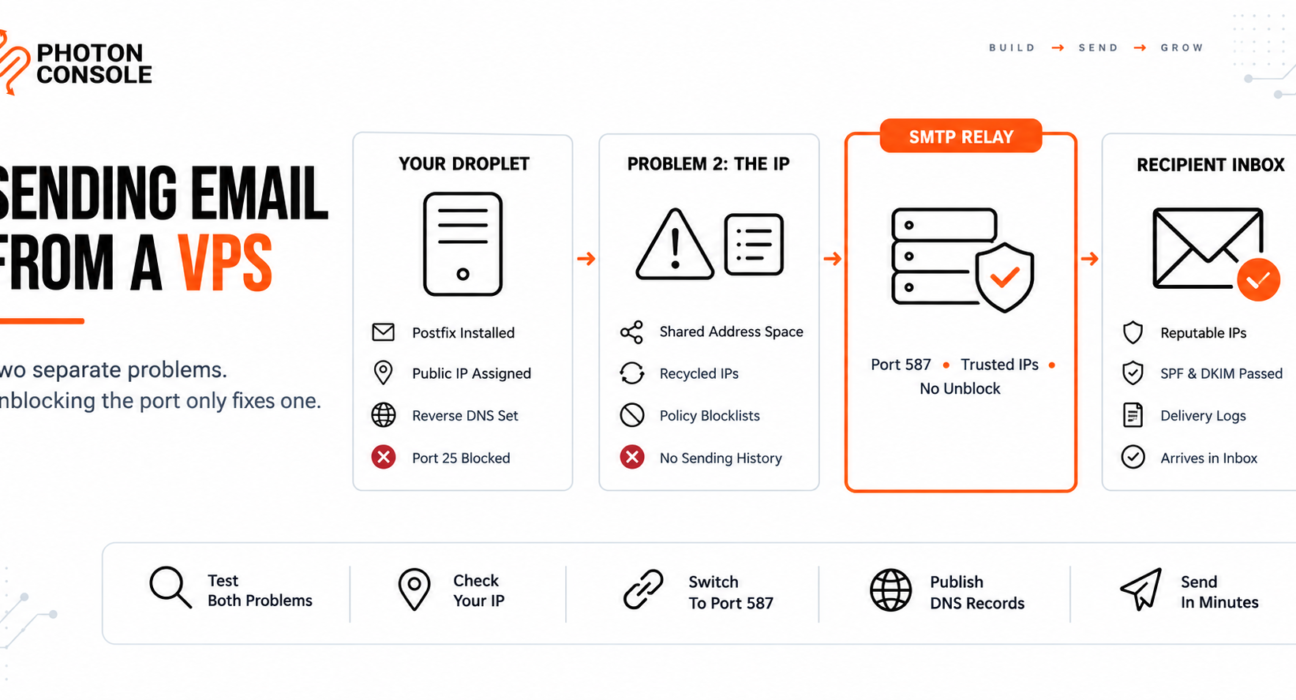
You spin up a droplet, install Postfix, and send a test message. Nothing arrives. You open a support ticket, get port 25 unblocked, set up a reverse DNS record, and try again.
This time the connection works — and the message bounces with a rejection naming a blocklist you have never heard of.
That second failure catches people out, because fixing the port feels like fixing the problem. On a VPS there are two separate obstacles: the provider blocking outbound SMTP, and the reputation of the IP address you were assigned. Solving the first does nothing about the second.
Quick Answer: Can You Send Email From a VPS?
Technically yes, practically rarely. Most VPS providers block outbound port 25 on new accounts, and even when unblocked, VPS IP ranges are widely distrusted by receiving mail servers because of their abuse history.

The reliable route is to send through an authenticated relay on port 587 or 2525, which needs no unblock request and arrives on IPs that already have a sending reputation:
Host:  smtp.photonrelay.com
Port:  587          # or 2525 if 587 is also restricted
User:  your_project_api_user
Pass:  your_secret_api_key
An authenticated relay such as PhotonConsole handles both problems at once — the port and the reputation.
Check Both Problems Before You Start
Most guides only test the port. Test both, from the server itself.
Test 1: Is port 25 blocked?
# Port 25 — likely to hang, then time out
nc -zvw5 smtp.photonrelay.com 25

# Port 587 — should connect immediately
nc -zvw5 smtp.photonrelay.com 587
A timeout on 25 with a connection on 587 confirms the provider block.
Test 2: What is your IP’s reputation?
# Find your public IP
curl -s ifconfig.me

# Check reverse DNS
dig -x YOUR_IP +short
Then look the IP up against the major blocklists. Spamhaus maintains lists that specifically cover address space considered unsuitable for direct mail sending, and large parts of VPS and cloud ranges sit inside them by policy rather than because of anything you did.
If the IP is listed before you have sent a single message, that is the second problem, and no port change fixes it.
Common Mistake
Setting up a reverse DNS record, confirming it resolves correctly, and assuming the IP is now trusted. A valid PTR record is a minimum requirement, not a reputation. Many VPS ranges are included on policy blocklists that cover the entire address block, so a perfectly configured server on a listed IP is still rejected. Check the IP against the blocklists before investing time in mail server configuration.
Quick Fix
Mail Sends but Bounces With a Blocklist Message
- Read the full bounce message — it usually names the list and gives a lookup URL
- Check whether the listing covers your single IP or the whole range
- A range-wide policy listing cannot be delisted by you
- Confirm reverse DNS resolves and matches your sending hostname
- If the range is listed by policy, switch to a relay rather than appealing
Why VPS Providers Block Port 25
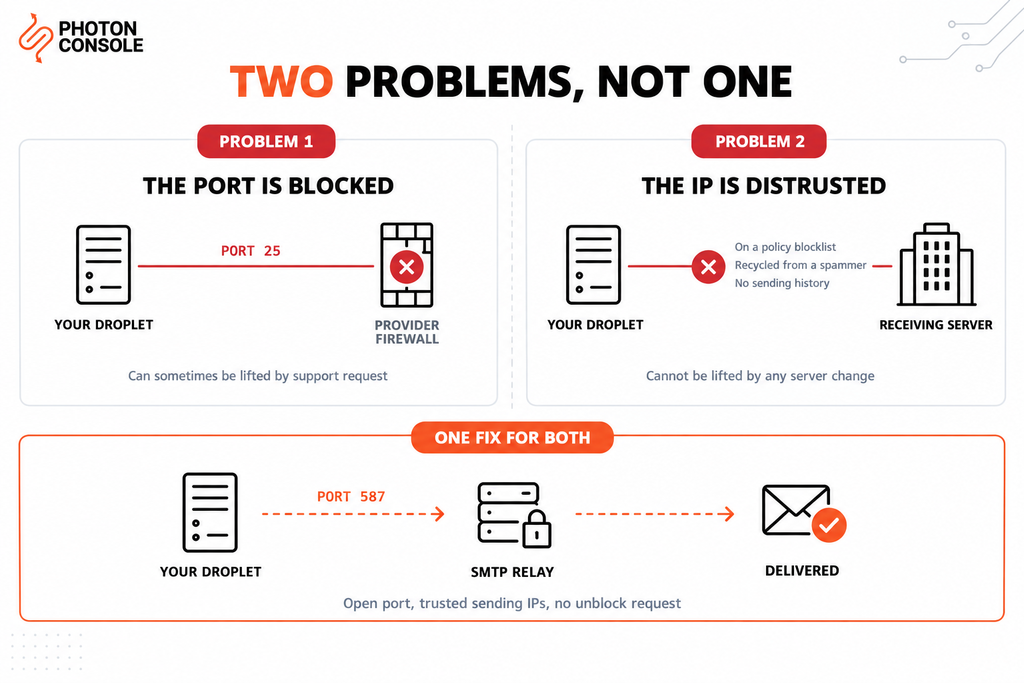
Port 25 carries mail between servers and requires no authentication by design. A VPS costs a few dollars, takes a minute to create, and can be paid for with a stolen card — which makes it ideal for sending spam at volume.
Providers block the port by default to protect the reputation of their address space. When a range earns a bad reputation, every legitimate customer on it suffers, so the restriction protects other users as much as the provider.
| Provider | Port 25 on new accounts | Unblock process |
|---|---|---|
| DigitalOcean | Commonly blocked | Support request, reviewed case by case |
| Linode | Commonly blocked | Support request after account history |
| Vultr | Commonly blocked | Support request, often declined |
| Hetzner | Often restricted initially | Request after account is established |
| OVH | Varies by product | Panel setting or support request |
Policies change, so confirm the current position with your provider’s documentation rather than relying on any article. The pattern across all of them is consistent: new accounts are restricted, and unblocking is a review rather than a toggle.
The Problem That Remains After Unblocking
Suppose the ticket succeeds and port 25 opens. You still face three things a port change cannot address.
The range may be listed by policy. Some blocklists cover address space considered unsuitable for direct-to-MX sending, regardless of who holds the IP. You cannot delist an IP from a listing that applies to the whole block.
Your IP may be recycled. VPS addresses are reassigned constantly. The IP handed to your droplet may have been used by a spammer last month, and you inherit whatever reputation came with it — with no way to choose a different one.
A new IP has no sending history. Even a genuinely clean address is unknown to receiving providers. Reputation is built through consistent sending over weeks, and until then your mail is treated cautiously, in line with Google’s sender guidelines.
What Each Fix Actually Solves
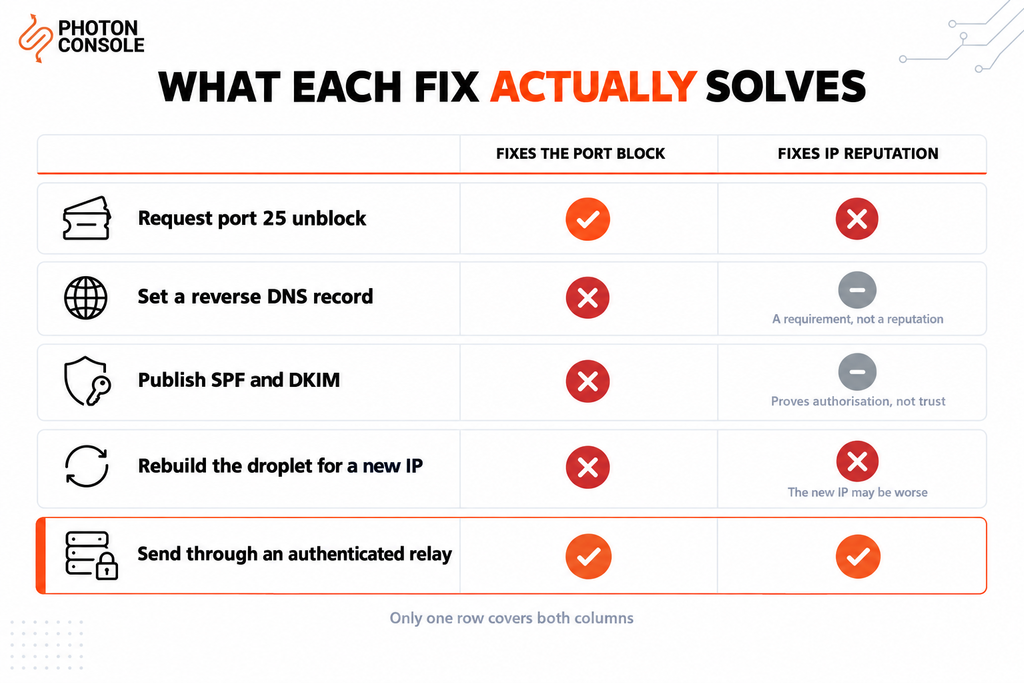
This is the table worth reading twice, because it explains why so much VPS mail configuration produces no improvement.
| Action | Fixes the port block | Fixes IP reputation |
|---|---|---|
| Request port 25 unblock | Yes | No |
| Set a reverse DNS record | No | Partially — a requirement, not a reputation |
| Publish SPF and DKIM | No | Partially — proves authorisation, not trust |
| Rebuild the droplet for a new IP | No | No — the new IP may be worse |
| Send through an authenticated relay | Yes | Yes |
Only the last row addresses both columns. That is the whole argument for using a relay on a VPS, and it is a practical observation rather than a sales one.
When Self-Hosting Is Still Reasonable
Running your own mail server on a VPS makes sense in a few situations: internal mail that never leaves your network, a learning exercise, or a service where you control both ends of the delivery.
For anything user-facing, the ongoing work is substantial. You take on blocklist monitoring, TLS certificate renewal, security patching of a service that is a constant attack target, bounce and complaint processing, and reputation management for an IP you did not choose. A managed SMTP relay service absorbs all of that, which is why most teams keep the droplet for the application and move only the mail path off it.
Our analysis of free SMTP servers covers where self-managed and free options stop being practical.
Configuring the Relay
Postfix as a Relay Host
If the server already runs Postfix, keep it and point it at the relay. Every local process that uses sendmail keeps working, with PhotonConsole handling the outbound delivery.
# /etc/postfix/main.cf
relayhost = [smtp.photonrelay.com]:587
smtp_sasl_auth_enable = yes
smtp_sasl_password_maps = hash:/etc/postfix/sasl_passwd
smtp_sasl_security_options = noanonymous
smtp_tls_security_level = encrypt
smtp_use_tls = yes
# /etc/postfix/sasl_passwd
[smtp.photonrelay.com]:587 your_project_api_user:your_secret_api_keysudo postmap /etc/postfix/sasl_passwd
sudo chmod 600 /etc/postfix/sasl_passwd*
sudo systemctl restart postfix
# Send a test
echo "Test body" | mail -s "Relay test" you@yourdomain.com
# Watch the log
sudo tail -f /var/log/mail.logApplication Configuration
# Node.js
const transporter = nodemailer.createTransport({
  host: 'smtp.photonrelay.com',
  port: 587,
  secure: false,
  auth: { user: process.env.SMTP_USER, pass: process.env.SMTP_PASS }
});
# Python
with smtplib.SMTP("smtp.photonrelay.com", 587, timeout=10) as server:
server.starttls()
server.login(smtp_user, smtp_pass)
server.send_message(msg)Our guides to sending email in Node.js and sending email in Python cover pooling, timeouts and retries in depth.
Publish Your DNS Records
TXT    @                    v=spf1 include:relay.photonconsole.com ~all
CNAME  photon._domainkey    dkim.photonconsole.com
Note
If you previously published an SPF record authorising your VPS IP directly, remove it when you move to a relay. Two separate TXT records starting with v=spf1 break authentication entirely, and an SPF record still pointing at an unused server adds nothing. DNS changes take from a few minutes to 24-48 hours to propagate.
Our guide to SPF, DKIM and DMARC explains the records, and the free email deliverability checker shows what your domain currently publishes.
Port Reference
| Port | Purpose | On a typical VPS |
|---|---|---|
| 25 | Server-to-server mail relay | Blocked on new accounts |
| 587 | Authenticated submission | Available |
| 465 | Submission over implicit SSL | Available |
| 2525 | Unofficial fallback | Available |
Port 587 is the submission port, defined in RFC 6409 for authenticated clients. Because every connection requires credentials, it cannot be abused anonymously the way port 25 can — which is why providers leave it open.
Quick Fix
Relay Configured but Still Not Sending
- Check
/var/log/mail.logfor the actual SMTP response - Confirm
postmapwas run after editing the password file - Confirm the password file is mode 600 and owned by root
- Check for whitespace copied into the credentials
- Try port 2525 if 587 also times out on your provider
Pro Tips
- Check the IP before you build. Look up a new droplet’s address against the blocklists on day one, before configuring anything.
- Never rebuild hoping for a better IP. Assignment is random, and the next one may be worse.
- Keep the firewall tight. An open mail server on a VPS becomes an open relay quickly, which gets the IP listed and the account suspended.
- Set reverse DNS anyway. It is required by many receivers even when you send through a relay for application mail.
- Verify DNS after any change. MXToolbox checks SPF, DKIM and blocklist status in one lookup.
- Score a real send before launch. Mail Tester flags authentication problems before users encounter them.
Related Issues You May Hit Next
- AWS EC2 port 25 blocked for how the AWS restriction compares
- Google Cloud SMTP port restrictions where the block is permanent
- SMTP connection timeouts when connections hang rather than fail
- Emails sent but not delivered when the server reports success
- Emails landing in Gmail spam after delivery succeeds
Frequently Asked Questions
Will DigitalOcean unblock port 25 for me?
It is reviewed case by case rather than granted automatically, and newer accounts are less likely to succeed. Policies change, so check the current documentation. Port 587 through a relay needs no request at all.
Why does my mail bounce even after port 25 is open?
Almost always IP reputation. Many VPS ranges sit on policy blocklists covering the whole block, so a correctly configured server on a listed IP is still rejected.
Can I get my VPS IP delisted?
If the listing is specific to your IP and caused by past abuse, sometimes. If it is a policy listing covering the entire range, no — that is not something an individual customer can appeal.
Does setting reverse DNS fix deliverability?
It removes one reason to reject you, but it does not create trust. Treat it as a minimum requirement rather than a solution.
Should I run my own mail server on a VPS?
For internal or learning use, it is reasonable. For user-facing mail, the blocklist monitoring, patching and reputation work usually costs more in engineering time than a relay does in fees.
Can I keep Postfix and still use a relay?
Yes. Configure Postfix with a relayhost and SASL credentials. Local processes keep sending through sendmail exactly as before.
What if port 587 is blocked too?
Use port 2525. It is an unofficial fallback that most relays accept for networks restricting the standard ports, and PhotonConsole accepts authenticated submission on it alongside 587 and 465.
Conclusion
VPS email fails for two reasons that look like one. The provider blocks port 25 to prevent abuse, and the address space itself carries a reputation problem that predates your account.
An unblock request, a reverse DNS record and correct SPF and DKIM all help, but they only address the first problem and part of the second. The IP remains unknown or pre-listed, and no amount of server configuration changes that.
Sending through an authenticated relay solves both at once: it uses a port that was never blocked, and it delivers from IPs that receiving providers already trust. A dedicated transactional email solution handles the ports, authentication and reputation, and keeps working if you later move the application to a different provider. Pricing starts with 5,000 free emails per month, enough to confirm the whole path before spending anything.