


Your user just requested a password reset. The OTP email was triggered. Your logs show it was sent. But the email never arrived. The user tries again. Nothing. They abandon your product and never return.
This is not a hypothetical scenario. It is what happens when businesses choose an SMTP relay based on the wrong criteria — price, brand recognition, or a generic blog recommendation — instead of evaluating it against real transactional email requirements.
A delayed OTP is not an inconvenience. It is a failed login system. Choosing the wrong SMTP relay does not just slow your emails down — it breaks your product at exactly the moments users are paying the most attention.
This guide does not give you another shallow list of tools. It gives you a decision framework — the criteria, the trade-offs, and a focused comparison of the top SMTP relay services in 2026 — so you can make the right infrastructure call for your use case.

Transactional email is infrastructure, not a plugin.
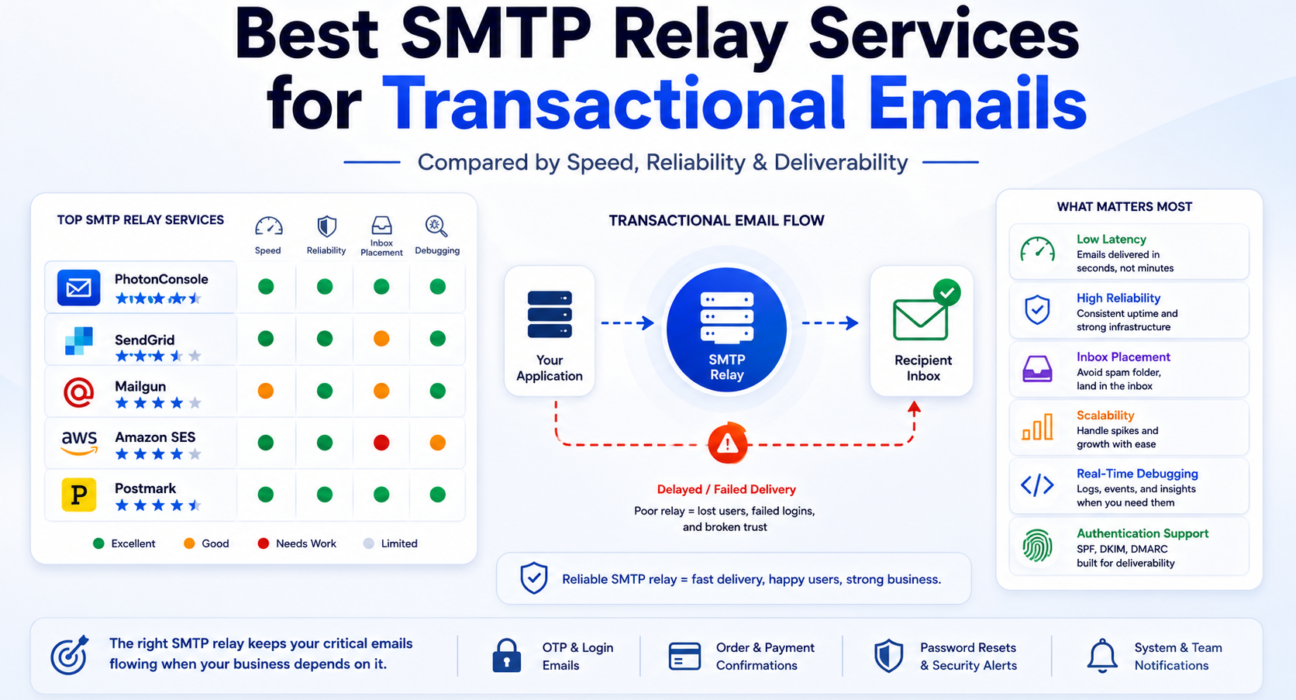
Quick Answer: What Is the Best SMTP Relay Service for Transactional Emails in 2026?
There is no single “best” — the right choice depends on your volume, technical maturity, and use case. Here is a direct summary before we go deeper:
- Best for developer simplicity and cost-efficiency at low-to-mid volume: PhotonConsole or Postmark
- Best for large-scale enterprise infrastructure: Amazon SES
- Best for teams wanting a combined marketing plus transactional suite: SendGrid
- Best for API-first developers with technical depth: Mailgun
If you are a startup, a growing SaaS, or a developer who needs reliable transactional email without complex infrastructure overhead, a purpose-built SMTP relay service will almost always outperform a general-purpose platform retrofitted for transactional use.
| If You Need | Best Fit |
|---|---|
| Lowest operational complexity + reliable delivery | PhotonConsole / Postmark |
| Deep AWS ecosystem integration | Amazon SES |
| Combined marketing + transactional platform | SendGrid |
| Maximum API control + inbound email routing | Mailgun |
| Industry-leading delivery speed at premium pricing | Postmark |
Why Transactional Email Has Zero Tolerance for Relay Failures
Not all email is equal. A promotional newsletter delayed by ten minutes is inconvenient. A one-time password delayed by ten minutes is a broken user flow.
Transactional emails are time-sensitive by design. They are triggered by user actions and expected within seconds. Authentication failures are one of the most common causes of email delivery issues in production environments, and when they occur inside the transactional email path, the business impact is immediate and often invisible until users stop converting.
Most teams notice deliverability problems only after conversion rates drop. By that point, the relay has been failing quietly for weeks.
Here is what actually breaks when transactional delivery fails or slows:
- Users cannot complete email-based authentication flows
- Order confirmations arrive after the customer has already contacted support
- Password reset tokens expire before the email reaches the inbox
- Two-factor authentication codes are useless by the time they arrive
- System alerts reach engineering teams too late to prevent incidents
Your SMTP relay is not a utility you configure once and forget. It is a critical component of your product’s trust layer. Understanding why emails sent are not delivered — even when your application reports success — starts with understanding what your relay is actually doing between your send call and the recipient’s inbox.
For a deeper look at the failure modes that affect production systems, the email infrastructure failure patterns guide covers the most common silent breakdowns teams encounter.
What Actually Makes an SMTP Relay the “Best” for Transactional Email
Most SMTP relay comparisons measure features. The right comparison measures outcomes. Here are the six criteria that determine real transactional email performance in 2026.
1. Delivery Latency — Not Just “Speed”
Delivery latency is the time between your application triggering the SMTP call and the email landing in the recipient’s inbox. Most services advertise fast sending, but actual end-to-end latency depends on queue management, server proximity, receiving ISP processing, and how the relay handles connection negotiation.
For transactional email, target under 5 seconds end-to-end under normal load. Anything consistently above 10 seconds begins to break OTP and authentication flows in measurable ways.
Delivery success is measured in inboxes, not API responses.
2. Inbox Placement Rate — Not Just Delivery Rate
A relay can report 99% delivery while 30% of those emails land in spam. Delivery rate measures acceptance by the receiving mail server. Inbox placement rate measures whether the email reaches the inbox. These are entirely different metrics and conflating them is one of the most common evaluation mistakes.
Inbox placement depends on IP reputation, sending infrastructure hygiene, and how aggressively the relay manages shared IP pool behavior. Test this before committing — tools like Mail Tester and MXToolbox Email Header Analyzer surface placement issues that delivery logs will not show you.
To understand why Gmail specifically filters transactional email into spam, the guide on why emails go to spam in Gmail walks through the specific signals Gmail’s filters evaluate.
3. Retry Logic and Greylisting Handling
Greylisting is a spam-filtering technique where receiving servers temporarily reject first-contact emails with a 4xx SMTP response — essentially saying “I don’t know you yet, try again.” A well-configured relay automatically retries after an appropriate delay, typically between 5 and 30 minutes. A poorly configured one either retries too aggressively (triggering rate-limit blocks) or waits too long (causing OTP tokens to expire before the email lands).
What this means in practice: If your OTP expires in 5 minutes and your relay hits a greylisting response, the retry window may outlast the token. The user never gets a usable code. This is a relay infrastructure problem, not an application problem — and it will not appear clearly in your application logs.
Authentication failures are one of the most common causes of email delivery problems in production systems, but greylisting and retry mishandling are a close second. Understanding SMTP response codes is the starting point for diagnosing whether your relay is handling 4xx responses correctly.
4. Debugging Visibility
When a transactional email fails at 2am, how quickly can your team find out exactly why? The best SMTP relays provide real-time delivery logs with full SMTP response codes, bounce classification by type (hard, soft, complaint), and per-message event timelines.
Without this, every production incident becomes a guessing game. If you have ever tried to diagnose a delivery failure through generic bounce summaries, you already understand the cost of poor debugging tooling. Proper SMTP testing and log analysis should be part of your evaluation process before you commit to any relay.
5. Authentication Infrastructure — SPF, DKIM, DMARC
Proper SPF, DKIM, and DMARC configuration is not optional in 2026. Gmail and Yahoo now enforce sender authentication at scale, and Microsoft’s Exchange Online filtering is tightening in the same direction. An SMTP relay that does not make authentication setup straightforward is not just inconvenient — it is a structural deliverability liability.
6. Scalability Without Architecture Penalty
Can you go from 5,000 emails per month to 500,000 without reconfiguring your infrastructure, manually warming up new IPs, or getting caught in volume-based throttling? The relay’s underlying architecture determines this — not its marketing page or pricing tier structure.
How to Choose an SMTP Relay Based on Your Actual Use Case
Before evaluating any individual service, map your situation to one of these scenarios. The right relay for a bootstrapped startup is structurally different from the right relay for a high-volume SaaS. Choosing without this mapping is how teams end up paying for complexity they do not need — or discovering that their relay cannot handle their scale.
Scenario A: Early-Stage Startup or Low-Volume Application
- Sending fewer than 10,000 emails per month
- Small or no dedicated DevOps capacity
- Need fast setup with minimal configuration overhead
- Budget sensitivity is real
What matters most: Fast SMTP setup, reliable shared IP infrastructure managed by the relay provider, pay-as-you-use pricing, and accessible support when something goes wrong. Monthly plan commitments during early growth stages create unnecessary financial risk.
Best fit: PhotonConsole, Postmark
Avoid if: You need bulk marketing email from the same platform
Scenario B: Scaling SaaS Product
- Sending 10,000 to 500,000 emails per month
- Mix of transactional and automated lifecycle email
- Engineering team involved in infrastructure decisions
- Deliverability has a direct relationship with churn and activation metrics
What matters most: Inbox placement rate, real-time delivery logs, dedicated IP availability, and clean integration with your stack. This is the segment where choosing the wrong relay has the highest business cost relative to fix time. Teams at this stage often discover relay problems through support ticket volume rather than monitoring — by which point user trust has already been affected.
Best fit: PhotonConsole, Postmark, SendGrid
Avoid if: You want the cheapest per-email rate above all other criteria
Scenario C: High-Volume Production System
- Sending millions of emails per month
- Custom domain sending, compliance requirements, dedicated DevOps team
- Internal engineering team managing relay configuration directly
- IP warming, suppression list management, and advanced analytics are operational requirements
What matters most: Raw infrastructure scale, dedicated IP control, advanced bounce management, and SLA-backed uptime. Cost efficiency at scale becomes a significant variable here, which is why Amazon SES tends to dominate this segment — though operational complexity is the trade-off.
Best fit: Amazon SES, SendGrid Enterprise
Avoid if: You do not have engineering resources to configure and maintain the stack
Scenario D: Developer Managing Multiple Clients or Applications
- Managing separate sending domains for multiple projects or clients
- Need project-level email tracking and domain isolation
- Integration flexibility across different frameworks matters
What matters most: Multi-domain support, per-project sending separation, clean documentation, and a pricing model that does not penalize you for running several low-volume senders simultaneously. A detailed SMTP configuration guide covering multi-domain setups is essential reading before building this kind of architecture.
Best fit: PhotonConsole, Mailgun
Avoid if: You need a single no-code interface for non-technical teams
The transition from picking a relay blindly to picking one correctly starts here — with the use case, not the feature list. Once your scenario is mapped, evaluating each provider becomes a structured decision rather than a comparison of marketing pages. For a deeper framework on this selection process, the guide on how to choose the right SMTP relay for transactional emails covers the full selection logic.
Top SMTP Relay Services for Transactional Emails in 2026: Evaluated by Real Criteria
What follows is not a feature matrix. Each service is evaluated against the criteria that determine real transactional performance — latency, inbox placement, debugging quality, operational overhead, and cost structure. The goal is to help you understand not just what each relay does, but where it will and will not serve you well.
Email systems fail silently long before they fail visibly. The provider you choose determines how quickly you find out.
PhotonConsole
PhotonConsole is a cloud-based SMTP relay and transactional email delivery service built specifically for developers, startups, and growing businesses. It was designed around a single, clearly defined use case: sending transactional email reliably, without the operational overhead of enterprise-scale platforms.
For teams that need transactional reliability without enterprise complexity, PhotonConsole aligns more closely with the actual requirement than marketing-heavy platforms that treat transactional email as one feature among many.
Strengths for transactional email:
- Purpose-built relay infrastructure focused on transactional delivery — not a marketing platform with an SMTP feature bolted on
- Pay-as-you-use pricing with no monthly commitment — cost scales with actual usage, not projected volume
- Fast SMTP integration with Node.js, PHP, WordPress, and standard SMTP clients
- Full SPF, DKIM, and DMARC support configured per domain
- Real-time email logs and delivery tracking for fast incident diagnosis
- Scalable infrastructure that grows with your volume without requiring plan renegotiation
Limitations to be aware of:
- Not optimized for large-scale bulk marketing campaigns requiring advanced segmentation or template editors
- Fewer native third-party integrations compared to older, larger platforms
- Best suited where transactional delivery is the primary — not secondary — requirement
Best for: Startups, SMBs, SaaS products at growth stage, developers managing transactional email for client applications
Key differentiator: Pay-as-you-use model with no commitment — low-friction entry with room to scale
Avoid if: You need bulk marketing email managed from the same platform
Review the PhotonConsole pricing model to confirm fit for your sending volume before evaluating further.
SendGrid (Twilio SendGrid)
SendGrid is one of the most recognized email delivery platforms, offering a transactional API alongside a full marketing campaign suite. It operates on mature infrastructure backed by Twilio, with a large community, extensive documentation, and deep integration options.
Strengths for transactional email:
- Mature, large-scale infrastructure with global IP pools and high uptime track record
- Detailed email analytics, event webhooks, and activity feeds for monitoring at scale
- Dedicated IP options available for high-volume senders who need full reputation control
- Extensive third-party integration ecosystem
Limitations to be aware of:
- Pricing scales quickly — costs become significant relative to transactional-only alternatives at mid-range volumes
- Platform complexity has grown considerably — some settings require navigating several configuration layers
- Support quality at lower tiers has been a recurring concern in the developer community
- For teams that only need reliable transactional delivery, the platform is significantly over-engineered
Best for: Larger businesses needing both marketing and transactional email from one platform, with engineering capacity to configure and maintain it
Key takeaway: Excellent infrastructure, but operational complexity and cost increase faster than the value curve for transactional-only use cases
Avoid if: You want simplicity and are only sending transactional email
If you are deciding between SendGrid and alternatives, the SendGrid vs Mailgun comparison provides a useful side-by-side on where each platform performs better.
Mailgun
Mailgun is a developer-first email API service known for its flexible sending control and email parsing capabilities. It has historically been popular with engineering teams that need programmatic email management beyond basic transactional sending.
Strengths for transactional email:
- Flexible, well-documented API with granular control over sending behavior
- Excellent inbound email routing and parsing capabilities — useful for reply-based workflows
- Solid delivery event webhooks and log access
- Supports multiple sending domains cleanly from a single account
Limitations to be aware of:
- Free tier has been discontinued; pricing at mid-range volumes is less competitive than dedicated transactional alternatives
- Deliverability on shared IPs can be inconsistent depending on co-tenant behavior in the sending pool
- Log retention on lower plans limits debugging capability for complex email flows
- The platform’s documentation and interface quality has had mixed feedback following its acquisition period
Best for: Developer teams building applications requiring programmatic email control, inbound processing, or advanced routing rules
Key takeaway: Strong technical capabilities, but shared IP variability and mid-tier pricing make it a less obvious choice for pure transactional reliability at growth-stage volumes
Avoid if: Shared IP deliverability consistency is non-negotiable for your use case
If you are evaluating Mailgun against other options, the Mailgun alternatives guide covers the realistic substitutes worth considering.
Amazon SES (Simple Email Service)
Amazon SES is a cloud email sending service integrated with the AWS ecosystem. It is the cheapest option at scale and is operationally compelling for organizations already running infrastructure on AWS. However, the low per-email price comes with meaningful setup and management overhead that is often underestimated during evaluation.
Strengths for transactional email:
- Lowest per-email cost at high volume — often 10x cheaper than competitor pricing above 500,000 emails per month
- Native AWS integration with Lambda, SNS, and other services for event-driven architectures
- Very high scalability ceiling with dedicated IP options
- Strong compliance and security posture for regulated industries
Limitations to be aware of:
- All new accounts begin in a sandbox with strict sending limits — production access requires a formal request through the AWS SES production access process, which takes days
- Bounce and complaint handling must be built manually via SNS or third-party tools — no built-in suppression list management at the basic level
- Debugging tools are minimal compared to purpose-built email platforms — diagnosing delivery problems requires CloudWatch setup and log configuration
- IP warming for dedicated IPs is a manual process requiring active monitoring over several weeks
- Not beginner-friendly — requires meaningful AWS operational knowledge to configure correctly
What this means in practice: A startup that chooses Amazon SES for its low price often spends 3 to 5 times the cost savings in engineering hours getting the bounce handling, monitoring, and delivery infrastructure right. The total cost calculation rarely favors SES until you are well above 250,000 emails per month with a dedicated DevOps resource managing it.
Best for: High-volume senders (500k+ per month) already operating in the AWS ecosystem with dedicated infrastructure capacity
Key takeaway: Unbeatable economics at scale, but operational complexity is a real cost that belongs in the evaluation
Avoid if: You need fast setup, accessible debugging tools, or are not already operating within the AWS stack
Postmark
Postmark is a dedicated transactional email service that has built its entire reputation around one thing: fast, reliable inbox placement. It intentionally does not serve bulk marketing email at all. This focus is both its strongest differentiator and its clearest limitation.
Strengths for transactional email:
- Industry-recognized delivery speed — Postmark publishes real-time delivery metrics transparently, which is itself a signal of operational confidence
- Strict sender policies mean shared IP pools are significantly cleaner than most competitors — fewer bad actors means better baseline reputation
- Excellent per-message delivery event logging built into the core product
- Clear, honest product positioning — what they do and do not do is unambiguous
Limitations to be aware of:
- Per-email pricing is higher than alternatives — the premium for clean infrastructure is real and visible in the bill
- Not suitable if you need marketing email alongside transactional — Postmark treats these as fundamentally separate concerns
- Limited infrastructure customization for large enterprise use cases that require advanced IP management
Best for: SaaS products and developer-led teams where inbox placement speed is the primary requirement and the cost premium is acceptable
Key takeaway: If you are willing to pay for clean infrastructure and transparency, Postmark earns its price. If cost efficiency matters at scale, the math shifts toward other options.
Avoid if: Budget is a constraint or you need marketing email from the same platform
SMTP Relay Comparison Table: 2026 Evaluation by Real Criteria
| Criteria | PhotonConsole | SendGrid | Mailgun | Amazon SES | Postmark |
|---|---|---|---|---|---|
| Delivery Latency | Fast — optimized for transactional | Fast at scale; queue-dependent at low volume | Fast; varies with shared IP health | Fast within AWS regions; variable globally | Industry-leading; independently measured |
| Inbox Placement | High — dedicated transactional infrastructure | High with dedicated IPs; variable on shared pools | Variable on shared IPs | High with proper warmup; sandbox limits initially | Very high — strict sender admission policies |
| Debugging Tools | Real-time logs and delivery tracking | Detailed activity feed and event webhooks | Good logs; retention limited on lower plans | Minimal native tools; requires CloudWatch setup | Excellent — full per-message event timeline |
| Ease of Setup | High — fast SMTP integration | Moderate — many configuration layers | Moderate — API-first, some learning curve | Low — AWS knowledge required; sandbox process | High — streamlined onboarding |
| Pricing Model | Pay-as-you-use — no monthly commitment | Tiered monthly plans; free tier available | Monthly plans; free tier removed | Per-email — cheapest at high volume | Monthly plans; higher per-email rate |
| Greylisting Handling | Automatic retry logic built-in | Automatic retry logic | Automatic retry logic | Retry via AWS infrastructure; manual config needed | Optimized retry with transparent reporting |
| Authentication (SPF/DKIM/DMARC) | Full support, per-domain | Full support | Full support | Full support | Full support |
| Scalability | Scales with usage; no plan upgrade required | High — enterprise-grade ceiling | High — flexible API architecture | Very high — AWS infrastructure ceiling | Moderate — quality-focused, not raw-scale |
| Operational Overhead | Low | Medium to high | Medium | High | Low |
| Best For | Startups, SMBs, SaaS at growth stage | Enterprises needing marketing + transactional | API-first developers, inbound email needs | High-volume AWS-native systems | SaaS prioritizing delivery speed above cost |
Common Mistakes Businesses Make When Choosing an SMTP Relay
These are not theoretical mistakes. They are the patterns that explain why engineering teams spend weeks debugging delivery problems they should never have encountered.
Mistake 1: Choosing Based on Price Alone
Price per email is the most visible variable in any SMTP relay comparison, and the most misleading. A relay charging $0.001 per email that delivers 20% of your OTPs to spam costs you far more than one charging $0.002 with 99% inbox placement — in lost users, support volume, and engineering time.
Calculate the total cost of delivery failure before concluding that the cheapest option is the most economical. The math rarely supports the lowest-price choice for transactional use cases.
Mistake 2: Using Free or Shared SMTP in Production
Free SMTP services — including generic shared relays and consumer-grade services not built for application sending — impose rate limits, offer no delivery guarantees, and provide zero debugging visibility. If your transactional flow fails at 2am, you need logs, support, and infrastructure accountability — not a shared server with no monitoring.
If you are still evaluating free options for production, the guide on free SMTP servers covers exactly where they are appropriate and where they create risk.
Mistake 3: Ignoring IP Reputation and Pool Hygiene
On a shared IP pool, your deliverability is partially determined by every other sender sharing that IP. If a bad actor on your pool triggers spam filters or gets blocked by a major ISP, your authentication emails take collateral damage. This is not a hypothetical — it is a regular occurrence on poorly managed shared infrastructure.
What this means in practice: Ask your relay provider explicitly how they manage shared IP pool admission and monitoring. The answer tells you a great deal about how seriously they take your deliverability.
Mistake 4: Skipping Pre-Launch Deliverability Testing
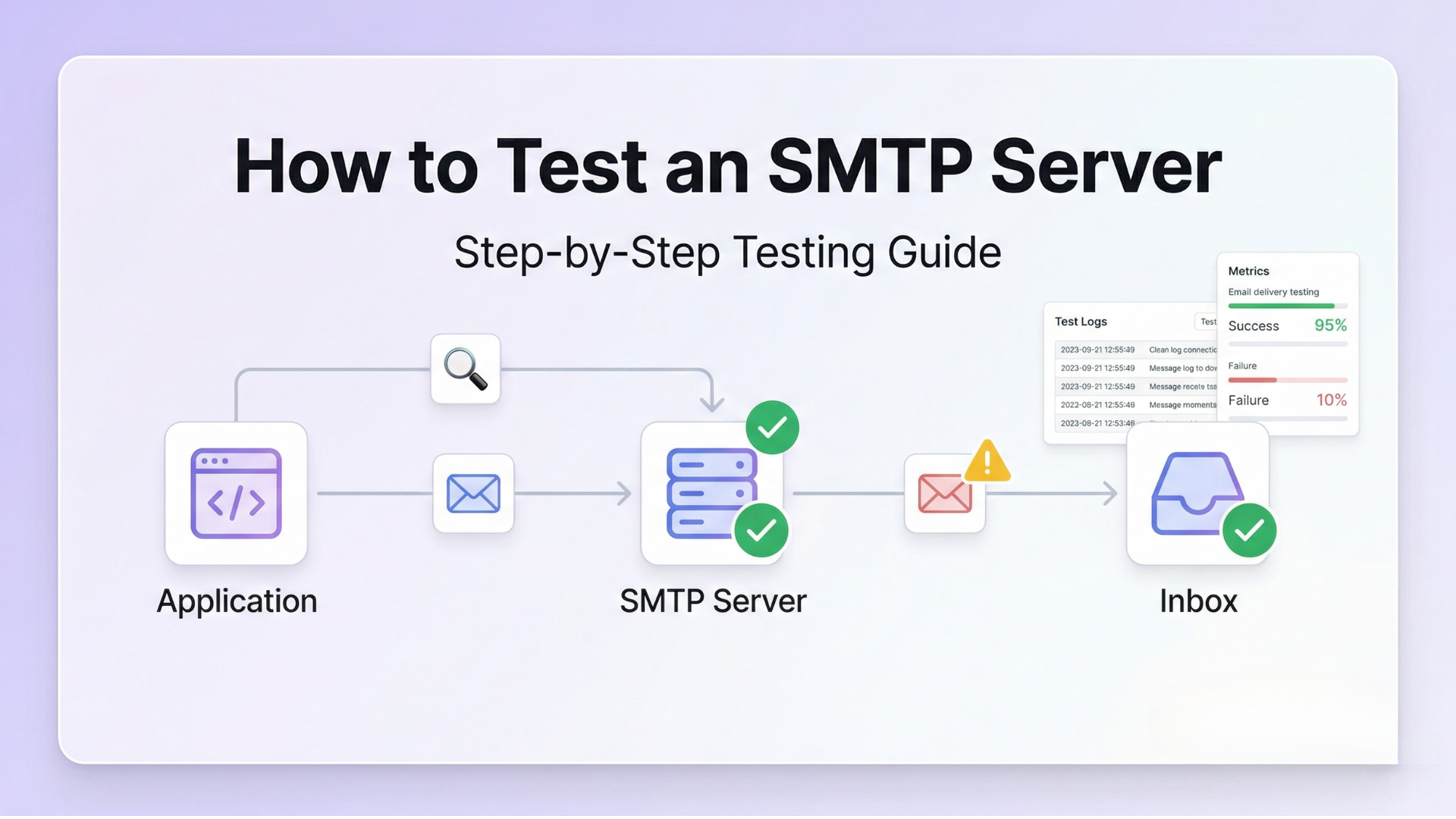
Running a proper evaluation before going live is non-negotiable. Test against the major receiving providers — Gmail, Outlook, Yahoo — check spam scoring through Mail Tester, and verify DNS authentication records are publishing correctly through MXToolbox. The guide on how to test an SMTP server step by step walks through this process systematically.
Transactional email failures are invisible until users disappear. Testing before launch is how you keep them from disappearing on day one.
Mistake 5: Not Building Bounce and Complaint Handling Into the Setup
Every relay provides mechanisms for tracking bounces and spam complaints. If these events are not being processed and acted upon — removing invalid addresses from your sending list, suppressing complainants — your sender reputation will degrade over time. This is one of the primary reasons well-configured email programs develop deliverability problems months after a successful launch.
Mistake 6: Treating SMTP Configuration as a One-Time Task
IP reputation shifts. Receiving ISP policies change. SPF record configurations become outdated as your infrastructure evolves. The teams that maintain strong deliverability treat their SMTP relay setup as a monitored system — not a completed task in a past sprint.
Quick Fix: Signs Your Current SMTP Relay Is Not Working for You
Review this list honestly. Three or more of these signals usually indicates a relay infrastructure problem, not an application problem:
- OTPs and password reset emails are consistently arriving more than 30 seconds after the trigger event
- Users report emails in spam despite clean, minimal email content
- Your logs show emails sent but recipients report never receiving them — a gap that points to silent delivery failure at the relay or receiving server level
- You cannot identify which specific emails bounced, or why, without significant manual log parsing
- Sending volume has grown substantially but relay configuration has not changed
- You are seeing SMTP connection timeout errors under moderate traffic load
- Bounce rate has been climbing without a clear, identified cause
- You have experienced an SMTP authentication error in production that was not immediately diagnosable
When You Need to Switch Your SMTP Relay
Switching relay providers is not trivial — domain reputation, DNS records, and integration configuration all require migration planning. But there are signals where the cost of staying clearly outweighs the cost of moving.
Switch if: Authentication Email Delivery Is Consistently Slow
Any consistent end-to-end delay above 10 to 15 seconds for OTP or authentication email is a product problem, not just an infrastructure note. If your relay logs show queue backlogs or you are encountering recurring email delays during normal traffic periods, your current relay cannot handle your requirements.
Switch if: Deliverability Is Declining Without Obvious Cause
If spam rates are rising, open rates on transactional emails are falling, and users are consistently finding emails in spam — and you have already verified authentication records are correctly published — the problem is at the relay infrastructure level. IP reputation decay and shared pool contamination do not appear in your application logs, but they show up clearly in user behavior data.
Switch if: Incident Diagnosis Takes More Than 15 Minutes
Debugging visibility is not a luxury — it is an operational requirement. If a delivery failure takes more than 15 minutes to diagnose because your relay’s logs are insufficient or inaccessible, you are paying for that in engineering time on every incident. The deliverability improvement guide outlines what proper monitoring should look like.
Switch if: Your Pricing Is No Longer Proportionate to Your Volume
Some relay services have pricing structures that effectively penalize growth. If your email volume has tripled but your per-email cost has only dropped marginally, compare the PhotonConsole pricing model and other dedicated transactional services built around usage-based flexibility.
Quick Fix: How to Evaluate an SMTP Relay Before Committing
- Send test emails to Gmail, Outlook, and Yahoo and measure delivery time end-to-end — not just the relay’s reported send time
- Run your sending domain through the MXToolbox Email Header Analyzer to see exactly how your relay is handling the message path
- Check shared IP reputation using the Spamhaus IP lookup tool before committing to a shared pool
- Test your full setup with Mail Tester for a scored deliverability assessment
- Verify bounce handling — the relay should offer automatic suppression for hard bounces, not just logging
- Confirm that DKIM signing is applied per sending domain, not just per account
- Review the relay’s SMTP testing and monitoring capabilities before you need them in an incident
Pro Tips for Maximizing SMTP Relay Performance in 2026
Warm Up Dedicated IPs Properly — Every Time
A cold IP with no sending history is treated as suspicious by receiving mail servers. Begin with low volume and increase gradually over 2 to 4 weeks, following your relay provider’s recommended IP warming schedule. Skipping this step is one of the fastest ways to tank deliverability on an otherwise clean infrastructure setup.
Separate Transactional and Marketing Email Streams
Transactional and marketing email have fundamentally different sender behavior profiles. High unsubscribe and spam complaint rates from marketing campaigns will degrade the IP reputation used for OTPs and authentication emails if they share the same pool. Configure separate subdomains — and where possible, separate sending IPs — for each stream. The guide on transactional vs marketing email explains the full architectural reasoning for this separation.
Monitor Bounce Rates Weekly, Not Monthly
A bounce rate above 2% is a warning. Above 5%, major ISPs will begin throttling or filtering your sending domain. Set up automated alerts if your bounce rate exceeds 1.5% in any rolling 7-day period. Do not wait for the monthly report to find out.
Register for ISP Feedback Loops
Both Gmail’s Postmaster Tools and Microsoft’s SNDS program give senders direct visibility into complaint rates and IP reputation. Register your sending domains and check them regularly — this data is often the earliest signal of a developing deliverability problem.
Keep Your SPF Record Lean
SPF has a hard limit of 10 DNS lookups per evaluation. Exceeding this causes SPF failures — which break DMARC alignment and hurt inbox placement. Review and trim your SPF record whenever you add or remove sending infrastructure. More services added without removing stale entries is a common cause of slow SPF degradation over time.
Use Subdomains to Isolate Sending Reputation
Use mail.yourdomain.com for transactional, news.yourdomain.com for newsletters. Subdomain isolation means a reputation problem in one stream does not contaminate the other — and gives you cleaner monitoring data per email type.
Where PhotonConsole Fits into This Decision
PhotonConsole was built to address a specific and common infrastructure gap: businesses and developers that need reliable transactional email delivery without the operational complexity, pricing unpredictability, or platform over-engineering of services designed primarily for enterprise marketing teams.
If your primary requirement is ensuring that OTPs, order confirmations, and system alerts consistently reach inboxes — reliably, quickly, and without requiring a dedicated email infrastructure team to maintain the stack — then a purpose-built SMTP relay service is structurally better suited to that requirement than adapting a large platform to a narrower use case.
PhotonConsole supports standard SMTP integration across Node.js, PHP, WordPress, and any SMTP-compatible stack. It implements SPF, DKIM, and DMARC per domain, uses a pay-as-you-use model that does not penalize you during early-stage growth or traffic spikes, and provides the delivery logging that makes incident diagnosis fast rather than painful.
It is not the right choice for every scenario — if you are building at enterprise scale on AWS or need a full marketing automation suite alongside transactional delivery, other options may serve you better. But for the large majority of growth-stage teams evaluating their first or second SMTP relay, it removes the complexity overhead that does not need to exist for a transactional-first use case.
Review the PhotonConsole pricing and the transactional email service guide to determine whether it maps to your volume and requirements.
Related Issues Worth Understanding Before You Decide
- Emails sent but not delivered — full diagnosis guide
- SMTP connection timeout errors — causes and complete debugging guide
- Why are my emails delayed — causes, diagnosis, and fixes
- SMTP not working — troubleshooting checklist
- How to improve email deliverability — a practical guide
- Email API integration guide
- How to choose the right SMTP relay for transactional emails
Frequently Asked Questions
What is the best SMTP relay service for transactional emails in 2026?
There is no single best relay for all use cases. For startups and growing SaaS products needing reliable transactional delivery without enterprise overhead, PhotonConsole and Postmark are the strongest fits. For high-volume AWS-native systems, Amazon SES is the most cost-effective option at scale. For teams requiring both marketing and transactional email from a single platform, SendGrid is the established choice. Use the decision framework in this guide to match your scenario before choosing.
What is the difference between an SMTP relay and an email API?
An SMTP relay accepts outgoing email via the standard SMTP protocol (port 587 or 465) and delivers it on your behalf. An email API accepts HTTP requests and sends email programmatically. Most modern services offer both. The SMTP relay path requires less code change when migrating from an existing configuration. The API path gives more granular control over sending behavior and delivery event handling. For most transactional email use cases, either works — choose based on how your application is currently built and what level of delivery control you need. See the email API integration guide for a deeper comparison.
What is the cheapest SMTP relay for transactional email?
Amazon SES is the cheapest at high volume — approximately $0.10 per 1,000 emails when sending from within AWS infrastructure. However, the total cost of ownership includes the engineering time required to configure, manage bounce handling, and monitor deliverability — which is substantial. At lower volumes, pay-as-you-use services often have a lower real cost when setup and maintenance overhead are included. Check the PhotonConsole pricing page for a direct volume-based comparison.
How does greylisting affect transactional email delivery?
Greylisting temporarily rejects emails from first-contact senders with a 4xx SMTP response. A well-configured relay retries automatically after an appropriate delay. For OTPs with short expiry windows — typically 5 to 10 minutes — a greylisting delay can cause the token to expire before the email arrives. A relay with strong IP reputation encounters greylisting less frequently because receiving servers recognize its sending IPs as trusted. This is one of the reasons IP pool quality matters more than most teams realize.
Should I use a shared or dedicated IP for transactional email?
At volumes below 50,000 emails per month, a well-managed shared IP pool at a reputable relay is usually sufficient. Above that threshold, dedicated IPs give you full control over your sending reputation — but require a proper IP warming process before sending at full volume. The right choice depends on your volume, your tolerance for shared pool variability, and your capacity to manage the warmup correctly without impacting deliverability during the transition.
What SMTP ports should I use for transactional email in 2026?
Port 587 with STARTTLS is the recommended standard for authenticated SMTP submission in most configurations. Port 465 with implicit TLS is also well-supported and increasingly preferred for its cleaner connection security model. Port 25 is reserved for server-to-server mail transfer and should never be used for application-level transactional sending. Both 587 and 465 are supported by major relay services including PhotonConsole.
How do I know if my SMTP relay is causing emails to land in spam?
Run your full sending setup through Mail Tester for a scored deliverability assessment. Check your relay’s delivery logs for bounce classifications and verify that SPF, DKIM, and DMARC records are publishing correctly through MXToolbox Blacklist Check. If those checks are clean, audit your shared IP reputation directly — a degraded IP pool will not show up in your application logs, but will appear clearly in spam placement rates across test inboxes.
Conclusion: This Is an Infrastructure Decision
Every password reset, every order confirmation, every OTP — these flows run through your SMTP relay. When the relay is working, users never think about it. When it is not, they do not report a bug. They leave.
The best SMTP relay for your transactional emails in 2026 is not the most expensive, the most recognized, or the one with the longest feature list. It is the one that matches your actual operational reality: your sending volume, your team’s technical capacity, your growth trajectory, and how much relay-specific complexity you are prepared to manage.
Use the evaluation framework in this guide. Map your use case to a scenario. Apply the criteria — latency, inbox placement, debugging visibility, scalability, authentication infrastructure — to every option you are considering. Then choose the relay that fits your requirements, not the one that fits someone else’s.
If you are a developer, startup, or growing SaaS team looking for a dedicated SMTP relay service that prioritizes transactional deliverability, straightforward integration, and transparent pay-as-you-use pricing, PhotonConsole is worth evaluating alongside the options in this guide.
Delivery success is measured in inboxes, not API responses. Choose accordingly.


EmailZoro Selects PhotonConsole As Its SMTP Relay Infrastructure Partner | Photonconsole.com
May 7, 2026[…] position is straightforward: this is the work it does. It operates SMTP relay infrastructure as its primary product, not as a feature attached to something […]
Email Delivery Infrastructure For SaaS: How Modern Platforms Send Email At Scale | Photonconsole.com
May 7, 2026[…] The relay accepts and processes it. It queues the message and takes on delivery. Related: how an SMTP relay service works. […]