Most developers who integrated SendGrid a few years ago remember a free plan that sent 100 emails a day indefinitely. That is no longer what the free tier is.
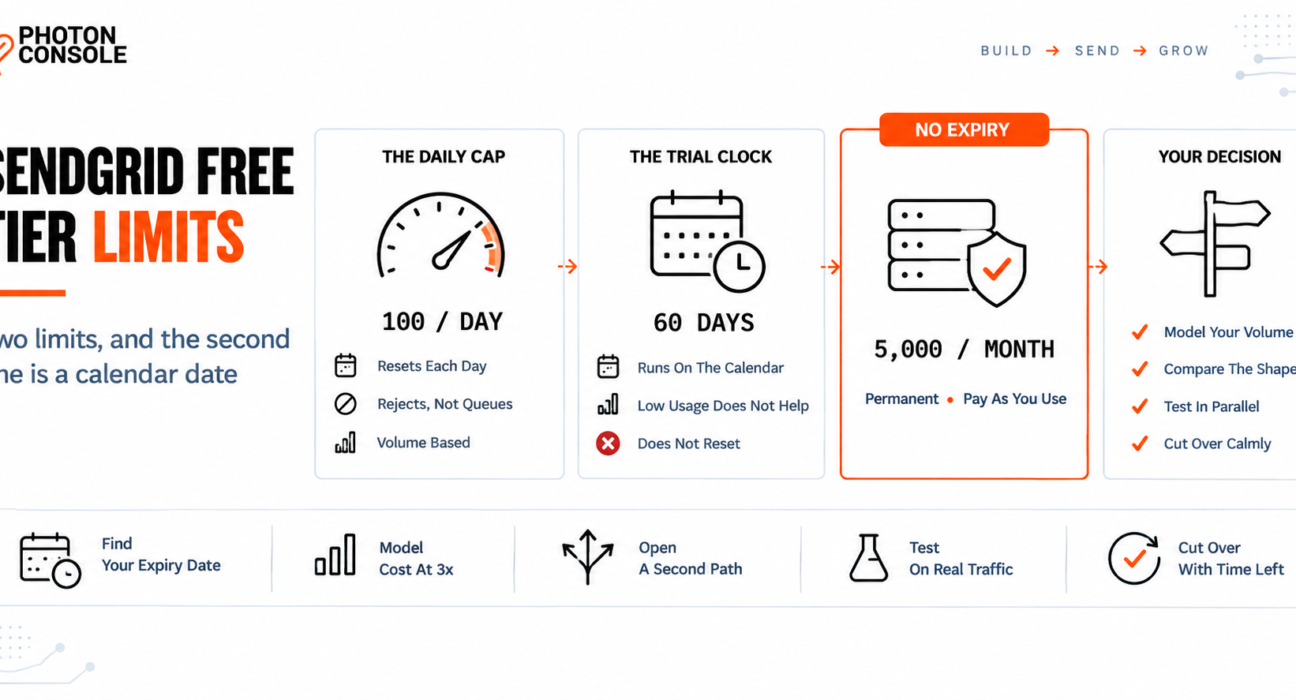
Today it is a trial. SendGrid’s own Email API page states it plainly: send 100 emails per day for 60 days, then upgrade to a paid plan. There are two separate limits in that sentence, and the second one is a calendar date.
Which means the question is not only what happens when you exceed your daily allowance. It is what happens on day 61 — and that one arrives whether you have sent 6,000 emails or six.
Quick Answer: What Is the SendGrid Free Tier?
According to SendGrid’s Email API page, the free trial allows 100 emails per day for 60 days, usable through the SMTP relay, the SMTP API or the Web API. After that period, a paid plan is required to keep sending.

| Limit | What it is | What triggers it |
|---|---|---|
| Daily cap | 100 emails per day | Volume — resets each day |
| Trial expiry | 60 days from signup | Time — does not reset |
Plan prices scale with sending volume and are not published on that page, so check the current SendGrid’s own site for today’s figures rather than any third-party article, including this one. Pricing and tiers change.
If you are reading this because the clock is running, the practical point is that 60 days is enough time to evaluate properly — but only if you start before week eight.
The Two Cliffs and Why the Second One Surprises People
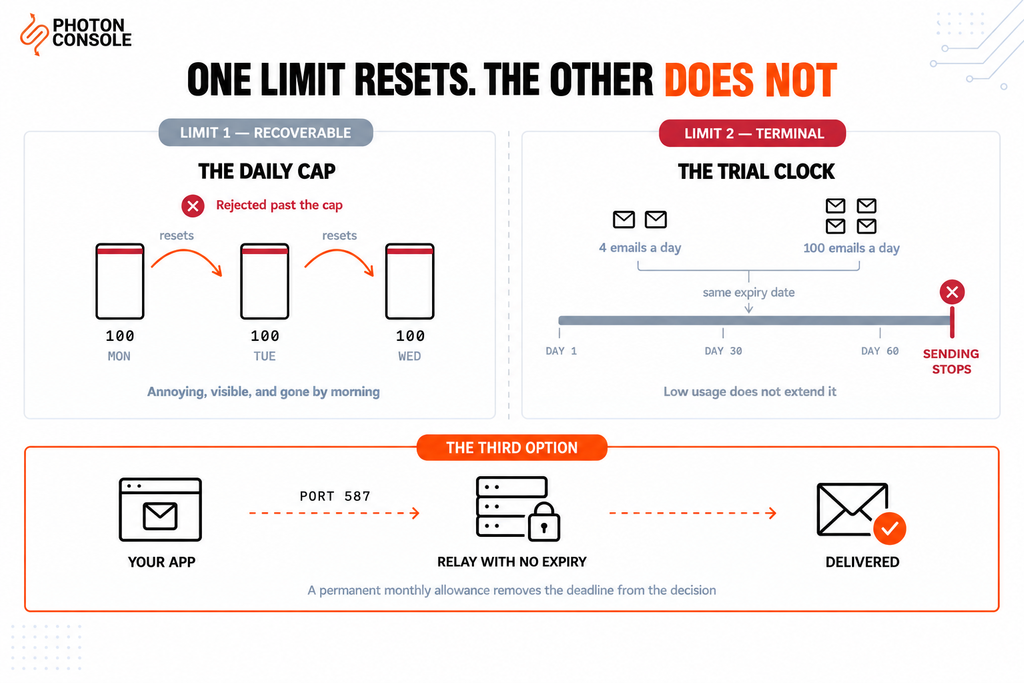
A daily cap is a limit you feel immediately and understand instantly. You send your hundred and first message, it is rejected, and tomorrow it works again. Annoying, but legible.
A trial expiry behaves differently in one important way: low usage does not extend it. A side project sending four emails a day is burning the same 60 days as one sending a hundred. Teams that stay well inside the daily allowance often assume they are comfortably within the free tier, right up until sending stops.
This matters most for the exact case the free tier attracts — a project in development. You integrate email early, the volume is tiny because there are no real users yet, and the clock runs during the months when you are building everything else. By launch, the trial may already be gone.
Common Mistake
Treating the free tier as a permanent foundation because the volume is low. The daily cap is about usage; the expiry is about the calendar. A prototype sending five emails a day consumes the trial at exactly the same rate as a live product sending a hundred. If email went into your application during early development, work out the actual expiry date now rather than discovering it through a support ticket from a user who never received a password reset.
What Happens When You Hit the Daily Cap
Exceeding a sending allowance is not a queue. Treat it as a rejection.
Any provider that enforces a daily limit will refuse submissions past it rather than holding them until tomorrow, which means your application receives an error at the moment of sending. What your code does with that error decides whether the message is recoverable.
// Fragile — a rejection becomes a lost email
await transporter.sendMail(message);
// no try/catch, no record, no retry

// Resilient — the rejection is caught and the work survives
try {
  const info = await transporter.sendMail(message);
  await log.success(message.id, info.messageId);
} catch (err) {
  await queue.retryLater(message, { reason: err.message });
  await alert.ifRateLimited(err);
}
Two things are worth building before you need them. Log the provider’s response for every send, so a limit rejection is visible rather than silent. And queue failures for retry, so hitting a cap delays an email instead of destroying it.
Our guide to transactional email queue architecture covers retry policy and backoff, and SMTP response codes explained covers reading the rejection itself.
Quick Fix
Sending Stopped and You Are Not Sure Why
- Check the provider dashboard for today’s count against the daily allowance
- Check your account’s trial start date and add 60 days — the expiry is separate from volume
- Read the actual SMTP or API response your application received, not just “it failed”
- Confirm whether failed messages were queued for retry or dropped
- If the trial has ended, a paid plan or a different provider are the only two paths
Day 61: The Decision You Cannot Defer
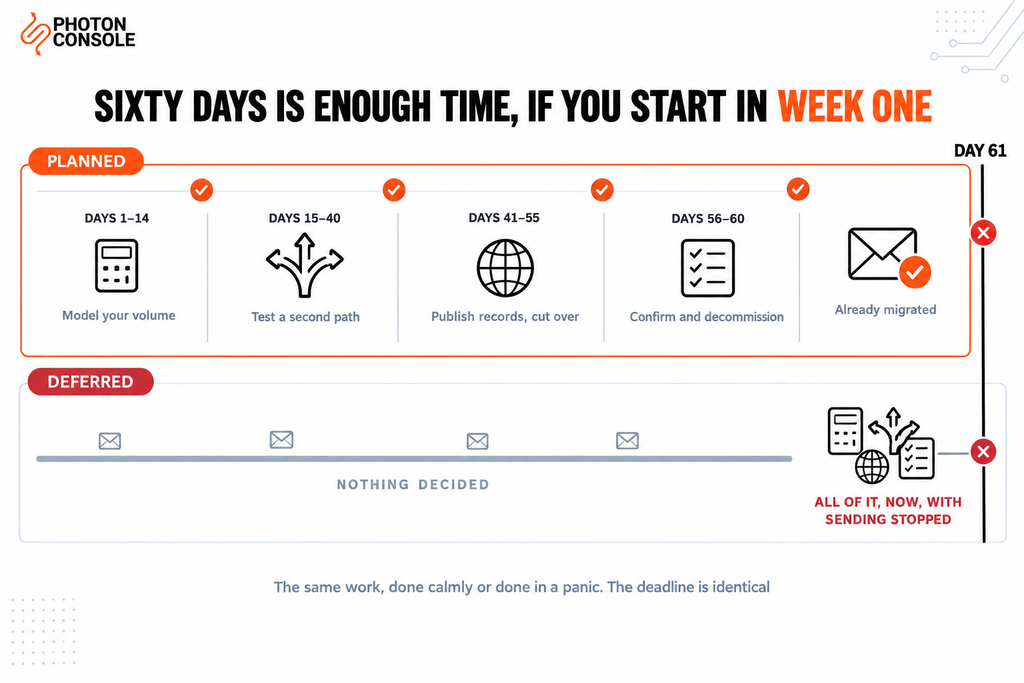
When the trial ends you have two options: pay, or move. Both are reasonable, and the only bad version is making the choice under pressure on the day sending stops.
The reason to decide early is that migrating a sending path is not difficult but it is not instant either. Authentication records need to propagate, a new sending domain benefits from a few days of warming, and you want a period where both paths work so you can compare them on real traffic.
| Window | What to do | Why then |
|---|---|---|
| Days 1–14 | Decide whether the paid tier fits your projected volume | Your volume estimate is cheapest to act on now |
| Days 15–40 | If not, open a second account and send test traffic through it | Both paths work, so comparison is free |
| Days 41–55 | Publish DNS records, warm the new path, cut over gradually | DNS and reputation both need lead time |
| Days 56–60 | Confirm and decommission the old path | Buffer for anything unexpected |
| Day 61 only | Choose in a hurry with sending already stopped | Avoid this |
Nothing about that schedule is specific to SendGrid. It is how you would move any critical dependency with a known end date.
Quick Fix
Trial Ends This Week and Nothing Is Ready
- Create an account with a second provider today — most issue credentials immediately
- Add the new
includeto your existing SPF record and publish the DKIM record now, so DNS propagates while you work - Send a handful of real messages through the new path and check they authenticate
- Change the four SMTP variables in your configuration and deploy
- Keep the old credentials until you have watched a full day of live traffic succeed
What to Actually Compare
SendGrid is a capable, mature product, and time-boxing a free tier is an ordinary commercial decision rather than a trick. The useful question is not whether it is good but whether its shape fits what you are building.
Three things are worth comparing properly, and volume price is only one of them.
| What to check | Why it matters | Where to look |
|---|---|---|
| Trial or permanent free allowance | Decides whether you face this again in 60 days | Provider’s own pricing page |
| Cost at three times your volume | Reveals whether the pricing model fits your growth | Pricing page, with your own arithmetic |
| Tier steps versus per-send pricing | Tier boundaries cause jumps; per-send tracks usage | Plan structure |
| Which deliverability features are gated | Logs and authentication matter at every volume | Feature comparison per plan |
| SMTP support versus SDK-only | Decides whether the next migration is config or code | Integration documentation |
1. Whether the free allowance is a trial or a floor
These are different products. A trial is for evaluation; a permanent free allowance is for projects whose volume genuinely stays small, and for keeping a staging environment sending without a second bill.
For comparison, PhotonConsole includes 5,000 emails per month that do not expire, which is more than SendGrid’s trial allowance over a 30-day period and continues after day 60. A low-volume internal tool or a development environment can sit inside that indefinitely.
2. How the pricing model behaves as you grow
Plan tiers and pay-as-you-use pricing fail differently. With tiers, cost moves in steps and crossing a boundary can produce a jump out of proportion to the extra volume. With usage-based pricing, cost tracks sending more closely but is harder to budget as a fixed line.
Work out your cost at roughly three times your current volume before committing either way. That is the number that tells you whether a model suits you, and transparent per-send pricing is easier to model at that horizon than a tier you have not reached yet.
3. What sits behind the free allowance
A free tier is only useful if the thing it is a free tier *of* is what you need. Check that deliverability features are not reserved for higher plans — authentication support, delivery logs, webhooks and sender reputation management matter at every volume, not only at scale.
SendGrid’s own page notes that higher tiers add dedicated IPs, deeper analytics and custom domains. That is normal, and it is also precisely the kind of detail to check against your requirements before the trial ends rather than after.
Note
Pricing, free allowances and plan features change at every provider, including both the one this article discusses and the one publishing it. Every figure attributed to SendGrid here comes from its own documentation at the time of writing and is linked so you can verify it. Before making a decision, open both providers’ current pricing pages yourself. Any article quoting competitor prices — this one included — should be treated as a starting point, not a source of truth.
Moving the Sending Path
The mechanical part is smaller than most people expect, because SMTP is a standard protocol. A provider change is a credential change.
# Before
SMTP_HOST=smtp.sendgrid.net
SMTP_PORT=587
SMTP_USER=apikey
SMTP_PASS=SG.xxxxxxxx

# After
SMTP_HOST=smtp.photonrelay.com
SMTP_PORT=587
SMTP_USER=your_project_api_user
SMTP_PASS=your_secret_api_key
If your application reads these from environment variables rather than hardcoding them, the change is a configuration update and a restart. If it uses a provider-specific SDK instead of SMTP, the move is larger — which is itself a good argument for using plain SMTP in the first place.
PhotonConsole issues SMTP credentials on signup, so a second path can be live and testable the same day you decide to evaluate one. Run both in parallel for a few days if you can. A feature flag that sends a percentage of traffic through the new provider will surface authentication or formatting problems on real mail while the old path is still there to fall back on.
Authentication records
TXT    @                    v=spf1 include:relay.photonconsole.com ~all
CNAME  photon._domainkey    dkim.photonconsole.com
During a parallel run you will have both providers authorised in one SPF record. That is correct and expected — add the new include alongside the existing one, and remove the old include only after the old path is decommissioned.
# During migration — both authorised
v=spf1 include:sendgrid.net include:relay.photonconsole.com ~all
Two rules apply throughout. One domain gets one SPF record, so never publish a second TXT record starting v=spf1. And watch the ten-lookup limit that RFC 7208 places on SPF evaluation, since each include consumes lookups and an over-limit record fails for every sender at once.
DKIM matters more than SPF because it survives forwarding, and receivers including Gmail expect aligned authentication on transactional mail. Our guide to SPF, DKIM and DMARC covers alignment, and the free email deliverability checker shows what your domain publishes right now.
Pro Tips
- Write down the expiry date today. Signup date plus 60 days, in the calendar, with a reminder two weeks before.
- Never let a free tier carry production traffic you cannot afford to lose. An evaluation allowance is for evaluating.
- Use SMTP rather than a provider SDK where you can. It turns a future migration into a credential change instead of a rewrite.
- Log the provider’s response on every send. Without it, a limit rejection and a bug look identical.
- Model cost at three times your current volume. Today’s price tells you little about whether the model fits.
- Verify before cutover. MXToolbox checks the combined SPF record in one lookup, and Mail Tester scores a real send end to end.
Related Reading
- Best SendGrid alternatives — an infrastructure-level comparison if you have decided to move
- Pay-per-use versus subscription pricing for modelling cost at your volume
- Sending 100,000 emails a month without overpaying
- Transactional email pricing across nine providers
- Free SMTP servers — where free options stop being practical
- SMTP response codes explained for reading a rejection properly
Frequently Asked Questions
Is the SendGrid free tier permanent?
No. SendGrid’s Email API page describes it as 100 emails per day for 60 days, after which a paid plan is required. The older permanent free allowance is not what is offered now.
What happens when I exceed 100 emails in a day?
Further submissions are rejected rather than queued, and your application receives an error at the point of sending. The allowance resets the following day.
Does low usage extend the 60 days?
No. The trial period runs on the calendar regardless of volume, so a project sending a handful of emails a day uses it up at the same rate as one at the daily cap.
What happens to my emails on day 61?
Sending requires a paid plan from that point. Any message your application attempts without one will fail, so this is a date to plan around rather than discover.
How much does the first paid SendGrid plan cost?
Pricing scales with volume and changes over time, so check SendGrid’s current pricing directly on its own site. Treat figures in any third-party article, including this one, as out of date by default.
How hard is it to switch providers?
If you send over SMTP, it is a change of host, port, username and password. If you use a provider-specific SDK, expect to rewrite the sending code.
Can I run two providers at once during a migration?
Yes, and it is the safest way to cut over. Authorise both in a single SPF record, send a portion of traffic through the new path, and remove the old include once you are done.
Conclusion
The SendGrid free tier is a 60-day evaluation of 100 emails a day, not a permanent allowance. The daily cap is the limit people plan for; the expiry date is the one that catches teams out, because it arrives on schedule no matter how little you have sent.
Handled early, it is a non-event. You work out your real volume, compare what the paid tier costs against what else is available, test a second path on live traffic while the first still works, and cut over with time in hand. Handled on day 61, the same decision gets made badly with production email already failing.
If what you need is a sending path that does not expire, a reliable SMTP provider with a permanent free allowance removes the deadline from the equation — 5,000 emails a month that keep working, pay-as-you-use pricing beyond that, and standard SMTP credentials so the next migration, if there ever is one, stays a configuration change. Start the comparison while both paths work, and the choice is yours to make rather than the calendar’s.