You shell into the container to test why the password reset never arrived, and the first command fails:
$ docker exec -it myapp sh
/app $ mail -s "test" me@example.com
sh: mail: not found
/app $ which sendmail
/app $
So you add Postfix to the Dockerfile. It works locally. Then you deploy to the cluster, and the queue disappears on every rollout, the image has doubled in size, and outbound port 25 is blocked by your cloud provider anyway.
The container is not the problem. The decision about what goes inside it is.
Quick Answer: How Do You Send Email from a Container?
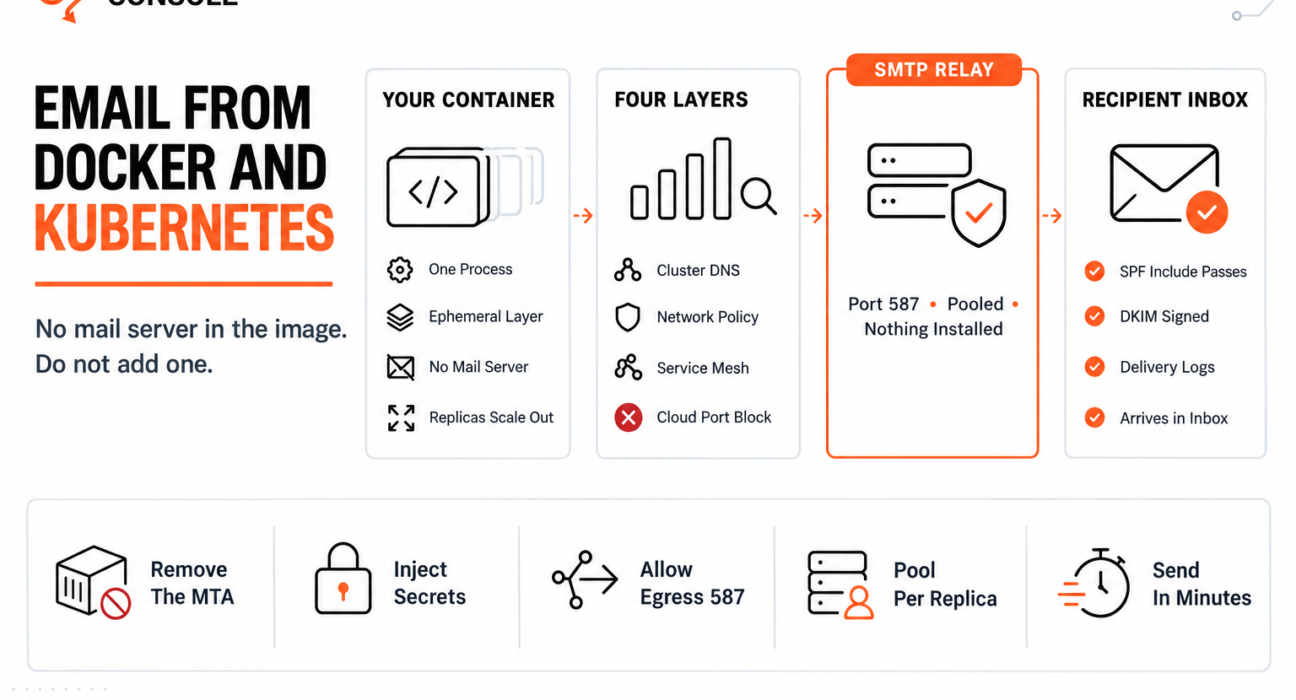
Connect your application directly to an authenticated SMTP relay on port 587, with credentials injected by the orchestrator’s secret store. Do not install a mail server in the image.

SMTP_HOST=smtp.photonrelay.com
SMTP_PORT=587
SMTP_USER=your_project_api_user
SMTP_PASS=your_secret_api_key
A container is a single process with no mail server and no durable disk. Treating email as an outbound network call rather than a local service is what matches that model, and a relay such as PhotonConsole is reached exactly like any other API dependency.
You Have a Choice That Platform Users Do Not
On a managed platform you cannot install a mail server, so the question never arises. Our guide to sending email from Heroku covers that case, where the absence of an MTA is simply a fact to work around.
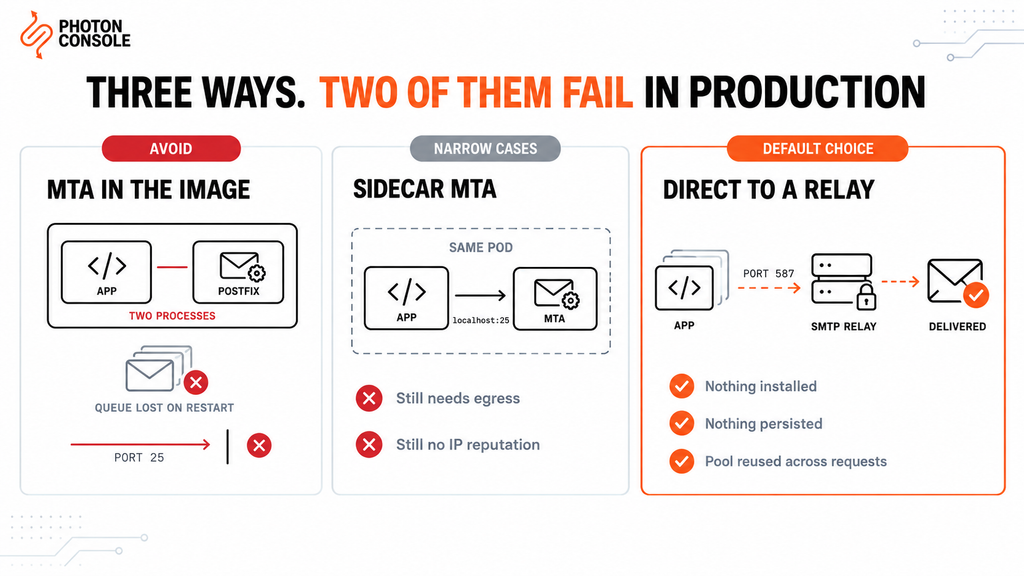
In a container you build the image, so you can install anything. That freedom is the problem: two of the three available approaches work in development and fail in production for reasons that only appear under load or during a deploy.
| Approach | Works in dev | What breaks in production | Verdict |
|---|---|---|---|
| MTA inside the app image | Yes | Queue lost on every restart; port 25 blocked; two processes in one container | Avoid |
| Sidecar MTA container | Yes | Still needs egress on 25; no IP reputation; another component to patch | Narrow cases only |
| Direct to a relay on 587 | Yes | Nothing structural — credentials and egress are configuration | Default choice |
Why an MTA in the application image fails
A container filesystem is a stack of layers with a thin writable layer on top, and that layer is discarded when the container is replaced. A mail queue written there is not persistent storage — it is a temporary scratchpad that disappears at the next rollout.
So every deployment silently destroys any message Postfix had accepted but not yet delivered. Nothing reports it, because from the application’s point of view those messages were handed off successfully.
Two further problems follow. You now run two processes in a container designed for one, so the orchestrator’s health signal no longer reflects whether mail is actually working. And the MTA will try to deliver on port 25, which AWS throttles and Google Cloud blocks outright — the same obstacle covered in our guides to EC2 port 25 and Google Cloud port restrictions.
Common Mistake
Adding postfix to the Dockerfile because the application calls sendmail and this is the smallest change that makes it work. The build succeeds, local testing passes, and the failure surfaces weeks later as “some emails never arrive after a deploy” — which is almost impossible to trace back to the image, because the messages were accepted locally and then vanished with the container. If the application genuinely cannot be changed, a sidecar is the lesser evil; adding the MTA to the application image is not.
Quick Fix
Emails Vanish After Every Deploy
- Check whether the image installs an MTA:
docker run --rm myapp:latest which sendmail postfix exim - If one is present, the queue is on the container’s writable layer and is lost on replacement
- Point the application at a relay on port 587 and remove the MTA from the Dockerfile
- Move pending work to an external queue so a rollout cannot destroy it
- Confirm the fix by redeploying mid-batch — nothing should be lost
When a sidecar is genuinely the right answer
There is one case: a legacy application hardcoded to localhost:25 that you cannot modify. Containers in the same Kubernetes pod share a network namespace, so a mail relay container in that pod answers on localhost exactly as the application expects.
Be clear about what that buys and what it does not. It buys compatibility without touching the application. It does not give you a deliverable sending identity — the sidecar still has to reach the internet, still needs an egress path the cloud has not blocked, and still sends from a cluster IP with no sending reputation. Configure the sidecar to forward to a relay on 587 rather than attempting direct delivery.
Getting Credentials In Without Leaking Them
This is where container email setups most often go wrong in a way that matters beyond email.
# WRONG — bakes the secret into an image layer
FROM node:20-alpine
ENV SMTP_PASS=your_secret_api_key
COPY . /app
Anyone who can pull the image can read that value, and deleting the line later does not remove it from the earlier layer. Check any image you are unsure about:
# Prints the build instructions, including ENV values
docker history --no-trunc myapp:latest | grep -i smtp
For Docker Compose, keep values in a file that is excluded from version control and never copied into the image:
# docker-compose.yml
services:
  app:
    image: myapp:latest
    env_file: .env          # listed in .gitignore and .dockerignore
In Kubernetes, use a Secret rather than putting the value in the Deployment manifest:
kubectl create secret generic smtp-credentials \
  --from-literal=host=smtp.photonrelay.com \
  --from-literal=user=your_project_api_user \
  --from-literal=pass=your_secret_api_key
# deployment.yaml — reference, do not inline
env:
- name: SMTP_HOST
valueFrom:
secretKeyRef:
name: smtp-credentials
key: host
- name: SMTP_PASS
valueFrom:
secretKeyRef:
name: smtp-credentials
key: passNote
Base64 is encoding, not encryption. A Kubernetes Secret is readable by anyone who can read the object, and whether Secrets are encrypted at rest depends on your cluster’s encryption configuration — a cluster-admin setting, not a default you can assume. Confirm how your cluster is configured and restrict read access accordingly; Kubernetes publishes good practices for Secrets covering this.
What Sits Between Your Container and the Relay
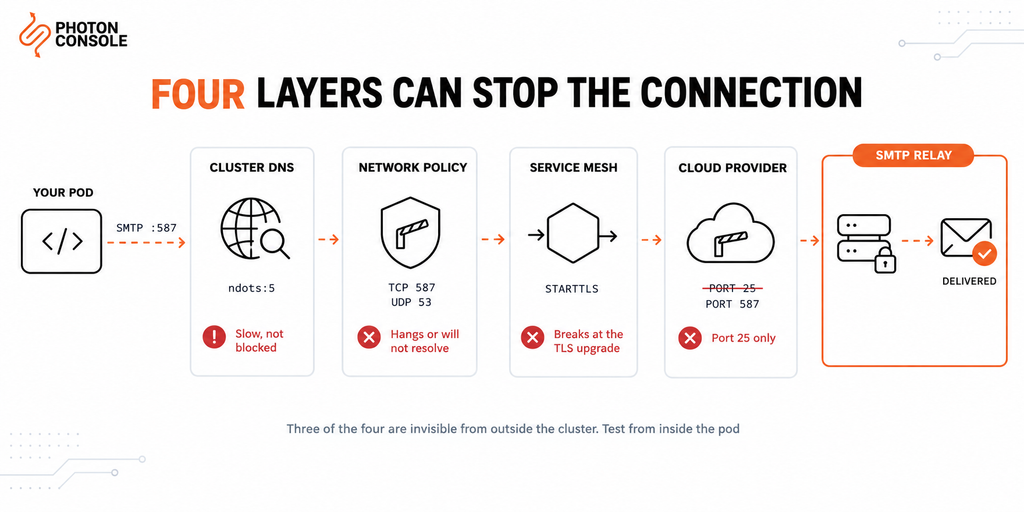
On a plain server, an SMTP connection has one thing to get past. In a cluster it has four, and each fails differently — which is why reading the symptom tells you which layer to check.
| Layer | Symptom when it blocks you | Where to look |
|---|---|---|
| Cluster DNS | Sends succeed but every one is slow | ndots in the pod’s /etc/resolv.conf |
| Network policy | Hostname fails to resolve, or connection hangs | Egress rules for TCP 587 and UDP 53 |
| Service mesh | Connection opens then breaks at the TLS upgrade | Port declaration, or try 465 |
| Cloud provider | Port 25 times out, 587 works fine | Provider’s outbound port policy |
Work down the table in that order. Three of the four are invisible from outside the cluster, so every test below runs inside a pod. PhotonConsole accepting 587, 465 and 2525 means the mesh and cloud rows can usually be settled by changing a port rather than a policy.
Cluster DNS and the ndots surprise
Kubernetes gives pods a resolver configured for in-cluster service discovery, with search domains and an ndots option. When ndots is set higher than the number of dots in your hostname, the resolver tries the search domains first.
For smtp.photonrelay.com — two dots — that can mean several failed cluster lookups before the real one succeeds, adding latency to every connection. Check what your pods actually get:
kubectl exec -it mypod -- cat /etc/resolv.conf

# Look at the search domains and the ndots value.
# A trailing dot makes the name absolute and skips the search list:
#   smtp.photonrelay.com.
Either use the fully qualified form with a trailing dot, or lower ndots for the pod with a dnsConfig block. The symptom is slow sends rather than failed ones, which is why this one goes undiagnosed for a long time.
Network policy egress
A default-deny NetworkPolicy blocks outbound traffic that is not explicitly permitted. SMTP is not HTTP, so an egress rule written for web traffic will not cover it.
# Allow outbound submission from the app pods
egress:
  - ports:
      - protocol: TCP
        port: 587
  - ports:                  # DNS, or the hostname never resolves
      - protocol: UDP
        port: 53
Forgetting the DNS rule is the common version of this mistake: the policy permits port 587 but blocks the lookup that finds the host, so the failure looks like a DNS problem rather than a policy one.
Service mesh interception
A service mesh sidecar intercepts the pod’s traffic. Meshes are built primarily around HTTP, and non-HTTP TCP traffic needs the port declared correctly or the proxy may handle it in ways that break the protocol — frequently during the TLS upgrade, since STARTTLS begins as plaintext.
If SMTP works with the mesh sidecar disabled and fails with it enabled, that is your answer. Declare the port as TCP for the destination, or exclude it from interception.
Quick Fix
SMTP Times Out from a Pod but Works Elsewhere
- Test from inside the pod, not from your laptop:
kubectl exec -it mypod -- nc -zvw5 smtp.photonrelay.com 587 - If the hostname does not resolve, check for a NetworkPolicy missing a UDP 53 egress rule
- If it resolves but hangs, check the policy permits TCP 587 outbound
- If a service mesh is running, retry with the sidecar disabled to isolate it
- Check
/etc/resolv.conffor a highndotsvalue adding lookup latency
Probes: Do Not Let the Relay Restart Your Pods
A liveness probe answers one question — should this container be killed and replaced? Tying that answer to an external service is a way to turn a brief third-party hiccup into a cluster-wide restart loop.
# livenessProbe  -> is this process healthy?
#                   Never checks the relay.
#
# readinessProbe -> should it receive traffic?
#                   May check dependencies it cannot work without.
#
# A relay outage should raise an alert, not recycle every pod.
The second probe-related issue is restarts during delivery. A pod terminated mid-send loses whatever was in flight, which is the same argument for an external queue that applies to any ephemeral runtime. Set a terminationGracePeriodSeconds long enough for a worker to finish its current message, and keep the queue outside the pod — our guide to transactional email queue architecture covers the retry and idempotency design.
Application Configuration
// Node.js — read from the injected environment
const transporter = nodemailer.createTransport({
  host: process.env.SMTP_HOST,
  port: Number(process.env.SMTP_PORT),
  secure: false,                 // STARTTLS on 587
  auth: {
    user: process.env.SMTP_USER,
    pass: process.env.SMTP_PASS
  },
  pool: true,                    // containers are long-lived, so pooling helps
  maxConnections: 5,
  connectionTimeout: 10000
});
Note the difference from a function runtime: a container is a long-running process, so connection pooling is genuinely useful here. Keep maxConnections modest and multiply it by your replica count to check the total against your relay’s connection limit — twenty replicas at five connections each is a hundred concurrent connections.
Our stack guides cover the libraries in depth, including Node.js with Nodemailer and Python with smtplib.
Publish Your DNS Records
TXT    @                    v=spf1 include:relay.photonconsole.com ~all
CNAME  photon._domainkey    dkim.photonconsole.com
Pod IP addresses are assigned from the cluster’s range and change constantly, so SPF cannot authorise the pod itself. Authorising the relay’s domain is what keeps the record correct as pods are rescheduled.
Authentication failures are one of the most common causes of email delivery problems, and receivers including Gmail expect aligned SPF and DKIM. Our guide to SPF, DKIM and DMARC explains the records, and the free email deliverability checker shows what your domain publishes today.
Port Reference
| Port | Purpose | From a container |
|---|---|---|
| 25 | Server-to-server relay | Avoid — blocked by most cloud providers |
| 587 | Authenticated submission | The standard choice |
| 465 | Submission over implicit SSL | Useful when a mesh mishandles STARTTLS |
| 2525 | Unofficial fallback | When 587 is restricted |
Port 587 is the submission port defined in RFC 6409 for authenticated clients. Port 465 is worth knowing about here specifically: because TLS is established before any SMTP commands, it avoids the plaintext-then-upgrade sequence that service mesh proxies handle least well. PhotonConsole accepts 587, 465 and 2525.
Pro Tips
- Test from inside the pod, always. Network policy, mesh and cluster DNS all behave differently from your laptop, and three of the four failure layers are invisible outside the cluster.
- Multiply connections by replicas. Pool settings that are sane per container become a problem at scale.
- Keep the liveness probe local. Nothing external belongs in the check that decides whether to kill a container.
- Add
.envto.dockerignore, not just.gitignore. They are separate files and the second does not imply the first. - Audit an inherited image once.
docker historytakes a second and finds credentials baked in by whoever built it before you. - Verify the published records. MXToolbox checks SPF and DKIM in one lookup, and Mail Tester scores a real send before launch.
Related Issues You May Hit Next
- AWS EC2 port 25 blocked if your nodes run on EC2
- Google Cloud SMTP port restrictions for GKE clusters
- Sending email from serverless functions where pooling is wrong rather than right
- SMTP connection timeouts for reading a hanging handshake
- Email working in dev but failing in production — the general case
- Emails sent but not delivered when the log reports success
Frequently Asked Questions
Why is there no mail command in my container?
Base images contain your application and its dependencies, not a mail transfer agent. The command is absent rather than broken, and adding one is usually the wrong fix.
Should I install Postfix in my Docker image?
No. The mail queue lands on the container’s writable layer and is destroyed at the next restart, you end up running two processes in a single-process container, and delivery still depends on port 25.
When does a sidecar MTA make sense?
When a legacy application is hardcoded to localhost:25 and cannot be changed. Configure the sidecar to forward to a relay on 587 rather than delivering directly.
Why does SMTP work locally but time out in Kubernetes?
Usually a default-deny NetworkPolicy without an egress rule for TCP 587, a missing UDP 53 rule for DNS, or a service mesh intercepting the connection. Test from inside the pod to narrow it down.
Should I use connection pooling in a container?
Yes, unlike in a serverless function. A container is long-running, so a pool is reused. Keep the per-container limit modest and check the total across all replicas.
Are Kubernetes Secrets safe for SMTP credentials?
They are better than inlining values in a manifest or an image layer, but base64 is encoding rather than encryption. Check whether your cluster has encryption at rest configured and limit who can read the object.
Why are my sends slow from inside the cluster?
Check /etc/resolv.conf in the pod. A high ndots value makes the resolver try cluster search domains before the real hostname, adding latency to every connection.
Conclusion
Containers do not make email harder, but they do reward the wrong instinct. The missing sendmail command invites you to install a mail server, and that single change introduces a queue on disposable storage, a second process in a single-process container, and a dependency on the one port cloud providers block.
The arrangement that matches the container model treats email as an outbound network call: credentials from the orchestrator’s secret store, a connection on port 587, a pool sized against your replica count, and a queue that lives outside the pod.
A reliable SMTP provider fits that shape, because the container needs nothing installed and nothing persisted — the same four environment variables work from a local Compose stack, a staging cluster and production, and they keep working when pods are rescheduled onto different nodes. Pricing starts with 5,000 free emails per month, enough to prove the path through every one of the four layers before committing.