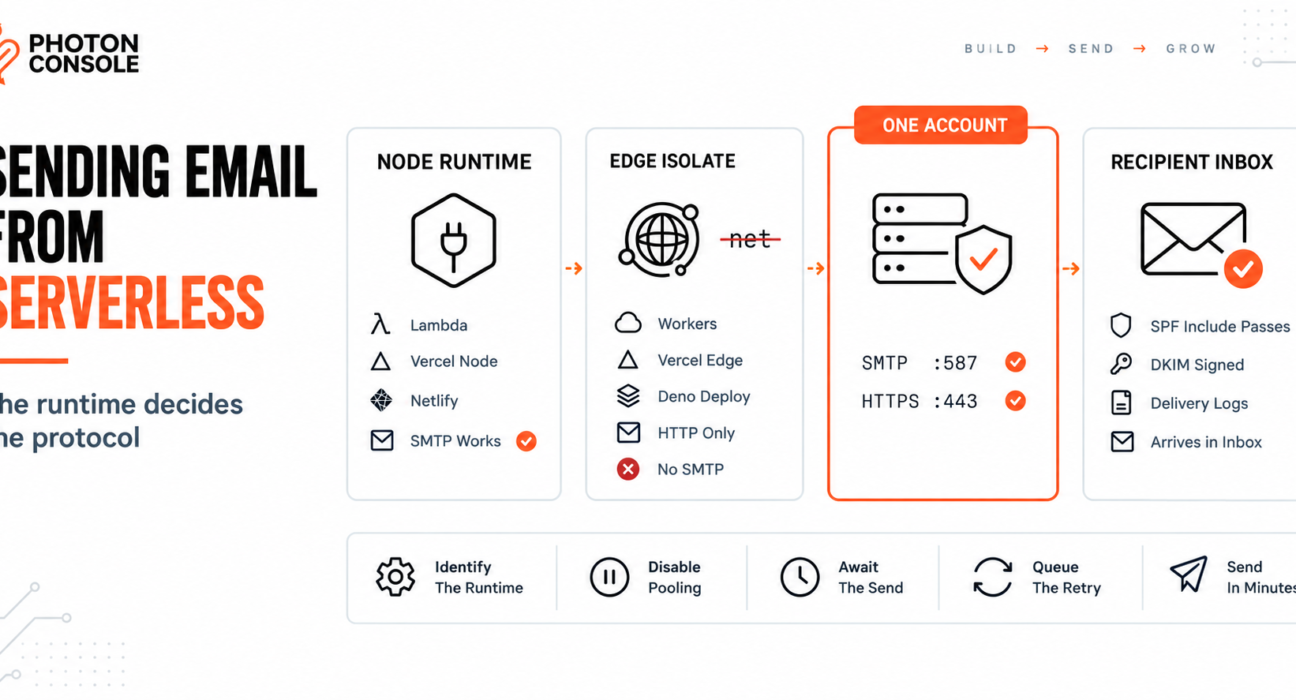
Your function returns 200 OK. The log shows no error. The user never receives the email.
Or the opposite: the code that worked on your laptop now throws a module resolution error the moment you deploy it, complaining about a package you never imported directly.
Both failures come from the same misunderstanding. “Serverless” describes two completely different runtimes, and they give opposite answers to the question of whether you can speak SMTP at all. Until you know which one your function runs in, you are guessing.
Quick Answer: How Do You Send Email from a Serverless Function?
It depends on the runtime, and there are only two cases:

- Node.js serverless (AWS Lambda, Vercel Node functions, Netlify Functions, Cloud Functions) — SMTP works. Create the transport per invocation, disable pooling, and
awaitthe send before returning. - Edge runtime (Cloudflare Workers, Vercel Edge, Deno Deploy) — SMTP libraries will not run. Send over HTTPS with
fetch()instead.
# Node.js serverless — SMTP over the submission port
SMTP_HOST=smtp.photonrelay.com
SMTP_PORT=587
SMTP_USER=your_project_api_user
SMTP_PASS=your_secret_api_key
A relay such as PhotonConsole accepts both routes on the same account, so the runtime decides the protocol without changing providers.
The Runtime Decides the Protocol
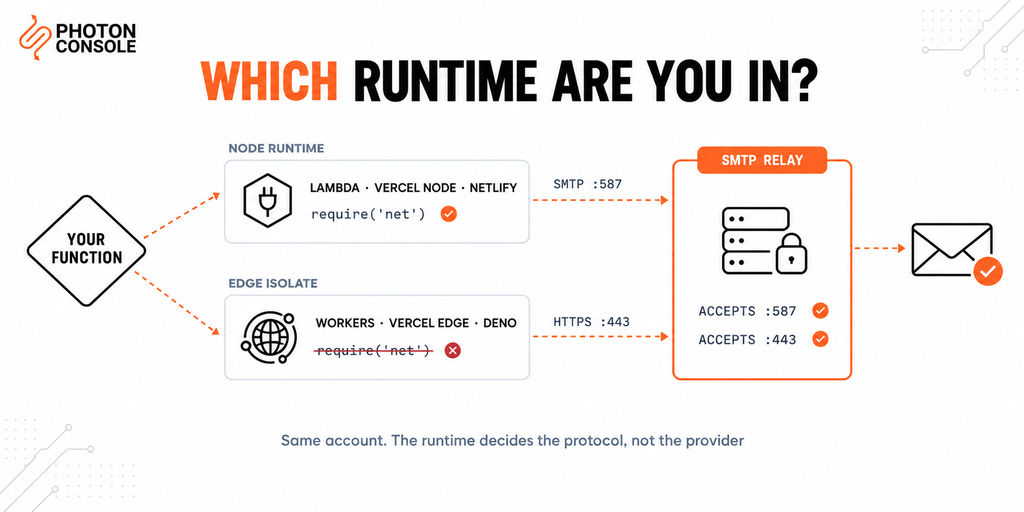
SMTP needs a TCP socket. In Node.js that comes from the built-in net module, which every SMTP client depends on underneath.
Edge runtimes are not Node. They are V8 isolates that expose web platform APIs — fetch(), Request, Response — and deliberately omit Node’s native modules. There is no net module to import, which is why a Node SMTP library fails at build or bundle time rather than at send time.
Some edge platforms now expose a low-level socket primitive of their own, but no mainstream SMTP client targets it. In practice, edge means HTTP.
| Runtime | Examples | SMTP possible | Use |
|---|---|---|---|
| Node.js serverless | Lambda, Vercel Node functions, Netlify Functions | Yes | SMTP on 587, no pooling |
| Edge isolate | Cloudflare Workers, Vercel Edge, Deno Deploy | No | HTTP API via fetch() |
| Container | Cloud Run, Fargate, App Runner | Yes | SMTP with normal pooling |
If you are in Next.js specifically, the runtime is a per-route choice and the failure modes are different enough to warrant their own treatment — our guide to sending email from Next.js covers server actions, route handlers and the runtime export.
Failure 1: The Function Freezes the Moment It Returns
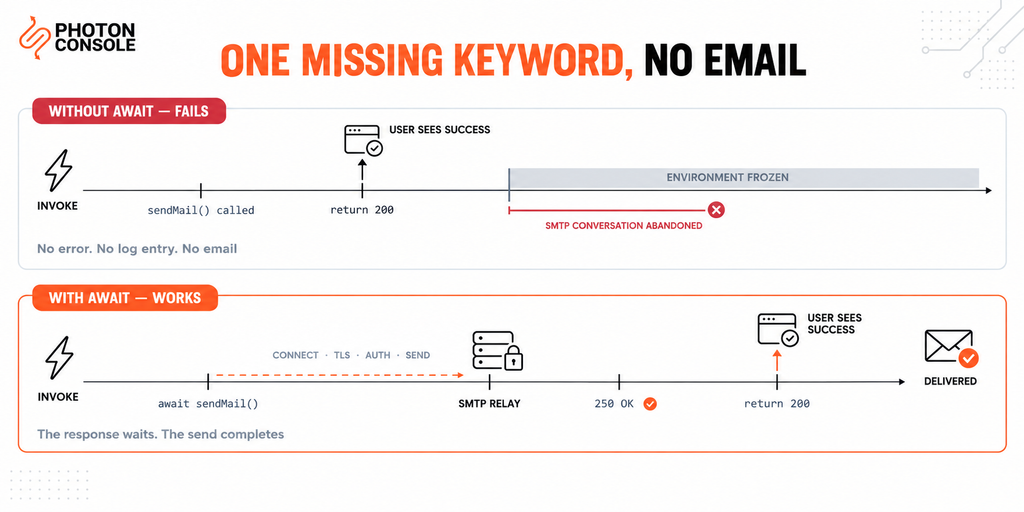
This is the cause of almost every “returned 200, no email” report, and it is invisible in testing because a long-running local process finishes the work anyway.
A serverless execution environment is suspended once the handler returns its response. Work still in flight does not continue in the background. It simply stops.
// BROKEN — the send is abandoned at the return statement
export async function handler(event) {
  transporter.sendMail(message);          // no await
  return { statusCode: 200, body: "ok" };
}
// CORRECT — the response waits for the send to complete
export async function handler(event) {
await transporter.sendMail(message);
return { statusCode: 200, body: "ok" };
}There is no error to find in the logs, because nothing failed. The promise was created, the handler returned, and the environment froze with the SMTP conversation half-finished.
Quick Fix
Function Returns 200 but No Email Arrives
- Search the handler for
sendMailorfetchwithoutawait - Check for
.then()chains with noreturnin front of them - Confirm the handler is declared
asyncand the send is awaited - Wrap the send in
try/catchand log the error branch explicitly - Log the message ID the relay returns — no ID means the send never completed
Failure 2: Connection Pooling Does Not Survive
On a long-running server, a connection pool is the standard optimisation. In serverless it is at best useless and at worst harmful.
Each cold invocation starts a fresh environment, so the pool is empty. It pays the full cost every time: DNS resolution, TCP handshake, TLS negotiation and SMTP authentication before a single byte of your message moves.
Common Mistake
Enabling pool: true in a serverless function because it is the recommended production setting elsewhere. A pooled transport keeps connections open for reuse that will never come — the environment freezes with them held, and the relay sees connections that sit idle and then vanish. On a frequently invoked function this can push you into per-account connection limits while delivering no benefit. Use a single unpooled connection per invocation and close it.
// Node.js serverless — correct transport settings
const transporter = nodemailer.createTransport({
  host: process.env.SMTP_HOST,
  port: Number(process.env.SMTP_PORT),
  secure: false,            // STARTTLS on 587
  auth: {
    user: process.env.SMTP_USER,
    pass: process.env.SMTP_PASS
  },
  pool: false,              // no pooling in serverless
  connectionTimeout: 5000,
  greetingTimeout: 5000,
  socketTimeout: 8000
});
Note
Set your SMTP timeouts comfortably below the function’s own timeout. If the platform kills the invocation first, you get a generic timeout with no SMTP detail and nothing useful in the log. If your own timeout fires first, you get a catchable error you can log and retry. Function timeouts vary by provider and plan, so check the current limit for yours and work backwards from it.
Failure 3: Concurrency Multiplies Connections
Serverless scales by running many copies of your function at once. Each copy opens its own SMTP connection, because there is nothing shared between them to coordinate.
A traffic spike that triggers two hundred concurrent invocations attempts two hundred simultaneous authenticated connections. Relays apply per-account connection limits, and past that point sends begin to fail — not because the message is wrong, but because the pattern is.
This is the point at which a queue stops being optional.
| Symptom | Actual cause | Fix |
|---|---|---|
| 200 returned, no email, no error | Send not awaited before return | Add await |
Module not found for net or tls | SMTP library on an edge runtime | Switch route to Node, or use HTTP |
| Intermittent timeouts under load | Concurrency exceeding connection limits | Queue, with limited worker concurrency |
| First request slow, later ones fast | Cold start paying the full handshake | Expected — move the send off the request path |
| Works locally, fails deployed | Missing environment variables | Set them in the platform, not a local file |
Sending from an Edge Runtime
On an edge runtime the send is an ordinary HTTPS request. There is no transport object, no handshake to tune and no socket to close.
// Edge runtime — HTTP, not SMTP
// Read the endpoint from config; take the exact URL and payload
// shape from your provider's API reference.
export default async function handler(request) {
  const res = await fetch(env.EMAIL_API_ENDPOINT, {
    method: "POST",
    headers: {
      "Authorization": `Bearer ${env.EMAIL_API_KEY}`,
      "Content-Type": "application/json"
    },
    body: JSON.stringify({
      from: "noreply@yourdomain.com",
      to: "user@example.com",
      subject: "Welcome",
      html: "<p>Thanks for signing up.</p>"
    })
  });

  if (!res.ok) {
    throw new Error(`Send failed: ${res.status}`);
  }

  return new Response("ok");
}
Note the explicit status check. As MDN documents, fetch() does not reject on an HTTP error status — a 4xx or 5xx response resolves normally. Code that only catches thrown errors will treat a rejected send as a success.
Take the endpoint and payload shape from your provider’s current API reference before deploying — the pattern above shows the structure, not the literal values. The PhotonConsole dashboard lists the endpoint and key for your project alongside the SMTP credentials, so both routes work from one account.
SMTP or HTTP when you have the choice
| Consideration | SMTP on 587 | HTTP API |
|---|---|---|
| Works on edge runtimes | No | Yes |
| Connection setup cost | Handshake plus auth | One TLS request |
| Portability across providers | High — a standard protocol | Lower — provider-specific |
| Existing framework support | Built into most mailers | Usually an SDK or custom code |
| Migration effort later | Change four variables | Rewrite the call |
On a Node runtime, SMTP is usually the better default precisely because it is portable: the same four credentials work from a container, a VPS or your laptop. On edge, HTTP is the only option, so the decision is made for you.
Add a Queue Before You Need One
Serverless gives you no durable local state. The filesystem does not persist, nothing is shared between invocations, and a failed send has nowhere to wait for a retry.
That makes an external queue the only place retry logic can live.
// Web-facing function — enqueue and return
export async function handler(event) {
  await queue.send({
    type: "welcome_email",
    userId: event.userId
  });
  return { statusCode: 202, body: "queued" };
}
# Consumer function — bounded concurrency
# Set the consumer's maximum concurrency to a value your
# relay's connection limit can absorb, not to the default.
#
# enqueue -> fast, always succeeds
# consume -> slow, retried with backoffTwo benefits follow immediately. The user-facing request stops depending on a third party being reachable, and a transient failure becomes a retry instead of a lost email. Our guide to transactional email queue architecture covers backoff, dead-letter handling and idempotency keys.
Quick Fix
Works Locally but Times Out When Deployed
- Confirm the environment variables are set in the platform, not in a local
.env - Set
pool: falseand explicit timeouts under the function limit - Verify the route’s runtime is Node, not edge, if you are using SMTP
- Try port 2525 if the platform restricts 587 on outbound
- Check whether the function has outbound network access at all in its VPC configuration
Platform Notes
- AWS Lambda — Node runtime, so SMTP works. A Lambda attached to a VPC has no internet route by default and needs a NAT gateway or VPC endpoint to reach anything outbound.
- Cloudflare Workers — isolate runtime. Use HTTP. Store the API key as a secret binding rather than a plain variable.
- Vercel — the runtime is per-route. Node functions can use SMTP; edge routes cannot.
- Netlify Functions — Node runtime, SMTP works. Background functions are the right place for sends that outlive a request.
- Deno Deploy — isolate runtime with web APIs. Use HTTP.
- Cloud Run and Fargate — containers, not functions. Normal pooling applies and nothing in this article’s pooling advice is needed.
Runtime limits and defaults change, so confirm the current timeout, concurrency and networking behaviour in your provider’s own documentation rather than trusting a figure from any article.
Authentication Still Applies
TXT    @                    v=spf1 include:relay.photonconsole.com ~all
CNAME  photon._domainkey    dkim.photonconsole.com
Serverless functions have no fixed outbound address, so SPF cannot authorise the function itself. Authorising the relay’s domain with an SPF include is what makes the record correct and keeps it correct as the platform scales.
Authentication failures are one of the most common causes of email delivery problems, and receiving providers including Gmail expect aligned SPF and DKIM on transactional mail. Our guide to SPF, DKIM and DMARC explains the records, and the free email deliverability checker shows what your domain publishes today.
Port Reference
| Port | Purpose | In a serverless function |
|---|---|---|
| 25 | Server-to-server relay | Not applicable — no local mail server |
| 587 | Authenticated submission | The standard choice on Node runtimes |
| 465 | Submission over implicit SSL | Works if your library prefers it |
| 2525 | Unofficial fallback | Useful if the platform restricts 587 |
| 443 | HTTPS | The only option on edge runtimes |
Port 587 is the submission port defined in RFC 6409 for authenticated clients. PhotonConsole accepts submission on 587, 465 and 2525, and an HTTPS endpoint for runtimes that cannot open a socket at all.
Pro Tips
- Await everything, then check the return value. A completed promise with an error response is still a failed send.
- Log the relay’s message ID on success. It is the difference between investigating a delivery question in two minutes and in two hours.
- Keep timeouts aggressive. Five seconds to connect is generous. A long default guarantees the platform kills the invocation before your code can report anything.
- Cap consumer concurrency deliberately. The queue exists to smooth the spike; an unbounded consumer recreates it.
- Separate credentials per environment. Preview deployments inheriting production keys send real mail to real people.
- Score a real send before launch. Mail Tester catches authentication problems while they are still cheap to fix, and MXToolbox confirms the published records.
Related Issues You May Hit Next
- Sending email from Next.js for per-route runtime selection
- Node.js with Nodemailer for the transport options in depth
- Sending email from Heroku where the request timeout is the constraint
- SMTP connection timeouts when the handshake hangs rather than fails
- Email working in dev but failing in production — the general case
- Emails sent but not delivered when the log reports success
Frequently Asked Questions
Can I use Nodemailer in a serverless function?
Yes, on a Node.js runtime such as Lambda or a Vercel Node function. Set pool: false, add explicit timeouts, and await the send. It will not run on an edge runtime.
Why does my function return success but send no email?
The send was not awaited. The environment is suspended when the handler returns, so an in-flight promise is abandoned rather than completed in the background.
Why do I get a module not found error for net?
Your route is running on an edge runtime, which does not provide Node’s native modules. Either move the route to the Node runtime or send over HTTPS instead.
Should I use SMTP or an HTTP API in serverless?
On edge, HTTP is the only option. On a Node runtime, SMTP is usually the better default because the same credentials work from any other environment without a rewrite.
Does connection pooling help in serverless?
No. The pool does not survive between invocations and holding connections can push you into per-account connection limits. Use one unpooled connection per invocation.
Do I need a queue for serverless email?
For anything user-facing, yes. Without one there is no durable place for a retry to live, and a transient failure becomes a permanently lost email.
Why does my Lambda time out with no network error?
A Lambda in a VPC has no outbound internet route by default. It needs a NAT gateway or a VPC endpoint before it can reach any external service.
Conclusion
Serverless email problems are rarely about email. They come from an execution model that suspends your code the moment it answers, starts cold more often than you expect, and runs many copies of itself at once.
Three decisions remove almost all of it. Identify the runtime, because that determines whether SMTP is even available. Await the send before returning, because nothing continues after the response. Put a queue between the request and the relay, because that is the only durable place a retry can live.
A dedicated transactional email solution fits this environment well, since a function needs nothing more than a credential and a reachable endpoint — no mail server, no local state, and the same configuration whether the code runs in a function, a container or on a server. Pricing starts with 5,000 free emails per month, enough to prove the whole path from invocation to inbox before committing.