


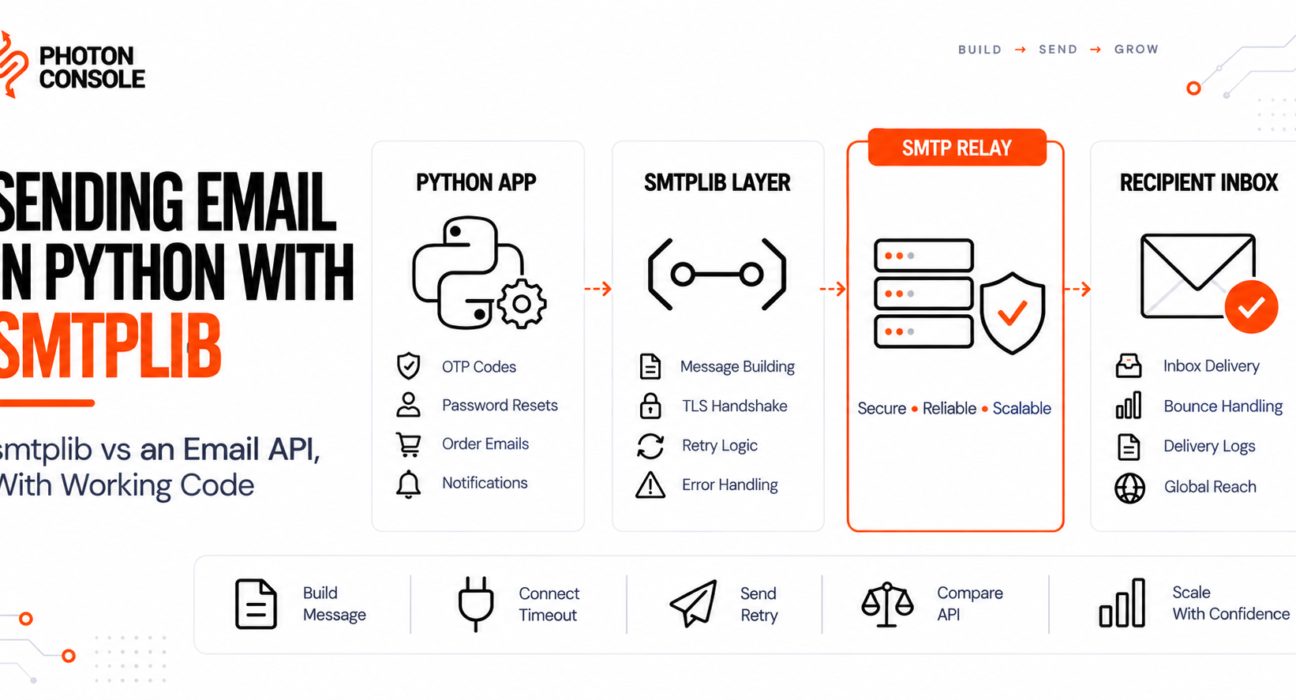
Your Python script sends email perfectly from your laptop. You deploy it to a server, add a bit of traffic, and it starts failing in ways that never showed up in testing: connections that hang for thirty seconds before timing out, authentication that suddenly gets rejected, or a script that sends the first ten emails fine and then locks up entirely.
None of this means smtplib is broken. It means smtplib was built as a thin, correct implementation of the SMTP protocol, and the protocol was never designed for a web application sending hundreds of emails a minute over an unreliable network. This guide covers both approaches: sending directly with smtplib the way most Python projects start, and where an HTTP-based email API takes over once smtplib’s limits start showing up in production.
Quick Answer: How Do You Send Email in Python?
Use the built-in smtplib module together with email.message.EmailMessage to build and send a message over an authenticated SMTP connection:
import smtplib
from email.message import EmailMessage

msg = EmailMessage()
msg["Subject"] = "Your verification code"
msg["From"] = "noreply@yourdomain.com"
msg["To"] = "user@example.com"
msg.set_content("Your code is 492019.")

with smtplib.SMTP("smtp.photonconsole.com", 587) as server:
    server.starttls()
    server.login("your_project_api_user", "your_secret_api_key")
    server.send_message(msg)
The library ships with every Python install, so there is nothing to install. The part that determines whether this works in production is the host you connect to. An unauthenticated personal mailbox or an unverified server will fail under real traffic; an authenticated relay such as PhotonConsole on port 587 with TLS is what keeps delivery working once you are past a handful of test emails.

What smtplib Actually Does
smtplib is Python’s built-in client for the SMTP protocol. It opens a socket, speaks the SMTP command sequence, and hands your message to a mail server. It does not compose messages, manage templates, track opens, or retry failures — that is what the email package and your own application code are for.
This matters because most “smtplib is broken” reports are actually one of two other things failing: the message wasn’t built to spec by the email package, or the server on the other end rejected the connection. If you want the protocol fundamentals first, see our guide to what SMTP is.
Why smtplib Fails in Production
Most SMTP errors occur due to misconfiguration or authentication issues rather than defects in smtplib itself. These five causes account for the majority of Python email failures.
1. Using SMTP() When the Server Requires SMTP_SSL()
Python’s smtplib documentation is explicit that SMTP_SSL is for connections that are encrypted from the first byte, typically port 465, while SMTP combined with .starttls() upgrades an initially plain connection, typically port 587. Using the wrong pairing produces a connection that hangs until it times out, with no useful error message.
2. Blocking Calls With No Timeout
By default, smtplib.SMTP() will wait indefinitely for a response. A single slow or unresponsive server can freeze a request thread completely. Every production connection needs an explicit timeout argument.
3. Your Host Blocks Outbound Port 25
AWS, Google Cloud, DigitalOcean and Azure all restrict outbound traffic on port 25 by default to control spam abuse. If your code targets port 25, the connection attempt stalls and eventually errors out. AWS documents its port 25 throttle removal process, but removal does not solve the underlying reputation problem of sending from a fresh IP. Our guide to SMTP connection timeouts covers the full diagnosis.
4. One Connection Per Email
Opening a new smtplib.SMTP instance for every message forces a fresh TCP handshake and TLS negotiation each time. At any real volume this is slow, and it looks like abusive traffic to the receiving server, which starts throttling or blocking the connection.
5. No Authentication Records on the Sending Domain
Without SPF and DKIM configured, mailbox providers cannot confirm your server was authorised to send as your domain, and messages are filtered or rejected outright regardless of how correct your Python code is. This is covered fully in our guide to SPF, DKIM and DMARC.
Quick Fix
smtplib Hangs and Never Returns
- Add an explicit
timeout=10to yourSMTP()orSMTP_SSL()call - Confirm you are using port 587 with
.starttls(), or port 465 withSMTP_SSL()— never mix the two patterns - Try port 2525 if your host silently blocks 587 and 465 outbound
- Wrap the connection in a try/except that catches
socket.timeoutspecifically - Confirm the host resolves with a DNS lookup before assuming the server is at fault
Step-by-Step: Sending Email With smtplib
Step 1: Build the Message With the email Package
Never hand-build raw SMTP message text. Use EmailMessage, which handles headers, encoding and line-length rules correctly.
from email.message import EmailMessage

msg = EmailMessage()
msg["Subject"] = "Your order has shipped"
msg["From"] = "orders@yourdomain.com"
msg["To"] = "customer@example.com"
msg.set_content("Your order #10928 has shipped.")

# Optional HTML alternative
msg.add_alternative(
    "<p>Your order <strong>#10928</strong> has shipped.</p>",
    subtype="html"
)
Step 2: Store Credentials as Environment Variables
Never hardcode SMTP credentials in source. Read them from the environment and keep secrets out of version control.
import os

SMTP_HOST = os.environ["SMTP_HOST"]
SMTP_PORT = int(os.environ.get("SMTP_PORT", 587))
SMTP_USER = os.environ["SMTP_USER"]
SMTP_PASS = os.environ["SMTP_PASS"]
Step 3: Connect With an Explicit Timeout
import smtplib

def get_connection():
    server = smtplib.SMTP(SMTP_HOST, SMTP_PORT, timeout=10)
    server.starttls()
    server.login(SMTP_USER, SMTP_PASS)
    return server
Common Mistake
Opening a fresh smtplib.SMTP connection inside a loop or a per-request function is the single most common cause of slow, unreliable Python email sending. Every connection re-runs the TCP handshake and the TLS negotiation from zero. Open one connection, send everything you need through it, and close it — the pattern shown in Step 4.
Step 4: Reuse One Connection for Multiple Sends
If you are sending several messages in the same process, open the connection once and reuse it rather than reconnecting per message.
def send_batch(messages):
    with smtplib.SMTP(SMTP_HOST, SMTP_PORT, timeout=10) as server:
        server.starttls()
        server.login(SMTP_USER, SMTP_PASS)
        for msg in messages:
            server.send_message(msg)
Step 5: Handle Errors Explicitly
smtplib raises specific exceptions for specific failures. Catching the base Exception class hides which one actually happened.
import logging

def send_email(msg):
    try:
        with smtplib.SMTP(SMTP_HOST, SMTP_PORT, timeout=10) as server:
            server.starttls()
            server.login(SMTP_USER, SMTP_PASS)
            server.send_message(msg)
        return True
    except smtplib.SMTPAuthenticationError as e:
        logging.error("SMTP auth rejected: %s", e)
    except smtplib.SMTPConnectError as e:
        logging.error("Could not connect to SMTP host: %s", e)
    except smtplib.SMTPRecipientsRefused as e:
        logging.error("Recipient refused: %s", e.recipients)
    except (TimeoutError, smtplib.SMTPServerDisconnected) as e:
        logging.error("Connection timed out or dropped: %s", e)
    return False
For interpreting the numeric codes inside these exceptions, our reference on SMTP response codes maps each one to its cause.
Step 6: Add Retry Logic for Transient Failures
A 4xx response is temporary; a 5xx response is permanent. Retrying a permanent failure wastes time and can damage your sender reputation.
import time

def send_with_retry(msg, attempts=3):
    for i in range(attempts):
        try:
            return send_email(msg)
        except smtplib.SMTPResponseException as e:
            if 400 <= e.smtp_code < 500 and i < attempts - 1:
                time.sleep(2 ** i)  # 1s, 2s, 4s
                continue
            raise
For a deeper treatment of backoff strategy across an entire sending pipeline, see our guide to SMTP retry logic for transactional systems.
Why smtplib Breaks Down at Scale
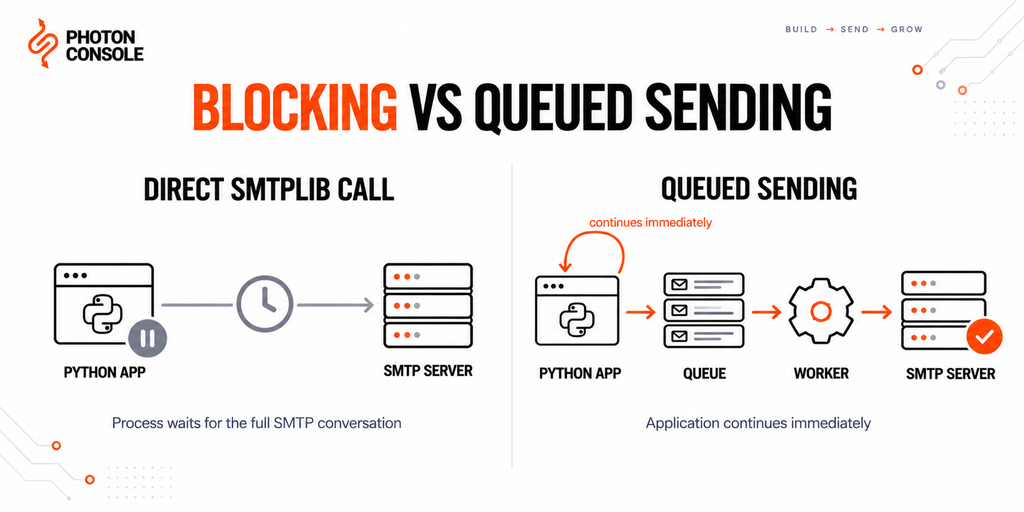
smtplib is synchronous and blocking by design. Each send_message() call waits for the full SMTP conversation to complete before your code continues. That is fine for a script sending a handful of emails. It becomes the bottleneck once your application needs to send hundreds or thousands of messages without freezing the process that triggered them — regardless of which relay, including PhotonConsole, sits on the other end of the connection.
| Approach | Good For | Breaks Down When |
|---|---|---|
| Direct smtplib call | Scripts, cron jobs, low-volume notifications | Called inside a request-response cycle or a tight loop |
| smtplib + background worker (Celery, RQ) | Web apps sending at moderate volume | Worker concurrency opens far more SMTP connections than the relay allows |
| HTTP email API | Serverless functions, high-volume transactional sending, async frameworks | Rarely — this is the pattern that scales furthest |
smtplib vs an Email API
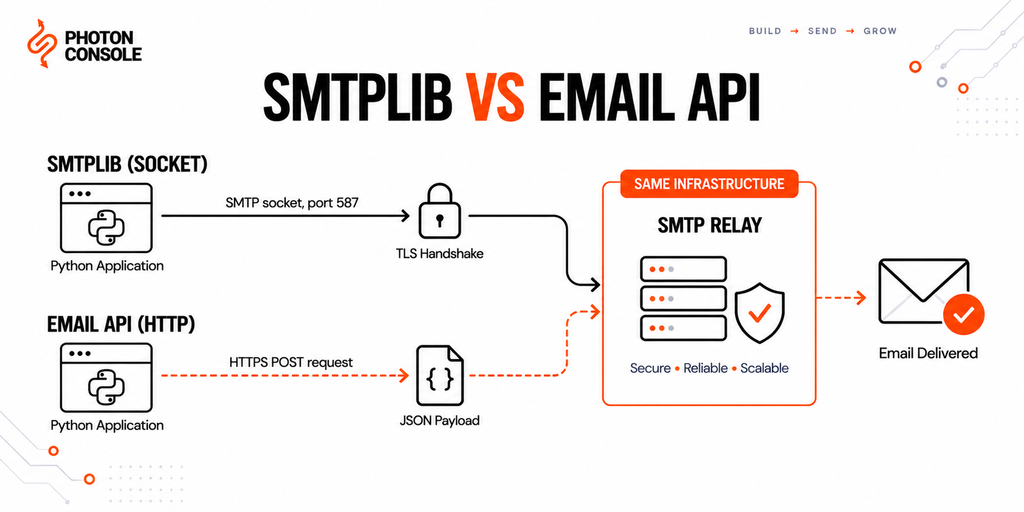
An HTTP-based email API replaces the SMTP conversation with a single authenticated POST request. The tradeoffs are specific, not a simple “API is better” story.
smtplib stays the better choice when: you are running a traditional server process that can hold an open connection, you want zero dependency on an external SDK, or your volume is low enough that connection overhead never becomes visible.
An email API becomes the better choice when: you are running in a serverless or edge environment where a persistent SMTP connection is impractical, you are using asyncio and want a non-blocking HTTP client instead of a blocking socket call, or your send volume is high enough that connection reuse and queuing add real operational complexity.
import requests

response = requests.post(
    "https://api.photonconsole.com/v1/send",
    headers={"Authorization": "Bearer YOUR_API_KEY"},
    json={
        "from": "alerts@yourdomain.com",
        "to": ["user@example.com"],
        "subject": "Your verification code",
        "html": "<p>Your code is 492019.</p>"
    },
    timeout=10
)
response.raise_for_status()
Both approaches point at the same underlying delivery infrastructure. Choosing between them is a question of what fits your application’s execution model, not which one is more reliable. Our email API integration guide covers the HTTP approach in more depth.
Configuring smtplib With PhotonConsole
Moving from an ad hoc mailbox to a dedicated relay requires two things: DNS authentication and updated connection details. Neither requires changing how you build messages with the email package.
DNS Records
Add these to your DNS provider to authenticate your sending domain:
TXT    @                    v=spf1 include:relay.photonconsole.com ~all
CNAME  photon._domainkey    dkim.photonconsole.com
Note
DNS changes are not instant. SPF and DKIM records can take anywhere from a few minutes to 24-48 hours to propagate depending on your provider and TTL settings. Confirm propagation with a DNS lookup tool before assuming a record is misconfigured.
Connection Configuration
SMTP_HOST = "smtp.photonconsole.com"
SMTP_PORT = 587       # 465 for implicit SSL, 2525 if 587 is blocked
SMTP_USER = os.environ["PHOTON_USER"]
SMTP_PASS = os.environ["PHOTON_PASS"]

with smtplib.SMTP(SMTP_HOST, SMTP_PORT, timeout=10) as server:
    server.starttls()
    server.login(SMTP_USER, SMTP_PASS)
    server.send_message(msg)
Port 2525 exists specifically for hosting environments that block the standard SMTP ports, which resolves the AWS, DigitalOcean and Google Cloud blocking problem described earlier in this guide. Nothing about how you build the EmailMessage changes — only the host, port and credentials. Every account includes 5,000 free emails per month, which is enough to validate the full setup end to end before any spend. Full configuration details are on the PhotonRelay page, and pricing has no monthly minimum.
If you are still weighing free options, our analysis of free SMTP servers covers where each one breaks down under production load.
Platform-Specific Notes
Django
Django’s EMAIL_BACKEND setting wraps smtplib internally — set EMAIL_HOST, EMAIL_PORT, EMAIL_HOST_USER, EMAIL_HOST_PASSWORD and EMAIL_USE_TLS in settings rather than calling smtplib directly, and Django handles connection management for you.
Flask and FastAPI
Neither framework includes a mail layer. Call smtplib directly for low-volume sending, or move to a background task queue once request-blocking becomes a problem. FastAPI’s async request handlers should never call blocking smtplib directly inside an async def route — use a thread pool executor or switch to an HTTP email API with an async client.
AWS Lambda and Serverless Functions
A cold-started function paying the full TCP and TLS handshake cost on every invocation is expensive and slow. An HTTP email API avoids the persistent-connection problem entirely and is usually the better fit here.
Celery and Background Workers
Each worker process that opens its own SMTP connection counts against your relay’s concurrent connection limit. Keep worker concurrency aligned with your plan’s connection allowance, and let each task open and close its own short-lived connection rather than sharing one across processes.
Pro Tips for Reliable Python Email
- Always call
quit()or use a context manager. An unclosed connection holds a socket open on both ends until it times out. - Set a real Reply-To address. A monitored reply address improves both user trust and engagement signals with mailbox providers.
- Send a plain-text alternative alongside HTML. Use
add_alternative()rather than HTML-only bodies, which score worse with spam filters. - Verify your DNS records after any change. MXToolbox confirms SPF, DKIM and blocklist status in one lookup.
- Test rendering before launch. Mail Tester scores a real send and flags authentication problems before real users see them.
- Never log full exception objects that might contain credentials. Log the exception type and SMTP code, not the raw auth payload.
- Separate transactional and bulk sending. A batch job that gets rate-limited should never be able to delay a password reset email.
Related Issues You May Hit Next
- SMTP authentication errors when credentials are rejected despite being correct
- SMTP not working across the ten most common failure modes
- Emails landing in Gmail spam despite a successful send
- Emails sent but not delivered when the SMTP response says success
- SMTP configuration reference for host, port and encryption settings
Frequently Asked Questions
Is smtplib still the recommended way to send email in Python?
Yes, for direct SMTP sending. It is part of the standard library, actively maintained, and documented at docs.python.org. Most third-party Python mail libraries are thin wrappers around it.
Should I use SMTP() with starttls() or SMTP_SSL()?
Use SMTP() with .starttls() on port 587 for most cases. Use SMTP_SSL() on port 465 only if your provider requires the connection to be encrypted from the first byte. Never mix the two patterns on the same port.
Why does send_message() succeed but no email arrives?
A successful call means the relay accepted the message for delivery, not that it reached the inbox. It can still bounce or be filtered downstream. Check delivery logs or bounce webhooks for the actual outcome.
Can smtplib send attachments?
Yes. Use EmailMessage.add_attachment() with the file’s bytes, maintype and subtype. The email package handles MIME encoding automatically.
How do I send email asynchronously in Python?
smtplib itself is synchronous and has no native async API. For an asyncio application, either run smtplib in a thread pool executor, use a third-party async SMTP library, or switch to an HTTP email API with an async HTTP client.
Do I need SPF and DKIM if I use a relay?
Yes. The relay delivers the message, but authentication records prove your domain authorised the send. Without them, delivery is far less reliable regardless of which relay you use.
What is the difference between smtplib and an email API?
smtplib speaks the SMTP protocol directly over a socket connection. An email API sends the same message over an HTTP POST request instead. Both can reach the same delivery infrastructure — PhotonConsole supports either — so the right choice depends on whether your application can hold an open connection or fits better with a stateless HTTP call.
Conclusion
smtplib does exactly what it was built to do: implement the SMTP protocol correctly. Most of what looks like a library problem in production is actually a connection pattern problem — the wrong port and security method paired together, no timeout on a blocking call, a fresh connection opened for every message, or a domain with no authentication records.
Fix those four things and direct smtplib sending is reliable well past the point most applications need it to be. The remaining decision is architectural, not a smtplib limitation: once your application moves to a serverless runtime or needs to send at volume that makes persistent SMTP connections impractical, an HTTP email API becomes the better fit, without changing what mail server sits behind either approach.
If your emails are being blocked by port restrictions, throttled by a mailbox provider, or filtered because your sending domain has no reputation, neither smtplib nor an API call will fix that on its own. A dedicated transactional email solution handles authentication, delivery routing and reputation for you, with the same smtplib code shown throughout this guide.



Fixing "WordPress Not Sending Email" Permanently | Photonconsole.com
September 6, 2026[…] Sending Email in Python: smtplib vs an Email… […]