

Let us get the uncomfortable part out of the way. At most volumes, SendGrid is substantially cheaper than Postmark. At 50,000 emails a month it is roughly a third of the price. That is not close and it is not in dispute.
So the real question is not which costs less. It is what Postmark’s premium actually buys, and whether that is worth paying for the kind of mail you send.
For transactional-only sending the answer is more interesting than the price comparison suggests.
Quick Answer
| Your situation | Use |
|---|---|
| Around 10,000 emails a month | Postmark — $15 undercuts SendGrid’s $19.95 floor |
| 50,000 or more, cost-sensitive | SendGrid — $19.95 against $55 is hard to argue with |
| You need delivery records older than a month | Postmark — 45 days base, up to 365 on Pro |
| You send both transactional and marketing mail | Postmark — separation is enforced, not configured |
| You want one platform for everything | SendGrid — far wider feature surface |
| You need a dedicated IP under 300,000/month | SendGrid — Postmark gates it behind that volume |
| Nobody on the team owns email configuration | Postmark — fewer decisions available to get wrong |
The pattern: Postmark charges more and makes fewer things your problem. SendGrid charges less and hands you the controls.

The Pricing, Honestly
Both vendors publish their rates. Postmark’s pricing is volume bands crossed with three feature tiers; SendGrid’s is volume bands with features gated by plan.
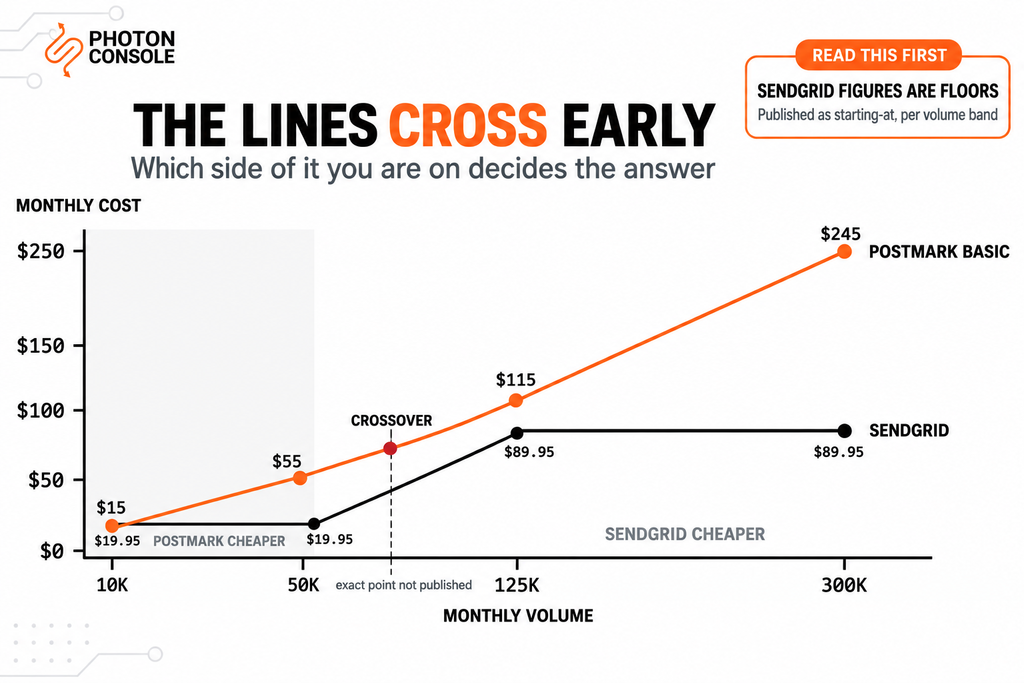
| Monthly volume | Postmark Basic | Postmark Pro | SendGrid |
|---|---|---|---|
| 10,000 | $15.00 | $16.50 | from $19.95 (Essentials, 50k band) |
| 50,000 | $55.00 | $60.50 | from $19.95 |
| 125,000 | $115.00 | $126.50 | from $89.95 (Pro band) |
| 300,000 | $245.00 | $269.50 | from $89.95 |
Three observations, in order of how surprising they are.
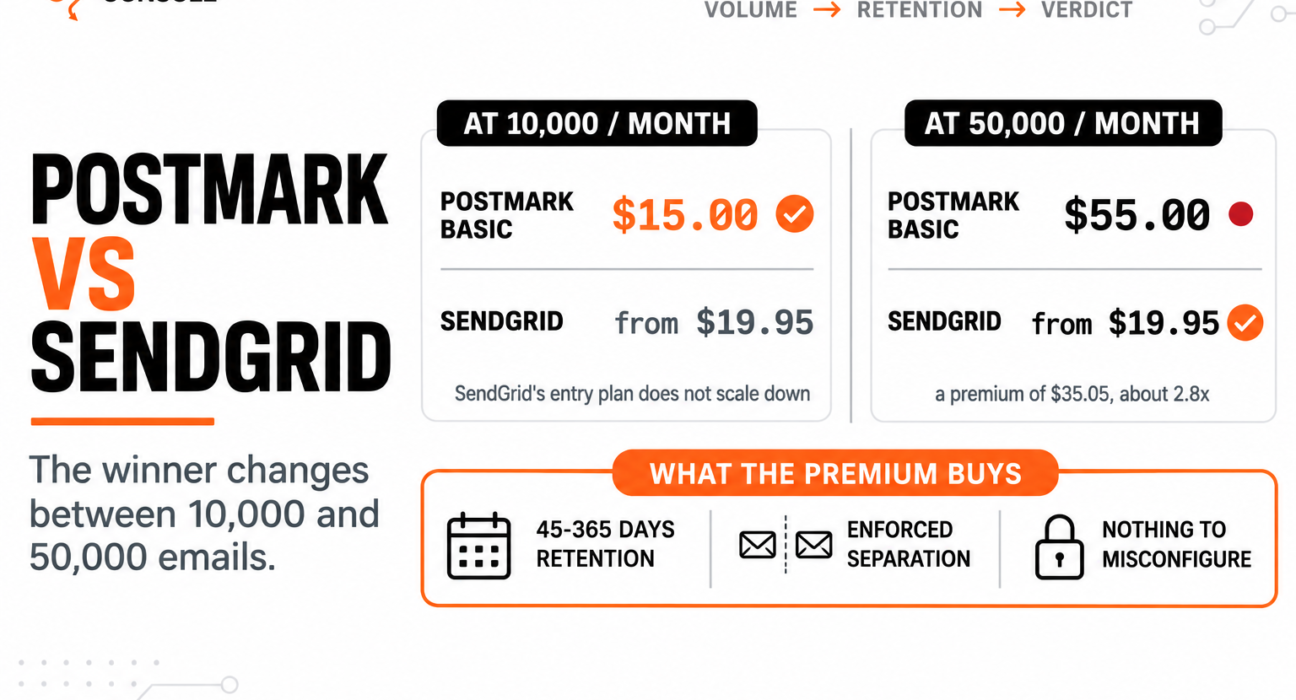
Postmark is cheaper at 10,000 a month. $15 against $19.95, because SendGrid’s entry plan starts at 50,000 emails and does not scale down. A product sending ten thousand transactional emails pays SendGrid for capacity it will not use.
SendGrid is dramatically cheaper at 50,000. The same $19.95 now covers your whole volume, while Postmark has climbed to $55. That is a premium of $35.05 a month, or about 2.8 times the price.
The crossover sits between those two rows, and the exact point depends on Postmark’s intermediate volume pricing, which is not in the published table rows. Do not assume it is linear.
Note
SendGrid publishes “starting at” prices across volume bands, so every SendGrid figure above is exact at the entry point of its band and not determinable above it from the published page. Postmark publishes a specific price per volume row, so its column is precise. This asymmetry matters when modelling: you can predict a Postmark bill exactly and you cannot predict a SendGrid bill inside a band without a quote. Treat the SendGrid column as a floor rather than a forecast, and get a written figure for your real volume before committing either way.
Postmark also has a gap worth knowing about: there is no tier between 100 emails a month and 10,000. A side project sending 2,000 a month either lives on the free 100 or pays the 10,000 price.
So What Does the Premium Buy?
Three things, and they are the reason this comparison is not simply “use SendGrid”.
1. Data retention that outlasts your disputes
This is the strongest argument for Postmark and it rarely appears in comparisons.
| Provider | Log retention |
|---|---|
| Elastic Email | 3 days free, 7 days on PRO |
| Resend | 30 days on Free, Pro and Scale |
| Postmark Basic | 45 days |
| Postmark Pro / Platform | Customisable up to 365 days |
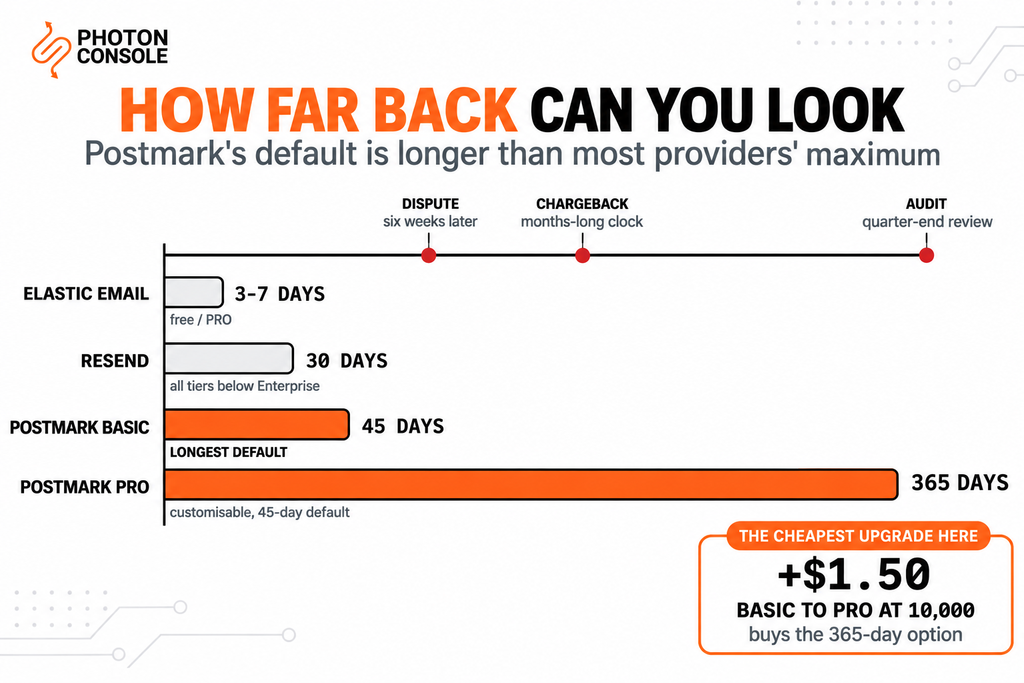
We have argued in both Resend alternatives and Elastic Email alternatives that short retention is the limit nobody evaluates and everybody eventually needs. A customer disputing an invoice does it six weeks later, not six days. A chargeback runs on a months-long clock.
Postmark’s 45-day base is the longest default among the providers we have verified, and 365 days on Pro — available as a $5-a-month add-on or built into the tier — is in a different category entirely. At 10,000 emails a month, Pro costs $16.50 against Basic’s $15.00. That is $1.50 for the option of year-long retention.
2. Separation you cannot accidentally break
Postmark keeps transactional and broadcast mail on separate IP pools as a property of the platform. Its message streams documentation states that the two “do not mix in Postmark, including IP ranges”, with a dedicated pool for each.
No configuration, no dedicated IP purchase, no volume threshold. We covered what that protects you from in migrating from Postmark — and what it costs to rebuild elsewhere in Brevo alternatives, where achieving the same separation requires two dedicated IPs each needing over 100,000 emails a month to stay warm.
On SendGrid, this separation is your job. It is entirely achievable — subusers, separate sending domains, IP pools on Pro — but it is configuration you must know to do, and nothing stops you sending a newsletter down the same identity as your password resets.
3. Fewer decisions available to get wrong
The least quantifiable and often the most valuable. SendGrid’s breadth means there are more ways to configure it correctly and more ways to configure it badly. Postmark’s opinionated design removes most of those choices.
If nobody on your team owns email configuration — and on most small teams nobody does — a platform that has already made the decisions is worth money.
Quick Fix
Is the Premium Worth It for You?
- Calculate the actual monthly difference at your volume — at 50,000 it is about $35
- Ask how far back you have needed delivery records in the last year; if ever beyond 30 days, retention alone may settle it
- Check whether you send marketing mail from the same domain as transactional; if yes, enforced separation is worth real money
- Name who owns email configuration today; if nobody does, buy the opinionated platform
- If you need a dedicated IP below 300,000 a month, Postmark cannot sell you one — that decides it
Where SendGrid Genuinely Wins
Price, at anything above about 10,000 a month. Stated plainly because it is true at every volume row above the first. $19.95 covering up to 100,000 emails is simply a lot of capacity for the money.
Breadth. Marketing campaigns, a template editor, subusers, single sign-on, a far wider set of platform integrations, and more engineers who have hit your exact problem before. Postmark is a transactional email product; SendGrid is an email platform.
Dedicated IPs without a volume gate. SendGrid includes one from Pro. Postmark requires a Pro plan and 300,000 emails a month, at $50 per IP per month on top. If you want a dedicated IP at 50,000 a month, Postmark will not sell you one at any price.
A larger free trial. 100 emails a day for 60 days is roughly 6,000 emails of runway against Postmark’s 100 a month.
Though that last one cuts both ways, and the contrast is neat:
| Postmark | SendGrid | |
|---|---|---|
| Free allowance | 100 emails/month | 100 emails/day |
| Duration | Permanent | 60 days |
| Overages on free | Not allowed | Not applicable |
| Best for | Keeping a staging environment alive indefinitely | Evaluating with real volume, briefly |
Postmark’s free tier is tiny but never expires, which makes it genuinely useful for a staging or development environment you want to keep sending from forever. SendGrid’s is larger but, as we covered in SendGrid free tier limits, it is a trial — it ends and leaves you with a decision.
The API and Operational Comparison
Both are mature, well-documented REST APIs with official libraries for the usual languages, and neither will be the reason your integration succeeds or fails. The differences that matter are operational.
| Dimension | Postmark | SendGrid |
|---|---|---|
| Message routing | MessageStream field; transactional stream’s API value is outbound | Categories and subusers; no enforced separation |
| Streams per server | Up to 10 | Not applicable — different model |
| Suppressions | Organised around streams | Six separate lists to export and reason about |
| Sending domains | Basic 5, Pro 10, Platform unlimited | Varies by plan |
| Overage behaviour | Charged per 1,000 extra, $1.20–$1.80 by tier | Overages may apply; rates published separately |
| Spend cap | None provider-side | None provider-side |
Two rows deserve expanding.
Postmark’s overage rates fall as you move up tiers — $1.80 per thousand on Basic against $1.20 on Platform in the 10,000 to 125,000 band. So the higher tier is cheaper per overage email, which quietly rewards buying up if your volume is spiky.
Neither offers a provider-side spend cap. We flagged this for Postmark in Postmark pricing explained, and it applies to both here. If a traffic spike or a loop sends ten times your normal volume, neither platform will stop you — you find out on the invoice. That is worth knowing given that Resend lets you cap overage between 100% and 1,000%.
Common Mistake
Choosing between these two on API quality. Both APIs are good, both are documented well, both have maintained libraries, and the integration is a day’s work either way — so API quality carries almost no decision weight and yet it is what most comparison articles spend their words on. What actually differs is what the platform decides on your behalf: whether transactional and marketing mail are kept apart, how long you can see what happened, and how many configuration mistakes are available to you. Those are the dimensions that produce incidents six months later, and none of them are visible while you are reading API documentation.
What Neither Gives You
Both share two gaps worth naming before you choose either.
No provider-side spend cap, as above. Your protection has to be in your own application.
Retention still has a ceiling. Even Postmark’s 365 days ends eventually, and most teams are on the 45-day default. The fix is the same one we recommend regardless of provider: consume the webhook event stream into storage you control, keeping message ID, recipient, event type and timestamp. Verify the result end to end with Mail Tester before you rely on it. Then retention stops being a purchasing decision. Our guide to transactional email webhooks covers building that consumer.
And if you are leaving SendGrid for Postmark, note that SendGrid holds your content: templates plus six separate suppression lists, per migrating away from SendGrid. Going the other way, Postmark holds an architecture rather than assets — the separation you will need to rebuild yourself.
Quick Fix
Deciding in Ten Minutes
- Look up last month’s send volume. Under 10,000 and Postmark is cheaper — stop there
- Search your support tickets for a delivery question older than 30 days; if you find one, retention decides it
- Check whether marketing mail leaves from your transactional domain. If yes, enforced separation is worth the premium
- Confirm you do not need a dedicated IP below 300,000/month — Postmark cannot provide one there at any price
- Verify both candidates against the Google and Yahoo sender requirements, which apply whichever you choose — Google publishes its own thresholds
- Get a written SendGrid quote for your real volume before comparing; the published price is a floor
The Verdict
For transactional-only sending, which is what this comparison is about:
Under about 10,000 emails a month, Postmark wins outright. It is cheaper than SendGrid’s floor, retention is longer, separation is free, and there is nothing to misconfigure. There is no argument for SendGrid at this volume unless you need a specific integration it has.
Between roughly 10,000 and 100,000, it is a judgement call and the honest answer depends on one question: have you ever needed a delivery record older than a month? If yes, Postmark’s 45-to-365 days against SendGrid’s lower ceiling is worth the premium. If no, SendGrid’s price is hard to argue with.
Above 100,000, SendGrid’s pricing pressure becomes serious — and the honest move is to compare both against a flat-rate relay rather than only against each other, because at that volume the premium for either is a real line item.
If you send marketing mail too, Postmark, unless you will genuinely do the separation work on SendGrid. Most teams say they will and do not.
The Third Option at Volume
Above about 100,000 emails a month both of these get expensive in different ways — Postmark through volume bands that climb steeply, SendGrid through bands whose real price you cannot see without a quote.
A flat per-thousand relay has neither shape: no feature tiers to choose between, no band to climb inside, and no overage rate that differs by plan. PhotonConsole bills flat per thousand — the pricing page and the cheapest SMTP relay comparison set out what that means against both.
Being straight about the trade: we do not match Postmark’s enforced stream separation or its 365-day retention option, and we do not match SendGrid’s breadth. What we offer instead is predictability — and at 10,000 emails a month, Postmark Basic at $15 is good value that we would not tell you to leave. The comparison page puts all three side by side, and our Postmark comparison and SendGrid comparison go into detail.
Pro Tips
- At 10,000 a month, check Postmark first. SendGrid’s $19.95 floor makes it the more expensive option there.
- Postmark Pro costs $1.50 more than Basic at 10,000. That buys retention up to 365 days — likely the cheapest useful upgrade in this comparison.
- Treat SendGrid’s published prices as floors. Get a quote for your real volume.
- Postmark gates dedicated IPs behind 300,000 a month. If you need one below that, this decides your choice.
- Postmark’s overage rate drops on higher tiers. Spiky volume is cheaper on Pro or Platform.
- Neither has a spend cap. Put the limit in your own application.
- Postmark’s free tier never expires. Useful for a permanent staging environment.
- Store your own events either way. It removes retention from the decision entirely.
Related Reading
- Postmark pricing explained — feature tiers, and the missing spend cap
- SendGrid free tier limits — why the free offering is a trial
- SendGrid vs Amazon SES — the other half of the SendGrid question
- Migrating from Postmark — what enforced separation costs to rebuild
- Migrating away from SendGrid — templates and six suppression lists
- Email provider migration checklist — the 40 checks before you switch
Frequently Asked Questions
Is Postmark more expensive than SendGrid?
Above about 10,000 emails a month, yes, substantially. At 50,000 Postmark Basic is $55.00 against SendGrid Essentials from $19.95. At 10,000 Postmark is cheaper, at $15.00 against SendGrid’s $19.95 floor.
Why is Postmark cheaper at low volume?
Because SendGrid’s entry plan covers 50,000 to 100,000 emails and starts at $19.95 regardless of how little you send. Postmark’s 10,000 tier is $15.00.
How long does Postmark keep email logs?
45 days on Basic, and customisable up to 365 days on Pro and Platform, with 45 days as the default. That is the longest base retention among the providers we have verified.
Does Postmark separate transactional and marketing email?
Yes, as a platform property. Its documentation states that transactional and broadcast traffic do not mix, including IP ranges, with a dedicated pool for each. On SendGrid this separation is your configuration job.
Can I get a dedicated IP on Postmark?
Only on a Pro plan or higher and at 300,000 or more emails a month, from $50 per IP per month. Below that volume Postmark will not sell you one.
Does Postmark have a free plan?
Yes — 100 emails a month, permanently, with no overages allowed. It is tiny but it does not expire, unlike SendGrid’s 60-day trial.
What is Postmark’s overage rate?
Between $1.20 and $1.80 per 1,000 extra emails depending on tier and volume band. Higher tiers have lower overage rates.
Which has the better API?
Neither meaningfully. Both are mature, well documented and have maintained libraries. The real differences are operational, not API quality.
Is there a gap in Postmark’s pricing?
Yes. There is no tier between 100 emails a month and 10,000, so a project sending 2,000 pays the 10,000 price.
Conclusion
Most comparisons of these two try to find a way for the more expensive product to also be the cheaper one. It is not, and pretending otherwise wastes the reader’s time.
SendGrid costs less at every volume above roughly 10,000 emails a month, and at 50,000 it costs about a third as much. If price is the deciding factor, the decision is already made.
What Postmark sells for that premium is a shorter list of things that can go wrong. Transactional and marketing mail cannot share a reputation because the platform will not allow it. Delivery records last 45 days by default and up to a year on a tier that costs $1.50 more at 10,000 emails. And there are simply fewer configuration decisions available, which matters more than it sounds on a team where nobody owns email.
So the verdict splits cleanly. Below 10,000 emails a month Postmark is both cheaper and better and there is no argument. In the middle band it comes down to whether you have ever needed a log older than a month. Above 100,000, both get expensive enough that comparing them only against each other is the wrong exercise — that is the point to look at a flat-rate relay alongside them, and to consume your own webhook events so that whichever you pick, retention stops being something you buy.