

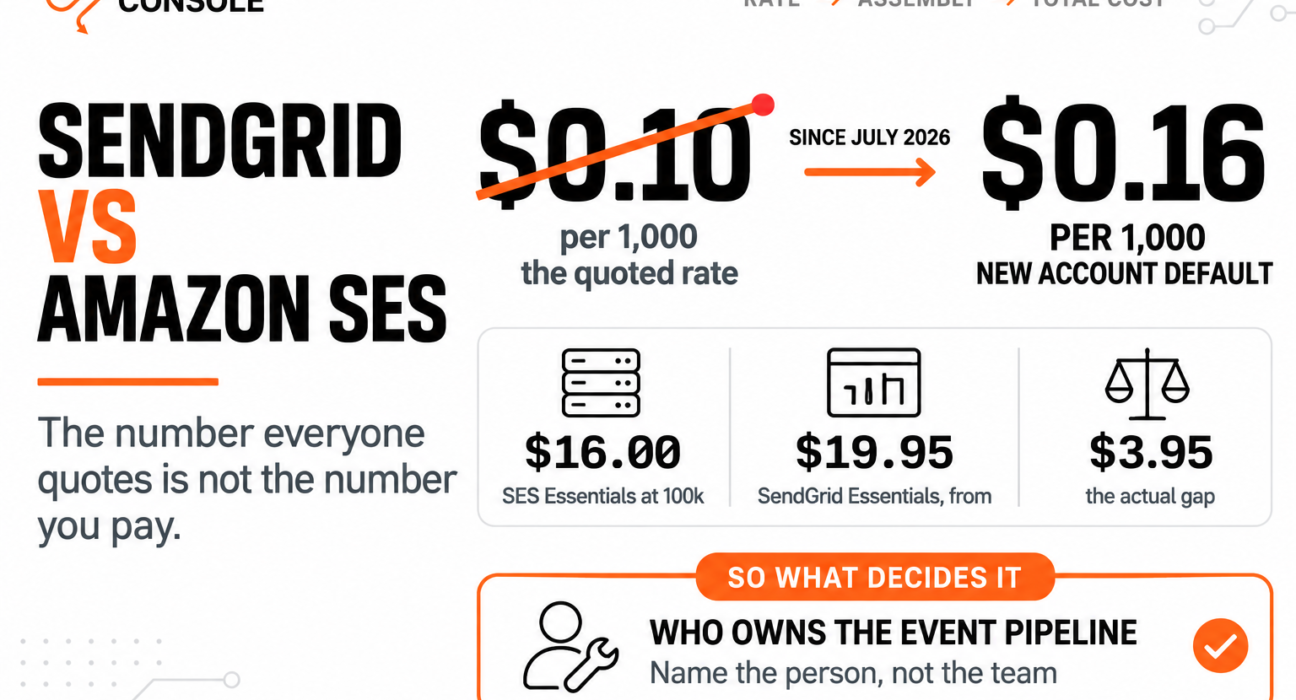
Nearly every comparison of these two rests on one number: Amazon SES costs $0.10 per thousand emails, so it is roughly ten times cheaper than SendGrid and the only question is whether you can tolerate building the rest yourself.
That number is still published. It is just not the number a new SES account pays.
Since 21 July 2026, new SES accounts start on a pricing plan called Essentials, which costs $0.16 per thousand — 60% more than the figure everyone quotes. At 100,000 emails a month that is $16 against SendGrid Essentials starting at $19.95, which is a difference of under four dollars rather than the order of magnitude the folklore promises.
The comparison most people are working from describes an SES you can no longer sign up for.

Quick Answer
| Your situation | Use |
|---|---|
| Under ~50,000 a month, and you have AWS engineers | SES — switch to à-la-carte and it is genuinely cheap |
| Around 100,000 a month, no spare engineering time | SendGrid — the price gap has nearly closed |
| You need dedicated IPs and managed deliverability | Compare carefully — SES Pro costs more than SendGrid Pro at 100k |
| Already deep in AWS with IAM, SNS and Lambda in use | SES — the integration is the real saving, not the rate |
| You want templates, suppression UI and support included | SendGrid — you are buying the assembly, not the transport |
| Multi-region failover is a requirement | SES Enterprise — nobody else sells this as a tier |
The decision still comes down to who does the work. What changed in July is that the price difference funding that decision got much smaller.
What Changed in July 2026
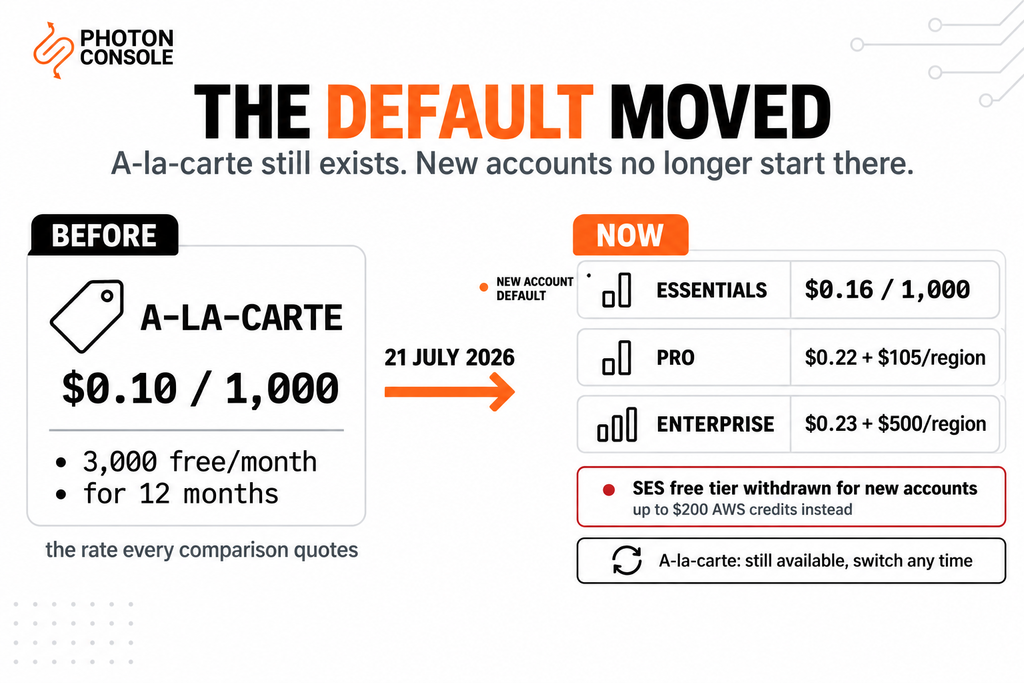
AWS announced SES pricing plans on 21 July 2026, describing them as making it easy “to purchase and access SES capabilities without evaluating them individually.” Three tiers, each building on the one before:
| Plan | Adds | Price, 0–10M emails/month |
|---|---|---|
| Essentials | Deliverability insights and recommendations | $0.16 per 1,000 |
| Pro | Managed dedicated IPs, email validation, inbox placement visibility across providers | $0.22 per 1,000 + $105 per account per region |
| Enterprise | Multi-region resilience, workload-level reputation isolation, annual deliverability assessment | $0.23 per 1,000 + $500 per account per region |
Three details from the AWS announcement blog decide whether any of this applies to you:
- New accounts from 21 July 2026 begin on Essentials. So do returning customers who have not sent through SES since 1 June 2025.
- Accounts that sent on or after 1 June 2025 stay on à-la-carte and can switch to a plan whenever they choose.
- The SES free tier of 3,000 message charges a month for 12 months is gone for new customers. Anyone already on it keeps it for the rest of their 12-month period. New AWS customers can instead apply up to $200 in AWS Free Tier credits over their first six months.
À-la-carte pricing has not been withdrawn — the blog confirms Essentials customers can “switch to à-la-carte pricing at any time.” The $0.10 rate is still published on the pricing page. It is simply no longer the default.
Quick Fix
Find Out Which Rate You Are Actually Paying
- Check your SES console for whether the account is on a pricing plan or à-la-carte
- If you sent through SES on or after 1 June 2025, you are on à-la-carte unless someone moved you
- If the account was created after 21 July 2026, you are on Essentials at $0.16 per 1,000 by default
- Compare your last bill against volume × $0.10 — a 60% gap means you are on Essentials
- Switching to à-la-carte is available at any time; the trade is losing the plan’s bundled features
The Arithmetic Nobody Has Updated
Here is what the two actually cost, using each vendor’s own published figures.
SendGrid’s Email API pricing lists Essentials starting at $19.95 for 50,000 to 100,000 emails a month, and Pro starting at $89.95 for 100,000 to 2,500,000. Free Trial is 100 emails a day for 60 days.
| At 100,000 emails/month | Cost | What you get |
|---|---|---|
| SES à-la-carte | $10.00 | Transport. You build everything else |
| SES Essentials (new account default) | $16.00 | Transport plus deliverability insights |
| SendGrid Essentials | from $19.95 | A product — templates, suppression UI, dashboard |
| SendGrid Pro | from $89.95 | Adds a dedicated IP, subusers, SSO |
| SES Pro | $127.00 | $22 of email plus $105 per region |
Two things in that table deserve to be said out loud.
SES Essentials and SendGrid Essentials are $3.95 apart at 100,000 emails a month. The ten-times-cheaper claim does not survive contact with the plan a new account actually lands on. It is still true at the à-la-carte rate — $10 against $19.95 — but that requires actively opting out of the default.
SES Pro costs more than SendGrid Pro at this volume. $127 against $89.95, because the $105 per-account-per-region fixed fee dominates at anything under a few hundred thousand emails. If you run SES in two regions, that fee applies twice.
The picture changes with volume, and the direction is worth knowing:
| Monthly volume | SES à-la-carte | SES Essentials | SES Pro |
|---|---|---|---|
| 10,000 | $1.00 | $1.60 | $107.20 |
| 100,000 | $10.00 | $16.00 | $127.00 |
| 1,000,000 | $100.00 | $160.00 | $325.00 |
At 10,000 a month SES is unarguable — a dollar or two against SendGrid’s $19.95 floor, because SendGrid’s entry plan does not scale down. At a million a month the fixed fee stops mattering and SES Pro’s $325 is competitive against custom-quoted alternatives. The awkward band is the middle, which is where most products live.
Note
SendGrid publishes its plans as “starting at” prices across volume bands, so the figures above are exact at the entry point of each band and not determinable above it from the published page. SES, by contrast, prices per thousand with a fixed component, which makes it fully calculable at any volume. This asymmetry matters when you are modelling: you can predict an SES bill precisely and you cannot predict a SendGrid bill without a quote once you move up inside a band. Treat the SendGrid column as a floor rather than a forecast, and get a written quote for your actual volume before committing either way.
They Have Converged, Which Changes the Question
The old framing was clean: SendGrid is a product, SES is infrastructure, so choose by whether you want to buy email delivery or build it.
That is now less true in both directions. SES Pro bundles managed dedicated IPs, address validation and cross-provider inbox placement visibility. Enterprise sells multi-region resilience and reputation isolation between workloads. These are product features with a tier gate on them, which is exactly how SendGrid has always sold.
What remains genuinely different is everything SES still does not give you at the à-la-carte rate:
- No template store — your content lives in your repository, which we would argue is better anyway
- No suppression interface — the API exists; a screen your support team can use does not
- No event pipeline — you build SNS topics, subscriptions, a consumer and your own storage
- No deliverability support — unless you buy an AWS support plan on top
That assembly work is real and it is the actual decision. We mapped the full dependency graph in migrating from Amazon SES — the IAM users, SNS topics, configuration sets and event destinations that have to exist before SES behaves like a product. Building it once is a sprint. Maintaining it is forever.
Common Mistake
Comparing the per-email rates and stopping there. At 100,000 emails a month the gap between SES à-la-carte and SendGrid Essentials is about ten dollars, which is under an hour of engineering time at most salaries — and the SES path requires considerably more than an hour of engineering, both to build and to keep working. The rate comparison only decides the question at very low volume, where SES is dramatically cheaper because SendGrid has a price floor, or at very high volume, where percentage differences turn into real money. In the middle band the per-email rate is close to irrelevant and the honest comparison is between a monthly invoice and an ongoing claim on your team’s attention.
The Free Tier Comparison Also Changed
This matters more than it sounds for anyone evaluating right now.
SES used to offer 3,000 message charges a month for twelve months, which was a genuinely generous runway for a new product. For accounts created from 21 July 2026 that is gone, replaced for new AWS customers by up to $200 in AWS Free Tier credits across the first six months.
SendGrid’s free offering is 100 emails a day for 60 days. As we covered in SendGrid free tier limits, that is a trial rather than a free plan — the distinction being that it expires and leaves you with a decision rather than a working free tier.
So neither has a permanent free allowance any more. Both now give you a time-boxed runway, which removes what used to be a clear advantage for SES at the evaluation stage. Worth knowing if your plan was to prototype on SES’s free tier for a year.
Where Each One Genuinely Wins
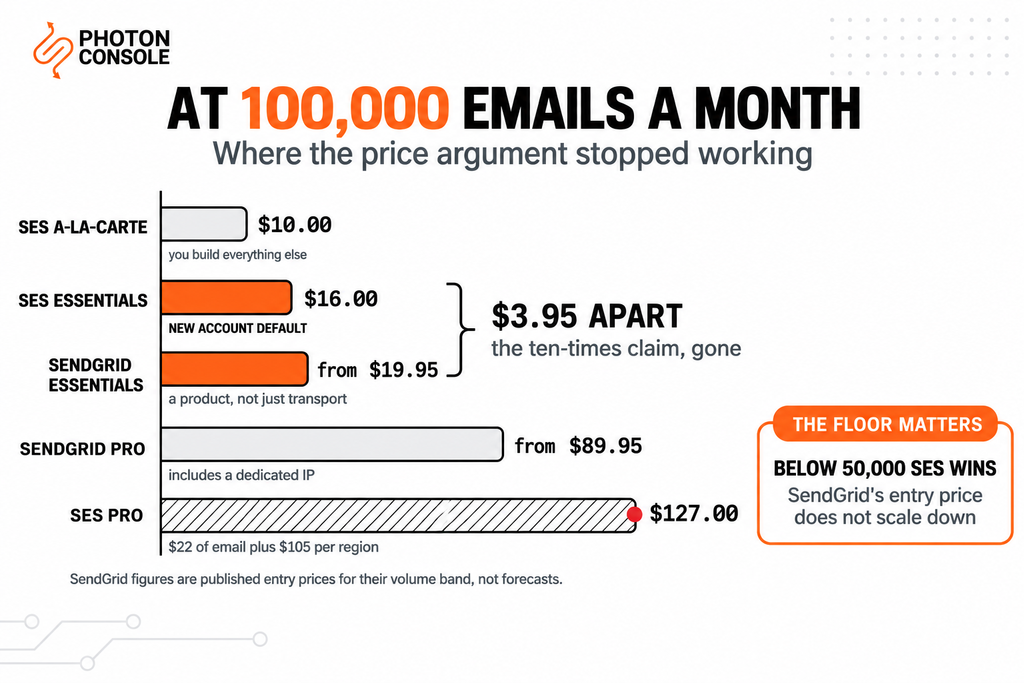
SES wins decisively below about 50,000 a month. SendGrid’s entry plan starts at $19.95 and does not scale down, so a product sending 10,000 transactional emails pays $1 to $1.60 on SES against a $19.95 floor. For a side project or an early-stage product that difference is the whole hosting budget.
SES wins when you already live in AWS. If IAM, SNS, Lambda and CloudWatch are already how your team operates, SES is not a new system to learn — it is one more service in a console you have open anyway. The integration saving is larger than the rate saving and it does not appear on either pricing page.
SES Enterprise sells something nobody else does. Multi-region resilience and workload-level reputation isolation as a purchasable tier is genuinely unusual. If a region outage stopping your email is a board-level risk, that tier exists for you and has no real competitor.
SendGrid wins on time-to-working. Templates, a suppression interface your support team can use, a dashboard somebody non-technical can read, and an event webhook that works without you building an SNS pipeline. At $19.95 covering up to 100,000 emails, that assembly is nearly free compared with doing it yourself.
SendGrid wins the mid-volume band on total cost. Once SES Essentials is $16 against SendGrid’s $19.95, and SES Pro is $127 against SendGrid Pro’s $89.95, the cost argument for SES in the middle has largely evaporated unless you opt back to à-la-carte and build everything.
SendGrid has the wider integration surface. More platform plugins, more third-party connectors, more people who have hit your problem before.
The Honest Third Option
Neither of these is the only shape available, and the framing of “cheap infrastructure versus assembled product” hides a middle.
SES is cheapest if you build around it. SendGrid is a product with a price floor and volume bands. A flat per-thousand relay is neither: no plan tiers, no per-region fixed fee, no band to move up inside, and no assembly project. PhotonConsole bills flat per thousand — our pricing and the pay-as-you-go relay page set out what that means, and the comparison page puts all three side by side.
Being straight about it: SES à-la-carte at $0.10 per thousand is cheaper per email than we are, and will stay that way. It is infrastructure sold at infrastructure margins by the largest cloud provider in the world. If per-email cost is the only thing that matters and you have the engineers to build around it, use SES and switch to à-la-carte. We are a better answer when the assembly work is the thing you are trying to avoid and a $19.95 floor is more than you want to pay for avoiding it.
A Decision Framework That Survives Price Changes
Quick Fix
Six Questions, In Order
- What is your actual monthly volume? Below 50,000 the answer is usually SES; the middle band is genuinely contested
- Is your team already in AWS daily? If yes, the integration saving outweighs the rate
- Who will build and maintain the event pipeline? Name the person, not the team
- Do you need a suppression screen for support staff? SES has an API, not an interface
- How many AWS regions will you send from? The SES Pro and Enterprise fixed fee is per region
- Which pricing model is your account on? This changes the comparison by 60% and most people have not checked
Question three is the one that decides it in practice. An SES event pipeline is not difficult, but it is owned by somebody, and that ownership continues after the engineer who built it moves team. A managed product converts that into a line item, which is often the correct trade even when the arithmetic says otherwise.
If You Switch Between Them
Authentication failures are one of the most common causes of delivery problems during a provider change, so the DNS work deserves more care than the code.
- Count your SPF lookups before adding a second include. Exceeding the ten-term limit returns
permerrorand fails authentication for both providers at once — see our guide to the SPF 10-lookup limit. - Leaving SES means unwinding a dependency graph, not just swapping credentials. IAM users, SNS topics, configuration sets and event destinations all need teardown in the right order, covered in migrating from Amazon SES.
- Leaving SendGrid means extracting content. Templates and six separate suppression lists, per migrating away from SendGrid.
- Decide about dedicated IPs deliberately. A cold dedicated IP with low volume performs worse than a shared pool — see shared IP versus dedicated IP.
- Import suppressions before the first production send, never after.
- Verify both paths against the Google and Yahoo sender requirements before real traffic moves — Google publishes its own thresholds, and they apply whichever provider you pick.
Follow the sequence in migrating email providers without downtime, measure the switch with running two email providers during a migration, and work through the migration checklist before cutting over.
Pro Tips
- Check which SES pricing model your account is on. It changes your rate by 60% and nothing announces it.
- Do not quote $0.10 per thousand as SES’s price unless you have confirmed the account is à-la-carte.
- Multiply the SES Pro fixed fee by your region count. $105 per account per region adds up quickly.
- Treat SendGrid’s published prices as floors, not forecasts — get a quote for your real volume.
- Below 50,000 a month, SendGrid’s price floor decides it. $19.95 does not scale down.
- Name the owner of the SES event pipeline before choosing SES. If you cannot, choose the product.
- Neither has a permanent free tier now. Plan the runway rather than assuming one.
- Keep templates in your repository either way. It makes the next comparison a configuration change.
Related Reading
- Amazon SES sending limits — the bounce and complaint thresholds that apply on any plan
- SendGrid free tier limits — why the free offering is a trial
- Migrating from Amazon SES — the AWS dependency graph you would be unwinding
- Migrating away from SendGrid — templates and six suppression lists
- Resend alternatives — if developer experience matters more than either
- Email provider migration checklist — the 40 checks before you switch
Frequently Asked Questions
Is Amazon SES still $0.10 per 1,000 emails?
The à-la-carte rate is still published at $0.10 per 1,000. But accounts created from 21 July 2026 start on the Essentials plan at $0.16 per 1,000 unless they switch to à-la-carte.
Is SES still ten times cheaper than SendGrid?
Not on the default plan. At 100,000 emails a month SES Essentials is $16.00 against SendGrid Essentials starting at $19.95. On à-la-carte at $10.00 it is still roughly half, not a tenth.
What are the Amazon SES pricing plans?
Essentials at $0.16 per 1,000, Pro at $0.22 per 1,000 plus $105 per account per region, and Enterprise at $0.23 per 1,000 plus $500 per account per region, for 0 to 10 million emails a month.
Does SES Pro cost more than SendGrid Pro?
At 100,000 emails a month, yes — $127.00 against SendGrid Pro starting at $89.95, because the $105 per-region fixed fee dominates at moderate volume.
Is SES à-la-carte pricing still available?
Yes. AWS states that Essentials customers can switch to à-la-carte at any time, and accounts that sent on or after 1 June 2025 remain on it by default.
Does SES still have a free tier?
Not for new customers. The 3,000 message charges a month for 12 months ended for accounts created from 21 July 2026. New AWS customers can apply up to $200 in Free Tier credits over six months instead.
Which is better for a small project?
SES, clearly. SendGrid’s entry plan starts at $19.95 and does not scale down, so at 10,000 emails a month SES costs $1.00 to $1.60.
What does SES not give you that SendGrid does?
A template store, a suppression interface for support staff, a ready-made event pipeline, and deliverability support. The APIs exist; the assembled product does not.
How do I know which SES pricing model my account uses?
Check the SES console, or compare your last bill against volume times $0.10. A 60% gap means you are on Essentials.
Conclusion
The received comparison between these two is out of date, and the direction of the change is the opposite of what most people assume.
SES has moved toward being a product — three plans, tier-gated features, managed dedicated IPs, and new accounts defaulting to a rate 60% above the one everybody quotes. SendGrid has not moved. The result is that at the volume where most products actually live, the two are within four dollars of each other at the entry tier, and SES Pro is more expensive than SendGrid Pro.
Where the old answer still holds is at the edges. Below about 50,000 emails a month SES is dramatically cheaper because SendGrid has a floor it will not go under. Deep inside AWS, SES is not a new system to learn. And nobody else sells multi-region email resilience as a tier you can simply buy.
Everywhere in between, the per-email rate has stopped being the deciding factor, and the real question is the one it always should have been: who on your team owns the event pipeline, the suppression tooling and the deliverability monitoring, and for how long. If you can name that person and they have the time, SES on à-la-carte is excellent value. If you cannot, you are choosing between paying SendGrid’s floor and finding a flat-rate relay that charges per thousand without a plan tier, a region fee or a band to climb.