

Migrations that go wrong rarely fail at the cutover. They fail three days earlier, when somebody edited an SPF record that had a 24-hour cache lifetime, and nobody noticed until half the world’s mail servers were working from one version of the truth and half from another.
The cutover itself is four environment variables. Everything that makes a migration risky happens around it, in DNS and in reputation — two systems that do not take instructions immediately and do not accept undo.
So the useful way to plan this is not as a checklist of tasks. It is an ordering problem: do the slow and irreversible things first, while you still have the old path running, and leave the instant and reversible things for last.
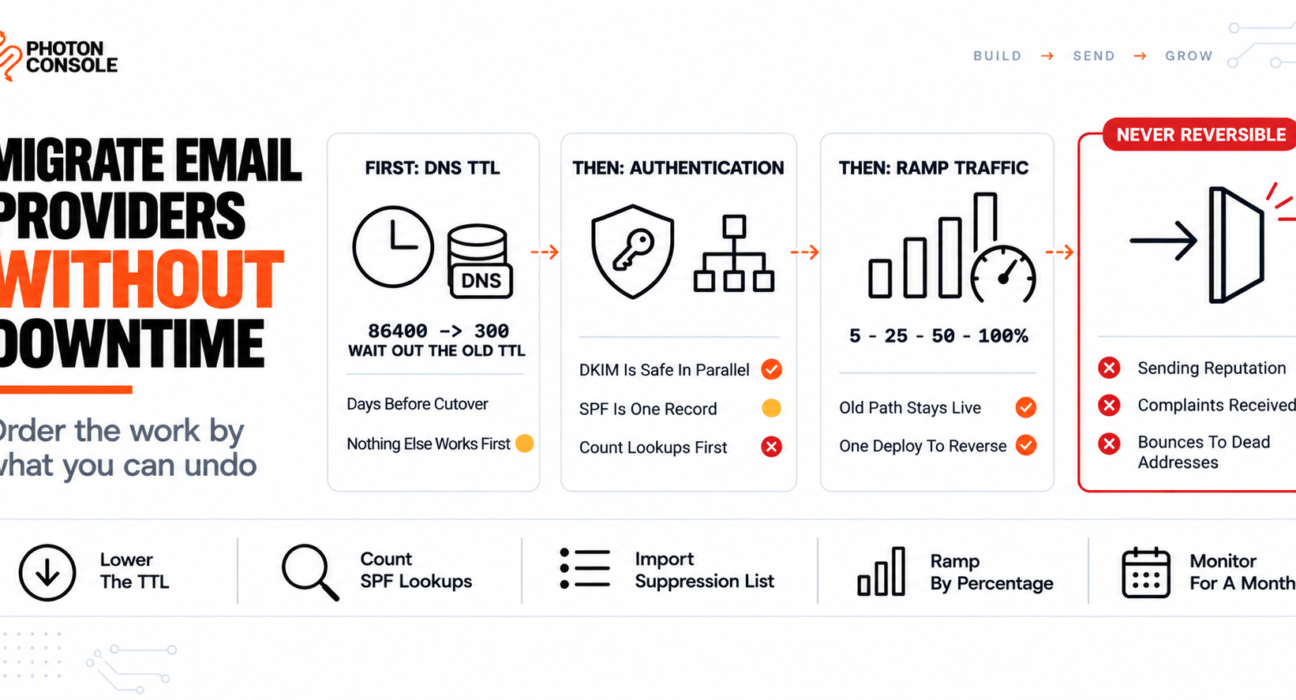
Quick Answer: What Is the Safe Migration Sequence?
| # | Step | When | Reversible? |
|---|---|---|---|
| 0 | Lower DNS TTL on your mail records. | Day 1, before anything else | Slowly |
| 1 | Inventory what you have, and count SPF lookups. | Day 1–2 | N/A |
| 2 | Publish the new DKIM record. | Day 3 | Yes, safely. |
| 3 | Add the new SPF included, and verify no permerror. | Day 3 | Slowly |
| 4 | Import your suppression list. | Before the first send | No |
| 5 | Send in parallel, compare outcomes. | Day 4–10 | Yes |
| 6 | Ramp traffic by percentage | Day 10–20 | Yes, instantly. |
| 7 | Monitor, then remove the old include. | Day 20+ | Slowly |
Note what is at the top. The first action in a safe migration is a DNS change that does nothing except make later DNS changes fast, and it has to happen days before you are ready to switch.

The Principle: Order by Reversibility
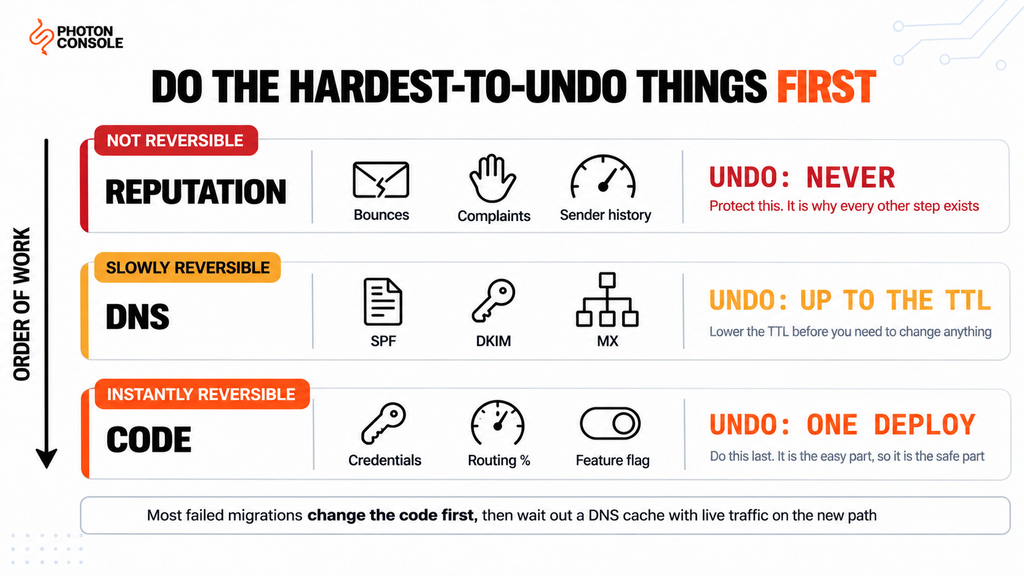
Every change in an email migration falls into one of three groups, and knowing which is which tells you when to do it.
| Category | Examples | Time to undo | Therefore |
|---|---|---|---|
| Instantly reversible | SMTP credentials, routing percentage, feature flags | One deploy | Do last; use freely |
| Slowly reversible | SPF, DKIM, MX, any DNS record | Up to the TTL | Do early, lower TTL first |
| Not reversible | Sending reputation, complaints, bounces to bad addresses | Never | Protect; never rush |
Most failed migrations invert this. Someone changes the code on Friday because that part is easy, discovers an authentication problem, and then has to wait out a DNS cache to fix it — with production traffic already on the new path.
Done in the right order, the code change at the end is genuinely trivial, because by then DNS has settled, authentication is verified, and the new path has already proved itself on real mail.
Step 0: Lower Your TTL Before You Touch Anything
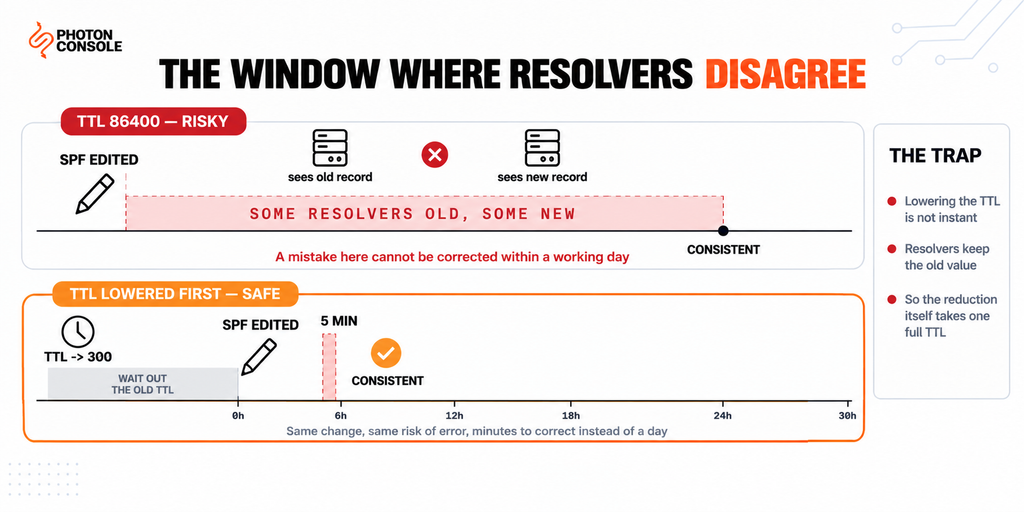
A DNS record’s TTL tells resolvers how long they may cache it. Change the record and the old value stays live, at some resolvers, until their cached copy expires.
That has two consequences during a migration. A mistake takes up to the TTL to correct. And for the duration, different receivers are evaluating your mail against different versions of your authentication — which produces the maddening symptom where delivery looks fine to you and broken to one customer.
# Check what you are working with
dig +noall +answer TXT yourdomain.com
dig +noall +answer +ttlid TXT yourdomain.com

# A record showing 86400 means a 24-hour cache.
# Lower it to 300 and WAIT for the old TTL to expire
# before relying on fast propagation.
The sequence that matters: lower the TTL, then wait out the old TTL. A record cached at 86400 seconds this morning is still cached at 86400 until it expires, whatever you set afterwards. If your TTL is 24 hours, the TTL reduction itself takes 24 hours to become effective.
Common Mistake
Lowering the TTL and immediately making the real change, on the assumption that the new TTL applies right away. It does not. Resolvers that already hold the record keep it for the remainder of the original TTL, so your first change still propagates at the old pace — and you have spent the preparation step without getting its benefit. Lower the TTL as its own action, wait longer than the previous TTL value, and only then begin. Raise it back after the migration is complete; a permanently short TTL means more lookups and slower resolution for no benefit.
Step 1: Inventory and Count Your SPF Lookups
Before changing anything, write down what you actually have. The parts people forget are rarely the sending code.
- Every system that sends. The application, the CRM, the help desk, the billing platform, the cron job nobody owns.
- Every sending domain and subdomain, including ones used only by a single integration.
- Webhook consumers — what listens for bounces and complaints today, and what will listen tomorrow.
- Templates, and whether they live in the provider or in your codebase. Provider-held templates are the single largest hidden cost of a migration.
- Your suppression list, which is reputation data rather than admin data.
Then count your SPF lookups, because this is where a migration can break authentication for both providers simultaneously.
The ten-lookup limit is a hard failure, not a degradation
RFC 7208, in section 4.6.4, requires that SPF implementations “MUST limit the total number of those terms to 10 during SPF evaluation.” The terms that count are the include, a, mx, ptr and exists mechanisms and the redirect modifier. And if the limit is exceeded, the specification is explicit: the implementation “MUST return permerror.”
permerror is not a partial result. SPF fails, for every sender in the record — including the provider that was working perfectly before you added a second include.
So adding your new provider to a record that already sits at nine or ten lookups does not add a provider. It removes both.
# These count toward the limit of 10:
#   include:  a:  mx:  ptr:  exists:  redirect=
#
# These do NOT count:
#   all   ip4:   ip6:   exp=
#
# So if you are near the limit, replacing an include
# with explicit ip4: ranges frees lookups — at the cost
# of having to maintain those ranges yourself.
Count before you add. Remember that each include can itself contain further lookups, so the arithmetic is recursive rather than a count of visible entries — this is why a record with four includes can still fail.
Quick Fix
Your SPF Record Is Already Near the Limit
- Check the full recursive count with a validator before adding anything
- Remove includes for providers you no longer use — most records carry at least one
- Replace one include with explicit
ip4:ranges, which do not count toward the limit - Consolidate: if two systems use the same provider, they share one include
- Only then add the new provider, and re-validate before sending anything
Step 2: DKIM Is Safe in Parallel. SPF Is Not.
This asymmetry is worth understanding properly, because it determines what you can and cannot do simultaneously.
DKIM is keyed by selector. Your old provider signs with its selector, your new one with a different selector, and both publish independent records at different names. They cannot collide. You can publish the new DKIM record today, leave the old one in place indefinitely, and remove it whenever you like — with no window in which anything is ambiguous.
SPF is a single record per domain. One record, shared by every sender, subject to one lookup budget, and returning one result. Two TXT records both beginning v=spf1 do not combine — they are a configuration error that breaks authentication outright.
# DKIM — independent, additive, safe
old._domainkey.yourdomain.com    CNAME  ...old provider...
photon._domainkey.yourdomain.com CNAME  dkim.photonconsole.com

# SPF — one record, both providers inside it
v=spf1 include:old-provider.example include:relay.photonconsole.com ~all

# NEVER this:
v=spf1 include:old-provider.example ~all
v=spf1 include:relay.photonconsole.com ~all
Practically: publish DKIM first and verify it independently, then make the single careful edit to SPF. Our guide to SPF, DKIM and DMARC covers alignment, and the free email deliverability checker shows what your domain currently publishes.
Keep ~all or -all as you found it. Loosening the policy during a migration to avoid problems hides exactly the failures you are migrating in order to observe.
Step 3: Move the Suppression List First
This is the step most likely to be treated as paperwork and most likely to cause lasting damage.
Your suppression list is the accumulated record of every address that hard-bounced or complained. It is not an administrative artifact — it is the reason your current reputation is as good as it is.
A new provider starts with none of it. If your first send on the new path goes to your full list, every dead address bounces again, on infrastructure with no history, and you have taught every major receiver that this new sending identity mails addresses that do not exist.
Export it and import it before the first production send, not after the migration. PhotonConsole accepts a suppression import before any mail is sent, so this can be done the same day credentials are issued. Our guide to reducing bounce rate covers why those early signals carry disproportionate weight.
Step 4: Send in Parallel and Compare
With DNS settled and suppression imported, start sending real mail through the new path alongside the old one. Not test mail — real mail, to real recipients, at low volume.
The point is comparison. Both providers are handling the same kind of traffic at the same time, so differences in outcome are attributable to the provider rather than to your list or your content.
Watch three things, in this order: whether messages are accepted, whether they are delivered, and where they land. The first is your configuration, the second is authentication, and the third is reputation.
Running two providers deliberately is a technique with enough detail to deserve its own treatment, including percentage routing and how to read the comparison — that is covered separately in our guide to running two email providers during a migration. For the purposes of this sequence, what matters is that this phase exists and that you do not skip from DNS straight to cutover.
Step 5: Ramp, Do Not Flip
A new sending path has no reputation. Volume arriving suddenly from an identity with no history is the pattern that filtering systems are built to catch.
So move traffic as a percentage, over days, with the ability to change the percentage in one deploy.
# The only migration logic you need in the application
const useNewProvider = hash(message.recipient) % 100 < ROLLOUT_PERCENT;
const transport = useNewProvider ? newTransport : oldTransport;

# ROLLOUT_PERCENT is an environment variable, not a constant.
# 5 -> 25 -> 50 -> 100, with a day or two between each.
#
# Hash the recipient rather than using random(), so a given
# user gets a consistent path and you can reason about reports.
Because PhotonConsole bills a flat rate per thousand rather than by tier, the percentage you choose has no effect on your unit cost — which means the ramp can be as slow as the reputation work requires. Hashing the recipient rather than randomising matters more than it looks. It means a user who reports a problem has been on one path consistently, so the report is diagnostic rather than noise.
Our guide to IP warming covers the ramp in more depth if you are moving to a dedicated IP, where the schedule matters considerably more.
Step 6: A Rollback Plan That Accounts for What Cannot Roll Back
“We can always roll back” is true of your code and false of everything else. A rollback plan worth having says explicitly what it can and cannot recover.
| If this goes wrong | Recovery | How long |
|---|---|---|
| Wrong credentials, bad config | Set ROLLOUT_PERCENT=0 and deploy | Minutes |
| Template rendering broken | Same — route back, fix offline | Minutes |
SPF permerror after an edit | Correct the record, wait out the TTL | Up to the TTL |
| Mail sent to suppressed addresses | Nothing. Stop, then rebuild slowly | Weeks |
| Complaints from a bad send | Nothing. The signal is already delivered | Months |
The bottom two rows are the argument for the whole sequence. Because they cannot be undone, every other step is arranged to make them unlikely — suppression imported before the first send, volume ramped rather than flipped, and the old path still live throughout so that stopping is always an option.
Note
Keep the old provider’s account open and funded for at least two weeks after reaching 100%. It costs one more billing cycle and it is the difference between a problem being an inconvenience and being an incident. Cancel only after you have seen a full billing period of clean delivery on the new path, and remove the old SPF include at the same time — not before, because an unused include costs you one lookup and nothing else, while a prematurely removed one costs you the ability to fall back.
Quick Fix
Delivery Dropped Mid-Migration
- Set
ROLLOUT_PERCENT=0and deploy first — diagnose with traffic back on the known-good path - Check SPF for
permerrorbefore anything else; it fails both providers at once - Confirm you have one SPF record, not two, and that both includes are inside it
- Verify DKIM on the new selector independently — it cannot be affected by the old one
- If authentication is clean, compare bounce reasons between the two paths rather than guessing
Step 7: What to Monitor, and for How Long
Delivery problems from a migration do not all appear immediately. Authentication failures show within hours; reputation effects take a week or more to become visible.
- Acceptance rate — the provider accepting your API or SMTP call. Immediate signal, catches configuration faults.
- Bounce rate, split hard and soft. A rise in hard bounces after migration means the suppression import missed something.
- Complaint rate. The slowest and most important. Watch it for a month.
- Delivery latency. Compare against your old baseline rather than against zero.
- Placement, where you can see it. Delivered is not the same as inboxed.
- Blocklist status of the new sending path. Spamhaus maintains the lists most receivers consult, and a listing explains a sudden drop that authentication cannot.
Receivers including Gmail publish sender expectations worth reading before you migrate rather than after. MXToolbox will confirm the published records resolve as intended, and Mail Tester scores an end-to-end send including authentication alignment.
A Realistic Timeline
Three weeks is comfortable. One week is possible if your TTL is already low and your SPF record has room. One day is how migrations become incidents.
| Days | Work | Traffic on new provider |
|---|---|---|
| 1–2 | Lower TTL, inventory, count SPF lookups | 0% |
| 3 | Publish DKIM, edit SPF, validate both | 0% |
| 4 | Import suppression list, first real sends | Under 5% |
| 5–10 | Parallel running, compare outcomes | 5–25% |
| 11–20 | Ramp with monitoring between steps | 25–100% |
| 21–35 | Watch complaint rate, keep old path warm | 100% |
| 35+ | Remove old include, raise TTL, close account | 100% |
A relay that issues credentials immediately shortens the front of this, because you can have the new path configured and validated while DNS is still settling. PhotonConsole provides SMTP credentials on signup and 5,000 free emails a month, which covers the entire parallel-running phase without a second bill — and pricing beyond that is a flat rate, so the ramp does not change your per-email cost at any percentage.
Pro Tips
- Lower the TTL as its own step, a day before you need it. It is the one preparation that cannot be done in a hurry.
- Count SPF lookups recursively. Four visible includes can still exceed ten.
- Publish DKIM early and leave both in place. Selectors cannot conflict, so there is no reason to rush removal.
- Hash the recipient for routing, not random. Consistent paths make bug reports usable.
- Import suppression before the first send, every time. It is the only irreversible step you fully control.
- Keep the old account open a fortnight past cutover. One billing cycle is cheap insurance.
- Migrate on a Tuesday. Not Friday, and not the day before a campaign.
Related Reading
- SPF, DKIM and DMARC explained — the authentication records this sequence changes
- IP warming explained — the ramp in depth for dedicated IPs
- Reducing email bounce rate — why the suppression import matters
- Email failover explained — permanent redundancy, as distinct from a temporary migration
- Transactional email queue architecture — where the routing logic belongs
- Emails sent but not delivered — diagnosing the gap between accepted and delivered
Frequently Asked Questions
How long does an email provider migration take?
Three weeks comfortably, or about one week if your DNS TTL is already low and your SPF record has lookup headroom. The constraint is DNS propagation and reputation ramp, not engineering effort.
What is the first thing I should do?
Lower the TTL on your mail-related DNS records, then wait out the previous TTL. Until that has happened, every later DNS change propagates at the old speed.
Can I run two email providers at the same time?
Yes, and you should during a migration. Both providers go in a single SPF record, DKIM uses separate selectors, and your application routes a percentage of traffic to each.
Will adding a second SPF include break anything?
It can. RFC 7208 limits SPF evaluation to ten DNS-querying terms and requires a permerror if that is exceeded — which fails authentication for every sender in the record, not just the new one. Count first.
Should I publish two SPF records during migration?
Never. One domain gets one SPF record. Two TXT records starting v=spf1 break authentication rather than combining.
Do I need to move my suppression list?
Yes, and before your first production send. A new provider has no bounce history, so mailing previously-bounced addresses from it damages a reputation you have not yet built.
How fast should I ramp traffic?
5%, 25%, 50%, 100%, with a day or two between steps and monitoring in between. Faster is possible on a shared pool; a dedicated IP needs a proper warming schedule.
When can I cancel the old provider?
After a full billing period at 100% with clean delivery metrics. Remove the old SPF include at the same time, not earlier.
Conclusion
The reason email migrations go wrong is that the easy part is reversible and the hard part is not. Changing which SMTP host your code talks to takes one deploy. Changing what the world’s resolvers believe about your domain takes as long as your TTL, and changing what receivers think of your sending identity takes weeks you cannot shorten.
Order the work accordingly. Lower the TTL first, because it is the only step that makes later steps fast. Count your SPF lookups before adding an include, because exceeding ten returns permerror and takes both providers down together. Publish DKIM freely, since selectors cannot collide. Import your suppression list before the first send, because that is the one irreversible thing entirely within your control. Then ramp by percentage with the old path still live, and keep it live for a fortnight after you think you are finished.
Do it in that order and there is no downtime, because at no point is there a moment when only the new path works. A reliable SMTP provider that issues credentials immediately and charges a flat rate makes the parallel phase cheap and the ramp cost-neutral — which removes the two commercial reasons teams rush the part they should not.