You add Nodemailer to a Next.js project, wire it into a contact form, and the build fails with a module resolution error about net or tls. Or it builds fine, deploys, and every send times out. Or worse, it works — and a security scan later shows your SMTP password sitting in the browser bundle.
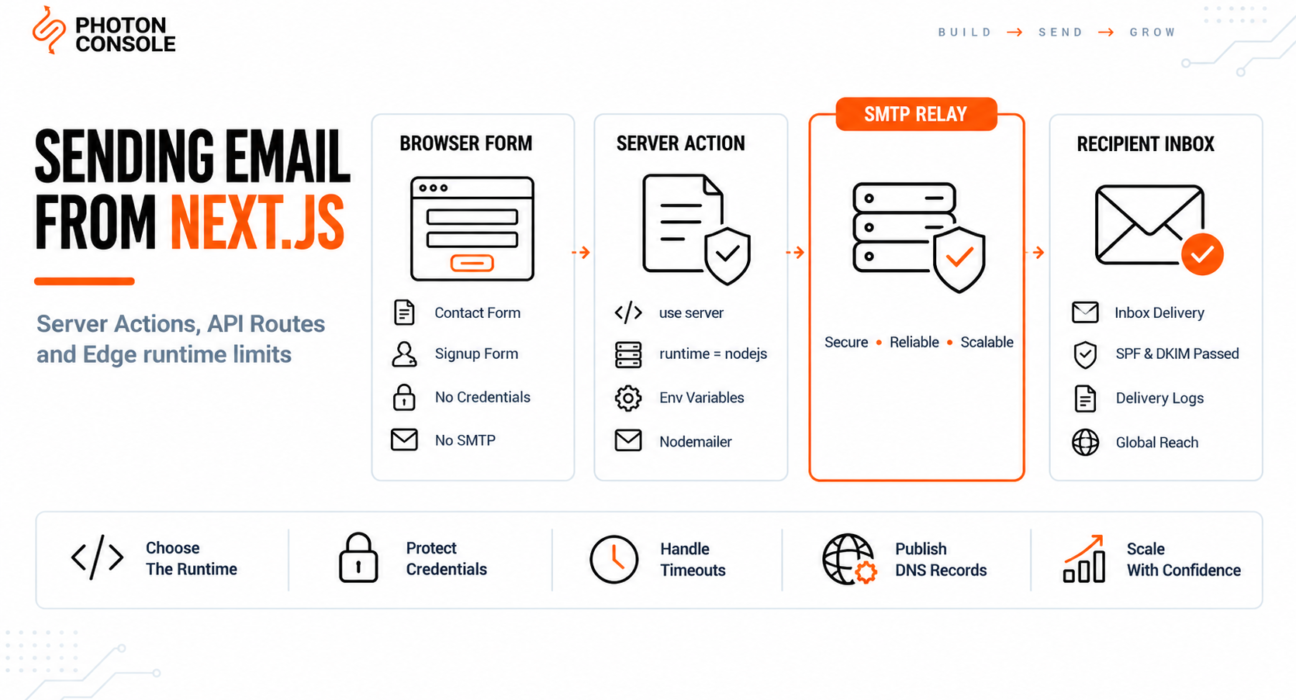
Next.js makes email harder than a traditional Node server because code can run in three different places: the browser, a Node.js serverless function, or the Edge runtime. Only one of those can open an SMTP connection.
This guide covers where email code belongs in a Next.js app, how to configure the runtime correctly, and how to avoid the credential leak that catches a surprising number of projects.
Quick Answer: How Do You Send Email in Next.js?
Send from a Route Handler or Server Action running on the Node.js runtime, never from a client component:

// app/api/send/route.ts
import nodemailer from 'nodemailer';
import { NextResponse } from 'next/server';

export const runtime = 'nodejs';   // required — Edge cannot open SMTP

const transporter = nodemailer.createTransport({
  host: process.env.SMTP_HOST,
  port: Number(process.env.SMTP_PORT),
  secure: false,
  auth: {
    user: process.env.SMTP_USER,
    pass: process.env.SMTP_PASS,
  },
});

export async function POST(request: Request) {
  const { email, message } = await request.json();

  await transporter.sendMail({
    from: process.env.MAIL_FROM,
    to: 'you@yourdomain.com',
    replyTo: email,
    subject: 'New contact form submission',
    text: message,
  });

  return NextResponse.json({ ok: true });
}
Two things decide whether this works: the runtime must be nodejs, and the credentials must never carry the NEXT_PUBLIC_ prefix. An authenticated relay such as PhotonConsole handles the delivery side once the code is in the right place.
Why You Cannot Send Email from the Browser
SMTP is a raw TCP protocol. Browsers do not permit raw TCP connections — they speak HTTP and WebSockets only. There is no browser API that can open an SMTP session, and no library can work around that.
This is a security feature rather than a limitation. If a browser could send SMTP, your mail credentials would have to be present in code the user can read, which means anyone could extract them and send mail as your domain.
So every email path in Next.js has to terminate on the server. The question is only which server context you use.
The Three Places Code Runs in Next.js
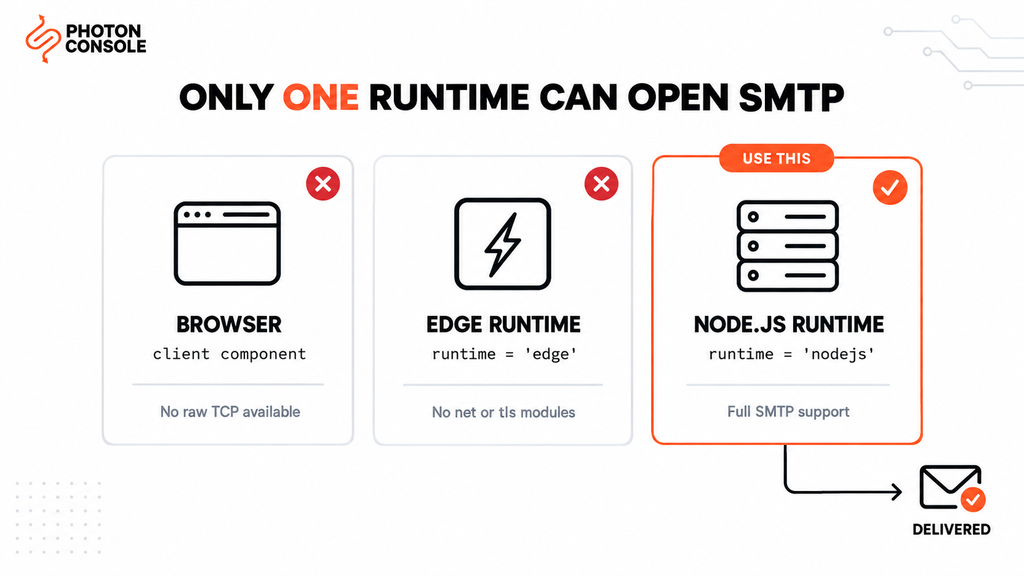
Understanding this table prevents most Next.js email problems.
| Context | Can open SMTP? | Use for email? |
|---|---|---|
| Client component (browser) | No — no raw TCP | Never. Credentials would be exposed |
| Edge runtime | No — no Node net or tls modules | Only via an HTTP email API |
| Node.js runtime | Yes | Yes — this is where SMTP belongs |
The Next.js documentation covers runtime selection in detail. The practical rule is simple: anything touching Nodemailer needs export const runtime = 'nodejs'.
Why Next.js Email Fails
Most failures come from the runtime, the environment variables, or the serverless execution model rather than from the mail code itself.
1. The Route Is Running on the Edge
Edge functions run in a restricted JavaScript environment without Node’s net and tls modules. Nodemailer depends on both. You will see build errors about unresolved modules, or runtime errors about missing Node APIs.
Setting export const runtime = 'nodejs' in the route file fixes this.
2. Credentials Are Prefixed with NEXT_PUBLIC_
Any environment variable starting with NEXT_PUBLIC_ is inlined into the JavaScript bundle sent to the browser. Naming your SMTP password NEXT_PUBLIC_SMTP_PASS publishes it to every visitor.
This happens because developers hit an “undefined variable” error in a client component and add the prefix to make the error go away. It does make the error go away. It also leaks the credential.
3. Nodemailer Is Imported into a Client Component
Importing a server-only library in a component that runs in the browser produces bundling errors. Keep mail code in Route Handlers, Server Actions, or files marked 'use server'.
4. The Function Times Out Before the Send Completes
Serverless functions have execution time limits that vary by platform and plan. An SMTP handshake on a cold start can take several seconds, and a slow mail server can push past the limit. The request fails with a platform timeout rather than a mail error, which makes it look like a Next.js fault.
5. No Authentication Records on the Sending Domain
Without SPF and DKIM, receiving servers cannot verify your application is authorised to send as your domain, in line with Google’s sender guidelines. Our guide to SPF, DKIM and DMARC covers the records, and the free email deliverability checker shows what your domain publishes today.
Common Mistake
Adding NEXT_PUBLIC_ to an SMTP variable to silence an undefined error. Everything with that prefix is compiled into the browser bundle and is readable by anyone who opens developer tools. If you have ever deployed with NEXT_PUBLIC_SMTP_PASS or similar, treat that credential as compromised, rotate it, and move the send into a Route Handler or Server Action where server-only variables are available.
Quick Fix
Module Not Found: net, tls or dns
- Add
export const runtime = 'nodejs'to the route file - Confirm the file is a Route Handler or Server Action, not a client component
- Check the file has no
'use client'directive at the top - Move the Nodemailer import out of any shared file that a client component also imports
- For Middleware, which is always Edge, use an HTTP email API instead of SMTP
Method 1: Route Handler (App Router)
The most common approach. Create app/api/send/route.ts:
import nodemailer from 'nodemailer';
import { NextResponse } from 'next/server';

export const runtime = 'nodejs';

const transporter = nodemailer.createTransport({
  host: process.env.SMTP_HOST,
  port: Number(process.env.SMTP_PORT ?? 587),
  secure: false,
  auth: {
    user: process.env.SMTP_USER,
    pass: process.env.SMTP_PASS,
  },
  connectionTimeout: 8000,
  socketTimeout: 8000,
});

export async function POST(request: Request) {
  try {
    const { name, email, message } = await request.json();

    if (!email || !message) {
      return NextResponse.json(
        { error: 'Missing required fields' },
        { status: 400 }
      );
    }

    await transporter.sendMail({
      from: process.env.MAIL_FROM,
      to: process.env.CONTACT_INBOX,
      replyTo: email,
      subject: `New enquiry from ${name ?? 'website'}`,
      text: message,
    });

    return NextResponse.json({ ok: true });
  } catch (err) {
    console.error('Send failed:', err);
    return NextResponse.json(
      { error: 'Unable to send message' },
      { status: 500 }
    );
  }
}
Note the error handling. Never return the raw exception to the client — it can contain your host name and account details.
Method 2: Server Action
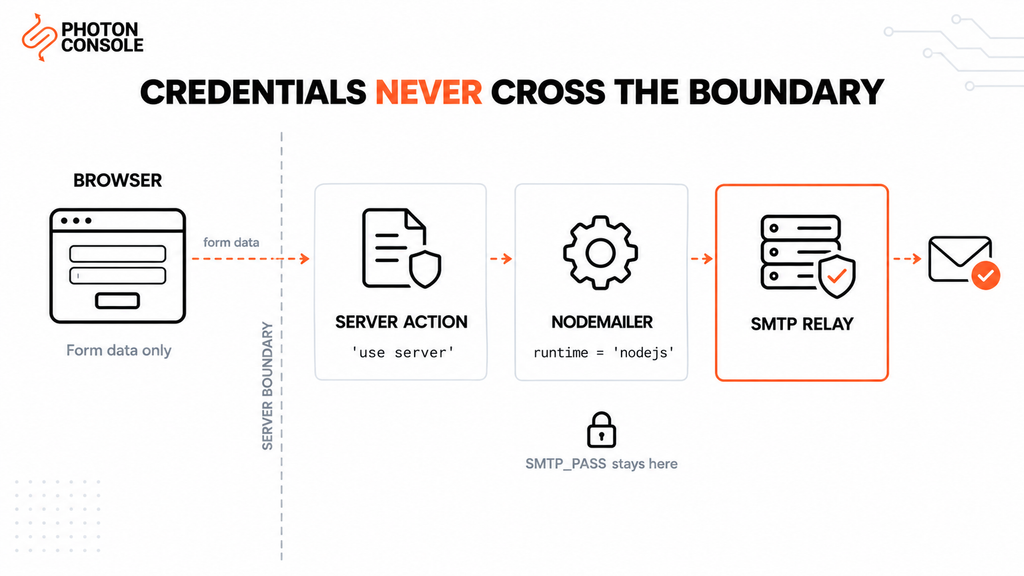
Server Actions remove the need for a separate API route and give progressive enhancement for free.
// app/actions/send-contact.ts
'use server';

import nodemailer from 'nodemailer';

const transporter = nodemailer.createTransport({
  host: process.env.SMTP_HOST,
  port: Number(process.env.SMTP_PORT ?? 587),
  secure: false,
  auth: {
    user: process.env.SMTP_USER,
    pass: process.env.SMTP_PASS,
  },
});

export async function sendContact(formData: FormData) {
  const email = String(formData.get('email') ?? '');
  const message = String(formData.get('message') ?? '');

  if (!email || !message) {
    return { ok: false, error: 'Missing required fields' };
  }

  try {
    await transporter.sendMail({
      from: process.env.MAIL_FROM,
      to: process.env.CONTACT_INBOX,
      replyTo: email,
      subject: 'New contact form submission',
      text: message,
    });
    return { ok: true };
  } catch {
    return { ok: false, error: 'Unable to send message' };
  }
}
// app/contact/page.tsx
import { sendContact } from '../actions/send-contact';
export default function ContactPage() {
return (
<form action={sendContact}>
<input name="email" type="email" required />
<textarea name="message" required />
<button type="submit">Send</button>
</form>
);
}The page itself stays a Server Component. The action file carries 'use server', so Nodemailer never reaches the browser bundle.
Environment Variables Done Correctly
# .env.local — never commit this file

# Server-only. No NEXT_PUBLIC_ prefix.
SMTP_HOST=smtp.photonrelay.com
SMTP_PORT=587
SMTP_USER=your_project_api_user
SMTP_PASS=your_secret_api_key
MAIL_FROM="Your App <noreply@yourdomain.com>"
CONTACT_INBOX=hello@yourdomain.com
Server-only variables are available in Route Handlers, Server Actions and Server Components. They are not available in client components, and that restriction is the point rather than an obstacle.
Note
Environment variables must also be set in your hosting platform’s dashboard, not only in .env.local. A local file is not deployed. Missing variables in production produce an authentication failure that looks identical to wrong credentials, which is why the same code works locally and fails once deployed.
Serverless Constraints Worth Planning For
A Next.js app on a serverless platform behaves differently from a long-running Node server.
Connection pooling gives little benefit. The container is often destroyed after the request, so a pooled connection has nothing to be reused by. Set pool: false and rely on short-lived connections instead.
Every invocation may pay the full handshake cost. A cold start plus TCP and TLS negotiation can take several seconds before the message is even accepted.
Execution time is capped. Limits vary by platform and plan, so check your provider’s current documentation and keep your Nodemailer timeouts comfortably below whatever that limit is. Setting connectionTimeout and socketTimeout to around 8 seconds gives the function room to return a clean error rather than being killed mid-send.
Heavy sending belongs in a queue. If a single request needs to send more than one or two messages, push the work to a background job rather than holding the request open. Our guide to transactional email queue architecture covers the pattern.
Quick Fix
Works Locally, Fails After Deploy
- Confirm every SMTP variable is set in the hosting dashboard, not just
.env.local - Check the deployed route is using the Node.js runtime, not Edge
- Try port 2525 if the platform blocks 587 outbound
- Lower Nodemailer timeouts below the platform function timeout
- Log
err.codeserver side —EAUTHmeans credentials,ETIMEDOUTmeans network
Port Reference
| Port | secure value | When to use |
|---|---|---|
| 587 | false (STARTTLS) | Recommended default |
| 465 | true (implicit SSL) | When the provider requires it |
| 2525 | false | When the platform blocks 587 |
| 25 | n/a | Avoid — blocked on nearly all hosts |
Configuring Next.js With PhotonConsole
Two steps: authenticate the domain in DNS, then set the environment variables.
TXT    @                    v=spf1 include:relay.photonconsole.com ~all
CNAME  photon._domainkey    dkim.photonconsole.com
SMTP_HOST=smtp.photonrelay.com
SMTP_PORT=587 # 465 for implicit SSL, 2525 if 587 is blocked
SMTP_USER=your_project_api_user
SMTP_PASS=your_secret_api_key
MAIL_FROM="Your App <noreply@yourdomain.com>"Port 2525 matters here specifically because serverless platforms sometimes restrict outbound ports, which resolves the deploy-time failures described above. Every PhotonConsole account includes 5,000 free emails per month, enough to validate the full path — runtime configuration, environment variables and DNS — before any spend. Details are on the PhotonRelay page, and pricing has no monthly minimum.
If you are comparing options first, our analysis of free SMTP servers covers where each stops being practical.
When to Use an HTTP Email API Instead
SMTP is the right default for most Next.js apps, but an HTTP API is the better fit in two cases.
Edge runtime. If the send has to happen in Middleware or an Edge function, SMTP is impossible. An HTTP request works anywhere fetch is available.
Very short function limits. A single HTTP POST completes faster than an SMTP conversation, which matters when the execution ceiling is tight.
Both approaches reach the same delivery infrastructure. Our email API integration guide covers the HTTP approach in more depth.
Pro Tips
- Add rate limiting to public forms. An unprotected contact endpoint becomes a spam relay within days of going live.
- Use replyTo, not from, for the visitor’s address. Sending as the visitor’s domain fails SPF and DMARC. Send from your own address and put theirs in
replyTo. - Never return raw errors to the client. Exception messages can expose your SMTP host and account name.
- Validate on the server too. Client-side validation is a convenience, not a control — anyone can post directly to the route.
- Verify DNS after any change. MXToolbox checks SPF, DKIM and blocklist status in one lookup.
- Score a real send before launch. Mail Tester flags authentication problems before users hit them.
- Keep the transporter at module scope. Creating it inside the handler adds avoidable work on every invocation.
Related Issues You May Hit Next
- Nodemailer production setup for the underlying transport configuration
- SMTP authentication errors when credentials are rejected
- SMTP connection timeouts when the connection hangs
- Emails landing in Gmail spam despite a successful send
- Emails sent but not delivered when the server reports success
Frequently Asked Questions
Can I use Nodemailer in Next.js?
Yes, in Route Handlers, Server Actions or Server Components running on the Node.js runtime. It cannot run in client components or on the Edge runtime, because both lack the Node networking modules it depends on.
Why do I get “Module not found: can’t resolve net”?
The code is being bundled for the browser or the Edge runtime. Add export const runtime = 'nodejs' and make sure the file is not imported by a client component.
Should I use a Route Handler or a Server Action?
Server Actions are simpler for form submissions within your own app. Route Handlers are better when an external service or a separate client needs to call the endpoint. Both run on the server.
Is it safe to put SMTP credentials in .env.local?
Yes, provided the variable names do not begin with NEXT_PUBLIC_ and the file is excluded from version control. Server-only variables are never sent to the browser.
Why does email work locally but not on Vercel?
Usually missing environment variables in the platform dashboard, or a route defaulting to the Edge runtime in production. Check both before investigating the mail server.
How do I send email from Middleware?
You cannot use SMTP there, because Middleware always runs on the Edge. Either call an HTTP email API, or have Middleware trigger a Node.js route that performs the send.
Do I still need SPF and DKIM with a relay?
Yes. The relay delivers the message, but the DNS records prove your domain authorised it. Without them, delivery is far less reliable regardless of which relay you use.
Conclusion
Next.js email problems are nearly always placement problems rather than mail problems. The code has to run on the Node.js runtime, the credentials have to stay server-side, and the timeouts have to fit inside the platform’s execution limit.
Get those three right and Nodemailer behaves exactly as it does on any Node server. Get the second one wrong and you publish your SMTP password to every visitor, which is worth checking in any existing project today.
Once the code is in the right place, what remains is delivery: whether the platform permits outbound SMTP, and whether receiving providers trust your domain. A dedicated transactional email solution handles authentication, routing and reputation, using the same configuration shown above. Developers working across stacks may also want our guides to sending email in Python and sending email in Node.js.