Your Django app sends email perfectly in development. You deploy it, and the emails stop arriving. Password reset links never reach users, signup confirmations vanish, and send_mail() keeps returning 1 as though everything worked.
Django is doing exactly what you configured it to do. The problem is that the settings which work on a laptop are not the settings that work on a server, and Django’s defaults are deliberately designed for development rather than production.
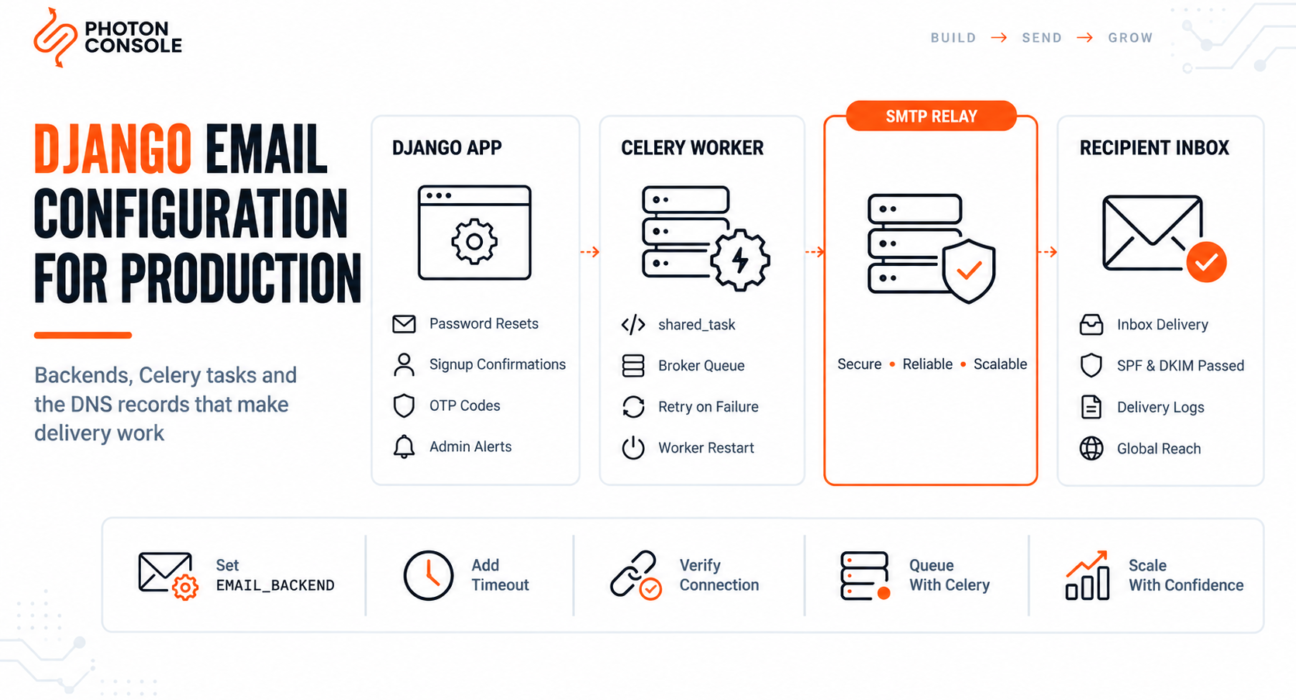
This guide covers the full production setup: the settings.py values that matter, connection handling, asynchronous sending with Celery, the password reset flow, and the specific configuration mistakes that let Django email fail without raising anything.
Quick Answer: How Do You Configure Email in Django?
Set the SMTP backend and connection details in settings.py, reading credentials from environment variables:

import os

EMAIL_BACKEND = 'django.core.mail.backends.smtp.EmailBackend'
EMAIL_HOST = 'smtp.photonrelay.com'
EMAIL_PORT = 587
EMAIL_HOST_USER = os.environ['EMAIL_HOST_USER']
EMAIL_HOST_PASSWORD = os.environ['EMAIL_HOST_PASSWORD']
EMAIL_USE_TLS = True
EMAIL_TIMEOUT = 10
DEFAULT_FROM_EMAIL = 'Your App <noreply@yourdomain.com>'
SERVER_EMAIL = 'errors@yourdomain.com'
from django.core.mail import send_mail
send_mail(
subject='Your verification code',
message='Your code is 492019.',
from_email=None, # falls back to DEFAULT_FROM_EMAIL
recipient_list=['user@example.com'],
fail_silently=False,
)The application code is rarely the problem. What decides whether a message reaches an inbox is the backend you selected, the host you authenticate against, and whether your domain is authorised to send. An authenticated relay such as PhotonConsole on port 587 removes most of the failure modes covered below.
How Django’s Email Layer Works
Django routes every outgoing message through a configurable backend. The backend decides what actually happens to the message: sent over SMTP, printed to the console, written to a file, or held in memory for tests.
The official Django email documentation lists five built-in backends. Only one of them sends anything.
| Backend | What it does | Use in |
|---|---|---|
smtp.EmailBackend | Sends over SMTP | Production |
console.EmailBackend | Prints the message to stdout | Local development |
filebased.EmailBackend | Writes each message to a file | Local inspection |
locmem.EmailBackend | Stores messages in memory | Automated tests |
dummy.EmailBackend | Discards everything silently | Disabling mail entirely |
Django does not deliver email itself. It hands a correctly formatted message to whichever backend is configured, and the SMTP backend hands it to whatever host you named. If you want the underlying protocol explained first, see our guide to what SMTP is.
Why Django Email Fails in Production
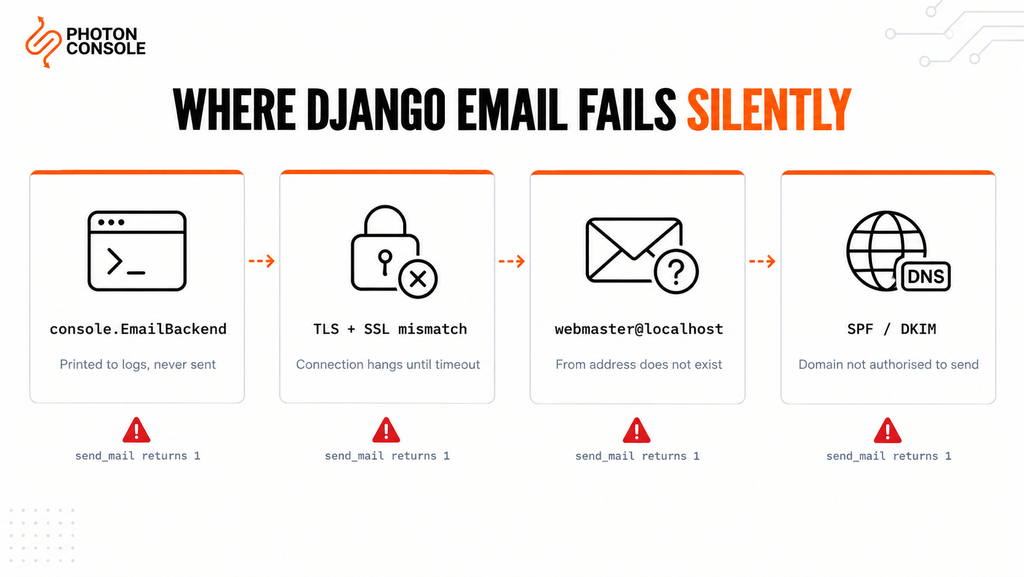
Most email failures in Django come from configuration or authentication rather than defects in the framework. These five account for the majority.
1. The Console Backend Is Still Active
Most tutorials and starter templates set EMAIL_BACKEND to the console backend so development does not send real mail. If that setting reaches production, every message is printed to your application logs and nothing is sent. send_mail() still returns 1, because from Django’s point of view the send succeeded.
This is the most common cause of “Django says it sent the email but nothing arrived”.
2. EMAIL_USE_TLS and EMAIL_USE_SSL Are Both Set
These two settings are mutually exclusive, and Django raises an error if both are True. More commonly, one is set to match the wrong port. Use TLS with port 587, or SSL with port 465, and never mix the pairings.
3. DEFAULT_FROM_EMAIL Was Never Changed
Django’s default from address is webmaster@localhost. That address does not exist on your domain, so it fails DMARC alignment and gives bounces nowhere to go. Mailbox providers treat mail from a non-existent sender with suspicion, in line with Google’s sender guidelines.
4. No Authentication Records on Your Domain
Without SPF and DKIM, receiving servers cannot verify your application is allowed to send as your domain. Our guide to SPF, DKIM and DMARC covers the records, and the free email deliverability checker shows what your domain currently publishes.
5. Your Host Blocks Outbound SMTP
AWS, Google Cloud, DigitalOcean and Azure restrict outbound port 25 by default. AWS documents its port 25 throttle removal process, though removal does not solve the reputation problem underneath. Our breakdown of SMTP connection timeouts covers the diagnosis.
Quick Fix
Django Reports Success but No Email Arrives
- Print
settings.EMAIL_BACKENDin production and confirm it ends insmtp.EmailBackend - Confirm only one of
EMAIL_USE_TLSorEMAIL_USE_SSLisTrue - Check
DEFAULT_FROM_EMAILis a real address on your own domain - Set
fail_silently=Falseso exceptions surface instead of being swallowed - Run a test send from
manage.py shellto see the actual SMTP error
Step-by-Step: Production Email Setup
Step 1: Keep Credentials Out of settings.py
Read every credential from the environment. Never commit an SMTP password to version control.
# settings.py
import os

EMAIL_BACKEND = 'django.core.mail.backends.smtp.EmailBackend'
EMAIL_HOST = os.environ.get('EMAIL_HOST', 'smtp.photonrelay.com')
EMAIL_PORT = int(os.environ.get('EMAIL_PORT', 587))
EMAIL_HOST_USER = os.environ['EMAIL_HOST_USER']
EMAIL_HOST_PASSWORD = os.environ['EMAIL_HOST_PASSWORD']
EMAIL_USE_TLS = True
EMAIL_USE_SSL = False
EMAIL_TIMEOUT = 10

DEFAULT_FROM_EMAIL = 'Your App <noreply@yourdomain.com>'
SERVER_EMAIL = 'errors@yourdomain.com'
DEFAULT_FROM_EMAIL is used for ordinary application mail. SERVER_EMAIL is used for error reports sent to ADMINS. Setting only the first leaves your error emails coming from root@localhost.
Common Mistake
Setting EMAIL_PORT = 465 while leaving EMAIL_USE_TLS = True. Port 465 expects the connection to be encrypted from the first byte, which is EMAIL_USE_SSL. The mismatch produces a connection that hangs until EMAIL_TIMEOUT expires, with no error explaining why. Use 587 with TLS, or 465 with SSL, and never set both flags.
Step 2: Always Set EMAIL_TIMEOUT
Without a timeout, a slow or unresponsive mail server can block a worker process indefinitely. Ten seconds is a reasonable default for a web request.
Step 3: Verify the Connection Before Trusting It
Test from the shell on the production server, not from your laptop.
python manage.py shellfrom django.core.mail import send_mail
from django.conf import settings
print(settings.EMAIL_BACKEND) # confirm this is the SMTP backend
print(settings.EMAIL_HOST, settings.EMAIL_PORT)
send_mail(
'SMTP connection test',
'If you received this, the connection works.',
None,
['you@yourdomain.com'],
fail_silently=False,
)If this raises an exception, the problem is configuration or connectivity. If it returns 1 and nothing arrives, the problem is delivery — authentication records or filtering rather than Django.
Step 4: Reuse One Connection for Multiple Messages
Calling send_mail() in a loop opens a new SMTP connection for every message. Open one connection and send through it instead.
from django.core.mail import get_connection, EmailMultiAlternatives

def send_batch(messages):
    connection = get_connection()
    connection.open()

    emails = []
    for msg in messages:
        email = EmailMultiAlternatives(
            subject=msg['subject'],
            body=msg['text'],
            to=[msg['to']],
            connection=connection,
        )
        email.attach_alternative(msg['html'], 'text/html')
        emails.append(email)

    connection.send_messages(emails)
    connection.close()
Step 5: Send HTML With a Plain Text Alternative
HTML-only messages score worse with spam filters. EmailMultiAlternatives lets you send both from a rendered template.
from django.core.mail import EmailMultiAlternatives
from django.template.loader import render_to_string
from django.utils.html import strip_tags

def send_welcome(user):
    html = render_to_string('emails/welcome.html', {'user': user})
    text = strip_tags(html)

    email = EmailMultiAlternatives(
        subject='Welcome to Your App',
        body=text,
        to=[user.email],
    )
    email.attach_alternative(html, 'text/html')
    email.send(fail_silently=False)
Step 6: Move Sending Off the Request Cycle
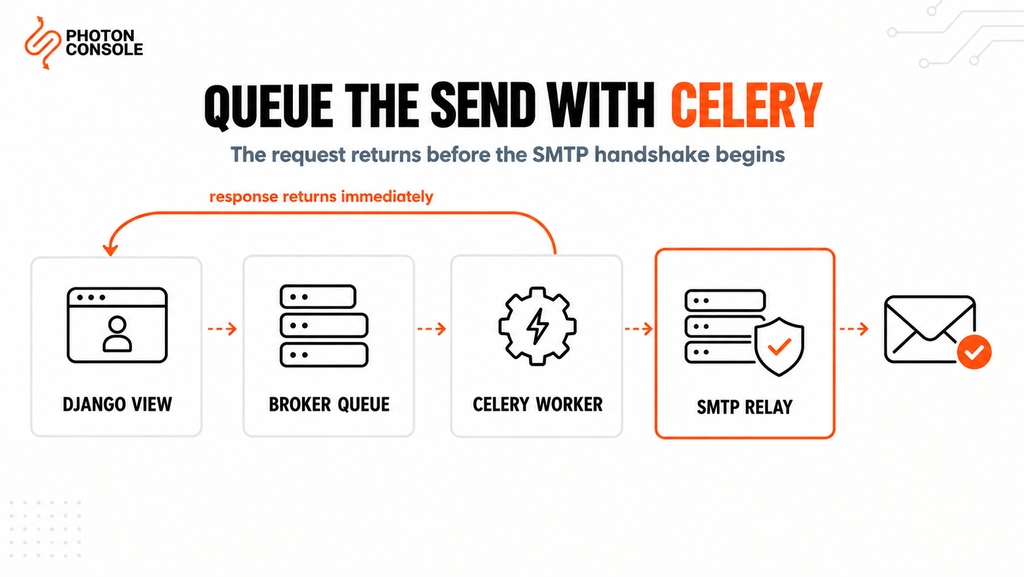
Never make a user wait for an SMTP handshake during a web request. Push the send into Celery so the response returns immediately and delivery is retried independently.
# tasks.py
from celery import shared_task
from django.core.mail import EmailMultiAlternatives

@shared_task(bind=True, max_retries=3, default_retry_delay=60)
def send_email_task(self, subject, text, html, to):
    try:
        email = EmailMultiAlternatives(subject, text, to=[to])
        email.attach_alternative(html, 'text/html')
        email.send(fail_silently=False)
    except Exception as exc:
        raise self.retry(exc=exc)
# views.py
send_email_task.delay(subject, text, html, user.email)The Celery documentation covers worker configuration in depth. Our guide to transactional email queue architecture covers the wider pattern, and SMTP retry logic explains which failures are worth retrying.
Quick Fix
Celery Tasks Queue but Never Send
- Confirm a worker is actually running with
celery -A yourproject worker -l info - Check the broker connection — a task queued to an unreachable broker fails silently
- Confirm the worker process has the same environment variables as the web process
- Restart workers after every deploy, as they hold old code and settings in memory
- Inspect failed tasks rather than assuming the SMTP connection is at fault
Fixing the Password Reset Flow
Django’s built-in password reset uses the same email configuration, so everything above applies. Three things specific to this flow cause failures.
The default template is plain and unbranded. Override registration/password_reset_email.html to control what users receive. An unbranded reset email is more likely to be ignored or reported as suspicious.
The reset link uses the site domain. Django builds the URL from the Sites framework or the request. If ALLOWED_HOSTS or the Site record is wrong, users receive links pointing at example.com.
Reset emails are time critical. Tokens expire, so a message delayed by an hour in a queue is useless by the time it arrives. Password resets should go through a priority path rather than sitting behind a bulk sending job.
Port and Encryption Reference
| EMAIL_PORT | Setting | When to use |
|---|---|---|
| 587 | EMAIL_USE_TLS = True | Recommended default |
| 465 | EMAIL_USE_SSL = True | When the provider requires implicit SSL |
| 2525 | EMAIL_USE_TLS = True | When the host blocks 587 and 465 |
| 25 | Neither | Avoid — blocked by most hosting providers |
Configuring Django With PhotonConsole
Moving Django onto a dedicated relay is a settings change plus DNS. No application code changes, and your templates and tasks stay exactly as they are.
DNS Records
TXT    @                    v=spf1 include:relay.photonconsole.com ~all
CNAME  photon._domainkey    dkim.photonconsole.com
Note
DNS changes are not instant. SPF and DKIM records can take from a few minutes to 24-48 hours to propagate depending on your provider and TTL settings. Check you do not already publish a second SPF record — two separate TXT records starting with v=spf1 break authentication entirely.
Settings
EMAIL_BACKEND = 'django.core.mail.backends.smtp.EmailBackend'
EMAIL_HOST = 'smtp.photonrelay.com'
EMAIL_PORT = 587          # 465 for implicit SSL, 2525 if 587 is blocked
EMAIL_HOST_USER = os.environ['PHOTON_USER']
EMAIL_HOST_PASSWORD = os.environ['PHOTON_PASS']
EMAIL_USE_TLS = True
EMAIL_TIMEOUT = 10
DEFAULT_FROM_EMAIL = 'Your App <noreply@yourdomain.com>'
Port 2525 exists specifically for hosting environments that block the standard SMTP ports, which resolves the AWS and DigitalOcean problem described earlier. Every PhotonConsole account includes 5,000 free emails per month, enough to validate the full setup — DNS records, Celery tasks and retry handling — before any spend. Details are on the PhotonRelay page, and pricing has no monthly minimum.
If you are still comparing options, our analysis of free SMTP servers covers where each one breaks down under production load.
Environment-Specific Notes
Local Development
Use the console backend or a mail catcher such as Mailpit. Keep the SMTP backend configured in a separate settings module so the production code path is exercised before deploy day rather than discovered on it.
Docker and Kubernetes
Containers have no local mail transfer agent, so an external relay is mandatory. Inject credentials through secrets rather than baking them into the image, and confirm the Celery worker container receives the same environment variables as the web container.
Heroku and Platform Hosting
Config vars must be set for every process type. A web dyno with correct mail settings and a worker dyno without them produces email that works synchronously and fails through Celery.
Serverless Deployments
Persistent SMTP connections are impractical when the container is destroyed after each invocation. Keep function timeouts above EMAIL_TIMEOUT so a send is never cut off mid-handshake.
Pro Tips for Reliable Django Email
- Never use
fail_silently=Truein production. It suppresses the exception that tells you what went wrong, turning a fixable error into a mystery. - Configure ADMINS and SERVER_EMAIL. Django emails unhandled exceptions to
ADMINS, which is useless if the mail configuration is what broke. - Use a subdomain for application mail. Sending from
mail.yourdomain.comisolates transactional reputation from your business email. - Verify DNS after any change. MXToolbox confirms SPF, DKIM and blocklist status in a single lookup.
- Score a real send before launch. Mail Tester flags authentication problems before users encounter them.
- Separate transactional and bulk queues. A newsletter batch that gets throttled should never delay a password reset.
- Never log the full settings object. Log the exception and SMTP response, not the values containing your password.
Related Issues You May Hit Next
- SMTP authentication errors when credentials are rejected despite being correct
- SMTP not working across the ten most common failure modes
- Emails landing in Gmail spam despite a successful send
- Emails sent but not delivered when the SMTP response says success
- SMTP configuration reference for host, port and encryption settings
Frequently Asked Questions
Why does send_mail return 1 when no email arrives?
The return value counts messages the backend accepted, not messages delivered. With the console backend it counts messages printed to stdout. Check EMAIL_BACKEND first.
Should I use EMAIL_USE_TLS or EMAIL_USE_SSL?
Use EMAIL_USE_TLS = True with port 587 for most applications. Use EMAIL_USE_SSL = True with port 465 only when the provider requires implicit SSL. Setting both raises an error.
How do I send email asynchronously in Django?
Use Celery with a broker such as Redis or RabbitMQ. Django has no built-in background task queue, so a synchronous send() call blocks the request until the SMTP conversation finishes.
Can I use Gmail SMTP with Django?
For local testing, yes. For production, no. Google enforces low sending caps, throttles automated traffic, and can lock the account, which takes your password reset emails down with it.
How do I test email without sending real messages?
Use locmem.EmailBackend in tests and inspect django.core.mail.outbox. For manual checks, use the file-based backend or a mail catcher rather than sending to real addresses.
Why do my Django emails go to spam?
Delivery and inbox placement are separate. A successful send only means the relay accepted the message. Missing SPF or DKIM records, or a from address that does not exist, are the usual causes.
Do I still need SPF and DKIM when using a relay?
Yes. The relay delivers the message, but authentication records prove your domain authorised it. Without them, delivery is far less reliable regardless of which relay you use.
Conclusion
Django’s email layer is dependable. Nearly every production failure traces to one of four things: the console backend left active, mismatched TLS and SSL settings, a default from address that does not exist, or a domain with no authentication records.
Fix those four and Django email works predictably. Add a timeout, reuse connections for batches, and move sending into Celery, and it stays reliable as traffic grows. What remains is infrastructure rather than framework: whether your host permits outbound SMTP, and whether receiving providers trust the domain you send from.
If messages are blocked by port restrictions, throttled by a mailbox provider, or filtered because your server has no sending reputation, no change to settings.py will fix it. A dedicated transactional email solution handles authentication, routing and reputation, using the same configuration shown above. Developers working across stacks may also want our guides to sending email in Python with smtplib and sending email in Node.js.