


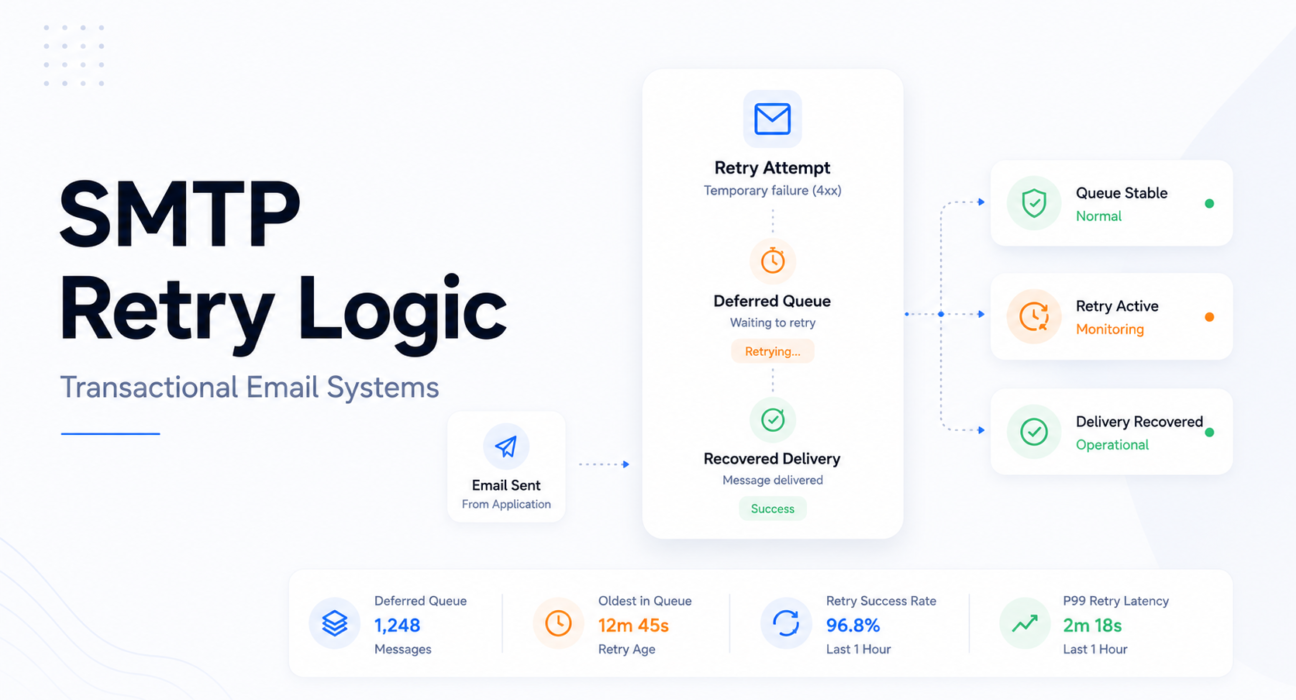
A product launch drives a 6x sign-up spike. Every sign-up triggers an OTP with a 5-minute expiry. The relay hits its hourly rate limit. Messages defer. The retry logic fires every 60 seconds. At T+60, 2,400 deferred messages retry simultaneously — generating a burst higher than the rate that triggered the original throttle. The rate limit re-triggers. All 2,400 defer again. At T+120, the same thing happens.
The traffic spike normalized at T+15 minutes. The retry storm ran for 90 minutes after that. The relay logs showed thousands of delivery attempts, zero hard errors, zero bounces. Every OTP expired before it delivered. Twenty-two percent of sign-ups from that window never completed verification.
Retry logic exists to recover from temporary delivery failures. Poor retry logic turns temporary failures into system-wide incidents.
Operational observation: Most production transactional email failures do not happen during the original send. They happen during retries — when the retry system amplifies the problem it was designed to resolve.

Table of Contents
- Quick Answer: What Is SMTP Retry Logic?
- What SMTP Retry Logic Actually Does
- 4xx vs 5xx SMTP Responses — The Most Important Distinction
- How SMTP Retry Queues Work
- Exponential Backoff and Why It Exists
- What Retry Storms Look Like in Production
- Useful Delivery vs Eventual Delivery
- Retry Windows by Email Type
- Common Retry Logic Mistakes
- How to Monitor Retry Systems
- Incident Snapshot: Retry Storm During Traffic Spike
- How PhotonConsole Handles Retry Observability
- SMTP Retry Monitoring Checklist
- Frequently Asked Questions
- Conclusion
Quick Answer: What Is SMTP Retry Logic?
SMTP retry logic is the system that determines what happens when a delivery attempt fails temporarily. When a receiving server returns a 4xx transient failure code, the sending MTA moves the message to a deferred queue and schedules a retry after a configured interval. It keeps trying until the message delivers, the receiving server returns a 5xx permanent failure, or the maximum retry window expires.
The four variables that determine whether a retry system is reliable or dangerous:
- Retry interval: Fixed intervals create synchronized storms; exponential backoff with jitter prevents them
- Maximum retry window: Must match the operational validity window of the email type — not a universal default
- Failure classification: 4xx (retry eligible) vs 5xx (suppress immediately) must be correctly distinguished at the enhanced status code level
- Queue prioritization: OTP and bulk sends sharing a retry queue means campaign retries delay authentication retries
What SMTP Retry Logic Actually Does
Retry logic is a queue management system as much as a delivery system. Understanding it only as “resend behavior” misses the operational dynamics that determine whether it helps or hurts during an incident.
When a delivery attempt fails with a transient 4xx response, the MTA moves the message from the active queue to the deferred queue, records the failure and timestamp, and schedules a retry. The deferred queue is separate — messages in it are not being processed continuously, they are waiting for their scheduled retry time.
This means the deferred queue accumulates depth during incidents. Every new temporary failure adds to it. The ratio between deferred and active queue depth is one of the earliest detectable signals of throttling — visible minutes before latency becomes user-visible.
What the retry system does not do: communicate with the recipient or the sending application during the retry period. The application logged the message as sent. The relay’s involvement has not yet produced a useful outcome. Both are unaware of this.
Retry expiration is the most consequential outcome most teams do not plan for. A message that exhausts its retry window without delivering has effectively hard-failed — but without generating a 5xx bounce. The message disappears from the queue. For OTP and password reset email, this is a broken user flow that the monitoring system may never register as a failure.
4xx vs 5xx SMTP Responses — The Most Important Distinction
This classification determines everything about how a message should be handled after a delivery failure. Getting it wrong is the fastest way to turn manageable delivery problems into serious reputation damage.
4xx — Transient Failures, Retry Eligible
The receiving server is deferring the message, not rejecting it. Try again later.
| Code | Enhanced | Meaning | Retry Action |
|---|---|---|---|
| 421 | 4.4.5 | Rate limited or connection overload | Back off and retry with exponential interval |
| 450 | 4.2.2 | Mailbox temporarily unavailable | Retry; escalate to suppression after 72 hours |
| 451 | 4.7.1 | Greylisting or temporary policy deferral | Retry after greylist interval; monitor time-to-delivery |
| 452 | 4.2.2 | Insufficient storage at receiving server | Retry after interval |
5xx — Permanent Failures, Suppress Immediately
The receiving server is refusing the message. Retrying will not change this. Every retry attempt is an additional bounce event contributing to sender reputation scoring.
| Code | Enhanced | Meaning | Action |
|---|---|---|---|
| 550 | 5.1.1 | Recipient address does not exist | Suppress immediately — globally |
| 550 | 5.7.1 | Policy rejection (SPF/DKIM failure or spam score) | Suppress; investigate authentication records |
| 551 | 5.1.6 | User not local (mailbox does not exist) | Suppress immediately — frequently misclassified as soft bounce |
| 554 | 5.7.0 | Sending IP or domain blocklisted | Suppress; check major DNSBLs; do not retry while listed |
Suppression rule: Any 5xx response triggers immediate suppression — before the next send cycle. A retry against a permanent failure is not resilience. It is reputation damage at the cost of additional SMTP connection attempts.
Enhanced status codes — the three-part X.X.X suffix — are what allow automated systems to classify failures correctly without human review. A monitoring system that logs only the numeric code (550) cannot distinguish between a non-existent address (5.1.1) and a policy rejection (5.7.1). The full classification reference is in the SMTP response codes guide.
How SMTP Retry Queues Work
The deferred queue is where most latency incidents actually live. Understanding how messages move through it — and how retry scheduling creates predictable failure patterns — is what allows engineers to design retry systems that recover instead of amplify.
Message Lifecycle Through the Retry System
| Event | Queue State | Time |
|---|---|---|
| Message submitted to relay | Incoming queue | T+0 |
| Worker attempts delivery | Active queue → SMTP connection | T+2 sec |
| 451 4.7.1 received (greylisting) | Deferred queue — scheduled for retry | T+3 sec |
| First retry attempt | Active queue → SMTP connection | T+5 min |
| 421 4.4.5 received (rate limited) | Deferred queue — second retry scheduled | T+5 min 2 sec |
| Second retry (exponential backoff) | Active queue → SMTP connection | T+15 min |
| 250 OK — delivery succeeds | Removed from queue | T+15 min 3 sec |
Total delivery time: 15 minutes. SMTP acceptance time in relay logs: 3 seconds. The 15-minute latency exists entirely in retry wait time — invisible to SMTP success metrics.
For an OTP with a 5-minute expiry, that message failed its operational purpose at T+5 minutes. The relay logged a successful delivery at T+15 minutes. Both are true. Only one reflects what the user experienced.
Queue Depth as the Leading Signal
The ratio between deferred queue depth and active queue depth is the earliest detectable signal of a throttling or rate limiting event. Deferred queue growing while active queue stays flat: receiving servers are returning 4xx temporaries. Both growing simultaneously: internal MTA resource saturation.
The diagnosis is different. The remediation is completely different. The deferred queue ratio is what makes it readable before it becomes a user-visible problem.
Exponential Backoff and Why It Exists
Exponential backoff is the retry interval strategy where each successive retry waits longer than the previous one — typically multiplying the previous interval by a factor between 1.5 and 3. First retry at T+5 minutes. Second at T+15. Third at T+45. Fourth at T+2 hours.
The operational reason is not politeness toward receiving servers. It is queue mechanics.
Fixed Intervals Create Synchronized Storms
If 3,000 messages defer simultaneously during a throttling event and retry logic uses a fixed 60-second interval, all 3,000 retry at T+60. The aggregate sending rate in that window is almost certainly higher than the rate that triggered the original throttle. The throttle re-triggers. All 3,000 defer again. The retry queue kept growing because retries were generating more retries.
Fixed-interval retries turn temporary congestion into synchronized retry storms.
Backoff Allows the Problem to Clear
With exponential backoff, messages that succeed on earlier retries leave the deferred queue. The retry population decreases. By the third cycle, only the most persistent failures remain. The receiving server’s rate limit window clears during the backoff interval. When retries resume, the aggregate rate is below the limit.
Jitter — The Detail Most Implementations Miss
Even correct exponential backoff can synchronize if all messages that deferred at the same moment retry at the same moment — just later. Adding jitter (a small random variance to each message’s retry time) prevents this.
Jitter math: 3,000 messages with a 5-minute base retry interval and 20% jitter retry between T+4 min and T+6 min — spreading across 2 minutes rather than firing simultaneously. A simultaneous burst of 3,000 messages sends 50/sec. Jittered retries across 2 minutes send approximately 25/sec — below most rate limits.
Exponential backoff without jitter is better than fixed intervals. Exponential backoff with jitter is the configuration that actually recovers from throttling events instead of just delaying them.
What Retry Storms Look Like in Production
A retry storm is not a single failure event. It is a feedback loop where retry behavior sustains the conditions it was supposed to resolve. The pattern is consistent regardless of what triggered it.
Retry Storm Timeline:
| Time | Event |
|---|---|
| T+0 | ISP throttling begins — rate limit reached |
| T+2 min | 8,000 messages in deferred queue |
| T+10 min | Fixed retry fires — all 8,000 retry simultaneously; rate limit re-triggered |
| T+15 min | Deferred queue doubles — original 8,000 plus 4,000 new incoming |
| T+20 min | Second synchronized retry — 12,000 messages simultaneously |
| T+25 min | OTP expiration failures begin — tokens generated at T+0 now expired |
| T+35 min | User resends begin — each adds a new message behind the existing backlog |
| T+45 min | Support tickets spike: “I’m not receiving my verification email” |
| T+85 min | Original traffic spike normalized at T+15 — storm has been self-sustaining for 70 minutes |
The Resend Amplification Effect
A resend button during a queue congestion event is not a user recovery mechanism. It is additional queue pressure. Each resend adds a new message behind the existing backlog. In a queue already processing 12,000 deferred retries, every resend extends the wait for all messages behind it.
Most retry storm analyses undercount this effect. The resend requests arrive exactly when the queue is most congested — which is also when users are most likely to tap “resend.” The retry storm generates user behavior that deepens the retry storm.
The relay metrics looked healthy because the failure existed entirely inside the retry system. SMTP success dashboards recorded delivery events. None of those delivery events were useful.
Useful Delivery vs Eventual Delivery
A successful delivery event after token expiry is operationally identical to failure. The message delivered. The user could not use it.
This distinction — between eventual delivery and useful delivery — is the framing that determines whether retry configuration is correct for time-bounded transactional email.
Useful Delivery vs Eventual Delivery:
| Scenario | Delivered | Operationally |
|---|---|---|
| OTP arrives in 40 seconds | Yes | Useful — authentication succeeds |
| OTP arrives in 12 minutes (5-min expiry) | Yes | Failed — user cannot authenticate |
| Password reset arrives in 8 minutes (60-min expiry) | Yes | Useful — link still valid |
| Password reset arrives in 90 minutes (60-min expiry) | Yes | Failed — account still locked |
| Invoice arrives in 4 hours | Yes | Useful — no hard expiry |
| Security alert arrives after incident resolved | Yes | Useless — not actionable |
Delivery success metrics capture the left column. They say nothing about the right.
For OTP email specifically, this changes the operational requirements for retry configuration in ways that most generic relay defaults do not accommodate:
- Maximum retry window must be shorter than token expiry: 2 to 4 minutes for OTP class. A universal 48-hour default means an OTP that bounces transiently will be retried for 48 hours — delivering at hour 12 to a user who gave up long ago.
- First retry must be fast: 30 seconds for OTP class. A 30-minute first retry interval applied to OTP email means a single transient failure produces a 30-minute delivery delay — past every reasonable token expiry window.
- Abandonment logic must notify the application: When the OTP retry window expires, the application needs to know so it can prompt for a new token — not leave the user waiting on a delivery that will never come, or arrive useless if it does.
The relay recovered. The OTPs were already useless.
The relationship between retry timing and OTP delivery windows is covered in detail in the transactional email latency guide.
Retry Windows by Email Type
| Email Type | First Retry | Max Window | Abandonment Action | Reason |
|---|---|---|---|---|
| OTP / MFA | 30 seconds | 2–4 min | Abandon + notify app for token regeneration | Token expiry: 5–10 min; post-expiry delivery is useless |
| Password Reset | 60 seconds | 5–10 min | Abandon + notify app; link may be expired | User is actively waiting; token expiry 15–60 min |
| Email Verification | 60 seconds | 10 min | Abandon + flag account for re-verification | User is in onboarding session; first-session completion at risk |
| Invoice / Billing | 5 minutes | 24 hours | Suppress after persistent failure | No hard expiry; compliance requires eventual delivery |
| System Alerts | 2 minutes | 30 min | Abandon if stale — alert may be irrelevant | Alert actionability degrades rapidly with delay |
| Marketing / Lifecycle | 30 minutes | 48 hours | Suppress after 72 hours persistent failure | No time sensitivity; aggressive retries waste queue resources |
These configurations only work if authentication and marketing email are in separate retry queues with separate configurations. A shared queue with uniform retry settings uses the configuration appropriate for one class and wrong for all others. In practice, defaults are usually calibrated for marketing email — which makes them wrong for OTP email in exactly the ways that cause authentication failures.
Common Retry Logic Mistakes
Retrying 5xx Permanent Failures
The single most damaging retry mistake. Retry logic that does not parse enhanced status codes cannot distinguish 4xx from 5xx. The default in some relay configurations is to retry everything that does not immediately succeed. At scale, 5xx retries accumulate into the bounce rate patterns that trigger ISP filtering increases. Retrying 550 5.1.1 responses does not deliver the message. It accelerates reputation damage at the rate of one bounce event per retry cycle.
Fixed Intervals Without Jitter
The most common configuration found in production systems that have experienced a retry storm. It looks reasonable in isolation. Under throttling with thousands of messages in the deferred queue, it becomes the mechanism that sustains the incident after its cause has resolved. The retry system is often the largest source of latency in transactional email infrastructure — and the least monitored component that produces it.
Excessive Maximum Retry Windows
A relay configured to retry for 5 days accumulates deferred queue depth from messages that failed transiently days ago and will almost certainly never deliver. These consume retry cycles, contribute to queue depth, and generate bounce events at each attempt. The correct response to a soft bounce persisting beyond 72 hours is escalation to suppression — not continued retry.
Shared Retry Queues Across Email Classes
When authentication and marketing email share a retry queue, deferred marketing retries compete with authentication retries for worker processing time. During a large marketing campaign that generates significant deferred volume, new OTPs wait behind marketing retries before their first delivery attempt. The user experience is an OTP that arrives after expiry. The root cause is queue architecture, not SMTP failure.
No Retry Visibility
Retry activity that is not logged, monitored, or alerted on is invisible until it produces a user-visible incident. The deferred queue may grow for 30 minutes before anyone is aware that a throttling event is sustaining a retry storm. The queue depth was the signal. The support tickets were the consequence.
Common failure patterns from missing or misconfigured retry systems are covered in the production email debugging guide.
How to Monitor Retry Systems
Relay delivery success metrics do not surface retry behavior. A message that retried 8 times over 45 minutes before delivering appears identically to a message that delivered on the first attempt. Retry monitoring requires queue-level instrumentation.
Deferred Queue Ratio
Monitor deferred queue depth relative to active queue depth. Alert when deferred queue exceeds 20% of active queue for more than 10 consecutive minutes — the earliest signal of a throttling event, typically detectable 20 to 40 minutes before user-visible latency appears.
In Postfix-based systems: postfix_queue_size{queue="deferred"} versus postfix_queue_size{queue="active"}. Configure the Prometheus alert on the ratio, not on absolute deferred queue size — absolute thresholds lose calibration as total volume changes.
Accumulated Retry Wait Time per Priority Class
For each delivered message that required at least one retry, log total retry count and accumulated wait time between first attempt and eventual delivery. Track P99 of accumulated retry wait time per email class. When P99 for authentication email exceeds 60 seconds, the retry system is adding latency beyond operational SLOs — regardless of whether delivery eventually succeeded.
Retry Synchronization Detection
A retry storm produces a characteristic signal: periodic SMTP connection rate spikes at intervals matching the retry configuration. Spikes every 60 seconds with high amplitude mean fixed-interval retries at scale. This is detectable in relay connection rate metrics before it produces user-visible delivery failures — if someone is watching it.
4xx Response Category Monitoring
- 421 4.4.5 spike: ISP or relay rate limiting — adjust sending rate and retry interval
- 451 4.7.1 spike: Greylisting — monitor time-to-delivery against token expiry windows
- 450 4.2.2 concentrated at one domain: Domain-level issue, not sender-side — investigate with ISP
Deferred queue growth matters more than delivery success rate during throttling. The complete observability stack is in the SMTP monitoring tools guide.
Retry Age Distribution
Track the age distribution of messages in the deferred queue: under 5 minutes, 5 to 15 minutes, 15 to 60 minutes, over 1 hour. For OTP-class email, any message in the deferred queue for more than 5 minutes has exceeded its operational utility window. The retry system is processing a message that cannot be useful — queue resources and SMTP connections spent on an outcome that no longer matters.
Incident Snapshot: Retry Storm During Traffic Spike
The retry system did not malfunction. It performed exactly as configured. That was the problem.
Context: A B2B SaaS product ran a product announcement campaign that drove 4x normal sign-up volume over 4 hours. Every sign-up triggered an email verification OTP with a 5-minute expiry. The relay was configured with a fixed 10-minute retry interval applied uniformly to all email categories. Rate limit: 300 messages per minute.
T+15 min: Sending rate hits 300 messages per minute. Relay returns 421 4.4.5. 4,200 messages defer. Retry timer set: T+25 minutes.
T+25 min: All 4,200 retry simultaneously. Aggregate rate: approximately 700 messages per minute. Rate limit re-triggers. All 4,200 defer again. New sign-up OTPs join the growing backlog. The retry queue kept growing because retries were generating more retries.
T+35 min: Second synchronized retry — now 6,800 messages. Same outcome. OTP tokens generated during the initial window begin expiring. Users tap “resend.” Each resend adds to the backlog.
T+48 min: First support tickets. Engineering investigates relay dashboard: 100% delivery success. Application logs: no errors. Deferred queue depth: not monitored.
T+75 min: An engineer checks the rate limit dashboard directly. Finds sending rate at the ceiling continuously for 60 minutes. Identifies synchronized retry pattern. Switches to exponential backoff with jitter. Queue begins draining.
T+120 min: Queue cleared. 26% of sign-ups from the T+15 to T+75 window did not complete verification.
The traffic spike had normalized at T+15. The retry storm ran for 70 minutes after that.
Operational lesson: The failure mode — synchronized retry amplification — only emerges at scale. Low-volume testing does not surface it. The deferred queue ratio alert would have fired at T+17 minutes. The first support ticket arrived at T+48. That 31-minute gap is the cost of monitoring delivery success rate instead of queue behavior.
How PhotonConsole Handles Retry Observability
The diagnostic gap in retry incidents is consistent: relay reports delivery success, and there is no per-message visibility into retry count, accumulated retry wait time, or whether the message delivered within the window where it was still useful.
PhotonConsole’s SMTP relay logs retry telemetry at the message level: retry count, attempt timestamps, response code per attempt, and accumulated wait time from submission to delivery. This data is what makes P99 accumulated retry delay calculable per email class — distinguishing a message that delivered after a single greylist retry from one that cycled through 12 attempts over 45 minutes delivering past every relevant expiry window.
Authentication-class sends run in a separate processing lane from bulk sends. A marketing campaign retry backlog does not compete with new OTP sends for worker processing slots. Pay-per-use pricing removes the incentive to stay on lower-tier plans with rate limits that trigger throttling under launch-day traffic — the condition that produced the incident above.
For teams evaluating relay infrastructure with retry observability as a selection criterion, the SMTP relay evaluation guide covers queue architecture and delivery telemetry alongside other infrastructure variables.
SMTP Retry Monitoring Checklist
| Signal | What It Means | Recommended Action |
|---|---|---|
| Deferred queue growing, active queue stable | ISP throttling or relay rate limit — receiving servers returning 4xx temporaries | Check relay rate limit; verify exponential backoff with jitter is active |
| Periodic SMTP connection spikes at regular intervals | Synchronized retry storm — fixed interval causing simultaneous retries | Switch to exponential backoff with jitter immediately |
| OTP-class messages in deferred queue over 5 min | Authentication email has exceeded token expiry — delivery will be functionally useless | Abandon OTP messages past max retry window; notify app for token regeneration |
| P99 accumulated retry wait time increasing (auth class) | Retry system adding latency beyond OTP expiry threshold | Investigate deferred queue composition; check for shared queue between auth and marketing |
| 421 4.4.5 spike | Rate limiting at relay or receiving server | Reduce sending rate; increase retry base interval |
| 451 4.7.1 spike | Greylisting — retry after interval required | Verify retry honors greylist interval; monitor time-to-delivery vs token expiry |
| Any 5xx responses being retried | Permanent failures treated as transient — reputation damage per retry cycle | Update retry logic to suppress on 5xx; audit enhanced status code parsing |
| Messages in deferred queue over 72 hours | Persistent soft bounce consuming retry cycles without delivery probability | Escalate to hard bounce suppression; remove from deferred queue |
| Support tickets about expired OTPs, relay shows success | Retry delivering after token expiry — relay records success, user cannot use it | Audit OTP retry window; check accumulated retry wait time for recent deliveries |
| Deferred queue not draining between traffic spikes | Retry interval too short or jitter absent — queue cannot clear before next spike | Increase base retry interval; add jitter; verify backoff multiplier |
Frequently Asked Questions
What is SMTP retry logic?
SMTP retry logic is the system that determines what happens when a delivery attempt fails temporarily. When a receiving server returns a 4xx transient failure, the MTA moves the message to a deferred queue and schedules a retry after a configured interval. The system retries until the message delivers, the server returns a 5xx permanent failure, or the maximum retry window expires. The retry interval, window duration, and failure classification rules determine whether the system recovers from temporary delivery failures or amplifies them into production incidents.
How do SMTP retries work?
A 4xx response from a receiving server moves the message from the active queue to the deferred queue with a scheduled retry time. At the scheduled time, the message returns to the active queue and delivery is reattempted. If it succeeds (250 OK), delivery event logged, message removed from queue. If another 4xx, deferred again with an increased interval (exponential backoff) or the same interval (fixed — creates retry storms under throttling). If a 5xx permanent failure, the message must be immediately suppressed — never retried.
What is the difference between 4xx and 5xx SMTP errors?
4xx indicates a temporary condition — rate limiting, greylisting, mailbox temporarily full. Retry is appropriate and expected. 5xx indicates a permanent rejection — the address does not exist, the sender is blocklisted, authentication failed. Retrying will not change this. Every 5xx retry is a bounce event contributing to sender reputation scoring. 5xx responses must trigger immediate suppression.
What causes SMTP retry storms?
Retry storms occur when a large number of messages defer simultaneously and fixed retry intervals cause them all to retry at the same moment — creating a sending burst higher than the original throttling event. The throttle re-triggers. All messages defer again. The loop sustains itself. The fundamental cause is fixed retry intervals without jitter. Exponential backoff with jitter spreads retries over time, allows the receiving server’s rate limit window to clear, and prevents the synchronized burst pattern that creates the loop.
How should retry logic work for OTP emails?
First retry within 30 seconds. Maximum retry window 2 to 4 minutes — within the token expiry window. After the maximum window, abandon the message and notify the application to regenerate a new token. OTP email must be in a separate retry queue from marketing and lifecycle email with its own configuration. A shared queue defaults to marketing email settings — long intervals, long windows — which makes it wrong for OTP in the specific ways that cause authentication failures.
What is exponential backoff in SMTP retry systems?
A retry interval strategy where each successive retry waits longer than the previous one — typically multiplying by 1.5 to 3. First retry at 5 minutes, second at 15, third at 45, fourth at 2 hours. This allows the receiving server’s rate limit window to clear between retry attempts and prevents the synchronized burst pattern that sustains retry storms. Adding jitter (a small random variance per message’s retry time) prevents synchronization even between messages deferred at the same moment.
Conclusion
Retry logic is part of the reliability architecture, not a background implementation detail. The two decisions that determine everything else: whether 4xx and 5xx responses are correctly classified (retrying permanent failures is reputation damage, not resilience), and whether exponential backoff with jitter is in place (fixed intervals create the synchronized storms that sustain incidents far beyond their cause).
Everything downstream — retry window length, queue prioritization, abandonment logic, monitoring — depends on getting those two decisions right. Miss them and the retry system becomes the failure mode. Most retry incidents begin with rate limits and end with queue collapse. The part in between — the storm, the OTP expirations, the support tickets — is the retry system doing exactly what it was told.
A retry system that cannot recover gracefully from throttling is not a resilience system. It is a traffic amplifier.
For teams auditing transactional email infrastructure before a production launch, the email infrastructure checklist for SaaS products before launch covers retry configuration alongside every other pre-production validation step. For active delivery delay diagnosis, the email delivery delay guide covers the infrastructure-level signals that distinguish queue congestion from relay failure from ISP-side throttling. For relay infrastructure with per-message retry telemetry, PhotonConsole provides the delivery event visibility that makes retry system behavior transparent instead of opaque.
Recommended Infrastructure Guides
Latency and Delivery Failures
- Transactional email latency — P99, queue congestion, and monitoring
- Email delivery delays — infrastructure-level diagnosis
- Transactional emails failing in production — debugging guide
Monitoring and Observability
- SMTP monitoring tools for transactional email infrastructure
- SMTP response codes — complete reference
Deliverability and Reputation



Transactional Email Queue Architecture Explained | Photonconsole.com
May 15, 2026[…] SMTP Retry Logic Explained for Transactional Email Systems […]
Laravel Mail Configuration For Production Delivery | Photonconsole.com
May 15, 2026[…] SMTP Retry Logic for Transactional Email Systems […]