


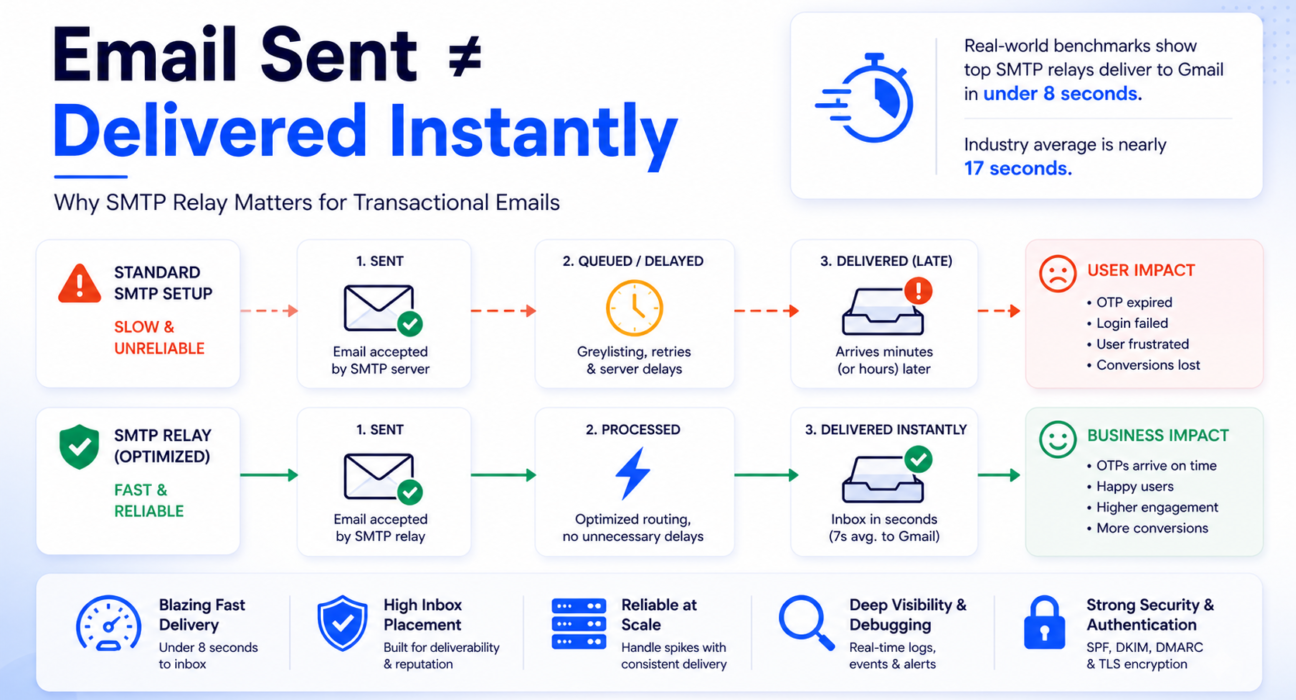
Your user clicks “Send me a login code.” They wait five seconds. Then ten. The OTP never comes.
They try again. The second code arrives at the same moment as the first — both now expired.
They close your app and do not come back.
That scenario plays out thousands of times every day across products running on inadequate SMTP infrastructure. The failure is never in the code. The email was sent. The problem is everything that happens between “sent” and “delivered” — and why it took longer than your user was willing to wait.

Transactional email is not a feature. It is infrastructure. And when the infrastructure fails, your product fails — silently, invisibly, and at exactly the wrong moment.
This guide cuts through the noise. You will learn what causes transactional delivery failures, how to evaluate SMTP relay services using real benchmarks, and how to make a decision that holds up in production — not just in a sales demo.
Quick Answer: What Is the Best SMTP Relay for Transactional Emails?
The best SMTP relay for transactional emails is one built specifically for time-sensitive, user-triggered sends — with dedicated IP infrastructure, full authentication support, and delivery latency measured in single-digit seconds rather than minutes.
Here is what the data shows:
- The best-performing relays deliver to Gmail in under 8 seconds on average.
- The industry average is nearly 17 seconds — more than twice as slow.
- Under greylisting — a common anti-spam technique — total delivery latency on poorly configured infrastructure can reach 15 to 60 minutes. That is not a delay. That is a broken authentication flow.
The short answer: use a dedicated SMTP relay service purpose-built for transactional email — not a shared general-purpose provider. The rest of this guide shows you exactly how to evaluate your options and choose correctly.
What Makes Transactional Email Fundamentally Different
Most email infrastructure discussions treat all outbound email the same. That single assumption is the root cause of most transactional delivery failures.
The Engagement Signal Gap
Transactional emails carry the highest engagement signals of any email type. Open rates consistently exceed 80 percent — because users are actively looking for them. The email is not a message. It is the action itself: the code, the link, the confirmation they triggered by clicking a button.
Marketing emails operate in a completely different reality. Open rates of 10 to 20 percent, meaningful spam complaint rates, and low engagement create a reputation signal that — when mixed with transactional infrastructure — contaminates the delivery environment your critical emails depend on.
When your transactional and marketing email share the same sending IP, a single marketing campaign that generates spam complaints will damage that IP’s reputation within minutes. Your next OTP goes out on a penalized IP. Instead of arriving in 7 seconds, it arrives in 60 minutes — or not at all.
In simple terms: Mixing marketing and transactional email on the same infrastructure is like sharing a credit score with a stranger. Their mistakes become your delivery failures.
Zero Tolerance for Delay
A promotional email arriving two hours late costs you some engagement.
An OTP arriving two hours late costs you the user.
MFA codes, password reset links, and payment confirmations all have hard expiry windows. Your relay’s retry logic and the receiving server’s anti-spam behavior interact directly with those windows. When the timing is wrong, your product breaks — for real users, in real time, with no error message to warn you.
What Falls Under “Transactional Email”
- One-time passwords and two-factor authentication codes
- Password reset and account recovery links
- Email address verification on signup
- Payment confirmations and purchase receipts
- Order confirmation and shipping status updates
- Login alerts and suspicious activity notifications
- Subscription renewals and billing reminders
- System alerts and downtime notifications
Every one of these messages carries an implicit contract with your user: they took an action and expect an immediate, reliable system response. An infrastructure that fails this contract fails your product.
Key takeaway: Transactional email is not background communication. It is the moment your product either works or does not.
Why Standard SMTP Setups Break Under Transactional Load
Standard SMTP setups fail transactional email in multiple compounding ways — not just one. Authentication failures are one of the most common causes of email delivery problems, but the infrastructure risks go deeper than that.
Retry Delays That Kill OTP Windows
When a receiving mail server returns a temporary 4xx error — essentially “try again later” — your sending server queues the message and retries after a backoff interval.
Postfix, the most common MTA used in relay infrastructure, starts with a 5-minute retry interval. Exim, another widely used MTA, defaults to 15 minutes for its first retry.
Under normal conditions, that is manageable. But under greylisting — where the first delivery attempt from an unrecognized sender is intentionally rejected to filter spam — the combination of greylisting window (1 to 20 minutes) and MTA retry interval produces total delivery delays of 15 to 60 minutes for first-time sends.
In simple terms: Greylisting is an inbox provider saying “I do not recognize you yet — come back in a few minutes.” A spammer gives up. A legitimate relay retries. But for an OTP that expires in 5 minutes, that retry window is already too late.
For a product using OTPs with a 10-minute expiry window, a 15-minute greylisting delay does not mean a slow login. It means a broken login. The code arrives after it has already expired.
High-reputation senders using established relay infrastructure bypass greylisting entirely — that reputation is built through consistent, authenticated delivery history, which you cannot build on a generic or newly configured SMTP setup. More on this in our guide on why emails are delayed.
Key takeaway: If your relay retries after 15 minutes and your OTP expires in 10, your authentication flow is already broken.
Shared IP Reputation Contagion
In a shared SMTP environment, if one sender on your IP triggers a burst of spam complaints, the entire IP’s reputation collapses within minutes. Every other sender on that pool — including you — immediately faces throttled delivery or outright rejection from major inbox providers.
This is not a hypothetical. It is the documented mechanism behind the majority of unexplained transactional delivery failures.
Your sending code is correct. Your authentication is configured. But someone else’s marketing blast poisoned the shared pool — and your OTP emails are now landing in spam.
Key takeaway: On a shared IP, you do not control your own deliverability. Someone else does.
Volume Spikes That Trigger Throttling
Mailbox providers monitor sending behavior in real time. A sudden spike in volume — a domain that normally sends 1,000 emails per day suddenly attempting 50,000 after a product launch — is treated as a threat signal.
The receiving server issues throttling responses, typically SMTP code 421, which forces the relay to queue and slow down. This queuing directly delays your most time-sensitive messages at exactly the moment when volume is highest and user expectations are strongest.
A purpose-built transactional relay uses dedicated IP pools with pre-established reputation and volume history, so your burst traffic does not trigger the same scrutiny as an unknown sender on a cold IP.
No Delivery Visibility
Generic SMTP setups give you zero insight into what happens after the send command. You cannot see whether a message was delivered, deferred with a 4xx code, rejected with a 5xx code, or silently filtered.
When a user reports they never received their verification email, you have nothing to work with. No logs, no event trail, no diagnosis path. This is explored in detail in our guide on emails sent but not delivered — the most common support scenario that standard SMTP leaves teams completely unable to diagnose.
Key takeaway: Without delivery logs, you are not running email infrastructure. You are hoping.
Section Recap — Why Standard SMTP Fails:
- Retry logic adds 5 to 15 minutes per deferral — greylisting multiplies this to 60 minutes
- Shared IPs transfer another sender’s reputation problems directly to your delivery
- Volume spikes on unestablished IPs trigger throttling at the worst possible moment
- No logs means no diagnosis when something goes wrong — and something always goes wrong
Key Factors to Evaluate When Choosing an SMTP Relay for Transactional Emails
Evaluate relay providers on what directly determines transactional performance. Not feature count. Not interface polish. These six criteria separate relays that actually work from those that merely claim to.
1. Time-to-Inbox Latency
Real-world delivery benchmarks from 2025 and 2026 reveal significant variation between providers:
| Inbox Provider | Best-in-Class Latency | Industry Average |
|---|---|---|
| Gmail | 7.48 seconds | 16.96 seconds |
| Yahoo | 11.22 seconds | 17.21 seconds |
| Outlook / Hotmail | 14.48 seconds | 18.80 seconds |
Those gaps look small on paper. In an authentication flow where your OTP expires in 5 minutes and your user is watching their inbox, the difference between 7 seconds and 17 seconds is felt immediately.
What this means for you: The best relays reach Gmail in under 8 seconds because they send transactional traffic only — no marketing bursts competing for the same delivery pipeline. A general-purpose relay does not give transactional email priority. It treats all sends equally, and your OTP waits in the same queue as a newsletter.
Ask any prospective relay provider for their published latency data. If they cannot provide it, that is your answer. You can also test directly using Mail Tester before committing.
Key takeaway: Delivery delay is silent failure. By the time your user notices, the damage is already done.
2. Inbox Placement Rate
Delivery speed means nothing if the email lands in spam.
Gmail’s 2025 benchmarks show an overall inbox placement rate of 53.70 percent across all senders. For low-reputation senders on Outlook, the situation is worse — up to 70 percent of messages are missing or blocked.
The gap between authenticated and unauthenticated senders is not marginal: senders with a properly enforced DMARC reject policy see inbox placement improvements of up to 2.7 times compared to unauthenticated senders.
Before onboarding any relay, use MXToolbox to verify that the IP ranges associated with that provider are not listed on major blacklists. A relay on a blacklisted IP will fail to deliver to Gmail regardless of how well your authentication is configured.
3. Authentication Infrastructure
As of 2026, Google, Microsoft, and Yahoo all mandate full SPF, DKIM, and DMARC alignment. This is not optional and it is not gradual — Google’s Postmaster Tools now operates on a binary compliance model. Your domain is either Pass or Fail. A Fail status triggers immediate rejection of all traffic, regardless of your prior sending history.
There are two specific technical traps that break delivery silently:
The SPF 10-lookup limit. SPF records have a hard cap of 10 DNS lookups per validation check. Exceed this and you get an SPF PermError, DMARC fails, and the receiving server can reject the message immediately. Many setups hit this limit accidentally after adding multiple relay providers or third-party services over time.
DKIM signing overhead. The industry is moving from RSA-2048 to Ed25519 DKIM signatures. Ed25519 is 60 times faster to generate — a meaningful difference for high-throughput transactional systems signing thousands of messages per minute. However, because Microsoft 365 and Yahoo do not yet fully support Ed25519 verification, the current best practice is dual signing: both RSA-2048 and Ed25519 on each message. A relay that supports this correctly signals genuine infrastructure investment.
In simple terms: Think of SPF, DKIM, and DMARC as your email’s ID documents. Without all three, Gmail and Outlook treat your message as suspicious. With all three correctly configured, they let it straight through to the inbox.
The full breakdown of how authentication records affect delivery is in our guide on SPF, DKIM, and DMARC explained.
Authentication Quick Recap:
- SPF — authorizes which IPs can send on your domain’s behalf (hard limit: 10 DNS lookups)
- DKIM — adds a cryptographic signature proving the message was not tampered with in transit
- DMARC — tells inbox providers what to do when SPF or DKIM fails (p=reject = highest protection)
- All three must align — one gap breaks the entire chain and will cost you inbox placement
Key takeaway: One misconfigured authentication record will silently block every email you send — no error, no warning, no user notification.
4. Debugging and Delivery Visibility
When a user says “I never got my OTP,” you need an immediate answer — not a guess.
In a production transactional system, delivery logs are an operational requirement. You need to know, per message: was it accepted, deferred with a 4xx code, or rejected with a 5xx code? Was it a hard bounce or a soft bounce? When exactly did it leave your relay and when did the recipient server respond?
Relays that provide 30 to 45 days of searchable delivery metadata make post-incident diagnosis possible. Relays with minimal logging force you to reconstruct failures entirely from user reports — which is slow, incomplete, and operationally unsustainable as your product scales.
When diagnosing issues, the SMTP response code reference tells you exactly what each server response means. But you need the raw delivery data first — and that only comes from a relay that captures it.
Key takeaway: A relay with no logs is not a tool for production email. It is a black box that sends messages into the void.
5. Infrastructure Isolation for Transactional Traffic
The clearest differentiator between relay providers is whether they physically separate transactional and marketing email infrastructure.
Providers that run both through shared IP pools expose your transactional delivery to the reputation effects of marketing sends — higher complaint rates, volume volatility, and Gmail’s tab categorization algorithms sorting your OTP into the Promotions folder.
The minimum you can do on your end: use a dedicated subdomain like mail.yourdomain.com for transactional sends. This creates independent domain-level reputation tracking. If your primary domain is ever flagged, transactional delivery continues without disruption.
But subdomain segmentation is a partial solution. A relay that enforces this isolation at the infrastructure level — separate IP pools for transactional sends — provides structural protection that configuration alone cannot replicate.
6. Scalability and Pricing Model
Cold IP addresses face strict throttling from mailbox providers during a warmup period that typically lasts 30 to 90 days. A relay that places you on pre-warmed IP infrastructure eliminates this risk — you send from day one without the delivery penalties of an unestablished sender.
On pricing: transactional email volume grows proportionally with your user base. A pay-as-you-use model matches this growth pattern naturally. Flat-rate tiers charge you for capacity you do not need at low volume — then penalize you when you scale past the tier ceiling. Review the pricing structure of any relay against your actual sending volume before committing.
The Decision Framework: Match Your Situation to the Right Relay
The right relay for a two-person startup is not the right relay for a product handling millions of authentications per month. Use this framework to identify what your situation actually requires.
| Your Situation | Key Risk | What You Need from a Relay | Priority Features |
|---|---|---|---|
| Early-stage product, low volume | Cold IP penalties, greylisting on first sends | Pre-warmed shared IPs with good reputation history | Easy SMTP setup, pay-per-use, basic delivery logs |
| Growing product, increasing signups | Volume spikes triggering throttling | Burst-tolerant infrastructure, event-level logging | Real-time delivery data, API access, subdomain isolation |
| Developer building from scratch | Misconfigured authentication, silent failures | Clear setup docs, DKIM and DMARC guidance | SDK support, sandbox testing, response code visibility |
| Migrating from broken SMTP setup | Reputation damage from previous configuration | Clean infrastructure with no legacy reputation baggage | Drop-in SMTP credentials, fast DNS setup, deliverability audit |
| High-volume product (100k+ sends/month) | Shared IP contamination, noisy neighbor effect | Dedicated IP pools with independent reputation management | IP warmup support, bounce suppression, postmaster monitoring |
Not sure which category fits? Run a full diagnostic on your current setup first. The SMTP testing methods guide walks you through every check — and the results will tell you whether your problems are code-level, configuration-level, or infrastructure-level. That distinction determines whether you need to fix something or replace something.
SMTP Relay Options for Transactional Email: Focused Evaluation
This section evaluates five relay providers on transactional use cases only. Marketing tools, campaign features, and list management are not part of this comparison.
PhotonConsole
PhotonConsole is a cloud-based SMTP relay built specifically for developers, startups, and growing businesses sending transactional and notification emails. It addresses exactly the problems described in this guide: pre-warmed IP infrastructure, real-time delivery logs, full SPF, DKIM, and DMARC support, and a pay-as-you-use model that scales with your product rather than against it.
For teams migrating away from a broken setup — or building transactional infrastructure for the first time — PhotonConsole provides the clean foundation that generic SMTP setups cannot: delivery event visibility, proper authentication scaffolding, and no marketing traffic contaminating your transactional IP pool.
SendGrid (Twilio)
SendGrid is one of the most established relay providers with broad coverage across transactional and marketing email. Its delivery infrastructure is reliable, but its pricing structure and interface complexity can be disproportionate for teams focused exclusively on transactional use cases. Managing IP pools across mixed traffic types requires active monitoring — without it, the reputation contagion described earlier will degrade your transactional delivery over time.
Mailgun
Mailgun is developer-focused with strong RESTful API capabilities and solid delivery logging. It is a sound choice for teams comfortable managing their own IP pool configuration and wanting fine-grained programmatic control. Inbox placement on shared IPs can vary by sending cohort — worth testing before relying on it for critical OTP delivery in production.
Amazon SES
Amazon SES offers the lowest per-email cost among major providers. That is a genuine advantage at scale. However, SES places the full operational burden on the sender: IP reputation management, bounce handling, DKIM configuration, and deliverability monitoring are all largely manual. Teams without dedicated infrastructure experience often find that managing SES correctly at a transactional level costs more in engineering time than the per-email savings justify. Best suited for AWS-native products with a dedicated infrastructure team.
Postmark
Postmark operates transactional-only infrastructure — it does not allow marketing email on the same IP pools. This architectural commitment is the primary reason Postmark consistently achieves the lowest time-to-inbox latency in independent benchmarks: 7.48 seconds to Gmail versus the 16.96-second industry average. It also provides 45 days of searchable delivery metadata for deep troubleshooting. Its per-email pricing is higher, but the deliverability performance is measurable and consistent for products where inbox placement is non-negotiable.
Comparison Table: Transactional Email Use Cases
| Provider | Avg. Gmail Latency | Inbox Placement | Debugging Depth | Setup Complexity | Pricing Model | Best Transactional Use Case |
|---|---|---|---|---|---|---|
| PhotonConsole | Fast | High | Real-time event logs | Low | Pay-as-you-use | Startups, developers, OTP and notification delivery |
| Postmark | ~7.5s (best-in-class) | Very high | 45-day metadata retention | Low | Higher per-email | Products requiring maximum inbox placement |
| Mailgun | Fast, variable | Moderate to high | Good | Moderate | Pay-per-use | Developer-first API-driven delivery |
| SendGrid | Fast | High (with active IP management) | Good | Moderate to high | Tiered plans | Enterprise teams consolidating all email |
| Amazon SES | Fast | Variable (fully self-managed) | Limited without add-ons | High | Very low cost | High-volume AWS-native products with a dedicated infra team |
Platform-Specific Considerations
WordPress
WordPress sends transactional emails through the built-in wp_mail() function, which defaults to PHP’s mail() through the local server. This means no delivery logging, no authentication enforcement, and high susceptibility to spam filtering.
The fix is straightforward: install WP Mail SMTP and configure it to route all WordPress email through your relay’s SMTP credentials. You gain delivery logs, authentication, and reliable inbox placement — without touching a single line of theme or plugin code.
Node.js Applications
Node.js applications using Nodemailer connect to SMTP relays by updating the transport configuration with your relay’s host, port, and credentials. This is a configuration change, not a code rewrite — it works across Express, Next.js, NestJS, and any other Node.js framework.
Use port 587 with STARTTLS. Never use port 25 for production transactional email — it is blocked by most cloud providers and ISPs for application-level sending.
PHP Applications
PHP applications using PHPMailer or SwiftMailer follow the same pattern. Replace the local sendmail configuration with your relay’s SMTP host, port, and credentials. If you are hitting SMTP authentication errors in PHP, the cause is almost always incorrect credential format, TLS negotiation failure, or port mismatch — relay-configuration issues, not code bugs.
Gmail and Google Workspace
Google Workspace has native SMTP relay settings for routing outbound application email. However, it caps sending at 2,000 emails per day for standard accounts, provides no per-message delivery logging, and cannot handle the burst volume that follows a product launch. For any production transactional system beyond basic notifications, a dedicated relay is the right architecture.
Microsoft 365 and Outlook
Microsoft’s SMTP relay for Microsoft 365 supports outbound application email but applies rate limits and lacks event-level delivery visibility. Microsoft’s Spam Confidence Level (SCL) and Bulk Complaint Level (BCL) filters are also among the most aggressive in the industry — senders with an SCL above 5 are automatically routed to Junk, regardless of content quality. Building and maintaining reputation with Outlook infrastructure requires consistent, authenticated sending from stable IPs over time.
When You Definitely Need a Dedicated SMTP Relay
These are not edge cases. They are the most common situations where inadequate email infrastructure is directly costing you users, trust, and revenue — often without you realizing it.
Warning Signs: Recognize These Before They Compound
- Users report that OTP or verification emails never arrive — or arrive after the code has expired
- Transactional emails are landing in Gmail Promotions or spam folders
- You have no per-message delivery logs to investigate user-reported failures
- Email delivery slows or breaks during signup spikes or traffic surges
- Password reset emails take more than 2 minutes from trigger to inbox
- Support tickets regularly open with “I never got the email”
- You are sending from a shared IP and have never checked its blacklist status
Each of these is a direct product reliability failure with a known infrastructure solution. A dedicated SMTP relay resolves all of them at the level where they actually originate.
If multiple warning signs apply to your current setup, you are not just facing occasional delivery failures. You are operating in a degraded state that compounds over time — as reputation damage accumulates, inbox placement deteriorates, and user trust quietly erodes. Our analysis of email infrastructure failures covers the most common compounding patterns in detail.
Key takeaway: Delivery failures are almost always silent. Your users notice before you do — and by then, they have already left.
Diagnosing Your Current Setup Before You Switch
Before migrating, run a structured diagnostic to confirm whether your problems are infrastructure-level or configuration-level. This determines the right fix — and prevents you from switching relays only to discover the issue was in your application code all along.
Diagnostic Checklist: 6 Checks Before You Migrate
- Check SMTP logs for 4xx and 5xx codes. Deferral codes (4xx) mean temporary failure — the relay is retrying. Rejection codes (5xx) mean permanent failure. Cross-reference any codes against the SMTP response code reference to understand the exact cause.
- Run a blacklist check on your sending IP. Use MXToolbox Blacklist Check. If your IP appears on any major list, no amount of configuration work will fix your inbox placement until the IP is clean.
- Test your authentication score. Send a test message through Mail Tester. A score below 8 out of 10 identifies specific, fixable configuration problems — authentication gaps, content issues, and more.
- Count your SPF DNS lookups. Verify your SPF record does not exceed 10 lookups. Use a free SPF analyzer. Many setups silently exceed the limit after adding multiple services over time — this breaks DMARC without any visible error.
- Verify DKIM alignment. Confirm the From domain matches the DKIM signing domain. Misalignment is the most common cause of DMARC failure on setups where authentication appears correctly configured.
- Check connection-level issues separately. If SMTP is not connecting at all, verify port availability, TLS configuration, and credential format before concluding the problem is infrastructure.
If your diagnostic reveals IP blacklisting, SPF failures, or consistently poor spam scores, the problem is infrastructure — not code. Switching to a clean relay with pre-warmed IP reputation resolves these issues at the root. The complete deliverability improvement guide walks through all post-migration configuration steps.
Pro Tips for Transactional Email Reliability in 2026
- Isolate transactional and marketing traffic at the IP level. Reputation cross-contamination between marketing campaigns and transactional sends is the single most preventable cause of OTP delivery failures. Separate infrastructure is not a luxury reserved for large senders — it is a baseline protection for any product that depends on email for authentication.
- Use a dedicated sending subdomain from day one. Configure a subdomain like
mail.yourdomain.comortx.yourdomain.comfor all transactional sends. This creates independent domain-level reputation tracking — if your primary domain is ever flagged, transactional delivery continues without disruption. - Set OTP expiry to at least 10 minutes. Greylisting on a new sender-recipient pair can add 15 to 60 minutes of delivery delay. A 5-minute OTP window creates unnecessary failures during warmup periods and for new user signups. Once your relay builds reputation history with major inbox providers, greylisting is bypassed — but 10 minutes is the right default until then.
- Monitor Google Postmaster Tools weekly. Google’s binary Pass/Fail compliance model means a single authentication misconfiguration can trigger immediate traffic rejection across your entire sending domain. Google Postmaster Tools is free and catches issues before they reach production. Check it weekly, not after a user complaint.
- Build automated bounce suppression into your system. Hard bounces — 550 errors for unknown addresses — damage IP reputation when they accumulate. Validate email addresses at the point of collection. Suppress confirmed invalid addresses after the first hard bounce. Most production relays handle suppression automatically — verify this feature is active before you rely on it.
- Monitor OAuth token refresh cycles if using API authentication. The shift from basic SMTP authentication to OAuth 2.0 has introduced a new class of silent failure: expired refresh tokens that stop all outbound mail without triggering a standard SMTP error. Automate token renewal and set up monitoring before an expired token becomes a production incident you discover from user reports.
Related Issues to Address After Migration
Switching to a better relay resolves the core infrastructure problem. These adjacent issues will still affect transactional delivery if left unaddressed after migration.
- DNS propagation windows. New SPF, DKIM, and DMARC records take 24 to 48 hours to propagate globally. During this window, receiving servers may see misaligned records and reject or defer messages. Send low-volume test traffic first — do not cut over production sends until propagation is confirmed.
- IP warmup for dedicated IPs. New dedicated IPs face strict throttling during a warmup period of 30 to 90 days. Sending full volume immediately from a fresh IP will trigger the volume volatility throttling described earlier. Follow a controlled warmup schedule — gradually increasing daily volume — before handling full production load.
- Gmail tab categorization. Even authenticated transactional emails can be sorted into the Promotions tab if their content pattern resembles marketing email. Keep transactional template content clearly functional, avoid tracking pixels in OTP and alert emails, and send from a distinct subdomain that Gmail can associate with transactional behavior.
- Recipient-side filtering. Some corporate and enterprise environments apply strict external email filtering policies. If specific users consistently report missing transactional emails after migration, investigate whether the issue is on the recipient mail server — not in your relay configuration. This is a support and communication issue, not an infrastructure fix.
For a comprehensive view of what can go wrong on Gmail specifically, the guide on why emails go to spam in Gmail covers both sender-side and Gmail-specific filtering behavior in full detail.
Frequently Asked Questions
What is the best SMTP relay for transactional emails?
The best SMTP relay for transactional emails is purpose-built for time-sensitive, user-triggered sends — with dedicated IP infrastructure, full SPF, DKIM, and DMARC support, fast time-to-inbox performance, and complete delivery visibility. Benchmarks show the top providers deliver to Gmail in under 8 seconds; the industry average is 17 seconds. For developers and startups building on clean infrastructure, PhotonConsole offers a developer-friendly, pay-as-you-use transactional relay. Postmark leads on raw latency benchmarks. Amazon SES leads on cost at high volume but requires significant self-managed configuration work.
What is the difference between SMTP relay and email API?
SMTP relay routes your email through a trusted third-party server using the standard SMTP protocol — no code changes required if you already send via SMTP. Email API replaces SMTP with HTTP requests, offering richer event callbacks, dynamic templating, and tighter integration with modern application architectures. Both methods ultimately use the same underlying delivery infrastructure. SMTP integrates faster with existing code. API access provides better operational control and event-level tracking at scale. Most production relays support both.
Why are my transactional emails being delayed?
Transactional email delays have three primary causes. First, SMTP retry logic: after a 4xx deferral, your relay queues the message and retries in 5 to 15 minutes depending on the MTA. Second, greylisting: the first message from an unrecognized sender is intentionally rejected and retried, adding 15 to 60 minutes of total latency for first-time sends. Third, volume throttling from a sending spike, which queues messages behind the rate limit. A relay with established IP reputation bypasses greylisting and handles volume bursts without queuing delays. Full technical detail is in our email delay diagnosis guide.
Why are my transactional emails going to spam?
The three most common causes: missing or misconfigured SPF, DKIM, or DMARC records; sending from an IP with damaged or unestablished reputation; or shared IP contamination from another sender’s marketing activity. Properly enforced DMARC delivers inbox placement improvements of up to 2.7 times versus unauthenticated senders. Switching to a relay with clean dedicated IPs and correct authentication resolves most spam placement problems at the infrastructure level — not the content level.
Do I need a dedicated IP for transactional email?
At low volumes, well-managed shared IPs are acceptable and avoid the 30 to 90 day warmup complexity of new dedicated IPs. Above approximately 50,000 emails per month — or if you send any mix of transactional and marketing email — dedicated IPs give you complete control over reputation and eliminate exposure to noisy neighbors. Factor the warmup timeline into your migration plan.
What SMTP port should I use for transactional email?
Port 587 with STARTTLS is the current recommended standard. Port 465 with implicit SSL is an acceptable alternative. Port 25 is blocked by most cloud providers and ISPs for application-level outbound sending and should not be used for production. If you see connection failures, verify port configuration first using the SMTP connection testing guide.
Can I use Gmail SMTP for transactional emails in production?
Gmail SMTP works for development and very low-volume sends. It is not viable for production. It caps at 2,000 sends per day for Google Workspace accounts, provides no per-message delivery logging, and cannot handle burst traffic. Google’s OAuth 2.0 enforcement also means an expired refresh token will silently stop all outbound email from your application without a standard SMTP error. A dedicated relay eliminates all of these limitations.
Conclusion: Choose Your Infrastructure as Carefully as Your Code
The infrastructure analysis is clear. Transactional email delivery is governed by reputation physics, authentication compliance, retry logic, and latency benchmarks — not by how clean your application code is.
You can have a perfectly functioning send function and still have users who never receive their OTP — because the relay queued the message behind a greylisting delay, or a shared IP was throttled by another tenant’s marketing burst, or an SPF record exceeded the 10-lookup limit and DMARC failed silently.
Every one of these failure modes is preventable. The prevention is a single, deliberate infrastructure decision: a dedicated SMTP relay built for transactional email — with pre-warmed IPs, proper authentication, real-time delivery visibility, and infrastructure isolated from marketing traffic.
The benchmarks are not ambiguous. The best relay reaches Gmail in under 8 seconds. The industry average is nearly 17 seconds. That gap is not a performance footnote. For products that depend on OTP authentication, password resets, and payment confirmations, it is the difference between a product that works and one that erodes user trust one failed delivery at a time.
Make the choice deliberately. The pay-as-you-use pricing model means you can migrate, test, and validate on real traffic without committing to infrastructure costs before your volume justifies them.
Transactional email is not a background process. It is the moment your product either earns trust or loses it. Build the infrastructure to match.
Read More
- Emails Sent But Not Delivered: Causes and Fixes
- Why Are My Emails Delayed: Causes, Diagnosis and Fixes
- Why Emails Go to Spam in Gmail
- How to Improve Email Deliverability
- SPF, DKIM and DMARC Explained Simply
- SMTP Response Codes Explained
- Best SMTP Relay Service: Full Comparison
- Transactional Email Service: What to Look For

Choosing An SMTP Relay: 8 Critical Criteria Developers Must Evaluate | Photonconsole.com
May 4, 2026[…] SMTP relay for transactional emails: architecture and setup […]