


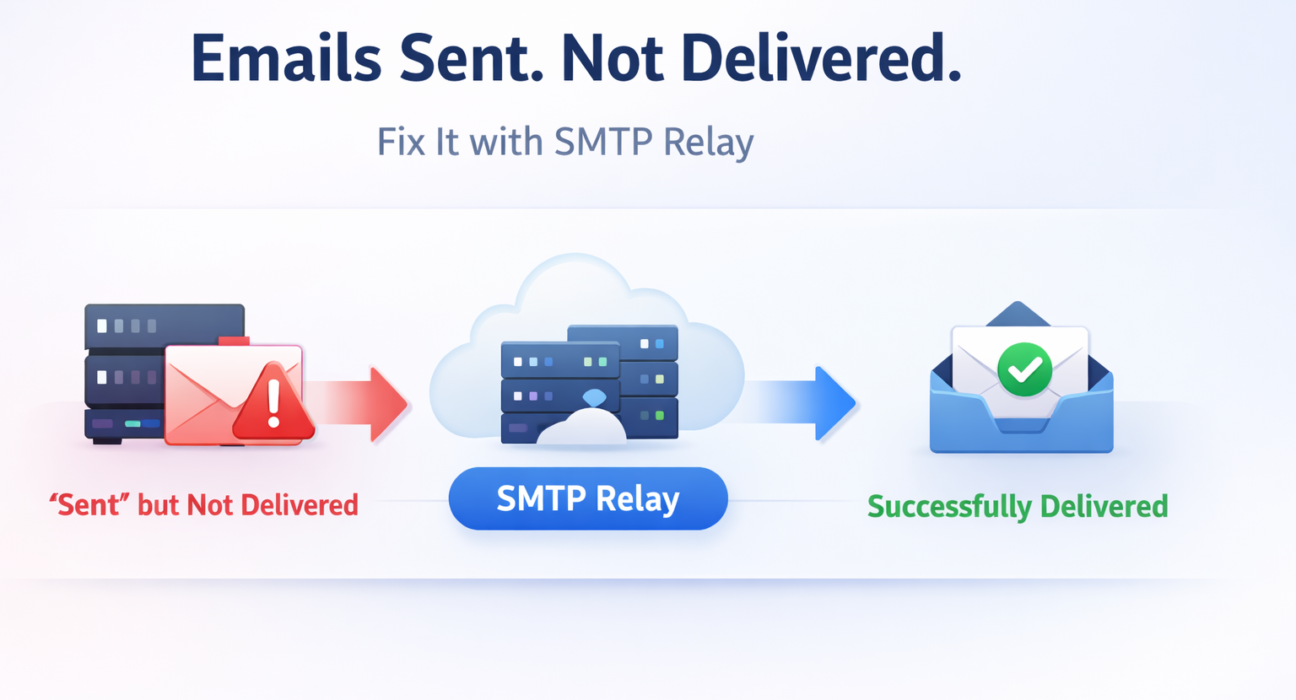
A user tries to log in. The OTP never arrives. They try again. Nothing. They abandon your product — not because your code failed, but because your email infrastructure failed silently, without a single error in your logs.
This is the real cost of a broken SMTP setup. Not a crash you can debug. Not a 500 error you can trace. Just users quietly leaving, passwords they cannot reset, orders they cannot confirm, and trust that does not come back. If your emails are ending up in Gmail’s spam folder or disappearing before they reach the inbox, the problem is almost certainly not your code — it is the infrastructure behind your sending setup.
This guide covers everything you need to understand, diagnose, and permanently fix email delivery. It connects all major SMTP delivery problems — from authentication failures and response code errors to infrastructure gaps and provider selection — and gives you the framework to make the right decision for your stack. Whether you are debugging a broken setup right now or building a new sending system from scratch, each problem is covered in detail below.
SMTP sends your emails. Infrastructure decides whether they survive.

Quick Answer: What Is an SMTP Relay Service and When Do You Need One?
An SMTP relay service is a cloud-based email delivery infrastructure that routes your outgoing emails through trusted, high-reputation servers — instead of sending them directly from your own server or application.
You need one when:
- Your emails are landing in spam folders instead of inboxes
- Your self-hosted SMTP server is getting rate-limited, blocked, or rejected
- You are sending transactional emails at scale (OTPs, alerts, order receipts)
- Your IP address has no sending history or has been blacklisted
- You have zero visibility into delivery failures, bounces, or complaint rates
The best SMTP relay services in 2025 are: PhotonConsole, SendGrid, Mailgun, Amazon SES, and Postmark — each suited to different use cases, team sizes, and budget constraints. This guide will help you choose the right one.
Why Most SMTP Setups Fail (And Why Configuration Alone Cannot Fix It)
Most developers treat SMTP as a solved problem. Set a host, a port, a username, a password — done. But email delivery is not just about transmitting a message. It is about being trusted by the server that receives it.
If you are new to how the protocol works at a fundamental level, start with the plain-language explanation of what SMTP is and how it works before troubleshooting. Understanding what actually happens between send and delivery changes how you diagnose problems.
Authentication failures are one of the most common causes of email delivery failure. Receiving servers check your SPF record, validate your DKIM signature, and enforce DMARC policies before accepting a single message. If your infrastructure does not pass these checks, your email is rejected or silently filtered — and your logs will show a successful send regardless.
Common failure points that configuration alone cannot fix:
- Missing or misconfigured SPF records — the receiving server cannot verify your sender identity, so it treats you as an unknown sender
- No DKIM signing — messages arrive unsigned, making them indistinguishable from spoofed email to the receiving server
- Low or cold IP reputation — new IPs and shared hosting IPs have no sending history. Major providers penalise unknown senders by default
- Port 25 blocked at the network level — AWS, GCP, and Azure all block outbound port 25. If you are on cloud infrastructure and sending directly, your emails are not leaving
- No bounce handling — sending repeatedly to invalid addresses raises your hard bounce rate, which is a direct signal to receiving servers that you are a low-quality sender
When your server returns an error, do not guess at the cause. The guide to SMTP response codes like 550, 421, and 554 tells you exactly what each code means — and whether the problem is on your end, the receiving server’s end, or a reputation issue you need to address at the infrastructure level.
For a complete walkthrough of the most common failure scenarios — misconfiguration, authentication rejection, blacklisting, port blocking — the detailed breakdown of why SMTP stops working and how to fix it covers each one with specific remediation steps.
The bottom line: most SMTP failures are not code problems. They are infrastructure and reputation problems. You cannot configure your way out of an infrastructure gap.
The Real Reason SMTP Delivery Fails (Most People Miss This)
Here is the insight that most SMTP troubleshooting guides skip entirely: receiving mail servers make their delivery decision in the first few milliseconds of a connection — before they have read a single word of your email content.
They are not evaluating your subject line, your HTML, or your unsubscribe link. They are evaluating your infrastructure. Specifically:
- Does this IP address have a sending history?
- Is the sending domain’s SPF record authorising this server?
- Is the DKIM signature cryptographically valid?
- Has this IP or domain appeared on a blocklist recently?
- What is the historical complaint rate from this sender?
If any of these signals are off, the email is rejected or filtered — regardless of how technically correct the message itself is.
This is why so many developers hit a wall when debugging delivery problems. They check the code (it is fine). They check the SMTP connection (it succeeds). They check the logs (sent successfully). But the user never receives the email, because the receiving server made its rejection decision at the infrastructure layer, not the content layer — and your sending server’s success response tells you nothing about what happened next.
The misconception that drives most wasted debugging time is this: developers assume delivery is a function of configuration. It is actually a function of reputation.
You can have perfect DNS records, correct authentication headers, and a flawlessly formatted email — and still fail delivery if your IP is cold, your domain is new, or your sending pattern looks unusual to the receiving server’s spam filters.
This is the infrastructure gap. It is why dedicated SMTP relay services exist. They have already solved the reputation problem, the IP warming problem, the authentication problem, and the bounce management problem — at a scale and with a history that no individual sender can replicate. Routing your email through that infrastructure means borrowing a trust signal that takes years to build yourself.
Most SMTP setup problems are not fixable at the configuration level. They are fixable at the infrastructure level. That is the real reason to switch.
What an SMTP Relay Service Actually Solves
When you route email through a dedicated SMTP relay, you are not just changing which server your messages pass through. You are replacing your infrastructure layer entirely — trading a cold, unvetted sending setup for a managed platform with established reputation, authentication, and deliverability tooling built in.
Here is what changes in practice:
IP Reputation and Warmed Infrastructure
Relay providers maintain large pools of warmed IP addresses with long sending histories that major email providers already recognise. Your emails leave through infrastructure that receiving servers trust — a foundational advantage that no amount of configuration on a new or shared IP can replicate.
Authentication Handled Correctly
Good relay services manage SPF, DKIM, and DMARC alignment for every outgoing message. You publish the DNS records they specify, and the platform handles the cryptographic signing process automatically. If you need to understand exactly what each of these protocols does before you configure them, the clear breakdown of how SPF, DKIM, and DMARC work together explains it without the jargon.
Deliverability Visibility and Bounce Handling
Relay services track bounces, complaints, and spam reports in real time, suppress problematic addresses automatically, and give you the data to understand exactly why individual messages fail. This visibility is the difference between debugging in 10 minutes and spending days trying to reproduce a delivery failure you cannot see.
For a detailed view of how email infrastructure breaks at scale — and the specific failure patterns that catch most teams off guard — the analysis of how and why email infrastructure fails is worth reading before you design your sending architecture.
Scalability Without Operational Overhead
Whether you send 500 emails a day or 5 million, a relay service scales without you managing server capacity, IP rotation, or rate limit logic. You configure credentials or call an API. The platform handles the rest.
SMTP sends emails. SMTP relay gets them delivered. These are not the same thing, and confusing them is the most expensive mistake a growing product can make.
The Best SMTP Relay Services in 2025: An Expert Comparison
There is no single best SMTP relay provider. The right choice depends on your volume, your technical stack, your team’s operational capacity, and your budget. Here is an honest comparison of the leading options — structured around the decision signals that actually matter.
If you are already using SendGrid or Mailgun and questioning whether either is the right fit, the head-to-head SendGrid vs Mailgun comparison covers where each platform wins and where each falls short. For alternatives that go beyond those two, the best Mailgun alternatives for 2025 covers the wider market.
1. PhotonConsole
PhotonConsole is a cloud-based SMTP relay and transactional email platform built for developers, startups, and small-to-medium businesses that need reliable delivery without enterprise pricing or enterprise complexity.
Its SMTP relay infrastructure is built around three priorities: inbox deliverability, debugging visibility, and pay-as-you-use pricing. You get full delivery logs, real-time bounce tracking, and SMTP authentication support — without paying for features you will never use.
Best for: Developers and startups sending transactional email who want straightforward integration, transparent pricing, and enough delivery visibility to debug failures without opening a support ticket.
Key strengths:
- Pay-as-you-use pricing — no forced monthly minimums, no overpaying at low volume
- Full delivery logs and real-time tracking included as standard
- SPF, DKIM, and DMARC support built in and preconfigured
- Works immediately with Node.js, PHP, WordPress, and any SMTP-compatible stack
- When a delivery fails, you can see exactly why — not just that it did
See the full PhotonConsole pricing breakdown to understand exactly what you pay at each sending volume — no hidden tiers, no feature gating on core functionality.
2. SendGrid
SendGrid (now part of Twilio) is one of the most widely deployed email delivery platforms, particularly strong for high-volume enterprise sending. It offers SMTP relay, a REST API, advanced analytics, and marketing email capabilities alongside transactional sending.
Best for: High-volume senders who need both transactional and marketing email under one roof with enterprise-grade support.
Considerations: Pricing tiers are structured to push you toward higher plans faster than your actual volume growth may justify. The platform has grown significantly more complex since the Twilio acquisition — configuration overhead is real, and support response times at lower plan tiers have drawn consistent criticism. At lower volumes, you are paying for infrastructure headroom you will not use.
3. Mailgun
Mailgun is a developer-first email service with a strong API, solid deliverability tooling, and detailed log access. It gives developers significant control over sending behaviour and is well-regarded for transactional use cases.
Best for: Developer teams that need API-first email integration with granular sending control.
Considerations: Mailgun removed its free tier and raised pricing significantly, making it less accessible for early-stage projects or low-volume senders. If cost is a constraint or you are evaluating whether to stay or switch, there are better-value options at lower volumes.
4. Amazon SES
Amazon Simple Email Service offers the lowest per-email cost available for high-volume senders operating inside the AWS ecosystem. The infrastructure reliability is excellent and the pricing is genuinely competitive at scale.
Best for: High-volume AWS users with dedicated DevOps capacity to build and manage the surrounding email operations infrastructure.
Considerations: SES is not a plug-and-play solution. Sandbox mode restricts sending until you request production access. Bounce and complaint handling require manual setup via AWS SNS. There is no built-in deliverability tooling. Customer support is minimal unless you carry a paid AWS support plan. Teams without infrastructure experience consistently underestimate the setup burden and ongoing maintenance cost.
5. Postmark
Postmark focuses exclusively on transactional email, with one of the strongest deliverability reputations in the market and a consistent emphasis on fast delivery — typically measured in seconds rather than minutes.
Best for: Applications where delivery speed is the critical variable — OTPs, password resets, system alerts where a 60-second delay has real user impact.
Considerations: Postmark does not support bulk or marketing email, which means you need a second platform if your sending mix is broader than pure transactional. Pricing is higher than SES or PhotonConsole at comparable volumes.
SMTP Relay Service Comparison Table
| Provider | Best For | Pricing Model | SMTP + API | Ease of Setup | Delivery Logs | Free Tier |
|---|---|---|---|---|---|---|
| PhotonConsole | Developers, startups, SMBs | Pay-as-you-use | Both | High | Full | Yes |
| SendGrid | High-volume, enterprise | Tiered monthly | Both | Medium | Full | Limited |
| Mailgun | Developer API users | Tiered monthly | Both | Medium | Full | No |
| Amazon SES | AWS users, bulk volume | Per-email | Both | Low | Manual setup | Yes (with EC2) |
| Postmark | Transactional speed | Tiered monthly | Both | High | Full | Trial only |
Is Your SMTP Setup Already Failing? Check These Signals Now
Most delivery problems are visible before users start complaining — if you know what to look for. Run through this checklist. Two or more of these, and your current setup is actively costing you.
- Emails consistently landing in Gmail or Outlook spam — your IP or domain reputation is flagged. Configuration changes will not fix a reputation problem.
- 550, 421, or 554 error codes appearing in your logs — receiving servers are actively rejecting your mail. Check exactly what each code means before you attempt a fix.
- Port 25 blocked by your cloud provider — AWS, GCP, and Azure all block direct outbound mail by default. You cannot bypass this at the configuration level.
- No delivery logs or bounce visibility — if you cannot see what is happening to outgoing mail, you cannot diagnose failures or protect your sender score.
- Your IP is on a public blocklist — check immediately at MXToolbox Blacklist Check. A blacklisted IP cannot be fixed with DNS records.
- Users reporting missing OTPs or account emails — transactional delivery failure is the most damaging kind because it blocks users from accessing your product entirely.
If you are seeing any of these, start your diagnosis with the complete breakdown of why SMTP stops working and where to begin fixing it. Want to check your setup right now? Run a free deliverability test at mail-tester.com and see your spam score, authentication status, and infrastructure health in under two minutes.
How to Choose the Right SMTP Relay: A Decision Framework
Before selecting a provider, answer these four questions clearly. Your answers will narrow the field significantly.
1. What type of email are you sending?
Transactional emails — OTPs, password resets, order confirmations, system alerts — have fundamentally different deliverability requirements from marketing and promotional email. Mixing them on the same IP is one of the most common and most damaging mistakes teams make. A single spam complaint on a promotional campaign can suppress the IP reputation used for your OTPs. The detailed breakdown of the differences between transactional and marketing email explains the technical and compliance implications of treating them the same.
2. What is your monthly send volume?
Low-volume senders (under 10,000 emails per month) consistently overpay on tiered monthly plans. Pay-as-you-use pricing is more economical until you reach consistent high volume. At that point, volume-tier pricing from larger providers becomes competitive — but only if you have the operational capacity to manage the surrounding infrastructure those platforms require.
3. What does your technical stack look like?
WordPress needs a plugin (WP Mail SMTP) and SMTP credentials. Node.js and PHP both work with standard SMTP configuration or HTTP API libraries. If you are already deep in AWS, SES becomes worth evaluating — but only if your team can absorb the setup and maintenance overhead. The guide on what to look for when choosing a transactional email service covers the integration decision in detail for each major stack.
4. How much operational overhead can your team absorb?
Amazon SES is cheap per email but expensive in engineering hours. Postmark and PhotonConsole are significantly closer to plug-and-play. If your team does not have dedicated DevOps capacity, the operational simplicity of a managed relay service is not a nice-to-have — it is a practical requirement that affects how quickly you can resolve delivery problems when they occur.
The right provider is the one that matches your actual volume, team capacity, and deliverability requirements — not the one with the most impressive marketing page.
Platform-Specific Setup Notes
WordPress
WordPress uses PHP’s mail() function by default, routing through the server’s local mail agent. On virtually every shared hosting environment, this is a deliverability disaster — low IP reputation, no DKIM signing, no delivery visibility. Install WP Mail SMTP and configure it with your relay provider’s credentials. Every outgoing WordPress email — contact forms, WooCommerce confirmations, new user registrations — routes through the relay automatically from that point forward.
Node.js
Use Nodemailer. Configure SMTP transport with your relay provider’s host and port (587 for STARTTLS, 465 for SSL/TLS), pass your API key as the SMTP password, and enable TLS. Before going to production, verify the full connection and authentication flow — the step-by-step SMTP server testing guide covers how to confirm your configuration is working correctly from connection through to authenticated delivery.
PHP Applications
PHPMailer is the standard. Call $mail->isSMTP(), set your relay host and credentials, enable SMTPSecure and SMTPAuth, and configure the correct port. Never rely on native mail() in production environments — it bypasses everything that makes a relay service valuable.
Any Other SMTP-Compatible Application
If your application accepts an SMTP host, port, username, and password, it can route through any relay service without code changes. The configuration is identical across providers — only the credentials change.
Technical Considerations Before You Switch
The Three DNS Records You Must Publish
Every relay provider will give you specific DNS records to add to your domain. Do not skip this step — publishing these records correctly is the single most important technical action after choosing a provider.
- SPF TXT record — explicitly authorises the relay service to send email on your domain’s behalf. Without this, receiving servers cannot verify your sender identity.
- DKIM CNAME or TXT record — enables cryptographic signing of every outgoing message. Without DKIM, your email is indistinguishable from a spoofed message.
- DMARC TXT record — instructs receiving servers on what to do when SPF or DKIM fails (monitor, quarantine, or reject). Start with a monitoring-only policy and tighten over time as you verify your setup is clean.
Validate your records after publishing using MXToolbox or mail-tester.com. A single misconfigured SPF record with too many DNS lookups, or a DKIM selector that does not resolve, will silently break your deliverability — and your logs will still show successful sends.
Suppression Lists and Bounce Management
Most relay services manage suppression lists automatically. When an address hard-bounces, it is suppressed and future sends to that address are blocked. Understand your provider’s suppression policy and wire up suppression webhook events if you need to sync them back to your application’s database — failing to do this means you will repeatedly attempt sends to addresses that will never succeed, accumulating bounce rate damage over time.
API vs SMTP: Which Integration Should You Use?
SMTP is simpler, more portable, and requires no new libraries if your application already sends mail. The HTTP API offers more features — templating, batch sending, webhook-driven event tracking — but requires integration work. For most transactional email use cases, SMTP relay is sufficient. The breakdown of when switching to email API integration is worth the overhead covers exactly when the API approach pays off relative to the added complexity.
How to Test Your SMTP Relay Before Going Live
Do not go live without verifying your relay is working correctly end to end. A passing SMTP connection does not guarantee deliverability — run these checks before your first real send.
- Send a test message through mail-tester.com and review your full spam score, authentication report, and infrastructure health
- Validate your SPF and DKIM records with MXToolbox SuperTool — confirm both show PASS status
- Send a test email to a Gmail account and inspect the full message headers — look for DKIM and SPF pass indicators in the authentication results section
- Check your relay provider’s delivery logs for the test send — confirm a 250 OK response and no deferred or bounced status
- Review any SMTP response codes in your logs — 4xx codes are temporary deferrals, 5xx codes are permanent rejections that need immediate investigation
For a complete diagnostic walkthrough — from telnet-level connection testing through to automated monitoring — the guide to SMTP testing methods used by email engineers covers the full process step by step.
Pro Tips for Getting the Most From Your SMTP Relay
- Warm up new sending domains gradually. Even on a high-reputation relay service, a new domain sending 50,000 emails on day one will trigger spam filters. Start with low volume and scale over two to four weeks. Most relay providers include warmup guidance — follow it.
- Keep transactional and marketing streams separated. Use different subdomains (mail.yourdomain.com for transactional, news.yourdomain.com for marketing) and different IP pools where possible. A spam complaint on a campaign should never affect your OTP or account email deliverability.
- Monitor your Gmail spam complaint rate actively. Gmail Postmaster Tools is free and shows you exactly how recipients are classifying your email. Keep your complaint rate below 0.1%. Above that threshold, Gmail’s filtering becomes increasingly aggressive. The guide on why emails go to spam in Gmail and how to prevent it covers every major trigger and how to stay well clear of each one.
- Process feedback loop events. Major ISPs send abuse reports (FBL notifications) when users mark email as spam. Your relay service captures these automatically — make sure you are suppressing complainers from future sends and not just letting the events accumulate unread.
- Watch your authentication logs.) A spike in authentication failures before users start complaining is always a sign that something has changed — a DNS record that expired, a key rotation that did not propagate, a credential that was rotated without updating your relay configuration. The guide to diagnosing and fixing SMTP authentication errors walks through the most common causes and how to resolve each one quickly.
- Clean your list continuously. Every hard bounce that goes unaddressed damages your sender score. Validate email addresses at the point of collection, suppress hard bounces immediately, and run periodic list hygiene on inactive addresses before they accumulate into a deliverability problem.
If You Are Still on a Free SMTP Server, Read This First
Many developers start with a free SMTP server — Gmail SMTP, a hosting provider’s mail relay, or a free-tier option from a service that has since removed that tier. These setups share a common characteristic: they are built for personal or very low-volume use, not for application sending at any meaningful scale.
Free SMTP servers impose sending limits (typically 500 emails per day or fewer), lack delivery logs, offer no bounce handling, and share IP pools with thousands of other senders — including ones that may be sending spam. The detailed analysis of why free SMTP servers fall short for application email covers exactly where and how these limitations become critical problems as your sending volume or reliability requirements grow.
If you are currently on a free SMTP setup and experiencing delivery problems, the fix is not configuration — it is moving to infrastructure that is built for application email. The cost difference at low sending volumes is negligible. The deliverability difference is significant.
Related Problems This Guide Connects
This guide is a central reference point for the full SMTP delivery topic cluster. Each of the issues listed below is covered in depth in a dedicated resource — use these to go deeper on the specific problem you are facing.
If your emails are landing in spam:
Start with why emails go to spam in Gmail and how to fix it — covers filtering triggers, sender reputation signals, and the specific actions that move email from spam to inbox.
If you are seeing SMTP errors in your logs:
The guide to SMTP response codes explained decodes every 4xx and 5xx code your server might return — and tells you exactly what action each one requires.
If your SMTP setup has stopped working:
The full breakdown of why SMTP stops working and how to diagnose it covers every major failure mode from port blocking to authentication rejection.
If you need to improve overall deliverability:
The actionable guide to improving email deliverability covers sender reputation management, list hygiene, authentication setup, and the specific metrics that determine inbox placement.
If you are comparing providers:
The SendGrid vs Mailgun comparison and the best Mailgun alternatives for 2025 cover the competitive landscape in detail — including pricing, deliverability tooling, and which provider fits which use case.
Frequently Asked Questions
What is the difference between an SMTP relay service and a standard SMTP server?
A standard SMTP server sends email directly from your own server’s IP. An SMTP relay service routes outgoing email through a managed, high-reputation infrastructure with established sending history. The practical difference is deliverability: relay services include warmed IP pools, automatic authentication handling (SPF, DKIM, DMARC), bounce management, complaint processing, and delivery visibility — none of which a basic SMTP server provides. If emails are going to spam or getting rejected, the relay layer is almost always what is missing.
What is the best SMTP relay service for developers in 2025?
For developers who need fast integration, transparent pay-as-you-use pricing, and delivery visibility without enterprise overhead, PhotonConsole is a strong fit. For very high volumes inside AWS, Amazon SES is cost-efficient if your team can build and maintain the surrounding infrastructure. SendGrid and Mailgun work well for API-first workflows at mid-to-large scale but carry pricing structures that disadvantage lower-volume senders. Postmark is the best choice when delivery speed (seconds, not minutes) is the critical requirement.
When should I stop using my current SMTP setup and switch?
Switch immediately if: emails are landing in spam, you are seeing 421 or 550 SMTP errors in your logs, your cloud provider blocks port 25, or you have no visibility into delivery failures. Do not wait for users to report missing emails — by that point the problem is already affecting your product’s reliability and your users’ trust. If you want to verify your current setup first, run a free deliverability test at mail-tester.com and see your authentication and spam score in under two minutes.
Do I need an SMTP relay service if I am only sending a few hundred emails per day?
Yes — volume is not the deciding factor, infrastructure trust is. A new or shared IP sending 200 emails per day with no reputation will hit spam filters at the same rate as a high-volume sender with a reputation problem. Pay-as-you-use relay pricing costs very little at low volume and gives you the deliverability foundation — IP reputation, authentication, suppression management — that a direct send setup cannot provide regardless of how carefully you configure it.
Is Amazon SES actually the cheapest SMTP relay option?
The per-email rate is among the lowest available, but total cost of ownership is different. SES requires significant setup investment: bounce handling via AWS SNS (manual), sandbox approval before production sending, manual suppression list management, and no built-in deliverability tooling. For teams without dedicated infrastructure experience, the engineering hours spent on setup and ongoing maintenance make SES considerably more expensive than its headline rate suggests. It is the right choice for high-volume AWS-native teams — not for teams that want to send email without building an email operations function around it.
Can I use an SMTP relay service with WordPress?
Yes, and you should — WordPress’s default mail() setup is a reliable deliverability failure. Install WP Mail SMTP, configure it with your relay provider’s SMTP credentials, and every WordPress email routes through the relay from that point forward. This applies to contact forms, WooCommerce notifications, user registration emails, and password reset emails — all handled automatically without any additional code changes.
What is the difference between transactional email and marketing email, and does it affect relay selection?
Transactional email is triggered by a specific user action and is expected immediately — OTPs, password resets, receipts. Marketing email is sent in bulk on a schedule — newsletters, promotions, announcements. They have different deliverability profiles, different compliance requirements (CAN-SPAM, GDPR), and should never share the same sending infrastructure. The full breakdown of how transactional and marketing email differ explains the technical and legal implications of treating them as the same thing — including the specific ways that mixing them damages deliverability for the email type your users need most.
How do I test whether my current SMTP setup is delivering correctly?
Three immediate steps: send a test through mail-tester.com for a full spam and authentication report; validate your SPF and DKIM records with MXToolbox SuperTool; and inspect the full headers of a delivered Gmail message to confirm both show PASS status. For a complete diagnostic process that goes deeper than surface-level checks, the step-by-step SMTP server testing guide covers connection verification, authentication testing, and delivery validation in sequence.
Conclusion: Fix the Infrastructure. Everything Else Follows.
Most SMTP email problems are not configuration problems. They are infrastructure and reputation problems. A self-hosted mail server, a basic hosting provider’s SMTP relay, or a cold IP address cannot deliver email reliably in today’s environment — regardless of how carefully you write your DNS records or how cleanly you structure your sending code.
The gap between an email that reaches the inbox and one that disappears into spam is decided at the infrastructure layer, before the receiving server reads a single line of your message. Every receiving server is evaluating your reputation, your authentication stack, and your sending history — not your subject line.
The right SMTP relay service gives you the reputation layer, the authentication infrastructure, the delivery visibility, and the bounce management that modern email sending requires. It is not a configuration change. It is a foundational infrastructure decision that determines whether your product’s most critical communications reach your users.
For developers and growing businesses that need practical deliverability without enterprise overhead, PhotonConsole provides a straightforward starting point — pay-as-you-use pricing, full delivery logs from day one, and SMTP relay infrastructure that works immediately with any stack. Check the pricing page to see exactly what you would pay at your current sending volume before committing to anything.
If you are still diagnosing your current setup, the fastest next step is a full deliverability check. Run your domain through mail-tester.com to see your spam score, authentication status, and infrastructure health in under two minutes. If the results flag problems, you now know exactly what to fix — and which infrastructure will fix it.
Your code works. Fix the infrastructure, and your email will too.
Continue Reading: Go Deeper on the Problem You Are Facing
Emails going to spam?
Why Emails Go to Spam in Gmail and How to Fix It — covers every filtering trigger and how to move from spam to inbox permanently.
Seeing SMTP errors you cannot interpret?
SMTP Response Codes Explained — decodes every 4xx and 5xx code with specific remediation guidance.
SMTP setup stopped working entirely?
Why SMTP Is Not Working and How to Fix It — covers port blocking, authentication rejection, configuration errors, and provider issues.
Need to improve overall deliverability?
How to Improve Email Deliverability — sender reputation management, list hygiene, authentication setup, and inbox placement signals.
Comparing SendGrid vs Mailgun?
SendGrid vs Mailgun: Honest Comparison for 2025 — where each platform wins, where each falls short, and which fits your use case.
Want to test your SMTP setup right now?
How to Test an SMTP Server Step by Step — a complete diagnostic guide from connection verification to delivery confirmation.

Why Are My Emails Delayed? Causes, Diagnosis, And Fixes | Photonconsole.com
April 20, 2026[…] Emails Going to Spam? Best SMTP Relay Services… […]
SMTP Monitoring Tools For Transactional Email Infrastructure: An Engineering Guide | Photonconsole.com
April 20, 2026[…] teams evaluating relay infrastructure at production scale, the SMTP relay evaluation guide covers the infrastructure variables that distinguish purpose-built transactional relays from […]