

Most migration plans treat the new provider as the risk. Pick carefully, test in staging, flip the switch, watch the dashboard.
The real risk is quieter: for the first week you have no way of knowing whether the new path is actually working. Your dashboard says 99.2% delivered, which sounds excellent until you realise the old provider also said 99.2% and you have no idea whether those two numbers mean the same thing.
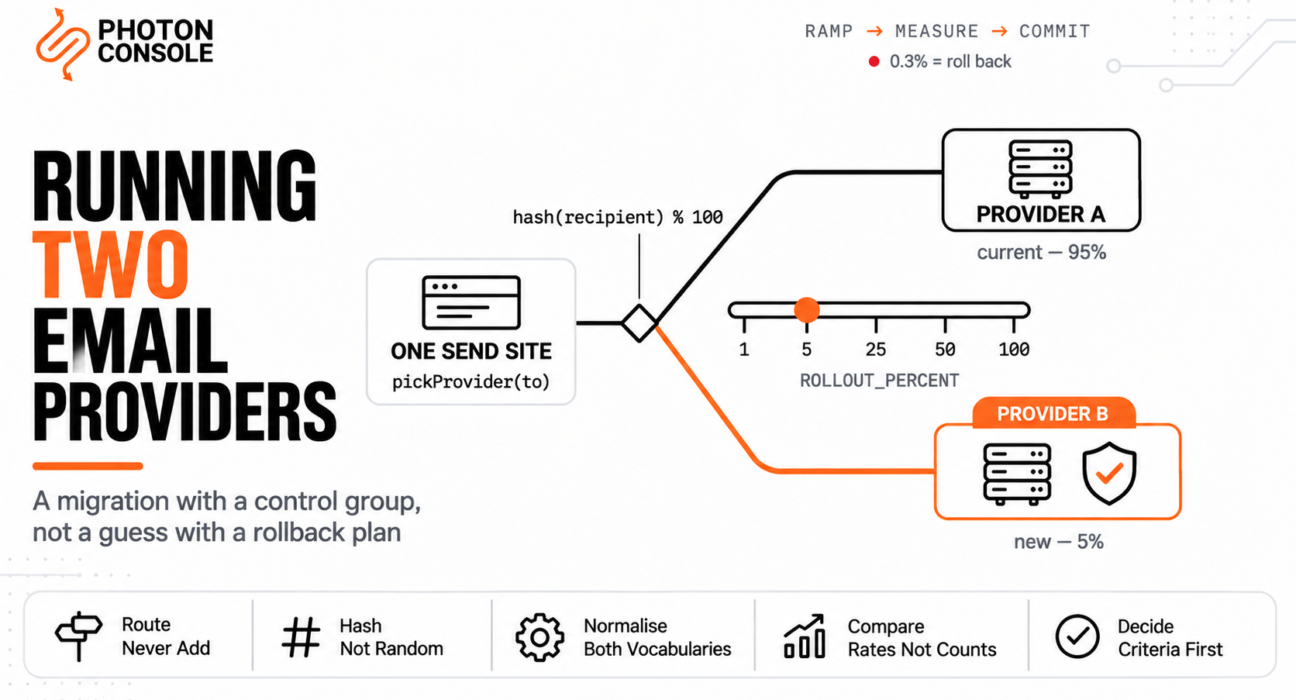
Running both providers at once solves that. Not as a safety net — as an experiment with a control group.
Quick Answer: What Dual-Sending Is and Is Not
| This is | This is not |
|---|---|
| Each message goes to one provider, chosen deterministically. | Each message is going to both providers. |
| A temporary technique with a defined end date | A permanent redundancy setup |
| A measured comparison on live traffic | A fallback that catches failures |
| Decided by recipient hash, so a user always takes one path. | Decided randomly per send |
| Ended by pre-agreed numeric criteria | Ended when it feels fine |
If you want two providers permanently so one can cover an outage, that is failover and a different design. This article is about the temporary arrangement that de-risks a switch, then gets removed.

For the surrounding sequence — DNS, authentication, rollback — follow our guide to migrating email providers without downtime. This article is the measurement layer that sits inside it.
Dual-Sending, Not Double-Sending
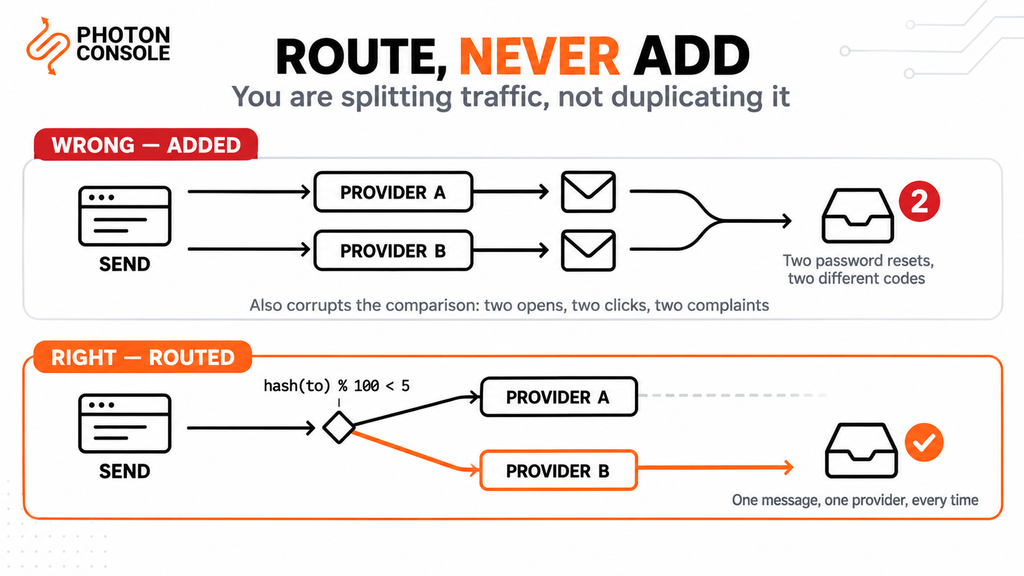
The phrase “dual-send” invites the single worst failure in this whole technique, so it is worth being blunt about it.
Every message must go out exactly once, through exactly one provider. You are splitting traffic, not duplicating it. A customer who receives two password reset emails with different codes will contact support, and a customer who receives two invoices will contact somebody more expensive than support.
Common Mistake
Adding the new provider as a second call alongside the existing one, “just to compare”. This produces duplicate delivery immediately, and it is surprisingly easy to ship — the new call gets added in a code path that already called the old provider, a reviewer reads it as a replacement, and nothing in testing catches it because staging has one recipient who does not mind. Worse, the duplicates corrupt the very comparison you set this up for: two sends to the same person means two open events, two click events and potentially two complaints, so both providers’ numbers are now wrong. Route, never add. One send site, one decision, one provider.
Route by Recipient Hash, Not at Random
The routing decision itself is a few lines. Getting the input right is what matters.
// One send site. One decision. One provider.
const ROLLOUT_PERCENT = Number(process.env.ROLLOUT_PERCENT || 0);

function pickProvider(recipient) {
  const bucket = stableHash(recipient.toLowerCase()) % 100;
  return bucket < ROLLOUT_PERCENT ? newProvider : oldProvider;
}

async function send(message) {
  const provider = pickProvider(message.to);
  const result = await provider.send(message);
  await recordAttempt({
    messageId: message.id,
    provider: provider.name,
    bucket: stableHash(message.to.toLowerCase()) % 100,
    at: Date.now()
  });
  return result;
}

// ROLLOUT_PERCENT is an environment variable, never a constant.
// Changing the split must not require a deploy.
Three things in there are deliberate.
The hash is of the recipient, not random. Random assignment means the same person takes a different path on every send. That breaks everything downstream: you cannot attribute a complaint to a provider, you cannot ask “did this user’s mail get worse”, and a customer reporting a problem gives you no usable signal because their last five emails went three different ways.
The hash is stable and lowercased. A hash that changes between processes, or that treats User@example.com and user@example.com as different people, reintroduces the problem it was meant to solve. Use a fixed algorithm, not the language’s built-in string hash, which is not guaranteed stable across runtimes or restarts.
The percentage lives in configuration. You will change it several times, sometimes urgently. If rolling back from 50% to 0% requires a deploy, you have built a migration you cannot abort quickly. Our SMTP relay API documentation covers the credential side of running two transports in one application.
Note
Record the bucket number alongside every send, not just the provider name. It costs one integer per row and it is the difference between a comparison you can defend and one you cannot. With the bucket stored, you can prove the two cohorts were assigned cleanly, reslice the data if you later suspect the hash was skewed, and answer the inevitable question of whether the new provider simply got easier recipients. Without it, every anomaly in the results becomes unfalsifiable.
The Ramp Schedule
Move in steps with enough time at each one to collect signal, and enough volume to make that signal mean something.
| Stage | Split | Hold | What you are watching for |
|---|---|---|---|
| 1 | 1% | 24 hours | Hard failures — auth errors, malformed payloads, broken templates |
| 2 | 5% | 2 to 3 days | First bounce and complaint signal; does anything differ at all |
| 3 | 25% | 3 to 5 days | Rates stabilising; enough volume for the numbers to be real |
| 4 | 50% | 5 to 7 days | Two comparable cohorts; receiver-side reputation on both paths |
| 5 | 100% | — | Old provider live but idle, as a rollback option |
Stage 4 is the one people skip, and it is the most valuable. At 50/50 you have two cohorts of similar size on live traffic, which is the only configuration where a difference of a few tenths of a percent is actually measurable. Everything before it is a smoke test.
Do not ramp on a Friday, and do not ramp while something else is changing — a template release, a DNS edit, a pricing email going out. One variable at a time, or the comparison tells you nothing.
Two Providers, Two Vocabularies
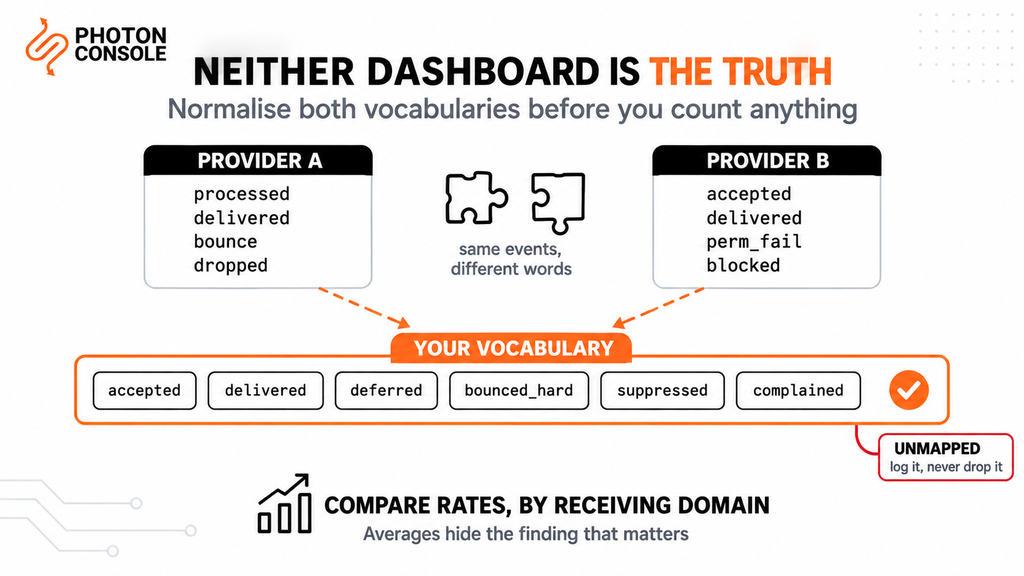
Here is where most dual-provider runs quietly fail. You get to 50/50, you open two dashboards, and the numbers are not comparable.
Providers disagree on what their words mean. One counts a message as delivered when the receiving server accepts it; another counts the same thing but excludes anything it later saw bounce asynchronously. One splits bounces into hard and soft; another into five categories; another reports a suppression-list block as a bounce. Open tracking differs by whether a pixel is proxied. None of this is dishonest — it is just unaligned.
| What you want to measure | Why do the two numbers disagree? |
|---|---|
| Delivered | One provider counts acceptance by the receiving server; another excludes messages it later saw bounce asynchronously. |
| Bounced | Hard and soft on one side, up to five categories on the other; some report a suppression-list block as a bounce |
| Suppressed | May appear as a bounce, as its own event, or not be reported at all |
| Opened | Depends on whether the tracking pixel is proxied and on how repeat opens are counted. |
| Complained | Depends on which feedback loops the provider is enrolled in. |
So you cannot compare dashboards. You have to normalise both providers’ events into one vocabulary of your own, and compare that.
// Both providers map into one vocabulary before anything is counted.
const CANONICAL = [
  'accepted',      // provider took it
  'delivered',     // receiving server accepted it
  'deferred',      // temporary failure, will retry
  'bounced_hard',  // permanent, suppress the address
  'bounced_soft',  // permanent for now, retry later
  'suppressed',    // never attempted, on a suppression list
  'complained',    // recipient reported it as spam
  'unsubscribed'
];

function normalise(providerName, rawEvent) {
  const map = EVENT_MAPS[providerName];
  const canonical = map[rawEvent.type];
  if (!canonical) {
    logUnmapped(providerName, rawEvent.type);  // do not silently drop
    return null;
  }
  return { ...rawEvent, type: canonical, provider: providerName };
}
The logUnmapped call matters more than it looks. An unmapped event type silently discarded is how a provider’s bounce category disappears from your comparison entirely, making it look better than it is. Count what you could not classify, and look at that number before you trust the rest.
Quick Fix
Making the Two Cohorts Comparable
- Normalise both providers’ events into one vocabulary before counting anything
- Log every unmapped event type rather than discarding it
- Compare rates, not counts — the cohorts are different sizes at every stage except 50/50
- Segment by receiving domain: a difference at Gmail and none at Outlook is a real finding, an average hides it
- Compare the same message types only—transactional against transactional, never against a newsletter
Volume Before Conclusions
A 5% cohort of 10,000 daily sends is 500 messages. One hard bounce in that cohort is a 0.2% bounce rate, which looks alarming next to the old provider’s 0.05% and means nothing at all.
This is the most common way a dual-provider run produces a wrong decision. The new provider looks worse at 5%, somebody panics, and the migration gets abandoned on noise.
Two rules keep it honest. Do not compare rates until the smaller cohort has produced at least a few hundred of whatever event you are measuring—for complaint rate at a tenth of a per cent, that means tens of thousands of sends, which is precisely why stage 4 exists. And when you see a difference, check whether it survives the next stage up before acting on it.
Authentication failures are one of the most common causes of email delivery differences between two otherwise identical sending paths, so before concluding anything about a provider, confirm both paths authenticate. The free email deliverability checker shows what your domain publishes, and MXToolbox confirms the combined SPF record resolves — exceeding the ten-term limit in RFC 7208 returns a permerror that breaks both providers at once and will look exactly like a new-provider problem.
Measure at the Receiver, Not the Provider
Provider-reported delivery means the receiving server accepted the message. It says nothing about whether the message reached an inbox or a spam folder, and inbox placement is the thing you actually care about.
So add two receiver-side signals to the comparison.
Google Postmaster Tools reports spam rate, domain reputation and authentication results for mail you send to Gmail, from Google’s side rather than your provider’s. Because it reports per sending domain, a dual-provider run on one domain gives you a blended figure — which is a reason to watch the trend rather than the absolute number during the run, and a reason some teams run the new provider on its own subdomain for the duration.
Seed inboxes on the major providers, sent to on a schedule from both paths, tell you where mail is landing rather than whether it was accepted. Mail Tester gives a per-message score and shows the authentication results a receiver sees.
Define the Exit Criteria Before You Start.
Write the numbers down before stage 1. A ramp without pre-agreed criteria ends when somebody gets bored, which is not a decision.
Google’s bulk sender guidelines give you defensible thresholds rather than invented ones. Google asks senders to keep the user-reported spam rate below 0.1%, and to prevent it from ever reaching 0.3% or higher. A sender above 0.3% is ineligible for mitigation and regains eligibility only after staying below it for seven consecutive days. Those are real numbers, published by the receiver that matters most, and they define both a target and a hard stop.
Google also treats anyone sending close to 5,000 messages or more to personal Gmail accounts in 24 hours as a bulk sender, and that status is permanent once assigned — worth knowing before you conclude that your volume is too small for any of this to apply.
Quick Fix
Exit Criteria Worth Agreeing In Advance
- Proceed when the new path’s delivered rate is within 0.5 percentage points of the old, at equal cohort size
- Proceed when Gmail spam rate on the new path stays below 0.1% for the full hold period
- Hold when any rate differs by more than 0.5 points — investigate before ramping further
- Roll back to 0% immediately if spam rate reaches 0.3%, or if authentication fails on either path
- Roll back if unmapped events exceed 1% of total events; the comparison is not trustworthy yet
Both providers stay live throughout, which means paying both for a few weeks. PhotonConsole pricing includes 5,000 free emails a month, which covers the early stages of a ramp without a second invoice arriving mid-migration, and credentials are issued on signup so the quickstart path can be live the same day you write the routing code.
Suppression Lists Diverge During the Run
An underrated problem, and it gets worse the longer the run lasts.
When an address hard-bounces on the old provider, the old provider suppresses it. The new provider knows nothing about it. Because routing is by recipient hash, that address stays on the old path and nothing breaks — until you reach 100% and every address that bounced during the run becomes a fresh bounce on the new provider, all at once, on a sending identity with no history.
Three ways to handle it, in order of preference:
- Suppress in your own application, before the provider sees the message. Your suppression list becomes the authoritative one, which is where it belongs anyway and solves this permanently.
- Sync both ways on a schedule during the run, pulling each provider’s new suppressions and pushing them to the other.
- Re-export from the old provider on the final day and import before going to 100%. Lowest effort, and the minimum acceptable option.
Whichever you pick, do not skip it. Our guide to reducing bounce rate covers why a burst of bounces on a new sending identity does disproportionate damage.
Decommissioning the Old Path
At 100% the old provider is live but sending nothing. Leave it that way for a defined period — two weeks is reasonable — because it is your rollback, and a rollback you have already deleted is not one.
Then remove it in this order:
- Delete the routing code and the environment variable. Dead branches that can still be switched on get switched on by accident.
- Export anything you still need — suppression lists one final time, and any logs you are required to retain.
- Remove the old provider from SPF. This frees a DNS lookup, which matters if you were near the ten-term limit.
- Revoke the old credentials before closing the account, so a forgotten integration fails loudly rather than silently continuing to send.
- Close the account.
Keep the normalisation layer. You built a provider-independent event vocabulary to run this comparison, and keeping it means the next provider change is a mapping file rather than a project.
Pro Tips
- Route, never add. One send site, one decision. A second call alongside the first is duplicate delivery.
- Hash the recipient, lowercased, with a stable algorithm. Not random, not the runtime’s built-in string hash.
- Keep the percentage in an environment variable. A rollback that needs a deploy is not a rollback.
- Store the bucket number on every send. One integer, and it is what makes the comparison defensible.
- Spend real time at 50/50. It is the only stage where small differences are measurable.
- Compare rates, segmented by receiving domain. Averages hide the finding that matters.
- Count your unmapped events. A silently dropped bounce category makes a provider look better than it is.
- Change one thing at a time. A template release during a ramp invalidates the week.
- Write the exit criteria down first. Ramping on vibes is how migrations get abandoned on noise.
Related Reading
- Migrating email providers without downtime — the sequence this technique sits inside
- Migrating away from SendGrid — where content is the lock-in
- Migrating from Amazon SES — where AWS plumbing is the lock-in
- Migrating from Mailgun — where inbound routing is the forgotten half
- Migrating from Postmark — where an enforced architecture is the lock-in
- Transactional email webhooks explained — building the event consumer this relies on
Frequently Asked Questions
What is a dual email provider setup?
Routing a defined percentage of your sending traffic through a new provider while the old one still handles the rest, so you can compare real delivery outcomes before committing. Each message goes to one provider only.
Does dual-sending mean each email goes out twice?
No. You split traffic, not duplicate it. Every message goes through exactly one provider. Sending the same message twice causes duplicate delivery and corrupts the comparison.
Why hash the recipient instead of using random routing?
So a given recipient always takes the same path. Random assignment makes complaints unattributable and makes any customer-reported problem impossible to trace to a provider.
What percentage should I start at?
1% for 24 hours to catch hard failures, then 5%, 25%, 50% and 100%, holding a few days at each. Spend real time at 50% — it is the only stage where small differences are measurable.
Why can I not just compare the two providers’ dashboards?
Because they define their terms differently. Delivery, bounce categories and open tracking are not counted the same way, so you must normalise both into one vocabulary of your own and compare that.
What spam rate should I treat as a hard stop?
Google asks senders to stay below 0.1% and to prevent the rate from ever reaching 0.3%. At or above 0.3% a sender is ineligible for mitigation until seven consecutive days below it, so 0.3% is a sensible rollback trigger.
What happens to suppression lists during the run?
They diverge, because each provider only knows its own bounces. Suppress in your own application if you can; otherwise sync both ways during the run, or at minimum re-export and import before going to 100%.
How long should I keep the old provider after reaching 100%?
Around two weeks. It is your rollback option, and it costs one billing cycle. Remove the routing code first, then SPF, then revoke credentials before closing the account.
Is this the same as email failover?
No. Failover is permanent redundancy designed to survive an outage. This is a temporary measurement technique with a defined end date and a decommissioning step.
Conclusion
A provider switch done as a flip is a guess with a rollback plan. Done as a ramp with a control group, it is a measurement.
The technique is not complicated: route by a stable hash of the recipient, keep the percentage in configuration, and move through 1, 5, 25, 50 and 100 with real time at each step. What makes it work is the part that is easy to skip — normalising both providers’ events into one vocabulary before you count anything, because two dashboards that both say 99.2% are not telling you the same thing.
Then write your exit criteria down before stage 1, using real thresholds rather than invented ones. Below 0.1% spam rate as a target, 0.3% as a hard stop, authentication verified on both paths, unmapped events under 1%. Numbers agreed in advance are what stop a migration being abandoned on a single bounce in a 500-message cohort.
The useful side effect is what you keep. A provider-independent event vocabulary and an application-level suppression list mean your sending is no longer shaped around one vendor’s API. Whether you end up on PhotonConsole or somewhere else, that is worth more than the migration itself — and if you are still choosing, our comparison page sets the options side by side.