

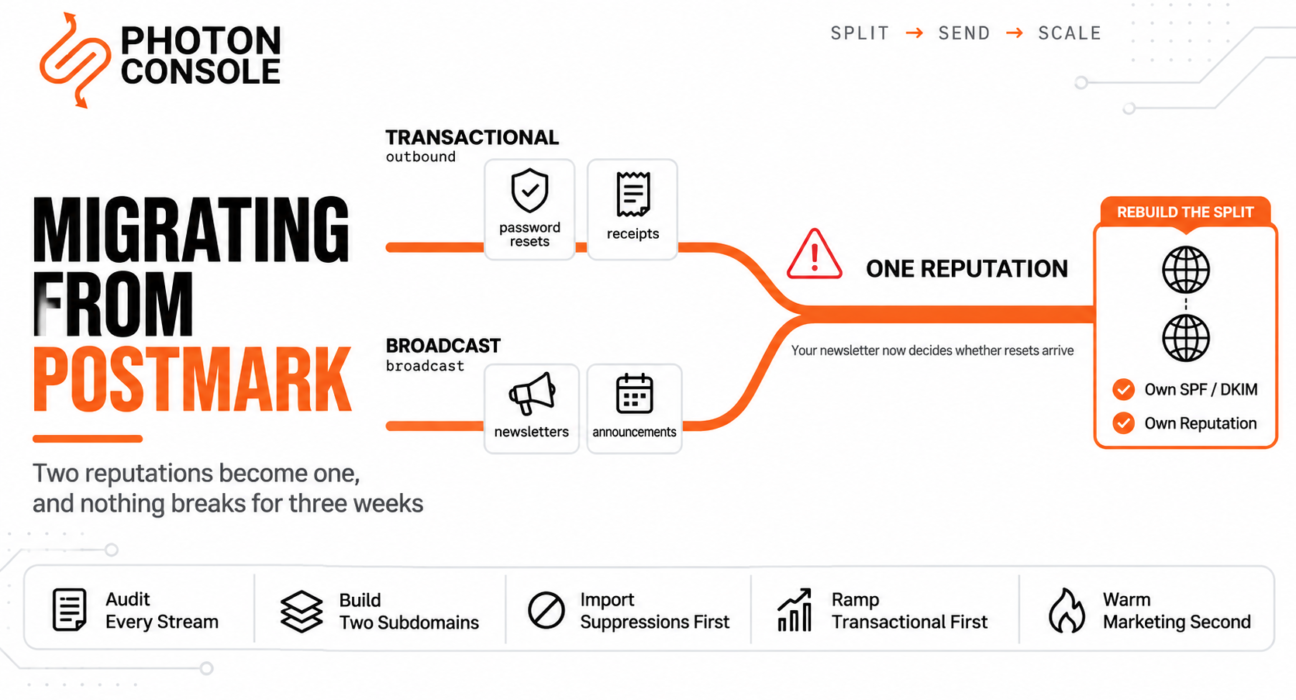
The migration goes cleanly. Templates ported, credentials swapped, delivery rates holding. Nobody notices anything for about three weeks.
Then a customer says they never received a password reset. Then another. You check, and your transactional mail is landing in spam at Gmail — not because anything broke, but because the monthly newsletter you now send down the same pipe has been quietly teaching Gmail that this sending identity is bulk mail.
Postmark was preventing that. Not as a feature you configured, but as an architecture it enforced. It is the one thing that does not survive the move unless you deliberately rebuild it.
Quick Answer: What Moves and What Rebuilds
| Asset | Moves or rebuilds | Effort |
|---|---|---|
| SMTP credentials | Moves — four variables | Minutes |
| Templates | Export into your repository | Hours |
| Suppression data | Export per stream, import first | Before first send |
MessageStream references in code | Remove or remap | Hours |
| Webhooks | Remap payloads and verification | Hours |
| Stream separation | Rebuild yourself, with subdomains | The real work |
Everything above the last row is an afternoon. The last row is the migration.

Sequencing—DNS TTL, SPF lookup limits, the percentage ramp, rollback — is covered in our guide to migrating email providers without downtime. Follow that ordering alongside this.
What Postmark Was Doing For You
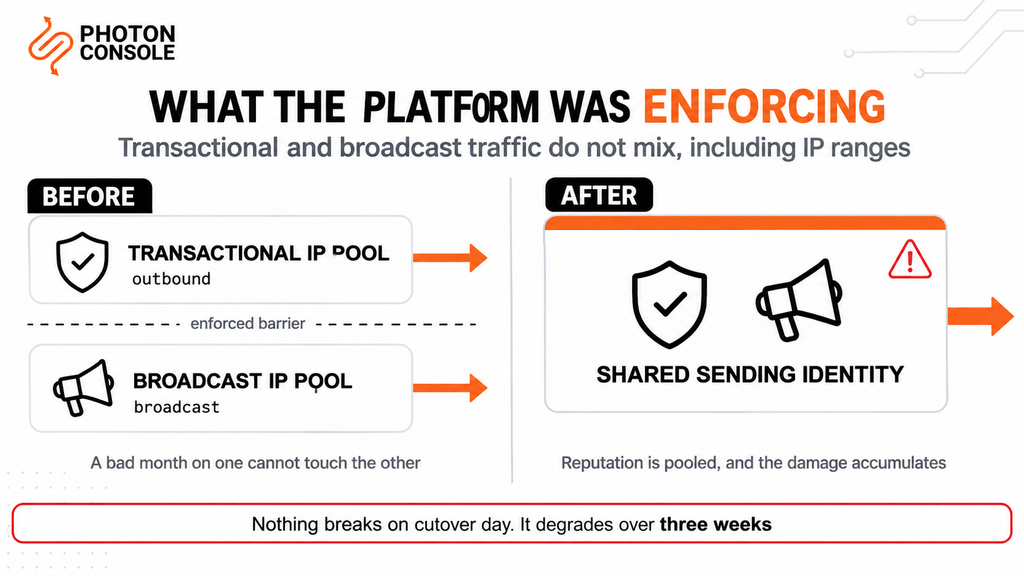
Most providers treat separating transactional from marketing mail as a best practice you may choose to follow. Postmark treats it as a property of the system.
Its message streams documentation states plainly that “transactional and broadcast traffic do not mix in Postmark, including IP ranges.” There is a dedicated transactional IP pool and a dedicated broadcast IP pool, and a message goes down one or the other depending on which stream you send it to.
So if you have been sending password resets through a transactional stream and a newsletter through a broadcast stream, those two have been running on separate sending infrastructure the whole time. One could have a bad month without touching the other.
Move to a provider that does not enforce that, send both through the same credentials, and the two reputations merge. Postmark’s own write-up on the subject describes the failure mode: when you use the same servers and address for both, filters such as Gmail’s may start classifying all of it as bulk. It also cites Google’s own guidance to separate mail by purpose as far as possible — advice Gmail publishes for all senders, not just Postmark customers.
Common Mistake
Treating stream separation as a Postmark feature rather than an email architecture. It reads like vendor functionality, so it gets dropped from the migration plan along with the stream API — and because reputation damage accumulates over weeks rather than appearing on cutover day, the migration looks like a success right up until transactional deliverability starts sliding. By the time anyone connects the two, the newsletter has been training receivers on your sending identity for a month. Rebuild the separation before the first marketing send, not after you see a problem.
Streams Are Not Just a Routing Label
Before you can remove them from your code, it helps to know exactly what you have.
| Stream type | What it carries | API value |
|---|---|---|
| Transactional | One recipient, triggered by a user action | outbound |
| Broadcast | Many recipients, sent on your schedule; requires an opt-out link | broadcast |
Two details catch people out.
First, the default transactional stream’s API value is outbound, not transactional. If you are grepping for stream references by name, searching for “transactional” will miss most of them.
Second, a Postmark server supports up to 10 streams. Accounts that have been running for a few years often have more than the two obvious ones — a separate stream for a legacy product, one somebody created for testing, one for a specific client. Enumerate them rather than assuming there are two.
Quick Fix
Finding Every Postmark Integration Point
- Grep for
MessageStream— the field name is the most reliable marker - Grep for
outboundas a string literal; the default transactional stream uses it, not the word “transactional” - List every stream on every server, not just the two you expect — up to 10 are possible
- Note which stream each code path sends to; that mapping becomes your subdomain plan
- Check your MX records — if Postmark also receives mail for you, that is a second migration
Rebuilding the Separation Yourself
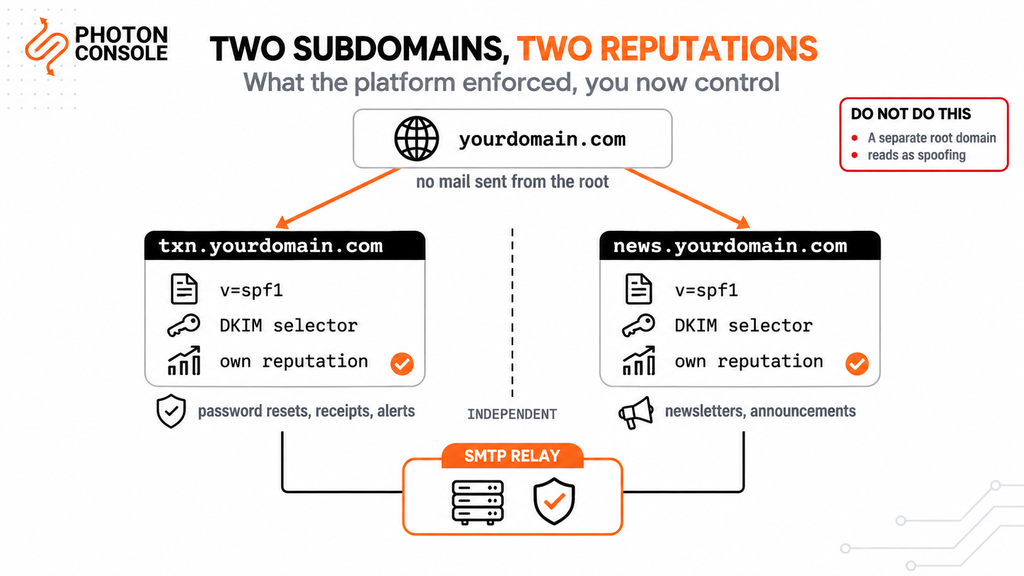
The useful thing is that Postmark has already written the specification for you. Its guidance ranks the options: different From addresses alone is “Good” and a last resort, different IPs is “Better”, and different From addresses, IPs and subdomains together is “Best”.
| Separation level | What it means | Postmark’s rating |
|---|---|---|
| Different From addresses only | Same infrastructure, different sender | Good — a last resort |
| Different sending IPs | Separate infrastructure, shared domain | Better |
| Different From addresses, IPs and subdomains | Fully independent sending identities | Best |
That top tier is what you are reproducing. In practice it means two sending subdomains:
# Two sending identities, two reputations

  txn.yourdomain.com     password resets, receipts, alerts
  news.yourdomain.com    newsletters, product announcements

# Each gets its own SPF record and its own DKIM selector.
# A bad week on news. does not touch txn.
# Keep the root domain out of it entirely — if you ever
# have to burn a sending reputation, burn a subdomain.
Each subdomain publishes its own SPF and DKIM records, so each accumulates its own reputation. This is the part that is genuinely better than what you had: you now control the boundary rather than inheriting it, and you can add a third subdomain for a new mail category without asking anyone.
PhotonConsole authenticates each subdomain independently, so txn. and news. are two sets of DNS records rather than two accounts or two bills.
Note
Resist the temptation to use a different root domain for marketing mail. It looks like the cleanest possible separation and it is a trap — Postmark’s own guidance warns that an unrelated domain “could look like a phishing or spoofing attempt” to receivers, and it also means your marketing mail builds no reputation that benefits your brand. Subdomains of the domain you already send from give you the separation without the suspicion.
Authentication for Two Subdomains
Each subdomain needs its own records. During the parallel run, the subdomain you are migrating authorises both providers:
# txn.yourdomain.com — during migration, both senders
v=spf1 include:spf.mtasv.net include:relay.photonconsole.com ~all

# news.yourdomain.com — new, so only one sender
v=spf1 include:relay.photonconsole.com ~all

# DKIM on independent selectors, so both sign in parallel
photon._domainkey.txn   CNAME  dkim.photonconsole.com
Take Postmark’s exact include from your own account rather than from this article. Then count your lookups: exceeding the ten-term limit in RFC 7208 returns a permerror that fails authentication for both providers at once — the one mistake in a migration that breaks the thing you were trying to protect. Our guide to SPF, DKIM and DMARC covers alignment, and the free email deliverability checker shows what each subdomain currently publishes.
Note that a fresh subdomain starts with no reputation at all. That is not a problem, but it does mean the marketing subdomain needs its own warm-up rather than being switched on at full volume — which is a reason to migrate transactional mail first and marketing second.
Suppression Data
Streams are the organizing unit for almost everything in Postmark, so export suppressions for every stream you send from rather than assuming a single account-wide list.
Quick Fix
Exporting Suppressions Safely
- Export for every stream on every server — over-collecting costs nothing, missing a list costs deliverability
- Keep the export in your own storage, not only in the new provider; this is your data
- Import before the first production send, never after
- Keep transactional and marketing suppressions mapped to the right subdomain — an unsubscribe from the newsletter is not a reason to stop sending receipts
- Re-export on your final day; addresses that bounced during the ramp exist only in Postmark
That fourth point matters more here than in other migrations. Because your streams were separate, your suppression data is separate too, and flattening it into one list means a marketing unsubscribe can silently block a password reset. Keep the lists distinct in the same way you keep the subdomains distinct. Our guide to reducing bounce rate explains why importing before the first send matters so much on a new sending identity.
Templates
Export them into your repository rather than into another provider’s template store.
Postmark supports layouts that templates inherit from, so check whether yours use one — a template exported without its layout renders without the wrapper, which is easy to miss in a quick visual check because the content all appears to be there. Flatten the layout into each template, or reproduce the layout mechanism in whatever renders your mail now.
Templates under version control are reviewable, diffable and testable in CI, which also means the next migration is a configuration change rather than a project. PhotonConsole sends whatever HTML your application renders, so there is no second template store to keep in sync.
Then test every template against payloads with missing and null fields before sending one to a real recipient. Renderers differ in how they treat an undefined variable: some output nothing, some output the literal placeholder, and finding out which on a live password reset is an unpleasant way to learn.
If Postmark Also Receives Your Mail
Check your MX records before you plan anything. If they point at Postmark, inbound processing is live and it is a separate migration from sending — with its own cutover, its own testing, and its own failure mode, which is silent in both directions.
The pattern for reimplementing inbound handling as application code is covered in our guide to migrating from Mailgun, where inbound routing is the central problem. The same approach applies: list the rules, express them as an ordered set with an explicit catch-all, and move inbound only after sending is settled.
Validation and Cutover
Before moving production traffic, confirm three things with real sends:
- Each subdomain authenticates independently. MXToolbox confirms the records resolve; Mail Tester scores an end-to-end send from each one separately.
- Templates render correctly, including with missing variables and with the layout applied.
- Webhook events parse, tested by triggering a real bounce to a known-invalid address.
Then migrate in this order, which is specific to Postmark and worth following:
- Transactional first, ramped by percentage with Postmark still live. This is your highest-stakes mail, so it gets the full parallel-run treatment per the migration guide.
- Marketing second, on its own subdomain, warmed up from low volume. It is lower-stakes and the subdomain is new, so it needs the ramp for a different reason.
- Inbound last, if applicable, as a separate change.
Doing transactional first is the opposite of what feels safe — most people want to test on the mail that matters least. But marketing mail from a cold subdomain will have a rough first week regardless, and you do not want to be diagnosing that at the same time as a transactional cutover. Separate the two problems in time.
Both providers stay live throughout, and PhotonConsole issues SMTP credentials on signup, so the transactional path can be live and testable the same day you start building subdomains. Pricing includes 5,000 free emails a month, which covers the whole parallel-running phase without a second bill arriving mid-migration.
Pro Tips
- Grep for
outbound, not “transactional”. The default stream’s API value is the word nobody expects. - Enumerate every stream. Up to 10 per server, and old accounts accumulate them.
- Build the subdomains before you touch any code. DNS propagation is the slowest part and it costs nothing to start early.
- Keep marketing and transactional suppressions separate. Flattening them lets an unsubscribe block a receipt.
- Never send marketing mail from the root domain. If a reputation has to be burned, burn a subdomain.
- Check for template layouts. A template exported without its layout looks almost right, which is the problem.
- Transactional first, marketing second. Do not debug a cold subdomain and a cutover in the same week.
Related Reading
- Migrating email providers without downtime — the sequence and timing this article defers to
- Postmark pricing explained — if cost is what started this
- Migrating from Mailgun — where inbound routing is the hidden half
- Migrating away from SendGrid — where templates and six suppression lists are the lock-in
- Migrating from Amazon SES — where the lock-in is AWS plumbing
- SPF, DKIM and DMARC explained simply — authenticating two subdomains properly
Frequently Asked Questions
What is the hardest part of leaving Postmark?
Rebuilding stream separation. Postmark keeps transactional and broadcast mail on separate IP pools automatically; most providers do not, so you reproduce that separation yourself using two sending subdomains.
What are Postmark message streams?
Routing targets that determine which sending infrastructure a message uses. Transactional streams carry single-recipient triggered mail; broadcast streams carry scheduled multi-recipient mail and require an opt-out link.
Does Postmark really keep the two types of mail separate?
Yes. Postmark’s documentation states that transactional and broadcast traffic do not mix, including IP ranges, with a dedicated IP pool for each.
Why does my transactional deliverability drop weeks after migrating?
Because marketing and transactional mail now share one sending identity, and receivers gradually learn to treat the whole identity as bulk. The damage accumulates rather than appearing on cutover day.
What is the API value for Postmark’s default transactional stream?
outbound. Searching your codebase for “transactional” will miss most stream references.
How many message streams can a Postmark server have?
Up to 10. Enumerate them before migrating rather than assuming you have only transactional and broadcast.
Should I use a separate domain for marketing email instead of a subdomain?
No. An unrelated domain can look like spoofing to receivers and builds no reputation for your brand. Use subdomains of the domain you already send from.
Should I migrate transactional or marketing email first?
Transactional first, with a full parallel run. Marketing second on a fresh subdomain that needs its own warm-up, so you are not diagnosing two different problems at once.
Conclusion
Postmark migrations do not fail on cutover day. They fail three weeks later, which is far harder to diagnose.
The reason is that Postmark’s most valuable property is not a feature you would think to port. It is an architecture: transactional and broadcast mail on separate IP pools, enforced by the platform rather than configured by you. Drop it, and two reputations that were insulated from each other become one, and your newsletter starts deciding whether your password resets reach the inbox.
So the migration has one central task, and it is not the credential swap. Build two sending subdomains, authenticate each independently, keep their suppression lists distinct, and move transactional mail first with marketing following on its own warm-up. That reproduces what Postmark was doing — and puts the boundary under your control, where you can add a third category without asking a vendor.
Everything else is a few hours: templates into version control, MessageStream references removed, webhooks remapped. A reliable SMTP provider handles the sending with standard SMTP and a flat per-thousand rate, and the separation ends up documented in your own DNS rather than assumed from a platform you no longer use.