Ten thousand recipients a day sounds like plenty. You have four hundred signups on a good day, so the Microsoft 365 mailbox your application already authenticates against seems like free infrastructure.
Then a campaign lands, two hundred people register inside two minutes, and most of the confirmation emails queue or fail outright. You check the daily total: under a thousand. Nowhere near the limit you planned around.
The daily limit was never the constraint. There is a second number, it is much smaller, and almost nobody reads it before building against it.
Quick Answer: What Are the Microsoft 365 SMTP Limits?
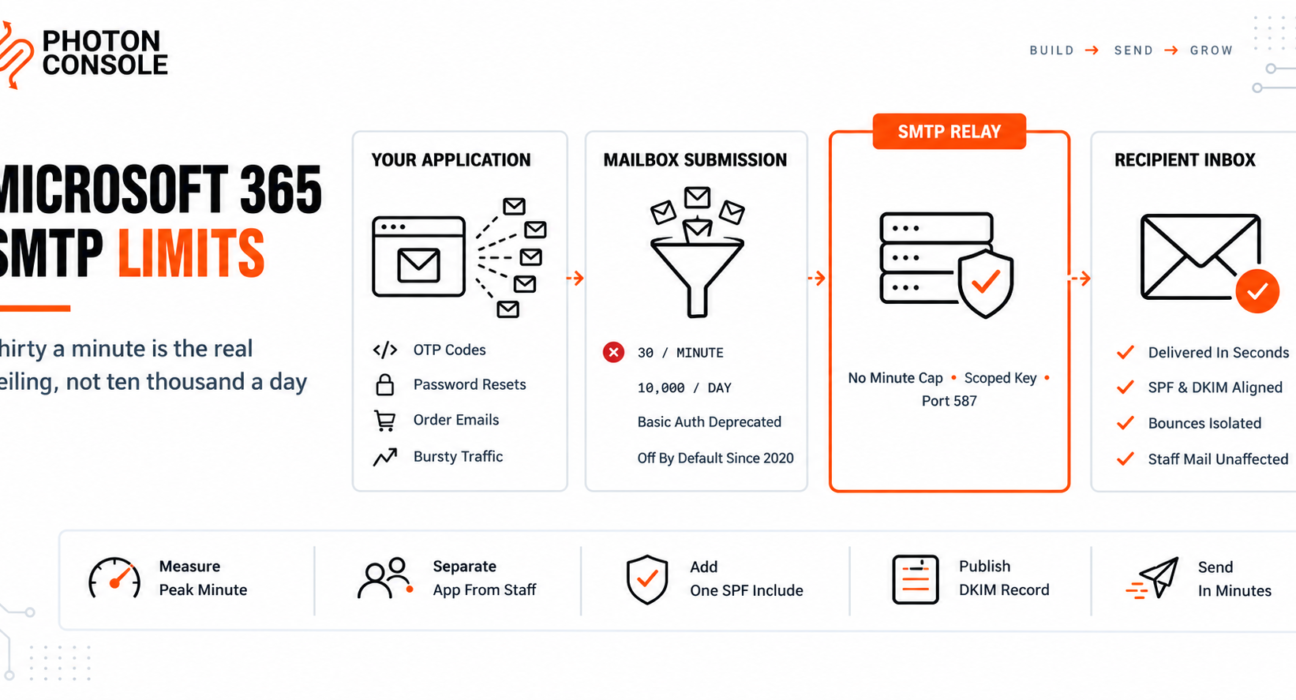
For the method most applications actually use — authenticated SMTP submission against a mailbox — Microsoft documents two throttling limits: 10,000 recipients per day and 30 messages per minute.

Thirty a minute is one message every two seconds. That is the number that breaks application email, and no plan upgrade changes it, because it is a property of mailbox submission rather than of your licence.
# Application mail belongs on its own path
SMTP_HOST=smtp.photonrelay.com
SMTP_PORT=587
SMTP_USER=your_project_api_user
SMTP_PASS=your_secret_api_key

# Staff mailboxes stay on Microsoft 365. Nothing moves.
Keeping the two separate is the whole fix. Your people keep their mailboxes, and your application sends through infrastructure built for it — a dedicated email delivery service rather than a mailbox doing a job it was not designed for. PhotonConsole applies no per-minute submission cap of this kind, which is the specific constraint that makes mailbox submission unsuitable here.
The Four Methods Microsoft Documents
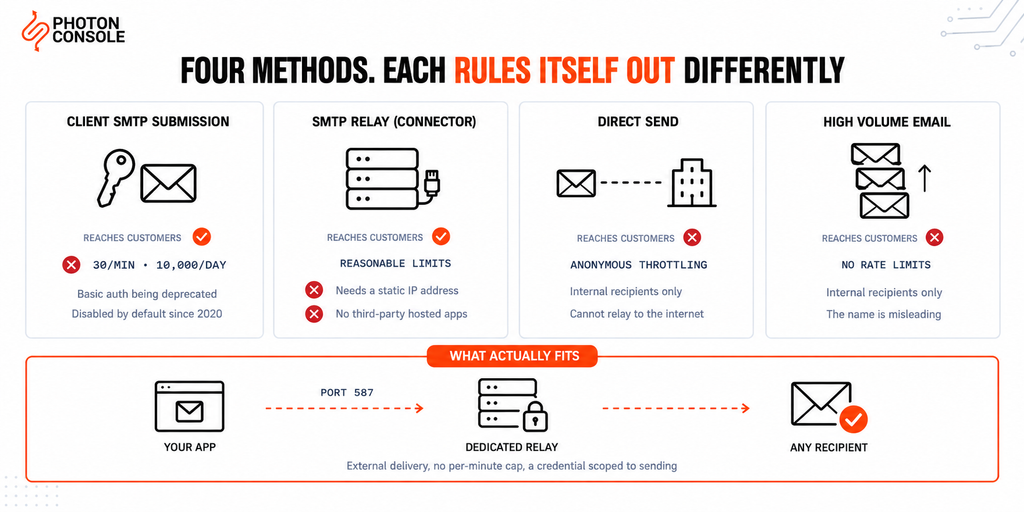
Microsoft’s guidance for devices and applications describes four approaches, and the differences between them decide the question before any limit does. Every figure in this article comes from that page or from Microsoft’s delivery pool documentation, both linked here so you can confirm the current position yourself.
| Method | Reaches external recipients | Requires | Documented throttling |
|---|---|---|---|
| Client SMTP submission | Yes | Mailbox username and password; TLS; port 587 or 25 | 10,000 recipients/day, 30 messages/minute |
| SMTP relay (connector) | Yes | One or more static IP addresses; port 25 | “Reasonable limits”; not for bulk mail |
| Direct Send | No | Nothing; port 25 | Standard anonymous throttling |
| High Volume Email | No | An HVE account; TLS; port 587 | No recipient or message rate limits |
Read the second column first. Two of the four methods cannot send to your customers at all, which removes them from consideration for transactional email regardless of how generous their limits look.
That matters most for High Volume Email, because the name invites exactly the wrong conclusion. It carries no rate limits and it is the one Microsoft points to for volume — and it is for internal recipients only. It will not deliver a password reset to a customer’s Gmail address.
Why 30 a Minute Is the Real Ceiling
Application email is bursty in a way human email never is. Nobody sends thirty messages a minute from Outlook, which is why the limit looks harmless until software is doing the sending.
| Event | Messages | Time to clear at 30/minute |
|---|---|---|
| Campaign drives 200 signups | 200 | Over 6 minutes |
| Flash sale, 500 order confirmations | 500 | Over 16 minutes |
| Password reset after an incident | 1,000 | Over 33 minutes |
| Daily digest to 5,000 users | 5,000 | Nearly 3 hours |
An OTP code that arrives six minutes late has failed even though it was delivered. A password reset that arrives half an hour after the request has been abandoned. For transactional mail the queue time *is* the failure.
And none of these rows come close to the 10,000 daily figure. You can be throttled all day while using a tenth of your documented allowance.
Quick Fix
Emails Queue or Fail During Traffic Spikes
- Count messages per minute at peak, not per day — the daily total hides the problem
- If peaks exceed 30 a minute, you are hitting the submission rate limit, not a bug
- Check whether your sends are synchronous; throttled sends will time out the request
- Move application mail to a relay and leave staff mailboxes on Microsoft 365
- Queue the sends so a spike becomes a backlog you control rather than failures
The Higher-Limit Method You Probably Cannot Use
SMTP relay through an inbound connector is the method with room to grow, and two of its requirements rule out most modern applications.
It authenticates by static IP address. Your application host must present one or more fixed addresses visible to Microsoft 365. If your code runs anywhere covered elsewhere in this series, you do not have that:
- Heroku dynos — stable outbound addresses are a Private Spaces feature, not a Common Runtime default
- Serverless functions — the address changes between invocations
- Kubernetes pods — addresses come from the cluster range and are reassigned constantly
The second requirement is more direct. Microsoft’s comparison states plainly that SMTP relay does not support mail sent from applications hosted by a third party. A SaaS application on someone else’s cloud is exactly that.
It also uses port 25, which AWS throttles and Google Cloud blocks — covered in our guides to EC2 port 25 and Google Cloud port restrictions. Three independent reasons, any one of which is enough.
Authentication Is Moving Under You
Two changes make mailbox submission a shrinking foundation even where the limits would fit.
SMTP AUTH is disabled by default for organisations created after January 2020. It can be enabled per mailbox, but a new tenant will not have it on, and an administrator has to deliberately turn it on for the mailbox your application uses.
More significantly, Microsoft has scheduled client SMTP submission using Basic authentication for deprecation and recommends alternatives instead. Basic authentication is also incompatible with Security Defaults in Microsoft Entra ID — so the hardening your security team is likely to apply is the same change that breaks your application’s sending.
Common Mistake
Treating a mailbox credential in your application’s configuration as a long-term integration. It is a credential with a deprecation date, which an administrator can disable, which Security Defaults will block, and which — because it belongs to a real mailbox — grants more than sending. If it leaks, the holder can read mail, not just send it. A relay credential is scoped to sending and can be rotated without touching anyone’s account.
The Risk Nobody Prices In
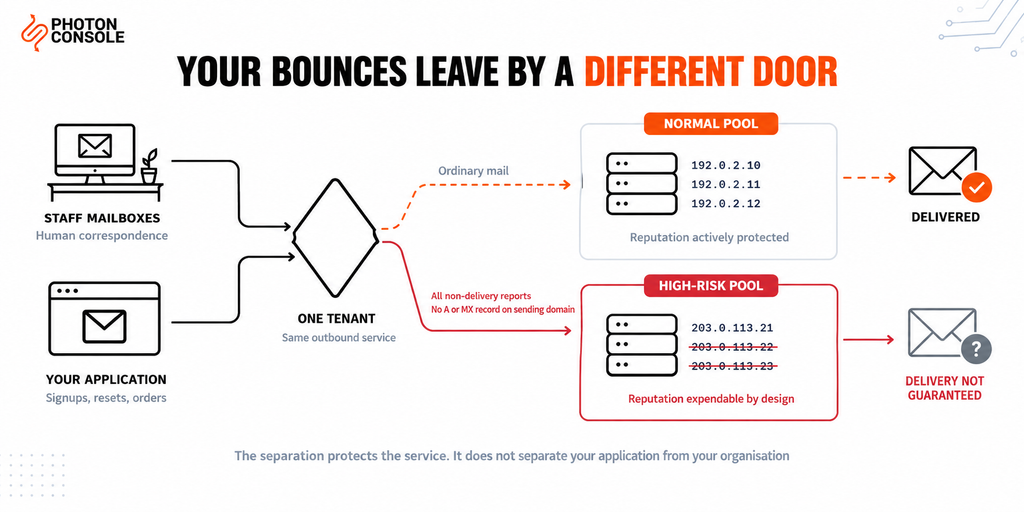
Rate limits are an inconvenience. This is the part that should decide the question.
Microsoft operates a separate high-risk delivery pool — a distinct outbound IP pool documented as being used only for low-quality messages such as spam and backscatter. Its stated purpose is to keep the normal outbound pool clean, so that the addresses carrying ordinary mail are less likely to appear on blocklists.
The detail that matters for application email: Microsoft documents that the high-risk delivery pool manages the delivery of all non-delivery reports. Bounces go through it by design.
Transactional applications generate bounces as a matter of course — mistyped addresses at signup, accounts closed since registration, domains that no longer exist. Every one produces a non-delivery report that leaves through a pool where, in Microsoft’s own words, delivery to the intended recipients is not guaranteed, because many email organisations do not accept messages from it.
There is a further trap for anyone sending from a subdomain they set up quickly. Messages from a source domain with no A or MX record in public DNS are always routed through the high-risk pool, regardless of anything else about them. A noreply@mail.yourdomain.com subdomain created for sending, with no A or MX record published, qualifies.
So the honest summary is this: your application’s mail quality is being measured inside the same tenant that carries your contracts, your invoices and your conversations with customers. Microsoft has built the separation that protects its own IP reputation. It has not built one that protects yours.
Where the Line Actually Falls
None of this means Microsoft 365 is doing anything wrong. It means the product has a purpose, and application mail is not it.
| Mail type | Belongs on | Why |
|---|---|---|
| Staff mailboxes and replies | Microsoft 365 | What it is built for — human correspondence |
| Internal notifications | Either; HVE suits internal-only volume | No external delivery required |
| OTP codes and password resets | Dedicated relay | Latency-critical; 30/minute is disqualifying |
| Order and account notifications | Dedicated relay | Bursty, and bounces must not touch staff reputation |
| Marketing and bulk sends | Dedicated relay | Microsoft states the relay method is not for bulk mail |
Note the last row carries Microsoft’s own position, not an opinion: the documentation for SMTP relay states that reasonable limits are imposed and that the service cannot be used to send spam or bulk mail. Running a newsletter through it is outside what the service is for.
Keeping Both, Correctly
The migration is smaller than people expect, because nothing about anyone’s mailbox changes. You repoint one configuration block.
// Before — a mailbox credential doing application work
host: 'smtp.office365.com',
port: 587,
auth: { user: 'noreply@yourdomain.com', pass: MAILBOX_PASSWORD }
// After — a credential scoped to sending
host: process.env.SMTP_HOST, // smtp.photonrelay.com
port: Number(process.env.SMTP_PORT),
secure: false, // STARTTLS on 587
auth: {
user: process.env.SMTP_USER,
pass: process.env.SMTP_PASS
},
pool: true,
maxConnections: 5Then revoke the mailbox credential from your application’s configuration, and ask your administrator to disable SMTP AUTH on that mailbox if nothing else uses it. Leaving a working credential in place is how it ends up back in a deploy six months later.
Note that pooling is useful here, because a long-running application server reuses connections. PhotonConsole accepts several concurrent connections per account, so a burst clears at the rate your workers can process it rather than at a fixed messages-per-minute ceiling.
Quick Fix
Moving App Mail Off a Mailbox Credential
- Create a sending credential on the relay and set it as environment variables
- Change the host, port and auth block in one place; leave message code untouched
- Add the relay’s
includeto your existing SPF record — do not publish a second one - Publish the DKIM CNAME and confirm both resolve before cutting over
- Remove the mailbox password from config, then have an administrator disable SMTP AUTH on that mailbox
The SPF record needs care, not a second record
Your tenant almost certainly publishes something like this already:
v=spf1 include:spf.protection.outlook.com -allAdd the relay to the same record. One domain gets one SPF record — a second TXT record starting v=spf1 breaks authentication entirely rather than combining:
v=spf1 include:spf.protection.outlook.com include:relay.photonconsole.com -allCNAME photon._domainkey dkim.photonconsole.comTwo further points. Keep the existing -all or ~all as it is rather than loosening it, and mind the ten-lookup limit that RFC 7208 places on SPF evaluation — each include consumes lookups, and a record that exceeds the limit fails for every sender at once.
DKIM is the more important of the two, because it survives forwarding where SPF does not, and receivers including Gmail expect aligned authentication on transactional mail. Our guide to SPF, DKIM and DMARC covers the alignment rules, and the free email deliverability checker shows what your domain publishes right now.
Note
If you send application mail from a dedicated subdomain, publish an A or MX record for it even if nothing receives mail there. Microsoft documents that messages from a source domain with no A or MX record in public DNS are always routed through the high-risk delivery pool regardless of their content or sending limits. A subdomain set up purely for sending, with no records beyond SPF and DKIM, meets that description exactly.
Port Reference
| Port | Purpose | Notes |
|---|---|---|
| 25 | Server-to-server relay | Required by the connector and Direct Send methods; blocked by most clouds |
| 587 | Authenticated submission | Used by client submission, HVE and any relay |
| 465 | Submission over implicit SSL | Supported by most relays |
| 2525 | Unofficial fallback | When 587 is restricted on your network |
Port 587 is the submission port defined in RFC 6409 for authenticated clients. The dependence of two Microsoft methods on port 25 is worth noting on its own: it means those methods are unavailable from most cloud-hosted applications before any limit is reached. PhotonConsole accepts 587, 465 and 2525.
Pro Tips
- Measure per minute, not per day. Your peak minute decides whether this works. A daily average tells you nothing about it.
- Never let application mail share a domain’s reputation with payroll. Separate sending paths exist so one cannot damage the other.
- Treat a mailbox password in config as a liability. It grants read access to a real mailbox, not just the ability to send.
- Publish an A or MX record on any sending subdomain. One DNS entry keeps your mail out of the high-risk pool.
- Keep one SPF record. Combine includes; never publish a second
v=spf1entry, and watch the ten-lookup ceiling. - Verify before you cut over. MXToolbox checks the combined record in one lookup, and Mail Tester scores a real send end to end.
Related Issues You May Hit Next
- Sending email from Heroku where no static IP rules out the connector method
- Sending email from serverless functions for the same reason
- Sending email from Docker and Kubernetes for cluster-hosted applications
- cPanel email sending limits — the same throttling pattern on shared hosting
- Emails arriving late which is what throttling looks like to a user
- Emails landing in Gmail spam after a reputation problem
Frequently Asked Questions
What is the Microsoft 365 SMTP sending limit?
For client SMTP submission, Microsoft documents 10,000 recipients per day and 30 messages per minute. The per-minute figure is the one that constrains application email.
Can I increase the 30 messages per minute limit?
It is a property of mailbox submission rather than your licence tier, so a plan upgrade does not change it. The alternative methods have different limits but also different restrictions.
Can High Volume Email send to my customers?
No. Microsoft’s comparison shows High Volume Email cannot relay to the internet — it is for internal recipients only, despite the name.
Why can my cloud app not use the SMTP relay connector?
It authenticates by static IP, and Microsoft states it does not support mail from applications hosted by a third party. It also uses port 25, which most cloud providers restrict.
Is sending bulk email through Microsoft 365 allowed?
The documentation for SMTP relay states that reasonable limits are imposed and the service cannot be used to send spam or bulk mail. Marketing sends belong on a service built for them.
Will my application’s bounces affect our staff email?
Bounces are handled by the high-risk delivery pool by design. Keeping application mail on a separate sending path is how you stop its quality signals mixing with your organisation’s correspondence.
Do I have to move our mailboxes to use a relay?
No. Mailboxes stay on Microsoft 365. You change the SMTP configuration in your application and add one include to your existing SPF record.
Why is SMTP AUTH not working on our new tenant?
It is disabled by default for organisations created after January 2020. An administrator can enable it per mailbox, though given the deprecation of Basic authentication for this method, a relay is the more durable choice.
Conclusion
Microsoft 365 will send your application’s email, and for a small, steady trickle it will do so without complaint. The problems appear at exactly the moment you least want them: during a launch, after an incident, when traffic spikes.
Thirty messages a minute is the practical ceiling, not ten thousand a day. The method with room to grow needs a static IP that cloud-hosted applications do not have, and rules out third-party hosting outright. The credential your application depends on is scheduled for deprecation and disabled by default on newer tenants. And your bounces leave through a delivery pool that Microsoft maintains precisely so that low-quality mail does not contaminate the good.
The sensible arrangement is not a migration. It is a separation: mailboxes stay where they belong, and application mail moves to a reliable SMTP provider built for bursts, bounces and volume — with a credential scoped to sending, and a reputation that belongs to your product rather than to your payroll. Pricing starts with 5,000 free emails per month, which is enough to run a real traffic spike through the new path before changing anything in production.