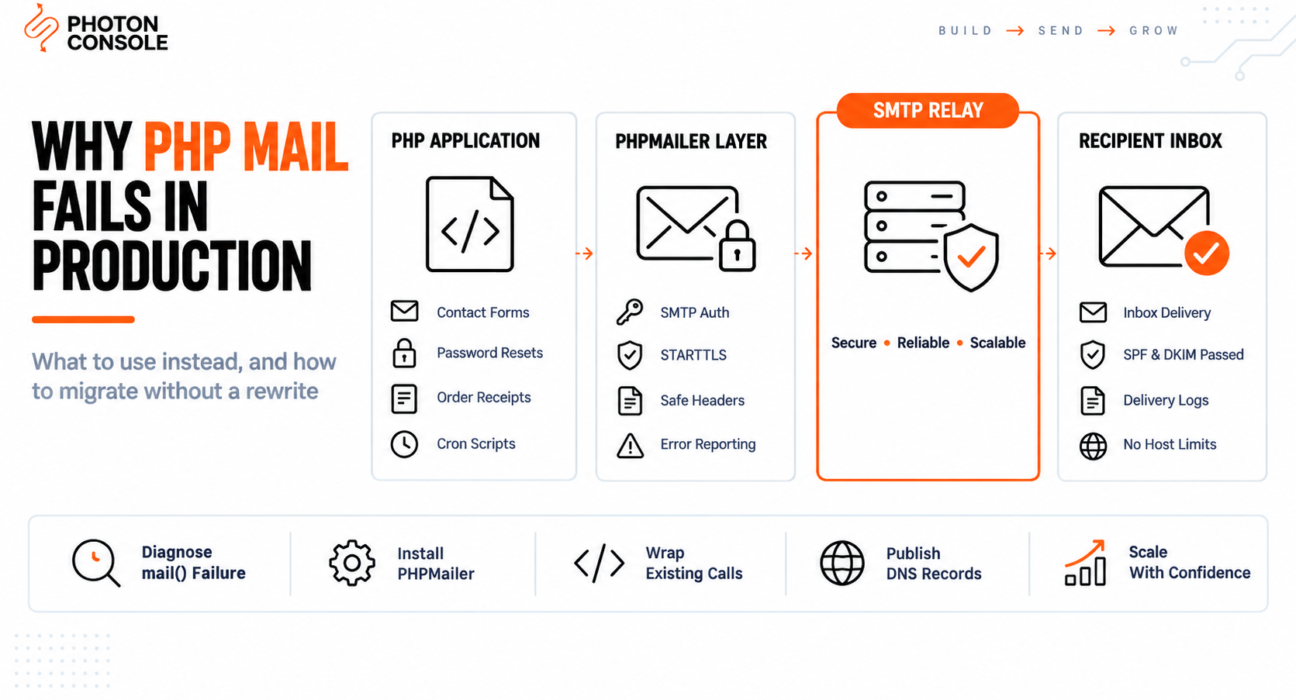
Your contact form works on localhost. You push to the production server and the messages stop arriving. mail() still returns true, PHP throws no error, and the logs show nothing unusual.
The function is behaving exactly as documented. The problem is that mail() was designed in an era when servers ran their own mail transfer agents and receiving servers accepted almost anything. Neither is true now, and the function has no way to meet modern authentication requirements.
This guide explains what mail() actually does when you call it, why that fails today, the security issue most developers never hear about, and how to replace it without rewriting every call in your codebase.
Quick Answer: Why Is PHP mail() Not Working?
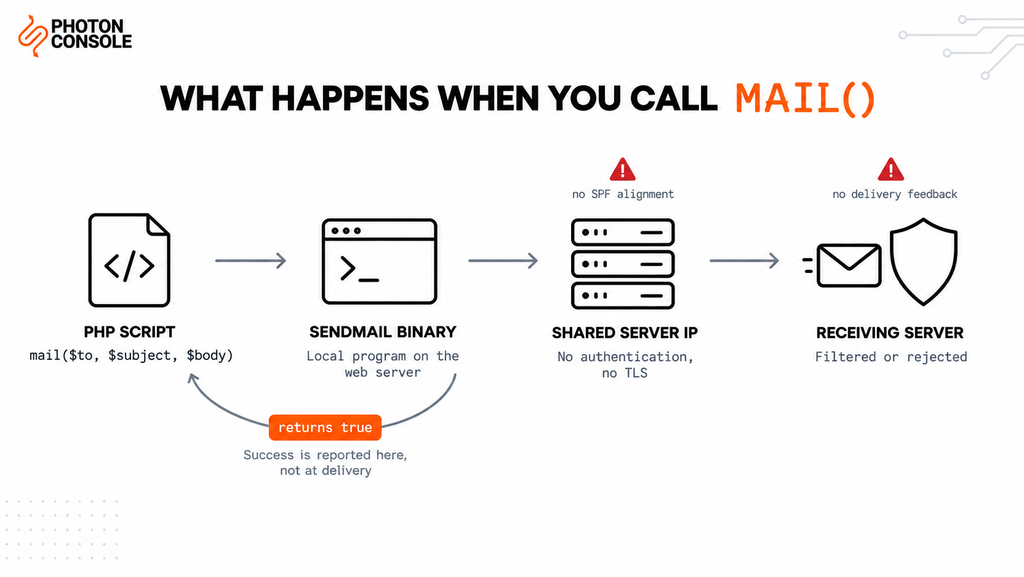
mail() hands your message to a local mail program on the web server. It cannot authenticate, cannot use TLS, and gives no delivery feedback. Most hosts either disable it or route it through an IP with no sending reputation, so receiving servers filter or reject the message.

The fix is to send through authenticated SMTP using PHPMailer or Symfony Mailer instead:
use PHPMailer\PHPMailer\PHPMailer;

$mail = new PHPMailer(true);
$mail->isSMTP();
$mail->Host       = 'smtp.photonrelay.com';
$mail->Port       = 587;
$mail->SMTPAuth   = true;
$mail->Username   = getenv('SMTP_USER');
$mail->Password   = getenv('SMTP_PASS');
$mail->SMTPSecure = PHPMailer::ENCRYPTION_STARTTLS;

$mail->setFrom('noreply@yourdomain.com', 'Your App');
$mail->addAddress('user@example.com');
$mail->Subject = 'Your verification code';
$mail->Body    = 'Your code is 492019.';

$mail->send();
An authenticated relay such as PhotonConsole supplies the credentials and handles the reputation side that mail() cannot.
What mail() Actually Does
The PHP manual describes mail() as sending mail, but the function itself sends nothing. On Linux it writes your message to the sendmail binary configured in php.ini. On Windows it opens a direct SMTP connection to the host in the SMTP directive, usually without authentication.
In both cases the function hands the message off and stops caring. Its return value tells you whether the handoff succeeded — not whether anything was delivered.
What mail() returns | What it actually means |
|---|---|
true | The local mail program accepted the message for processing |
false | The handoff failed, usually because no mail program exists |
| Nothing about delivery | There is no return value for delivered, bounced or filtered |
This is why mail() returning true tells you almost nothing. The message can be discarded a millisecond later and your code will never know.
The Five Reasons It Fails
1. It Cannot Authenticate
SMTP authentication proves a sender is permitted to use a mail server. mail() has no parameter for a username or password because it was never designed to connect to an authenticated server. Receiving providers increasingly treat unauthenticated mail as suspect by default.
2. The Envelope Sender Does Not Match Your Domain
SPF checks the envelope sender, not the From: header you set in your headers array. With mail() the envelope sender is usually the web server’s system user, something like www-data@srv-1234.hostingcompany.net.
Your message claims to be from your domain while the envelope says otherwise, so SPF alignment fails. Our guide to SPF, DKIM and DMARC explains why alignment matters, and the free email deliverability checker shows what your domain currently publishes.
3. Hosts Disable or Throttle It
Compromised PHP applications are a common spam source, so many hosts disable mail() entirely, cap it per hour, or silently route it to a null destination. Cloud providers including AWS also restrict outbound port 25 by default, documented in the AWS port 25 throttle removal process.
4. Shared Server Reputation
On shared hosting your mail leaves from the same IP as every other site on that server. One spamming neighbour is enough to get the IP blocklisted, and your transactional mail goes down with it through no fault of your own.
5. No TLS in Transit
Messages handed to a local agent without TLS can traverse the network unencrypted. Beyond the privacy problem, Google’s sender guidelines expect encrypted transmission, and unencrypted mail is weighed against you.
Quick Fix
Checking Whether mail() Works At All
- Run
php -i | grep sendmail_pathto see whether a mail program is configured - Check
disable_functionsinphp.iniformail - Test the return value:
var_dump(mail(...))—falsemeans no local agent - Check your host’s mail logs, usually under
/var/log/mail.log - If it returns
trueand nothing arrives, the problem is authentication, not PHP
The Security Problem Nobody Mentions
Beyond deliverability, mail() carries a well-known injection risk when any part of the headers comes from user input.
// Vulnerable — never do this
$headers = "From: " . $_POST['email'] . "\r\n";
mail($to, $subject, $message, $headers);
Because headers are separated by newlines, an attacker who submits an email field containing a newline followed by Bcc: can add recipients of their own. The result is a contact form that quietly sends spam on someone else’s behalf, from your domain and your server.
Common Mistake
Building header strings by concatenating anything a user submitted. Even with validation added later, string-built headers remain fragile because the safety depends on every call site getting it right. PHPMailer and Symfony Mailer construct headers programmatically and reject values containing newlines, which removes the entire class of vulnerability rather than patching one instance of it.
What to Use Instead
Option 1: PHPMailer
The most widely used library for this, and the closest replacement if your codebase already calls mail() directly.
composer require phpmailer/phpmailer<?php
require 'vendor/autoload.php';
use PHPMailer\PHPMailer\PHPMailer;
use PHPMailer\PHPMailer\Exception;
function send_email(string $to, string $subject, string $html, string $replyTo = ''): bool
{
$mail = new PHPMailer(true);
try {
$mail->isSMTP();
$mail->Host = getenv('SMTP_HOST');
$mail->Port = (int) getenv('SMTP_PORT');
$mail->SMTPAuth = true;
$mail->Username = getenv('SMTP_USER');
$mail->Password = getenv('SMTP_PASS');
$mail->SMTPSecure = PHPMailer::ENCRYPTION_STARTTLS;
$mail->Timeout = 10;
$mail->CharSet = 'UTF-8';
$mail->setFrom(getenv('MAIL_FROM'), getenv('MAIL_FROM_NAME'));
$mail->addAddress($to);
if ($replyTo !== '') {
$mail->addReplyTo($replyTo);
}
$mail->isHTML(true);
$mail->Subject = $subject;
$mail->Body = $html;
$mail->AltBody = strip_tags($html);
$mail->send();
return true;
} catch (Exception $e) {
error_log('Mail failed: ' . $mail->ErrorInfo);
return false;
}
}The PHPMailer repository documents the full API. Note AltBody — sending a plain text alternative alongside HTML improves spam filter scores.
Option 2: Symfony Mailer
A better fit for modern applications, and the transport layer Laravel uses internally.
composer require symfony/mailer<?php
require 'vendor/autoload.php';
use Symfony\Component\Mailer\Mailer;
use Symfony\Component\Mailer\Transport;
use Symfony\Component\Mime\Email;
$dsn = sprintf(
'smtp://%s:%s@%s:%d',
urlencode(getenv('SMTP_USER')),
urlencode(getenv('SMTP_PASS')),
getenv('SMTP_HOST'),
(int) getenv('SMTP_PORT')
);
$mailer = new Mailer(Transport::fromDsn($dsn));
$email = (new Email())
->from('noreply@yourdomain.com')
->to('user@example.com')
->subject('Your verification code')
->text('Your code is 492019.')
->html('<p>Your code is <strong>492019</strong>.</p>');
$mailer->send($email);The Symfony Mailer documentation covers transports and DSN configuration in depth. Note the urlencode() calls — passwords containing special characters break a DSN otherwise, which is a common source of authentication failures.
Migrating an Existing Codebase
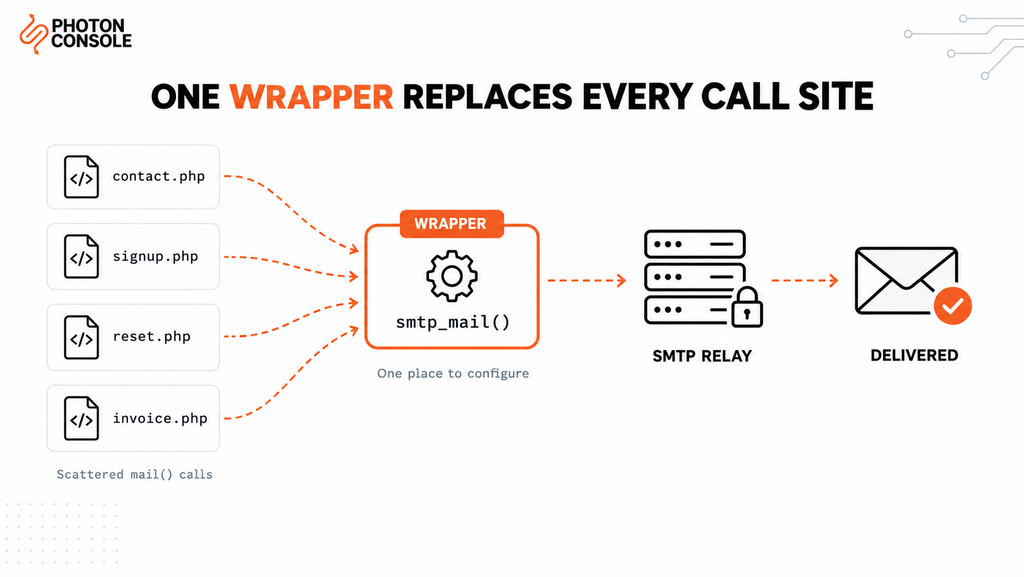
You rarely need to rewrite every call site. Define a wrapper with the same shape as mail(), then change the calls to point at it.
<?php
/**
 * Drop-in replacement for mail() using authenticated SMTP.
 * Change mail(...) to smtp_mail(...) at each call site.
 */

use PHPMailer\PHPMailer\PHPMailer;
use PHPMailer\PHPMailer\Exception;

function smtp_mail(string $to, string $subject, string $message, array $options = []): bool
{
    static $mail = null;

    if ($mail === null) {
        $mail = new PHPMailer(true);
        $mail->isSMTP();
        $mail->Host       = getenv('SMTP_HOST');
        $mail->Port       = (int) getenv('SMTP_PORT');
        $mail->SMTPAuth   = true;
        $mail->Username   = getenv('SMTP_USER');
        $mail->Password   = getenv('SMTP_PASS');
        $mail->SMTPSecure = PHPMailer::ENCRYPTION_STARTTLS;
        $mail->SMTPKeepAlive = true;   // reuse the connection
    }

    try {
        $mail->clearAllRecipients();
        $mail->clearReplyTos();

        $mail->setFrom(getenv('MAIL_FROM'), getenv('MAIL_FROM_NAME'));
        $mail->addAddress($to);

        if (!empty($options['reply_to'])) {
            $mail->addReplyTo($options['reply_to']);
        }

        $mail->Subject = $subject;
        $mail->Body    = $message;
        $mail->isHTML(!empty($options['html']));

        return $mail->send();
    } catch (Exception $e) {
        error_log('smtp_mail failed for ' . $to . ': ' . $mail->ErrorInfo);
        return false;
    }
}
Two details make this work well in production. SMTPKeepAlive reuses one connection across multiple sends in the same request instead of reconnecting each time. And clearAllRecipients() on each call prevents recipients accumulating across sends, which is the most common bug when reusing a PHPMailer instance.
Quick Fix
PHPMailer SMTP Connection Errors
SMTP connect() failed— wrong host or port, or the host blocks outbound SMTPSMTP Error: Could not authenticate— wrong credentials, or whitespace copied into them- Connection hangs — port 587 needs STARTTLS, port 465 needs SMTPS. Do not mix them
- Enable
$mail->SMTPDebug = 2temporarily to see the full SMTP conversation - Try port 2525 if your host blocks both 587 and 465
Port Reference
| Port | PHPMailer setting | When to use |
|---|---|---|
| 587 | ENCRYPTION_STARTTLS | Recommended default |
| 465 | ENCRYPTION_SMTPS | When the provider requires implicit SSL |
| 2525 | ENCRYPTION_STARTTLS | When the host blocks 587 and 465 |
| 25 | None | Avoid — blocked by nearly all hosts |
Configuring PHP With PhotonConsole
Two steps: authenticate your domain in DNS, then set the environment variables the code above reads.
TXT    @                    v=spf1 include:relay.photonconsole.com ~all
CNAME  photon._domainkey    dkim.photonconsole.com
Note
DNS changes are not instant. SPF and DKIM records can take from a few minutes to 24-48 hours to propagate depending on your registrar and TTL settings. Check you do not already publish a second SPF record — two separate TXT records starting with v=spf1 break authentication entirely.
SMTP_HOST=smtp.photonrelay.com
SMTP_PORT=587          # 465 for implicit SSL, 2525 if 587 is blocked
SMTP_USER=your_project_api_user
SMTP_PASS=your_secret_api_key
MAIL_FROM=noreply@yourdomain.com
MAIL_FROM_NAME="Your App"
Port 2525 exists for hosts that block the standard SMTP ports, which resolves the shared hosting and cloud provider problems described above. Every PhotonConsole account includes 5,000 free emails per month, enough to migrate and validate the full path before any spend. Details are on the PhotonRelay page, and pricing has no monthly minimum.
If you are comparing options first, our analysis of free SMTP servers covers where each stops being practical.
Framework-Specific Notes
WordPress
wp_mail() wraps PHPMailer but defaults to the mail() transport, so it inherits every problem above. Our guide to fixing WordPress not sending email covers the plugin and code approaches.
Laravel
Laravel uses Symfony Mailer internally and never touches mail() when the SMTP mailer is configured. See our guide to Laravel mail configuration.
CodeIgniter and Legacy Frameworks
Older framework email classes often default to the mail protocol. Switch the protocol setting to smtp and supply host, port and credentials rather than replacing the framework’s mail class.
Plain PHP Scripts and Cron Jobs
The wrapper function above works unchanged in CLI scripts. Remember that CLI PHP often reads a different php.ini, so environment variables set for the web server may not be present for cron.
Pro Tips
- Never send from the visitor’s address. Put their address in Reply-To and send from your own domain, or SPF and DMARC will fail.
- Keep credentials out of source control. Read them from environment variables, not from a config file committed to the repository.
- Turn SMTPDebug off before deploying. Debug output can appear in responses and expose your host and username.
- Log failures with the SMTP response.
$mail->ErrorInfocontains the actual server reply, which usually names the cause. - Verify DNS after any change. MXToolbox checks SPF, DKIM and blocklist status in a single lookup.
- Score a real send before launch. Mail Tester flags authentication problems before users encounter them.
- Add rate limiting to public forms. An open contact endpoint becomes a spam relay within days of going live.
Related Issues You May Hit Next
- SMTP authentication errors when credentials are rejected despite looking correct
- SMTP connection timeouts when the connection hangs
- SMTP not working across the ten most common failure modes
- Emails landing in Gmail spam despite a successful send
- Emails sent but not delivered when the server reports success
Frequently Asked Questions
Why does mail() return true but no email arrives?
The return value only confirms the local mail program accepted the message. It says nothing about delivery. The message can be discarded, rejected or filtered afterwards with no feedback to your code.
Is PHP mail() deprecated?
No, it remains part of PHP. But it cannot authenticate or use TLS, so it fails modern deliverability requirements regardless of its supported status.
Do I need Composer to use PHPMailer?
Composer is the recommended route. PHPMailer can be included manually by requiring its class files, which is useful on legacy hosting without Composer access.
Which is better, PHPMailer or Symfony Mailer?
PHPMailer is the easier migration from existing mail() code and works on older PHP versions. Symfony Mailer has a cleaner API and suits modern applications. Both send authenticated SMTP correctly.
Can I keep using mail() for low volume?
You can, but volume is not the issue. A single password reset that lands in spam is as damaging as a hundred, and the header injection risk applies at any volume.
Why does authentication fail when the password is correct?
Two usual causes: whitespace copied into the credential, or special characters in a password inside a DSN string without URL encoding. Check both before assuming the credentials are wrong.
Do I still need SPF and DKIM with a relay?
Yes. The relay delivers the message, but the DNS records prove your domain authorised it. Without them, delivery is far less reliable regardless of which relay you use.
Conclusion
PHP’s mail() function is not broken. It does what it was built to do, which is hand a message to a local mail program and report whether that handoff worked. Everything modern email delivery requires — authentication, TLS, alignment between envelope and header, delivery feedback — sits outside what the function can offer.
Replacing it is usually a short job. A wrapper with the same signature lets you change call sites incrementally rather than rewriting the application, and it closes the header injection risk at the same time.
What remains after the code change is infrastructure: whether your host permits outbound SMTP, and whether receiving providers trust your sending domain. A dedicated transactional email solution handles authentication, routing and reputation using the configuration shown above. Developers working across stacks may also want our guides to Laravel mail configuration and sending email in Python.