

Resend is one of the nicest email APIs to build on. The SDK is clean, the docs are good, and you can get a verified domain sent in an afternoon. None of that is in dispute.
The questions that decide whether you stay arrive later, and they are not developer-experience questions. They arrive at three in the morning during an incident when you need the log of a message sent six weeks ago. Or during a flash sale, when your send queue starts returning 429. Or at a compliance review, when someone asks how long you retain delivery records.
This is a comparison of what sits underneath, with the figures from Resend’s own documentation.
Quick Answer: Who Should Stay and Who Should Look
| Your situation | Verdict |
|---|---|
| Under ~50k/month, no compliance requirement; 30 days of logs is fine. | Stay. You are getting good value and better DX than most. |
| You need delivery records older than 30 days. | Look — retention is 30 days on Free, Pro and Scale. |
| You send in bursts rather than at a steady rate. | Use the batch endpoint first; look if that is not enough. |
| Cost per email is your main constraint. | Amazon SES is cheaper than everyone, including us. |
| You send both transactional and marketing mail at volume. | Look for enforced separation between the two. |
| You need inbound mail routed into your application. | Check inbound capability specifically — it varies enormously. |
Most teams reading this should stay on Resend. The rest of this article is for the ones who should not, and for anyone who wants to know which questions to ask before committing.

What Resend Actually Documents
Credit where it is due: Resend publishes its limits clearly, which is more than several competitors manage. Here is what the quotas and limits documentation states.
| Limit | Documented value |
|---|---|
| Free tier | 100 emails per day, 3,000 per month; the day is a UTC calendar day, resetting at midnight UTC. |
| Free marketing | Unlimited emails to up to 1,000 contacts per month |
| Paid tiers | No daily limit; monthly quota set by tier |
| How is volume counted? | Each To, CC and BCC the recipient counts separately, and received emails count too. |
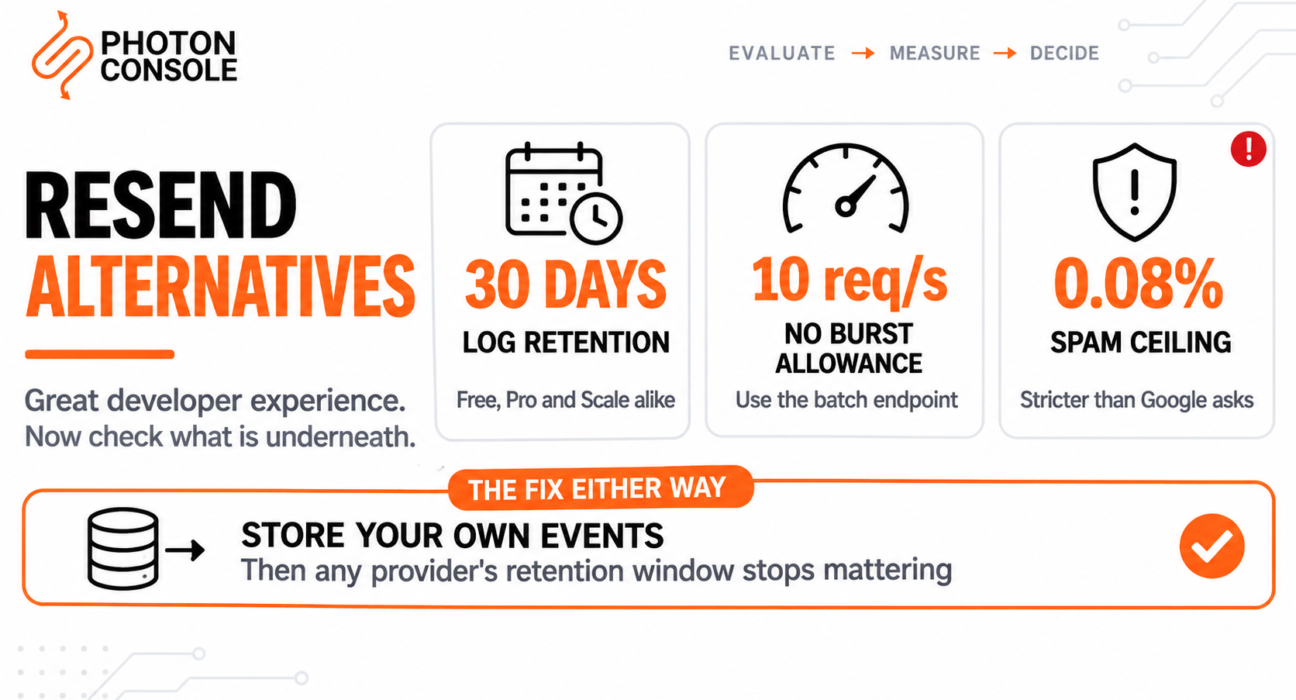
| API rate limit | 10 requests per second per team, shared across all API keys, with no burst allowance |
| Batch endpoint | Up to 100 emails per call, counting as one request |
| Data retention | 30 days on Free, Pro and Scale. Enterprise is flexible by arrangement. |
| Domains | Free 3, Pro 10, Scale 1,000; Pro and Scale can add 100 more for $20/month |
| Inboxes | 3 included on all plans; beyond that, $1/month each where pay-as-you-go is enabled |
| Bounce rate ceiling | Must stay under 4% |
| Spam rate ceiling | Must stay under 0.08% |
| Overage control | Pay-as-you-go is opt-in; the overage limit defaults to 400% and is settable from 100% to 1,000%. |
Note
The free tier’s daily limit resets at midnight UTC, which is not midnight where most teams are. In India that boundary falls at 5:30am, in California at 4pm or 5pm depending on the season. So an evening test run can land in what the quota considers tomorrow, and a batch sent during a Pacific afternoon can split across two daily allowances. It is a small thing that produces confusing results during evaluation when you are trying to work out why the 100th send succeeded and the next one did not.
Three of those rows deserve more than a table cell.
Thirty Days of Logs, on Every Plan but Enterprise
This is the finding worth acting on, because it is the one that does not announce itself.
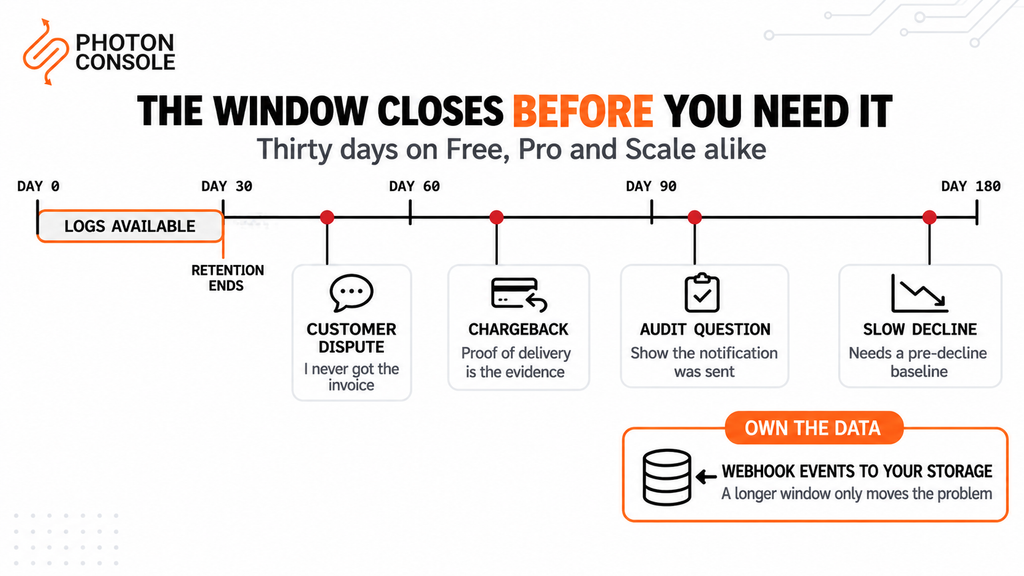
Resend documents 30 days of data retention on Free, Pro and Scale alike. Scale is a paid tier, and it still gets 30 days. Longer retention is an enterprise arrangement.
Thirty days is fine for debugging. It is not fine for the situations where delivery logs actually get pulled:
- A customer dispute. “I never received the invoice” arrives six weeks after the invoice, not six days.
- A chargeback. Proving a receipt was delivered is often the evidence, and card disputes run on a months-long clock.
- A compliance or audit question. Any process that asks you to demonstrate notification was sent will be looking further back than a month.
- A slow-building deliverability problem. Diagnosing a gradual decline needs a baseline from before it started.
Quick Fix
Stop Depending on Any Provider’s Retention
- Consume the webhook event stream and write every event to your own storage
- Store the message ID, recipient, event type, timestamp and provider — that is enough to answer a dispute
- Normalise event names into your own vocabulary while you are at it, so the data survives a provider change
- Keep it for as long as your disputes, chargebacks and audits actually run — usually years, not weeks
- Do this regardless of which provider you use; a longer retention window only moves the problem
That last point is the honest version. Switching to a provider with 90-day retention does not solve this — it buys you 60 more days of the same dependency. The fix is owning the data, and our guide to transactional email webhooks covers building that consumer properly.
Ten Requests Per Second, With No Burst Allowance
The rate limit documentation states 10 requests per second per team, shared across all API keys, returning 429 when exceeded. The limit can be raised for trusted senders on request.
The phrase that matters is no burst allowance. Many APIs let you exceed the steady-state rate briefly before throttling. This one does not, which changes how you have to send.
Ten requests per second is 864,000 single sends per day, so for steady traffic it is generous. The problem is that almost no real application sends steadily:
- A flash sale fires several thousand order confirmations in a minute
- A forced password reset after a security event mails your whole user base at once
- A nightly digest job wakes up and tries to send everything in one loop
- A deploy clears a retry queue that accumulated during a brief outage
Each of those is a burst against a limit with no headroom.
# The fix is the batch endpoint, not a higher rate limit.
#
#   Single sends:  10 requests/sec  =     10 emails/sec
#   Batch of 100:  10 requests/sec  =  1,000 emails/sec
#
# Same rate limit. 100x the throughput.

const BATCH_SIZE = 100;          // documented maximum per call
const RATE = 10;                 // requests per second, per team

for (const chunk of chunks(messages, BATCH_SIZE)) {
  await sendBatch(chunk);
  await sleep(1000 / RATE);      // stay under, deliberately
}

# Two things to get right either way:
#  - Honour retry-after on a 429 rather than retrying immediately
#  - Queue sends so a burst becomes a backlog, not a wall of errors
If you are sending from a serverless function, the rate limit is shared across every concurrent invocation, which means your effective per-invocation budget shrinks as you scale out. Our guide to sending email from serverless functions covers why that environment makes rate limits harder than it looks.
Common Mistake
Treating a rate limit as a reason to switch providers. It almost never is — every provider has one, and moving to a higher ceiling without queueing just raises the volume at which you hit the same wall. A send path that cannot absorb a burst is an architecture problem, not a vendor problem, and the fix is the same everywhere: queue the sends, batch where the API supports it, and honour the retry header. Make that change first. If you still need more throughput afterwards, you now have a real number to take to a provider rather than a guess, and most will raise the limit for an account with a clean sending record.
A Spam Threshold Stricter Than Google’s
Resend documents with a bounce rate ceiling of 4% and a spam rate ceiling of 0.08%.
That spam figure is worth pausing on. Google asks bulk senders to keep user-reported spam below 0.1% and to prevent it from ever reaching 0.3%. Resend’s own ceiling is tighter than the number the largest receiver recommends.
This is not a criticism — a provider enforcing stricter standards than the receiver is protecting its shared IP reputation, and that protection benefits every sender on the platform. But it does mean your account can be in trouble at a spam rate Gmail itself would consider acceptable, and it is a figure to know before you send a campaign to a list you have not mailed in a year.
Where Resend Is Genuinely the Better Choice
Three things, stated plainly.
The overage controls are better than several incumbents’. Pay-as-you-go is opt-in rather than on by default, and the overage limit is settable from 100% to 1,000% in steps. That is a real spend cap, configurable by a team admin. It is worth knowing that Postmark offers no provider-side spend cap at all and that several providers charge overage at a premium to their headline rate. Resend lets you bound the invoice, which is a feature and not a small one.
The limits are published. Retention, rate limits, bounce and spam ceilings, domain counts — all documented, with numbers, on pages you can read before you sign up. A surprising number of providers make you discover these by hitting them.
The developer experience is the best in the category. If your team is small, your volume is moderate and your main constraint is engineering time rather than cost or compliance, that advantage is worth more than any individual limit in the table above. An afternoon saved now is real, and a migration you never have to do is cheaper than one you do.
The Alternatives, by the Problem You Have
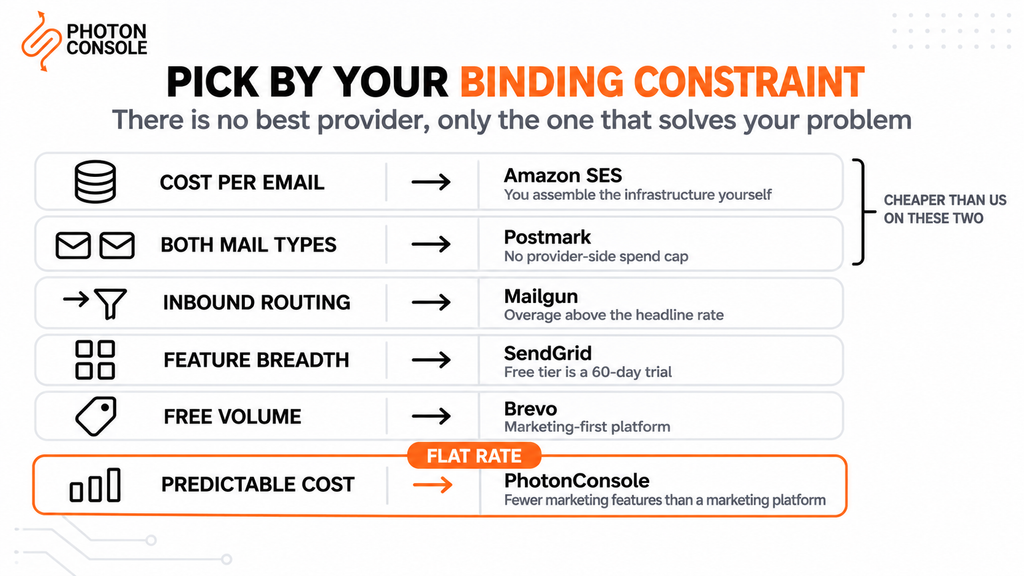
Pick by the constraint that is binding, not by a feature matrix.
| Your binding constraint | Where to look | What you trade |
|---|---|---|
| Cost per email above all | Amazon SES — cheaper per email than every managed provider, us included | You assemble the infrastructure yourself: notifications, suppression, logging. See our SES limits guide |
| Transactional and marketing mail are both at volume. | Postmark — keeps the two on separate IP pools as a platform property | Feature-based tiers, and no provider-side spend cap |
| Inbound mail routed into your app | Mailgun — a real regex-based routing engine | Overage charged above the headline rate; see our pricing breakdown |
| Breadth of features and integrations | SendGrid — the widest surface area in the category | Complexity, and a free tier that is a 60-day trial rather than a free plan |
| Marketing-led sending with a generous free tier | Brevo — more free monthly volume than most, including us | A marketing-first platform; transactional is not the centre of the product |
| Predictable flat-rate cost with logs you keep | PhotonConsole — flat per-thousand pricing, no overage premium | Fewer marketing features than a marketing platform |
Two of those rows say something that works against us, and both are accurate. SES is genuinely cheaper per email than PhotonConsole and will remain so, because it is infrastructure sold at infrastructure margins. Brevo’s free plan offers more monthly volume than ours. If either of those is your binding constraint, the honest answer is that we are not your best option.
If you have not shortlisted yet, our comparison page sets the options side by side, and the SMTP relay API reference shows what integration looks like.
Evaluating Any Provider’s Infrastructure in Fifteen Minutes
Whatever you shortlist, these are the questions that separate providers once the DX comparison is over. Most can be answered from documentation without talking to anyone.
Quick Fix
The Eight Questions That Actually Differentiate
- Log retention — how many days, at the tier you will actually be on, not Enterprise
- Rate limit — requests per second, whether bursts are allowed, and whether batching is available
- Bounce and spam ceilings — the provider’s own thresholds, which may be stricter than the receiver’s
- Spend cap — can you bound the invoice, and is overage charged at the headline rate or above it
- Dedicated IP — available at what plan, what volume and what cost, or not at all
- Stream separation — does the platform keep transactional and marketing mail apart, or is that your job
- Inbound — does it receive mail, and what happens to your routing if you leave
- SLA — is there a published uptime commitment with service credits, or nothing
Published answers to all eight is itself a signal. A provider that documents its ceilings is easier to plan around than one that does not, regardless of whether the numbers are the best in the category.
If You Do Move: The Migration Surface
Resend holds less of your setup than most providers, which makes leaving comparatively easy. Authentication failures are one of the most common causes of delivery problems during a provider change, so the DNS work deserves more care than the code.
- Templates — if your content lives in your repository rather than a provider template store, this is already done
- Webhook consumer — event names and payload shape differ between providers, so the mapping gets rewritten
- Suppression data — export it and import before the first production send, never after
- Authentication — a new SPF include and a DKIM selector; count your SPF lookups first, because exceeding the ten-term limit in RFC 7208 returns
permerrorand fails both providers at once - Inbound — if you use Resend inboxes, check what receives that mail afterwards
Follow the sequence in our guide to migrating email providers without downtime, and measure the switch rather than guessing at it using the method in running two email providers during a migration. Verify both paths with MXToolbox and Mail Tester before moving real traffic.
Pro Tips
- Write every webhook event to your own storage from day one. It makes any provider’s retention window irrelevant.
- Use the batch endpoint before asking for a rate limit increase. 100 emails per request against the same 10 per second is a hundredfold difference.
- Queue your sends. A burst should become a backlog, not a wall of 429s.
- Honour
retry-after. Retrying immediately on a 429 makes the throttle worse. - Remember that CC and BCC recipients each count toward your quota, as do received emails.
- Set your overage limit deliberately. The default allows up to five times your monthly quota.
- Check retention at the tier you will actually buy, not the one on the Enterprise column.
- Do not switch providers over a rate limit until you have queued and batched. The wall moves; it does not disappear.
Related Reading
- Amazon SES sending limits — the cheapest option, and what it asks of you in return
- Postmark pricing explained — feature tiers, and the missing spend cap
- Mailgun pricing explained — where the overage premium bites
- SendGrid free tier limits — why it is a trial, not a free plan
- Brevo free plan limits — generous free volume, and what the first paid tier does
- Migrating email providers without downtime — if you decide to move
- Email provider migration checklist — the 40 checks before you switch
Frequently Asked Questions
What are the main limits to know about Resend?
Thirty days of data retention on Free, Pro and Scale; 10 API requests per second per team with no burst allowance; a bounce ceiling of 4% and a spam ceiling of 0.08%.
How long does Resend keep email logs?
Thirty days on Free, Pro and Scale. Enterprise retention is flexible by arrangement. If you need records for disputes or audits, store webhook events in your own system.
What is Resend’s API rate limit?
Ten requests per second per team, shared across all API keys, with no burst allowance. Exceeding it returns 429. The limit can be raised for trusted senders on request.
How do I send more than 10 emails per second on Resend?
Use the batch endpoint, which accepts up to 100 emails per call and counts as a single request. That is 1,000 emails per second against the same rate limit.
What is Resend’s free tier?
100 emails per day and 3,000 per month, with the day being a UTC calendar day. Marketing is unlimited to up to 1,000 contacts per month. Free accounts get up to three verified domains.
Can I cap my spending on Resend?
Yes. Pay-as-you-go is opt-in, and the overage limit defaults to 400% and can be set from 100% to 1,000%. This is better than several competitors, some of which offer no spend cap at all.
What is the cheapest alternative to Resend?
Amazon SES is cheaper per email than every managed provider. The trade is that you assemble the surrounding infrastructure — notifications, suppression and logging — yourself.
Is Resend good enough for production?
For most teams under moderate volume with no long-retention or compliance requirement, yes. The constraints that matter are retention, burst capacity and your own spam rate, not the quality of the API.
Does Resend count CC and BCC recipients separately?
Yes. Each To, CC and BCC recipient counts individually toward your quota, and received emails count as well.
Conclusion
Most comparison articles in this category exist to tell you the author’s product is better. This one cannot honestly do that across the board, so here is the useful version.
Resend has the best developer experience in the category and publishes its limits openly, which is more than several incumbents manage. Its overage controls are better than Postmark’s. If you are under moderate volume, have no compliance requirement, and 30 days of logs covers your needs, staying is the right call and switching would cost you engineering time for no gain.
Three things should prompt a look elsewhere. Retention of 30 days on every tier below Enterprise, which is shorter than disputes and audits run. A rate limit with no burst allowance, if your traffic is spiky and batching does not cover it. And a 0.08% spam ceiling that is stricter than Google’s own recommendation, which matters if you mail large or aged lists.
The one change worth making whatever you decide: consume the webhook stream and store every event yourself. It removes your dependency on any provider’s retention window, it survives a migration, and it is the difference between answering a chargeback with evidence and answering it with an apology. After that, a reliable SMTP relay is a commodity you can swap — which is exactly the position you want to be in.