

Migrations rarely fail on a missing step. They fail on a step nobody owned.
Someone assumed the DNS change was handled because someone else mentioned DNS in a meeting. The suppression list was exported, but only for the primary domain. The rollback plan existed, in the sense that somebody said, “We can always switch back,” out loud.
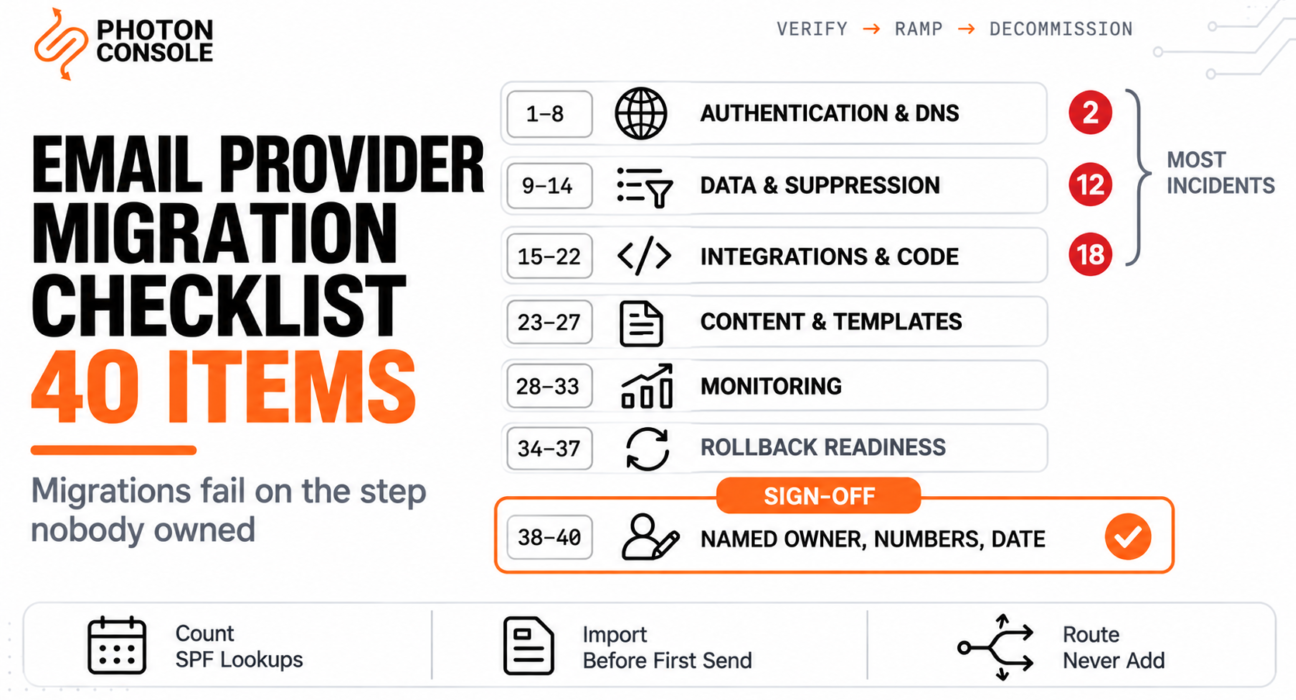
This is the list of 40 checks, grouped into the seven phases they belong to, with the reason each one matters. Work through it with a name against every line.
Quick Answer: The Seven Phases
| Phase | Items | When |
|---|---|---|
| Authentication and DNS | 1–8 | Before any traffic moves |
| Data and suppression | 9–14 | Before the first production send |
| Integrations and code | 15–22 | Before the first production send |
| Content and templates | 23–27 | Before the first production send |
| Monitoring and measurement | 28–33 | Before you ramp past 5% |
| Rollback readiness | 34–37 | Before you ramp past 5% |
| Sign-off | 38–40 | Before stage 1 |
Three items cause most incidents: item 2 (SPF lookup count), item 12 (suppressions imported before the first send) and item 18 (no duplicate send path). If you only verify three things, verify those.

How to Use This
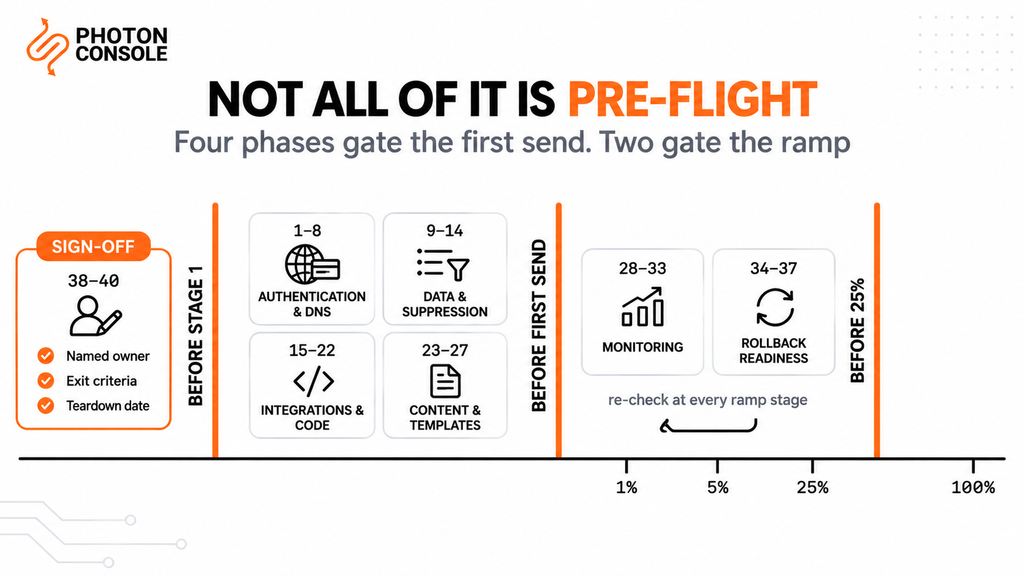
Two rules make the difference between a checklist that works and one that gets pasted into a document and forgotten.
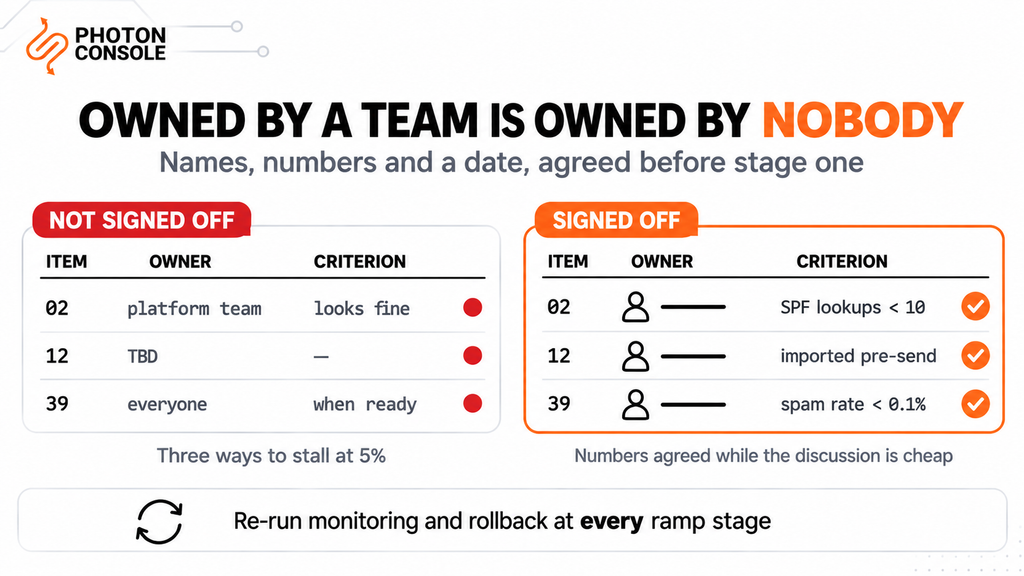
Every item needs a named owner, not a team. “Platform team” is not an owner. An item assigned to a group is an item assigned to nobody, and those are the ones that turn up unfinished at 50% rollout.
This is a gate, not a one-time pass. Items 28–37 get re-checked at every ramp stage, because what was true at 5% can stop being true at 50% — alerts that never fired, a rollback path that quietly broke when someone cleaned up an unused environment variable.
Common Mistake
Treating the checklist as pre-flight only. Teams work through all 40 items carefully, start the ramp, and never look at the list again — which is exactly when the monitoring and rollback items start to decay. The rollback was verified in week one; by week three somebody has rotated the old provider’s credentials during a routine security sweep, and the rollback that everyone believes in no longer exists. Re-run phases 5 and 6 at the start of every ramp stage. It takes ten minutes and it is the difference between having a rollback and believing you have one.
This checklist covers what to verify. It deliberately does not cover the order in which to move traffic — that is in our guide to migrating email providers without downtime, and the measurement method is in running two email providers during a migration.
Phase 1: Authentication and DNS (Items 1–8)
Authentication failures are one of the most common causes of email delivery problems, and during a migration they are the most likely thing to break both providers at once rather than just the new one.
| # | Check | Why it matters |
|---|---|---|
| 1 | New provider’s include added to SPF, with the old one still present | Both must be authorised during the parallel run |
| 2 | Total SPF DNS lookups counted and confirmed under ten | Exceeding it returns permerror and fails authentication for both providers simultaneously |
| 3 | DKIM published on a new selector, independent of the old provider’s | Independent selectors let both sign in parallel with no conflict |
| 4 | The DKIM signature was verified on a real send, not just a published record | A record that resolves is not proof the signature validates |
| 5 | DMARC record present with a policy of at least p=none | Google requires a DMARC record from bulk senders |
| 6 | From-domain alignment confirmed on SPF or DKIM | Only one needs to align, but one must |
| 7 | TTLs lowered at least one full old-TTL period before cutover | Lowering a TTL only takes effect after the old one expires everywhere |
| 8 | Any sending subdomain has an A or MX record in public DNS | Some receivers treat a subdomain with neither with more suspicion |
Item 2 is the one that bites hardest. The ten-term limit is specified in RFC 7208, and it counts include, a, mx, ptr, exists and redirect — but not ip4, ip6 or all. Adding one more provider’s include is often what tips a long-standing record over the edge. Verify with MXToolbox and the free email deliverability checker, and see our guide to SPF, DKIM and DMARC for the mechanics.
Phase 2: Data and Suppression (Items 9–14)
| # | Check | Why it matters |
|---|---|---|
| 9 | Suppressions exported from every list type the old provider keeps | Some providers split them into several separate lists |
| 10 | Exported per sending domain, and per stream where the provider has them | Suppression data is often scoped below the account level |
| 11 | Export stored in your own system, not only uploaded to the new provider | This is your data; the next migration should not need an export at all |
| 12 | Hard bounces and complaints are imported before the first production send | A new sending identity with no bounce history gets judged hardest on its first sends |
| 13 | Explicit decision on which categories not to import | Provider-side blocks reflect that provider’s infrastructure, not your recipients |
| 14 | Final re-export scheduled for the last day of the parallel run | Addresses that bounced during the ramp exist only on the old provider |
Item 13 catches people out. Not every suppression is about the recipient — some record the old provider’s own delivery decisions, and importing those carries another company’s infrastructure history into your new setup. Our guide to reducing bounce rate covers why the first sends from a new identity matter disproportionately.
Phase 3: Integrations and Code (Items 15–22)
| # | Check | Why it matters |
|---|---|---|
| 15 | Every send site found by grepping for the old provider’s hostname and SDK | A forgotten cron job or admin tool keeps sending after cutover |
| 16 | All old credentials inventoried, including any in CI and in staging | Credentials in a pipeline are the ones nobody remembers |
| 17 | Routing by recipient hash implemented, percentage in configuration | A rollback that needs a deploy is not a rollback |
| 18 | One send site, one decision, one provider — no duplicate path | Adding a second call rather than routing causes duplicate delivery |
| 19 | New provider’s webhook endpoint deployed and publicly reachable | Events you cannot receive are events you cannot compare |
| 20 | Webhook signature verification implemented and tested against a real event | Signing schemes differ entirely between providers |
| 21 | Every payload shape the new provider sends is handled | Some providers post more than one shape depending on the event source |
| 22 | Inbound mail checked — MX records and any routing rules | If the old provider also receives mail, that is a second migration |
Item 22 is the one most likely to be missed entirely, because inbound routing is configured once and then never touched. Its failure is silent in both directions: senders get a bounce you never see, and your application simply stops receiving the posts it used to. See migrating from Mailgun for the reimplementation pattern, and the SMTP relay API reference for the sending side. PhotonConsole issues SMTP credentials on signup, so items 17 to 21 can be built and tested against a live endpoint before any production traffic moves.
Quick Fix
The Five Items That Cause Most Incidents
- Item 2 — SPF lookups over ten returns
permerrorand breaks both providers at once - Item 12 — suppressions imported after the first send instead of before
- Item 18 — a second provider call added rather than traffic routed, causing duplicate delivery
- Item 22 — inbound mail forgotten, failing silently for days
- Item 36 — old credentials rotated mid-migration, destroying the rollback nobody re-tested
Phase 4: Content and Templates (Items 23–27)
| # | Check | Why it matters |
|---|---|---|
| 23 | Templates exported into version control, not into another provider’s store | Version-controlled templates make the next change a config edit |
| 24 | Layouts or shared wrappers flattened or reproduced | A template exported without its wrapper looks almost right |
| 25 | Every template rendered against missing and null variables | Renderers differ on undefined values: blank, literal placeholder, or error |
| 26 | Marketing mail carries a one-click unsubscribe with an HTTPS URL | Required by Google for bulk marketing mail, per RFC 8058 |
| 27 | Tracking and link domains updated where the provider rewrites URLs | Links pointing at a decommissioned tracking domain break after teardown |
On item 26, Google’s bulk sender requirements ask for one-click unsubscribe on marketing and promotional messages, implemented with List-Unsubscribe headers under RFC 8058, including one HTTPS URL in the header. Transactional mail is exempt. A mailto link or a link in the body does not satisfy it, and Google recommends fulfilling requests within 48 hours.
Phase 5: Monitoring and Measurement (Items 28–33)
| # | Check | Why it matters |
|---|---|---|
| 28 | Both providers’ events normalised into one vocabulary of your own | Two dashboards both reading 99.2% are not measuring the same thing |
| 29 | Unmapped event types logged and counted, never silently discarded | A dropped bounce category makes a provider look better than it is |
| 30 | Rates reported segmented by receiving domain, not only as an average | A problem at Gmail and none at Outlook is a finding an average hides |
| 31 | Google Postmaster Tools access confirmed for every sending domain | Provider-reported delivery is acceptance, not inbox placement |
| 32 | Seed inbox tests scheduled on both paths | Shows where mail lands rather than whether it was accepted |
| 33 | Alerts configured on bounce rate and complaint rate thresholds | Nobody watches a dashboard at 3am on the third day of a ramp |
For item 31, Postmaster Tools reports spam rate and domain reputation from Google’s side. Google asks senders to stay below 0.1% user-reported spam and to prevent the rate from ever reaching 0.3%; a sender above 0.3% is ineligible for mitigation until it has stayed below that for seven consecutive days. Those are the numbers to put in item 39. Mail Tester covers item 32 for individual messages.
Phase 6: Rollback Readiness (Items 34–37)
| # | Check | Why it matters |
|---|---|---|
| 34 | Rollback to 0% achievable without a deploy | If reverting needs a release, you cannot abort quickly |
| 35 | Old provider still fully functional — not downgraded, paused or cancelled | A downgraded plan may not handle 100% of your volume any more |
| 36 | Old provider’s credentials still valid and excluded from rotation | A routine security sweep silently destroys the rollback |
| 37 | Rollback executed once, in production, at a low percentage | An untested rollback is a plan, not a capability |
Item 37 is the one people resist and the one worth insisting on. Take the rollout from 5% to 0%, confirm mail still flows entirely through the old provider, then put it back. Ten minutes, during business hours, while the stakes are low. The alternative is discovering at 50% that the revert path has a bug.
Phase 7: Sign-Off (Items 38–40)
| # | Check | Why it matters |
|---|---|---|
| 38 | A named individual against every item above | An item owned by a team is owned by nobody |
| 39 | Numeric exit criteria agreed in writing before stage 1 | A ramp without criteria ends when somebody gets bored |
| 40 | A decommissioning date set, with the teardown order written down | Migrations that are never finished leave credentials live indefinitely |
Quick Fix
The Day Before Cutover
- Re-verify SPF resolves and the lookup count is still under ten
- Confirm the old provider’s credentials are still valid — test an actual send
- Re-export suppressions from the old provider and import them
- Check that alerts from item 33 have fired at least once in testing
- Confirm nothing else ships today: no template release, no DNS edit, no campaign
Note
Items 39 and 40 look like paperwork and are the two that most often decide whether the migration ends. Without agreed numbers, a single hard bounce in a small cohort becomes an argument rather than a data point, and the ramp stalls at 5% indefinitely. Without a decommissioning date, the old provider stays live for months with valid credentials and an open invoice, which is both a cost and a security exposure. Set both before stage 1, when nobody is under pressure and the discussion is cheap.
Pro Tips
- Put a name, not a team, against every line. This single change catches more than any individual item.
- Count your SPF lookups before adding anything. It is the one mistake that breaks both providers at once.
- Import suppressions before the first send, never after. First impressions on a new sending identity are expensive.
- Grep for the provider’s hostname, not its SDK name. The hostname appears in config files the SDK search misses.
- Test the rollback for real, at 5%. Ten minutes to turn a plan into a capability.
- Exclude the old provider’s credentials from rotation until teardown, and tell whoever runs the sweep.
- Re-run phases 5 and 6 at every ramp stage. Monitoring and rollback decay quietly.
- Change one thing at a time. A template release during a ramp invalidates the week’s data.
Related Reading
This checklist is the hub for our migration cluster. Each article below covers one part in depth:
- Migrating email providers without downtime — the sequence and timing, ordered by reversibility
- Running two email providers during a migration — recipient hashing, event normalisation and exit criteria
- Migrating away from SendGrid — where templates and multiple suppression lists are the lock-in
- Migrating from Amazon SES — where an AWS dependency graph is the lock-in
- Migrating from Mailgun — where inbound routing is the forgotten half
- Migrating from Postmark — where an enforced architecture is the lock-in
- SPF, DKIM and DMARC explained simply — the authentication records in phase 1
Frequently Asked Questions
What is the most commonly missed item in an email provider migration?
Inbound mail. If the old provider also receives mail through an MX record, that is a second migration with its own cutover, and its failure is silent in both directions.
Which item breaks migrations most often?
The SPF lookup count. Adding a second provider’s include can push the record past the ten-term limit, which returns permerror and fails authentication for both providers at the same time.
Should I import every suppression list from my old provider?
No. Import hard bounces and complaints, which are facts about recipients. Decide deliberately about provider-side blocks, which reflect that provider’s infrastructure rather than your recipients.
When should suppression data be imported?
Before the first production send. A new sending identity has no bounce history, so mailing previously-bounced addresses from it teaches receivers that this identity sends to addresses that do not exist.
How do I avoid sending duplicate emails during a migration?
Route rather than add. One send site makes one decision and calls one provider. Adding a second provider call alongside the existing one causes duplicate delivery and corrupts your comparison data.
What spam rate should trigger a rollback?
Google asks senders to stay below 0.1% and to prevent the rate from ever reaching 0.3%. At or above 0.3% a sender is ineligible for mitigation until seven consecutive days below it, which makes 0.3% a sensible hard stop.
Do I really need to test the rollback?
Yes. Take the rollout from 5% to 0% in production, confirm mail flows through the old provider, then restore it. An untested rollback is a plan rather than a capability.
How long should I keep the old provider after reaching 100%?
Around two weeks, fully functional and with valid credentials. Set the decommissioning date in advance so the account does not stay live for months.
Why does every item need an individual owner?
Because an item assigned to a team is assigned to nobody. Items owned by groups are the ones that turn up unfinished halfway through a ramp.
Conclusion
Forty items sounds like a lot until you consider that most of them take under five minutes and three of them prevent the incidents that make migrations memorable.
If you do nothing else from this list, do these: count your SPF lookups before adding a provider, import suppressions before the first send rather than after, and confirm you have one send site making one decision rather than two calls running side by side. Those three cover the failures that produce duplicate invoices, authentication outages affecting both providers, and a burst of bounces on a brand-new sending identity.
Then do the two that feel like administration. Put a person’s name against every line, and agree the numbers that mean proceed, hold and roll back before the first percent of traffic moves. Checklists do not fail because items are missing. They fail because nobody owned the one that mattered, and because without agreed criteria a single bounce becomes an argument instead of a data point.
Done properly, what you keep is worth more than the switch itself: templates in version control, a suppression list you own, and an event vocabulary that is not shaped around one vendor’s API. At that point the next migration is a configuration change. If you are still choosing a destination, our comparison page sets the options side by side, and PhotonConsole issues credentials on signup so the new path can be live and testable while you work through phase 1.