

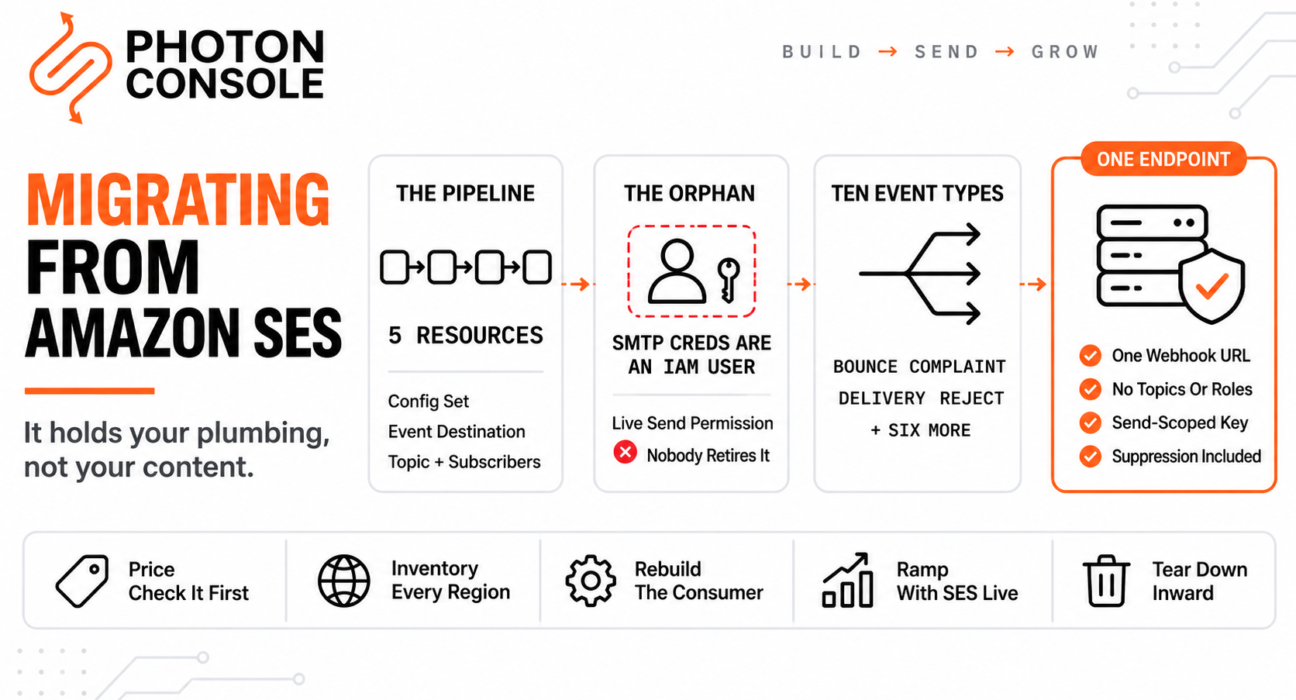
Leaving SendGrid means getting your content out. Leaving SES is a different problem entirely, because SES holds almost nothing of yours.
No templates, usually. No meaningful template engine. A light suppression list. What it holds instead is plumbing — IAM users, SNS topics, configuration sets, event destinations and IAM roles, scattered across one or more AWS regions and wired into each other.
You cannot export plumbing. You decommission it. That makes this migration less an extraction and more an untangling, and the risk is not losing data — it is leaving things switched on.
Quick Answer: What Actually Changes?
| What you have on SES | What replaces it | Effort |
|---|---|---|
| SMTP credentials derived from an IAM user | A provider-issued username and password | Minutes |
| Configuration set referenced in every send | Nothing — the reference disappears | Find every call site |
| Event destination to SNS, Firehose or EventBridge | One webhook endpoint | Rebuild the consumer |
| SNS topic plus its subscribers and IAM roles | Nothing — tear it down | Careful decommissioning |
| Verified identities, per region | One set of DNS records | Low |
| Account-level suppression list | Export and import it | Do before first send |
Note the third and fourth rows. Most of the engineering in this migration is replacing a multi-resource AWS event pipeline with a single HTTPS endpoint — which is simpler afterwards, and real work to get to.

The provider-agnostic sequencing — DNS TTL, SPF lookup limits, the ramp, the rollback plan — is in our guide to migrating email providers without downtime. Follow that ordering alongside this.
First, Be Honest About Why You Are Leaving
This matters because it determines whether the migration is a good idea, and the honest answer is uncomfortable for anyone selling an alternative.
You will not save money per email. SES is the cheapest way to send email at volume, by a wide margin, and essentially every managed provider — including this one — costs more per message. If your reason for leaving is the invoice, stop and re-check, because the invoice is going up.
The defensible reasons to leave are operational:
- You are the deliverability team. SES gives you infrastructure at close to cost and leaves bounce handling, complaint processing, suppression hygiene and reputation monitoring to you. Our guide to SES sending limits covers the enforcement thresholds that come with that.
- The notification pipeline costs more to run than it is worth at your volume — four AWS resources and an on-call rota to receive bounce events.
- Nobody on the team wants to own it. A legitimate reason, and the most common real one.
- You need delivery data your product team can query without building it on Firehose and a warehouse.
Those are good reasons. “It is expensive” is not one, and a migration undertaken for the wrong reason tends to get reversed in six months.
Quick Fix
Deciding Whether This Migration Is Worth It
- Work out your monthly send cost on SES, then the same volume on the new provider — expect it to rise
- Estimate hours per month currently spent on bounce handling, suppression and reputation monitoring
- Multiply those hours by a loaded engineering rate; that is what the price difference is buying
- Add the cost of the AWS resources in the notification pipeline and whoever is on call for them
- If the time saved is worth more than the price increase, migrate. If not, stay — and fix the pipeline instead
What the Notification Pipeline Actually Is
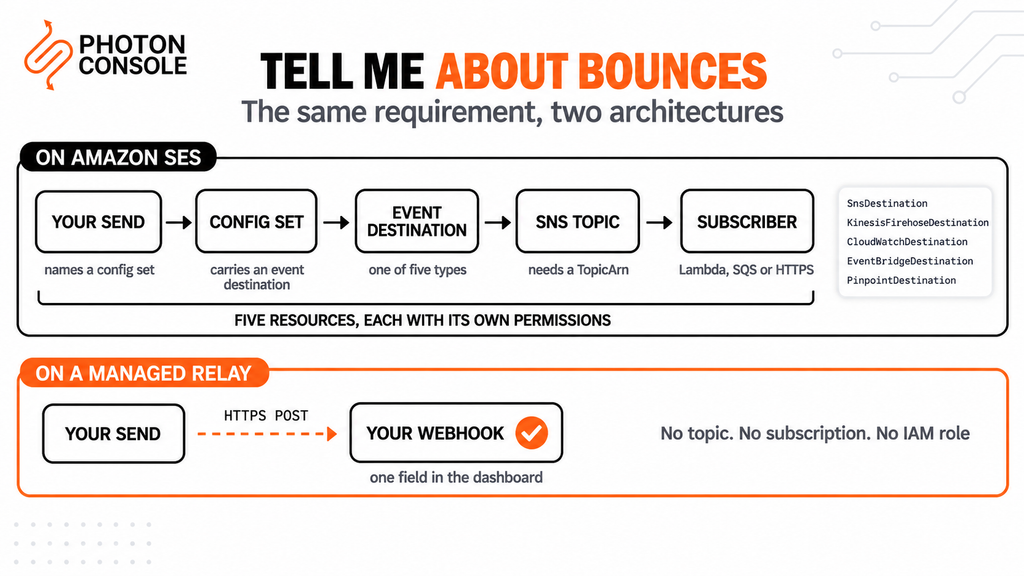
Here is the thing people underestimate. On most providers, “tell me about bounces” is a URL you paste into a settings field. On SES it is a graph.
A configuration set carries an event destination, and per the SES v2 CLI reference that destination can be one of five types:
| Destination type | What it also requires |
|---|---|
SnsDestination | A TopicArn — plus the topic’s own subscribers |
KinesisFirehoseDestination | An IamRoleArn and a DeliveryStreamArn |
CloudWatchDestination | DimensionConfigurations |
EventBridgeDestination | An EventBusArn — default bus only |
PinpointDestination | An ApplicationArn |
And the events it can match are ten specific types: SEND, REJECT, BOUNCE, COMPLAINT, DELIVERY, OPEN, CLICK, RENDERING_FAILURE, DELIVERY_DELAY and SUBSCRIPTION.
So a typical “we handle bounces” setup is a configuration set, an event destination, an SNS topic, an SQS queue or Lambda subscribed to that topic, and an IAM role permitting the whole chain. Five resources, each with its own permissions, each capable of failing independently.
# Inventory what exists before you change anything
aws sesv2 list-configuration-sets --region us-east-1

aws sesv2 get-configuration-set-event-destinations \
  --configuration-set-name my-config-set --region us-east-1

aws sns list-topics --region us-east-1
aws sns list-subscriptions-by-topic --topic-arn <arn> --region us-east-1

# Repeat for EVERY region you have identities in.
# Verify these commands against the current CLI reference
# before relying on them in a script.
Common Mistake
Decommissioning in the wrong direction. The instinct is to delete the SNS topic first because it looks like the top of the chain. Do the opposite — leave every AWS resource running until your new webhook has been receiving events correctly for days. An SNS topic nobody reads costs almost nothing; a deleted topic while SES is still generating bounce events means those events are gone, and you will not know which addresses bounced during the gap. Tear down from the consumer inward, last of all the configuration set, and only after the old sending path is fully retired.
Your SMTP Credentials Are an IAM User
This is the detail that creates an orphan after most SES migrations, and it is a security point rather than a tidiness one.
Amazon’s credentials documentation is explicit: “Although your Amazon SES SMTP credentials are different than your AWS access keys and IAM user access keys, Amazon SES SMTP credentials are actually a type of IAM credentials.” Creating them requires permission for iam:ListUsers, iam:CreateUser, iam:CreateAccessKey and iam:PutUserPolicy.
In other words, generating SMTP credentials created an IAM user with a send policy attached. When you migrate, that user remains — with live credentials and permission to send email from your domain, sitting in an account nobody is auditing for email any more.
Quick Fix
Finding and Retiring the SES IAM Users
- List IAM users and look for ones with an SES send policy attached — these are your SMTP credentials
- Check each one’s last-used date before touching it; something may still be sending through it
- Deactivate the access key first rather than deleting the user — deactivation is reversible
- Wait out your full rollback window, then delete the key and the user
- Do this for every region and every environment, including the staging user someone made once
Deactivate rather than delete while rollback is still possible. A deactivated key can be re-enabled in seconds; a deleted IAM user means recreating credentials and reconfiguring under pressure.
Replacing the Pipeline With One Endpoint
The replacement is genuinely simpler, and the work is in the translation rather than the plumbing.
Your new provider posts delivery events to an HTTPS endpoint you own. On PhotonConsole that is a single field in the dashboard — there is no topic, no subscription, no role. But the event vocabulary differs, so the consumer needs rewriting — and this is the moment to stop coupling your data model to a provider’s event names.
# Map the provider's vocabulary to your own, once.
const EVENT_MAP = {
  // SES                -> yours
  SEND:              'accepted',
  DELIVERY:           'delivered',
  BOUNCE:             'bounced',
  COMPLAINT:          'complained',
  REJECT:             'rejected',
  DELIVERY_DELAY:     'deferred',
  RENDERING_FAILURE:  'render_failed',
  SUBSCRIPTION:       'preference_changed'
};

# Two SES-specific details that do not survive the move:
#   - BOUNCE events carry a bounceType/bounceSubType you may
#     be branching on. Check what your new provider sends instead.
#   - Events arrive wrapped in an SNS envelope, so your handler
#     probably unwraps Message before parsing. That goes away.
That second note catches people. If your consumer parses an SNS notification envelope and then JSON-parses the Message field inside it, a direct webhook posting the event body at the top level will break it — and the failure looks like malformed JSON rather than a schema change. Our guide to transactional email webhooks covers verification and idempotency for the new consumer.
Find Every Configuration Set Reference
Sends that use a configuration set name it explicitly, which means that string is scattered through your codebase and will become meaningless.
With the API it is a parameter. Over SMTP it is usually a header, which is easy to forget because it does not look like configuration.
# Grep for all of these before you cut over
X-SES-CONFIGURATION-SET
ConfigurationSetName
X-SES-MESSAGE-TAGS
configuration_set

# The SMTP header form is the one people miss.
# Leaving it in place is harmless on a new provider
# but it is dead weight, and it misleads the next reader.
Message tags are worth noting too. If you used X-SES-MESSAGE-TAGS for reporting dimensions, whatever dashboards consume those tags need an equivalent on the new provider, or that reporting continuity breaks silently.
Everything Is Regional
SES identities, configuration sets, suppression lists and sending quotas are all scoped per AWS region. A migration that audits only your primary region misses whatever exists elsewhere.
That matters in two directions. You may have verified identities in a region you forgot about, still able to send. And a multi-region setup means repeating the entire decommissioning sequence per region rather than once.
If your application also runs on EC2, note that the port 25 restriction is separate from any of this — our guide to EC2 port 25 blocking covers that, and it does not go away just because you changed email provider.
The Good News: What SES Does Not Hold
Short section, and genuinely reassuring after the above.
SES has no template lock-in worth the name for most teams. If your email content is already rendered by your own code — which it almost certainly is, because SES gives you little reason to do otherwise — then the single hardest part of a SendGrid or Mailgun migration simply does not apply here.
Suppression is lighter too. SES maintains an account-level suppression list, and it is one list rather than six. Export it, import it before your first production send, and that part is done. It is still the only irreversible step you fully control, so do not skip it — mailing previously-bounced addresses from new infrastructure damages a reputation you have not built yet. Our guide to reducing bounce rate covers why those first signals carry disproportionate weight.
The Decommissioning Order
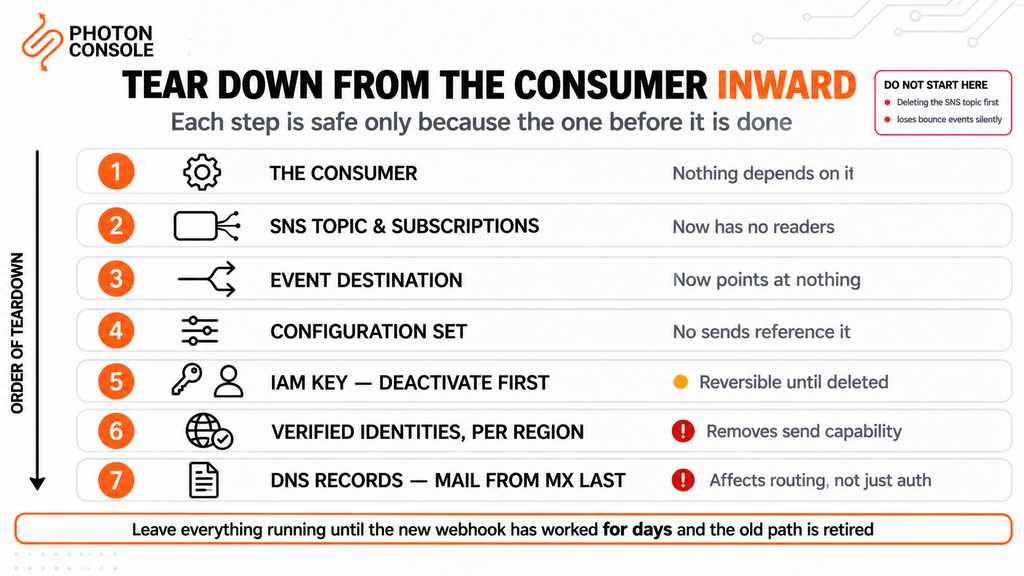
Once traffic is fully moved and the rollback window has closed, work through the teardown in this order. Each step is safe only because the one before it is done.
| Order | Tear down | Why this position |
|---|---|---|
| 1 | The consumer — Lambda, SQS subscriber or HTTPS endpoint | Nothing depends on it |
| 2 | The SNS topic and its subscriptions | Now has no readers |
| 3 | The event destination | Now points at nothing |
| 4 | The configuration set | No sends reference it any more |
| 5 | IAM access key — deactivate, then delete | Reversible until deleted |
| 6 | Verified identities, per region | Removes send capability entirely |
| 7 | DNS records, MAIL FROM MX last | Affects routing, not just auth |
Note
Keep the AWS account itself open, and keep SES in production access, for at least a full billing cycle after you reach 100% on the new provider. SES charges nothing for an account that is not sending, so the only cost is the resources you have deliberately left running — and getting back into production access is not instant if you ever surrender it. Our guide to SES sending limits covers the production access request; going through it a second time under pressure, because a migration needed reversing, is a situation worth spending nothing to avoid.
DNS Cleanup, Last
SES put records in your DNS and they should be the final thing you remove.
- Easy DKIM CNAMEs. SES manages the keys behind CNAME records it gave you. Leave them while rollback is possible — DKIM is keyed by selector, so they cannot conflict with your new provider’s records.
- The SPF include. One record, both providers inside it during the parallel run. Count your lookups before adding the new include: exceeding the limit in RFC 7208 returns
permerrorand fails authentication for both providers at once. - Custom MAIL FROM. If you configured one, there is an MX record pointing at SES. This is the one DNS change that needs real care, because an MX record affects mail routing rather than just authentication. Change it only after the old path is fully retired.
# During the parallel run — one SPF record, both senders
v=spf1 include:amazonses.com include:relay.photonconsole.com ~all

# New DKIM alongside the SES CNAMEs, different selector
photon._domainkey  CNAME  dkim.photonconsole.com
Take the exact SES include from your own account rather than from this article. Our guide to SPF, DKIM and DMARC covers alignment, and the free email deliverability checker shows what your domain publishes right now.
Quotas and Cost, Compared Honestly
| Amazon SES | Managed relay | |
|---|---|---|
| Price per email | Lowest available | Higher per message |
| Sending quota | Set per account and per region, not published | Published rate |
| Reputation enforcement | Thresholds with account pause | Provider manages the pool |
| Bounce and complaint handling | Yours to build and run | Included |
| Notification setup | Four to five AWS resources | One endpoint |
| Credentials | An IAM user with a send policy | A send-scoped key |
Read the first row and the last four together. That is the whole trade: you pay more per message and stop operating a pipeline. Whether that is worth it depends entirely on your volume and on what an engineer’s time is worth to you — which is a calculation only you can run, and worth running before you start rather than after.
A reliable SMTP provider with a flat per-thousand rate makes that arithmetic easy to do, because there is one number to multiply — PhotonConsole publishes a single rate rather than a tier table, so the comparison against your SES bill takes one calculation. Pricing includes 5,000 free emails a month, which covers the entire parallel-running phase while SES is still live.
Validate, Then Cut Over
Three confirmations before any production traffic moves.
Authentication aligns. Both providers in one SPF record, DKIM on separate selectors, no permerror. MXToolbox confirms the combined record resolves, and Mail Tester scores an end-to-end send. Receivers including Gmail publish sender expectations worth reading before rather than after.
The new webhook receives a real bounce. Trigger one deliberately to a known-invalid address. Reading documentation is not verification.
Your suppression import is complete, checked by count rather than by assumption.
Then ramp by percentage with SES still live, per the sequence in the migration guide. Keep the AWS resources running throughout, and tear them down in the order described above once you are done.
Pro Tips
- Audit every region, not just the primary. Identities, config sets and quotas are all regional.
- Deactivate IAM keys before deleting users. Deactivation is reversible; deletion under pressure is not.
- Check whether your handler unwraps an SNS envelope. A direct webhook will break it, and the error looks like bad JSON.
- Grep for the SMTP configuration-set header. It does not look like config, so it survives refactors.
- Tear down from the consumer inward. The SNS topic goes late, not first.
- Leave the custom MAIL FROM MX record until last. It affects routing, not just authentication.
- Do the cost arithmetic before you start. Your per-email price is going up; make sure you know by how much.
Related Reading
- Migrating email providers without downtime — the sequence and timing to follow alongside this
- Amazon SES sending limits — the enforcement thresholds that often start this decision
- Best Amazon SES alternatives — if you have not chosen a destination yet
- Transactional email webhooks explained — rebuilding the event consumer
- Migrating away from SendGrid — the contrasting case, where content is the lock-in
- AWS EC2 port 25 blocked — a separate AWS constraint that survives the migration
Frequently Asked Questions
Will I save money leaving Amazon SES?
No. SES is the cheapest per-email option available and essentially every managed provider costs more per message. The reasons to leave are operational, not financial.
Are SES SMTP credentials the same as IAM keys?
Not the same, but related. Amazon’s documentation states SMTP credentials “are actually a type of IAM credentials”, and creating them creates an IAM user with a send policy — which you must retire separately after migrating.
What SES event types do I need to remap?
Ten: SEND, REJECT, BOUNCE, COMPLAINT, DELIVERY, OPEN, CLICK, RENDERING_FAILURE, DELIVERY_DELAY and SUBSCRIPTION.
What should I delete first?
Nothing. Leave every AWS resource running until the new webhook has worked for days and the old sending path is retired, then tear down from the consumer inward with the configuration set last.
Why is my new webhook receiving malformed JSON?
Your consumer probably unwraps an SNS notification envelope and parses the Message field inside it. A direct webhook posts the event at the top level, so that unwrapping step has to go.
Do I need to check every AWS region?
Yes. Identities, configuration sets, suppression lists and quotas are all regional, so a single-region audit will miss whatever exists elsewhere.
Does SES lock in my email templates?
Rarely. Most SES users render content in their own code, which means the hardest part of a SendGrid or Mailgun migration does not apply here.
When can I remove the SES DNS records?
After the rollback window closes. DKIM CNAMEs are safe to leave since selectors cannot collide; the custom MAIL FROM MX record should be the very last change.
Conclusion
SES migrations fail differently from other migrations. There is no content trapped in a vendor UI and no six-list suppression export. What there is instead is a dependency graph — a configuration set pointing at an event destination pointing at an SNS topic with its own subscribers and IAM roles, repeated per region, plus an IAM user holding live send credentials that nobody will think to retire.
So the discipline is reversed from an extraction. Change nothing early, add the new path alongside, prove the webhook works on real bounce events, and only then tear down — from the consumer inward, configuration set last, MAIL FROM record last of all. Deactivate IAM keys rather than deleting users while rollback is still a possibility.
And be clear-eyed about the trade. Your per-email cost is going up, and what you get for it is not sending capability — you already had that — but the end of operating a pipeline. A managed email delivery service replaces five AWS resources with one endpoint and a send-scoped credential, and absorbs the bounce handling, suppression and reputation work that SES correctly leaves to you. If that work is worth more to your team than the price difference, this is a good migration. If it is not, SES remains the right answer and there is no shame in staying.