

Quick Answer: Transactional vs Marketing Email
Transactional emails are automated, one-to-one messages triggered by a specific user action — such as an OTP, password reset, or order confirmation. Marketing emails are bulk messages sent to promote a product, offer, or content. The core difference between transactional and marketing email is intent: one serves the user in the moment, the other serves the business’s campaign goals. Sending both from the same infrastructure is one of the most common and costly deliverability mistakes in SaaS.
A Small Email Mistake That Is Silently Costing You Users
Your user clicks “Forgot Password.” They wait. Five seconds. Ten. Twenty. The email never arrives.
They do not file a support ticket. They do not try again. They close the tab and open a competitor.
Email failures do not show errors. They show up as lost users, silent churn, and onboarding drop-off you cannot explain in your analytics.
This is the real cost of a broken email setup – and it is almost never caught until the damage is done. Industry data consistently shows that most users who experience a failed OTP or delayed password reset do not attempt a second login. They leave. That is not a support problem. That is a revenue problem.
The root cause, in most cases, is not a code bug. It is an infrastructure decision made early in the product’s life: routing transactional and marketing emails through the same SMTP server, the same IP, the same domain. It works in development. It quietly collapses in production at scale.
Deliverability is not a feature you add later. It is infrastructure you build correctly from the start.
If you are a developer, product manager, or SaaS founder sending OTPs, alerts, newsletters, and promotional blasts from the same place – this post will show you exactly why that is dangerous and what to fix before it costs you more users.
What Is a Transactional Email?
A transactional email is a one-to-one message sent automatically in response to a user action or system event. It is not promotional. It serves a functional purpose. The key difference between transactional and marketing email starts here: one is triggered by the user, the other is broadcast by the sender.
Common Transactional Email Examples
- OTP and two-factor authentication codes
- Password reset links
- Order confirmations and invoices
- Account registration and welcome emails
- Shipping notifications
- Payment receipts
- Error alerts and system notifications
Transactional emails are triggered by user actions, which means they are expected. The recipient is actively waiting for them. That is why deliverability must be near-perfect for this category.
If your OTP takes more than 10 seconds to arrive, your user has already assumed it failed. Research into mobile authentication patterns shows that abandonment rates spike sharply when OTP delivery exceeds 15 seconds. A missed invoice delays a payment. A lost welcome email breaks your onboarding sequence at the first step. These are not email problems – they are product problems wearing an email mask.
What Is a Marketing Email?
A marketing email – sometimes called a promotional or bulk email – is a message sent to a list of subscribers with the goal of driving engagement, promoting a product, or generating revenue. It is not triggered by user action. It is scheduled or broadcast by the sender on their own timeline.
Common Marketing Email Examples
- Promotional campaigns and discount announcements
- Weekly or monthly newsletters
- Product launch announcements
- Re-engagement campaigns for inactive users
- Drip sequences for onboarding or sales nurturing
- Event invitations and webinar announcements
Marketing emails are sent in bulk to many recipients at once. Because of this, they face stricter filtering from inbox providers like Gmail and Outlook. According to Google’s bulk sender guidelines, a spam complaint rate above 0.1% begins to affect inbox placement — and above 0.3%, it triggers active filtering. High complaint rates, unsubscribes, and spam reports directly affect their deliverability — and the reputation of any infrastructure they share with your transactional emails.
Transactional vs Marketing Email: Full Comparison
| Feature | Transactional Email | Marketing Email |
|---|---|---|
| Trigger | User action or system event | Scheduled or manually sent |
| Volume | One-to-one | One-to-many (bulk) |
| User expectation | Expected and time-sensitive | Not urgently expected |
| Opt-in required | No (in most regions) | Yes (CAN-SPAM, GDPR) |
| Unsubscribe required | No (functional emails) | Yes, mandatory |
| Spam risk | Low (if sent correctly) | Higher, due to bulk sending |
| Deliverability priority | Critical – must arrive instantly | Important but more flexible |
| IP reputation risk | Low | Higher, due to volume and complaints |
| Examples | OTP, password reset, receipt | Newsletter, promo offer, re-engagement |
| Infrastructure recommended | Dedicated SMTP relay | Separate sending domain or ESP |
How Email Delivery Actually Works
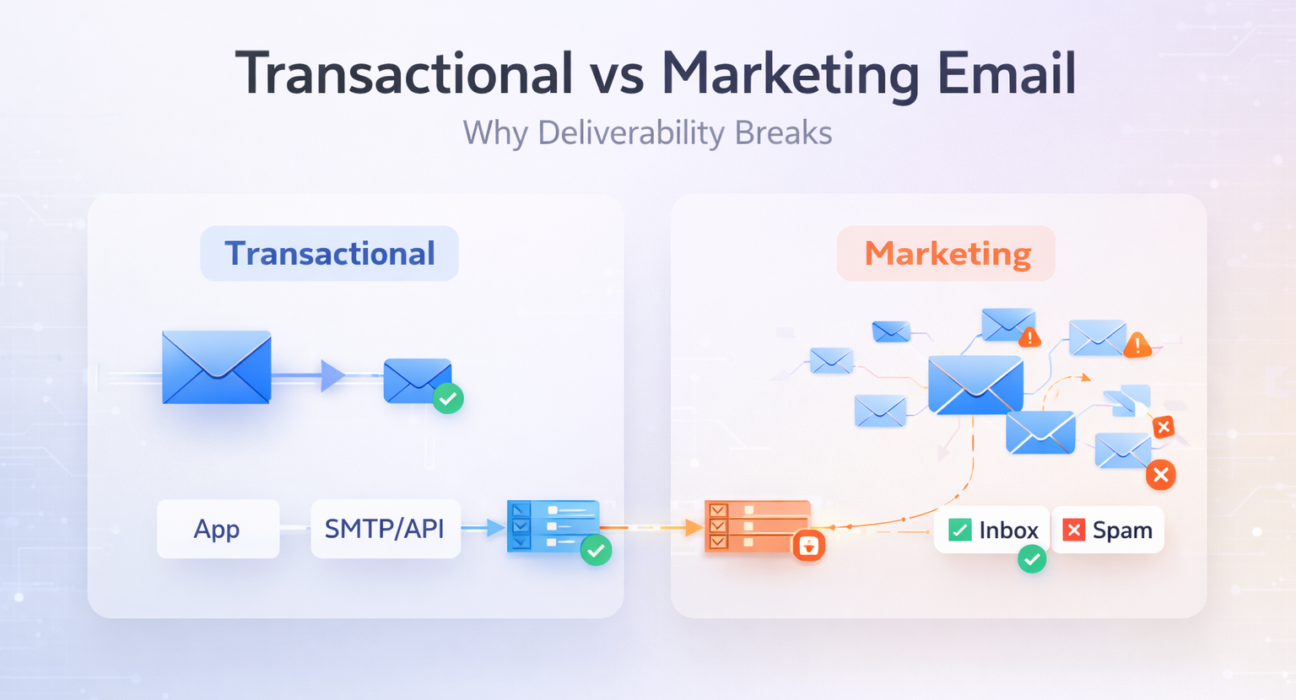
Before fixing deliverability, it helps to understand what actually happens between “send” and “inbox.” Most teams treat email as a black box. Here is the real path every email takes:
Your Application generates the email (OTP, receipt, newsletter) and passes it to an SMTP server or email API.
SMTP Server or Email API authenticates the message using SPF and DKIM, queues it, and forwards it to the recipient’s mail server.
Sending Infrastructure (IP + Domain) is evaluated by the receiving server. Reputation, authentication, sending history, and complaint rate are all checked here – before the email moves forward.
Receiving Mail Server (ISP) at Gmail, Outlook, or another provider runs its own filtering logic. It scores the email based on IP reputation, domain reputation, content, and engagement history.
Inbox or Spam is the final destination – determined entirely by steps 3 and 4. Your code has already done its job. What happens next is decided by infrastructure and reputation.
Visualised simply:
App → SMTP / API → Sending Server (IP + Domain) → ISP Filter → Inbox or Spam
Every point in this chain is a potential failure. The two most common failure points are the sending server configuration and the ISP filter stage – both of which are directly affected by whether you are mixing transactional and marketing traffic on the same infrastructure.
The Real SaaS Problem: What Happens When You Mix Them
Here is where most teams get burned.
They set up a single SMTP server or one shared IP for everything: OTPs, newsletters, promotional blasts, welcome emails, weekly updates – all going out from the same place. It looks fine in staging. In production, it is a slow disaster that takes weeks to surface.
One bad marketing campaign can blacklist the same IP your OTPs are sending from. Your users lose access. You lose users. Nobody sends you an error report.
A Real Scenario: How This Breaks in Production
Consider a SaaS product with 10,000 active users. The team uses a single shared SMTP server for both OTP delivery and their weekly marketing newsletter. In month three, they run a re-engagement campaign targeting 8,000 lapsed users – many with stale or unmonitored email addresses.
The campaign generates a bounce rate above 4% and a spam complaint rate near 0.2%. Gmail and Outlook begin throttling the sending IP. Within 48 hours, OTP delivery times climb from under 3 seconds to over 90 seconds. Some fail to arrive entirely. The team’s support queue fills with “I can’t log in” tickets. Active users – people who never saw the campaign – cannot access the product. By the time the team traces the issue to the shared IP, several hundred users have churned.
The campaign that caused the damage cost nothing to send. The churn it triggered cost significantly more to recover.
This is the hidden cost of the difference between transactional and promotional email being treated as the same thing.
1. Marketing Emails Damage Your IP Reputation
Bulk promotional emails generate unsubscribes and spam complaints. When those complaints accumulate on a shared IP, Gmail and Outlook begin throttling or blocking all mail from that IP — including your OTPs. Your user never gets their login code. You never find out why they churned. This pattern is covered in depth in why email infrastructure fails and what most teams get wrong.
2. OTP Failures Destroy User Trust
Authentication emails are zero-tolerance. If an OTP is delayed by more than 30 seconds, most users assume it failed. If it lands in spam, most users never check there. The session is lost.
OTP failures at scale are a silent churn multiplier — and they are almost always caused by poor infrastructure, not bad code. Your engineers will look for a bug. The bug is not in the code.
3. Compliance Risk Increases
Mixing transactional and marketing emails on the same stream can create legal exposure. Under CAN-SPAM and GDPR, commercial emails require a clear opt-out mechanism. If a transactional email starts resembling a promotional one — in tone, content, or frequency — regulators and ISPs may classify it as such.
SMTP vs Email API: What Most Teams Get Wrong
Most developers default to SMTP because it is familiar. SMTP works. But it is not always the right tool for every email type — and the difference matters more than most teams realize when they hit production scale.
What Is SMTP?
SMTP (Simple Mail Transfer Protocol) is the standard protocol for sending email. It works by routing messages from your application to a mail server, which then delivers to the recipient. SMTP is supported by virtually every language and framework. The key distinction: SMTP is a transport protocol. It moves the message. What happens to that message after it leaves your server depends entirely on the infrastructure you route it through.
What Is an Email API?
An email API is an HTTP-based interface offered by email delivery providers. Instead of configuring SMTP credentials and handling connection errors manually, you make a POST request with your email payload and the provider handles the rest — including queuing, retries, bounce processing, and delivery reporting.
When to Use Each
| Use Case | SMTP | Email API |
|---|---|---|
| WordPress / CMS platforms | Yes | Sometimes |
| Legacy applications | Yes | Depends on language support |
| High-volume transactional email | Possible, with a dedicated relay | Recommended |
| OTP delivery at scale | Only with a dedicated relay | Preferred |
| Bounce and complaint handling | Manual setup required | Built-in |
| Delivery analytics and logging | Limited | Full visibility |
Why Basic SMTP Setups Fail in Production
Self-hosted SMTP servers and default PHP mail() functions are the most consistent source of deliverability failures across SaaS products. The reasons are predictable:
- No DKIM signing, causing emails to fail authentication checks at the ISP level
- Shared or new IPs with no sending history and no warm-up process
- No retry logic when receiving servers are temporarily unavailable
- No bounce processing, allowing bad addresses to accumulate and raise complaint rates
- Ports 25 and 587 frequently blocked by hosting providers to prevent spam abuse
If you are hitting SMTP errors regularly, the guide on fixing the 10 most common SMTP errors walks through each failure mode with step-by-step solutions. Not sure if your SMTP server is even healthy? Start with how to test an SMTP server step by step before changing anything.
SMTP is not broken. A poorly configured SMTP setup is. The fix is not to abandon SMTP — it is to route it through infrastructure built for production workloads.
Deliverability Challenges: Why the Difference Between Transactional and Promotional Email Demands Different Infrastructure
Email deliverability is not a single setting. It is a combination of IP reputation, domain authentication, sending volume, and content signals. The difference between transactional and promotional email is that each stresses these factors in different ways — which is exactly why they need separate infrastructure.
Authentication Failures Are One of the Most Common Causes of Email Delivery Issues
Every email you send should pass three core authentication checks:
- SPF (Sender Policy Framework): Verifies your sending IP is authorized for your domain
- DKIM (DomainKeys Identified Mail): Cryptographically signs your email to confirm it has not been altered in transit
- DMARC (Domain-based Message Authentication Reporting): Tells receiving servers what to do when SPF or DKIM fails
Missing or misconfigured SPF and DKIM records are behind a large proportion of transactional email failures reported by SaaS teams. If you are not sure whether yours are correctly set up, the plain-English guide to SPF, DKIM, and DMARC covers each one without the jargon. You can verify your setup using MXToolbox Email Health or Mail-Tester.
Dedicated IP vs Shared IP: Why It Matters More Than Most Teams Realize
This is the infrastructure decision most teams skip — and one of the highest-impact ones for transactional email reliability.
A shared IP is used by multiple senders simultaneously. Your emails share a sending reputation with every other customer on that IP pool. If another sender on the same IP runs a poorly managed bulk campaign and accumulates spam complaints, your OTP delivery takes the hit. You did nothing wrong. Your users still cannot log in.
A dedicated IP belongs exclusively to you. Your sending behavior is the only thing that builds or damages its reputation. For transactional email at any meaningful volume, a dedicated IP is not a premium feature — it is a reliability requirement.
The important tradeoff: dedicated IPs must be warmed up gradually. Starting with high volume from a cold IP with no history will trigger spam filters just as fast as a bad shared IP. The warm-up process typically takes two to four weeks, increasing volume incrementally as ISPs build trust with the new IP.
Domain Reputation: The Deliverability Layer Most Teams Miss
IP reputation gets most of the attention. Domain reputation is equally important and often the faster path to deliverability problems when it is neglected.
Domain reputation is tied to the sending domain in your From address and the domain in your DKIM signature. Google, Microsoft, and other inbox providers track how recipients interact with email from your domain over time — opens, spam reports, unsubscribes, and engagement patterns all contribute to this score.
This is why using separate subdomains for transactional and marketing email is critical. A spam complaint spike from your promotional campaigns must not be able to damage the domain reputation behind your OTP delivery. Use a structure like mail.yourapp.com for transactional and news.yourapp.com for marketing — completely isolated.
Most SMTP errors occur due to misconfiguration or authentication issues — not server downtime. The failure is almost always in the setup, not the code.
For a complete breakdown of what affects deliverability and how to fix it, see the full guide to improving email deliverability.
Best Practices for Transactional and Marketing Emails
For Transactional Emails
- Use a dedicated sending subdomain (e.g., mail.yourapp.com) separate from your marketing domain
- Never batch or schedule transactional emails — they must send immediately on trigger
- Keep content minimal and functional — avoid any promotional language that could trigger content filters
- Set short expiry on OTPs (5–10 minutes) and communicate the expiry clearly to the user in the email itself
- Log every send event and monitor delivery rates in real time, not after the fact
- Use a dedicated SMTP relay service with dedicated IPs and proper authentication
For Marketing Emails
- Always include a visible, one-click unsubscribe link — required under CAN-SPAM and GDPR
- Clean your list regularly to remove inactive addresses and suppress known bouncers
- Warm up your sending IP gradually before large campaigns — do not jump volume overnight
- Keep your spam complaint rate below 0.1% per Google’s bulk sender guidelines
- Segment your audience and personalize where possible — generic blasts perform poorly and generate higher complaint rates
- Use a separate domain and IP pool from your transactional infrastructure, always
Quick Fix: Separate Your Email Streams Right Now
- Route all OTPs, receipts, and system alerts through a dedicated transactional SMTP relay
- Send newsletters and promotional campaigns from a separate subdomain or ESP
- Set up isolated subdomains: transact.yourdomain.com and news.yourdomain.com
- Monitor both streams independently using separate email logs and delivery dashboards
Quick Fix: Verify Before Your Next Send
- Run your sending domain through MXToolbox Blacklist Check
- Confirm SPF and DKIM are correctly configured on every sending domain and subdomain
- Score your email through Mail-Tester.com before launching campaigns
- Ensure your DMARC policy is set to at least p=quarantine to protect your domain from spoofing
If you are experiencing OTP delays right now, your SMTP authentication configuration is the first thing to check. The guide to SMTP error 535 and authentication failures covers the most common causes behind OTP delivery failures — work through it before making any infrastructure changes.
Platform-Specific Notes
WordPress
WordPress sends emails through PHP’s built-in mail() function by default. This function does not support DKIM signing and frequently fails SMTP authentication checks at modern ISPs. OTPs, WooCommerce order confirmations, and password reset links sent this way routinely land in spam or fail to deliver entirely.
The fix is to replace the default mailer with a proper SMTP plugin — such as WP Mail SMTP — connected to a reliable SMTP relay service. This ensures all transactional emails from WordPress are authenticated and routed through infrastructure built for consistent delivery.
Node.js Applications
Node.js applications using Nodemailer or similar libraries must be configured with proper SMTP credentials, TLS settings, and an authenticated relay server. Using a self-hosted SMTP or Gmail SMTP for production OTPs is a common shortcut that creates delays and spam filtering issues at scale.
PHP Applications
PHP’s mail() function shares the same limitations as the WordPress default. For any application sending transactional emails in PHP, use PHPMailer or SwiftMailer routed through a dedicated SMTP relay to ensure proper DKIM signing and reliable delivery.
How PhotonConsole Solves This
Most email delivery failures trace back to one structural decision: using the wrong infrastructure for the email type being sent.
PhotonConsole is built specifically for the transactional email use case. It is a cloud-based SMTP relay and email delivery platform designed for developers, SaaS products, and growing businesses that cannot afford OTP failures or unreliable inbox delivery.
What PhotonConsole Provides
- A dedicated SMTP relay service with high deliverability infrastructure and dedicated IPs
- Full SPF, DKIM, and DMARC support configured out of the box
- Real-time email logs and delivery tracking for every send event
- Pay-as-you-use pricing — no monthly minimums for lower-volume senders
- Plug-and-play compatibility with Node.js, PHP, WordPress, and any SMTP-capable platform
- A reliable alternative to SendGrid, Mailgun, and Amazon SES — without the complexity
If your current setup is unreliable, it is already affecting your users right now — even if your support queue has not surfaced it yet. OTP delays and missed authentication emails are silent failures. They do not create tickets. They create churn.
Switching to a purpose-built transactional email relay is the most direct fix available. See the pricing page to find a plan that matches your sending volume — and get transactional email working the way your users expect it to.
Pro Tips
- Never reuse your marketing sending domain for transactional emails. A single spam complaint spike from one campaign can suppress your OTP delivery for days across the same domain.
- Set up DMARC reporting immediately. It is the only way to know when someone is spoofing your sending domain before the damage is done to your reputation.
- Keep transactional email content simple and text-dominant. Heavy HTML templates with multiple images and tracked links trigger spam filters at a much higher rate than plain-text functional emails.
- Monitor your bounce rate actively. A bounce rate above 2% is a signal of list quality problems that will hurt deliverability across both email streams if left unaddressed.
- Always test OTP delivery end-to-end in a staging environment before launching. SMTP credentials, TLS settings, and relay configurations that work locally often behave differently in production.
- Warm up any new dedicated IP over two to four weeks. Sending at full volume from a cold IP with no sending history signals bulk spam patterns to ISPs — even if every recipient is legitimate.
Related Issues to Watch For
- SMTP 550 errors: Typically caused by IP blacklisting or a failed SPF check at the receiving server
- Emails going to Gmail Promotions tab: Usually caused by template design or sending patterns that resemble bulk marketing mail — see why emails go to spam in Gmail and how to fix it
- OTP delivery delays: Most commonly caused by shared IP throttling or queue backlog on an overloaded SMTP server
- High bounce rates: Indicate stale lists, expired addresses, or a domain reputation issue that needs immediate attention
- DMARC failures: Point to SPF or DKIM misconfiguration — the sending domain and the DKIM signature domain are not aligned
- SMTP error 535: An authentication failure that blocks all outgoing mail — one of the most disruptive transactional email issues and often misdiagnosed as a server problem
Frequently Asked Questions
What is the difference between transactional and marketing email?
Transactional emails are triggered by a specific user action — such as an OTP, password reset, or order confirmation. Marketing emails are sent in bulk for promotional purposes — such as newsletters, campaigns, or offers. The core difference is that transactional emails are expected immediately by the recipient, while marketing emails are broadcast on the sender’s schedule.
Can transactional emails be used for marketing?
Technically yes, but with strict limits. Adding light promotional content to a transactional email — such as a product suggestion in an order confirmation — is permitted if it does not overshadow the functional content. If it does, the email may be legally classified as commercial under CAN-SPAM or GDPR, requiring a compliant opt-out mechanism.
Why are transactional emails more reliable than marketing emails?
Transactional emails are one-to-one, expected by the recipient, and generate very few spam complaints. They do not carry bulk sending signals that trigger ISP filters. Marketing emails are sent in volume to large lists, face stricter filtering, and are far more sensitive to IP reputation and spam complaint rates.
Do transactional emails go to spam?
Yes — when sent from misconfigured SMTP servers, shared IPs with damaged reputations, or domains missing proper SPF and DKIM records. Transactional emails routed through a dedicated relay with correct authentication rarely land in spam. Infrastructure quality is the single most important factor in whether your OTPs reach the inbox.
What is an example of a transactional email?
Common examples include OTP codes for two-factor authentication, password reset links, order confirmation emails, shipping status updates, payment receipts, and account welcome emails. All are triggered automatically by a user action and are expected to arrive within seconds of that action occurring.
Should I use a separate SMTP server for transactional and marketing emails?
Yes — this is one of the most critical infrastructure decisions for email deliverability. Marketing emails accumulate complaints that degrade shared IP reputation. If your OTPs share that IP, they suffer the consequences. Use a dedicated SMTP relay for transactional email and a fully separate sending domain and IP for marketing campaigns.
What is the best SMTP service for transactional emails?
The best services offer dedicated IPs, real-time delivery logs, built-in DKIM signing, and low-latency infrastructure. Options include PhotonConsole, SendGrid, Mailgun, and Amazon SES. The right choice depends on your sending volume, budget, and how much control you need over authentication and deliverability configuration.
What is the difference between SMTP and an email API?
SMTP is a transport protocol your application uses to hand an email off to a mail server. An email API is an HTTP interface offered by delivery platforms that manages queuing, retries, bounce handling, and reporting automatically. SMTP is compatible with almost any stack; an email API offers greater control and visibility at higher sending volumes.
Does a dedicated IP improve transactional email deliverability?
Yes, significantly. A dedicated IP means your sending reputation is yours alone. On a shared IP, another sender’s poor campaign practices — high bounces, spam complaints, sudden volume spikes — can suppress your OTP delivery without any action on your part. For reliable transactional email, a dedicated IP with a proper warm-up process is the recommended baseline.
What is the difference between transactional and promotional email in terms of legal requirements?
Promotional emails are regulated commercial communications that require a visible opt-out mechanism under laws like CAN-SPAM and GDPR. Transactional emails — when they are purely functional and directly related to a user action — are generally exempt from opt-out requirements in most jurisdictions. Mixing promotional content into transactional emails can remove that exemption.
Conclusion: The Fix Is Simpler Than the Problem
Transactional and marketing emails are not interchangeable. They serve different purposes, carry different risks, and require different infrastructure. Treating them the same is not a minor inefficiency — it is a structural flaw that compounds quietly until it becomes a churn problem you cannot trace back to its source.
Delayed OTPs drive abandonment. Missed password resets block access. A shared IP dragged down by one marketing campaign can shut down your product’s authentication flow for days.
You will not see a 500 error when your email infrastructure fails. You will just see users disappear.
The fix is not complicated. Separate your email streams. Authenticate your domains with SPF, DKIM, and DMARC. Use infrastructure built for the specific job each email type requires. For transactional email, that means a dedicated relay with isolated IPs and real-time delivery monitoring — not a shared server that also carries your newsletter traffic.
If your current setup is unreliable, it is already affecting your users. The longer it runs, the more reputation damage accumulates on the domains and IPs you will need to rebuild trust with. The best time to fix it was before launch. The second best time is now.
Start by auditing your current email infrastructure: are your transactional and marketing streams separated? Are SPF, DKIM, and DMARC correctly configured on every sending domain? If either answer is no, use the resources below to work through it — or evaluate PhotonConsole as a purpose-built solution that handles the infrastructure so your team does not have to.
Read More From the PhotonConsole Blog
- How to Improve Email Deliverability — Full Guide
- SPF, DKIM, and DMARC Explained Simply
- Why Emails Go to Spam in Gmail — 7 Real Reasons and Fixes
- Why Email Infrastructure Fails and What Most Teams Get Wrong
- SMTP Not Working — 10 Common Errors and How to Fix Them
- How to Test an SMTP Server — Step-by-Step Guide
- SMTP Authentication Error 535 — Causes and Fixes
- PhotonConsole SMTP Relay Service — How It Works
- PhotonConsole Pricing — Pay As You Use Email Delivery