

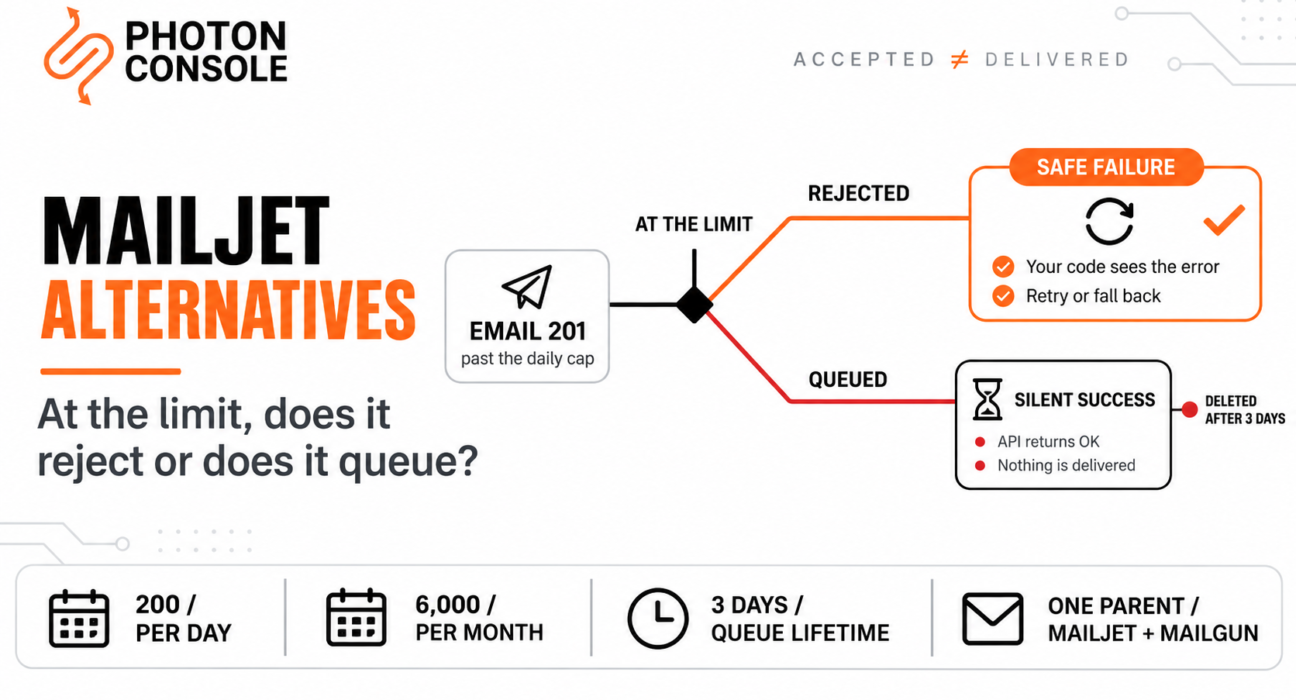
Every provider has a sending cap. The question nobody asks during evaluation is what happens to the email that exceeds it.
Mailjet’s free plan allows 200 emails a day. Email number 201 is not rejected. It is queued and delivered tomorrow — and if the queue cannot clear within three days, it is permanently removed.
For a newsletter, that is thoughtful design. For a password reset, it is the worst available outcome, because your application was told the send succeeded.
Quick Answer: Who Should Stay and Who Should Look
| Your situation | Verdict |
|---|---|
| Campaigns and newsletters are your main use | Stay. Queueing is the right behaviour for scheduled mail |
| You want a collaborative template editor for a marketing team | Stay. This is a real strength |
| You send transactional mail on the free plan | Move now. Overflow is queued, not rejected |
| Transactional mail is business-critical at any volume | Check your provider’s overflow behaviour before anything else |
| You are leaving over pricing or ownership | Note that Mailgun has the same parent company |
| EU data residency is why you chose it | Shortlist carefully — it narrows the field considerably |
The short version: Mailjet’s behaviour under load is tuned for marketing mail. If that is what you send, this article is not for you.

Queued, Not Rejected
Mailjet’s sending limits documentation is clear about the free plan:
| Free plan | Documented behaviour |
|---|---|
| Monthly allowance | Up to 6,000 emails a month |
| Daily cap | 200 emails per day |
| Above the daily cap | Queued for the next day, not rejected |
| Queue lifetime | Queued emails are kept for 3 days, then permanently removed |
| Newsletter editor | Campaigns limited to a contact list of 200 addresses |
| Paid 15k plan | 15,000 emails a month, with no daily sending limit |
Read those two middle rows together and the problem becomes visible. The first means a transactional message can be delayed by up to a day. The second means it can be destroyed without anyone being told.
Why This Is the Wrong Failure Mode
A rejection and a queue look similar on a dashboard and behave nothing alike in an application.
# What your application believes
const result = await mail.send(resetEmail);
if (result.ok) {
  logger.info('reset email sent', { user: user.id });
  return res.json({ message: 'Check your inbox' });
}

# What actually happened, past the daily cap:
#   - The API accepted the message        -> result.ok is true
#   - Nothing was delivered               -> inbox is empty
#   - No error was raised                 -> no retry, no fallback
#   - Your logs say "sent"                -> support cannot see the cause
#   - The user was told "check your inbox" -> and there is nothing there
#
# Three days later, if the queue has not cleared,
# the message is deleted. Still silently.
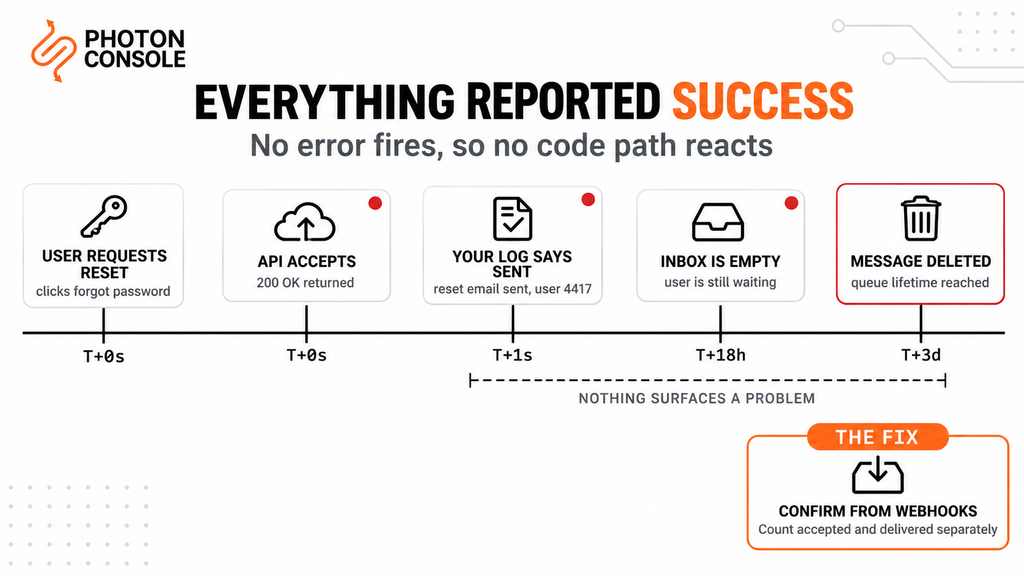
A rejection is a bug report. Your code gets an error, retries, falls back to a second provider, or alerts somebody. The failure is loud, immediate and actionable.
A queue is a time bomb. Everything reports success, so no code path triggers, no alert fires, and the first signal is a support ticket from a user who cannot get into their account. By then the reset token in that queued email has probably expired anyway, so even delivery tomorrow does not help — the user receives a link that no longer works, which is a second support ticket rather than a resolution.
Common Mistake
Assuming a successful API response means the email is on its way. It means the provider accepted responsibility for the message, which is not the same thing and never has been. Acceptance tells you the request was well formed and within your quota’s accounting rules; it says nothing about whether the message was transmitted, queued, throttled or held. This is why delivery must be confirmed from webhook events rather than inferred from the send call, and it is the single most common incorrect assumption in transactional email code. If your only record that an email was sent is a 200 response in your application log, you do not have delivery confirmation — you have a receipt for a request.
Quick Fix
Detecting Silent Queueing
- Compare accepted counts against delivered counts daily; a persistent gap is mail sitting somewhere
- Alert on the delay between your send timestamp and the delivery webhook, not just on errors
- Track time-to-delivery for transactional mail specifically — a reset arriving in 40 seconds and one arriving in 14 hours both count as delivered
- Check whether your daily send pattern has a cliff at the same number every day; that is a cap, not demand
- Include the send timestamp in reset links and log when tokens are used after expiry; a cluster of those means delayed delivery
The broader lesson applies to every provider: find out whether yours rejects or defers when you cross a limit, and make sure your code can tell the difference. Our guide to transactional email webhooks covers building the confirmation path properly.
Mailjet and Mailgun Are the Same Company
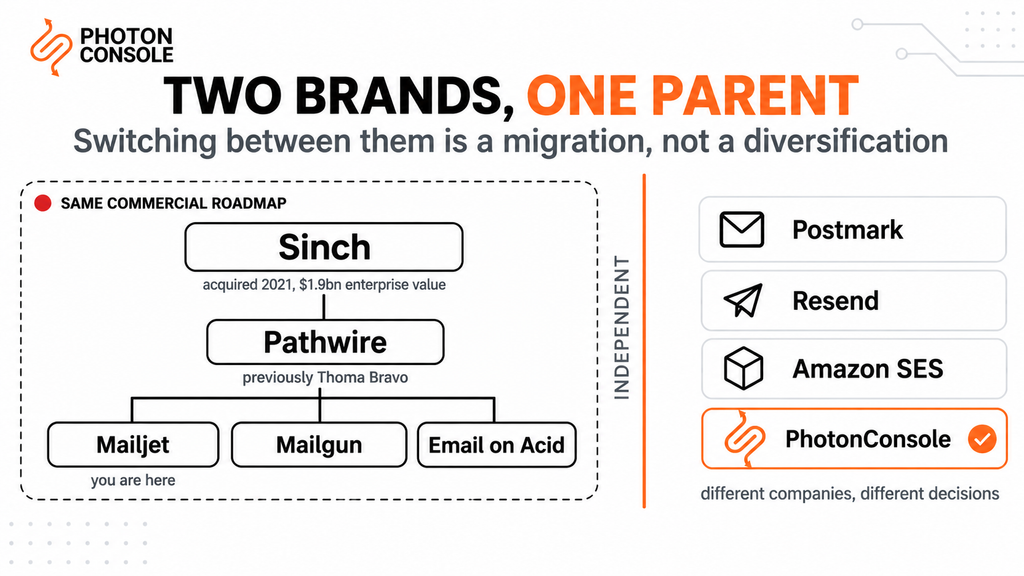
This belongs in any honest list of Mailjet alternatives, and it is almost never mentioned.
Mailjet and Mailgun are both Pathwire products. Sinch signed a definitive agreement to acquire Pathwire on 30 September 2021 for $925 million in cash plus 51 million new Sinch shares, an enterprise value of $1.9 billion, as Sinch announced at the time. The brands included were Mailgun, Mailjet and Email on Acid. Before that, Pathwire was owned by Thoma Bravo, which had itself acquired Mailjet.
So if you are leaving Mailjet because of a pricing change, a support experience, or a concern about the company that owns your email infrastructure, moving to Mailgun does not address any of those. Same parent, same corporate roadmap, same commercial decisions.
Mailgun may still be the right technical choice — it has a genuine inbound routing engine that Mailjet does not, as covered in our guide to migrating from Mailgun. It also charges overage above its headline rate, which we broke down in Mailgun pricing explained. Choose it for the routing engine if you need one. Do not choose it expecting a different vendor relationship.
Note
This is worth checking generally, not just here. Email delivery has consolidated heavily, and several brands that present as independent competitors share a parent. If your reason for switching is commercial rather than technical — a price rise, a support decline, a wish not to depend on one company for everything — then the ownership structure is part of the decision and not a detail. Look up who owns a provider before you shortlist it, because a comparison table of brand names will not tell you that two of the rows are the same company.
Where Mailjet Is Genuinely the Better Choice
Three things, and the first is the one this article has spent 800 words criticising.
Queueing is correct behaviour for marketing mail. If a campaign exceeds your daily allowance, holding it until tomorrow is kinder than discarding it and far kinder than failing the whole send. Nobody is waiting on a newsletter, no token expires, and the recipient cannot tell. The design is not a mistake — it is a design for a different kind of email than the one this article is about. Judged as a marketing platform, Mailjet’s overflow handling is a feature.
6,000 a month on a free plan is competitive. That is twice Resend’s 3,000 monthly free allowance and more than our own free tier. If free volume is the constraint, Mailjet is ahead of several specialists.
The collaborative editor is a real differentiator. Mailjet’s template editing is built for several people working on the same email, which matters when the person writing the copy is not the person who can deploy. Most transactional-first providers assume templates live in a repository and are edited by engineers — a reasonable assumption that becomes a daily annoyance if your marketing team needs to change a subject line without filing a ticket.
That last point is also the quiet migration cost, and it is organisational rather than technical. Templates built collaboratively by non-engineers are the hardest asset to move, because the people who own them do not control the deployment and the people who control the deployment did not write them. Budget for that conversation before you promise anyone a timeline.
The Alternatives, by the Problem You Have
| Your binding constraint | Where to look | What you trade |
|---|---|---|
| Transactional mail must fail loudly, not quietly | Any transactional-first provider — rejection on limit is the norm | Fewer campaign and template-collaboration features |
| Cost per email above all | Amazon SES — cheaper than every managed provider, us included | You assemble notifications, suppression and logging yourself |
| Separation of transactional and marketing | Postmark — enforces it as a platform property | Feature-based tiers, and no provider-side spend cap |
| Developer experience | Resend — the best API in the category | Thirty-day log retention on every tier below Enterprise |
| Inbound routing | Mailgun — a real regex routing engine | Same parent company as Mailjet, and overage above the headline rate |
| Keeping a marketing platform for campaigns | Split the stack — Mailjet for campaigns, a relay for transactional | Two integrations; separation by subdomain, at no cost |
| Predictable flat-rate transactional sending | PhotonConsole — flat per-thousand pricing, no overage premium | No collaborative editor, no campaign builder |
As with Brevo, the row most readers should consider is the split. Keep Mailjet for campaigns, where its editor and its queueing behaviour are both assets, and route transactional mail through a dedicated relay on its own subdomain. The marketing team keeps the tool they know, and your password resets stop sharing a quota with your newsletter.
PhotonConsole authenticates a subdomain like transac.yourdomain.com independently, and rejects rather than queues when a limit is reached — which is the behaviour you want from the path that carries account recovery. The comparison page sets the options side by side, and the SMTP relay API reference shows what the integration looks like.
Two rows work against us and both are accurate. SES is cheaper per email and will stay that way. Mailjet’s free tier gives more monthly volume than ours. If either is binding, we are not your answer.
Evaluating Failure Modes on Any Provider
Quick Fix
Six Questions About What Happens When Things Go Wrong
- At the sending cap, does it reject or queue? Rejection is correct for transactional mail
- Is the cap daily or monthly? Transactional volume follows your users, not your calendar
- If it queues, how long is the queue kept before messages are discarded?
- Does the API response distinguish accepted from delivered? If not, you need webhooks to know anything
- Who owns the provider, and do you already depend on another brand with the same parent?
- What does a rate limit return — an error you can retry, or a silent deferral?
Question one is the one this whole article exists to put on the list. Most evaluations compare price, volume and features, and never ask what the system does at its own boundary — which is precisely where transactional and marketing requirements diverge most sharply.
If You Split the Stack
Moving transactional mail off Mailjet while keeping it for campaigns is the lowest-risk change here, because none of the collaborative template work moves.
- Pick a transactional subdomain and publish its own SPF and DKIM records. Count your SPF lookups first, because exceeding the ten-term limit in RFC 7208 returns
permerrorand breaks authentication for everything you send. - Move transactional templates into your repository. Only the ones your application sends — campaign templates stay in Mailjet where the marketing team can reach them.
- Export suppressions and import them before the first production send, never after.
- Add delivery confirmation from webhooks while you are in the code. This is the fix for the silent-queue problem regardless of provider.
- Verify both paths with MXToolbox and Mail Tester before real traffic moves.
Follow the sequence in our guide to migrating email providers without downtime, measure the switch using the method in running two email providers during a migration, and work through the migration checklist before cutting over.
Pro Tips
- Find out whether your provider rejects or queues at its cap. It is the most important question nobody asks.
- Never treat a 200 response as delivery. It is a receipt for a request, not a confirmation of arrival.
- Alert on accepted-versus-delivered gaps, not only on errors. Silent failures do not raise errors.
- Measure time-to-delivery for transactional mail. Forty seconds and fourteen hours are both “delivered”.
- Watch for a daily cliff at the same number. That is a cap being hit, not demand falling off.
- Check who owns a provider before shortlisting it. Two rows in your comparison may be one company.
- Keep campaign templates where marketing can edit them. Moving those is an organisational cost, not a technical one.
- Judge queueing by mail type. It is a feature for newsletters and a hazard for account recovery.
Related Reading
- Brevo alternatives for transactional email — the same platform-fit question, with a routing answer
- Mailgun pricing explained — the sibling brand, and where its overage bites
- Migrating from Mailgun — if the inbound routing engine is what you need
- Resend alternatives — if developer experience is your priority
- Amazon SES sending limits — the cheapest option, and what it asks in return
- Email provider migration checklist — the 40 checks before you switch
Frequently Asked Questions
What happens when you exceed Mailjet’s daily sending limit?
On the free plan, emails above the 200-per-day cap are queued for the next day rather than rejected. Queued emails are kept for three days and then permanently removed.
Why is queueing a problem for transactional email?
Because the API reports success. Your application logs a successful send, no error triggers a retry or fallback, and the user is told to check an inbox that has nothing in it.
What are Mailjet’s free plan limits?
Up to 6,000 emails a month with a cap of 200 per day. The online newsletter editor limits a campaign to a contact list of 200 addresses.
Does Mailjet’s paid plan have a daily limit?
The documented 15k plan allows 15,000 emails a month with no daily sending limit. The queueing behaviour described here is documented for the free plan.
Are Mailjet and Mailgun the same company?
They share a parent. Both are Pathwire brands, and Sinch agreed to acquire Pathwire in September 2021 for an enterprise value of $1.9 billion. Email on Acid was included too.
Is a successful API response proof an email was sent?
No. It confirms the provider accepted the message. Delivery must be confirmed from webhook events, which is why accepted and delivered should be counted separately.
How do I know if my emails are being silently queued?
Compare accepted counts against delivered counts, alert on the delay between sending and the delivery webhook, and look for a daily send volume that stops at the same number every day.
Can I keep Mailjet for campaigns and move only transactional email?
Yes, and for most teams this is the lowest-risk option. Campaign templates and the collaborative editor stay where they are; only your application’s transactional sending moves, onto its own subdomain.
What is the hardest part of leaving Mailjet?
Usually not the code. Templates built collaboratively by non-engineers are the difficult asset, because the people who own them do not control deployment.
Conclusion
Mailjet is a reasonable marketing platform whose behaviour at its own boundary is wrong for transactional mail, and that is a different criticism from saying it is a poor product.
When a campaign exceeds its allowance, holding it until tomorrow is the humane choice. When a password reset exceeds the same allowance, the same behaviour produces a user who was told to check their inbox, an application log that says the email was sent, no error anywhere, and three days later a message deleted without a word. Nothing in that sequence is visible until someone contacts support.
So the question to carry into any provider evaluation is the one the price and feature comparison never covers: at the limit, does it reject or does it queue? For mail that carries account recovery, a loud failure you can retry beats a quiet success you cannot detect. And whatever you choose, confirm delivery from webhook events rather than from the send call, because a 200 response has never meant the message arrived.
If campaigns are working well where they are, the smallest useful change is not a migration. Keep Mailjet for marketing, route transactional mail through a reliable SMTP relay on its own subdomain, and let each path fail in the way that suits the mail it carries. One is worth deferring. The other is worth an error.