


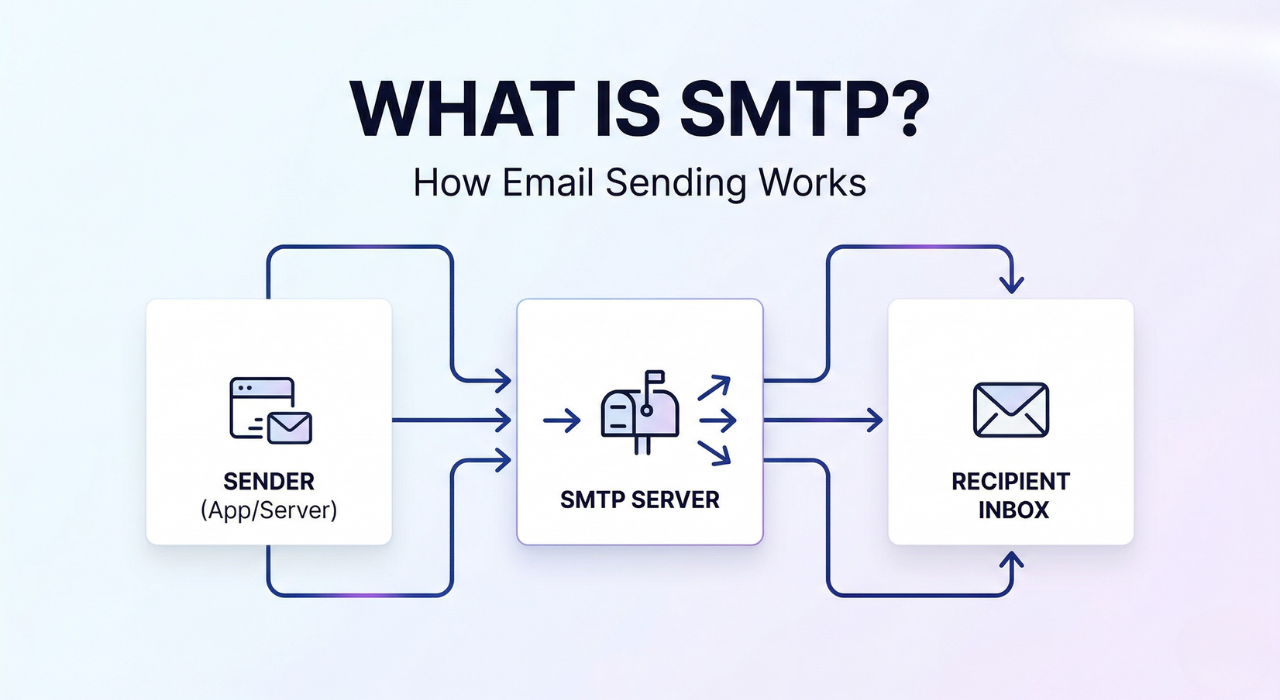
SMTP — Simple Mail Transfer Protocol — is the standard internet protocol used to send email from one server to another.
Think of it as the postal system for email. Just as the postal service has rules for how letters get addressed, sorted, and delivered — SMTP defines how email messages are formatted, handed off, and routed across the internet.
Every time you hit “Send,” what is SMTP moves that message. It doesn’t receive email (that’s IMAP or POP3’s job), and it doesn’t store anything. Its one job is pushing messages forward until they reach the right destination.
Featured Snippet: SMTP (Simple Mail Transfer Protocol) is a TCP/IP protocol used to send and relay outgoing emails between mail servers. It operates on port 25 (server-to-server), port 587 (authenticated submission), or port 465 (SSL). It is the foundational standard that powers all outgoing email communication on the internet.
Most SMTP guides overcomplicate something that is actually simple. This one won’t.

⚡ SMTP Explained in 30 Seconds
- SMTP = the protocol your app or email client uses to send emails
- It works between servers and apps — routing messages from sender to recipient
- It uses three key ports: 25 (server relay), 587 (authenticated submission, recommended), 465 (SSL)
- It requires proper authentication (SPF, DKIM, DMARC) to actually reach the inbox
- It does not receive email — that’s IMAP or POP3’s job
Keep that mental model and the rest of this guide will click fast.
Why SMTP Matters in the Real World
SMTP isn’t just a background technicality — it’s the reason email works at all. Every business email, OTP, password reset, shipping notification, and invoice travels through an SMTP connection.
For SaaS companies and developers, this becomes especially important because not all email is the same. A promotional newsletter and a password reset email have fundamentally different requirements — and sending them through the wrong channel causes serious delivery problems.
If you’re building or running a SaaS product, you need to understand the difference between transactional email and marketing email — and SMTP sits at the center of both. Mixing them up is one of the most common (and costly) mistakes growing teams make.
Sending an email is easy. Getting it delivered is the real challenge.
How SMTP Works: A Simple Flow
Here’s what happens in the milliseconds after you press “Send”:
- Your email client or app connects to an SMTP server — usually your mail provider’s outgoing server.
- The SMTP server authenticates your credentials — it verifies you’re allowed to send through it.
- Your message is handed off — if the recipient’s inbox lives on a different server, your SMTP server talks directly to theirs.
- DNS MX records are consulted — SMTP uses Mail Exchange records to find the recipient server’s address.
- The message is delivered or queued — if the receiving server is available, the email lands. If not, SMTP retries on a backoff schedule.
The entire conversation runs over plain-text commands: HELO, MAIL FROM, RCPT TO, DATA. It’s deceptively simple — which is exactly why it was so easy to abuse, and why authentication standards like SPF, DKIM, and DMARC had to be layered on top.
Key SMTP Ports
| Port | Purpose |
|---|---|
| 25 | Server-to-server relay — often blocked by ISPs on consumer connections |
| 587 | Authenticated email submission — the recommended port for apps |
| 465 | SMTP over SSL — legacy, but still widely supported |
SMTP vs IMAP vs POP3: What’s the Difference?
These three protocols all deal with email — but they handle completely different sides of it.
SMTP handles outgoing email only. It pushes messages from your client to a server, and from server to server.
IMAP (Internet Message Access Protocol) handles incoming email. It syncs your inbox across devices and keeps messages stored on the server — which is how Gmail, Outlook, and Apple Mail work.
POP3 (Post Office Protocol 3) also handles incoming email, but downloads messages to a single device and typically removes them from the server. It’s older and far less flexible than IMAP.
Simple rule: SMTP = sending. IMAP/POP3 = receiving.
When someone says “configure your email client,” they almost always mean setting up both: an SMTP server for outgoing mail and an IMAP server for incoming.
SMTP Relay Explained
SMTP relay is when an email server forwards a message on behalf of another server — rather than delivering it directly to the final recipient’s inbox.
This is exactly how services like SendGrid, Mailgun, and AWS SES operate. Your application doesn’t send emails directly from your own server. It passes the message to a relay service, which then handles delivery, reputation management, and retry logic.
Why does this matter in practice?
- Your app’s IP address doesn’t get blacklisted for spam activity
- Delivery rates are higher because relay providers carry established sender reputations
- You get bounce handling, monitoring, and analytics without building any of it yourself
Choosing between self-managed SMTP relay and a dedicated service is a real architectural decision — not just a configuration detail. If you’re comparing email-sending methods for a production application, the email API integration guide covers how SMTP relay fits into the modern stack and when each approach makes sense.
SMTP doesn’t fail loudly. It fails quietly — and that’s exactly why teams spend hours debugging something that was misconfigured from day one.
SMTP vs Email API: Which Should You Use?
SMTP is the established standard. Email APIs are the modern abstraction built on top of it. They’re not opposites — APIs typically use SMTP under the hood — but the integration experience is completely different.
| SMTP | Email API | |
|---|---|---|
| Integration method | Configure server, port, credentials | HTTP POST requests |
| Developer experience | Moderate setup friction | Simple, language-agnostic |
| Portability | Works with any language, any stack | Vendor-specific SDK or REST call |
| Analytics | Limited out of the box | Rich — opens, clicks, bounces |
| Best for | Legacy apps, CMS tools, broad compatibility | SaaS apps, high-volume sending, modern stacks |
Here’s the honest take: SMTP is still the most portable and universal way to send email — even if APIs are more modern. If you’re integrating with a CMS, a legacy system, or any tool that has SMTP built in, you’re not doing it wrong by using it. SMTP works everywhere. APIs require the receiving system to support them.
That said, if you’re building a new SaaS application from scratch, an Email API gives you better observability, simpler debugging, and faster iteration.
The email API integration guide walks through both approaches with real implementation context — worth reading before you commit to either.
In short: Use SMTP for portability and compatibility. Use an Email API for control, analytics, and modern developer experience. Both are valid — the choice depends on your stack.
SMTP and Email Deliverability: SPF, DKIM, and DMARC
Configuring SMTP correctly gets your email sent. It does not guarantee it gets delivered. Those are two different problems — and most teams only discover the gap after emails start disappearing into spam folders.
Three authentication standards sit on top of SMTP to prove your emails are legitimate:
SPF (Sender Policy Framework)
A DNS record that lists which IP addresses are authorized to send email for your domain. When a receiving server checks your incoming message and your sending IP isn’t on the list, the email may be rejected or flagged before it ever reaches an inbox.
DKIM (DomainKeys Identified Mail)
Adds a cryptographic signature to every outgoing message. The receiving server verifies this signature to confirm the email wasn’t modified in transit. Without it, your messages have no tamper-proof chain of custody.
DMARC (Domain-based Message Authentication, Reporting & Conformance)
Ties SPF and DKIM together and tells receiving servers what action to take when authentication fails — nothing, quarantine, or reject. It also generates reports so you can see who is sending email from your domain.
Most SMTP problems are not protocol problems. They are configuration mistakes — and missing authentication records are the most common one.
The full setup walkthrough for all three records lives in SPF, DKIM, and DMARC explained simply. For a complete deliverability strategy covering IP reputation, list hygiene, content scoring, and warm-up schedules, the full email deliverability guide is the most comprehensive resource available. And if your emails are specifically landing in Gmail’s spam folder, there are 7 specific reasons why that happens — most of them tied directly to how SMTP authentication was (or wasn’t) configured.
In short: SMTP moves your email. SPF, DKIM, and DMARC determine whether it lands in the inbox or gets silently discarded.
Common SMTP Errors and What They Actually Mean
SMTP uses a numerical response code system. Once you know the pattern, debugging becomes dramatically faster.
2xx — Success
250 OK— Message accepted. You’re done.
4xx — Temporary failures (retry will often work)
421— Server temporarily unavailable. Try again shortly.450 / 451— Mailbox busy or server-side error. Usually resolves on retry.
5xx — Permanent failures (something needs to be fixed)
550— The recipient address doesn’t exist. Hard bounce.535— Authentication failed. Wrong credentials or expired token.554— Transaction failed. Often triggered by a spam filter or IP blacklist.
The 535 error is the one that catches teams off guard most often. If your application suddenly stops sending email in production, it’s almost always a credential rotation issue or a failed authentication handshake — not a network problem. The full cause analysis and step-by-step resolution for SMTP authentication errors including 535 breaks down every scenario.
For everything else — connection timeouts, TLS failures, relay denials, DNS mismatches — the complete SMTP error troubleshooting guide covers the 10 most common failures with step-by-step diagnosis for each.
In short: 4xx errors are temporary — wait and retry. 5xx errors are permanent — something in your configuration needs to change.
How to Test Your SMTP Configuration
Never go to production without testing your SMTP setup first. Catching a misconfiguration in staging takes minutes. Diagnosing it in production — while users aren’t receiving emails — takes hours.
Telnet (command line)
Manually connect to an SMTP server and walk through the handshake commands — EHLO, AUTH LOGIN, MAIL FROM, RCPT TO — to verify the connection and authentication are working at the protocol level. No tools required.
MXToolbox
MXToolbox’s SMTP diagnostic tool tests server connectivity, checks MX record configuration, and flags blacklist issues — all from a browser. Useful for quick infrastructure checks without touching the command line.
Sandbox testing services
Tools like Mailtrap capture outgoing test emails in an isolated environment, letting you inspect headers, check formatting, and verify authentication records without sending to real recipients.
Google and AWS documentation
If you’re using Gmail’s relay, Google’s SMTP relay guide has the exact settings. For Amazon SES, the AWS SES SMTP documentation covers per-region configuration values.
For a full testing walkthrough — from raw telnet commands to browser-based tools to interpreting server responses — the step-by-step SMTP testing guide covers every method with practical examples.
Why SMTP Fails at the Infrastructure Level
Here’s the scenario that frustrates teams the most: SMTP is configured correctly. Authentication records are in place. Errors are clean. And emails still aren’t arriving reliably.
When that happens, the problem isn’t SMTP. It’s the infrastructure around it.
The most common infrastructure-level failures include:
- Shared IP pools with poor sender reputation — your emails inherit the reputation of every other sender on that IP
- No dedicated sending domain — mixing transactional and marketing email from the same domain poisons both streams
- Inconsistent sending volume — sudden spikes in volume trigger spam filters even when content is clean
- Missing feedback loop integrations — bounced and complained-about addresses stay on your list and drag down reputation over time
- No monitoring — problems compound silently until a threshold is hit
These aren’t configuration mistakes. They’re structural ones — and they’re far more common than teams realize. If you’ve fixed every SMTP error and emails are still underperforming, the breakdown of why email infrastructure fails is the right next read. It covers what most teams get wrong at the systems level — not just the settings level.
Choosing the Right SMTP Provider
Once SMTP makes sense to you, the next decision is practical: which service actually handles your sending?
The market is crowded, pricing structures aren’t always transparent, and marketing copy from vendors tends to obscure the real trade-offs. Here are the most honest comparison resources available:
- SendGrid vs. Mailgun: These two dominate the developer email space — but their pricing, deliverability tooling, and support quality differ more than their homepages suggest. The full SendGrid vs. Mailgun comparison, including hidden costs, is worth reading before signing up for either.
- Mailgun alternatives: If you’re already on Mailgun and reconsidering, or just evaluating it alongside other options, this decision-driven Mailgun alternatives guide is built specifically for developers making that call.
- Best transactional email service overall: For a head-to-head view of the top providers in 2026 — covering reliability, developer experience, pricing, and scale — the transactional email service decision guide lays it all out without the vendor spin.
For teams that don’t want to manage SMTP complexity manually, PhotonConsole simplifies both SMTP and API-based email sending into a predictable, developer-friendly setup — without the pricing surprises that come with larger platforms.
Quick Recap: SMTP in 60 Seconds
- What it is: The protocol that handles all outgoing email on the internet
- What it does: Routes messages from sender to recipient across mail servers
- Key ports: 25 (relay), 587 (submission — use this one), 465 (SSL)
- What it doesn’t do: Receive or store email — that’s IMAP/POP3
- Authentication required: SPF, DKIM, and DMARC to actually reach the inbox
- Modern alternative: Email APIs — simpler to integrate, richer analytics
- Most common failure points: Auth errors, blacklisted IPs, misconfigured DNS
Frequently Asked Questions About SMTP
What does SMTP stand for?
Simple Mail Transfer Protocol. It is the standard protocol used to send email over the internet, defined in RFC 5321.
What port does SMTP use?
Port 587 is the recommended port for authenticated email submission. Port 465 is used for SMTP over SSL. Port 25 is used for server-to-server relay but is commonly blocked by ISPs on consumer and cloud hosting connections to prevent spam abuse.
Is SMTP the same as an email API?
No. SMTP is a protocol — a defined set of rules for sending email. An email API is an HTTP-based interface that abstracts that process. Most email APIs use SMTP under the hood, but expose a simpler REST interface so developers don’t need to manage the protocol directly.
Do I need SMTP to send email from my website or app?
Yes, in most cases. Unless you’re using a service with its own dedicated API, your application will connect to an SMTP server — either your own or a third-party provider’s — to send outgoing mail.
Why is my SMTP connection being blocked?
Port 25 is blocked by most ISPs and cloud providers to prevent spam. Switch to port 587 or 465. If those fail, your sending IP may be on a blacklist — run a check with MXToolbox to verify.
Why do my emails pass SMTP but still land in spam?
Because SMTP and deliverability are separate concerns. SMTP moves the message. Whether it reaches the inbox depends on SPF, DKIM, DMARC, sender reputation, content quality, and list hygiene. A clean SMTP connection is the starting point — not the finish line.
For a developer-friendly email platform that handles both SMTP and API sending without complexity or unpredictable pricing, explore PhotonConsole.


How To Send Emails In Node.js With Nodemailer: A Production Setup Guide | Photonconsole.com
April 13, 2026[…] you are new to the underlying protocol, our explanation of what SMTP is and how it works covers the fundamentals this guide builds […]
Sending Email In Python: Smtplib Vs An Email API, With Working Code | Photonconsole.com
April 13, 2026[…] This matters because most “smtplib is broken” reports are actually one of two other things failing: the message wasn’t built to spec by the email package, or the server on the other end rejected the connection. If you want the protocol fundamentals first, see our guide to what SMTP is. […]
Fixing "WordPress Not Sending Email" Permanently | Photonconsole.com
April 13, 2026[…] The message leaves. It just never arrives. If you want the underlying protocol explained first, see our guide to what SMTP is. […]
Django Email Configuration For Production Applications | Photonconsole.com
April 13, 2026[…] Django does not deliver email itself. It hands a correctly formatted message to whichever backend is configured, and the SMTP backend hands it to whatever host you named. If you want the underlying protocol explained first, see our guide to what SMTP is. […]